Page 462 of 653
5-16
Driving your vehicle
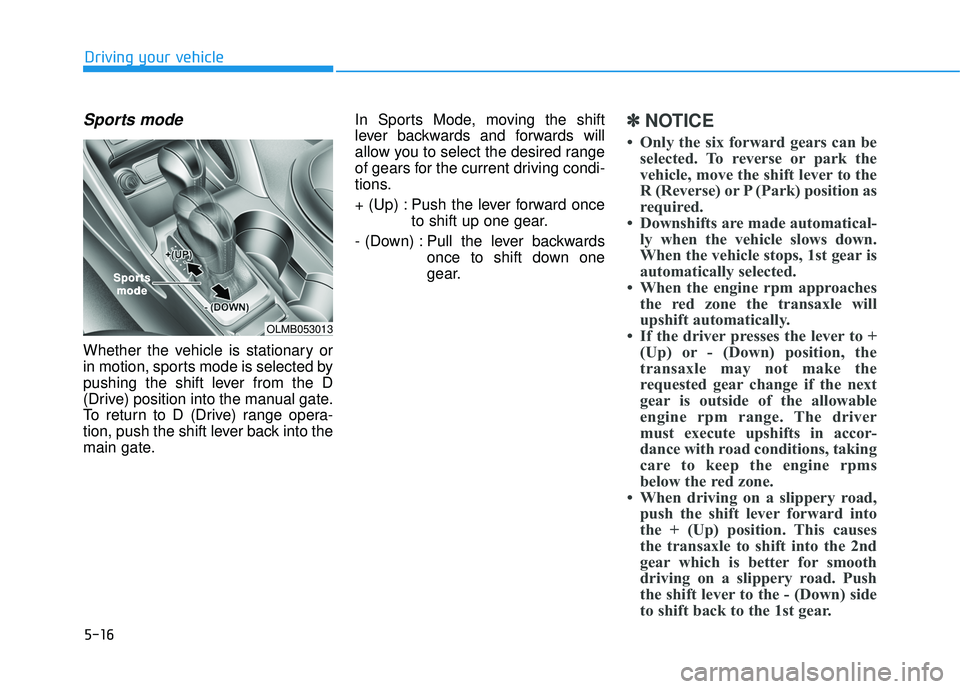
Sports mode
Whether the vehicle is stationary or
in motion, sports mode is selected by
pushing the shift lever from the D
(Drive) position into the manual gate.
To return to D (Drive) range opera-
tion, push the shift lever back into the
main gate.In Sports Mode, moving the shift
lever backwards and forwards will
allow you to select the desired range
of gears for the current driving condi-
tions.
+ (Up) : Push the lever forward once
to shift up one gear.
- (Down) : Pull the lever backwards once to shift down one
gear.
✽✽NOTICE
Only the six forward gears can be selected. To reverse or park the
vehicle, move the shift lever to the
R (Reverse) or P (Park) position as
required.
Downshifts are made automatical- ly when the vehicle slows down.
When the vehicle stops, 1st gear is
automatically selected.
When the engine rpm approaches the red zone the transaxle will
upshift automatically.
If the driver presses the lever to + (Up) or - (Down) position, the
transaxle may not make the
requested gear change if the next
gear is outside of the allowable
engine rpm range. The driver
must execute upshifts in accor-
dance with road conditions, taking
care to keep the engine rpms
below the red zone.
When driving on a slippery road, push the shift lever forward into
the + (Up) position. This causes
the transaxle to shift into the 2nd
gear which is better for smooth
driving on a slippery road. Push
the shift lever to the - (Down) side
to shift back to the 1st gear.
OLMB053013
SporSportstsmodemode
Page 463 of 653
5-17
Driving your vehicle
5
Shift-lock system
For your safety, the automatic
transaxle has a shift-lock system
which prevents shifting the transaxle
from P (Park) or N (Neutral) into R
(Reverse) unless the brake pedal isdepressed.
To shift the transaxle from P (Park) or
N (Neutral) into R (Reverse):
1.Depress and hold the brake pedal.
2.Start the engine or place the igni-tion switch in the ON position.
3.Move the shift lever.
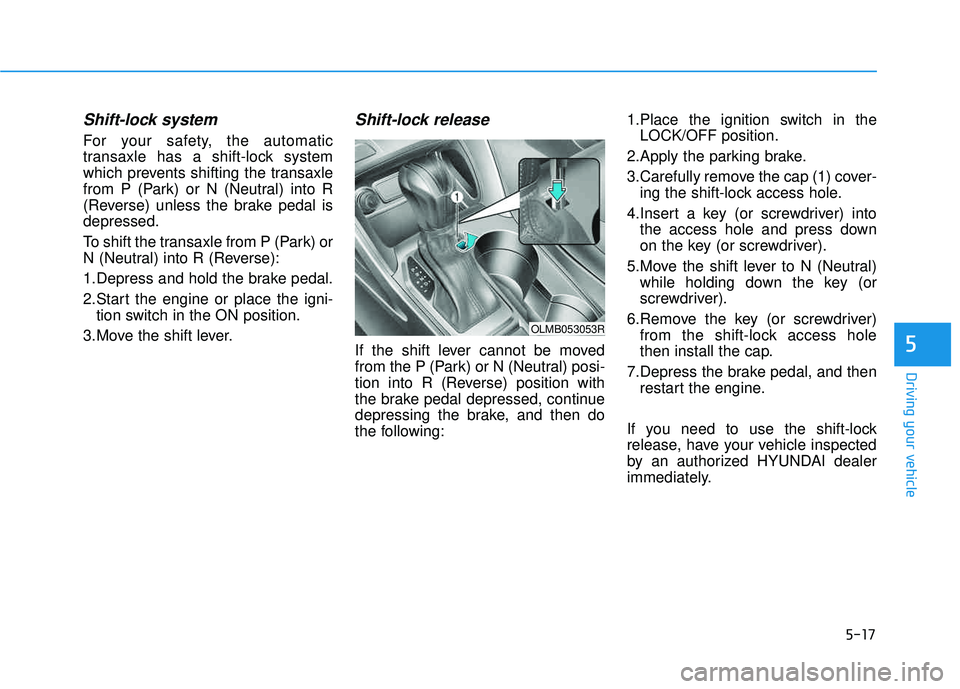
Shift-lock release
If the shift lever cannot be moved
from the P (Park) or N (Neutral) posi-
tion into R (Reverse) position with
the brake pedal depressed, continue
depressing the brake, and then do
the following: 1.Place the ignition switch in the
LOCK/OFF position.
2.Apply the parking brake.
3.Carefully remove the cap (1) cover- ing the shift-lock access hole.
4.Insert a key (or screwdriver) into the access hole and press down
on the key (or screwdriver).
5.Move the shift lever to N (Neutral) while holding down the key (or
screwdriver).
6.Remove the key (or screwdriver) from the shift-lock access hole
then install the cap.
7.Depress the brake pedal, and then restart the engine.
If you need to use the shift-lock
release, have your vehicle inspected
by an authorized HYUNDAI dealer
immediately.
OLMB053053R
Page 464 of 653
5-18
Driving your vehicle
Ignition key interlock system
The ignition key cannot be removed
unless the shift lever is in the P
(Park) position.
Parking
Always come to a complete stop and
continue to depress the brake pedal.
Move the shift lever into the P (Park)
position, apply the parking brake,
and place the ignition switch in the
LOCK/OFF position. Take the Key
with you when exiting the vehicle.
Good driving practices
Never move the shift lever from P(Park) or N (Neutral) to any other
position with the accelerator pedaldepressed.
Never move the shift lever into P (Park) when the vehicle is inmotion.
Be sure the vehicle is completely
stopped before you attempt to shift
into R (Reverse) or D (Drive).
Do not move the shift lever to N (Neutral) when driving. Doing so
may result in an accident because
of a loss of engine braking and the
transaxle could be damaged.
Do not drive with your foot resting on the brake pedal. Even light, butconsistent pedal pressure can
result in the brakes overheating,
brake wear and possibly even
brake failure.
When driving in Sports mode, slow down before shifting to a lower
gear. Otherwise, the lower gear
may not be engaged if the engine
rpms are outside of the allowable
range.
When you stay in the vehicle
with the engine running, becareful not to depress the accel-
erator pedal for a long period of
time. The engine or exhaust
system may overheat and start
a fire.
The exhaust gas and the
exhaust system are very hot.
Keep away from the exhaustsystem components.
Do not stop or park over flam-
mable materials, such as dry
grass, paper or leaves. They
may ignite and cause a fire.WARNING
Page 475 of 653
5-29
Driving your vehicle
5
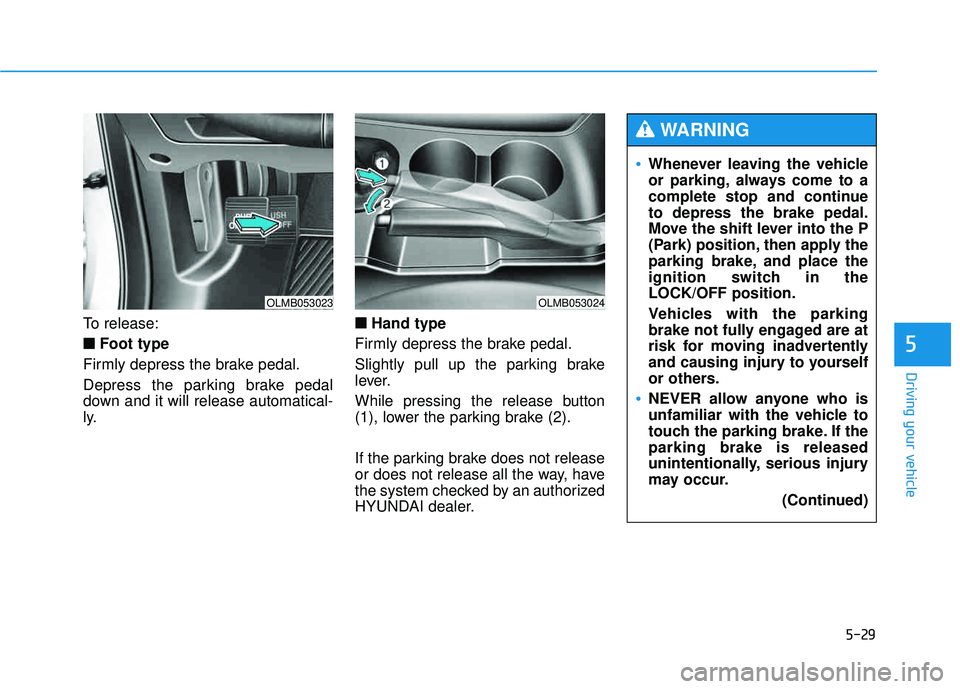
To release:■
■ Foot type
Firmly depress the brake pedal.
Depress the parking brake pedal
down and it will release automatical-
ly. ■
■
Hand type
Firmly depress the brake pedal.
Slightly pull up the parking brake
lever.
While pressing the release button
(1), lower the parking brake (2).
If the parking brake does not release
or does not release all the way, have
the system checked by an authorized
HYUNDAI dealer.
OLMB053023OLMB053024
Whenever leaving the vehicle
or parking, always come to a
complete stop and continueto depress the brake pedal.
Move the shift lever into the P
(Park) position, then apply the
parking brake, and place the
ignition switch in theLOCK/OFF position.
Vehicles with the parking
brake not fully engaged are at
risk for moving inadvertently
and causing injury to yourself
or others.
NEVER allow anyone who is
unfamiliar with the vehicle to
touch the parking brake. If theparking brake is released
unintentionally, serious injury
may occur. (Continued)
WARNING
Page 485 of 653
5-39
Driving your vehicle
5
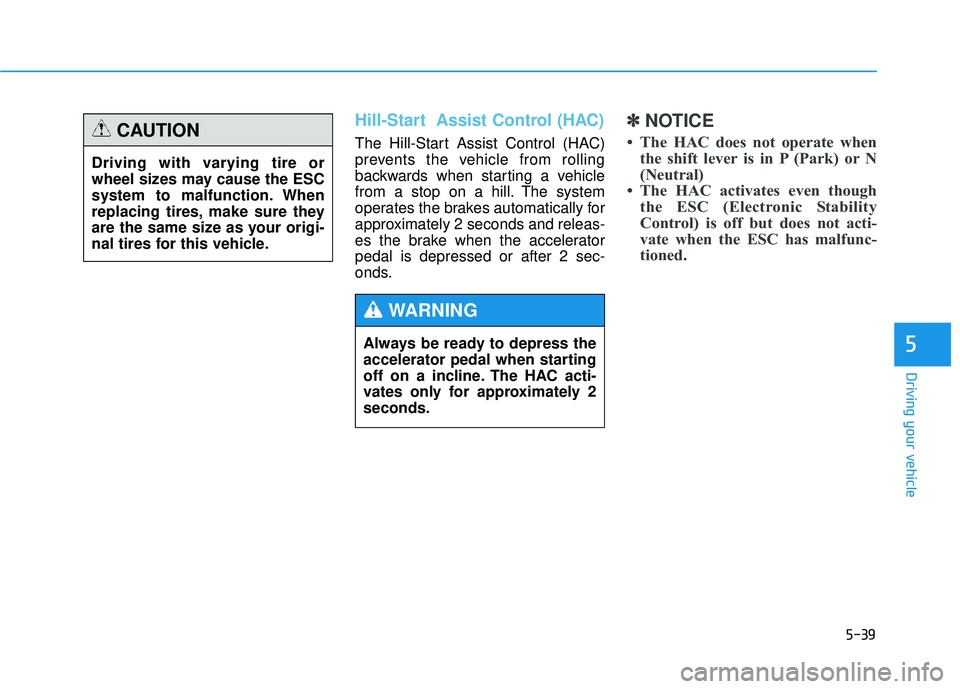
Hill-Start Assist Control (HAC)
The Hill-Start Assist Control (HAC)
prevents the vehicle from rolling
backwards when starting a vehicle
from a stop on a hill. The system
operates the brakes automatically for
approximately 2 seconds and releas-
es the brake when the acceleratorpedal is depressed or after 2 sec-
onds.
✽✽NOTICE
The HAC does not operate when the shift lever is in P (Park) or N
(Neutral)
The HAC activates even though the ESC (Electronic Stability
Control) is off but does not acti-
vate when the ESC has malfunc-
tioned.
Always be ready to depress the
accelerator pedal when starting
off on a incline. The HAC acti-
vates only for approximately 2seconds.
WARNING
Driving with varying tire or
wheel sizes may cause the ESC
system to malfunction. When
replacing tires, make sure they
are the same size as your origi-
nal tires for this vehicle.
CAUTION
Page 487 of 653
5-41
Driving your vehicle
5✽✽NOTICE
The DBC may not deactivate on steep inclines even though the
brake or accelerator pedal is
depressed.
The DBC does not operate when: - The shift lever is in P (Park).
- The ESC is activated.
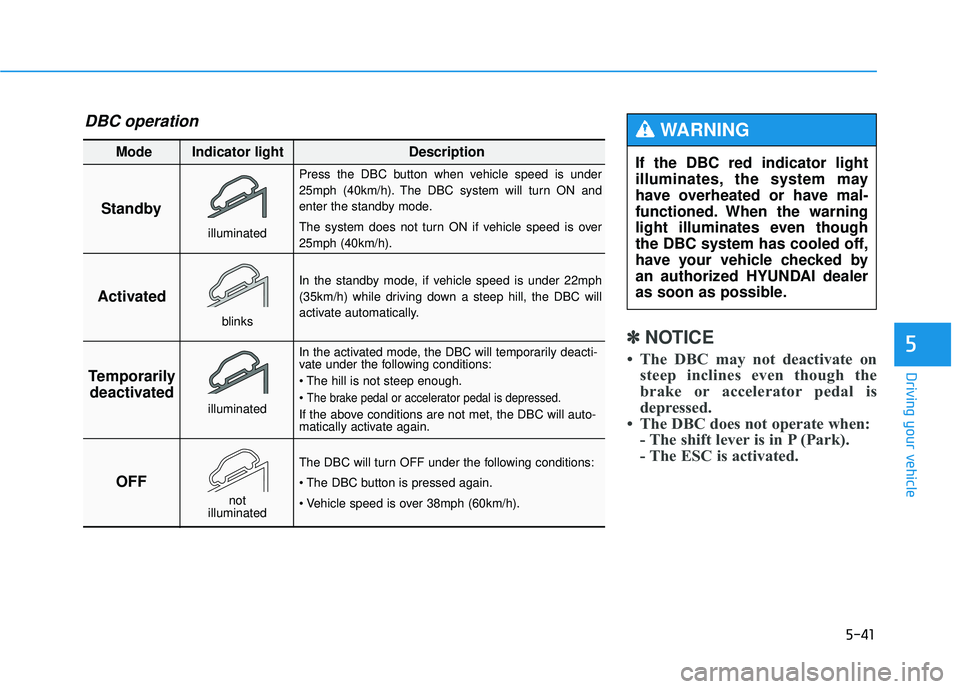
Standby Press the DBC button when vehicle speed is under
25mph (40km/h). The DBC system will turn ON and
enter the standby mode.
The system does not turn ON if vehicle speed is over 25mph (40km/h).
In the standby mode, if vehicle speed is under 22mph
(35km/h) while driving down a steep hill, the DBC will
activate automatically.
In the activated mode, the DBC will temporarily deacti-
vate under the following conditions:
The brake pedal or accelerator pedal is depressed.
If the above conditions are not met, the DBC will auto-
matically activate again.
The DBC will turn OFF under the following conditions:
Activated
Temporarily deactivated
OFF
Mode Indicator light Description
blinks
illuminated
not
illuminated
illuminated
If the DBC red indicator light
illuminates, the system may
have overheated or have mal-
functioned. When the warning
light illuminates even though
the DBC system has cooled off,
have your vehicle checked by
an authorized HYUNDAI dealer
as soon as possible.
WARNING DBC operation
Page 488 of 653
5-42
Driving your vehicle
Good braking practices Wet brakes can be dangerous! The
brakes may get wet if the vehicle is
driven through standing water or if it
is washed. Your vehicle will not stop
as quickly if the brakes are wet. Wet
brakes may cause the vehicle to pull
to one side.
To dry the brakes, apply the brakes
lightly until the braking action returns
to normal, taking care to keep the
vehicle under control at all times. If the
braking action does not return to nor-
mal, stop as soon as it is safe to do so
and call an authorized HYUNDAI
dealer for assistance.
DO NOT drive with your foot resting
on the brake pedal. Even light, butconstant pedal pressure can result in
the brakes overheating, brake wear,
and possibly even brake failure.If a tire goes flat while you are driv-
ing, apply the brakes gently and
keep the vehicle pointed straight
ahead while you slow down. When
you are moving slowly enough for it
to be safe to do so, pull off the road
and stop in a safe location.
Keep your foot firmly on the brake
pedal when the vehicle is stopped to
prevent the vehicle from rolling for-
ward.
Whenever leaving the vehicle or
parking, always come to a com-
plete stop and continue to
depress the brake pedal. Move
the shift lever into the P (Park)
position, then apply the parking
brake, and place the ignition
switch in the LOCK/OFF posi-tion.
Vehicles with the parking brake
not fully engaged are at risk for
moving inadvertently and caus-
ing injury to yourself or others.
WARNING
Page 490 of 653
5-44
Driving your vehicle
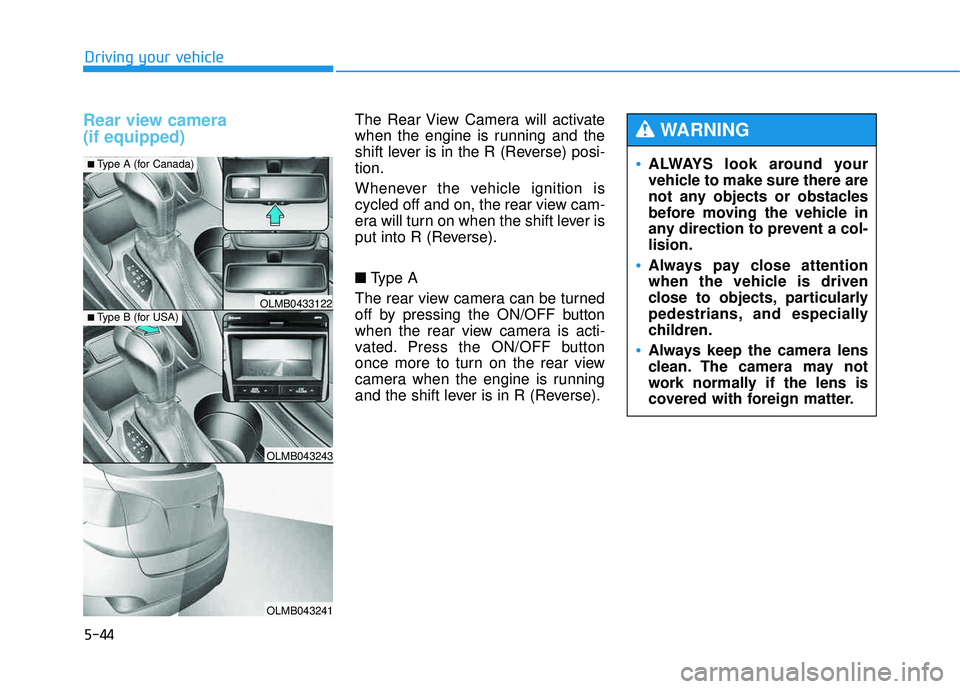
Rear view camera (if equipped) The Rear View Camera will activate
when the engine is running and the
shift lever is in the R (Reverse) posi-tion.
Whenever the vehicle ignition is
cycled off and on, the rear view cam-
era will turn on when the shift lever is
put into R (Reverse). ■Type A
The rear view camera can be turned
off by pressing the ON/OFF button
when the rear view camera is acti-
vated. Press the ON/OFF button
once more to turn on the rear view
camera when the engine is running
and the shift lever is in R (Reverse).
OLMB043243
OLMB043241
OLMB0433122
■ Type A (for Canada)
■Type B (for USA)
ALWAYS look around your
vehicle to make sure there are
not any objects or obstacles
before moving the vehicle in
any direction to prevent a col-lision.
Always pay close attention
when the vehicle is driven
close to objects, particularly
pedestrians, and especially
children.
Always keep the camera lens
clean. The camera may not
work normally if the lens is
covered with foreign matter.
WARNING