Page 12 of 785
15
Introduction
If TOP TIER Detergent Gasoline is
not available, one bottle of additive
added to the fuel tank at every
12,000km (7,500mile) or every
engine oil change is recommended.
Additives are available from your
authorized HYUNDAI dealer along
with information on how to use them.
Do not mix other additives.
Operation in foreign countries
If you are going to drive your vehicle
in another country, be sure to:
• Observe all regulations regarding
registration and insurance.
• Determine that acceptable fuel is
available.No special break-in period is needed.
By following a few simple precautions
for the first 1,000 km (600 miles) you
may add to the performance, econo-
my and life of your vehicle.
• Do not race the engine.
• While driving, keep your engine
speed (rpm, or revolutions per
minute) between 2,000 rpm and
4,000 rpm.
• Do not maintain a single speed for
long periods of time, either fast or
slow. Varying engine speed is
needed to properly break-in the
engine.
• Avoid hard stops, except in emer-
gencies, to allow the brakes to seat
properly.As with other vehicles of this type,
failure to operate this vehicle correct-
ly may result in loss of control, an
accident or vehicle rollover.
Specific design characteristics (high-
er ground clearance, track, etc.) give
this vehicle a higher center of gravity
than other types of vehicles. It is not
designed for cornering at the same
speeds as a conventional 2-wheel
drive sedans or sports coupe. Avoid
sharp turns or abrupt maneuvers.
Failure to operate this vehicle cor-
rectly may result in loss of control, an
accident or vehicle rollover.Be sure
to read the “Reducing the risk of a
rollover” driving guidelines, in
section 5 of this manual.
VEHICLE HANDLING
INSTRUCTIONS VEHICLE BREAK-IN
PROCESS
Page 149 of 785
Features of your vehicle
56 4
Electric power steering (EPS)
The power steering uses a motor to
assist you in steering the vehicle. If
the engine is off or if the power steer-
ing system becomes inoperative, the
vehicle may still be steered, but it will
require increased steering effort.
The motor driven power steering is
controlled by a power steering con-
trol unit which senses the steering
wheel torque and vehicle speed to
command the motor.
The steering becomes heavier as the
vehicle’s speed increases and
becomes lighter as the vehicle’s
speed decreases for optimum steer-
ing control.
Should you notice any change in the
effort required to steer during normal
vehicle operation, have the power
steering checked by an authorized
HYUNDAI dealer.
✽NOTICE
The following symptoms may occur
during normal vehicle operation:
• The EPS warning light does not
illuminate.
• The steering gets heavy immedi-
ately after turning the ignition
switch on. This happens as the sys-
tem performs the EPS system
diagnostics. When the diagnostics
is completed, the steering wheel
will return to its normal condition.
• A click noise may be heard from
the EPS relay after the ignition
switch is turned to the ON or
LOCK (OFF) position.
• A motor noise may be heard when
the vehicle is at a stop or at a low
driving speed.
• If the Electric Power Steering
System does not operate normally,
the warning light will illuminate on
the instrument cluster. The steer-
ing wheel may become difficult to
control or operate abnormally.
Take your vehicle to an authorized
HYUNDAI dealer and have the
vehicle checked as soon as possible.
(Continued)
STEERING WHEEL
CAUTION
• If the Electric Power Steering
System does not operate nor-
mally, the warning light will
illuminate on the instrument
cluster. The steering wheel
may become difficult to con-
trol or operate abnormally.
Take your vehicle to an
authorized HYUNDAI dealer
and have the vehicle checked
as soon as possible.
• When you operate the steer-
ing wheel in low temperature,
abnormal noise could occur. If
temperature rises, the noise
will disappear. This is a normal
condition.
• When the vehicle is stationary,
if you turn the steering wheel
all the way to the left or right
continuously, the steering
wheel becomes heavier from
the end. But this is for your
safety, not system malfunc-
tion. As time passes, the
steering wheel return to its
normal condition.
Page 150 of 785
457
Features of your vehicle
(Continued)
• When you operate the steering
wheel in low temperature, abnor-
mal noise could occur. If tempera-
ture rises, the noise will disappear.
This is a normal condition.
• When the charging system warn-
ing light comes on or the voltage is
low (When the alternator (or bat-
tery) does not operate normally or
it malfunctions), the steering wheel
may get heavy and become diffi-
cult to control operate abnormally.Tilt steering
A tilt steering wheel allows you to
adjust the steering wheel before you
drive. You can also raise it to give
your legs more room when you exit
and enter the vehicle (if equipped).
The steering wheel should be posi-
tioned so that it is comfortable for
you to drive, while permitting you to
see the instrument panel warning
lights and gauges.
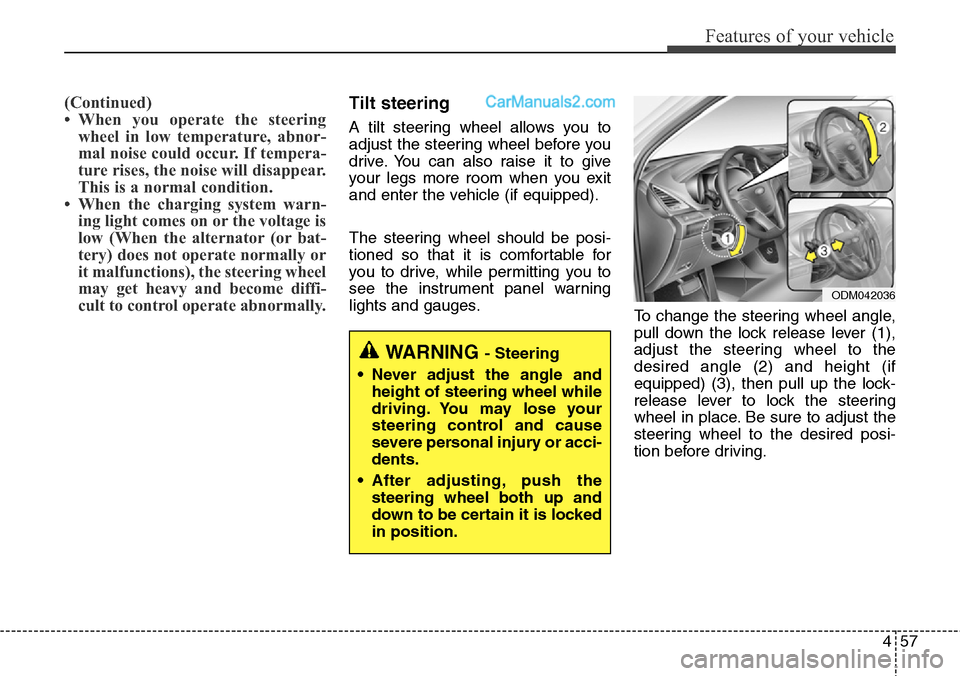
To change the steering wheel angle,
pull down the lock release lever (1),
adjust the steering wheel to the
desired angle (2) and height (if
equipped) (3), then pull up the lock-
release lever to lock the steering
wheel in place. Be sure to adjust the
steering wheel to the desired posi-
tion before driving.
WARNING - Steering
• Never adjust the angle and
height of steering wheel while
driving. You may lose your
steering control and cause
severe personal injury or acci-
dents.
• After adjusting, push the
steering wheel both up and
down to be certain it is locked
in position.
ODM042036
Page 152 of 785
459
Features of your vehicle
Driver selectable steering
mode (if equipped)
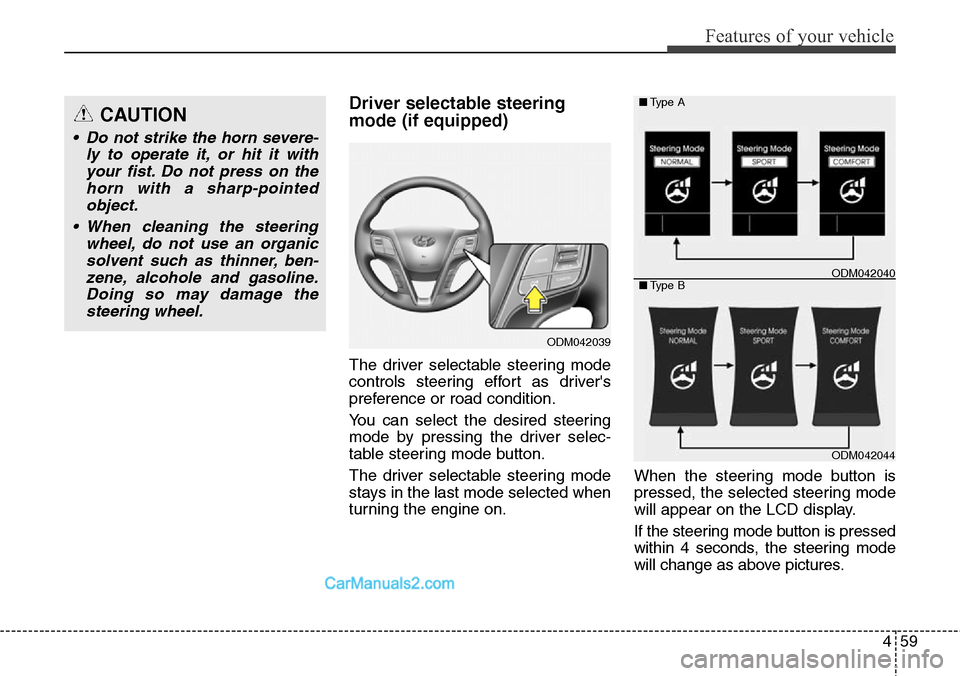
The driver selectable steering mode
controls steering effort as driver's
preference or road condition.
You can select the desired steering
mode by pressing the driver selec-
table steering mode button.
The driver selectable steering mode
stays in the last mode selected when
turning the engine on.When the steering mode button is
pressed, the selected steering mode
will appear on the LCD display.
If the steering mode button is pressed
within 4 seconds, the steering mode
will change as above pictures.
ODM042039
ODM042044 ■Type A
■Type B
ODM042040
CAUTION
• Do not strike the horn severe-
ly to operate it, or hit it with
your fist. Do not press on the
horn with a sharp-pointed
object.
• When cleaning the steering
wheel, do not use an organic
solvent such as thinner, ben-
zene, alcohole and gasoline.
Doing so may damage the
steering wheel.
Page 153 of 785
Features of your vehicle
60 4
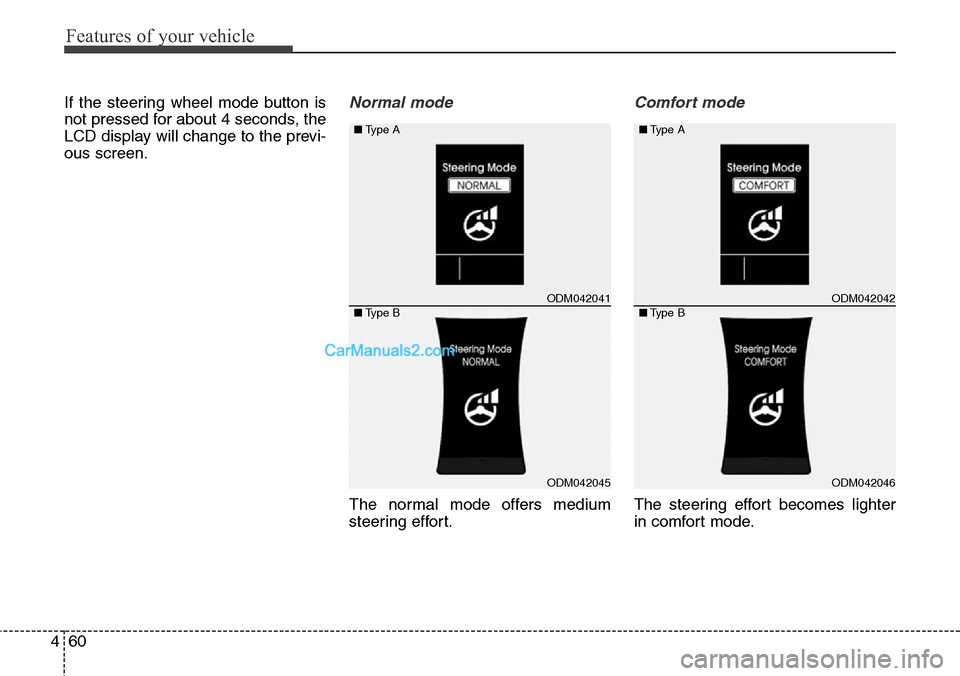
If the steering wheel mode button is
not pressed for about 4 seconds, the
LCD display will change to the previ-
ous screen.Normal mode
The normal mode offers medium
steering effort.
Comfort mode
The steering effort becomes lighter
in comfort mode.
ODM042041
ODM042045
■Type A
■Type BODM042042
ODM042046 ■Type A
■Type B
Page 154 of 785
461
Features of your vehicle
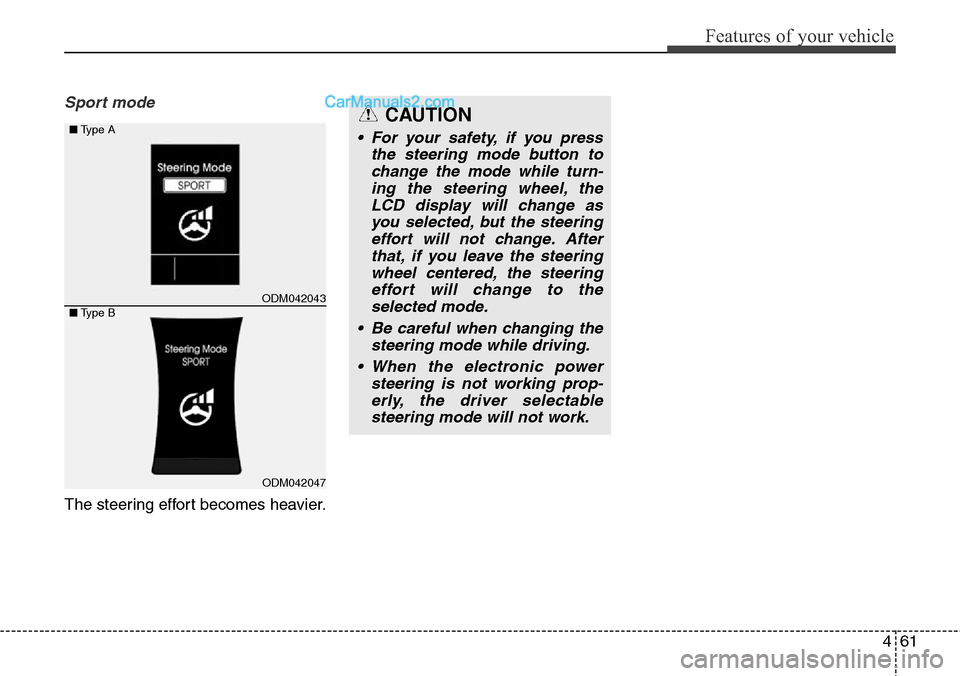
Sport mode
The steering effort becomes heavier.
CAUTION
• For your safety, if you press
the steering mode button to
change the mode while turn-
ing the steering wheel, the
LCD display will change as
you selected, but the steering
effort will not change. After
that, if you leave the steering
wheel centered, the steering
effort will change to the
selected mode.
• Be careful when changing the
steering mode while driving.
• When the electronic power
steering is not working prop-
erly, the driver selectable
steering mode will not work.
ODM042043
ODM042047
■Type A
■Type B
Page 178 of 785
485
Features of your vehicle
Instrument Cluster Control
Adjusting Instrument Cluster
Illumination
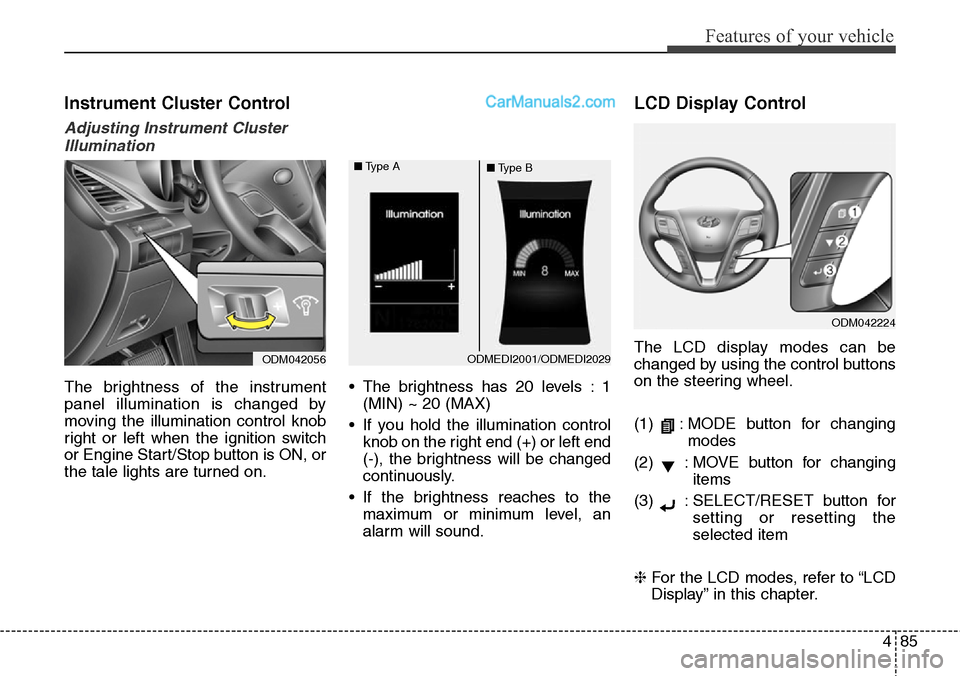
The brightness of the instrument
panel illumination is changed by
moving the illumination control knob
right or left when the ignition switch
or Engine Start/Stop button is ON, or
the tale lights are turned on.• The brightness has 20 levels : 1
(MIN) ~ 20 (MAX)
• If you hold the illumination control
knob on the right end (+) or left end
(-), the brightness will be changed
continuously.
• If the brightness reaches to the
maximum or minimum level, an
alarm will sound.
LCD Display Control
The LCD display modes can be
changed by using the control buttons
on the steering wheel.
(1) : MODE button for changing
modes
(2) : MOVE button for changing
items
(3) : SELECT/RESET button for
setting or resetting the
selected item
❈For the LCD modes, refer to “LCD
Display” in this chapter.
ODM042224
ODM042056ODMEDI2001/ODMEDI2029 ■Type A
■Type B
Page 189 of 785
Features of your vehicle
96 4
Warning Messages
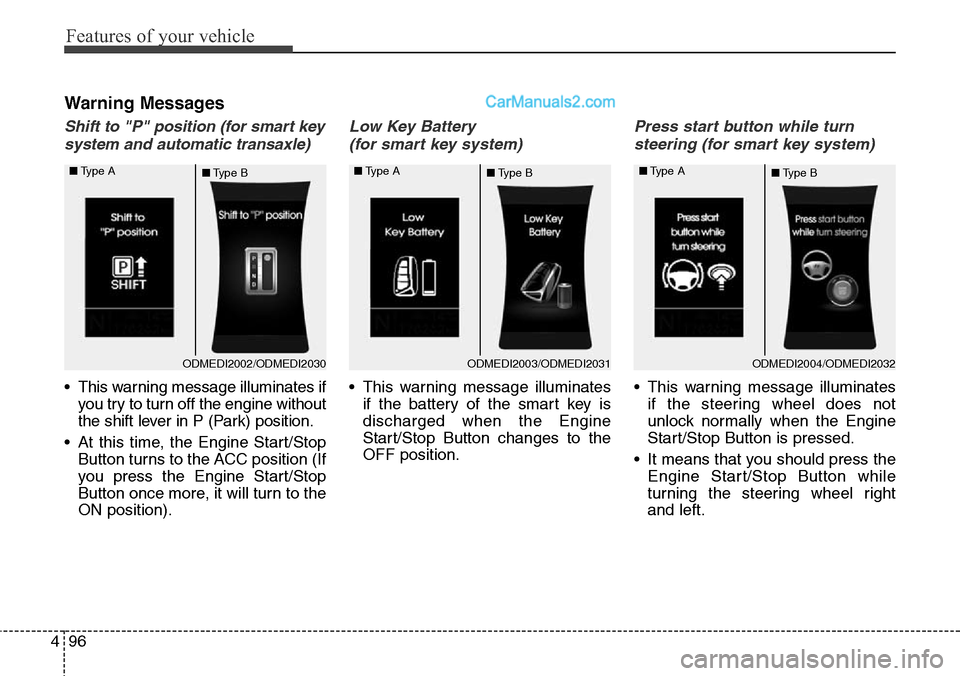
Shift to "P" position (for smart key
system and automatic transaxle)
• This warning message illuminates if
you try to turn off the engine without
the shift lever in P (Park) position.
• At this time, the Engine Start/Stop
Button turns to the ACC position (If
you press the Engine Start/Stop
Button once more, it will turn to the
ON position).
Low Key Battery
(for smart key system)
• This warning message illuminates
if the battery of the smart key is
discharged when the Engine
Start/Stop Button changes to the
OFF position.
Press start button while turn
steering (for smart key system)
• This warning message illuminates
if the steering wheel does not
unlock normally when the Engine
Start/Stop Button is pressed.
• It means that you should press the
Engine Start/Stop Button while
turning the steering wheel right
and left.
ODMEDI2003/ODMEDI2031 ■Type A
■Type BODMEDI2004/ODMEDI2032 ■Type A
■Type BODMEDI2002/ODMEDI2030 ■Type A
■Type B