Page 297 of 785
![Hyundai Santa Fe Sport 2015 Owners Manual Features of your vehicle
204 4
Delete All
Press the key Set [ Del.All]
through the TUNEknob or key.
Deletes all songs of My Music.
Delete Selection
Press the key Set [ Del.Sel]
through the TUNEknob](/manual-img/35/16759/w960_16759-296.png "Hyundai Santa Fe Sport 2015 Owners Manual Features of your vehicle
204 4
Delete All
Press the key Set [ Del.All]
through the TUNEknob or key.
Deletes all songs of My Music.
Delete Selection
Press the key Set [ Del.Sel]
through the TUNEknob")
Features of your vehicle
204 4
Delete All
Press the key Set [ Del.All]
through the TUNEknob or key.
Deletes all songs of My Music.
Delete Selection
Press the key Set [ Del.Sel]
through the TUNEknob or
key.
Songs within My Music are selected
and deleted.
➀ Select the songs you wish to
delete from the list.
➁ After selecting, press the key and
select the delete menu.
✽NOTICE - USING THE My
Music
• Even if memory is available, a
maximum of 6,000 songs can be
stored.
• The same song can be copied up to
1,000 times.
• Memory info can be checked in
the System menu of Setup.
AUX
AUX is used to play external MEDIA
currently connected with the AUX
terminal.
AUX mode will automatically start
when an external device is connect-
ed with the AUX terminal.
If an external device is connected,
you can also press the key to
change to AUX mode.
❈ AUX mode cannot be started
unless there is an external device
connected to the AUX terminal.
✽NOTICE - USING THE AUX
Fully insert the AUX cable into the
AUX terminal for use.
MEDIA6
MENU
5
MENU
Page 298 of 785
4205
Features of your vehicle
Bluetooth®Wireless Technology
AUDIO
What is Bluetooth®Wireless
Technology
?
Bluetooth®Wireless Technology allows
devices to be connected in a short dis-
tance, including hands-free devices,
stereo headsets, wireless remote con-
trollers, etc. For more information, visit
the Bluetooth®Wireless Technology
website at www.Bluetooth.com
Before using Bluetooth®Wireless
Technologyaudio features
•
Bluetooth®Wireless Technology
audio may not be supported
depending on the compatibility of
your
Bluetooth®Wireless
Technologymobile phone.
• In order to use
Bluetooth®Wireless
Technologyaudio, you must first
pair and connect the
Bluetooth®
Wireless Technologymobile phone.
•
Bluetooth®Wireless Technology
audio can be used only when the
[Audio Streaming] of Phone is
turned .
❈Setting
Bluetooth®Wireless
Technology
Audio Streaming : Press
the key Select [Phone]
through the tune knob or key
Select [Audio Streaming] through
the TUNE knob Set
/
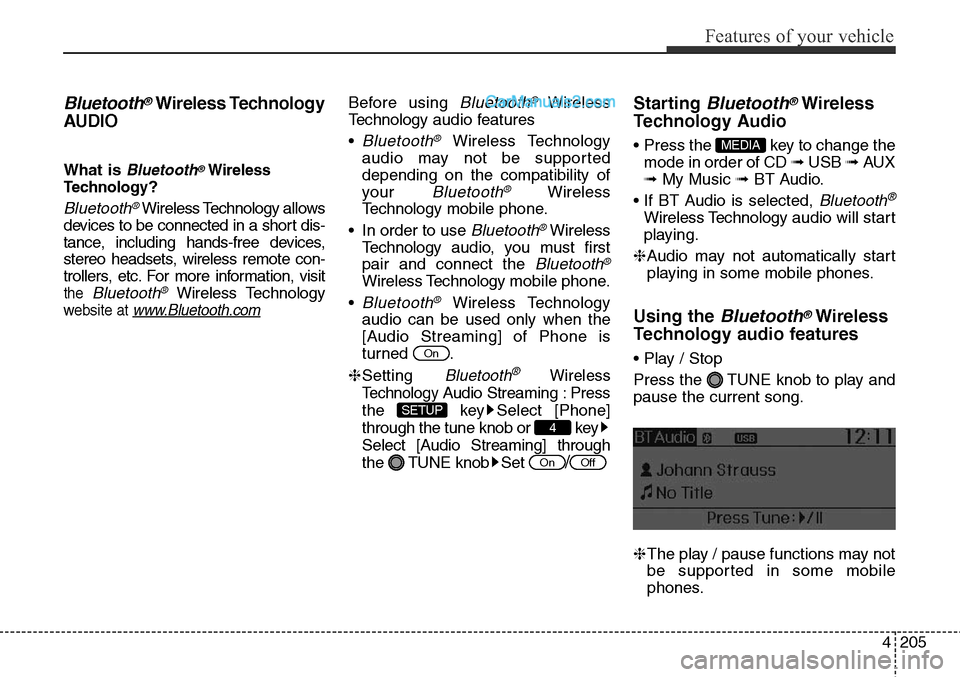
Starting Bluetooth®Wireless
Technology Audio
• Press the key to change the
mode in order of CD ➟ USB ➟ AUX
➟ My Music ➟ BT Audio.
• If BT Audio is selected,
Bluetooth®
Wireless Technology audio will start
playing.
❈Audio may not automatically start
playing in some mobile phones.
Using the Bluetooth®Wireless
Technology audio features
• Play / Stop
Press the TUNE knob to play and
pause the current song.
❈The play / pause functions may not
be supported in some mobile
phones.
MEDIA
OffOn
4
SETUP
On
Page 313 of 785
![Hyundai Santa Fe Sport 2015 Owners Manual Features of your vehicle
220 4
VOICE RECOGNITION
Using Voice Recognition
Starting Voice Recognition
Shortly press the key on the
steering wheel. Say a command.If prompt feedback is in [ON], then
th](/manual-img/35/16759/w960_16759-312.png "Hyundai Santa Fe Sport 2015 Owners Manual Features of your vehicle
220 4
VOICE RECOGNITION
Using Voice Recognition
Starting Voice Recognition
Shortly press the key on the
steering wheel. Say a command.If prompt feedback is in [ON], then
th")
Features of your vehicle
220 4
VOICE RECOGNITION
Using Voice Recognition
Starting Voice Recognition
Shortly press the key on the
steering wheel. Say a command.If prompt feedback is in [ON], then
the system will say “Please say a
command after the beep (BEEP)”
• If prompt feedback is in [OFF]
mode, then the system will only
say “(BEEP)”
• To change Prompt Feedback
[On]/[Off], go to [System]
[Prompt Feedback]
✽NOTICE
For proper recognition, say the com-
mand after the voice instruction and
beep tone.
Contact List Best Practices
1) Do not store single-name entries
(e.g., “Bob”, “Mom”, “Kim”, etc.).
Instead, always use full names
(including first and last names) for
all contacts (e.g., use “Jacob
Stevenson” instead of “Dad”).
2) Do not use abbreviations (i.e., use
“Lieutenant” instead of “Lt.” or
“Sergeant” instead of “Sgt.”).
3) Do not use acronyms (i.e., use
“County Finance Department”
instead of “CFD”).4) Do not use special characters
(e.g., “@”, “hyphen -”, “asterisk *”,
“ampersand &”).
5) If a name is not recognized from
the contact list, change it to a
more descriptive name (e.g., use
“Grandpa Joseph” instead of “Pa
Joe”).
Skipping Prompt Messages
While prompt message is being stat-
ed Shortly press the key on the
steering remote controller
The prompt message is immediately
ended and the beep tone will sound.
After the “beep”, say the voice com-
mand.
Re-starting Voice Recognition
While system waits for a command
Shortly press the key on the
steering remote controller
The command wait state is immedi-
ately ended and the beep tone will
sound. After the “beep”, say the voice
command.
SETUP
Page 315 of 785
Features of your vehicle
222 4
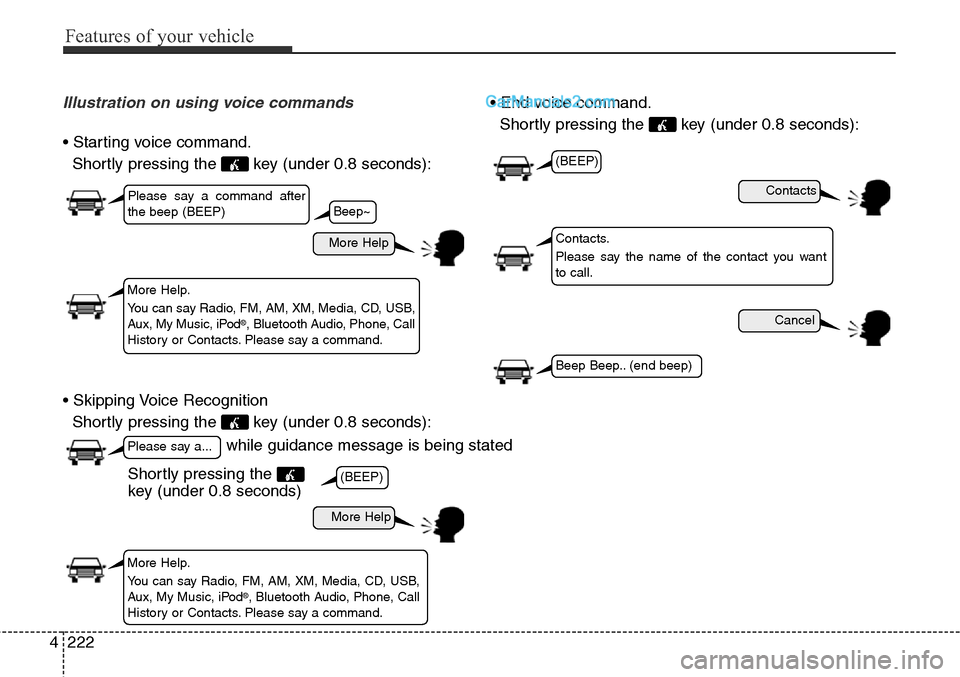
Illustration on using voice commands
• Starting voice command.
Shortly pressing the key (under 0.8 seconds):
• Skipping Voice Recognition
Shortly pressing the key (under 0.8 seconds):• End voice command.
Shortly pressing the key (under 0.8 seconds):
while guidance message is being stated
More Help
Contacts
Cancel
More Help
Please say a command after
the beep (BEEP)
Please say a...
More Help.
You can say Radio, FM, AM, XM, Media, CD, USB,
Aux, My Music, iPod
®, Bluetooth Audio, Phone, Call
History or Contacts. Please say a command.
Contacts.
Please say the name of the contact you want
to call.
More Help.
You can say Radio, FM, AM, XM, Media, CD, USB,
Aux, My Music, iPod
®, Bluetooth Audio, Phone, Call
History or Contacts. Please say a command.
(BEEP)
(BEEP)
Beep Beep.. (end beep)
Shortly pressing the
key (under 0.8 seconds)
Beep~
Page 334 of 785
![Hyundai Santa Fe Sport 2015 Owners Manual 4241
Features of your vehicle
VOICE RECOGNITION
Using Voice Recognition
Starting Voice Recognition
Shortly press the key on the
steering wheel. Say a command.If prompt feedback is in [ON], then
the](/manual-img/35/16759/w960_16759-333.png "Hyundai Santa Fe Sport 2015 Owners Manual 4241
Features of your vehicle
VOICE RECOGNITION
Using Voice Recognition
Starting Voice Recognition
Shortly press the key on the
steering wheel. Say a command.If prompt feedback is in [ON], then
the")
4241
Features of your vehicle
VOICE RECOGNITION
Using Voice Recognition
Starting Voice Recognition
Shortly press the key on the
steering wheel. Say a command.If prompt feedback is in [ON], then
the system will say “Please say a
command after the beep (BEEP)”
• If prompt feedback is in [OFF]
mode, then the system will only
say “(BEEP)”
• To change Prompt Feedback
[On]/[Off], go to [System]
[Prompt Feedback]
✽NOTICE
For proper recognition, say the com-
mand after the voice instruction and
beep tone.
Contact List Best Practices
1) Do not store single-name entries
(e.g., “Bob”, “Mom”, “Kim”, etc.).
Instead, always use full names
(including first and last names) for
all contacts (e.g., use “Jacob
Stevenson” instead of “Dad”).
2) Do not use abbreviations (i.e., use
“Lieutenant” instead of “Lt.” or
“Sergeant” instead of “Sgt.”).
3) Do not use acronyms (i.e., use
“County Finance Department”
instead of “CFD”).4) Do not use special characters
(e.g., “@”, “hyphen -”, “asterisk *”,
“ampersand &”).
5) If a name is not recognized from
the contact list, change it to a
more descriptive name (e.g., use
“Grandpa Joseph” instead of “Pa
Joe”).
Skipping Prompt Messages
While prompt message is being stat-
ed Shortly press the key on the
steering remote controller
The prompt message is immediately
ended and the beep tone will sound.
After the “beep”, say the voice com-
mand.
Re-starting Voice Recognition
While system waits for a command
Shortly press the key on the
steering remote controller
The command wait state is immedi-
ately ended and the beep will sound.
After the “beep”, say the voice com-
mand.
SETUP
Page 336 of 785
4243
Features of your vehicle
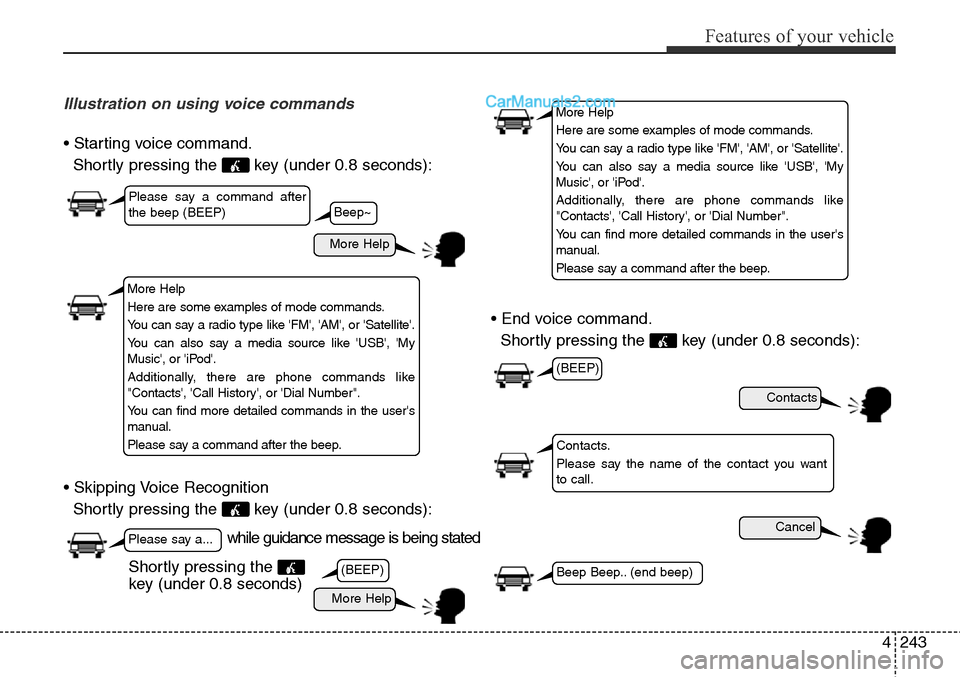
Illustration on using voice commands
• Starting voice command.
Shortly pressing the key (under 0.8 seconds):
• Skipping Voice Recognition
Shortly pressing the key (under 0.8 seconds):• End voice command.
Shortly pressing the key (under 0.8 seconds):
while guidance message is being stated
More Help
Contacts
Cancel
More Help
Please say a command after
the beep (BEEP)
Please say a...
Contacts.
Please say the name of the contact you want
to call.
(BEEP)
(BEEP)
Beep Beep.. (end beep)Shortly pressing the
key (under 0.8 seconds)
Beep~
More Help
Here are some examples of mode commands.
You can say a radio type like 'FM', 'AM', or 'Satellite'.
You can also say a media source like 'USB', 'My
Music', or 'iPod'.
Additionally, there are phone commands like
"Contacts', 'Call History', or 'Dial Number".
You can find more detailed commands in the user's
manual.
Please say a command after the beep.
More Help
Here are some examples of mode commands.
You can say a radio type like 'FM', 'AM', or 'Satellite'.
You can also say a media source like 'USB', 'My
Music', or 'iPod'.
Additionally, there are phone commands like
"Contacts', 'Call History', or 'Dial Number".
You can find more detailed commands in the user's
manual.
Please say a command after the beep.
Page 349 of 785
Features of your vehicle
256 4
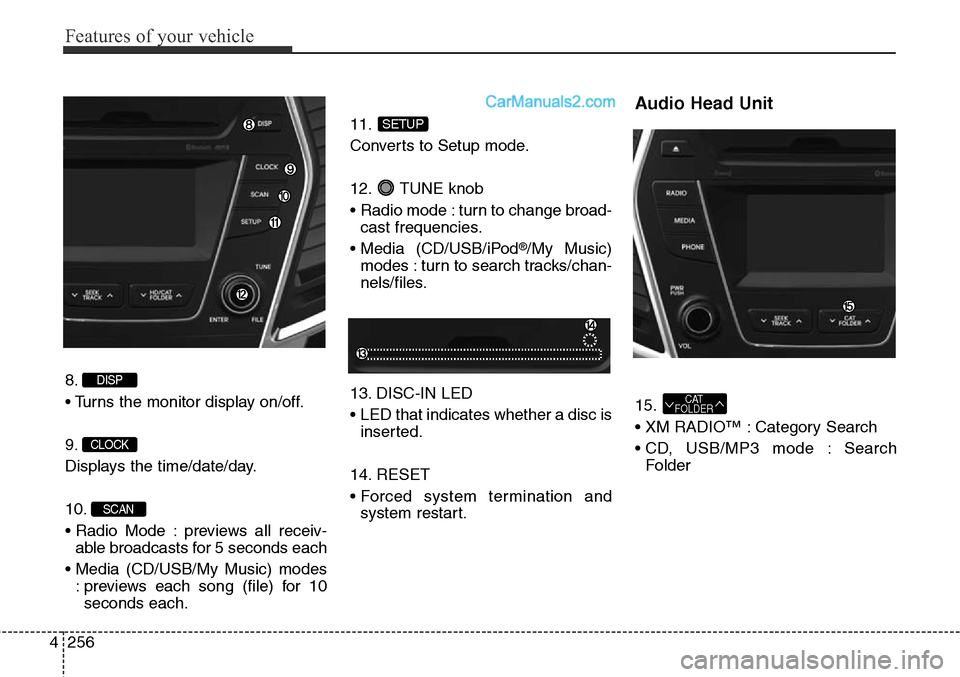
8.
• Turns the monitor display on/off.
9.
Displays the time/date/day.
10.
• Radio Mode : previews all receiv-
able broadcasts for 5 seconds each
• Media (CD/USB/My Music) modes
: previews each song (file) for 10
seconds each.11.
Converts to Setup mode.
12. TUNE knob
• Radio mode : turn to change broad-
cast frequencies.
• Media (CD/USB/iPod
®/My Music)
modes : turn to search tracks/chan-
nels/files.
13. DISC-IN LED
• LED that indicates whether a disc is
inserted.
14. RESET
• Forced system termination and
system restart.
Audio Head Unit
15.
• XM RADIO™ : Category Search
• CD, USB/MP3 mode : Search
FolderCAT
FOLDER
SETUP
SCAN
CLOCK
DISP
Page 350 of 785
4257
Features of your vehicle
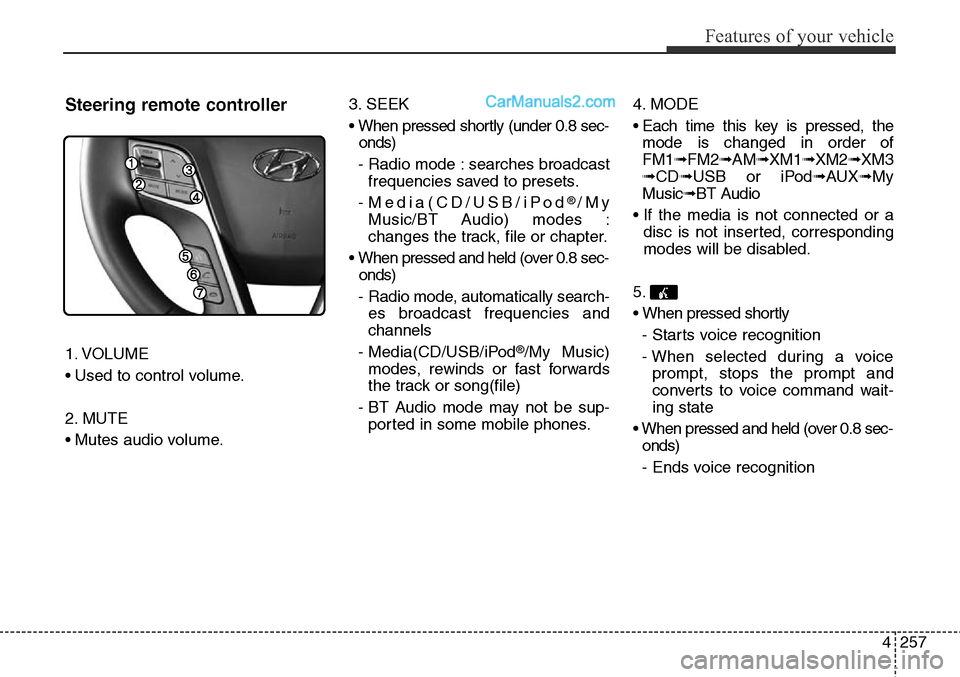
Steering remote controller
1. VOLUME
• Used to control volume.
2. MUTE
• Mutes audio volume.3. SEEK
• When pressed shortly (under 0.8 sec-
onds)
- Radio mode : searches broadcast
frequencies saved to presets.
- Media(CD/USB/iPod
®/My
Music/BT Audio) modes :
changes the track, file or chapter.
• When pressed and held (over 0.8 sec-
onds)
- Radio mode, automatically search-
es broadcast frequencies and
channels
- Media(CD/USB/iPod
®/My Music)
modes, rewinds or fast forwards
the track or song(file)
- BT Audio mode may not be sup-
ported in some mobile phones.4. MODE
• Each time this key is pressed, the
mode is changed in order of
FM1➟FM2➟AM➟XM1➟XM2➟XM3
➟CD➟USB or iPod➟AUX➟My
Music➟BT Audio
• If the media is not connected or a
disc is not inserted, corresponding
modes will be disabled.
5.
• When pressed shortly
- Starts voice recognition
- When selected during a voice
prompt, stops the prompt and
converts to voice command wait-
ing state
• When pressed and held (over 0.8 sec-
onds)
- Ends voice recognition