2015 Hyundai H350 engine
[x] Cancel search: enginePage 297 of 473
5-26
Driving your vehicle
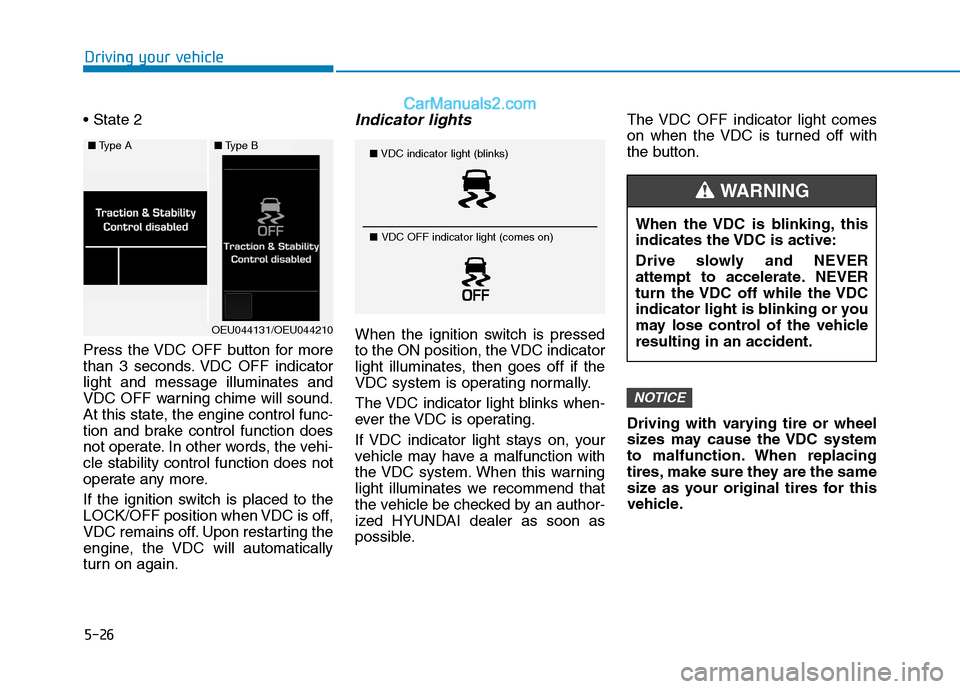
Press the VDC OFF button for more
than 3 seconds. VDC OFF indicatorlight and message illuminates and
VDC OFF warning chime will sound.
At this state, the engine control func-
tion and brake control function does
not operate. In other words, the vehi-cle stability control function does not
operate any more.
If the ignition switch is placed to the
LOCK/OFF position when VDC is off,
VDC remains off. Upon restarting the
engine, the VDC will automatically
turn on again.Indicator lights
When the ignition switch is pressed
to the ON position, the VDC indicator
light illuminates, then goes off if the
VDC system is operating normally.
The VDC indicator light blinks when-
ever the VDC is operating.
If VDC indicator light stays on, your
vehicle may have a malfunction with
the VDC system. When this warning
light illuminates we recommend that
the vehicle be checked by an author-
ized HYUNDAI dealer as soon as
possible.The VDC OFF indicator light comes
on when the VDC is turned off with
the button.
Driving with varying tire or wheel
sizes may cause the VDC system
to malfunction. When replacing
tires, make sure they are the same
size as your original tires for this
vehicle.
NOTICE
■
Type A■Type B
OEU044131/OEU044210
■VDC indicator light (blinks)
■ VDC OFF indicator light (comes on)
When the VDC is blinking, this
indicates the VDC is active:
Drive slowly and NEVER
attempt to accelerate. NEVER
turn the VDC off while the VDC
indicator light is blinking or you
may lose control of the vehicleresulting in an accident.
WARNING
Page 298 of 473
5-27
Driving your vehicle
5
VDC OFF usage
When Driving
The VDC OFF mode should only be
used briefly to help free the vehicle if
stuck in snow or mud by temporarily
stopping operation of the VDC to
maintain wheel torque.
To turn VDC off while driving, press
the VDC OFF button while driving on
a flat road surface.To prevent damage to thetransaxle:
Do not allow wheel(s) of one
axle to spin excessively while
the VDC, ABS, and brake warn-
ing lights are displayed. The
repairs would not be covered by
the vehicle warranty. Reduce
engine power and do not spin
the wheel(s) excessively while
these lights are displayed.
When operating the vehicle on a dynamometer, ensure the VDC isturned off (VDC OFF light illumi-nated).
Information
Turning the VDC off does not affect
ABS or standard brake system opera-
tion.
Hill-Start Assist Control (HAC) (if equipped)
The Hill-Start Assist Control (HAC)
prevents the vehicle from rolling
backwards when starting a vehicle
from a stop on a hill. The system
operates the brakes automatically for
approximately 2 seconds and releas-
es the brake when the acceleratorpedal is depressed or after 2 sec-
onds.
i
NOTICE
Always be ready to depress the
accelerator pedal when starting
off on an incline. The HAC acti-
vates only for approximately 2seconds.
WARNING
Page 300 of 473
5-29
Driving your vehicle
5
Good braking practices Wet brakes can be dangerous! The
brakes may get wet if the vehicle is
driven through standing water or if it
is washed. Your vehicle will not stop
as quickly if the brakes are wet. Wet
brakes may cause the vehicle to pull
to one side.
To dry the brakes, apply the brakes
lightly until the braking action returns
to normal, taking care to keep the
vehicle under control at all times. If
the braking action does not return to
normal, stop as soon as it is safe to
do so and we recommend that you
call an authorized HYUNDAI dealer
for assistance.
DO NOT drive with your foot resting
on the brake pedal. Even light, butconstant pedal pressure can result in
the brakes overheating, brake wear,
and possibly even brake failure.If a tire goes flat while you are driv-
ing, apply the brakes gently and
keep the vehicle pointed straight
ahead while you slow down. When
you are moving slowly enough for it
to be safe to do so, pull off the road
and stop in a safe location.
Keep your foot firmly on the brake
pedal when the vehicle is stopped to
prevent the vehicle from rolling for-
ward.
Whenever leaving the vehicle or
parking, always come to a com-
plete stop and continue to
depress the brake pedal. Move
the shift lever into the P (Park)
position, then apply the parking
brake, and place the Engine
Start/Stop button in the OFFposition.
Vehicles with the parking brake
not fully engaged are at risk for
moving inadvertently and caus-
ing injury to yourself or others.
WARNING
Page 301 of 473
5-30
Driving your vehicle
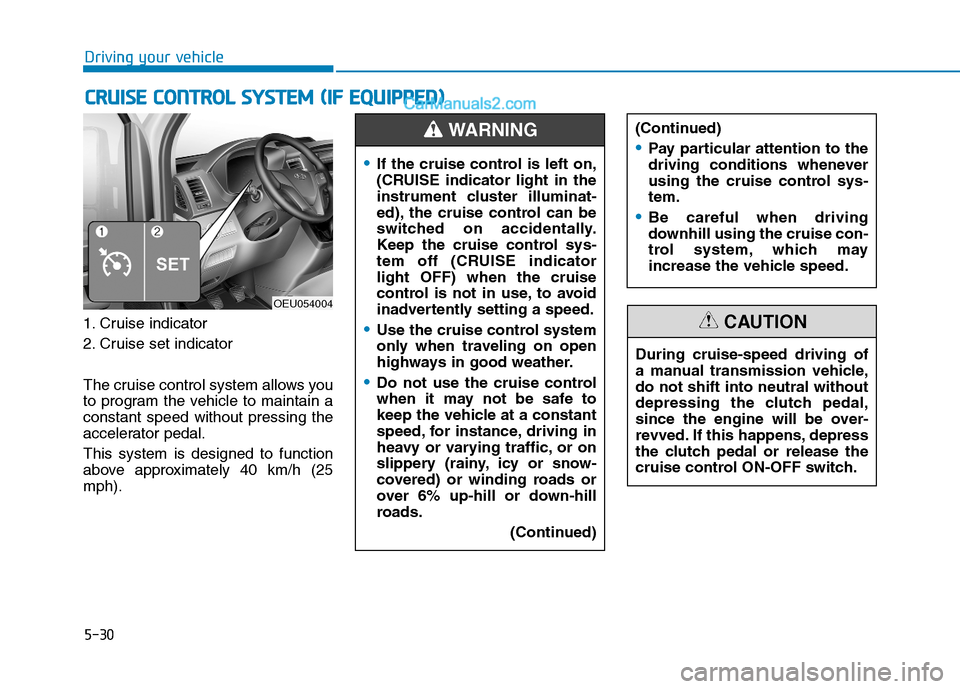
1. Cruise indicator
2. Cruise set indicator
The cruise control system allows you
to program the vehicle to maintain aconstant speed without pressing the
accelerator pedal. This system is designed to function
above approximately 40 km/h (25mph).
CCRR UU IISS EE CC OO NNTTRR OO LL SS YY SSTT EEMM (( IIFF EE QQ UUIIPP PPEEDD ))
OEU054004
If the cruise control is left on,
(CRUISE indicator light in the
instrument cluster illuminat-
ed), the cruise control can be
switched on accidentally.
Keep the cruise control sys-
tem off (CRUISE indicatorlight OFF) when the cruise
control is not in use, to avoid
inadvertently setting a speed.
Use the cruise control system
only when traveling on open
highways in good weather.
Do not use the cruise control
when it may not be safe to
keep the vehicle at a constant
speed, for instance, driving in
heavy or varying traffic, or on
slippery (rainy, icy or snow-
covered) or winding roads or
over 6% up-hill or down-hill
roads.
(Continued)
(Continued)
Pay particular attention to the
driving conditions whenever
using the cruise control sys-tem.
Be careful when driving
downhill using the cruise con-
trol system, which may
increase the vehicle speed.
WARNING
During cruise-speed driving of
a manual transmission vehicle,do not shift into neutral without
depressing the clutch pedal,
since the engine will be over-
revved. If this happens, depress
the clutch pedal or release the
cruise control ON-OFF switch.
CAUTION
Page 302 of 473
5-31
Driving your vehicle
5
During normal cruise control
operation, when the SET switch is
activated or reactivated after
applying the brakes, the cruise
control will energize after approxi-
mately 3 seconds. This delay isnormal.
To activate cruise control, depress the brake pedal at least once after
turning the ignition switch to the
ON position or starting the
engine. This is to check if the
brake switch which is important
part to cancel cruise control is innormal condition.
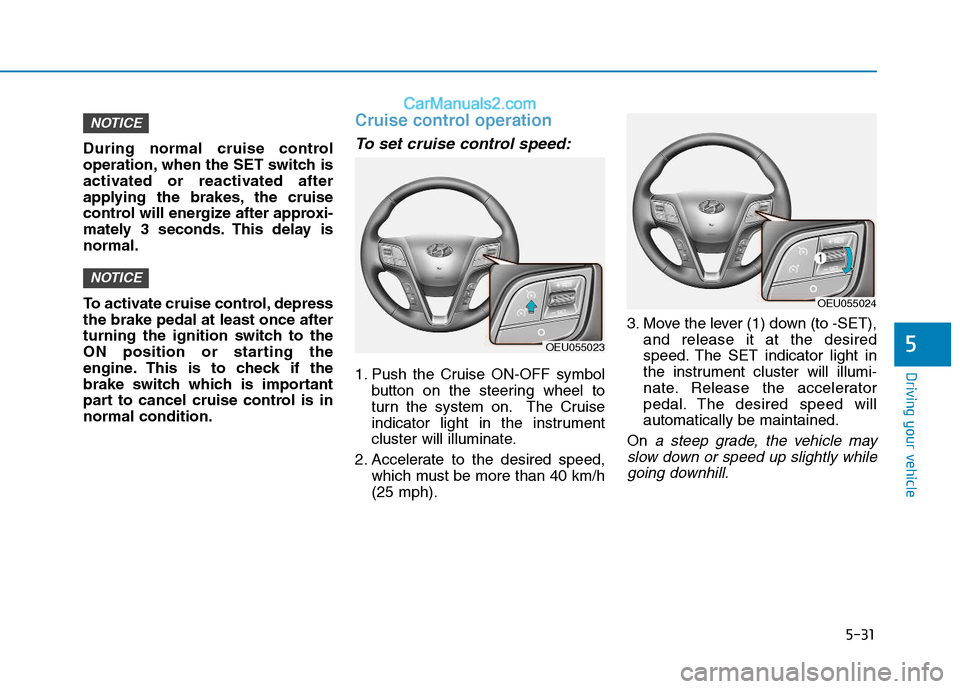
Cruise control operation
To set cruise control speed:
1. Push the Cruise ON-OFF symbolbutton on the steering wheel to
turn the system on. The Cruise
indicator light in the instrument
cluster will illuminate.
2. Accelerate to the desired speed, which must be more than 40 km/h(25 mph). 3. Move the lever (1) down (to -SET),
and release it at the desired
speed. The SET indicator light in
the instrument cluster will illumi-
nate. Release the accelerator
pedal. The desired speed willautomatically be maintained.
On
a steep grade, the vehicle may
slow down or speed up slightly while going downhill.
NOTICE
NOTICE
OEU055023
OEU055024
Page 311 of 473

5-40
Driving your vehicle
DRIVER'S ATTENTION
The LDWS may not warn you even
if the vehicle leaves the lane, or may
warn you even if the vehicle does not
leave the lane when:
The lane can't be visible due tosnow, rain, stain, a puddle or other
factors.
The brightness outside changes suddenly such as tunnel enter/exit.
The headlamps are not on at night or in a tunnel, or light level is low.
It is difficult to distinguish the color of the lane marking from the
road or the lane line is damaged or
indistinct.
Driving on a steep grade or a curve.
Light such as street light, sunlight or oncoming vehicle light reflects
from the water on the road.
The lens or windshield is covered with foreign matter.
The sensor cannot detect the lane because of fog, heavy rain, or
heavy snow. (Continued)(Continued)
The surrounding of the inside rear
view mirror temperature is high
due to direct sun light.
The lane is very wide or narrow.
The windshield is fogged by humid air in the vehicle.
A shadow is on the lane line.
There is a mark that looks like a lane line.
There is a boundary structure, such as a concrete barrier.
The distance from the vehicle ahead is very short or the vehicle
ahead drives covering the lane
line.
The vehicle vibrates heavily due to road conditions.
The number of lanes increases or decreases or the lane lines are
crossing.
Putting something on the dash- board.
Driving with the sun in front of you.
Driving in areas under construc- tion.
There are more than two lane lines.
Active ECO operation
Active ECO helps improve fuel effi-
ciency by controlling the engine. But
fuel-efficiency can be changed by
the driver's driving habits and road
conditions.
When the Active ECO button ispressed the ECO indicator (green)
will illuminate to show that the
Active ECO is operating.
AACCTT IIVV EE EE CCOO SS YY SSTT EEMM
(
( IIFF EE QQ UUIIPP PP EEDD ))
OEU044195
Page 312 of 473

5-41
Driving your vehicle
5
When the Active ECO is activated,it does not turn off even though the
engine is restarted again. To turn
off the system, press the active
ECO button again.
If Active ECO is turned off, it will return to the ECO mode.
When Active ECO is activated:
Vehicle speed may drop.
When driving up a hill, you mayfeel the engine torque change.
Limitation of Active ECO oper- ation :
If the following conditions occur while
Active ECO is operating, the system
operation is limited even thoughthere is no change in the ECO indi-
cator.
When the coolant temperature islow:The system will be limited until
engine performance becomes nor-mal.
When driving up a hill: The system will be limited to gain
power when driving uphill because
the engine torque is restricted. This is the switch of the PTO (Power
Take Off) which takes off the power
from the transmission.To activate the P.T.O. system
1.Stop the vehicle. Then, apply the
parking brake.
2.Depress the clutch pedal to dis- connect the power. Wait for 2 to 3
seconds. Press ON the P.T.O.
switch. Then, slowly take your footoff the clutch pedal.
3.Make sure that the P.T.O indicator illuminates on the cluster.
To deactivate the P.T.O. sys- tem
1.Depress the clutch pedal. PressOFF the P.T.O. switch. Then, slowly
take your foot off the clutch pedal.
2.Make sure that the P.T.O indicator goes OFF on the cluster.
PPTTOO SS WW IITT CCHH (( IIFF EE QQ UUIIPP PPEEDD ))
OEU044062
Page 314 of 473

5-43
Driving your vehicle
5
Keep your vehicle in good condi-tion. For better fuel economy and
reduced maintenance costs, main-
tain your vehicle in accordancewith the maintenance schedule in
Section 7. If you drive your vehicle
in severe conditions, more frequentmaintenance is required (see
Section 7 for details).
Keep your vehicle clean. For maxi- mum service, your vehicle should
be kept clean and free of corrosive
materials. It is especially important
that mud, dirt, ice, etc. not be
allowed to accumulate on the
underside of the vehicle. This extra
weight can result in increased fuel
consumption and also contribute tocorrosion.
Travel lightly. Don't carry unneces- sary weight in your vehicle. Weight
reduces fuel economy.
Don't let the engine idle longer than necessary. If you are waiting
(and not in traffic), turn off your
engine and restart only when
you're ready to go. Remember, your vehicle does not
require extended warm-up. After
the engine has started, allow the
engine to run for 10 to 20 seconds
prior to placing the vehicle in gear.
In very cold weather, however, give
your engine a slightly longer warm-
up period.
Don't "lug" or "over-rev" the engine. Lugging is driving too slowly in too
high a gear resulting engine buck-
ing. If this happens, shift to a lower
gear. Over-revving is racing the
engine beyond its safe limit. This
can be avoided by shifting at the
recommended speeds.
Use your air conditioning sparingly. The air conditioning system is
operated by engine power so your
fuel economy is reduced when youuse it.
Open windows at high speeds can reduce fuel economy.
Fuel economy is less in crosswinds and headwinds. To help offset
some of this loss, slow down when
driving in these conditions. Keeping a vehicle in good operating
condition is important both for econ-
omy and safety. Therefore, we rec-
ommend that you contact an author-
ized HYUNDAI dealer to performscheduled inspections and mainte-
nance.
Engine off during motion
Never turn the engine off to
coast down hills or anytime the
vehicle is in motion. The power
steering and power brakes will
not function properly without
the engine running. Instead,
keep the engine on and down-
shift to an appropriate gear for
engine braking effect. In addi-
tion, turning off the ignition
while driving could engage the
steering wheel lock resulting in
loss of vehicle steering which
could cause serious injury ordeath.
WARNING