2015 Hyundai Genesis seat
[x] Cancel search: seatPage 92 of 501

2-66
Safety system of your vehicle
Air bags may not inflate if the vehicle
collides with objects such as utility
poles or trees, where the point of
impact is concentrated and the colli-
sion energy is absorbed by the vehi-
cle structure.
SRS care
The SRS is virtually maintenance-
free and there are no parts you can
safely service by yourself. If the SRS
air bag warning light does not illumi-
nate when the Engine Start/Stop but-
ton is in the ON position, or continu-
ously remains on, have your vehicle
immediately inspected by an author-
ized HYUNDAI dealer.
Any work on the SRS system, such
as removing, installing, repairing, or
any work on the steering wheel, the
front passenger's panel, front seats
and roof rails must be performed by
an authorized HYUNDAI dealer.
Improper handling of the SRS system
may result in serious personal injury.To reduce the risk of serious
injury or death, take the follow-
ing precautions:
Do not attempt to modify or
disconnect the SRS compo-
nents or wiring, including the
addition of any kind of badges
to the pad covers or modifica-
tions to the body structure.
Do not place objects over or
near the air bag modules on
the steering wheel, instrument
panel, or the front passen-
ger's panel above the glove
box.
Clean the air bag pad covers
with a soft cloth moistened
with plain water. Solvents or
cleaners could adversely
affect the air bag covers and
proper deployment of the sys-
tem.
We recommend that inflated
air bags be replaced by an
authorized HYUNDAI dealer.
(Continued)
WARNING
ODH033078
Page 93 of 501

2-67
Safety system of your vehicle
2
Additional safety precautions
Passengers should not move out of
or change seats while the vehicle is
moving.A passenger who is not
wearing a seat belt during a crash or
emergency stop can be thrown
against the inside of the vehicle,
against other occupants, or be ejected
from the vehicle.
Do not use any accessories on seat
belts.Devices claiming to improve
occupant comfort or reposition the
seat belt can reduce the protection
provided by the seat belt and increase
the chance of serious injury in a crash
Do not modify the front seats.
Modification of the front seats could
interfere with the operation of the sup-
plemental restraint system sensing
components or side air bags.
Do not place items under the front
seats.Placing items under the front
seats could interfere with the opera-
tion of the supplemental restraint sys-
tem sensing components and wiring
harnesses.
Do not cause impact to the doors.
Impact to the doors when the Engine
Start/Stop button is in the ON position
may cause the air bags to inflate.Modifications to accommodate
disabilities.If you require modifica-
tion to your vehicle to accommodate
a disability, contact the HYUNDAI
Customer Connect Center at 1-877-
378-8727.
Adding equipment to or modify-
ing your air bag equipped vehicle
If you modify your vehicle by changing
your vehicle's frame, bumper system,
front end or side sheet metal or ride
height, this may affect the operation of
your vehicle's air bag system. (Continued)
If components of the air bag
system must be discarded, or if
the vehicle must be scrapped,
certain safety precautions
must be observed. Consult an
authorized HYUNDAI dealer for
the necessary information.
Failure to follow these precau-
tions could increase the risk of
personal injury.
Page 108 of 501

3-14
Auto door lock/unlock features
Impact sensing door unlock
system
All doors will be automatically
unlocked when an impact causes the
air bags to deploy.
Speed sensing door lock system
All doors will be automatically locked
when vehicle speed exceeds 9 mph
(15 km/h).
All of the doors will be automatically
unlocked after the engine is turned
off.
Shift lever auto door lock
All doors will be automatically locked
when shifting the shift lever out of P
(Park) with the engine running.
You can activate or deactivate the
Auto Door Lock/Unlock features from
the User Settings Mode on the LCD
display.
For more details, refer to "LCD
Display" in this chapter.
Child-protector rear door locks
The child safety lock is provided to
help prevent children seated in the
rear from accidentally opening the
rear doors. The rear door safety locks
should be used whenever children
are in the vehicle.
The child safety lock is located on
the edge of each rear door. When the
child safety lock is in the lock (1)
position, the rear door will not open if
the inner door handle (2) is pulled.
Convenient features of your vehicle
ODH043013
Always secure your vehicle.
Leaving your vehicle unlocked
increases the potential risk to
you or others from someone
hiding in your vehicle.
To secure your vehicle, while
depressing the brake, move the
shift lever to the P (Park) posi-
tion, engage the parking brake,
and press the Engine Start/Stop
button to the OFF position, close
all windows, lock all doors, and
always take the Smart Key with
you.
WARNING
Opening a door when something
is approaching may cause dam-
age or injury. Be careful when
opening doors and watch for
vehicles, motorcycles, bicycles
or pedestrians approaching the
vehicle in the path of the door.
WARNING
Page 110 of 501

3-16
Convenient features of your vehicle
The Driver Position Memory System
is provided to store and recall the fol-
lowing memory settings with a sim-
ple button operation.
- Driver's seat position
- Outside rearview mirror position
- Steering wheel position
- Instrument panel illumination intensity
- Head Up Display (HUD) position
and brightness
✽ ✽
NOTICE
• If the battery is disconnected, the
position memory will be lost and
the driving positions must be
stored in the system again.
• If the Driver Position Memory
System does not operate normally,
have the system checked by an
authorized HYUNDAI dealer.
Storing positions into memory
1. Check that the shift lever is in P
(Park) while the Engine Start/Stop
button is in the ON position.
2. Adjust the driver's seat position, out-
side rearview mirror position, steer-
ing wheel position, instrument panel
illumination intensity and head-up
display height/brightness to posi-
tions comfortable for the driver.
3. Press the SET button. The system
will beep once and notify you
"Press button to save settings"on
the LCD display.
4. Press one of the memory buttons
(1 or 2) within 5 seconds. The sys-
tem will beep twice when the mem-
ory has been successfully stored.
5.
"Driver 1 (or 2) settings saved" will
appear on the LCD display.
D DR
RI
IV
VE
ER
R
P
PO
OS
SI
IT
TI
IO
ON
N
M
ME
EM
MO
OR
RY
Y
S
SY
YS
ST
TE
EM
M
(
(I
IF
F
E
EQ
QU
UI
IP
PP
PE
ED
D)
)
ODH043041
Never attempt to operate the driv-
er position memory system while
the vehicle is moving.
This could result in loss of con-
trol, and an accident causing
death, serious injury, or property
damage.
WARNING
ODH043156L/ODH043157L
Page 111 of 501

3-17
Convenient features of your vehicle
3
Recalling positions from memory
1. Check that the shift lever is in P
(Park) while the Engine Start/Stop
button is in the ON position.
2. Press the desired memory button
(1 or 2). The system will beep
once, and then the driver's seat
position, outside rearview mirror
position, steering wheel position,
instrument panel illumination
intensity and head-up display
height/brightness will automatical-
ly adjust to the stored positions.
3.
"Driver 1(or 2) settings is applied" will
appear on the LCD display.
✽ ✽
NOTICE
• While recalling the "1" memory
position, pressing the SET or 1
button temporarily stops the
adjustment of the recalled memo-
ry position. Pressing the 2 button
recalls the "2" memory position.
• While recalling the "2" memory
position, pressing the SET or 2
button temporarily stops the
adjustment of the recalled memo-
ry position. Pressing the 1 button
recalls the "1" memory position.
• While recalling the stored posi-
tions, pressing one of the control
buttons for the driver's seat, out-
side rearview mirror, steering
wheel, instrument panel illumina-
tion or head-up display will cause
the movement of that component
to stop and move in the direction
that the control button is pressed.
Easy access function
When exiting the vehicle, the steering
wheel will move away from the driver
and the seat will move rearward
when the engine is turned off.
When entering the vehicle, the steer-
ing wheel will move toward the driver
and the seat will move forward when
the Engine Start/Stop button is
pressed to the ACC position.
You can activate or deactivate the
Easy Access Function from the User
Settings Mode on the LCD display.
For more details, refer to "LCD
Display" in this chapter.
ODH043158L/ODH043159L
Page 115 of 501

3-21
Convenient features of your vehicle
3
M MI
IR
RR
RO
OR
RS
S
Inside rearview mirror
Before you start driving, adjust the
rearview mirror to the center on the
view through the rear window.
Electric chromic mirror (ECM)
with HomeLink®system,
compass and Blue Link®
(for U.S.A)
Your vehicle may be equipped with a
Gentex Automatic-Dimming Mirror
with a Z-Nav™ Electronic Compass
Display and an Integrated HomeLink
®
Wireless Control System. During
nighttime driving, this feature will
automatically detect and reduce
rearview mirror glare while the com-
pass indicates the direction the vehi-
cle is pointed. The HomeLink
®
Universal Transceiver allows you to
activate your garage door(s), electric
gate, home lighting, etc. Make sure your line of sight is
not obstructed. Do not place
objects in the rear seat, cargo
area, or behind the rear head-
rests which could interfere with
your vision through the rear
window.
WARNING
NEVER adjust the mirror while
driving. This may cause loss of
vehicle control resulting in an
accident.
WARNING
To prevent serious injury during
an accident or deployment of
the air bag, do not modify the
rearview mirror and do not
install a wide mirror.
WARNING
When cleaning the mirror, use a
paper towel or similar material
dampened with glass cleaner.
Do not spray glass cleaner
directly on the mirror as that
may cause the liquid cleaner to
enter the mirror housing.
CAUTION
Page 139 of 501
3-45
Convenient features of your vehicle
3
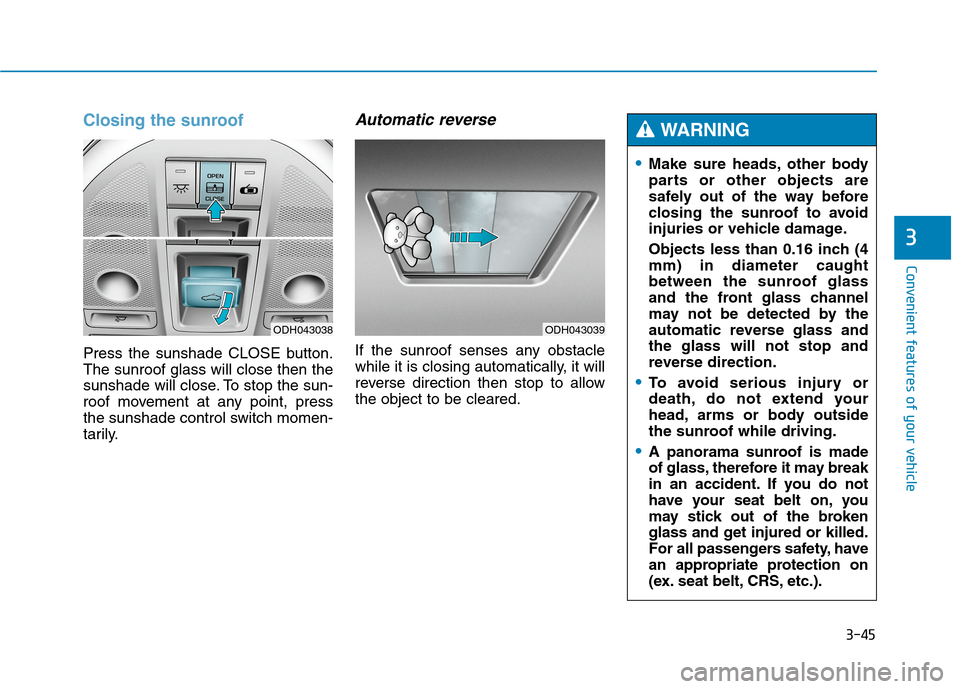
Closing the sunroof
Press the sunshade CLOSE button.
The sunroof glass will close then the
sunshade will close. To stop the sun-
roof movement at any point, press
the sunshade control switch momen-
tarily.
Automatic reverse
If the sunroof senses any obstacle
while it is closing automatically, it will
reverse direction then stop to allow
the object to be cleared.
ODH043038ODH043039
Make sure heads, other body
parts or other objects are
safely out of the way before
closing the sunroof to avoid
injuries or vehicle damage.
Objects less than 0.16 inch (4
mm) in diameter caught
between the sunroof glass
and the front glass channel
may not be detected by the
automatic reverse glass and
the glass will not stop and
reverse direction.
To avoid serious injury or
death, do not extend your
head, arms or body outside
the sunroof while driving.
A panorama sunroof is made
of glass, therefore it may break
in an accident. If you do not
have your seat belt on, you
may stick out of the broken
glass and get injured or killed.
For all passengers safety, have
an appropriate protection on
(ex. seat belt, CRS, etc.).
WARNING
Page 161 of 501

3-67
Convenient features of your vehicle
3
LCD Modes
L LC
CD
D
D
DI
IS
SP
PL
LA
AY
Y
Modes SymbolExplanation
Trip Computer This mode displays driving information like the tripmeter, fuel economy, and so on.
For more details, refer to "Trip Computer" in this chapter.
Turn By Turn (TBT)
(if equipped)This mode displays the state of the navigation.
ASCC/LKAS
(if equipped)
This mode displays the state of the Advanced Smart Cruise Control (ASCC)
and Lane Keeping Assist System (LKAS).
For more details, refer to "Advanced Smart Cruise Control (ASCC)" and
Lane Keeping Assist System (LKAS) in chapter 5.
A/VThis mode displays the state of the A/V system.
Information
This mode informs of the tire pressure information, service interval (mileage or days)
and warning messages related to the advanced smart cruise control system,
pre-safe seat belt, and so on.
User SettingsOn this mode, you can change settings of the doors, lamps, and so on.
For more information on controlling the LCD modes, refer to "LCD Display Control" in the previous pages of
this chapter.
or