Page 146 of 501
3-52
Convenient features of your vehicle
If the automatic stop and reverse fea-
ture operates more than twice during
one opening or closing operation, the
Power Trunk may stop at that posi-
tion. If this occurs, close the trunk
manually and operate the trunk auto-
matically again.
To reset the power trunk
If the battery has been discharged or
disconnected, or if the related fuse
has been replaced or disconnected,
reset the Power Trunk as follows:
1. Move the shift lever to the P (Park)
position.
2. Close the trunk manually.
If the Power Trunk doesn't work prop-
erly after performing the above pro-
cedure, have the system checked by
an authorized HYUNDAI dealer.
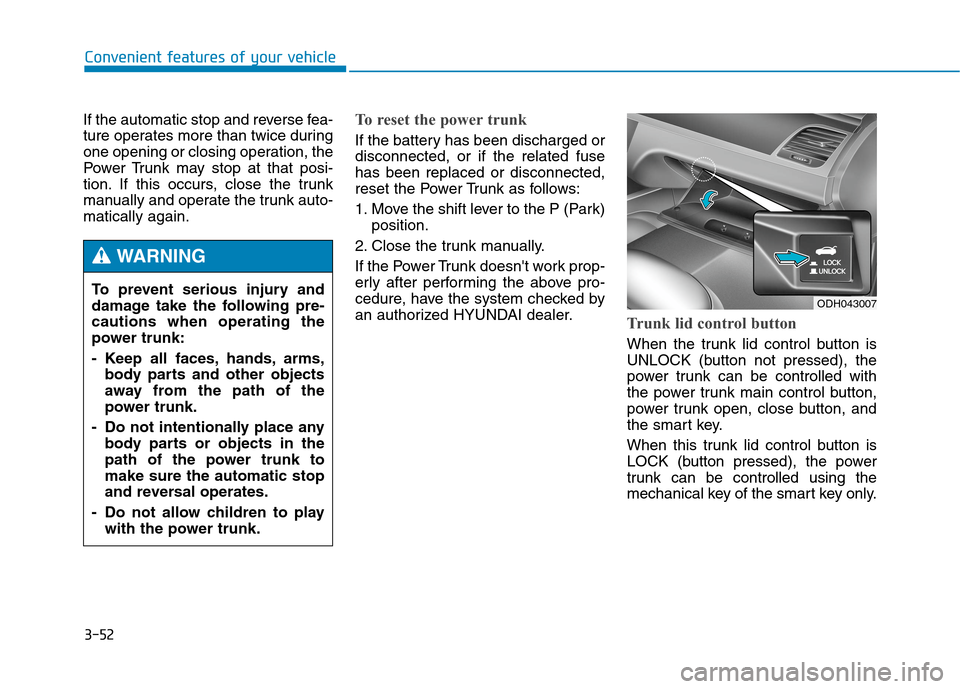
Trunk lid control button
When the trunk lid control button is
UNLOCK (button not pressed), the
power trunk can be controlled with
the power trunk main control button,
power trunk open, close button, and
the smart key.
When this trunk lid control button is
LOCK (button pressed), the power
trunk can be controlled using the
mechanical key of the smart key only. To prevent serious injury and
damage take the following pre-
cautions when operating the
power trunk:
- Keep all faces, hands, arms,
body parts and other objects
away from the path of the
power trunk.
- Do not intentionally place any
body parts or objects in the
path of the power trunk to
make sure the automatic stop
and reversal operates.
- Do not allow children to play
with the power trunk.
WARNING
ODH043007
Page 147 of 501

3-53
Convenient features of your vehicle
3
Even though the trunk lid control but-
ton is LOCK (button pressed), the
trunk will still be propelled upward by
mechanical force if the trunk is man-
ually opened more than 10 degrees
beyond the fully closed position. In
addition, if the trunk is manually
closed to the secondary latch posi-
tion, the trunk will be electrically
moved to the fully latched position.Emergency trunk safety release
Your vehicle is equipped with an
Emergency Trunk Safety Release
lever located inside the trunk. When
someone is inadvertently locked in
the trunk, the trunk can be opened by
moving the lever in the direction of the
arrow and pushing the trunk open.
Always keep the Trunk Lid
Control Button in the LOCK
(button pressed) position when
not in use. Serious injury or
death can result from uninten-
tional operation by a child.
Make sure heads, other body
parts or other obstacles are
safely out of the way before
operating the power trunk.
WARNING
Close the trunk, and keep the
trunk lid control button in the
LOCK (button pressed) position
before washing the vehicle in an
automatic car wash.
CAUTION
ODH043020
Page 151 of 501
3-57
Convenient features of your vehicle
3
✽ ✽
NOTICE
• If you press the door unlock but-
ton (2), the Smart Trunk function
will be deactivated temporarily.
But, if you do not open any door
for 30 seconds, the smart trunk
function will be activated again.
• If you press the trunk open button
(3) for more than 1 second, the
trunk opens.
• If you press the door lock button
(1) or trunk open button (3) when
the Smart Trunk function is not in
the Detect and Alert stage, the
smart trunk function will not be
deactivated.
• In case you have deactivated the
Smart Trunk function by pressing
the smart key button and opened a
door, the smart trunk function can
be activated again by closing and
locking all doors.
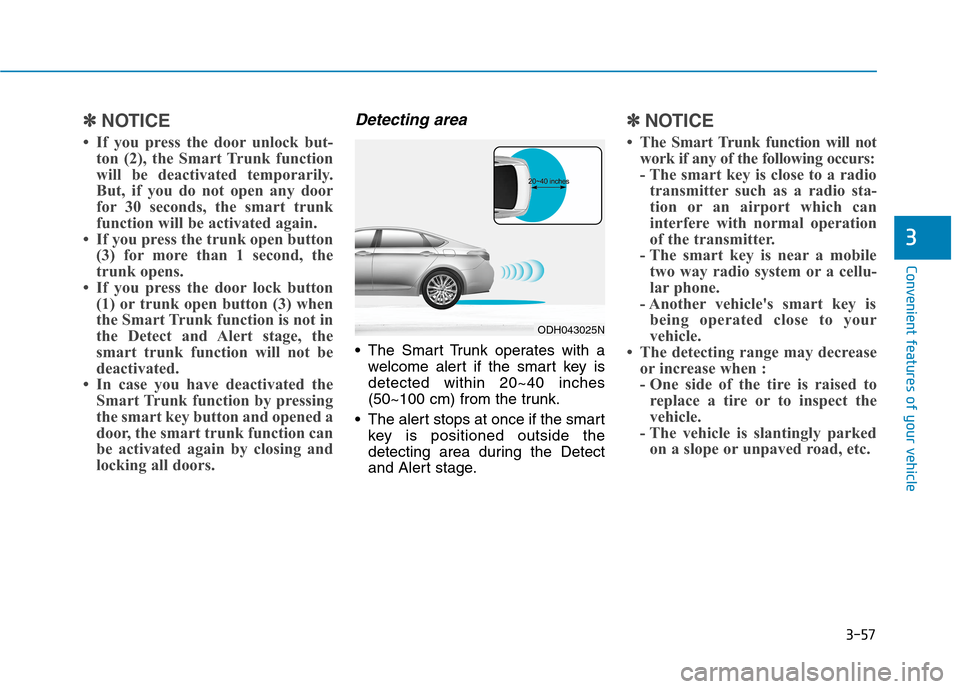
Detecting area
The Smart Trunk operates with a
welcome alert if the smart key is
detected within 20~40 inches
(50~100 cm) from the trunk.
The alert stops at once if the smart
key is positioned outside the
detecting area during the Detect
and Alert stage.
✽ ✽
NOTICE
• The Smart Trunk function will not
work if any of the following occurs:
- The smart key is close to a radio
transmitter such as a radio sta-
tion or an airport which can
interfere with normal operation
of the transmitter.
- The smart key is near a mobile
two way radio system or a cellu-
lar phone.
- Another vehicle's smart key is
being operated close to your
vehicle.
• The detecting range may decrease
or increase when :
- One side of the tire is raised to
replace a tire or to inspect the
vehicle.
- The vehicle is slantingly parked
on a slope or unpaved road, etc.
ODH043025N
Page 168 of 501
3-74
Convenient features of your vehicle
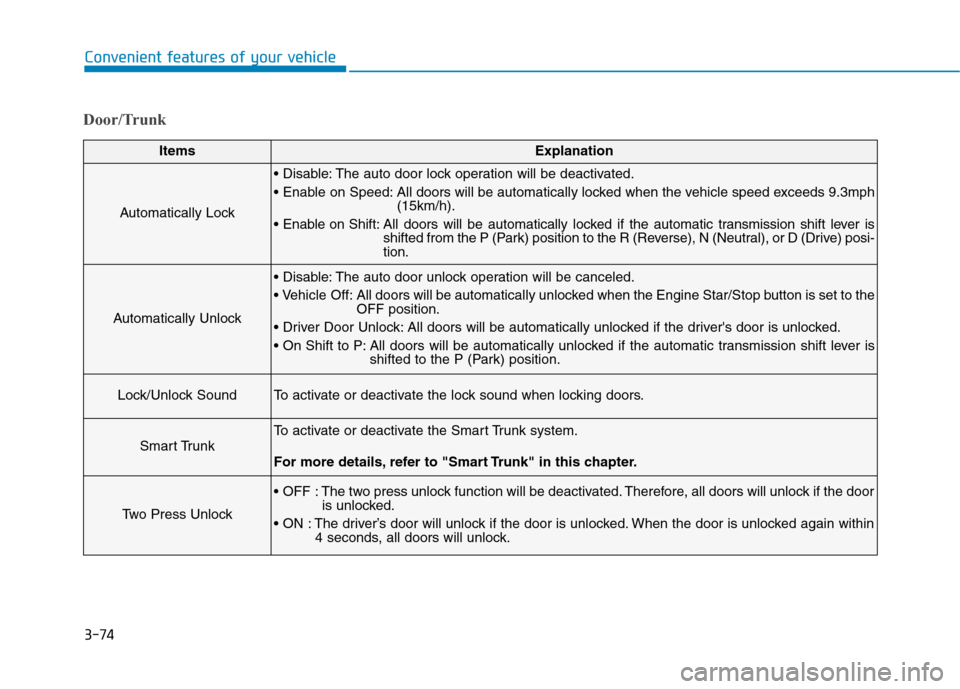
Door/Trunk
ItemsExplanation
Automatically Lock
The auto door lock operation will be deactivated.
All doors will be automatically locked when the vehicle speed exceeds 9.3mph
(15km/h).
All doors will be automatically locked if the automatic transmission shift lever is
shifted from the P (Park) position to the R (Reverse), N (Neutral), or D (Drive) posi-
tion.
Automatically Unlock
The auto door unlock operation will be canceled.
Off: All doors will be automatically unlocked when the Engine Star/Stop button is set to the
OFF position.
All doors will be automatically unlocked if the driver's door is unlocked.
All doors will be automatically unlocked if the automatic transmission shift lever is
shifted to the P (Park) position.
Lock/Unlock SoundTo activate or deactivate the lock sound when locking doors.
Smart Trunk
To activate or deactivate the Smart Trunk system.
For more details, refer to "Smart Trunk" in this chapter.
Two Press Unlock
The two press unlock function will be deactivated. Therefore, all doors will unlock if the door
is unlocked.
The driver’s door will unlock if the door is unlocked. When the door is unlocked again within
4 seconds, all doors will unlock.
Page 190 of 501

3-96
Convenient features of your vehicle
Anti-lock Brake System
(ABS) Warning Light
This warning light illuminates:
Once you set the Engine Start/Stop
button to the ON position.
- It illuminates for approximately 3
seconds and then goes off.
When there is a malfunction with
the ABS (The normal braking sys-
tem will still be operational without
the assistance of the anti-lock
brake system).
In this case, have your vehicle
inspected by an authorized
HYUNDAI dealer.
Electronic Brake force
Distribution (EBD)
System Warning Light
These two warning lights illuminate
at the same time while driving:
When the ABS and regular brake
system may not work normally.
In this case, have your vehicle
inspected by an authorized
HYUNDAI dealer. Parking Brake & Brake Fluid
Warning Light
Driving the vehicle with a warn-
ing light ON is dangerous. If the
Parking Brake & Brake Fluid
Warning Light illuminates with
the parking brake released, it
indicates that the brake fluid
level is low.
In this case, have your vehicle
inspected by an authorized
HYUNDAI dealer.
WARNING
Page 201 of 501
3-107
Convenient features of your vehicle
3
Head Up Display ON/OFF
To activate the head up display,
select “Head-up Display” on the
“User Settings Mode” in the cluster.
If you do not select “Head-up
Display”, the head up display will be
deactivated.
Head Up Display Information
1. Turn By Turn (TBT) navigation
information
2. Road signs
3. Speedometer
4. Cruise setting speed
5. Advanced Smart Cruise Control
(ASCC) information (if equipped)
6. Lane Keeping Assist System
(LKAS) information (if equipped) When replacing the front wind-
shield glass of the vehicles
equipped with the head up dis-
play, replace it with a wind-
shield glass designed for the
head up display operation.
Otherwise, duplicated images
may be displayed on the wind-
shield glass.
CAUTION
ODH043283LODH043312N
Page 203 of 501

3-109
Convenient features of your vehicle
3
Exterior lights
Lighting control
To operate the lights, turn the knob at
the end of the control lever to one of
the following positions:
(1) DRL OFF position
(2) AUTO light position
(3) Parking lamp position
(4) Headlamp position
AUTO light position
The parking lamp and headlamp will
be turned ON or OFF automatically
depending on the amount of light
outside the vehicle.
Even with the AUTO light feature in
operation, it is recommended to
manually turn ON the lamps when
driving at night or in a fog, or when
you enter dark areas, such as tun-
nels and parking facilities.
L LI
IG
GH
HT
T
ODH044073N
Do not cover or spill anything
on the sensor (1) located on
the instrument panel.
Do not clean the sensor using
a window cleaner, the cleanser
may leave a light film which
could interfere with sensor
operation.
If your vehicle has window tint
or other types of metallic
coating on the front wind-
shield, the AUTO light system
may not work properly.
CAUTION
ODH044171N
Page 204 of 501
3-110
Convenient features of your vehicle
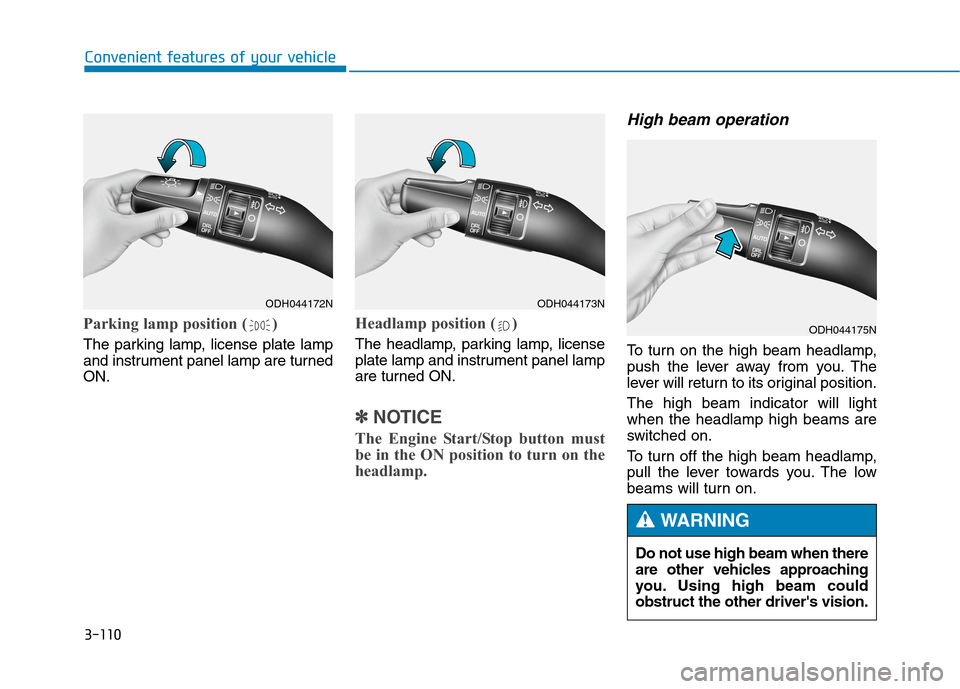
Parking lamp position ( )
The parking lamp, license plate lamp
and instrument panel lamp are turned
ON.
Headlamp position ( )
The headlamp, parking lamp, license
plate lamp and instrument panel lamp
are turned ON.
✽ ✽
NOTICE
The Engine Start/Stop button must
be in the ON position to turn on the
headlamp.
High beam operation
To turn on the high beam headlamp,
push the lever away from you. The
lever will return to its original position.
The high beam indicator will light
when the headlamp high beams are
switched on.
To turn off the high beam headlamp,
pull the lever towards you. The low
beams will turn on.
ODH044172NODH044173N
ODH044175N
Do not use high beam when there
are other vehicles approaching
you. Using high beam could
obstruct the other driver's vision.
WARNING