Page 160 of 473
483
Features of your vehicle
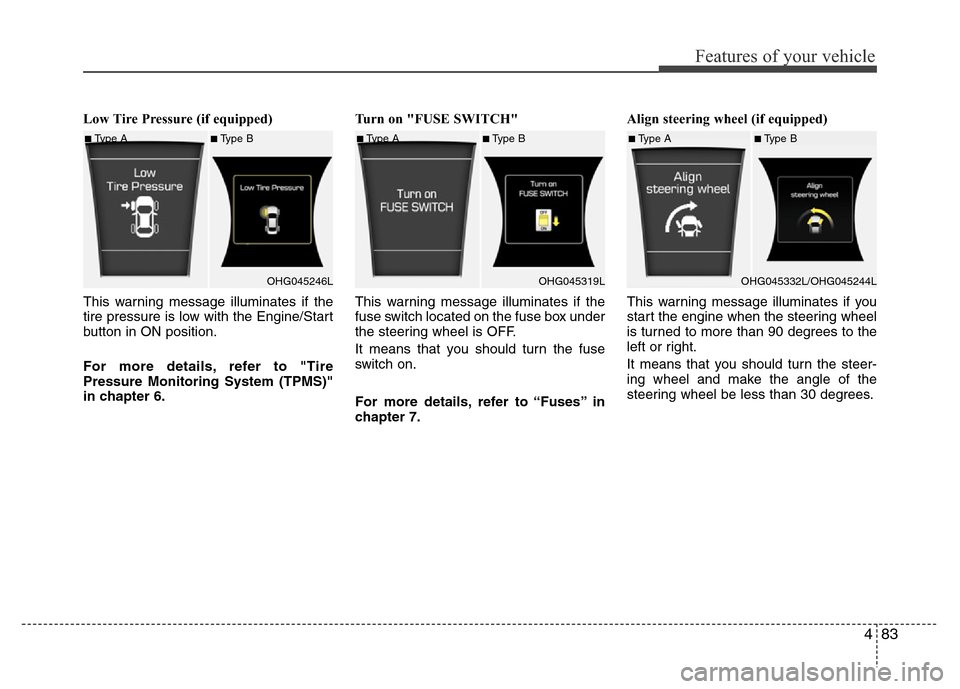
Low Tire Pressure (if equipped)
This warning message illuminates if the
tire pressure is low with the Engine/Start
button in ON position.
For more details, refer to "Tire
Pressure Monitoring System (TPMS)"
in chapter 6.Turn on "FUSE SWITCH"
This warning message illuminates if the
fuse switch located on the fuse box under
the steering wheel is OFF.
It means that you should turn the fuse
switch on.
For more details, refer to “Fuses” in
chapter 7.Align steering wheel (if equipped)
This warning message illuminates if you
start the engine when the steering wheel
is turned to more than 90 degrees to the
left or right.
It means that you should turn the steer-
ing wheel and make the angle of the
steering wheel be less than 30 degrees.
■Type A■Type B
OHG045246L■Type A■Type B
OHG045319L■Type A■Type B
OHG045332L/OHG045244L
Page 161 of 473
Features of your vehicle
84 4
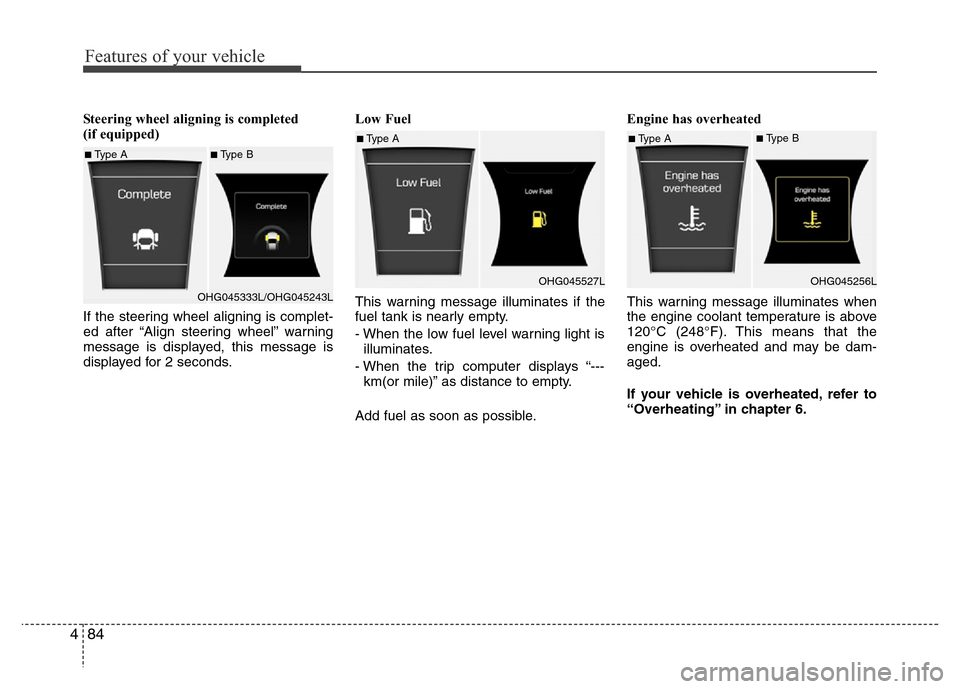
Steering wheel aligning is completed
(if equipped)
If the steering wheel aligning is complet-
ed after “Align steering wheel” warning
message is displayed, this message is
displayed for 2 seconds.Low Fuel
This warning message illuminates if the
fuel tank is nearly empty.
- When the low fuel level warning light is
illuminates.
- When the trip computer displays “---
km(or mile)” as distance to empty.
Add fuel as soon as possible.Engine has overheated
This warning message illuminates when
the engine coolant temperature is above
120°C (248°F). This means that the
engine is overheated and may be dam-
aged.
If your vehicle is overheated, refer to
“Overheating” in chapter 6.
■Type A■Type B
OHG045333L/OHG045243L
■Type A
OHG045527L■Type A■Type B
OHG045256L
Page 171 of 473
Features of your vehicle
94 4
Battery saver function
• The purpose of this feature is to pre-
vent the battery from being dis-
charged. The system automatically
turns off the parking lights when the
driver removes the ignition key (smart
key: turns off the engine) and opens
the driver-side door.
• With this feature, the parking lights will
be turned off automatically if the driver
parks on the side of road at night.
If necessary, to keep the lights on
when the ignition key is removed,
(smart key: turns off the engine) per-
form the following:
1) Open the driver-side door.
2) Turn the parking lights OFF and ON
again using the light switch on the
steering column.
Headlight escort function
(if equipped)
If you turn the ignition switch to the ACC
or OFF position with the headlights ON,
the headlights (and/or tail lights) remain
on for about 5 minutes. However, if the
driver’s door is opened and closed, the
headlights are turned off after 15 sec-
onds.
The headlights can be turned off by
pressing the lock button on the transmit-
ter (or smart key) twice or turning the
light switch to the OFF or parking light
position.
Headlight welcome function
When the headlight is ON or AUTO posi-
tion and all doors (and trunk) are closed
and locked, if you press the door unlock
button on the transmitter (or the smart
key), the headlights will come on for
about 15 seconds. At this time, if you
press the door lock or unlock button, the
headlights will turn off immediately.
Daytime running light
(if equipped)
Daytime Running Lights (DRL) can make
it easier for others to see the front of your
vehicle during the day. DRL can be help-
ful in many different driving conditions,
and it is especially helpful after dawn and
before sunset.
The DRL system turns OFF when:
1. The headlights are ON.
2. The turn signal is ON. (the blinking
side of the DRL will turn off)
3. The hazard warning light is ON.
4. The parking brake is applied.
5. Engine stops.
LIGHTING
CAUTION
If the driver gets out of the vehicle
through other doors, the battery
saver function does not operate.
Therefore, it causes the battery to
be discharged. In this case, make
sure to turn off the lamp before get-
ting out of the vehicle.
Page 216 of 473
4139
Features of your vehicle
Digital clock
Whenever the battery terminals or relat-
ed fuses are disconnected, you must
reset the time.
Detailed information on setting the clock
is described in Audio system section 4.
Clock with AVN system (if equipped)
You can set the clock by using the Audio
or Navigation.
OHG045222L
WARNING
Do not adjust the clock while driv-
ing. You may lose your steering
control and cause an accident that
results in severe personal injury or
death.
WARNING
Do not put a finger or a foreign ele-
ment (pin, etc.) into a power outlet
and do not touch with a wet hand.
You may get electrocuted or fire
may occur.
Page 221 of 473
Features of your vehicle
144 4
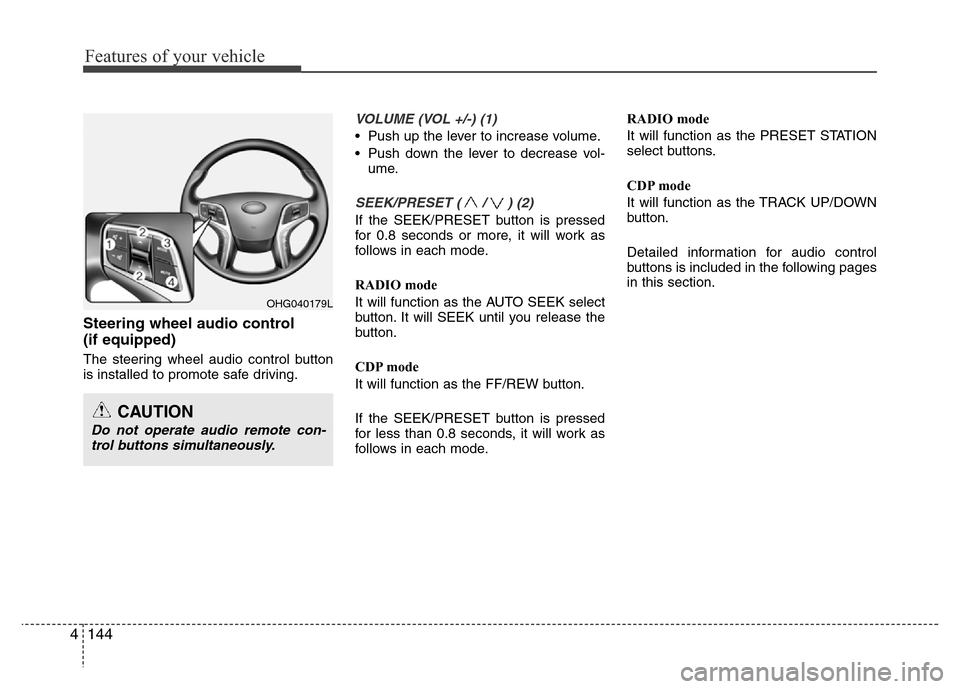
Steering wheel audio control
(if equipped)
The steering wheel audio control button
is installed to promote safe driving.
VOLUME (VOL +/-) (1)
• Push up the lever to increase volume.
• Push down the lever to decrease vol-
ume.
SEEK/PRESET ( / ) (2)
If the SEEK/PRESET button is pressed
for 0.8 seconds or more, it will work as
follows in each mode.
RADIO mode
It will function as the AUTO SEEK select
button. It will SEEK until you release the
button.
CDP mode
It will function as the FF/REW button.
If the SEEK/PRESET button is pressed
for less than 0.8 seconds, it will work as
follows in each mode.RADIO mode
It will function as the PRESET STATION
select buttons.
CDP mode
It will function as the TRACK UP/DOWN
button.
Detailed information for audio control
buttons is included in the following pages
in this section.
OHG040179L
CAUTION
Do not operate audio remote con-
trol buttons simultaneously.
Page 239 of 473
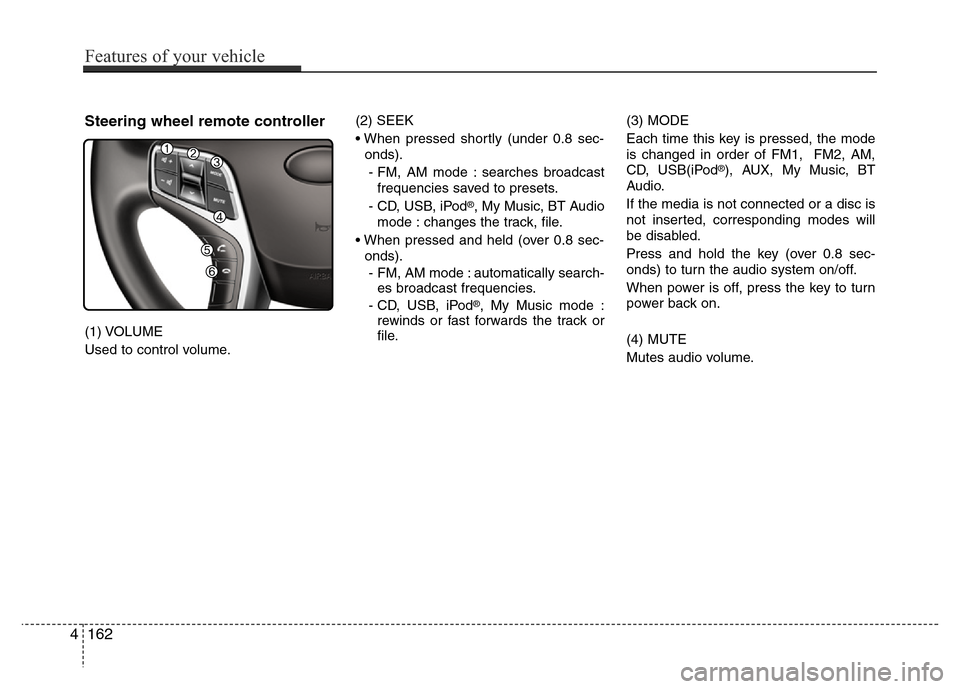
Steering wheel remote controller
(1) VOLUME
Used to control volume.(2) SEEK
• When pressed shortly (under 0.8 sec-
onds).
- FM, AM mode : searches broadcast
frequencies saved to presets.
- CD, USB, iPod
®, My Music, BT Audio
mode : changes the track, file.
• When pressed and held (over 0.8 sec-
onds).
- FM, AM mode : automatically search-
es broadcast frequencies.
- CD, USB, iPod
®, My Music mode :
rewinds or fast forwards the track or
file.(3) MODE
Each time this key is pressed, the mode
is changed in order of FM1, FM2, AM,
CD, USB(iPod
®), AUX, My Music, BT
Audio.
If the media is not connected or a disc is
not inserted, corresponding modes will
be disabled.
Press and hold the key (over 0.8 sec-
onds) to turn the audio system on/off.
When power is off, press the key to turn
power back on.
(4) MUTE
Mutes audio volume.
4162
Features of your vehicle
Page 265 of 473
4188
Features of your vehicle
Pairing a Bluetooth®Wireless
Technology Device
What is Bluetooth® Wireless
Technology Pairing?
Pairing refers to the process of synchro-
nizing your
Bluetooth®Wireless
Technology phone or device with the car
audio system for connection. Pairing is
necessary to connect and use the
Bluetooth®Wireless Technology feature.
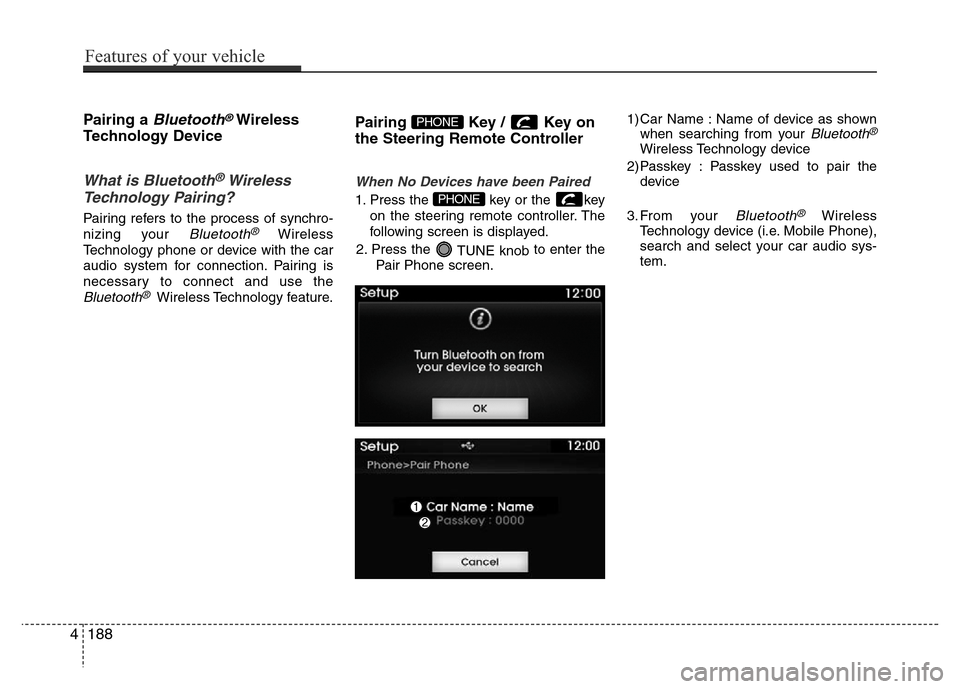
Pairing Key / Key on
the Steering Remote Controller
When No Devices have been Paired
1. Press the key or the key
on the steering remote controller. The
following screen is displayed.
2. Press the
TUNE knobto enter the
Pair Phone screen.1) Car Name : Name of device as shown
when searching from your
Bluetooth®
Wireless Technology device
2) Passkey : Passkey used to pair the
device
3. From your
Bluetooth®Wireless
Technology device (i.e. Mobile Phone),
search and select your car audio sys-
tem.
PHONE
PHONE
Page 266 of 473
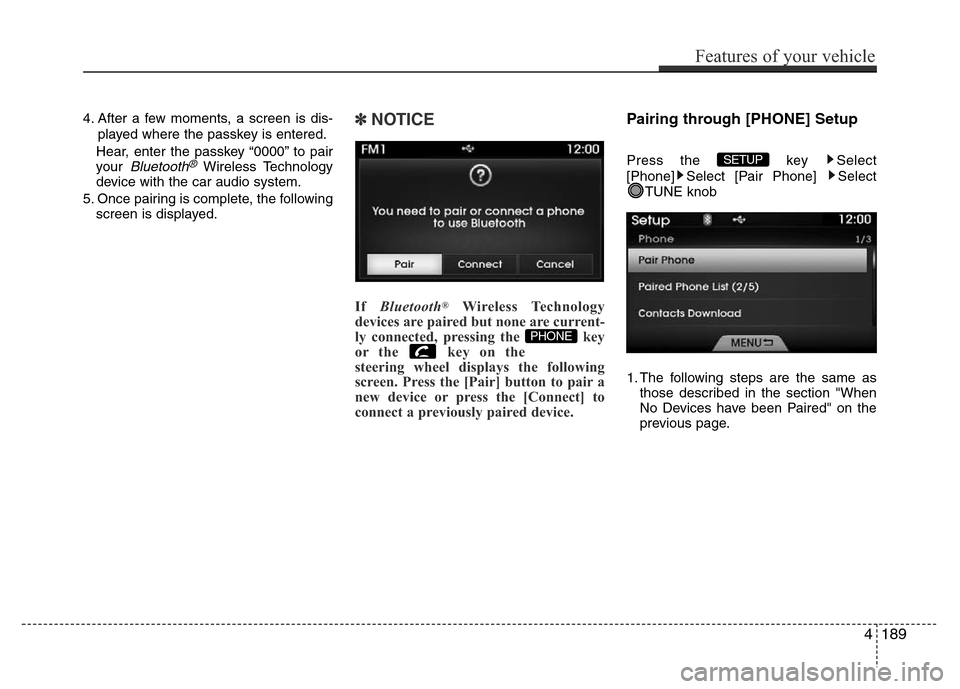
4. After a few moments, a screen is dis-
played where the passkey is entered.
Hear, enter the passkey “0000” to pair
your
Bluetooth®Wireless Technology
device with the car audio system.
5. Once pairing is complete, the following
screen is displayed.
✽NOTICE
If Bluetooth®Wireless Technology
devices are paired but none are current-
ly connected, pressing the key
or the key on the
steering wheel displays the following
screen. Press the [Pair] button to pair a
new device or press the [Connect] to
connect a previously paired device.
Pairing through [PHONE] Setup
Press the key Select
[Phone] Select [Pair Phone] Select
TUNE knob
1. The following steps are the same as
those described in the section "When
No Devices have been Paired" on the
previous page.SETUP
PHONE
Features of your vehicle
189 4