2015 HONDA FIT electrical
[x] Cancel search: electricalPage 24 of 453

Quick Reference Guide
23
Handling the Unexpected (P403)
Flat Tire (P405)
● Park in a safe location and replace the
flat tire with the comp act spare tire in the
cargo area.
Indicators Come On
(P419)
● Identify the indica tor and consult the
owner’s manual.
Engine Won’t Start (P411)
● If the battery is dead, jump start using a
booster battery.
Blown Fuse (P423)
● Check for a blown fuse if an electrical
device does not operate.
Overheating (P417)
● Park in a safe location. If you do not see
steam under the hood, open the hood,
and let the engine cool down.
Emergency Towing (P428)
● Call a professional towing service if you
need to tow your vehicle.
15 US FIT-31T5A6000.book 23 ページ 2014年3月6日 木曜日 午後7時5分
Page 79 of 453

78
uuIndicators u
Instrument Panel
*1:Models with the smart entry system have an ENGINE START/STOP button instead of an ignition switch.
IndicatorNameOn/BlinkingExplanation
Immobilizer System
Indicator
●Comes on briefly when you turn the
ignition switch to ON
(w*1, then goes
off.
●Comes on if the immobilizer system
cannot recognize the key information.
●Blinks -
You cannot start the engine. Turn the ignition
switch to LOCK
(0, pull the key out, and then insert
the key and turn it to ON
(w again.
You cannot start the engine. Set the power mode to
VEHICLE OFF (LOCK), then select the ON mode
again.
●Repeatedly blinks - The system may be
malfunctioning. Have the vehicle checked by a
dealer.
●Do not attempt to alter this system or add other
devices to it. Electrical problems can occur.
ECON Mode
Indicator*
●Comes on for a few seconds when you
turn the ignition switch to ON
(w*1, then
goes off.
●Comes on when you press the ECON
button.
2 ECON Button* P. 328
Models without smart entry system
Models with smart entry system
* Not available on all models
15 US FIT-31T5A6000.book 78 ページ 2014年3月6日 木曜日 午後7時5分
Page 93 of 453

92
uuLocking and Unlocking the Doors uLow Smart Entry Remote Signal Strength*
Controls
Low Smart Entry Remo te Signal Strength*
The vehicle transmits radio waves to loca te the smart entry remote when locking/
unlocking the doors and tailgate, or to start the engine.
In the following cases, locking/unlocking the doors and tailgate, or starting the
engine may be inhibited or operation may be unstable:
• Strong radio waves are being tra nsmitted by nearby equipment.
• You are carrying the smart entry remote together with telecommunications
equipment, laptop computers, ce ll phones, or wireless devices.
• A metallic object is touching or covering the smart entry remote.1Low Smart Entry Remote Signal Strength*
Communication between the smart entry remote and
the vehicle consumes the smart entry remote’s
battery.
Battery life is about two years, but this varies
depending on regularity of use.
The battery is consumed whenever the smart entry
remote is receivi ng strong radio wave s. Avoid placing
it near electrical appliances such as televisions and
personal computers.
* Not available on all models
15 US FIT-31T5A6000.book 92 ページ 2014年3月6日 木曜日 午後7時5分
Page 118 of 453
117
uuOperating the Switches Around the Steering Wheel uENGINE START/STOP Button
Continued
Controls
ENGINE START/STOP Button
*1 : Except U.S. models with automatic transmission (CVT)
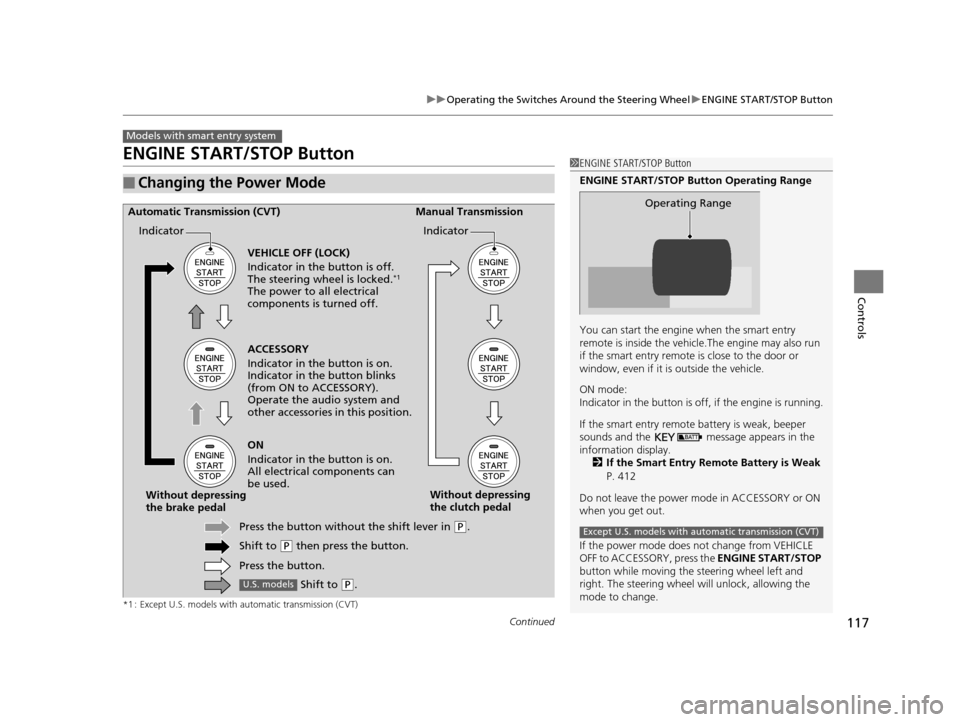
■Changing the Power Mode
Models with smart entry system
1ENGINE START/STOP Button
ENGINE START/STOP Button Operating Range
You can start the engine when the smart entry
remote is inside the vehicl e.The engine may also run
if the smart entry remote is close to the door or
window, even if it is outside the vehicle.
ON mode:
Indicator in the button is of f, if the engine is running.
If the smart entry remote battery is weak, beeper
sounds and the message appears in the
information display. 2 If the Smart Entry Remote Battery is Weak
P. 412
Do not leave the power mode in ACCESSORY or ON
when you get out.
If the power mode does not change from VEHICLE
OFF to ACCESSORY, press the ENGINE START/STOP
button while moving the st eering wheel left and
right. The steering wheel will unlock, allowing the
mode to change.
Operating Range
Except U.S. models with automatic transmission (CVT)
ACCESSORY
Indicator in the button is on.
Indicator in th e button blinks
(from ON to ACCESSORY).
Operate the audio system and
other accessories in this position.
Automatic Transmission (CVT) Manual Transmission
VEHICLE OFF (LOCK)
Indicator in the button is off.
The steering wheel is locked.
*1
The power to all electrical
components is turned off.
ON
Indicator in the button is on.
All electrical components can
be used.
Press the button withou t the shift lever in
(P.
Shift to
( P then press the button.
Press the button.
Without depressing
the brake pedal
Without depressing
the clutch pedal
Indicator Indicator
Shift to (
P.U.S. models
15 US FIT-31T5A6000.book 117 ページ 2014年3月6日 木曜日 午後7時5分
Page 121 of 453

120
uuOperating the Switches Around the Steering Wheel uIgnition Switch and Power Mode Comparison
Controls
Ignition Switch and Power Mode Comparison
*1 : Except U.S. models with automatic transmission (CVT)
Ignition Switch
Position
Without Smart
Entry System●Engine is turned off and
power is shut down.
●The steering wheel is
locked.
●No electrical components
can be used.
●Engine is turned off.●Some electrical
components such as the
audio system and the
accessory power socket
can be operated.
●Normal key position
while driving.
●All electrical components
can be used.
●Use this position to start
the engine.
●The ignition switch
returns to ON
(w when
you release the key.
Power Mode
With Smart Entry
System and
ENGINE START/
STOP ButtonIndicator-Off●Engine is turned off and
power is shut down.
●The steering wheel is
locked.*1
●No electrical components
can be used.
Indicator-On or blinking●Engine is turned off.●Some electrical
components such as the
audio system and the
accessory power socket
can be operated.
Indicator-
On (engine is turned off)
Off (engine is running)
●All electrical components
can be used.
Indicator-Off●The mode automatically
returns to ON after the
engine starts.
LOCK ( 0
(with/without
the key)
ACCESSORY (qON (wSTART (e
VEHICLE OFF
(LOCK)ACCESSORY ON
Indicator is: On Off
START
15 US FIT-31T5A6000.book 120 ページ 2014年3月6日 木曜日 午後7時5分
Page 148 of 453
Continued147
uuInterior Lights/Interior Convenience Items uInterior Convenience Items
Controls
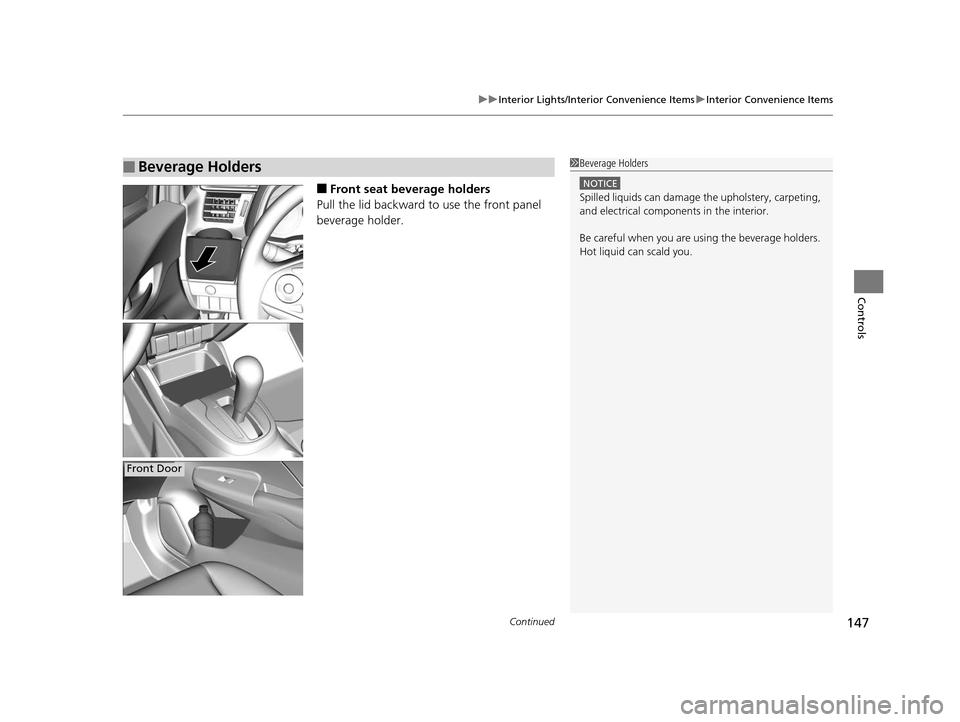
■Front seat beverage holders
Pull the lid backward to use the front panel
beverage holder.
■Beverage Holders1 Beverage Holders
NOTICE
Spilled liquids ca n damage the upholstery, carpeting,
and electrical components in the interior.
Be careful when you are us ing the beverage holders.
Hot liquid can scald you.
Front Door
15 US FIT-31T5A6000.book 147 ページ 2014年3月6日 木曜日 午後7時5分
Page 312 of 453

311Continued
Driving
When Driving
Starting the Engine
1.Make sure the parkin g brake is applied.
2. Check that the shift lever is in
(P, then
depress the brake pedal.
u Although it is possible to start the vehicle
in
(N, it is safer to start it in (P.
2. Check that the shift lever is in
(N. Then
depress the brake pedal with your right
foot, and the clutch pedal with your left
foot.
u The clutch pedal must be fully depressed
to start the engine.
Models without smart entry system
1Starting the Engine
Keep your foot firmly on the brake pedal when
starting the engine.
The engine is harder to st art in cold weather and in
thinner air found at altitudes above 8,000 feet (2,400
meters).
When starting the engine in cold weather, turn off all
electrical accessories such as the lights, heating and
cooling
* system, and rear defo gger in order to reduce
battery drain.
If you live in a region where winter is extremely cold,
an engine block heater will improve starting and
warming of the engine. If temperatures consistently
below -22°F (-30°C) are expected, the coolant
mixture should be changed to a higher concentration
to prevent freezing. Cons ult a dealer for details.
If the exhaust system sounds abnormal or you can
smell exhaust gas inside the vehicle, have your vehicle
checked by a dealer. There may be a problem with
the engine or exhaust system.
Brake PedalAutomatic transmission (CVT) models
Brake Pedal
Clutch Pedal
Manual transmission models
* Not available on all models
15 US FIT-31T5A6000.book 311 ページ 2014年3月6日 木曜日 午後7時5分
Page 314 of 453

313
uuWhen Driving uStarting the Engine
Continued
Driving
Starting the Engine
1. Make sure the parkin g brake is applied.
2. Check that the shift lever is in
(P, then
depress the brake pedal.
u Although it is possible to start the vehicle
in
(N, it is safer to start it in (P.
2. Check that the shift lever is in
(N. Then
depress the brake pedal with your right
foot, and the clutch pedal with your left
foot.
u The clutch pedal must be fully depressed
to start the engine.
Models with smart entry system
1Starting the Engine
Keep your foot firmly on the brake pedal when
starting the engine.
The engine is harder to st art in cold weather and in
thinner air found at altitudes above 8,000 feet (2,400
meters).
When starting the engine in cold weather, turn off all
electrical accessories such as the lights, heating and
cooling system/climate c ontrol system, and rear
defogger in order to reduce battery drain.
If you live in a region where winter is extremely cold,
an engine block heater will improve starting and
warming of the engine. If temperatures consistently
below -22°F (-30°C) are expected, the coolant
mixture should be changed to a higher concentration
to prevent freezing. Cons ult a dealer for details.
If the exhaust system sounds abnormal or you can
smell exhaust gas inside the vehicle, have your vehicle
checked by a dealer. There may be a problem with
the engine or exhaust system.
The immobilizer system pr otects your vehicle from
theft.If an improperly c oded device is used, the
engine’s fuel system is disabled.
2 Immobilizer System P. 110
Brake PedalAutomatic transmission (CVT) models
Brake Pedal
Clutch Pedal
Manual transmission models
15 US FIT-31T5A6000.book 313 ページ 2014年3月6日 木曜日 午後7時5分