Page 197 of 453
uuAudio System Basic Operation uAudio/Information Screen
196
Features
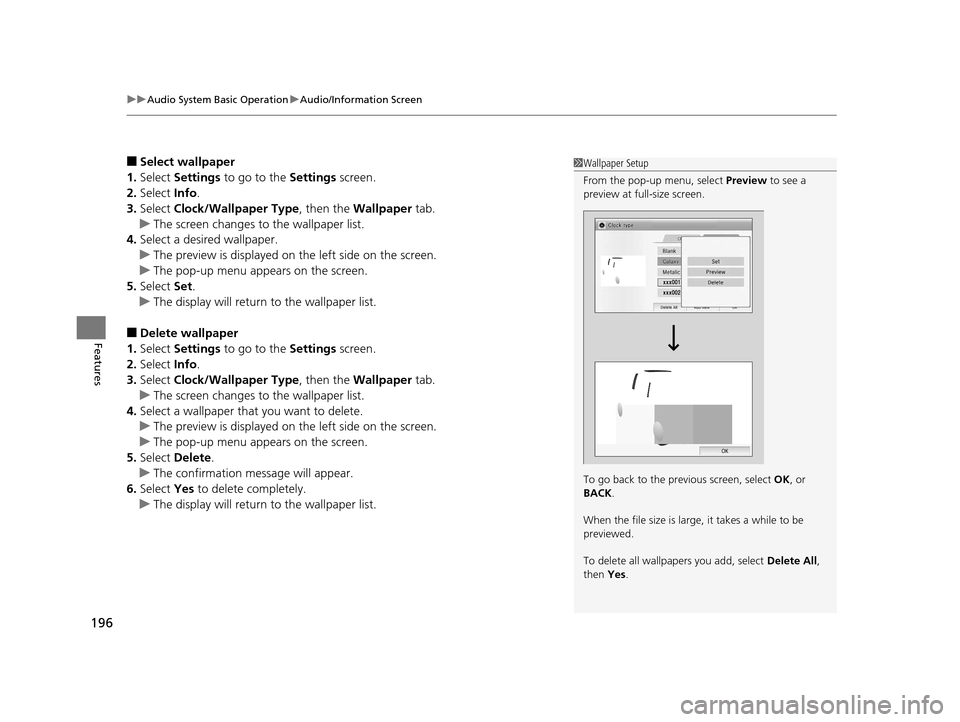
■Select wallpaper
1. Select Settings to go to the Settings screen.
2. Select Info.
3. Select Clock/Wallpaper Type , then the Wallpaper tab.
u The screen changes to the wallpaper list.
4. Select a desired wallpaper.
u The preview is displayed on the left side on the screen.
u The pop-up menu appears on the screen.
5. Select Set.
u The display will return to the wallpaper list.
■Delete wallpaper
1. Select Settings to go to the Settings screen.
2. Select Info.
3. Select Clock/Wallpaper Type , then the Wallpaper tab.
u The screen changes to the wallpaper list.
4. Select a wallpaper that you want to delete.
u The preview is displayed on the left side on the screen.
u The pop-up menu appears on the screen.
5. Select Delete.
u The confirmation message will appear.
6. Select Yes to delete completely.
u The display will return to the wallpaper list.
1Wallpaper Setup
From the pop-up menu, select Preview to see a
preview at full-size screen.
To go back to the previous screen, select OK, or
BACK .
When the file size is large, it takes a while to be
previewed.
To delete all wallpapers you add, select Delete All,
then Yes.
15 US FIT-31T5A6000.book 196 ページ 2014年3月6日 木曜日 午後7時5分
Page 229 of 453
228
uuCustomized Features u
Features
Display ChangeAudio
Wallpaper
WallpaperSelect
Import
Delete
Color ThemeBlue
Red
Amber
Gray
Language
Clock Format12H
24H
15 US FIT-31T5A6000.book 228 ページ 2014年3月6日 木曜日 午後7時5分
Page 232 of 453
231
uuCustomized Features u
Continued
Features
*1 : Default Setting
Setup
GroupCustomizable FeaturesDescriptionSelectable Settings
Settings Display Change
Changes the display type. Audio
*1/Wallpaper
Wallpaper Select
Changes the wallpaper type. Clock*1/
Image1 /Image2/
Image3
Import Imports an image file for a new wallpaper.
2
Wallpaper Setup P. 173—
Delete Deletes an image file for a wallpaper. Image1
*1/Image2/Image3
Color Theme Changes the background color of the audio/
information screen.
Blue
*1/
Red /Amber /Grey
Language Changes the display language. English
*1/French /Spanish
Clock Format Selects the digital clock display from 12H to
24H. 12H
*1/
24H
15 US FIT-31T5A6000.book 231 ページ 2014年3月6日 木曜日 午後7時5分
Page 235 of 453
234
uuCustomized Features u
Features
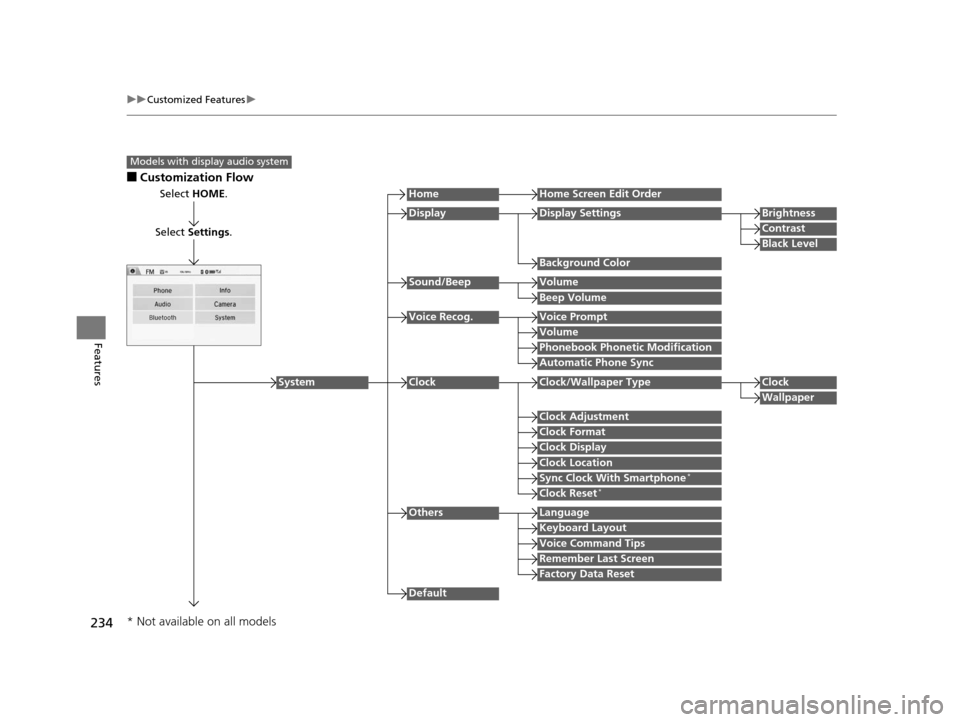
■Customization Flow
Models with display audio system
Select HOME.
Select Settings .
HomeHome Screen Edit Order
Background Color
DisplayDisplay SettingsBrightness
Contrast
Black Level
Beep Volume
Sound/BeepVolume
Volume
Voice Recog.Voice Prompt
Automatic Phone Sync
Phonebook Phonetic Modification
Default
Factory Data Reset
Clock Format
ClockClock/Wallpaper TypeClock
Wallpaper
Clock Adjustment
Clock Display
Clock Location
Sync Clock With Smartphone*
Clock Reset*
Keyboard Layout
OthersLanguage
Remember Last Screen
Voice Command Tips
System
* Not available on all models
15 US FIT-31T5A6000.book 234 ページ 2014年3月6日 木曜日 午後7時5分
Page 237 of 453
236
uuCustomized Features u
Features
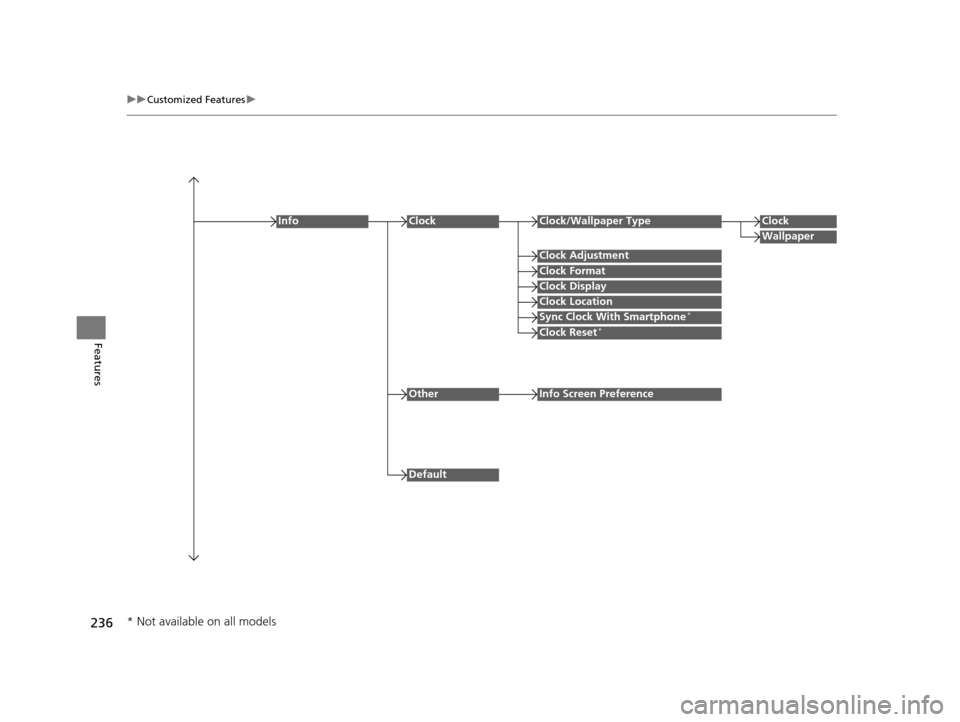
Clock Format
ClockClock/Wallpaper TypeClock
Wallpaper
Clock Adjustment
Clock Display
Clock Location
Sync Clock With Smartphone*
Clock Reset*
Info
Default
OtherInfo Screen Preference
* Not available on all models
15 US FIT-31T5A6000.book 236 ページ 2014年3月6日 木曜日 午後7時5分
Page 241 of 453
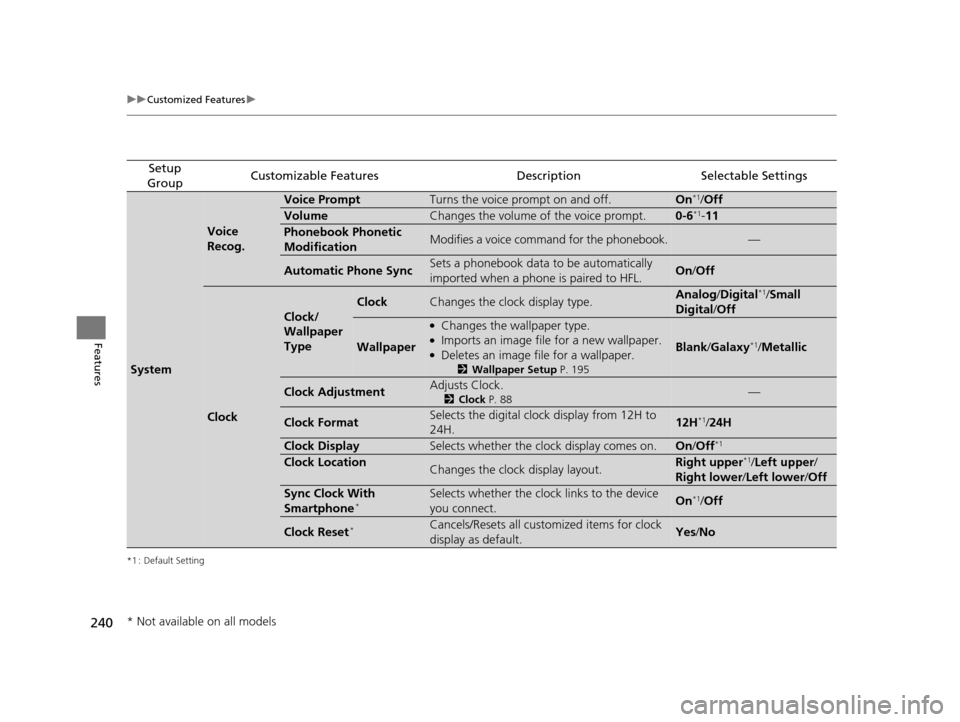
240
uuCustomized Features u
Features
*1 : Default Setting
Setup
GroupCustomizable FeaturesDescriptionSelectable Settings
System
Voice
Recog.
Voice PromptTurns the voice prompt on and off.On*1/ Off
VolumeChanges the volume of the voice prompt.0-6*1- 11
Phonebook Phonetic
ModificationModifies a voice command for the phonebook.—
Automatic Phone SyncSets a phonebook data to be automatically
imported when a phone is paired to HFL.On /Off
Clock
Clock/
Wallpaper
Type
ClockChanges the clock display type.Analog /Digital*1/Small
Digital /Off
Wallpaper
●Changes the wallpaper type.●Imports an image file for a new wallpaper.●Deletes an image file for a wallpaper.
2 Wallpaper Setup P. 195
Blank/Galaxy*1/ Metallic
Clock AdjustmentAdjusts Clock.
2 Clock P. 88—
Clock FormatSelects the digital clock display from 12H to
24H.12H*1/24H
Clock DisplaySelects whether the clock display comes on.On /Off*1
Clock LocationChanges the clock display layout.Right upper*1/Left upper /
Right lower /Left lower /Off
Sync Clock With
Smartphone*Selects whether the clock links to the device
you connect. On*1/Off
Clock Reset*Cancels/Resets all customized items for clock
display as default.Yes /No
* Not available on all models
15 US FIT-31T5A6000.book 240 ページ 2014年3月6日 木曜日 午後7時5分
Page 244 of 453
243
uuCustomized Features u
Continued
Features
*1 : Default Setting
Setup
GroupCustomizable FeaturesDescriptionSelectable Settings
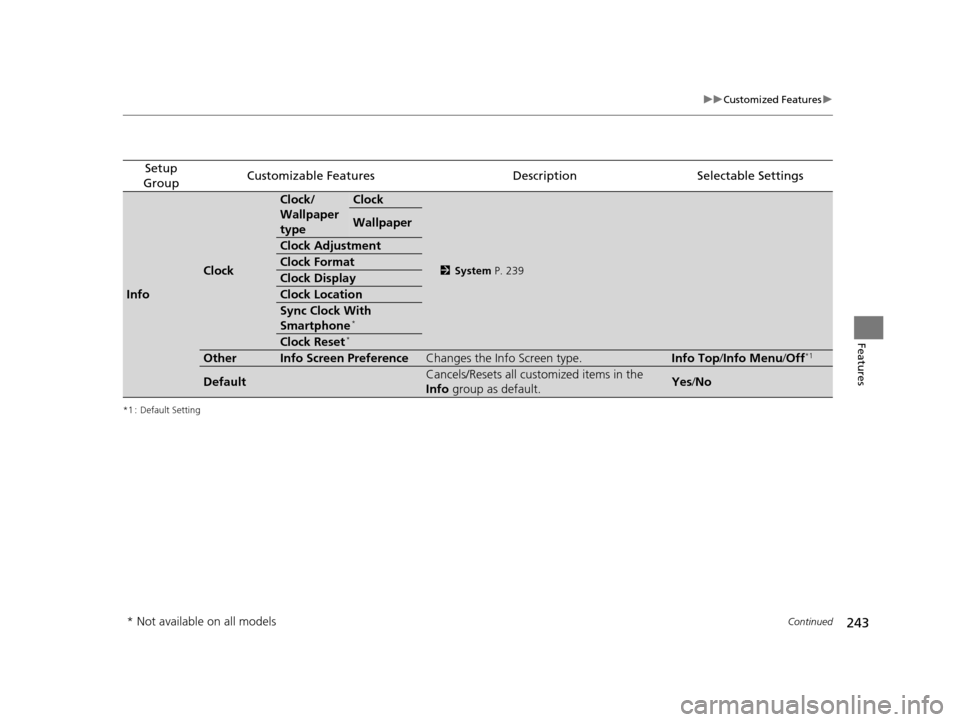
Info
Clock
Clock/
Wallpaper
typeClock
2 System P. 239
Wallpaper
Clock Adjustment
Clock Format
Clock Display
Clock Location
Sync Clock With
Smartphone*
Clock Reset*
OtherInfo Screen PreferenceChanges the Info Screen type.Info Top /Info Menu/ Off*1
DefaultCancels/Resets all customized items in the
Info group as default.Yes/No
* Not available on all models
15 US FIT-31T5A6000.book 243 ページ 2014年3月6日 木曜日 午後7時5分
Page 453 of 453

452
Index
U
Unlocking the Doors............................. 93, 99
USB Flash Drives ........................................ 225
USB Port(s) ................................................. 163
V
Vanity Mirrors ............................................... 7
Vehicle Identification Number (VIN) ....... 434
Vehicle Stability Assist (VSA ®).................. 332
Off Button ............................................... 333
Off Indicator .............................................. 74
System Indicator ........................................ 74
Viscosity (Oil) ..................................... 363, 433
VSA ® (Vehicle Stability Assist) .................. 332
W
Wallpaper................................................. 195
Warning Indicator On/Blinking ............... 419
Warning Labels ........................................... 67
Warranties (Warranty Manual provided
separately) .............................................. 439
Watts ......................................................... 432
Wear Indicators (Tire) .............................. 389
Wheel Nut Wrench (Jack Handle) ... 404, 408
Window Washers ..................................... 126
Adding/Refilling Fluid .............................. 372
Switch ..................................................... 126
Windshield ................................................ 126
Cleaning ................................................. 401
Defrosting/Defogging .............................. 156
Washer Fluid ........................................... 372
Wiper Blades ........................................... 380
Wipers and Washers................................ 126
Winter Tires .............................................. 392
Snow Tires .............................................. 392
Tire Chains .............................................. 392
Wipers and Washers ................................. 126
Checking and Replacing Wiper Blades ........................................... 380, 382
WMA ......................................... 179, 185, 210
Worn Tires ........................................ 384, 389
15 US FIT-31T5A6000.book 452 ページ 2014年3月6日 木曜日 午後7時5分