2015 HONDA CROSSTOUR check engine
[x] Cancel search: check enginePage 80 of 573
79
uuIndicators u
Continued
Instrument Panel
*1:Models with the smart entry system have an ENGINE START/STOP button instead of an ignition switch.
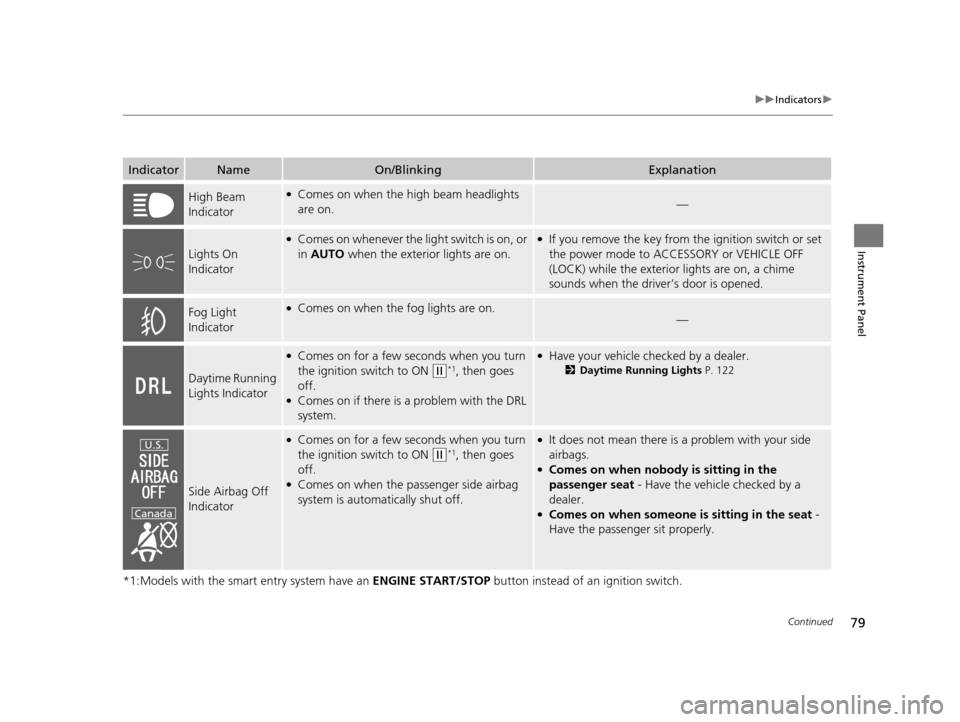
IndicatorNameOn/BlinkingExplanation
High Beam
Indicator●Comes on when the high beam headlights
are on.—
Lights On
Indicator
●Comes on whenever the light switch is on, or
in AUTO when the exterior lights are on.●If you remove the key from the ignition switch or set
the power mode to ACCESSORY or VEHICLE OFF
(LOCK) while the exterior lights are on, a chime
sounds when the driv er’s door is opened.
Fog Light
Indicator●Comes on when the fog lights are on.—
Daytime Running
Lights Indicator
●Comes on for a few seconds when you turn
the ignition switch to ON
(w*1, then goes
off.
●Comes on if there is a problem with the DRL
system.
●Have your vehicle checked by a dealer.
2 Daytime Running Lights P. 122
Side Airbag Off
Indicator
●Comes on for a few seconds when you turn
the ignition switch to ON
(w*1, then goes
off.
●Comes on when the passenger side airbag
system is automatically shut off.
●It does not mean there is a problem with your side
airbags.
●Comes on when nobody is sitting in the
passenger seat - Have the vehicle checked by a
dealer.
●Comes on when someone is sitting in the seat -
Have the passenger sit properly.
U.S.
Canada
15 CROSSTOUR-31TP66500.book 79 ページ 2014年7月31日 木曜日 午後3時23分
Page 81 of 573
80
uuIndicators u
Instrument Panel
*1:Models with the smart entry system have an ENGINE START/STOP button instead of an ignition switch.
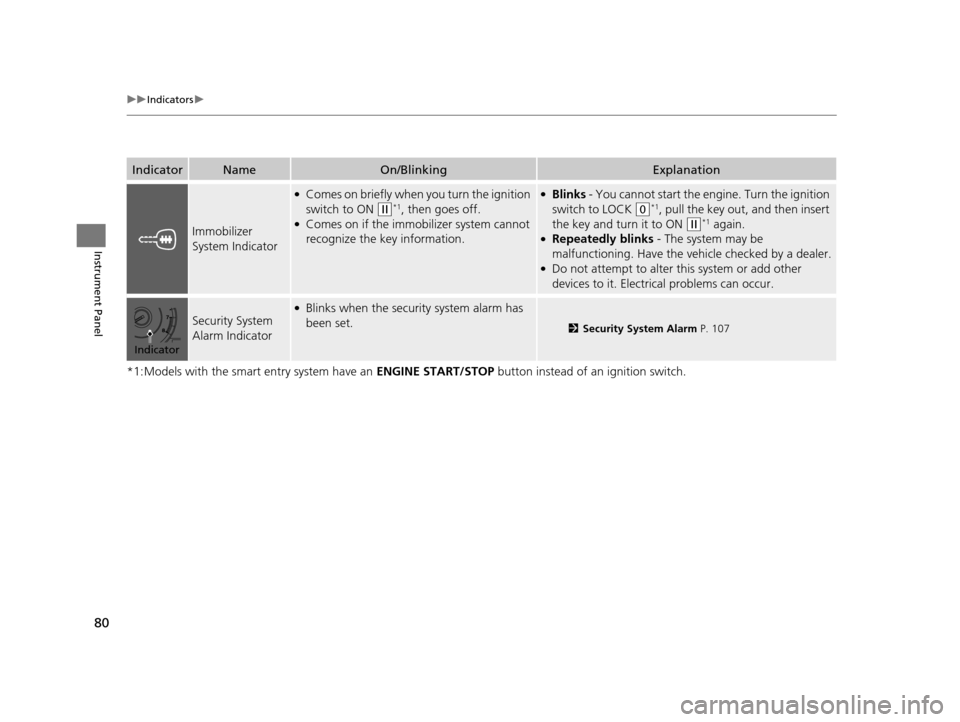
IndicatorNameOn/BlinkingExplanation
Immobilizer
System Indicator
●Comes on briefly when you turn the ignition
switch to ON
(w*1, then goes off.●Comes on if the immobilizer system cannot
recognize the key information.
●Blinks - You cannot start the engine. Turn the ignition
switch to LOCK
(0*1, pull the key out, and then insert
the key and turn it to ON
(w*1 again.●Repeatedly blinks - The system may be
malfunctioning. Have the ve hicle checked by a dealer.
●Do not attempt to alter this system or add other
devices to it. Electrical problems can occur.
Security System
Alarm Indicator
●Blinks when the security system alarm has
been set.
2Security System Alarm P. 107
Indicator
15 CROSSTOUR-31TP66500.book 80 ページ 2014年7月31日 木曜日 午後3時23分
Page 83 of 573
82
uuIndicators uInformation Display Warning and Information Messages
Instrument Panel
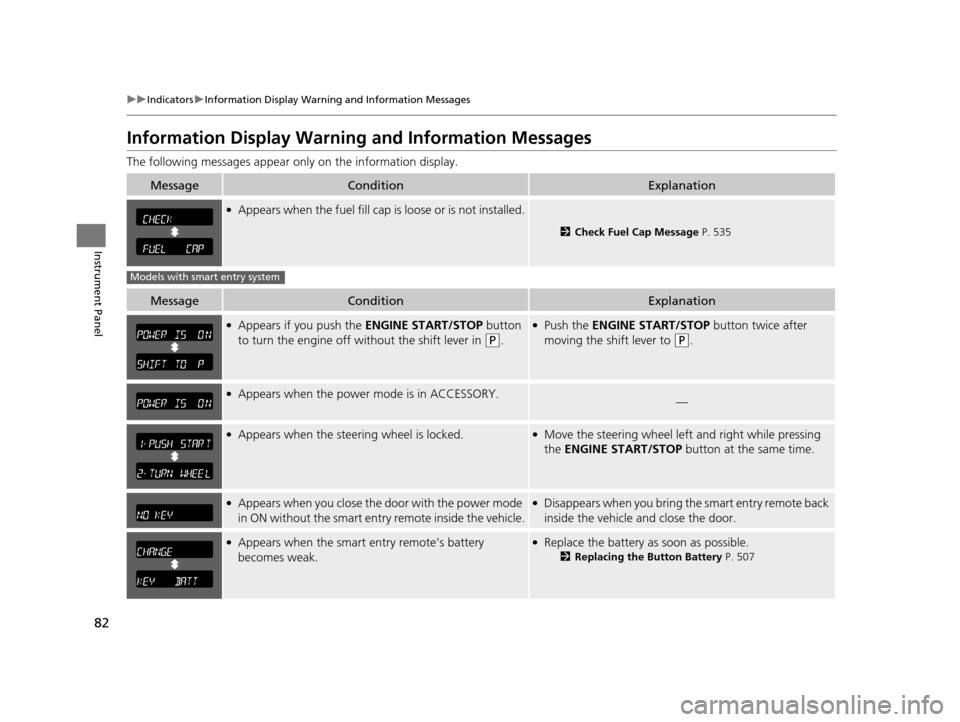
Information Display Warning and Information Messages
The following messages appear on ly on the information display.
MessageConditionExplanation
●Appears when the fuel fill cap is loose or is not installed.
2Check Fuel Cap Message P. 535
MessageConditionExplanation
●Appears if you push the ENGINE START/STOP button
to turn the engine off wi thout the shift lever in
(P.
●Push the ENGINE START/STOP button twice after
moving the shift lever to
(P.
●Appears when the power mode is in ACCESSORY.—
●Appears when the steer ing wheel is locked.●Move the steering wheel left and right while pressing
the ENGINE START/STOP button at the same time.
●Appears when you close the door with the power mode
in ON without the smart entry remote inside the vehicle.●Disappears when you bring the smart entry remote back
inside the vehicle and close the door.
●Appears when the smart entry remote’s battery
becomes weak.●Replace the battery as soon as possible.
2Replacing the Button Battery P. 507
Models with smart entry system
15 CROSSTOUR-31TP66500.book 82 ページ 2014年7月31日 木曜日 午後3時23分
Page 86 of 573
Continued85
uuGauges and Displays uInformation Display
Instrument Panel
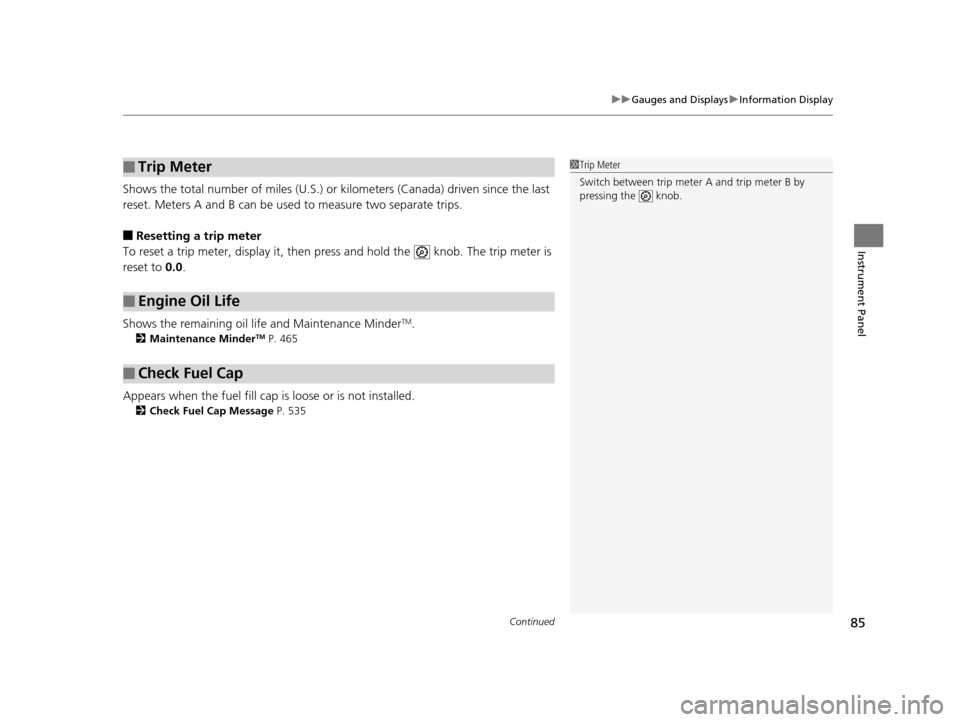
Shows the total number of miles (U.S.) or k ilometers (Canada) driven since the last
reset. Meters A and B can be used to measure two separate trips.
■Resetting a trip meter
To reset a trip meter, display it, then pr ess and hold the knob. The trip meter is
reset to 0.0.
Shows the remaining oil life and Maintenance Minder
TM.
2 Maintenance MinderTM P. 465
Appears when the fuel fill cap is loose or is not installed.
2Check Fuel Cap Message P. 535
■Trip Meter
■Engine Oil Life
■Check Fuel Cap
1Trip Meter
Switch between trip meter A and trip meter B by
pressing the knob.
15 CROSSTOUR-31TP66500.book 85 ページ 2014年7月31日 木曜日 午後3時23分
Page 167 of 573
166
uuAudio System uAudio System Theft Protection
Features
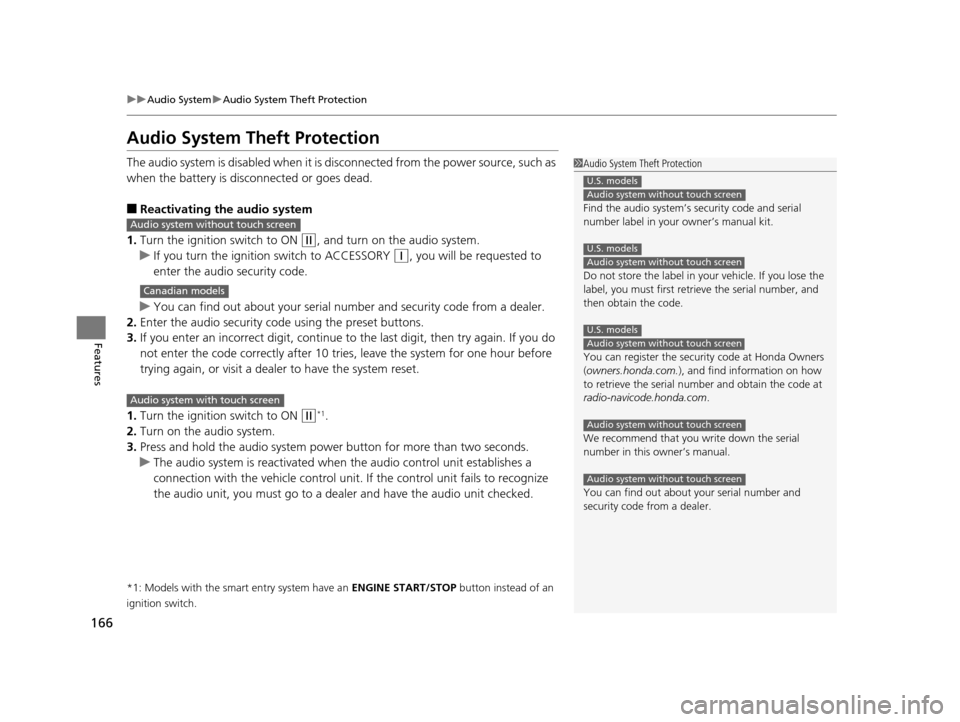
Audio System Theft Protection
The audio system is disabled when it is di sconnected from the power source, such as
when the battery is disconnected or goes dead.
■Reactivating the audio system
1. Turn the ignition switch to ON
(w, and turn on the audio system.
u If you turn the ignition switch to ACCESSORY
(q, you will be requested to
enter the audio security code.
u You can find out about your serial numb er and security code from a dealer.
2. Enter the audio security code using the preset buttons.
3. If you enter an incorrect digit, continue to the last digit, then try again. If you do
not enter the code correctly after 10 tries , leave the system for one hour before
trying again, or visit a dealer to have the system reset.
1. Turn the ignition switch to ON
(w*1.
2. Turn on the audio system.
3. Press and hold the audio system power button for more than two seconds.
u The audio system is reac tivated when the audio co ntrol unit establishes a
connection with the vehicle control unit. If the control unit fails to recognize
the audio unit, you must go to a dealer and have the audio unit checked.
*1: Models with the smart entry system have an ENGINE START/STOP button instead of an
ignition switch.
1 Audio System Theft Protection
Find the audio system’s se curity code and serial
number label in your owner’s manual kit.
Do not store the label in your vehicle. If you lose the
label, you must first retrie ve the serial number, and
then obtain the code.
You can register the securi ty code at Honda Owners
(owners.honda.com. ), and find information on how
to retrieve the serial num ber and obtain the code at
radio-navicode.honda.com .
We recommend that you write down the serial
number in this owner’s manual.
You can find out about your serial number and
security code from a dealer.
U.S. models
Audio system without touch screen
U.S. models
Audio system without touch screen
U.S. models
Audio system without touch screen
Audio system without touch screen
Audio system without touch screen
Audio system without touch screen
Canadian models
Audio system with touch screen
15 CROSSTOUR-31TP66500.book 166 ページ 2014年7月31日 木曜日 午後3時23分
Page 411 of 573
410
Driving
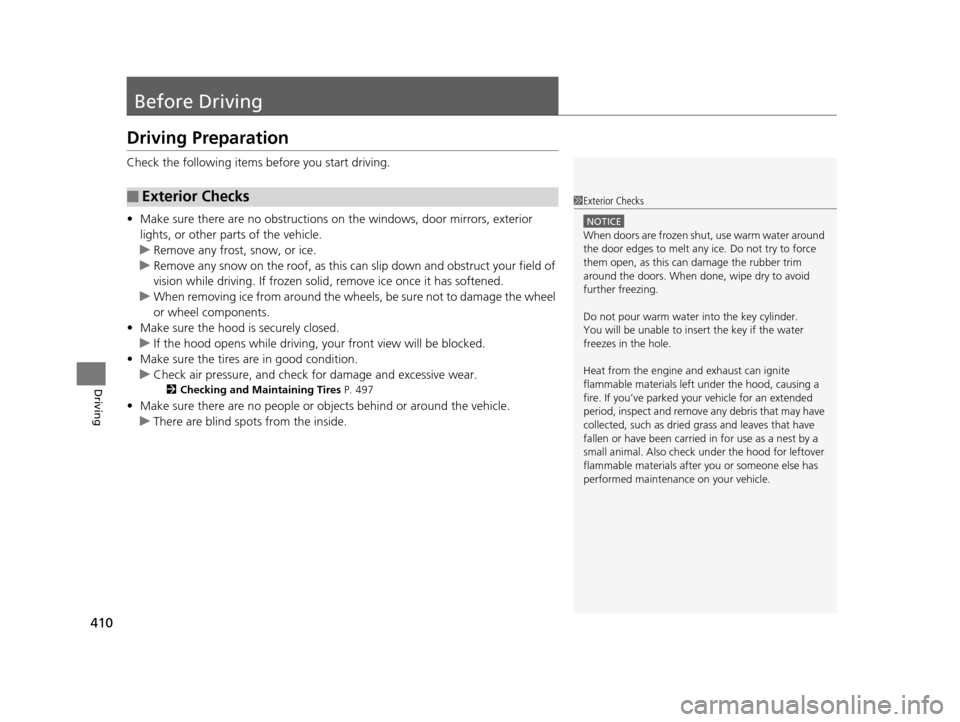
Before Driving
Driving Preparation
Check the following items before you start driving.
• Make sure there are no obstructions on th e windows, door mirrors, exterior
lights, or other parts of the vehicle.
u Remove any frost, snow, or ice.
u Remove any snow on the roof, as this can slip down and obstruct your field of
vision while driving. If frozen solid , remove ice once it has softened.
u When removing ice from around the wheel s, be sure not to damage the wheel
or wheel components.
• Make sure the hood is securely closed.
u If the hood opens while driving, your front view will be blocked.
• Make sure the tires are in good condition.
u Check air pressure, and check for damage and excessive wear.
2 Checking and Maintaining Tires P. 497
•Make sure there are no people or ob jects behind or around the vehicle.
u There are blind spots from the inside.
■Exterior Checks1Exterior Checks
NOTICE
When doors are frozen s hut, use warm water around
the door edges to melt any ice. Do not try to force
them open, as this can damage the rubber trim
around the doors. When done, wipe dry to avoid
further freezing.
Do not pour warm water into the key cylinder.
You will be unable to insert the key if the water
freezes in the hole.
Heat from the engine and exhaust can ignite
flammable material s left under the hood, causing a
fire. If you’ve parked y our vehicle for an extended
period, inspect and remove any debris that may have
collected, such as dried grass and leaves that have
fallen or have been carried in for use as a nest by a
small animal. Also check under the hood for leftover
flammable materials after you or someone else has
performed maintenance on your vehicle.
15 CROSSTOUR-31TP66500.book 410 ページ 2014年7月31日 木曜日 午後3時23分
Page 416 of 573

415Continued
Driving
Towing a Trailer
Towing Preparation
Your vehicle can tow a trailer if you carefully observe the load limits, use the proper
equipment, and follow the towing guidelin es. Check the load limits before driving.
■Total trailer weight
Maximum allowable weight of the trailer,
cargo, and everything in or on it must not
exceed 1,500 lbs (680 kg) for 6-cylinder
models and 1,000 lbs (453 kg) for 4-cylinder
models. Towing loads in excess of this can
seriously affect vehicle handling and
performance and can damage the engine and
drivetrain.
■Tongue load
The weight of the tongue with a fully loaded
trailer on the hitch should be approximately
10% of the total trailer weight.
• Excessive tongue load reduces front tire
traction and steering control. Too little
tongue load can make the trailer unstable
and cause it to sway.
• To achieve a proper tongue load, start by
loading 60% of the load toward the front
of the trailer and 40% toward the rear.
Readjust the lo ad as needed.
■Towing Load Limits1Towing Load Limits
Check if all loads are within limits at a public scale.
If a public scale is not available, add the estimated
weight of your cargo load to the weight of your
trailer (as quoted by th e manufacturer), and the
tongue load.
Break-in Period
Avoid towing a trailer duri ng your vehicle’s first 600
miles (1,000 km).
Never exceed the gross weight ratings.
Gross weight information 2 Vehicle Specifications P. 546, 548
3WARNING
Exceeding any load limit or improperly
loading your vehicle and trailer can cause a
crash in which you can be seriously hurt or
killed.
Check the loading of your vehicle and
trailer carefully before starting to drive.
Total Load
To ngue LoadTongue Load
15 CROSSTOUR-31TP66500.book 415 ページ 2014年7月31日 木曜日 午後3時23分
Page 421 of 573

420
Driving
When Driving
Starting the Engine
1.Make sure the parking brake is applied.
2. Check that the shift lever is in
(P, then
depress the brake pedal.
u Although it is possibl e to start the vehicle
in
(N, it is safer to start it in (P.
Models without smart entry system
1 Starting the Engine
Keep your foot firmly on the brake pedal when
starting the engine.
The engine is harder to st art in cold weather and in
thinner air found at altitudes above 8,000 feet (2,400
meters).
When starting the engine in cold weather, turn off all
electrical accessories such as the lights, heating and
cooling system
*/climate control system*, and rear
defogger in order to reduce battery drain.
If you live in a region where winter is extremely cold,
an engine block heater will improve starting and
warming of the engine. If temperatures consistently
below -22°F (-30°C) are expected, the coolant
mixture should be changed to a higher concentration
to prevent freezing. Cons ult a dealer for details.
If the exhaust system sounds abnormal or you can
smell exhaust gas inside the vehicle, have your vehicle
checked by a dealer. There may be a problem with
the engine or exhaust system.
Brake Pedal
* Not available on all models
15 CROSSTOUR-31TP66500.book 420 ページ 2014年7月31日 木曜日 午後3時23分