Page 77 of 329

76
uuIndicators u
Instrument Panel
*1:The driving mode message on the multi-information display app ears for a few seconds when you press the appropriate mode butt on.
IndicatorNameOn/BlinkingExplanationMessage
Shift Up
Indicator*
●Comes on briefly when you turn
the ignition switch to ON
(w.●Comes on when shifting up is
recommended.
2Shift Up/Down Indicators P. 191—
Shift Down
Indicator*
●Comes on briefly when you turn
the ignition switch to ON
(w.●Comes on when shifting down is
recommended.
SPORT Mode
Indicator*1
●Comes on for a few seconds when
you turn the igniti on switch to ON
(w, then goes off.●Comes on when you press the
SPORT mode button.
23-Mode Drive System P. 199
NORMAL
Mode
Indicator
*1
●Comes on for a few seconds when
you turn the igniti on switch to ON
(w.●Comes on when you press the
NORMAL mode button.
23-Mode Drive System P. 199
ECON Mode
Indicator*1
●Comes on for a few seconds when
you turn the ignition switch to ON
(w.●Comes on when you press the
ECON mode button.
23-Mode Drive System P. 199
* Not available on all models
15 CR-Z-31SZT6400.book 76 ページ 2014年8月1日 金曜日 午後1時59分
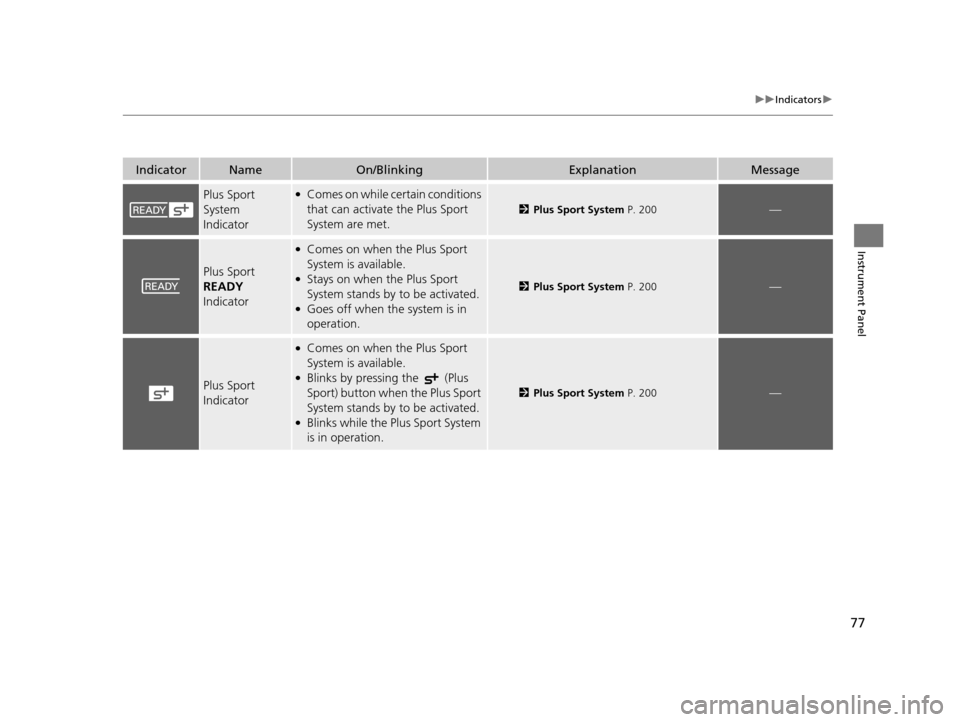
Page 78 of 329
77
uuIndicators u
Instrument Panel
IndicatorNameOn/BlinkingExplanationMessage
Plus Sport
System
Indicator●Comes on while certain conditions
that can activate the Plus Sport
System are met.
2Plus Sport System P. 200—
Plus Sport
READY
Indicator
●Comes on when the Plus Sport
System is available.
●Stays on when the Plus Sport
System stands by to be activated.
●Goes off when the system is in
operation.
2 Plus Sport System P. 200—
Plus Sport
Indicator
●Comes on when the Plus Sport
System is available.
●Blinks by pressing the (Plus
Sport) button when the Plus Sport
System stands by to be activated.
●Blinks while the Plus Sport System
is in operation.
2Plus Sport System P. 200—
15 CR-Z-31SZT6400.book 77 ページ 2014年8月1日 金曜日 午後1時59分
Page 79 of 329

78
uuIndicators uMulti-Information Display Warn ing and Information Messages
Instrument Panel
Multi-Information Display Warn ing and Information Messages
The following messages appear only on the multi-information display. Press the (information) button to see the message again
with the system me ssage indicator on.
MessageConditionExplanation
●Appears when the fuel fill cap is loose or is not
installed.
2Tighten Fuel Cap Message P. 298
●Appears if there is a prob lem with the DRL system.●Have your vehicle checked by a dealer.
2Daytime Running Lights P. 114
●Appears when the washer fluid is low.●Refill washer fluid.
2Refilling Window Washer Fluid P. 243
●Appears when the scheduled maintenance is due
soon.
●Consequently, SERVICE DUE NOW and SERVICE
PAST DUE follow.2Maintenance Minder Messages on the Multi-
Information Display P. 227
●Appears when you open the driver’s door while the
ignition key is in ACCESSORY
(q.
●Turn the ignition switch to LOCK (0, then remove the
key.
Canadian models
15 CR-Z-31SZT6400.book 78 ページ 2014年8月1日 金曜日 午後1時59分
Page 80 of 329
79
uuIndicators uMulti-Information Display Warning and Information Messages
Continued
Instrument Panel
MessageConditionExplanation
●Appears when the igniti on key is turned to
ACCESSORY
(q from ON (w. (The driver’s door is
closed.)—
●Appears when you open th e driver’s door while the
ignition key is in LOCK
(0.
●Remove the key from the ignition switch.
●Appears when the IMA batt ery is significantly low.●Drive continuously or, if nece ssary, allow the vehicle to
idle in an open area unt il the message disappears.
●Appears while you are custom izing the settings for the
following reasons:
The shift lever is moved out of
(P.
The parking brake is released.2 How to customize P. 90
Continuously variable transmission models
Manual transmission models
15 CR-Z-31SZT6400.book 79 ページ 2014年8月1日 金曜日 午後1時59分
Page 81 of 329
80
uuIndicators uMulti-Information Display Warn ing and Information Messages
Instrument Panel
MessageConditionExplanation
●Appears if the clutch pedal is not fully depressed while
the Auto Idle Stop is in operation, and the engine is
ready to restart.●Fully depress the clutch pedal.
2Auto Idle Stop P. 196
●Appears when the shift leve r is in any forward gear
position, and the Auto Idle Stop operating time has
continued for a while.●Shift to (N.
2 Auto Idle Stop P. 196
●Appears when the engine does not automatically
restart for the following re asons while the Auto Idle
Stop is in operation.
• The IMA battery charge is low.
• There is a problem with the system.●Manually start the engine.
2 Starting the Engine P. 180
Manual transmission models
15 CR-Z-31SZT6400.book 80 ページ 2014年8月1日 金曜日 午後1時59分
Page 82 of 329

81Continued
Instrument Panel
Gauges and Multi-Information Display
Gauges
Gauges include the speedometer, tachometer, fuel gauge, and related indicators.
They are displayed when the ignition switch is in ON
(w.
Displays your driving speed in mph or km/h.
Shows the number of engine revolutions per minute.
Displays the amount of fuel left in the fuel tank.
Shows the instant fuel economy as a bar graph in mpg or l/100km.
■Speedometer
■Tachometer
■Fuel Gauge
■Instant Fuel Economy Gauge
1Gauges
Press and hold the km/h/mph change button until
you hear a beep. The speedometer reading and the
displayed measurements switch between mph and
km/h. The display change message appears for a few
seconds.
1 Fuel Gauge
NOTICE
You should refuel when the reading approaches .
Running out of fuel can cause the engine to misfire,
damaging the cata lytic converter.
The actual amount of remain ing fuel may differ from
the fuel gauge reading.E
1 Instant Fuel Economy Gauge
Press and hold the km/h/mph change button to
switch the measurement.
15 CR-Z-31SZT6400.book 81 ページ 2014年8月1日 金曜日 午後1時59分
Page 83 of 329

uuGauges and Multi-Information Display uGauges
82
Instrument Panel
The remaining battery charge level is displayed
as a bar graph.
The degree to which the electric motor is as sisting the engine is displayed by the
ASST indicator bar.
The degree to which the IMA battery is being charged is displayed by the CHRG
indicator bar.
■IMA Battery Charge Level Indicator1 IMA Battery Charge Level Indicator
The IMA battery charge le vel may decrease rapidly
under the following conditions:
•When the 12 volt battery has been replaced.
•When the IMA battery has been disconnected.•When the IMA battery control system is correcting
its reading.
The charge level readi ng will be corrected
automatically while driving.READY
IMA Battery Charge
Level Indicator
CHRG Indicator ASST Indicator
■Electric Motor Assist Indicator (ASST)
■Battery Charge in Progress (CHRG)
1Electric Motor Assist Indicator (ASST)
If the IMA batter y is too hot or too cold, the IMA
battery’s output power is limited to protect the
battery. This disables the IMA assist and Auto Idle
Stop, even though the ba ttery is well charged.
It takes a short time to normalize the IMA battery’s
output power depending on the weather.
15 CR-Z-31SZT6400.book 82 ページ 2014年8月1日 金曜日 午後1時59分
Page 84 of 329
83
uuGauges and Multi-Information Display uMulti-Information Display
Continued
Instrument Panel
Multi-Information Display
The multi-information display shows the odom eter, trip meter, outside temperature,
and other gauges. It also displays important messages such as warnings and other
helpful information.
Press the (information) button or the SEL/RESET button to change the
display.
■Switching the Display
(Information)
ButtonSEL/RESET
Button
Ecological Drive
DisplayAverage Fuel
Economy
Records Average Fuel
Economy A
Range
Elapsed Time
Average Vehicle
Speed
Power Flow Monitor
Engine Oil Life
Customizable Setting
Entry
HFL*
Blank
Shown when Bluetooth ®
HandsFreeLink ® is activated.
* Not available on all models
15 CR-Z-31SZT6400.book 83 ページ 2014年8月1日 金曜日 午後1時59分