Page 150 of 329

149
uuAudio System uPlaying a CD
Continued
Features
Playing a CD
Your audio system supports audio CDs, CD-Rs and CD-RWs in either MP3 or WMA
format. With the CD loaded, press the CD button.
SCAN Button
You will get a 10-second sampling of each song.
●Press to sample all tracks on the CD (all files in
the current folder in MP3 or WMA).
●Press two times to sample the first file in each
of the main folders (MP3 or WMA).
●To turn off scan, press and hold the button.
(CD Eject) Button
Press to eject a CD.
/ Button
Press to skip to the next folder, and to skip to
the beginning of the previous folder in MP3 or WMA.
(Power) Button
Press to turn the audio
system on and off.
CD Slot
Insert a CD about halfway into the CD slot.
/ SEEK Buttons
Press or to change tracks
(files in MP3 or WMA).
Selector Knob
Turn to adjust the volume.
Press and turn to select an item, then
press to set your selection.
TITLE Button
Press to display the text data
on a CD (if it was recorded
with text data).CD Button
Press to play a CD.
RDM (Random) Button
●Press to play all tracks/files on a CD
in random order.
●Press two times to play all files in
the current folder (MP3 or WMA) in
random order.
●To turn off random , press and hold
the button.
RPT (Repeat) Button
●Press to replay a track/file continuously.●Press two times to replay all files in the current folder.●To turn off repeat, press and hold the button.
15 CR-Z-31SZT6400.book 149 ページ 2014年8月1日 金曜日 午後1時59分
Page 151 of 329

uuAudio System uPlaying a CD
150
Features
1. Press to switch the display to a folder list.
2. Rotate to select a folder.
u Press button to play the firs t file on the selected folder.
3. Press to change the display to a list of files in that folder.
4. Rotate to select a file, then press .
■How to Select a File from a Fo lder with the Selector Knob
(MP3/WMA)1 Playing a CD
NOTICE
Do not use CDs with adhesive labels. The label can
cause the CD to jam in the unit.
WMA files protected by di gital rights management
(DRM) cannot be played.
The audio system displays UNSUPPORTED, then
skips to the next file.
Text data appears on the di splay under the following
circumstances:
•When you select a new folder, file, or track.
•When you change the audio mode to CD.
•When you insert a CD.
The display shows up to 31 ch aracters of text data.
Press and hold the TITLE button to see additional
characters. indicates that the text data continues.
The display goes back to th e previous screen if you
press and hold the button again.
If you eject the CD but do not remove it from the slot,
the system reloads the CD automatically after several
seconds.
15 CR-Z-31SZT6400.book 150 ページ 2014年8月1日 金曜日 午後1時59分
Page 152 of 329

151
uuAudio System uPlaying an iPod
Continued
Features
Playing an iPod
Connect the iPod using your dock connector to the USB adapter cable, then press
the AUX button.
2USB Adapter Cable P. 141
AUX Button
Press to select iPod (if connected).
Button
Press to go back to the
previous display.
(Power) Button
Press to turn the audio system
on and off.
Selector Knob
Turn to adjust the volume. Press
and turn to select an item, then
press to set your selection. USB Indicator
Comes on when an iPod is connected.
/ SEEK Buttons
Press or to change songs.
Button
Press to set your selection.
TITLE Button
Press to display the text data.
RDM (Random) Button
●Press to play all available files in a
selected list (playlists, artists,
albums or songs) in random order.
●Press two times to play all available
albums in a selected list (playlists,
artists, albums or songs) in random
order.
●To turn off shuffle mode, press and
hold the button.
RPT (Repeat) Button
●Press to replay a file continuously.●To turn off repeat, press the button
again.
15 CR-Z-31SZT6400.book 151 ページ 2014年8月1日 金曜日 午後1時59分
Page 153 of 329
uuAudio System uPlaying an iPod
152
Features
1. Press to display the iPod menu.
2. Rotate to select a menu.
3. Press to display the items on that menu.
4. Rotate to select an item, then press .
■How to Select a File from the iPod Menu1Playing an iPod
Available operating functi ons vary on models or
versions. Some functions ma y not be available on the
vehicle's audio system.
If there is a problem, you may see an error message
on the display. 2 iPod/USB Flash Drive P. 156
15 CR-Z-31SZT6400.book 152 ページ 2014年8月1日 金曜日 午後1時59分
Page 154 of 329

153
uuAudio System uPlaying a USB Flash Drive
Continued
Features
Playing a USB Flash Drive
Your audio system reads and plays sound files on a USB flash drive in either MP3,
WMA or AAC*1 format.
Connect your USB flash drive to the USB adapter cable, then press the AUX button.
2USB Adapter Cable P. 141
*1:Only AAC format files recorded with iTunes are playable on this unit.
AUX Button
Press to select USB flash drive
(if connected).
SCAN Button
You will get a 10-second sampling of each file.
●Press to sample all files in the current folder.●Press two times to sample the first file in each of
the main folders.
●To turn off scan, pres s and hold the button.
(Power) Button
Press to turn the audio system
on and off.
Selector Knob
Turn to adjust the volume. Press
and turn to select an item, then
press to set your selection. USB Indicator
Comes on when a USB flash
drive is connected.
/ Button
Press to skip to the next folder,
and to skip to the beginning of
the previous folder.
/ SEEK Buttons
Press or to change files.
TITLE Button
Press to display the text data.
RDM (Random) Button
●Press to play all files in random order.●Press two times to play all files in the
current folder in random order.
●To turn off random, press and hold
the button.
RPT (Repeat) Button
●Press to replay a file continuously.●Press two times to replay all files in the current folder.●To turn off repeat, pr ess and hold the button.
15 CR-Z-31SZT6400.book 153 ページ 2014年8月1日 金曜日 午後1時59分
Page 155 of 329
uuAudio System uPlaying a USB Flash Drive
154
Features
1. Press to switch the display to a folder list.
2. Rotate to select a folder.
u Press button to play the firs t file on the selected folder.
3. Press to change the display to a list of files in that folder.
4. Rotate to select a file, then press .
■How to Select a File from a Folder with the Selector Knob1Playing a USB Flash Drive
Use the recommended USB flash drives.
2 USB Flash Drives P. 159
Files in WMA format prot ected by digital rights
management (DRM) are not played.
The audio system displays UNPLAYABLE FILE, and
then skips to the next file.
If there is a problem, you may see an error message
on the display. 2 iPod/USB Flash Drive P. 156
15 CR-Z-31SZT6400.book 154 ページ 2014年8月1日 金曜日 午後1時59分
Page 156 of 329

155
Features
Audio Error Messages
CD Player
If a disc error occurs, you may see the following error messages.
Error MessageCauseSolution
HEAT ERRORHigh temperature●Turn the audio system off and allo w the player to cool down until
the error message is cleared.
UNSUPPORTEDTrack/file format not supported●Current track/file will be skipped. The next supported track/file
plays automatically.
BAD DISC
PLEASE CHECK
OWNERS MANUAL
PUSH EJECT
Mechanical error
●Press the (eject) button and remo ve the disc, and check that the
error message is cleared.
●Check that the disc is not dama ged or deformed, and insert the
disc again.
2 Protecting CDs P. 158
●If the error message reappears, press the button, and pull out
the disc.
●Insert a different disc.
If the new disc plays, there is a problem with the first disc.
●If the error message repeats, or the disc cannot be removed,
contact your dealer.
Do not try to force the disc out of the player.
MECH ERROR
CHECK DISCDisc error●Check that the disc is not damaged or deformed.
2Protecting CDs P. 158
15 CR-Z-31SZT6400.book 155 ページ 2014年8月1日 金曜日 午後1時59分
Page 157 of 329
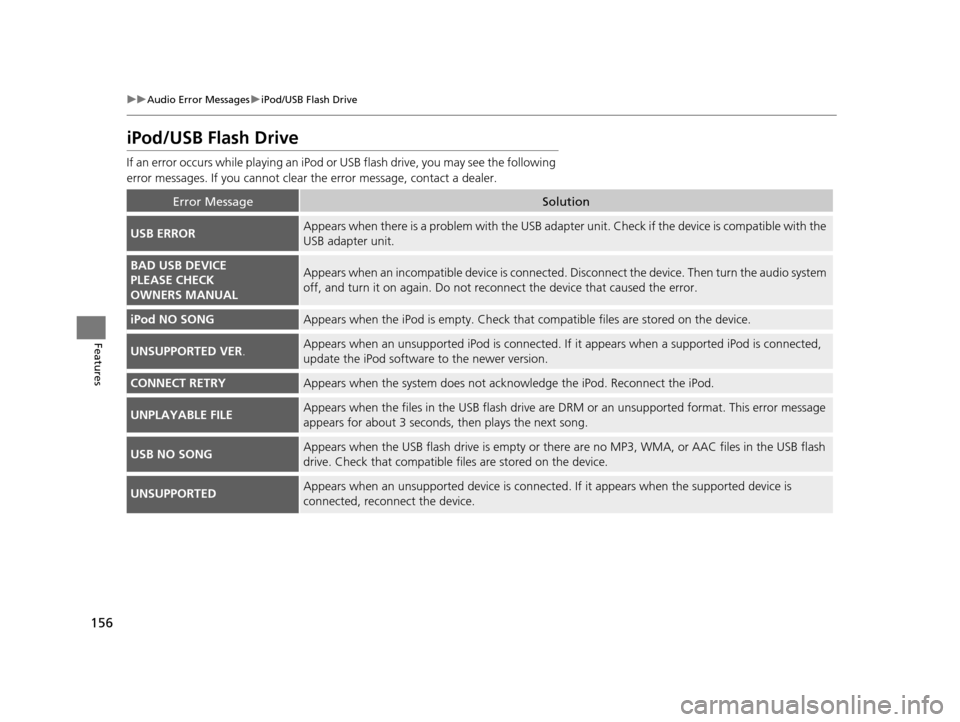
156
uuAudio Error Messages uiPod/USB Flash Drive
Features
iPod/USB Flash Drive
If an error occurs while play ing an iPod or USB flash driv e, you may see the following
error messages. If you cannot clear the error message, contact a dealer.
Error MessageSolution
USB ERRORAppears when there is a problem with the USB adapter unit. Check if the device is compatible with the
USB adapter unit.
BAD USB DEVICE
PLEASE CHECK
OWNERS MANUALAppears when an incompatible device is connected. Disconnect the device. Then turn the audio system
off, and turn it on again. Do not reco nnect the device that caused the error.
iPod NO SONGAppears when the iPod is empty. Check that compatible files are stored on the device.
UNSUPPORTED VER.Appears when an unsupported iPod is connected. If it appears when a supported iPod is connected,
update the iPod software to the newer version.
CONNECT RETRYAppears when the system does not ac knowledge the iPod. Reconnect the iPod.
UNPLAYABLE FILEAppears when the files in the USB flash drive are DRM or an unsupported format. This error message
appears for about 3 seconds, then plays the next song.
USB NO SONGAppears when the USB flash drive is empty or ther e are no MP3, WMA, or AAC files in the USB flash
drive. Check that compatible fi les are stored on the device.
UNSUPPORTEDAppears when an unsupported device is connected . If it appears when the supported device is
connected, reconnect the device.
15 CR-Z-31SZT6400.book 156 ページ 2014年8月1日 金曜日 午後1時59分

