2015 HONDA CIVIC COUPE pairing phone
[x] Cancel search: pairing phonePage 183 of 253

182
uuBluetooth ® HandsFreeLink ®u Phone Setting
Bluetooth ® HandsFreeLink ®
Phone Setting
HHOME uSetting su Phone uPhone
Set HFL options and features. Select an item.
The following items are available:
• Connect Phone : Connects another paired device.
2Pairing from Phone Setting P. 171
•Bluetooth Device List : Displays the list of paired devices.2Editing the Paired Phone Name P. 174
2 Deleting a Paired Phone P. 175
•Edit Speed Dial : Creates, edits, and deletes speed dial entries.2Setting Up Speed Dialing P. 177
•Ring Tone : Sets the ring tone.
Fixed : Uses the built-in ring tone of the system.
Mobile Phone (factory default): Uses the ring tone set for the phone.
• Automatic Phone Sync : Imports the phonebook and call history of the paired
phone automatically.
2 Automatic Phone Sync P. 176
•HondaLink Assist : Turns the HondaLink Assist on or off.
On : When a crash is detected, the vehicle will attempt to call emergency services
automatically.
Off (factory default): Disables the feature.
2HondaLink Assis t P. 195
1 Phone Setting
You can control the HFL system using voice
commands. 2 HFL Menu s P. 188
15 CIVIC NAVI-31TR38300.book 182 ページ 2014年8月7日 木曜日 午前11時49分
Page 189 of 253
188
uuBluetooth ® HandsFreeLink ®u HFL Menus
Bluetooth ® HandsFreeLink ®
HFL Menus
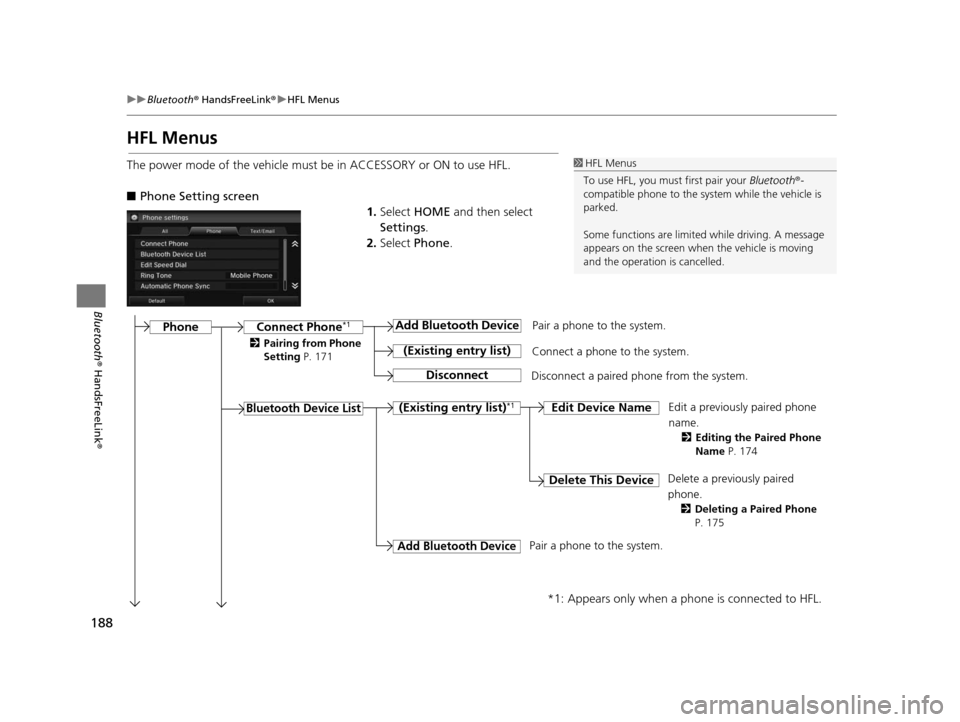
The power mode of the vehicle must be in ACCESSORY or ON to use HFL.
■Phone Setting screen
1.Select HOME and then select
Settings .
2. Select Phone .1HFL Menus
To use HFL, you must first pair your Bluetooth®-
compatible phone to the system while the vehicle is
parked.
Some functions are limited while driving. A message
appears on the screen when the vehicle is moving
and the operation is cancelled.
Pair a phone to the system.
Edit a previously paired phone
name.
2Editing the Paired Phone
Name P. 174
Connect Phone*1
Bluetooth Device Li st
Add Bluetooth Device
(Exi sting entry li st)
Di sconnect
Connect a phone to the system.
Disconnect a paired phone from the system.
(Exi sting entry li st)*1Edit Device Name
Delete Thi s DeviceDelete a previously paired
phone.
2 Deleting a Paired Phone
P. 175
Add Bluetooth Device
*1: Appears only when a phone is connected to HFL.
Pair a phone to the system.
Phone
2 Pairing from Phone
Setting P. 171
15 CIVIC NAVI-31TR38300.book 188 ページ 2014年8月7日 木曜日 午前11時49分
Page 193 of 253
192
Bluetooth® HandsFreeLink ®
Text/E-mail Message
If your paired phone is MAP-compatible, you can receive and hear text or e-mail
messages and reply to them using fixed reply messages.
2 Pairing a Phone P. 170
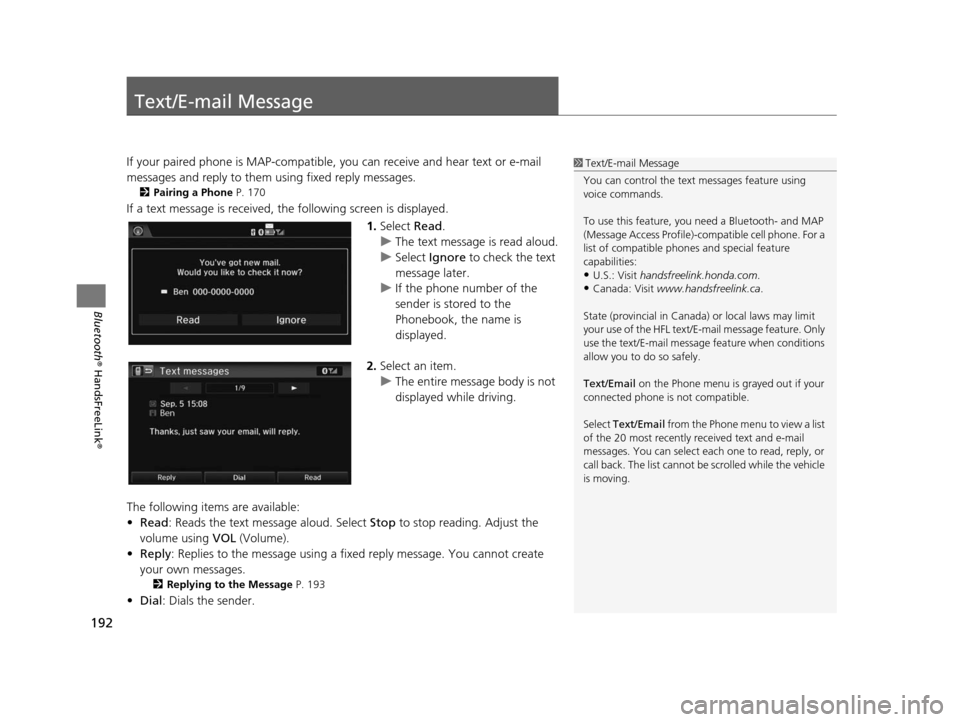
If a text message is received, the following screen is displayed.
1.Select Read.
u The text message is read aloud.
u Select Ignore to check the text
message later.
u If the phone number of the
sender is stored to the
Phonebook, the name is
displayed.
2. Select an item.
u The entire message body is not
displayed while driving.
The following items are available:
• Read : Reads the text message aloud. Select Stop to stop reading. Adjust the
volume using VOL (Volume).
• Reply : Replies to the message using a fixed reply message. You cannot create
your own messages.
2 Replying to the Message P. 193
•Dial : Dials the sender.
1Text/E-mail Message
You can control the text messages feature using
voice commands.
To use this feature, you need a Bluetooth- and MAP
(Message Access Profile)-c ompatible cell phone. For a
list of compatible phon es and special feature
capabilities:
•U.S.: Visit handsfreelink.honda.com.
•Canada: Visit www.handsfreelink.ca .
State (provincial in Canada) or local laws may limit
your use of the HFL text/E-m ail message feature. Only
use the text/E-mail message feature when conditions
allow you to do so safely.
Text/Email on the Phone menu is grayed out if your
connected phone is not compatible.
Select Text/Email from the Phone me nu to view a list
of the 20 most recently re ceived text and e-mail
messages. You can select each one to read, reply, or
call back. The list cannot be scrolled while the vehicle
is moving.
15 CIVIC NAVI-31TR38300.book 192 ページ 2014年8月7日 木曜日 午前11時49分
Page 196 of 253

195
Bluetooth® HandsFreeLink ®
HondaLink Assist
If your vehicle’s airbags deploy or if the unit detects that the vehicle is severely
impacted, your vehicle automatically will attempt to connect to the HondaLink
operator. Once connected, information about your vehicle, its positioning, and its
condition will be sent to the operator; you also can speak to the operator when
connected.
To use this function, you need to connect a phone via Bluetooth® in advance.
2Pairing a Phone P. 170
1.Select Call Now .
u If you do not select Call Now,
HondaLink Assist automatically
calls emergency services after
10 seconds.
2. Talk to the operator.
u When an emergency call is
connected, the talk with the
operator begins as necessary.
u Select Talk Now to talk to the
operator immediately.
u The talk with the operator may
be interrupted to confirm the
information about your vehicle
position.
u Select Hang Up or press the
(Hang-Up/Back) button
to hang up the call.
1 HondaLink Assist
IMPORTANT: Owner ac tivation constitutes
authorization for Honda to collect information from
your vehicle needed to provide the service, and
agreement to the Terms and Conditions at
www.hondalink.com/TermsAndConditions . In a
crash, HondaLink Assist will attempt to notify
emergency services but NEITHER Honda NOR ITS
SERVICE PROVIDERS GUARANTEE THAT SUCH
NOTIFICATION WILL OCCUR.
This function may not wo rk properly depending on
the phone, carrier, or contract conditions.
Your vehicle may not be able to connect to the operator
if the battery level is low, the line is disconnected, or you
do not have adequate cellular coverage.
You cannot use emergency services when:
•You travel outside the H ondaLink service coverage
areas.
•There is a problem with th e connecting devices, such
as the microphones, speakers, or the unit itself.
You cannot operate othe r navigation- or phone-
related functions using the screens while talking to
the operator.
If the unit fails to connect to the operator, it
repeatedly tries until it succeeds.
If you select Cancel or press the (Hang-Up/
Back) button before callin g the operator, you can
cancel to call.
15 CIVIC NAVI-31TR38300.book 195 ページ 2014年8月7日 木曜日 午前11時49分
Page 212 of 253

211
uuTroubleshooting uSmartphone Connection
Troubleshooting
Smartphone Connection
Does the navigation syst em work outside North
America?The navigation system contains maps fo r the 50 U.S. states, Canada, and Puerto
Rico. The navigation system will not work in Mexico or other countries.
2 Map Coverage P. 227
Can I play video DVDs in my navigation system?No. The navigation system is designed only to read music discs. If you experience
any problems that you cannot resolve, please contact your dealer.
How do I report errors I find in the database?Minor errors are bound to occur in a large database. If you encounter major errors, see
2Reporting Error s P. 226
ProblemSolution
I cannot connect my smartphone to the system.●Make sure your smartphone is compatible with the system, and that it is paired
and linked to Bluetooth® HandsFreeLink ®. To check phone compatibility,
–
U.S.: Visit handsfreelink.honda.com
–Canada: Visit www.handsfreelink.ca
2Pairing a Phone P. 170●The HondaLink app must be installed on your smartphone to connect to the
system. For more information: –
U.S.: Visit www.hondalink.com
–Canada: Visit www.honda.ca/hondalink●Check that your smartphone is in goo d operating condition. Then try the
following operations on your smartphone. –
Unlock the security.
–Connect to the system on the HOME screen.
–Close all apps.
–Restart the smartphone.
ProblemSolution
15 CIVIC NAVI-31TR38300.book 211 ページ 2014年8月7日 木曜日 午前11時49分
Page 220 of 253

219
uuError Messages uBluetooth ® HandsFreeLink ®
Troubleshooting
Bluetooth® Hand sFreeLink ®
Error MessageCau seSolution
Unable to pair with your
device.
Please try again.The system failed to connect to
the Bluetooth ® device.●Make sure that Bluetooth function is turned ON, on your
Bluetooth -compatible device. For details, check the manual of
your Bluetooth -compatible device.
●Try pairing your Bluetooth device again.
2Pairing a Phone P. 170
If the problem is not resolved yet, contact your dealer.
Unable to add smartphone.
Please check the settings in
your smartphone.The settings in your phone are
not correct.Make sure the settings in your phone are set to allow Bluetooth
connection.
Unable to import phonebook.
Please try again later.Your phone is not compatible
with Automatic Phone Sync.Check that your phone is compatible with Automatic Phone Sync.
Visit:
●U.S.: handsfreelink.honda.com●Canada: www.handsfreelink.ca
15 CIVIC NAVI-31TR38300.book 219 ページ 2014年8月7日 木曜日 午前11時49分
Page 221 of 253
220
uuError Messages uSmartphone Connection
Troubleshooting
Smartphone Connection
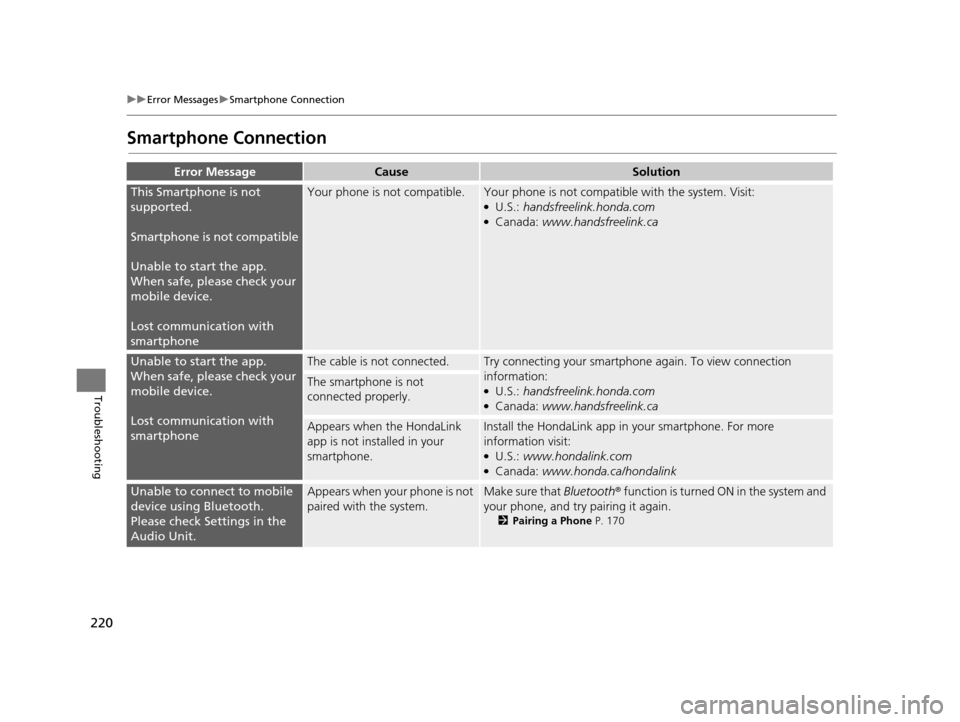
Error Mess ageCauseSolution
This Smartphone is not
supported.
Smartphone is not compatible
Unable to start the app.
When safe, please check your
mobile device.
Lost communication with
smartphoneYour phone is not compatible.Your phone is not compatib le with the system. Visit:●U.S.: handsfreelink.honda.com●Canada: www.handsfreelink.ca
Unable to start the app.
When safe, please check your
mobile device.
Lost communication with
smartphoneThe cable is not connected.Try connecting your smartphone again. To view connection
information:
●U.S.: handsfreelink.honda.com●Canada: www.handsfreelink.ca
The smartphone is not
connected properly.
Appears when the HondaLink
app is not installed in your
smartphone.Install the HondaLin k app in your smartphone. For more
information visit:
●U.S.: www.hondalink.com●Canada: www.honda.ca/hondalink
Unable to connect to mobile
device using Bluetooth.
Please check Settings in the
Audio Unit.Appears when your phone is not
paired with the system.Make sure that Bluetooth ® function is turned ON in the system and
your phone, and try pairing it again.
2 Pairing a Phone P. 170
15 CIVIC NAVI-31TR38300.book 220 ページ 2014年8月7日 木曜日 午前11時49分
Page 246 of 253

Index
245
Index
Index
Symbols
9 (Audio Power) Button ............................ 4
bn (Channel) Button ....................... 4, 129
a (Display Mode) Button ................. 4, 25
! (Display/Information) Button .... 4, 129
E (Eject) Button .......................................... 4
J (Hang-Up/Back) Button ............... 4, 22
h (Pick-Up) Button ............................. 4, 187
d (Talk) Button .................................... 4, 22
NB (Volume) Button ........................ 4, 129
Numbers
3D Angle Adjustment ................................ 55
3D Map ....................................................... 54
A
Address
Editing Address Book ................................ 30
Editing Avoid Area .................................... 45
Setting Destination ................................... 82
Address Book
Editing Address Book ................................ 28
Saving to Address Book ............................ 98
Setting Destination ................................... 87
Address Book PIN ....................................... 34
Adjust Time ................................................ 75
Answer ...................................................... 187
ATM/Bank (Place Category) ....................... 91Audio
..................................................... 7, 125
Basic Operation ........................................... 9
Remote Control ....................................... 128
Settings ................................................... 131
Voice Commands List .............................. 237
Audio Menu
Bluetooth ® Audio .................................... 164
Disc ......................................................... 144
FM/AM Radio .......................................... 135
iPod ......................................................... 149
Pandora ®................................................. 156
SiriusXM ® Radio ...................................... 139
USB Flash Drive ........................................ 160
Audio Source Pop-Up ............................... 131
Auto Daylight ............................................. 70
Auto Time Zone .......................................... 70
Automatic Phone Sync ............................. 176
Avoid Streets ............................................. 119
Avoided Area .............................................. 44
B
BACK............................................................. 4
Background Color ....................................... 66
Beep Volume .............................................. 67
Black Level .................................................. 65
Bluetooth (Settings) ................................. 172
Bluetooth On/Off Status .......................... 172
Bluetooth Device List
Audio ...................................................... 131
Phone ...................................................... 174
Bluetooth® Audio
Playing .................................................... 161 Voice Commands List .............................. 239
Bluetooth ® HandsFreeLink ®..................... 167
Bluetooth Setting .................................... 172
Making a Call .......................................... 183
Pairing a Phone ....................................... 170
Phone Setting.......................................... 182
Receiving a Call ....................................... 187
Setting Speed Dials.................................. 177
Brightness ................................................... 65
C
Call History ................................................ 186
Cancel Route ............................................. 118
Category
Editing Address Book ................................ 31
Place Category List .................................. 244
SiriusXM ®................................................ 138
Category History ......................................... 37
Change Bluetooth Audio Device ............. 131
Change Route Preference ........................ 111
Change State .............................................. 83
Channel
SiriusXM ®................................................ 138
Channel List .............................................. 139
City .............................................................. 84
City Vicinity ................................................. 92
Clear Current Route ................................. 120
15 CIVIC NAVI-31TR38300.book 245 ページ 2014年8月7日 木曜日 午前11時49分