Page 513 of 569

uuCleaning uExterior Care
512Maintenance
A good coat of automotive body wax helps protect your vehicle’s paint from the
elements. Wax will wear off over time and expose your vehicle’s paint to the
elements, so reapply as necessary.
If you get gasoline, oil, engine coolant, or battery fluid on resin coated parts, they
may be stained or the coating may peel. Promptly wipe it away using a soft cloth and
clean water.
Wipe using a glass cleaner.
Aluminum is susceptible to deterio ration caused by salt and other road
contaminants. Use a sponge and mild de tergent to wipe away promptly.
Be careful not to use harsh chemicals (including some commercial wheel cleaners) or
a stiff brush. They can damage the clear coat of the aluminum alloy wheels that
helps keep the aluminum from corroding and tarnishing.■
Applying Wax
■
Maintaining the Bumpers and Other Resin Coated Parts
■
Cleaning the Window
■
Maintaining Aluminum Wheels
1 Applying WaxNOTICEChemical solvents and strong cleaners can damage
the paint, metal, and plastic on your vehicle. Wipe
away spills immediately.1Maintaining the Bumpers and Other Resin Coated Parts
Ask a dealer about the correct coating material when
you want to repair the painted surface of the parts
made of resin.1Cleaning the Window
Wires are mounted to the inside of the rear window.
Wipe along the same direction as the wires with a
soft cloth so as not to damage them.
Page 516 of 569

515
Handling the Unexpected
This chapter explains how to handle unexpected troubles.
If a Tire Goes Flat
Temporarily Repairing a Flat Tire....... 516
Power System Won’t Start Checking the Procedure ................... 525If the Smart Entry Remote Battery is Weak .......................................... 526Emergency Power System Off........... 527
Jump Starting .................................... 528
Shift Lever Does Not Move .............. 530Overheating
How to Handle Overheating............. 531
Indicator, Coming On/Blinking
If the Low Oil Pressure Indicator Comes On ............................................. 534If the 12-Volt Battery Charging System
Indicator Comes On ....................... 534
If the Malfunction Indicator Lamp Comes On or Blinks ................................... 535If the Brake System Indicator (Red) Comes On ........................... ....... 536
If the Electric Power Steering (EPS) System
Indicator Comes On............................ 536If the Low Tire Pressure/TPMS Indicator Comes On or Blinks ....................... 537
Fuses Fuse Locations ................................. 538
Inspecting and Changing Fuses ........ 540
Emergency Towing ........................... 541
Page 526 of 569

525Handling the Unexpected
Power System Won’t StartChecking the ProcedureWhen the READY indicator does not come on and the Ready to Drive message
does not appear on the multi-information display, check the following items and
take appropriate action.
Checklist
Condition
What to Do
Check if the related
indicator or multi-
information display
messages come on.
The Temperature is Too Cold For Vehicle To Operate
message appears.
2 Multi-Information Display Warning and
Information Messages P. 86
The To Start, Hold Remote Near Start Button message
appears.
u Make sure the smart entry remote is in its operating range.
2 POWER Button Operating Range P. 137
2If the Smart Entry Remote Battery is Weak
P. 526
The POWER SYSTEM indicator comes on.
Have your vehicle checked by a dealer.
Check the brightness
of the interior lights. The interior lights are dim or do not come
on at all. Have the 12-volt battery checked by a dealer.
The interior lights come on normally. Check all fuses, or have your vehicle checked by
a dealer.
2 Inspecting and Changing Fuses P. 540
Check the shift lever
position.
The shift lever is not in
(P
or
(N
.
Move the shift lever to the
(P
position.
Check the
immobilizer system
indicator. When the immobilizer system indicator is blinking, the power
system cannot be turned on.
2
Immobilizer System Indicator P. 82
1Checking the Procedure
If you must start the vehicle immediately, use an
assisting vehicle to jump start it.
2 Jump Starting P. 528
Page 527 of 569
526
uuPower System Won’t Start uIf the Smart Entry Remote Battery is Weak
Handling the Unexpected
If the Smart Entry Remote Battery is WeakIf the beeper sounds, the To Start, Hold Remote Near Start Button message
appears on the multi-information display, and the indicator on the POWER button
flashes, the READY indicator does not come on.
Turn on the power system as follows. 1.Touch the center of the POWER button
with the H logo on the smart entry remote
while the indicator on the POWER button is
flashing. The buttons on the smart entry
remote should be facing you.
u The indicator flashes for about 30
seconds.
2. Depress the brake pedal and press the
POWER button within 10 seconds after the
beeper sounds and the indicator stays on.
u If you don’t depress the pedal, the mode
will change to ACCESSORY.
Page 529 of 569

528Handling the Unexpected
Jump StartingTurn off the power to electric devices, such as audio and lights. Turn off the power
system, then open the hood.1.Connect the first jumper cable to your
vehicle's 12-volt battery + terminal.
2. Connect the other end of the first jumper
cable to the booster battery + terminal.
u Use a 12-volt booster battery only.
u When using an automotive battery
charger to boost your 12-volt battery,
select a lower charging voltage than 15-
volt. Check the charger manual for the
proper setting.
3. Connect the second jumper cable to the
booster battery - terminal.
4. Connect the other end of the second
jumper cable to the engine mounting bolt
as shown. Do not connect this jumper cable
to any other part.
5. If your vehicle is c onnected to another
vehicle, start the assisting vehicle's engine
and increase its rpm slightly.
6. Attempt to start your vehicle's engine. If it
turns over slowly, check that the jumper
cables have good metal-to-metal contact.■
Jump Starting Procedure
1Jump Starting
Securely attach the jumper cables clips so that they
do not come off when the engine vibrates. Also be
careful not to tangle the jumper cables or allow the
cable ends to touch each other while attaching or
detaching the jumper cables.
12-volt battery performance degrades in cold
conditions and may prevent the engine from starting.
3
WARNING
A 12-volt battery can explode if you do not
follow the correct procedure, seriously
injuring anyone nearby.
Keep all sparks, open flames, and smoking
materials away from the 12-volt battery.
Booster Battery
Page 530 of 569
529
uuJump Starting u
Handling the Unexpected
Once your vehicle's engine has started, remove the jumper cables in the following
order.
1.Disconnect the jumper cable from your vehicle's ground.
2. Disconnect the other end of the jumper cable from the booster battery -
terminal.
3. Disconnect the jumper cable from your vehicle's 12-volt battery + terminal.
4. Disconnect the other end of the jumper cable from the booster battery +
terminal.
Have your vehicle inspected by a dealer.■
What to Do After the Engine Starts
Page 535 of 569

534Handling the Unexpected
Indicator, Coming On/BlinkingIf the Low Oil Pressure Indicator Comes On
■Reasons for the indicator to come on
Comes on when the engine oil pressure is low.■What to do as soon as the indicator comes on
1. Immediately park the vehicle in a safe place.
2. If necessary, turn the hazard warning lights on.■What to do after parking the vehicle
1. Turn the power system off and let the engine sit for about three
minute.
2. Open the hood and check the oil level.
u Add oil as necessary.
3. Turn the power system on and check the low oil pressure indicator.
u The indicator goes off: Start driving again.
u The indicator does not go off within 10 seconds: Turn the power
off and contact a dealer for repairs immediately.
If the 12-Volt Battery Charging System Indicator Comes On
■Reasons for the indicator to come on
Comes on when the 12-vo lt battery is not being charged.■What to do when the indicator comes on
Turn off the climate control system, rear defogger, and other electrical
systems, and immediately contact a dealer for repairs.
1 If the Low Oil Pressure Indicator Comes OnNOTICERunning the engine with low oil pressure can cause
serious mechanical damage almost immediately.
Page 539 of 569
538Handling the Unexpected
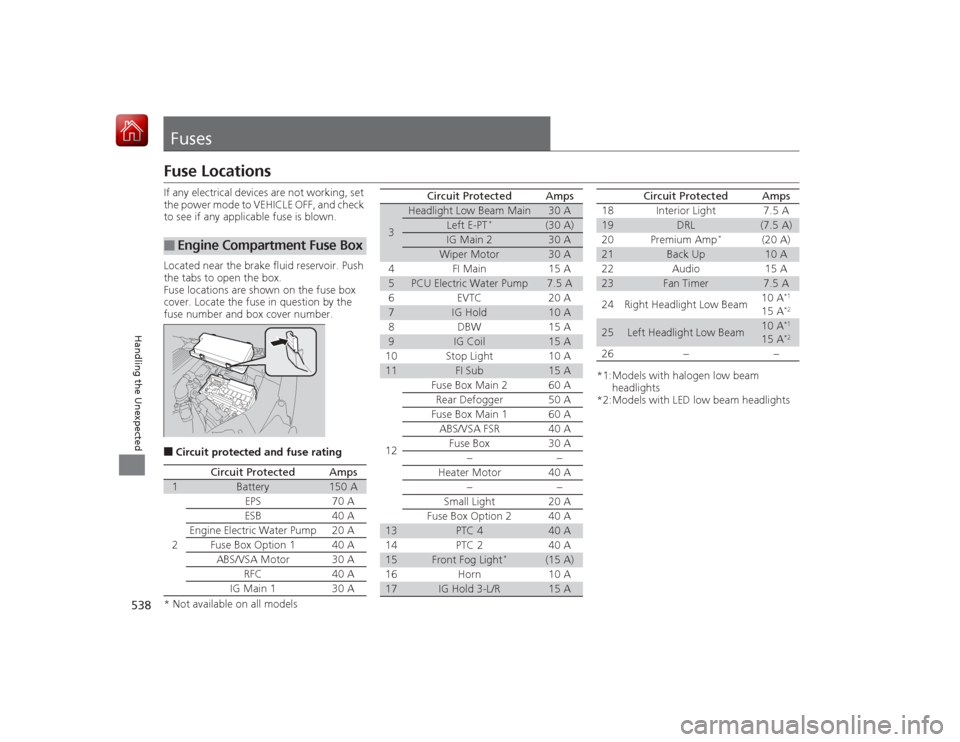
FusesFuse LocationsIf any electrical devices are not working, set
the power mode to VEHICLE OFF, and check
to see if any applicable fuse is blown.
Located near the brake fluid reservoir. Push
the tabs to open the box.
Fuse locations are shown on the fuse box
cover. Locate the fuse in question by the
fuse number and box cover number.■Circuit protected and fuse rating■
Engine Compartment Fuse Box
Circuit Protected
Amps
1
Battery
150 A
2
EPS
70 A
ESB 40 A
Engine Electric Water Pump
20 A
Fuse Box Option 1 40 A
ABS/VSA Motor
30 A
RFC 40 A
IG Main 1 30 A
3
Headlight Low Beam Main
30 A
Left E-PT
*
(30 A)
IG Main 2
30 A
Wiper Motor
30 A
4 FI Main 15 A
5
PCU Electric Water Pump
7.5 A
6EVTC 20A
7
IG Hold
10 A
8 DBW 15 A
9
IG Coil
15 A
10 Stop Light 10 A
11
FI Sub
15 A
12 Fuse Box Main 2 60 A
Rear Defogger 50 A
Fuse Box Main 1 60 A ABS/VSA FSR 40 A Fuse Box 30 A −−
Heater Motor 40 A −−
Small Light 20 A
Fuse Box Option 2 40 A
13
PTC 4
40 A
14 PTC 2 40 A
15
Front Fog Light
*
(15 A)
16 Horn 10 A
17
IG Hold 3-L/R
15 A
Circuit Protected
Amps
*1:Models with halogen low beam headlights
*2:Models with LED low beam headlights 18 Interior Light 7.5 A19
DRL
(7.5 A)
20 Premium Amp
*
(20 A)
21
Back Up
10 A
22 Audio 15 A
23
Fan Timer
7.5 A
24 Right Headlight Low Beam 10 A
*1
15 A
*2
25
Left Headlight Low Beam
10 A
*1
15 A
*2
26
− −
Circuit Protected
Amps
* Not available on all models

