2015 HONDA ACCORD HYBRID sensor
[x] Cancel search: sensorPage 58 of 569

57
uuAirbags uAirbag Care
Safe Driving
Airbag CareYou do not need to, and should not, perform any maintenance on or replace any
airbag system components yourself. However, you should have your vehicle
inspected by a dealer in the following situations:■When the airbags have deployed
If an airbag has inflated, the control unit and other related parts must be replaced.
Similarly, once an automatic seat belt tensioner has been activated, it must be
replaced.■When the vehicle has been in a moderate-to-severe collision
Even if the airbags did not inflate, have your dealer inspect the following: the driver’s
seat position sensor, weight sensors in the passenger’s seat, front seat belt
tensioners, and each seat belt that was worn during the crash.■Do not remove or modify a front seat without consulting a dealer
This would likely disable the driver's seat position sensor or the weight sensors in the
passenger's seat. If it is necessary to remove or modify a front seat to accommodate
a person with disabilities, contact a dealer, or for U.S. vehicles, American Honda
Automobile Customer Service at 800-999-1009 and for Canadian vehicles, Honda
Canada Customer Relations at 888-9-HONDA-9.
1 Airbag Care
We recommend against the use of salvaged airbag
system components, including the airbag, tensioners,
sensors, and control unit.
Page 78 of 569
77
uuIndicators u
Continued
Instrument Panel
Indicator
Name
On/Blinking
Explanation
Message
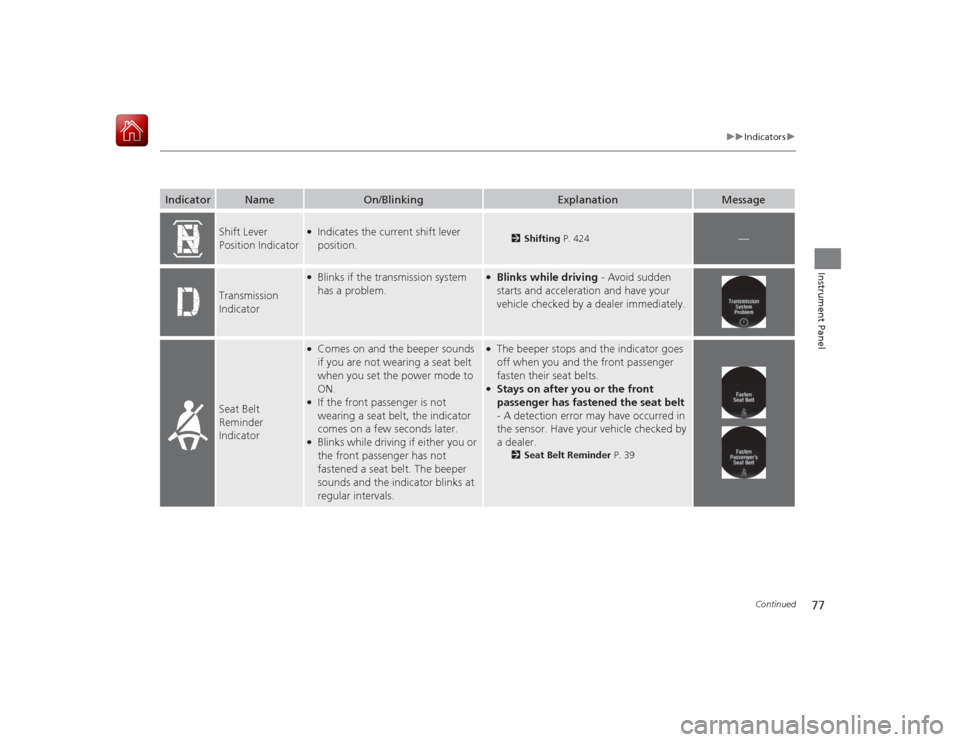
Shift Lever
Position Indicator
●Indicates the current shift lever
position.
2Shifting P. 424
—
Transmission
Indicator
●Blinks if the transmission system
has a problem.
●Blinks while driving - Avoid sudden
starts and acceleration and have your
vehicle checked by a dealer immediately.
Seat Belt
Reminder
Indicator
●Comes on and the beeper sounds
if you are not wearing a seat belt
when you set the power mode to
ON.●If the front passenger is not
wearing a seat belt, the indicator
comes on a few seconds later.●Blinks while driving if either you or
the front passenger has not
fastened a seat belt. The beeper
sounds and the indicator blinks at
regular intervals.
●The beeper stops and the indicator goes
off when you and the front passenger
fasten their seat belts.●Stays on after you or the front
passenger has fastened the seat belt
- A detection error may have occurred in
the sensor. Have your vehicle checked by
a dealer.
2 Seat Belt Reminder P. 39
Page 84 of 569

83
uuIndicators u
Continued
Instrument Panel
*1:On the left: Models without adaptive cruise control
On the right: Models with adaptive cruise controlIndicator
Name
On/Blinking
Explanation
Message
*1
Forward
Collision
Warning
(FCW )
Indicator
*●Comes on for a few seconds
when you set the power mode
to ON, then goes off.●Comes on when you have
customized FCW to turn off.●Comes on if there is a problem
with the FCW system.
●Stays on constantly without FCW off - Have your
vehicle checked by a dealer.
●Comes on when the FCW
system shuts itself off.
●Stays on - The temperature inside the FCW system is
too high. The system activates when the temperature
inside the system cools down.
2 Automatic shutoff P. 441
●Stays on - The radar sensor or the area around the
camera is blocked by dirt, mud, etc. Stop your vehicle
in a safe place, and wipe it off with a soft cloth.●Have your vehicle checked by a dealer if:
The indicator and message stay on after you cleaned
the radar sensor cover.
The indicator and message come back on after you
cleaned the area around the camera.
2 Automatic shutoff P. 4412Automatic shutoff P. 441
—
Models without adaptive cruise controlModels with adaptive cruise controlModels without adaptive cruise control
* Not available on all models
Page 91 of 569

90
uuIndicators uMulti-Information Display Warn ing and Information Messages
Instrument Panel
Message
Condition
Explanation
●Appears if there is a problem with the radiator
system.
●Drive slowly to prevent overheating and have your
vehicle checked by a dealer as soon as possible.
●Appears when there is a problem with the sensor on
the 12-volt battery.●Appears when the 12-volt battery is not charging.
●Have your vehicle checked by a dealer.
2 Checking the 12-Volt Battery P. 506
●Appears along with the 12-volt battery charging
system indicator - Turn off the climate control system
and rear defogger to reduce electricity consumption.
2 If the 12-Volt Battery Charging System Indicator
Comes On P. 534
●Appears when the washer fluid gets low.
●Refill the washer fluid.
2Refilling Window Washer Fluid P. 487
●Appears when the turn-by-turn direction comes on
the multi-information display.
2Refer to the Navigation System Manual
Canadian models
Page 101 of 569

uuGauges and Multi- Information Display uMulti-Information Display
100Instrument Panel
Shows the average speed in mph (U.S.) or km/h (Canada) since Trip A or Trip B was
reset.
Shows the instant fuel economy as a bar graph in mpg (U.S.) or l/100 km (Canada).
Shows the remaining oil life and Maintenance Minder
TM.
2 Maintenance Minder
TM P. 471
Shows the outside temperature in Fahrenheit (U.S.) or Celsius (Canada).■Adjusting the outside temperature display
Adjust the temperature reading up to ±5°F or ±3°C if the temperature reading
seems incorrect.
Shows you turn-by-turn driving directions to your destination linked with the
navigation system
*.
2 Refer to the Navigation System Manual■
Average Speed
■
Instant Fuel Economy
■
Engine Oil Life
■
Outside Temperature
■
Turn-by-Turn Directions
*
1Average Speed
You can change when to reset the average speed.
2 Customized Features P. 104, 2971Outside Temperature
The temperature sensor is in the front bumper.
Road heat and exhaust from another vehicle can
affect the temperature reading when your vehicle
speed is less than 19 mph (30 km/h).
It may take several mi nutes for the display to be
updated after the temperature reading has stabilized.
Use the multi-information display's customized
features to corre ct the temperature.
2 Customized Features P. 104, 2971Turn-by-Turn Directions
*
You can select whether the turn-by-turn display
comes on during the route guidance.
2 Customized Features P. 104, 297
* Not available on all models
Page 114 of 569

113
Controls
This chapter explains how to operate the various controls necessary for driving.
Clock.................................................. 114
Locking and Unlocking the Doors
Key Types and Functions .................. 116
Low Smart Entry Remote Signal Strength ........................................ 117
Locking/Unlocking the Doors from the Outside .......................................... 118
Locking/Unlocking the Doors from the Inside ............................................. 122
Childproof Door Locks ..................... 124
Auto Door Locking/Unlocking .......... 125
Opening and Closing the Trunk ....... 126
Security System Immobilizer System .......................... 130
Security System Alarm ...................... 130
Opening and Closing the Windows .... 133
Opening and Closing the Moonroof
*.. 136
Operating the Switches Around the Steering Wheel POWER Button................................. 137
Turn Signals ..................................... 140
Light Switches.................................. 140
Daytime Running Lights ................... 143
Wipers and Washers ........................ 144
Brightness Control ........................... 145
Rear Defogger/Heated Door Mirror
Button .......................................... 146
Driving Position Memory System
*.... 147
Adjusting the Steering Wheel........... 149 Adjusting the Mirrors
Interior Rearview Mirror ................... 150
Power Door Mirrors ......................... 151
Adjusting the Seats .......................... 152
Interior Lights/Interior Convenience
Items ................................................ 159
Climate Control System Using Automatic Climate Control .... 169
Synchronized Mode ......................... 171
Automatic Climate Control Sensors ... 172
* Not available on all models
Page 120 of 569
Continued
119
uuLocking and Unlocking the Doors uLocking/Unlocking the Doors from the Outside
Controls
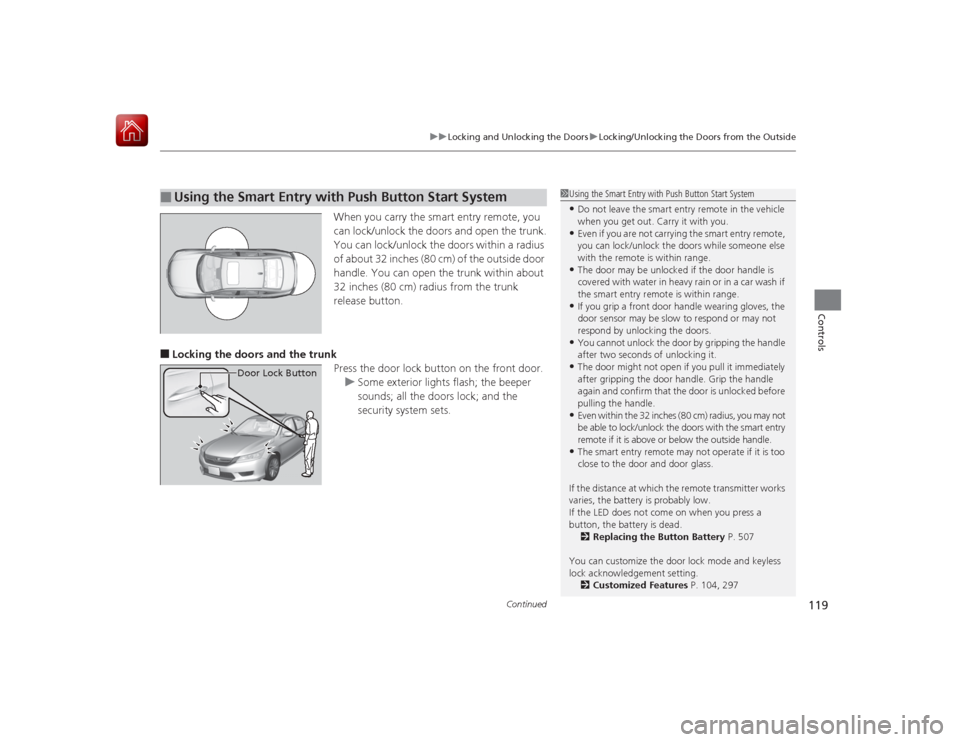
When you carry the smart entry remote, you
can lock/unlock the doors and open the trunk.
You can lock/unlock the doors within a radius
of about 32 inches (80 cm) of the outside door
handle. You can open the trunk within about
32 inches (80 cm) radius from the trunk
release button.
■Locking the doors and the trunk
Press the door lock button on the front door.u Some exterior lights flash; the beeper
sounds; all the doors lock; and the
security system sets.■
Using the Smart Entry with Push Button Start System
Door Lock Button
1Using the Smart Entry with Push Button Start System•Do not leave the smart entry remote in the vehicle
when you get out. Carry it with you.•Even if you are not carrying the smart entry remote,
you can lock/unlock the doors while someone else
with the remote is within range.•The door may be unlocked if the door handle is
covered with water in heavy rain or in a car wash if
the smart entry remot e is within range.•If you grip a front door handle wearing gloves, the
door sensor may be slow to respond or may not
respond by unlocking the doors.•You cannot unlock the door by gripping the handle
after two seconds of unlocking it.•The door might not open if you pull it immediately
after gripping the door handle. Grip the handle
again and confirm that the door is unlocked before
pulling the handle.•Even within the 32 inches (80 cm) radius, you may not
be able to lock/unlock the doors with the smart entry
remote if it is above or below the outside handle.•The smart entry remote may no t operate if it is too
close to the door and door glass.
If the distance at which the remote transmitter works
varies, the battery is probably low.
If the LED does not come on when you press a
button, the battery is dead. 2 Replacing the Button Battery P. 507
You can customize the door lock mode and keyless
lock acknowledgement setting. 2 Customized Features P. 104, 297
Page 142 of 569

Continued
141
uuOperating the Switches Around the Steering Wheel uLight Switches
Controls
Automatic lighting control can be used when
the power mode is in ON.
When you turn the light switch to AUTO, the
headlights and other exterior lights will switch
on and off automatically depending on the
ambient brightness. u You can change the auto light sensitivity
setting.
2 Customized Features P. 104, 297
■
Automatic Lighting Control
1Automatic Lighting Control
We recommend that you turn on the lights manually
when driving at night, in a dense fog, or in dark areas
such as long tunnels or parking facilities.
The light sensor is in the location shown below.
Do not cover this light sensor with anything;
otherwise, the automatic lighting system may not
work properly.
Adjust the auto light sensitivity as follows:
Setting
The exterior lights come on
when the ambient light is at
MAXHIGHMIDLOWMINLight Sensor
Bright
Dark