2015 GMC YUKON XL steering
[x] Cancel search: steeringPage 24 of 459
Black plate (17,1)GMC 2015i Yukon/Yukon XL Owner Manual (GMNA-Localizing-U.S./Canada/
Mexico-8431503) - 2015 - crc - 8/11/14
In Brief 1-17
While using Range Selection Mode,
cruise control and the Tow/Haul
Mode can be used.
Grade Braking is not available when
Range Selection Mode is active.
SeeTow/Haul Mode on page 9-36.
Four-Wheel Drive
If the vehicle has four-wheel drive,
you can send the engine's driving
power to all four wheels for extra
traction.
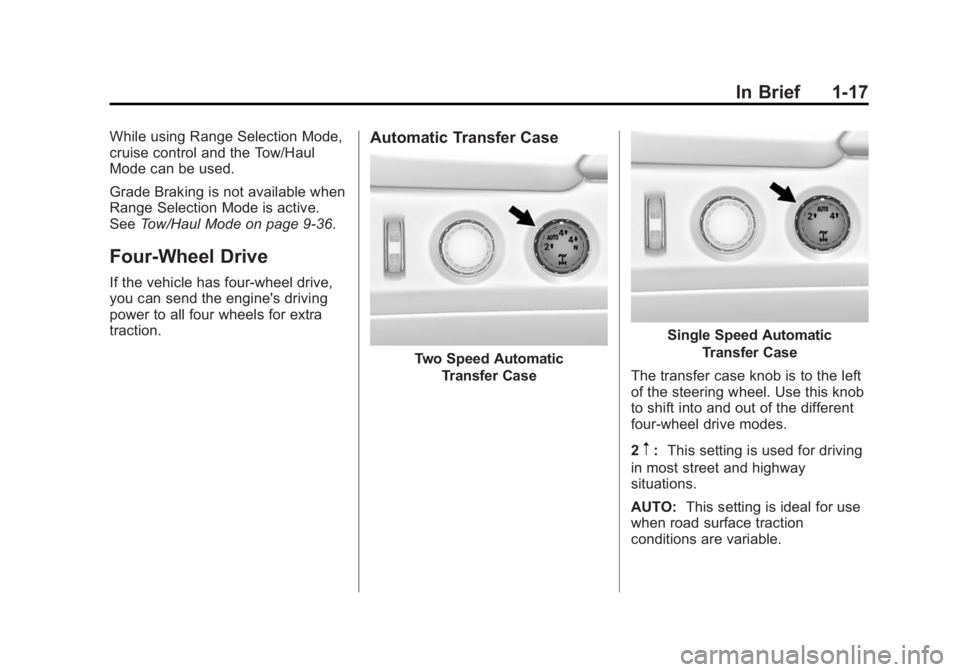
Automatic Transfer Case
Two Speed Automatic
Transfer Case
Single Speed Automatic Transfer Case
The transfer case knob is to the left
of the steering wheel. Use this knob
to shift into and out of the different
four-wheel drive modes.
2
m: This setting is used for driving
in most street and highway
situations.
AUTO: This setting is ideal for use
when road surface traction
conditions are variable.
Page 25 of 459

Black plate (18,1)GMC 2015i Yukon/Yukon XL Owner Manual (GMNA-Localizing-U.S./Canada/
Mexico-8431503) - 2015 - crc - 8/11/14
1-18 In Brief
4m:Use the Four-Wheel Drive
High position when extra traction is
needed, such as on snowy or icy
roads or in most off-road situations.
4
n: Vehicles with a two speed
automatic transfer case have a
Four-Wheel Drive Low position. This
setting sends maximum power to all
four wheels. You might choose 4
nif
you are driving off-road in deep
sand, mud, or snow, and while
climbing or descending steep hills.
N (Neutral): Vehicles with a two
speed automatic transfer case have
a N (Neutral) position. Shift the
transfer case to N (Neutral) only
when towing the vehicle. See
Recreational Vehicle Towing on
page 10-81 orTowing the Vehicle
on page 10-81.
See Four-Wheel Drive on
page 9-37.
Vehicle Features
Infotainment System
See the infotainment manual for
information on the radio, audio
players, phone, navigation system,
and voice or speech recognition.
It also includes information on
settings.
Steering Wheel Controls
The infotainment system can be
operated by using the steering
wheel controls. See "Steering
Wheel Controls" in the infotainment
manual.
Cruise Control
5: Press to turn the system on or
off. The indicator light is white when
cruise control is on and turns off
when cruise control is off.
SET −:Press briefly to set the
speed and activate cruise control.
If cruise control is already active,
use to decrease vehicle speed.
+RES: If there is a set speed in
memory, press to resume that
speed or press and hold to
Page 26 of 459

Black plate (19,1)GMC 2015i Yukon/Yukon XL Owner Manual (GMNA-Localizing-U.S./Canada/
Mexico-8431503) - 2015 - crc - 8/11/14
In Brief 1-19
accelerate. If cruise control is
already active, use to increase
vehicle speed.
*:Press to disengage cruise
control without erasing the set
speed from memory.
See Cruise Control on page 9-47 or
Adaptive Cruise Control on
page 9-50 (If Equipped).
Driver Information
Center (DIC)
The DIC display is in the instrument
cluster. It shows the status of many
vehicle systems.
If the vehicle has the base level
instrument cluster, the trip odometer
reset stem is used to operate
the DIC.
If the vehicle has the uplevel
instrument cluster, the right steering
wheel controls are used to operate
the DIC.worx:Press to move up or
down in a list.
oorp: Press to move between
the interactive display zones in the
cluster.
V: Press to open a menu or select
a menu item. Press and hold to
reset values on certain screens.
See Driver Information Center (DIC)
on page 5-28.
Forward Collision Alert
(FCA) System
If equipped, FCA may help avoid or
reduce the harm caused by
front-end crashes. FCA provides a
green indicator,
V, when a vehicle
is detected ahead. This indicator
displays amber if you follow a
vehicle much too closely. When
approaching a vehicle ahead too
quickly, FCA provides a flashing red
alert on the windshield and rapidly
beeps or pulses the driver seat.
See Forward Collision Alert (FCA)
System on page 9-61.
Lane Departure
Warning (LDW)
If equipped, LDW may help avoid
unintentional lane departures at
speeds of 56 km/h (35 mph) or
greater. LDW uses a camera sensor
to detect the lane markings. The
LDW light,
@, is green if a lane
marking is detected. If the vehicle
departs the lane, the light will
Page 30 of 459

Black plate (23,1)GMC 2015i Yukon/Yukon XL Owner Manual (GMNA-Localizing-U.S./Canada/
Mexico-8431503) - 2015 - crc - 8/11/14
In Brief 1-23
Performance and
Maintenance
Traction Control/
Electronic Stability
Control
The vehicle has a traction control
system that limits wheel spin and
the StabiliTrak system that assists
with directional control of the vehicle
in difficult driving conditions. Both
systems come on automatically
when the vehicle is started and
begins to move.
.To turn off traction control, press
and release
gon the instrument
panel to the left of the steering
wheel. The traction off light
i
displays in the instrument
cluster. The appropriate DIC
message displays. See Ride
Control System Messages on
page 5-38.
.To turn off both traction control
and StabiliTrak, press and
hold
guntiliandgilluminate
in the instrument cluster and the
appropriate DIC message
displays. See Ride Control
System Messages on page 5-38.
.Press and releasegagain to
turn on both systems.
.StabiliTrak will automatically turn
on if the vehicle exceeds
56 km/h (35 mph). Traction
control will remain off.
See Traction Control/Electronic
Stability Control on page 9-44.
Tire Pressure Monitor
This vehicle may have a Tire
Pressure Monitor System (TPMS).
The low tire pressure warning light
alerts to a significant loss in
pressure of one of the vehicle's
tires. If the warning light comes on,
stop as soon as possible and inflate
the tires to the recommended
pressure shown on the Tire and
Loading Information label. See
Vehicle Load Limits on page 9-14.
The warning light will remain on until
the tire pressure is corrected.
The low tire pressure warning light
may come on in cool weather when
the vehicle is first started, and then
turn off as the vehicle is driven. This
may be an early indicator that the
tire pressures are getting low and
the tires need to be inflated to the
proper pressure.
The TPMS does not replace normal
monthly tire maintenance. Maintain
the correct tire pressures.
See Tire Pressure Monitor System
on page 10-53.
Page 35 of 459
Black plate (2,1)GMC 2015i Yukon/Yukon XL Owner Manual (GMNA-Localizing-U.S./Canada/
Mexico-8431503) - 2015 - crc - 8/11/14
2-2 Keys, Doors, and Windows
Keys and Locks
Keys (Keys)
{Warning
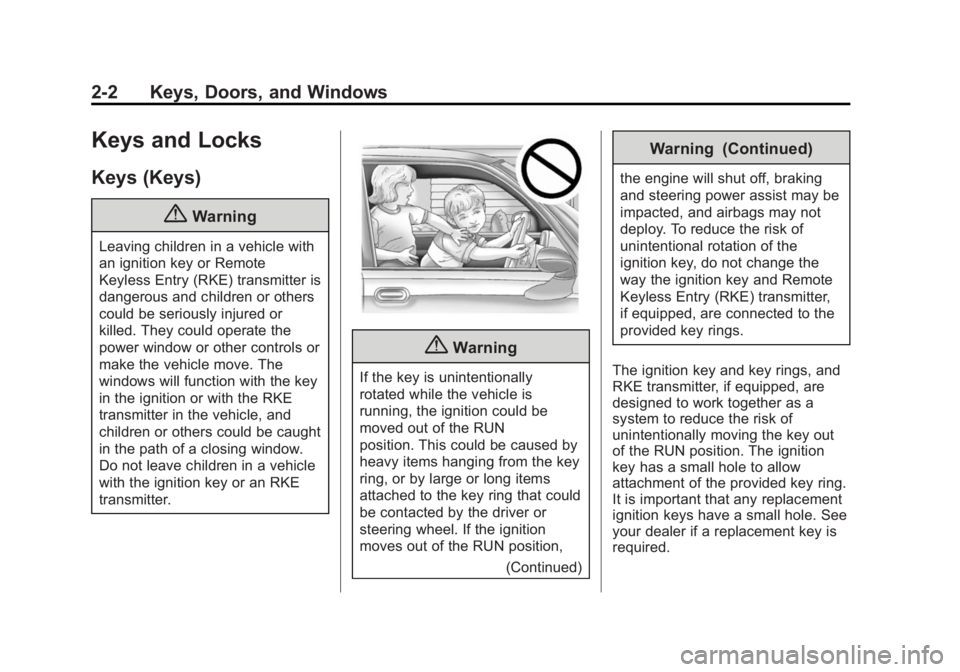
Leaving children in a vehicle with
an ignition key or Remote
Keyless Entry (RKE) transmitter is
dangerous and children or others
could be seriously injured or
killed. They could operate the
power window or other controls or
make the vehicle move. The
windows will function with the key
in the ignition or with the RKE
transmitter in the vehicle, and
children or others could be caught
in the path of a closing window.
Do not leave children in a vehicle
with the ignition key or an RKE
transmitter.
{Warning
If the key is unintentionally
rotated while the vehicle is
running, the ignition could be
moved out of the RUN
position. This could be caused by
heavy items hanging from the key
ring, or by large or long items
attached to the key ring that could
be contacted by the driver or
steering wheel. If the ignition
moves out of the RUN position,(Continued)
Warning (Continued)
the engine will shut off, braking
and steering power assist may be
impacted, and airbags may not
deploy. To reduce the risk of
unintentional rotation of the
ignition key, do not change the
way the ignition key and Remote
Keyless Entry (RKE) transmitter,
if equipped, are connected to the
provided key rings.
The ignition key and key rings, and
RKE transmitter, if equipped, are
designed to work together as a
system to reduce the risk of
unintentionally moving the key out
of the RUN position. The ignition
key has a small hole to allow
attachment of the provided key ring.
It is important that any replacement
ignition keys have a small hole. See
your dealer if a replacement key is
required.
Page 74 of 459
Black plate (5,1)GMC 2015i Yukon/Yukon XL Owner Manual (GMNA-Localizing-U.S./Canada/
Mexico-8431503) - 2015 - crc - 8/11/14
Seats and Restraints 3-5
.Tilt the top of the control forward
to raise.
{Warning
Sitting in a reclined position when
the vehicle is in motion can be
dangerous. Even when buckled
up, the safety belts cannot do
their job.
The shoulder belt will not be
against your body. Instead, it will
be in front of you. In a crash, you
could go into it, receiving neck or
other injuries.
The lap belt could go up over
your abdomen. The belt forces
would be there, not at your pelvic
bones. This could cause serious
internal injuries.
For proper protection when the
vehicle is in motion, have the
seatback upright. Then sit well
back in the seat and wear the
safety belt properly.
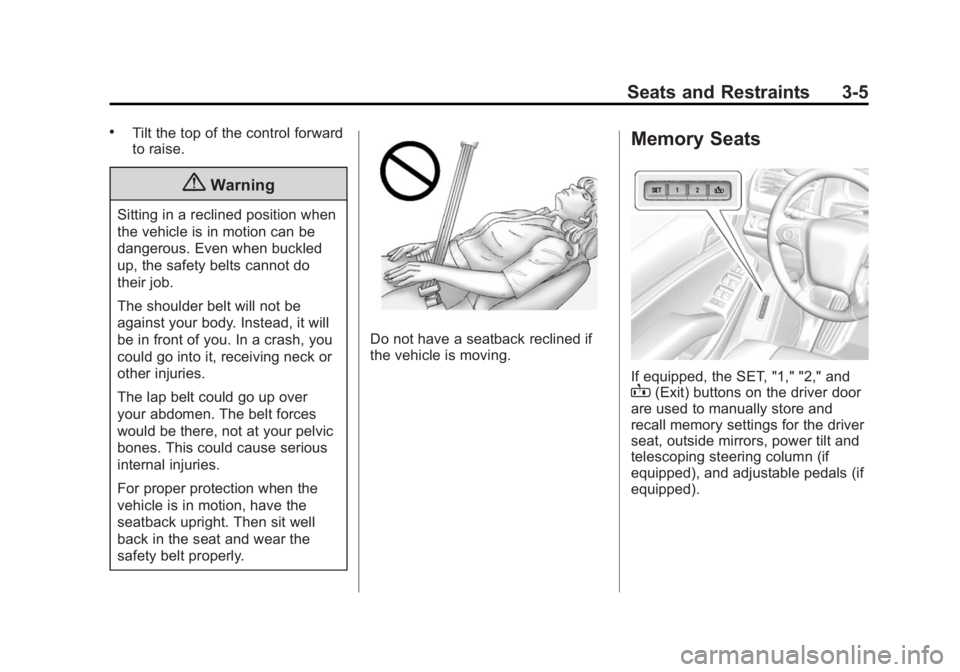
Do not have a seatback reclined if
the vehicle is moving.
Memory Seats
If equipped, the SET, "1," "2," andB(Exit) buttons on the driver door
are used to manually store and
recall memory settings for the driver
seat, outside mirrors, power tilt and
telescoping steering column (if
equipped), and adjustable pedals (if
equipped).
Page 75 of 459
Black plate (6,1)GMC 2015i Yukon/Yukon XL Owner Manual (GMNA-Localizing-U.S./Canada/
Mexico-8431503) - 2015 - crc - 8/11/14
3-6 Seats and Restraints
Storing Memory Positions
To store positions to the“1”and “2”
buttons:
1. Adjust the driver seat, outside mirrors, power tilt and
telescoping steering column (if
equipped), and adjustable
pedals (if equipped) to the
desired driving positions.
2. Press and release SET. A beep will sound.
3. Immediately press and hold “1”
until two beeps sound.
4. Repeat Steps 1–3 for a second driver using “2.”
To store positions to the
B(Exit)
button and easy exit features:
1. Adjust the driver seat, power tilt and telescoping steering column
(if equipped), adjustable pedals,
and the outside mirrors on some
vehicles to the desired positions
for getting out of the vehicle.
2. Press and release SET. A beep will sound. 3. Immediately press and hold
B
until two beeps sound.
Manually Recalling Memory
Positions
If the vehicle is off or not in P (Park),
press and hold "1," "2," or
B(Exit)
to manually recall the previously
stored memory positions. Releasing
"1,” "2," or
Bbefore the stored
positions are reached stops the
recall.
If the vehicle is on and in P (Park),
press and release “1,” “2,”or
Bto
manually recall the previously
stored memory positions. Placing
the ignition in OFF/LOCK before the
stored positions are reached stops
the recall.
Automatically Recalling Memory
Positions (Auto Memory Recall)
The Auto (Automatic) Memory
Recall feature automatically recalls
the current driver ’s previously stored
“1” or“2” position when entering the
vehicle. If the Auto Memory Recall feature is
enabled in the vehicle
personalization menu, memory
“1”
or “2” positions are recalled in the
following ways:
.PressKon the RKE transmitter
and open the driver door.
.PressKon the RKE transmitter
when the driver door is open.
.If equipped with Keyless Access,
press the lock/unlock button on
the outside driver door handle
and open the driver door. The
RKE transmitter must be present
for the recall to activate.
See Vehicle Personalization on
page 5-44.
To stop recall movement, press one
of the memory, power mirror,
or power seat controls; press the
power tilt and telescoping steering
column control (if equipped); or
press the adjustable pedal control (if
equipped).
Page 76 of 459

Black plate (7,1)GMC 2015i Yukon/Yukon XL Owner Manual (GMNA-Localizing-U.S./Canada/
Mexico-8431503) - 2015 - crc - 8/11/14
Seats and Restraints 3-7
RKE Transmitters are not labeled
with a number. If your memory seat
position is stored to”1”or“2” but this
position is not automatically
recalling, then change the stored
position or switch RKE transmitters
with the other driver
Easy Exit Recall
If programmed on in the vehicle
personalization menu, the easy exit
feature automatically moves the
driver seat, power tilt and
telescoping steering column (if
equipped), adjustable pedals (if
equipped), and outside mirrors on
some vehicles to the memory
positions stored to the
B(Exit)
button. See “Storing Memory
Positions” listed previously. See
also Vehicle Personalization on
page 5-44. Easy exit recall automatically
activates when one of the following
occurs:
.The vehicle is turned off and the
driver door is opened within a
short time.
.The vehicle is turned off with the
driver door open.
Obstructions
If something has blocked the driver
seat, power tilt and telescoping
steering column, and/or the
adjustable pedals while recalling a
memory position, while recalling a
memory position, the recall may
stop. Remove the obstruction. Then
do one of the following:
.If automatically or manually
recalling the stored memory
position, press and hold the
appropriate manual control for
two seconds. Try recalling again
by pressing the appropriate
memory button.
.If recalling the exit position,
press and hold the appropriate
manual control for the exit
feature not recalling for
two seconds. Then try recalling
the exit position again.
If the memory position is still not
recalling, see your dealer for
service.
Heated and Cooled Front
Seats
If equipped, the vehicle may have
heated or heated and cooled seats.
{Warning
If you cannot feel temperature
change or pain to the skin, the
seat heater may cause burns. To
reduce the risk of burns, people
with such a condition should use
care when using the seat heater,
especially for long periods of
time. Do not place anything on (Continued)