2015 GMC SIERRA 1500 buttons
[x] Cancel search: buttonsPage 17 of 539
Black plate (10,1)GMC Sierra Owner Manual (GMNA Localizing-U.S/Canada/Mexico-
7299746) - 2015 - crc - 11/11/13
1-10 In Brief
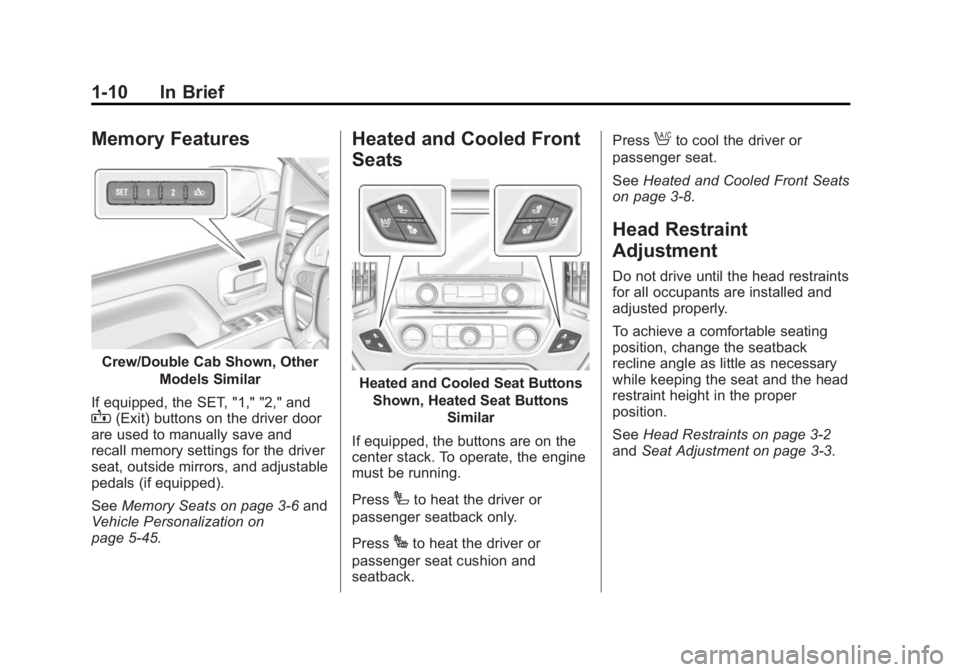
Memory Features
Crew/Double Cab Shown, OtherModels Similar
If equipped, the SET, "1," "2," and
B(Exit) buttons on the driver door
are used to manually save and
recall memory settings for the driver
seat, outside mirrors, and adjustable
pedals (if equipped).
See Memory Seats on page 3-6 and
Vehicle Personalization on
page 5-45.
Heated and Cooled Front
Seats
Heated and Cooled Seat Buttons
Shown, Heated Seat Buttons Similar
If equipped, the buttons are on the
center stack. To operate, the engine
must be running.
Press
Ito heat the driver or
passenger seatback only.
Press
Jto heat the driver or
passenger seat cushion and
seatback. Press
Ato cool the driver or
passenger seat.
See Heated and Cooled Front Seats
on page 3-8.
Head Restraint
Adjustment
Do not drive until the head restraints
for all occupants are installed and
adjusted properly.
To achieve a comfortable seating
position, change the seatback
recline angle as little as necessary
while keeping the seat and the head
restraint height in the proper
position.
See Head Restraints on page 3-2
and Seat Adjustment on page 3-3.
Page 27 of 539
Black plate (20,1)GMC Sierra Owner Manual (GMNA Localizing-U.S/Canada/Mexico-
7299746) - 2015 - crc - 11/11/13
1-20 In Brief
2. Press the plus/minus buttons onthe shift lever to select the
desired range of gears for
current driving conditions. See
Manual Mode on page 9-36.
While using Range Selection Mode,
cruise control and the Tow/Haul
Mode can be used.
Grade Braking is not available when
Range Selection Mode is active.
See Tow/Haul Mode on page 9-37.
Four-Wheel Drive
If the vehicle has Four-Wheel Drive,
the engine's driving power can be
sent to all four wheels for extra
traction.
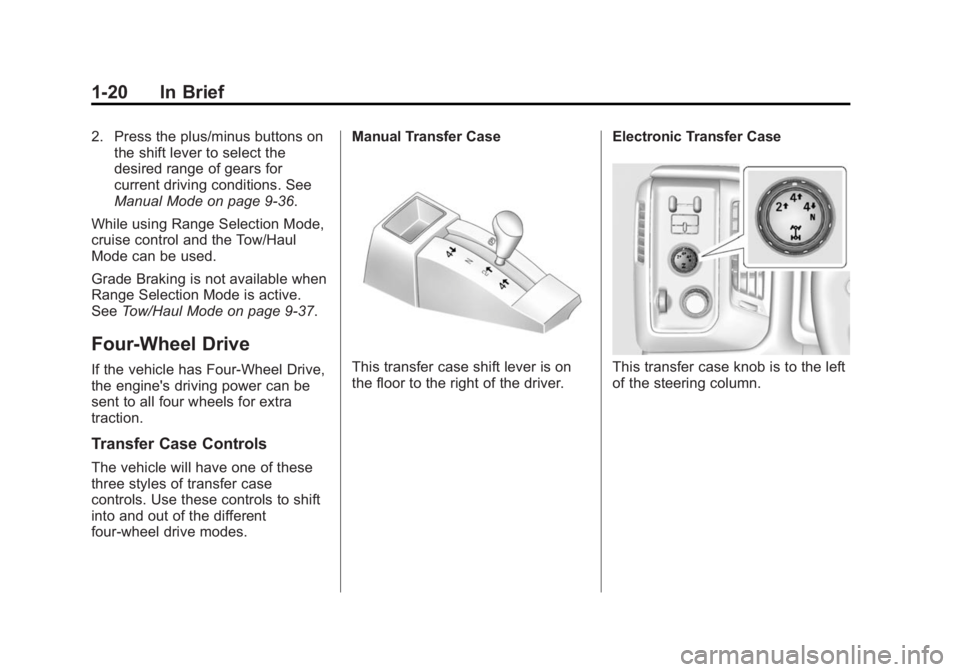
Transfer Case Controls
The vehicle will have one of these
three styles of transfer case
controls. Use these controls to shift
into and out of the different
four-wheel drive modes. Manual Transfer Case
This transfer case shift lever is on
the floor to the right of the driver.
Electronic Transfer CaseThis transfer case knob is to the left
of the steering column.
Page 33 of 539
Black plate (26,1)GMC Sierra Owner Manual (GMNA Localizing-U.S/Canada/Mexico-
7299746) - 2015 - crc - 11/11/13
1-26 In Brief
provide the object distance. In
addition, multiple beeps or seat
pulses may occur if very close to an
object.
The vehicle may also have the Front
Parking Assist system.
SeeAssistance Systems for Parking
or Backing on page 9-56.
Power Outlets
Accessory power outlets can be
used to plug in electrical equipment,
such as a cell phone, MP3
player, etc.
The vehicle may have up to four
accessory power outlets.
Vehicles with a Center Console
.One or two in front of the
cupholders on the center
console.
.One inside the center console.
.One on the rear of the center
console. Vehicles with Bench Seats
.One on the center stack below
the climate control system.
.One or two in the storage area
on the bench seat.
Lift the cover to access and replace
when not in use.
See Power Outlets on page 5-6.
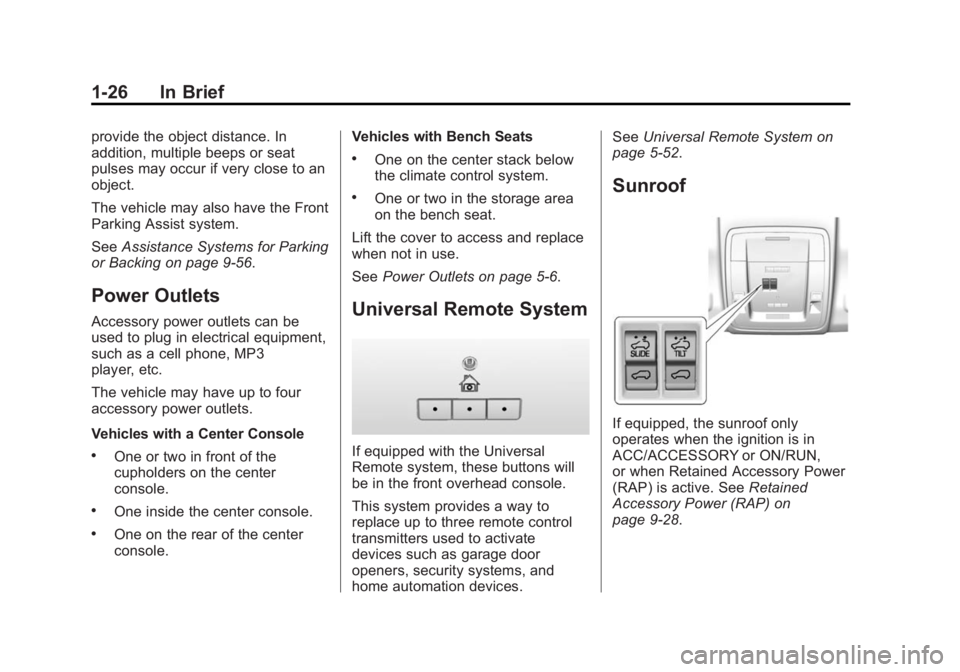
Universal Remote System
If equipped with the Universal
Remote system, these buttons will
be in the front overhead console.
This system provides a way to
replace up to three remote control
transmitters used to activate
devices such as garage door
openers, security systems, and
home automation devices. See
Universal Remote System on
page 5-52.
Sunroof
If equipped, the sunroof only
operates when the ignition is in
ACC/ACCESSORY or ON/RUN,
or when Retained Accessory Power
(RAP) is active. See Retained
Accessory Power (RAP) on
page 9-28.
Page 35 of 539
Black plate (28,1)GMC Sierra Owner Manual (GMNA Localizing-U.S/Canada/Mexico-
7299746) - 2015 - crc - 11/11/13
1-28 In Brief
.To turn off both traction control
and StabiliTrak, press and
hold
guntiliandgilluminate
in the instrument cluster and the
appropriate DIC message
displays. See Ride Control
System Messages on page 5-40.
.Press and releasegagain to
turn on both systems.
.StabiliTrak will automatically turn
on if the vehicle exceeds
56 km/h (35 mph). Traction
control will remain off.
See Traction Control/Electronic
Stability Control on page 9-50.
Tire Pressure Monitor
This vehicle may have a Tire
Pressure Monitor System (TPMS).
The low tire pressure warning light
alerts to a significant loss in
pressure of one of the vehicle's
tires. If the warning light comes on,
stop as soon as possible and inflate
the tires to the recommended
pressure shown on the Tire and
Loading Information label. See
Vehicle Load Limits on page 9-15.
The warning light will remain on until
the tire pressure is corrected.
The low tire pressure warning light
may come on in cool weather when
the vehicle is first started, and then
turn off as the vehicle is driven. This
may be an early indicator that the
tire pressures are getting low and
the tires need to be inflated to the
proper pressure. The TPMS does not replace normal
monthly tire maintenance. Maintain
the correct tire pressures.
See
Tire Pressure Monitor System
on page 10-61.Engine Oil Life System
The engine oil life system calculates
engine oil life based on vehicle use
and, on most vehicles, displays a
DIC message when it is necessary
to change the engine oil and filter.
The oil life system should be reset
to 100% only following an oil
change.
Resetting the Oil Life System
To reset the engine oil life system:
1. Display OIL LIFE REMAINING on the DIC. See Driver
Information Center (DIC) (Base
Level) on page 5-30 orDriver
Information Center (DIC)
(Uplevel) on page 5-32. If the
vehicle does not have DIC
buttons, the vehicle must be in
P (Park) to access this display.
Page 36 of 539
Black plate (29,1)GMC Sierra Owner Manual (GMNA Localizing-U.S/Canada/Mexico-
7299746) - 2015 - crc - 11/11/13
In Brief 1-29
2. Press and hold theVbutton on
the DIC, or the trip odometer
reset stem if the vehicle does
not have DIC buttons, for
several seconds. The oil life will
change to 100%.
The oil life system can also be reset
as follows:
1. Turn the ignition to ON/RUN with the engine off.
2. Fully press the accelerator pedal slowly three times within
five seconds.
3. Display OIL LIFE REMAINING on the DIC. If the display shows
100%, the system is reset.
See Engine Oil Life System on
page 10-13.
E85 or FlexFuel
Vehicles with a yellow fuel cap can
use either unleaded gasoline or
ethanol fuel containing up to 85%
ethanol (E85). See E85 or FlexFuel on page 9-66. For all other vehicles,
use only the unleaded gasoline
described under
Fuel on page 9-64.
Driving for Better Fuel
Economy
Driving habits can affect fuel
mileage. Here are some driving tips
to get the best fuel economy
possible.
.Avoid fast starts and accelerate
smoothly.
.Brake gradually and avoid
abrupt stops.
.Avoid idling the engine for long
periods of time.
.When road and weather
conditions are appropriate, use
cruise control.
.Always follow posted speed
limits or drive more slowly when
conditions require.
.Keep vehicle tires properly
inflated.
.Combine several trips into a
single trip.
.Replace the vehicle's tires with
the same TPC Spec number
molded into the tire's sidewall
near the size.
.Follow recommended scheduled
maintenance.
Roadside Assistance
Program
U.S.: 1-888-881-3302
TTY Users (U.S. Only):
1-888-889-2438
Canada: 1-800-268-6800
New GMC owners are automatically
enrolled in the Roadside Assistance
Program.
SeeRoadside Assistance Program
on page 13-5.
Page 54 of 539
Black plate (17,1)GMC Sierra Owner Manual (GMNA Localizing-U.S/Canada/Mexico-
7299746) - 2015 - crc - 11/11/13
Keys, Doors, and Windows 2-17
1. When the approaching vehicle isa long distance away, the image
in the main mirror is small and
near the inboard edge of the
mirror.
2. As the vehicle gets closer, the image in the main mirror gets
larger and moves outboard.
3. As the vehicle enters the blind zone, the image transitions from
the main mirror to the blind spot
mirror.
4. When the vehicle is in the blind zone, the image only appears in
the blind spot mirror.
Using the Outside Mirror with
the Blind Spot Mirror
1. Set the main mirror so that theside of the vehicle can just be
seen and the blind spot mirror
has an unobstructed view.
2. When checking for traffic or before changing a lane, look at
the main driver/passenger side
mirror to observe traffic in the
adjacent lane, behind your vehicle. Check the blind spot
mirror for a vehicle in the blind
zone. Then, glance over your
shoulder to double check before
moving slowly into the
adjacent lane.
Reverse Tilt Mirrors
If equipped with the memory
package, the passenger and/or
driver mirror tilts to a preselected
position when the vehicle is in
R (Reverse). This feature allows the
driver to view the curb when parallel
parking. The mirror(s) return to the
original position when the vehicle is
shifted out of R (Reverse), the
ignition is turned off, or if the vehicle
is driven in (R) above a
predetermined speed.
Turn this feature on or off through
vehicle personalization. See
Vehicle
Personalization on page 5-45.
Interior Mirrors
Interior Rearview Mirrors
Adjust the rearview mirror for a clear
view of the area behind your
vehicle.
If equipped with OnStar, the vehicle
may have three control buttons at
the bottom of the mirror. See your
dealer for more information about
OnStar and how to subscribe to it.
See OnStar Overview on page 14-1.
Do not spray glass cleaner directly
on the mirror. Use a soft towel
dampened with water.
Manual Rearview Mirror
If equipped, push the tab forward for
daytime use and pull it rearward for
nighttime use to avoid glare from
the headlamps from behind.
Page 65 of 539
Black plate (6,1)GMC Sierra Owner Manual (GMNA Localizing-U.S/Canada/Mexico-
7299746) - 2015 - crc - 11/11/13
3-6 Seats and Restraints
To adjust a manual seatback:
1. Lift the lever.The seatback will automatically
fold forward.
2. To recline, move the seatback rearward to the desired position,
then release the lever to lock the
seatback in place.
3. Push and pull on the seatback to make sure it is locked.
To return the seatback to the upright
position:
1. Lift the lever fully without applying pressure to the
seatback, and the seatback will
return to the upright position.
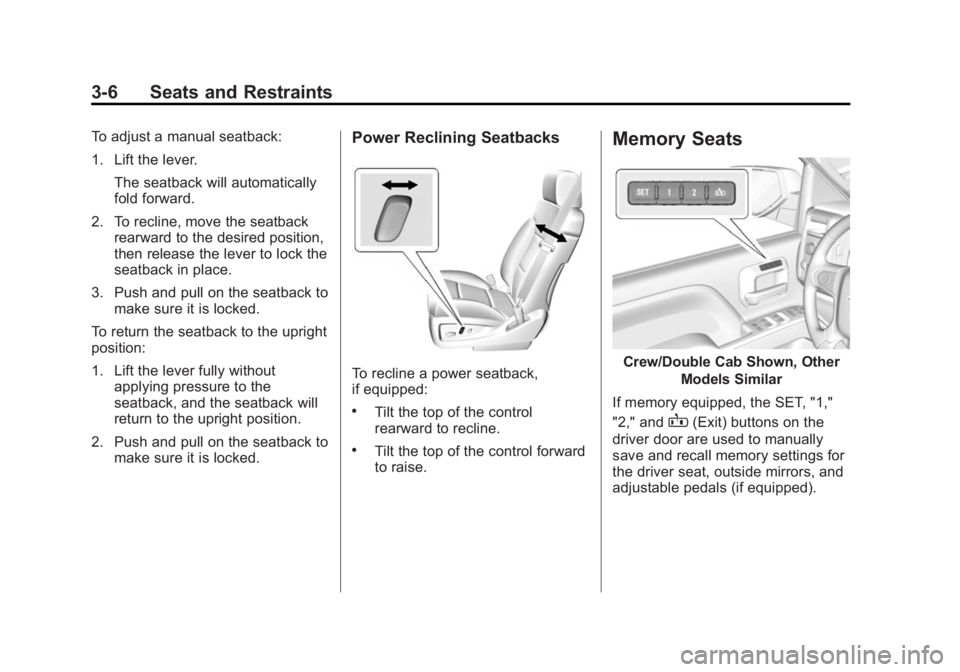
2. Push and pull on the seatback to make sure it is locked.Power Reclining Seatbacks
To recline a power seatback,
if equipped:
.Tilt the top of the control
rearward to recline.
.Tilt the top of the control forward
to raise.
Memory Seats
Crew/Double Cab Shown, Other
Models Similar
If memory equipped, the SET, "1,"
"2," and
B(Exit) buttons on the
driver door are used to manually
save and recall memory settings for
the driver seat, outside mirrors, and
adjustable pedals (if equipped).
Page 66 of 539
Black plate (7,1)GMC Sierra Owner Manual (GMNA Localizing-U.S/Canada/Mexico-
7299746) - 2015 - crc - 11/11/13
Seats and Restraints 3-7
Storing Memory Positions
To save positions to the“1”and “2”
buttons:
1. Adjust the driver seat, outside mirrors, and adjustable pedals (if
equipped) to the desired driving
positions.
2. Press and release SET, then immediately press and hold “1”
until a beep sounds.
3. Repeat Steps 1 and 2 for a second driver using “2.”
To save positions to the
B(Exit)
button and easy exit features:
1. Adjust the driver seat, adjustable pedals (if equipped), and the
outside mirrors on some vehicles
to the desired positions for
getting out of the vehicle.
2. Press and release SET, then immediately press and hold
B
until a beep sounds. Manually Recalling Memory
Positions
If the vehicle is OFF or not in
P (Park), press and hold "1," "2," or
Bto manually recall the previously
stored memory positions. Releasing
"1,” "2," or
Bbefore the stored
positions are reached stops the
recall.
If the vehicle is ON and in P (Park),
press and release “1,” “2,”or
Bto
manually recall the previously
stored memory positions. Placing
the ignition in OFF/LOCK before the
stored positions are reached stops
the recall.
If something has blocked the driver
seat and/or adjustable pedals while
recalling a memory position, the
recall may stop. Remove the
obstruction; then press and hold the
appropriate manual control for the
memory item that is not recalling for
two seconds. Try recalling the
memory position again by pressing
the appropriate memory button. If the memory position is still not
recalling, see your dealer for
service.
Automatically Recalling Memory
Positions (Auto Memory Recall)
The Auto (Automatic) Memory
Recall feature automatically recalls
the current driver
’s previously stored
“1” or“2” position when entering the
vehicle.
If the Auto Memory Recall feature is
enabled in the vehicle
personalization menu, memory “1”
or “2” positions are recalled in the
following ways:
.PressKon the RKE transmitter
and open the driver door.
.PressKon the RKE transmitter
when the driver door is
already open.
See Vehicle Personalization on
page 5-45.