2015 GMC CANYON tow
[x] Cancel search: towPage 2 of 433

Black plate (1,1)GMC Canyon Owner Manual (GMNA-Localizing-U.S./Canada-7587000) -
2015 - CRC - 3/17/15
2015 GMC Canyon Owner ManualM
In Brief. . . . . . . . . . . . . . . . . . . . . . . . 1-1
Instrument Panel . . . . . . . . . . . . . . 1-2
Initial Drive Information . . . . . . . . 1-4
Vehicle Features . . . . . . . . . . . . . 1-16
Performance and Maintenance . . . . . . . . . . . . . . . . 1-20
Keys, Doors, and Windows . . . . . . . . . . . . . . . . . . . . 2-1
Keys and Locks . . . . . . . . . . . . . . . 2-1
Doors . . . . . . . . . . . . . . . . . . . . . . . . 2-10
Vehicle Security . . . . . . . . . . . . . . 2-12
Exterior Mirrors . . . . . . . . . . . . . . . 2-14
Interior Mirrors . . . . . . . . . . . . . . . . 2-17
Windows . . . . . . . . . . . . . . . . . . . . . 2-17
Seats and Restraints . . . . . . . . . 3-1
Head Restraints . . . . . . . . . . . . . . . 3-2
Front Seats . . . . . . . . . . . . . . . . . . . . 3-3
Rear Seats . . . . . . . . . . . . . . . . . . . . 3-7
Safety Belts . . . . . . . . . . . . . . . . . . . . 3-9
Airbag System . . . . . . . . . . . . . . . . 3-16
Child Restraints . . . . . . . . . . . . . . 3-30 Storage
. . . . . . . . . . . . . . . . . . . . . . . 4-1
Storage Compartments . . . . . . . . 4-1
Instruments and Controls . . . . 5-1
Controls . . . . . . . . . . . . . . . . . . . . . . . 5-2
Warning Lights, Gauges, and Indicators . . . . . . . . . . . . . . . . . . . . 5-7
Information Displays . . . . . . . . . . 5-27
Vehicle Messages . . . . . . . . . . . . 5-33
Vehicle Personalization . . . . . . . 5-41
Lighting . . . . . . . . . . . . . . . . . . . . . . . 6-1
Exterior Lighting . . . . . . . . . . . . . . . 6-1
Interior Lighting . . . . . . . . . . . . . . . . 6-6
Lighting Features . . . . . . . . . . . . . . 6-7
Infotainment System . . . . . . . . . 7-1
Introduction . . . . . . . . . . . . . . . . . . . . 7-1
Radio . . . . . . . . . . . . . . . . . . . . . . . . . . 7-7
Audio Players . . . . . . . . . . . . . . . . 7-13
Navigation . . . . . . . . . . . . . . . . . . . . 7-17
Voice Recognition . . . . . . . . . . . . 7-19
Phone . . . . . . . . . . . . . . . . . . . . . . . . 7-25
Settings . . . . . . . . . . . . . . . . . . . . . . 7-35
Trademarks and License
Agreements . . . . . . . . . . . . . . . . . 7-37 Climate Controls
. . . . . . . . . . . . . 8-1
Climate Control Systems . . . . . . 8-1
Air Vents . . . . . . . . . . . . . . . . . . . . . . . 8-6
Maintenance . . . . . . . . . . . . . . . . . . . 8-6
Driving and Operating . . . . . . . . 9-1
Driving Information . . . . . . . . . . . . . 9-2
Starting and Operating . . . . . . . 9-21
Engine Exhaust . . . . . . . . . . . . . . 9-29
Automatic Transmission . . . . . . 9-30
Manual Transmission . . . . . . . . . 9-35
Drive Systems . . . . . . . . . . . . . . . . 9-36
Brakes . . . . . . . . . . . . . . . . . . . . . . . 9-40
Ride Control Systems . . . . . . . . 9-43
Cruise Control . . . . . . . . . . . . . . . . 9-46
Driver Assistance Systems . . . 9-48
Fuel . . . . . . . . . . . . . . . . . . . . . . . . . . 9-54
Trailer Towing . . . . . . . . . . . . . . . . 9-57
Conversions and Add-Ons . . . 9-66
Page 3 of 433
Black plate (2,1)GMC Canyon Owner Manual (GMNA-Localizing-U.S./Canada-7587000) -
2015 - CRC - 3/17/15
2015 GMC Canyon Owner ManualM
Vehicle Care. . . . . . . . . . . . . . . . . 10-1
General Information . . . . . . . . . . 10-2
Vehicle Checks . . . . . . . . . . . . . . . 10-4
Headlamp Aiming . . . . . . . . . . . 10-30
Bulb Replacement . . . . . . . . . . 10-30
Electrical System . . . . . . . . . . . . 10-33
Wheels and Tires . . . . . . . . . . . 10-41
Jump Starting . . . . . . . . . . . . . . . 10-75
Towing the Vehicle . . . . . . . . . . 10-78
Appearance Care . . . . . . . . . . . 10-83
Service and Maintenance . . . 11-1
General Information . . . . . . . . . . 11-1
Maintenance Schedule . . . . . . . 11-3
Special Application
Services . . . . . . . . . . . . . . . . . . . . 11-9
Additional Maintenance
and Care . . . . . . . . . . . . . . . . . . . 11-10
Recommended Fluids, Lubricants, and Parts . . . . . . 11-13
Maintenance Records . . . . . . . 11-16 Technical Data
. . . . . . . . . . . . . . . 12-1
Vehicle Identification . . . . . . . . . 12-1
Vehicle Data . . . . . . . . . . . . . . . . . . 12-2
Customer Information . . . . . . . 13-1
Customer Information . . . . . . . . 13-1
Reporting Safety Defects . . . . 13-12
Vehicle Data Recording and
Privacy . . . . . . . . . . . . . . . . . . . . 13-13
OnStar . . . . . . . . . . . . . . . . . . . . . . . 14-1
OnStar Overview . . . . . . . . . . . . . 14-1
OnStar Services . . . . . . . . . . . . . . 14-2
OnStar Additional Information . . . . . . . . . . . . . . . . . . 14-6
Index . . . . . . . . . . . . . . . . . . . . . i-1
Page 10 of 433

Black plate (3,1)GMC Canyon Owner Manual (GMNA-Localizing-U.S./Canada-7587000) -
2015 - CRC - 3/17/15
In Brief 1-3
1.Air Vents on page 8-6.
2. Turn Signal Lever. See Turn and
Lane-Change Signals on
page 6-4.
Driver Information Center (DIC)
(Base Level) Controls (If
Equipped). See Driver
Information Center (DIC) (Base
Level) on page 5-27 orDriver
Information Center (DIC)
(Uplevel) on page 5-29.
3. Instrument Cluster (Base Level)
on page 5-8 orInstrument
Cluster (Uplevel) on page 5-10.
4. Windshield Wiper/Washer on
page 5-3.
5. Light Sensor. See Automatic
Headlamp System on page 6-3.
Vehicle Alarm System Indicator
(If Equipped). See Vehicle Alarm
System on page 2-12.
6. Infotainment on page 7-1.
7. Instrument Panel Illumination
Control on page 6-6. 8.
Exterior Lamp Controls on
page 6-1.
Fog Lamps on page 6-5 (If
Equipped).
9. Data Link Connector (DLC) (Out of View). See Malfunction
Indicator Lamp on page 5-18.
10. Parking Brake on page 9-41.
11. Hood Release. See Hood on
page 10-5.
12. Transfer Case Knob (If Equipped). See Four-Wheel
Drive on page 9-36.
13. Cruise Control on page 9-46.
Forward Collision Alert (FCA)
System on page 9-48 (If
Equipped).
14. Steering Wheel Adjustment on
page 5-2 (Out of View).
15. Horn on page 5-3. 16.
Steering Wheel Controls on
page 5-3 (If Equipped).
Driver Information Center (DIC)
(Uplevel) Controls (If
Equipped). See Driver
Information Center (DIC) (Base
Level) on page 5-27 orDriver
Information Center (DIC)
(Uplevel) on page 5-29.
17. Hazard Warning Flashers on
page 6-4.
Traction Control/Electronic
Stability Control on page 9-43.
Cargo Lamp on page 6-6.
Lane Departure Warning
(LDW) on page 9-52 (If
Equipped).
Hill Descent Control (If
Equipped). See Hill Descent
Control (HDC) on page 9-45.
Tow/Haul Selector Button (If
Equipped). See Tow/Haul
Mode on page 9-34.
Page 19 of 433

Black plate (12,1)GMC Canyon Owner Manual (GMNA-Localizing-U.S./Canada-7587000) -
2015 - CRC - 3/17/15
1-12 In Brief
AUTO:Automatically turns on the
headlamps at normal brightness,
together with the following:
.Parking Lamps
.Instrument Panel Lights
.Taillamps
.License Plate Lamps
.Front/Rear Sidemarker Lamps
;: Turns on the parking lamps
including all lamps, except the
headlamps.
5: Turns on the headlamps
together with the parking lamps and
instrument panel lights.
See:
.Exterior Lamp Controls on
page 6-1.
.Daytime Running Lamps (DRL)
on page 6-3.
.Fog Lamps on page 6-5.
Windshield Wiper/Washer
The windshield wiper/washer lever
is on the right side of the steering
column. With the ignition in ACC/
ACCESSORY or ON/RUN, move
the windshield wiper lever to select
the wiper speed.
HI: Use for fast wipes.
LO: Use for slow wipes.
INT: Move the lever up to INT for
intermittent wipes, then turn the
x
INT band up for more frequent
wipes or down for less frequent
wipes.
OFF: Use to turn the wipers off.
1X : For a single wipe, briefly move
the wiper lever down. For several
wipes, hold the wiper lever down.
n L: Pull the windshield wiper
lever toward you to spray windshield
washer fluid and activate the wipers.
See Windshield Wiper/Washer on
page 5-3.
Climate Controls
These systems control the heating,
cooling, and ventilation.
Page 21 of 433
Black plate (14,1)GMC Canyon Owner Manual (GMNA-Localizing-U.S./Canada-7587000) -
2015 - CRC - 3/17/15
1-14 In Brief
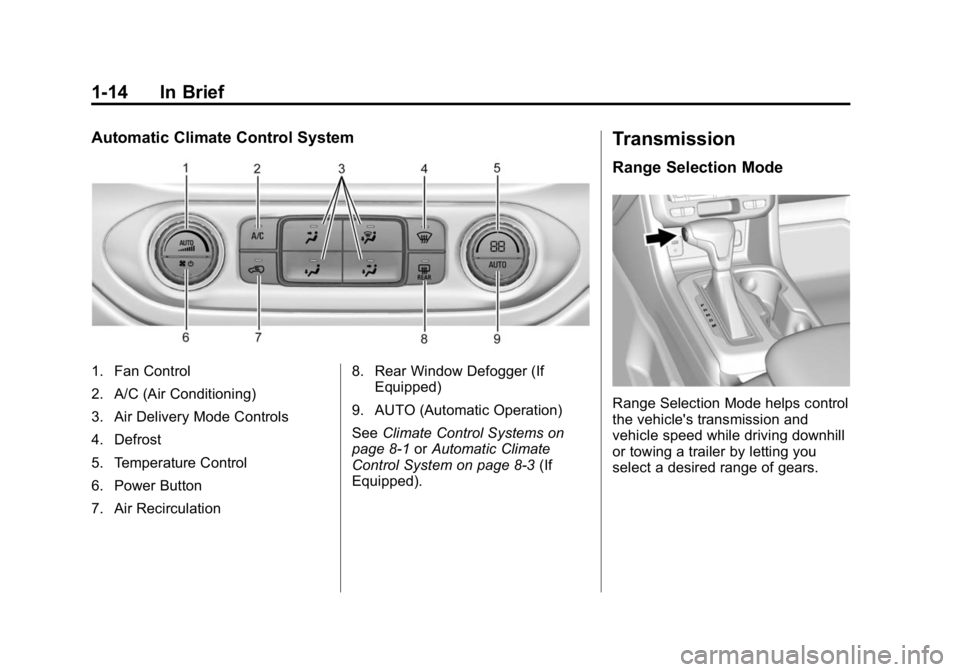
Automatic Climate Control System
1. Fan Control
2. A/C (Air Conditioning)
3. Air Delivery Mode Controls
4. Defrost
5. Temperature Control
6. Power Button
7. Air Recirculation8. Rear Window Defogger (If
Equipped)
9. AUTO (Automatic Operation)
See Climate Control Systems on
page 8-1 orAutomatic Climate
Control System on page 8-3 (If
Equipped).
Transmission
Range Selection Mode
Range Selection Mode helps control
the vehicle's transmission and
vehicle speed while driving downhill
or towing a trailer by letting you
select a desired range of gears.
Page 22 of 433

Black plate (15,1)GMC Canyon Owner Manual (GMNA-Localizing-U.S./Canada-7587000) -
2015 - CRC - 3/17/15
In Brief 1-15
To enable:
1. Move the shift lever to theM (Manual Mode) position. The
current range will display next to
the M. This is the highest
attainable range with all lower
gears accessible. For example,
when 5 (Fifth) gear is selected,
1 (First) through 5 (Fifth) gears
are available.
2. Press the plus/minus button on the shift lever to select the
desired range of gears for
current driving conditions. See
Manual Mode on page 9-33.
Four-Wheel Drive
If the vehicle has four-wheel drive,
the engine's driving power can be
sent to all four wheels for extra
traction.
Automatic Transfer Case
The transfer case knob is to the left
of the steering column. Use it to
shift into and out of the different
four-wheel drive modes.
The different drive options that may
be available are described following.
2
m(Two-Wheel Drive High): This
setting is used for driving in most
street and highway situations. AUTO (Automatic Four-Wheel
Drive):
This setting is ideal for use
when road surface traction
conditions are variable.
4
m(Four-Wheel Drive High): Use
this setting when extra traction is
needed, such as on snowy or icy
roads or in most off-road situations.
N (Neutral): Shift to this setting
only when towing the vehicle. See
Recreational Vehicle Towing on
page 10-78 orTrailer Towing on
page 9-60.
4
n(Four-Wheel Drive Low):
Choose 4
nwhen driving in deep
sand, mud, or snow, and while
climbing or descending steep hills.
See Four-Wheel Drive on
page 9-36.
Page 35 of 433

Black plate (6,1)GMC Canyon Owner Manual (GMNA-Localizing-U.S./Canada-7587000) -
2015 - CRC - 3/17/15
2-6 Keys, Doors, and Windows
To replace the battery:
1. Separate and remove the backcover of the transmitter with a
flat, thin object, such as a coin.
2. Press and slide the battery downtoward the pocket of the
transmitter in the direction of the
key ring. Do not use a metal
object.
3. Remove the battery.
4. Insert the new battery, positive side facing up. Replace with a
CR2032 or equivalent battery.
5. Push together the transmitter back cover top side first, and
then the bottom toward the
key ring.
Remote Vehicle Start
If equipped, the engine can be
started from outside of the vehicle.
The climate controls and rear
window defogger may also
come on.
If the vehicle has heated seats and
the feature is turned on in vehicle
personalization, the heated seats
will turn on during colder outside
temperatures and will shut off when
the key is turned to ON/RUN. See
Heated Front Seats on page 3-6.
Laws in some communities may
restrict the use of remote starters.
Check local regulations for any
requirements on remote starting of
vehicles.
Do not use remote start if the
vehicle is low on fuel.
Page 44 of 433
Black plate (15,1)GMC Canyon Owner Manual (GMNA-Localizing-U.S./Canada-7587000) -
2015 - CRC - 3/17/15
Keys, Doors, and Windows 2-15
Power Mirrors
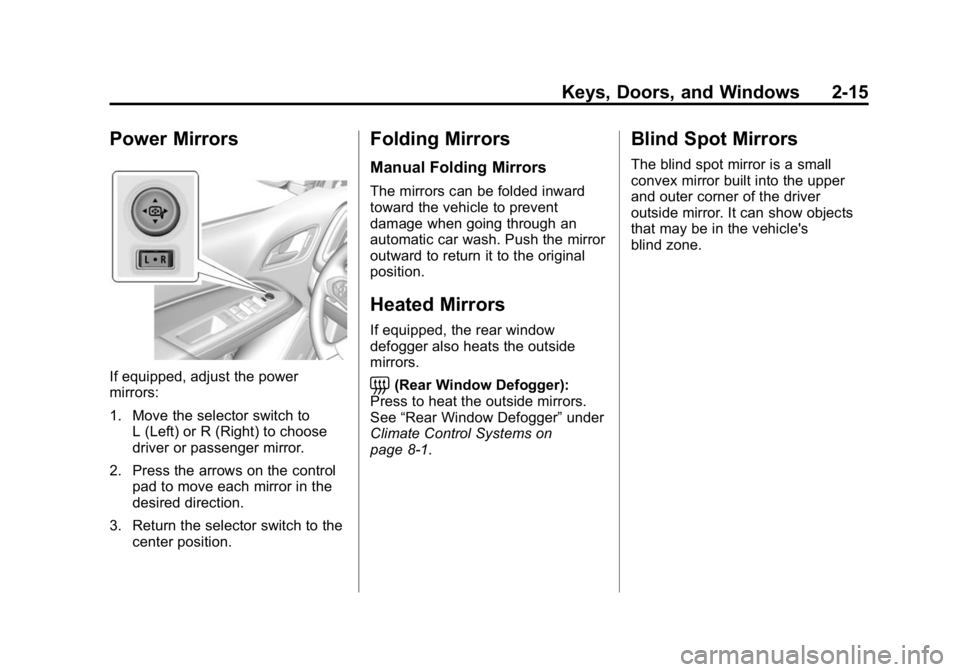
If equipped, adjust the power
mirrors:
1. Move the selector switch toL (Left) or R (Right) to choose
driver or passenger mirror.
2. Press the arrows on the control pad to move each mirror in the
desired direction.
3. Return the selector switch to the center position.
Folding Mirrors
Manual Folding Mirrors
The mirrors can be folded inward
toward the vehicle to prevent
damage when going through an
automatic car wash. Push the mirror
outward to return it to the original
position.
Heated Mirrors
If equipped, the rear window
defogger also heats the outside
mirrors.
=(Rear Window Defogger):
Press to heat the outside mirrors.
See “Rear Window Defogger” under
Climate Control Systems on
page 8-1.
Blind Spot Mirrors
The blind spot mirror is a small
convex mirror built into the upper
and outer corner of the driver
outside mirror. It can show objects
that may be in the vehicle's
blind zone.