2015 GMC CANYON lower
[x] Cancel search: lowerPage 13 of 433
Black plate (6,1)GMC Canyon Owner Manual (GMNA-Localizing-U.S./Canada-7587000) -
2015 - CRC - 3/17/15
1-6 In Brief
Windows
Power Windows
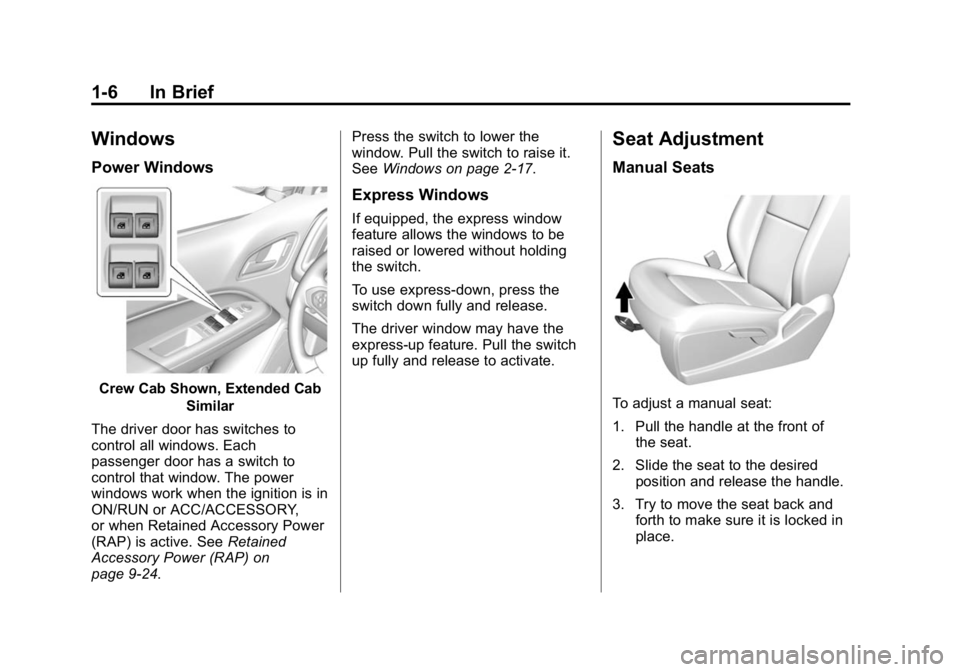
Crew Cab Shown, Extended CabSimilar
The driver door has switches to
control all windows. Each
passenger door has a switch to
control that window. The power
windows work when the ignition is in
ON/RUN or ACC/ACCESSORY,
or when Retained Accessory Power
(RAP) is active. See Retained
Accessory Power (RAP) on
page 9-24. Press the switch to lower the
window. Pull the switch to raise it.
See
Windows on page 2-17.
Express Windows
If equipped, the express window
feature allows the windows to be
raised or lowered without holding
the switch.
To use express-down, press the
switch down fully and release.
The driver window may have the
express-up feature. Pull the switch
up fully and release to activate.
Seat Adjustment
Manual Seats
To adjust a manual seat:
1. Pull the handle at the front of
the seat.
2. Slide the seat to the desired position and release the handle.
3. Try to move the seat back and forth to make sure it is locked in
place.
Page 14 of 433
Black plate (7,1)GMC Canyon Owner Manual (GMNA-Localizing-U.S./Canada-7587000) -
2015 - CRC - 3/17/15
In Brief 1-7
Power Seats
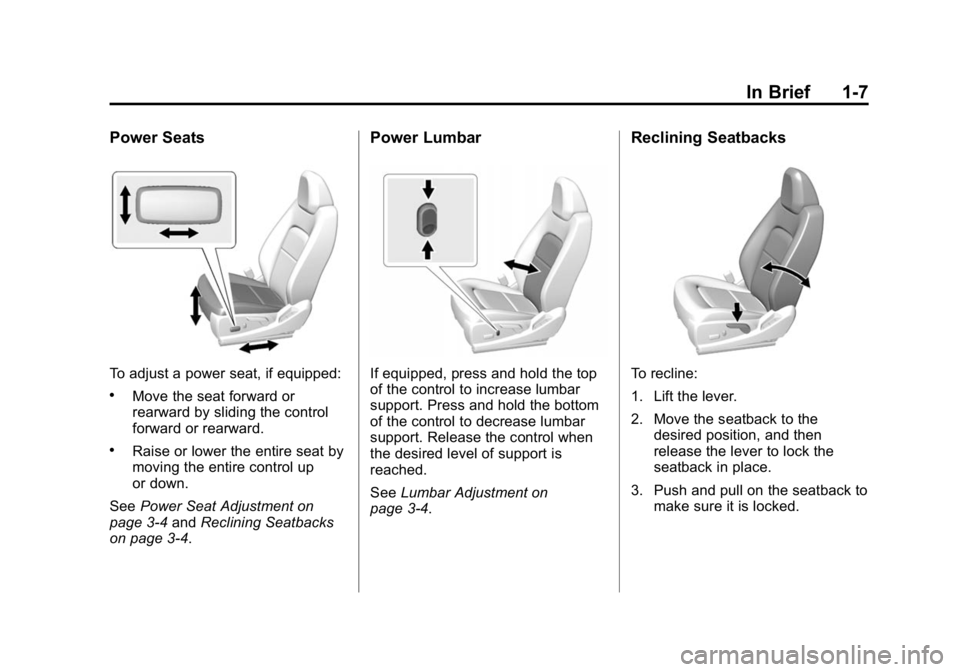
To adjust a power seat, if equipped:
.Move the seat forward or
rearward by sliding the control
forward or rearward.
.Raise or lower the entire seat by
moving the entire control up
or down.
See Power Seat Adjustment on
page 3-4 andReclining Seatbacks
on page 3-4.
Power Lumbar
If equipped, press and hold the top
of the control to increase lumbar
support. Press and hold the bottom
of the control to decrease lumbar
support. Release the control when
the desired level of support is
reached.
See Lumbar Adjustment on
page 3-4.
Reclining Seatbacks
To recline:
1. Lift the lever.
2. Move the seatback to the
desired position, and then
release the lever to lock the
seatback in place.
3. Push and pull on the seatback to make sure it is locked.
Page 16 of 433
Black plate (9,1)GMC Canyon Owner Manual (GMNA-Localizing-U.S./Canada-7587000) -
2015 - CRC - 3/17/15
In Brief 1-9
.Lap-Shoulder Belt on page 3-11.
.Lower Anchors and Tethers for
Children (LATCH System) on
page 3-38.
Passenger Sensing
System
United States
Canada
The passenger sensing system will
turn off the front outboard
passenger frontal airbag under
certain conditions. No other airbag is affected by the passenger
sensing system. See
Passenger
Sensing System on page 3-23.
The passenger airbag status
indicator lights on the overhead
console are visible when the vehicle
is started. See Passenger Airbag
Status Indicator on page 5-17.
Mirror Adjustment
Using hood-mounted air deflectors
and add-on convex mirror
attachments could decrease mirror
performance.
Exterior Mirrors
Manual Mirrors
If equipped, adjust the manual
mirror by moving it up and down or
left to right to see a little of the side
of the vehicle and to have a clear
view behind the vehicle.
See Manual Mirrors on page 2-14. Power Mirrors
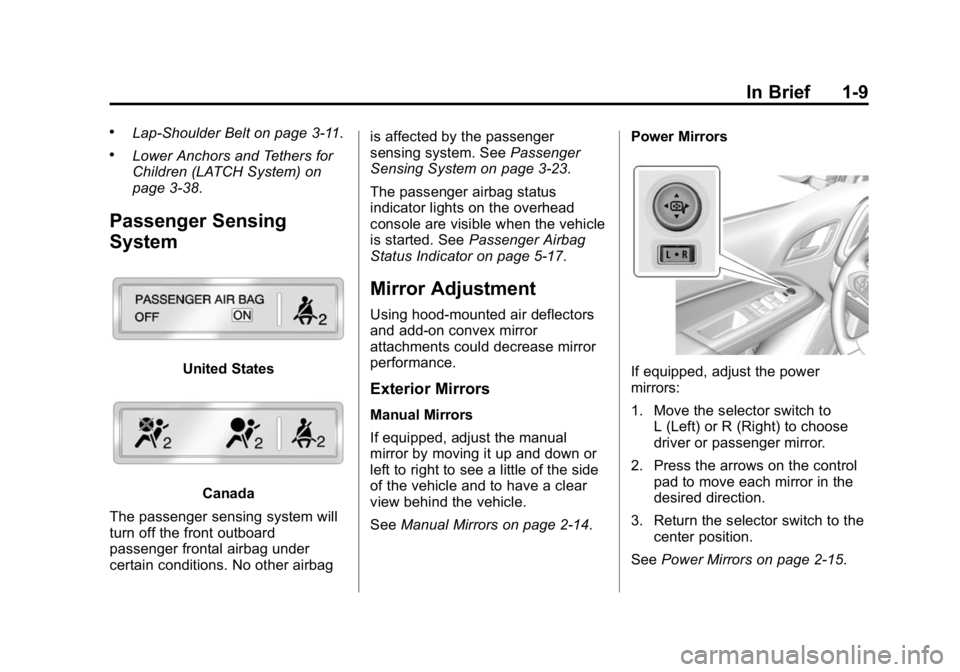
If equipped, adjust the power
mirrors:
1. Move the selector switch to
L (Left) or R (Right) to choose
driver or passenger mirror.
2. Press the arrows on the control pad to move each mirror in the
desired direction.
3. Return the selector switch to the center position.
See Power Mirrors on page 2-15.
Page 22 of 433

Black plate (15,1)GMC Canyon Owner Manual (GMNA-Localizing-U.S./Canada-7587000) -
2015 - CRC - 3/17/15
In Brief 1-15
To enable:
1. Move the shift lever to theM (Manual Mode) position. The
current range will display next to
the M. This is the highest
attainable range with all lower
gears accessible. For example,
when 5 (Fifth) gear is selected,
1 (First) through 5 (Fifth) gears
are available.
2. Press the plus/minus button on the shift lever to select the
desired range of gears for
current driving conditions. See
Manual Mode on page 9-33.
Four-Wheel Drive
If the vehicle has four-wheel drive,
the engine's driving power can be
sent to all four wheels for extra
traction.
Automatic Transfer Case
The transfer case knob is to the left
of the steering column. Use it to
shift into and out of the different
four-wheel drive modes.
The different drive options that may
be available are described following.
2
m(Two-Wheel Drive High): This
setting is used for driving in most
street and highway situations. AUTO (Automatic Four-Wheel
Drive):
This setting is ideal for use
when road surface traction
conditions are variable.
4
m(Four-Wheel Drive High): Use
this setting when extra traction is
needed, such as on snowy or icy
roads or in most off-road situations.
N (Neutral): Shift to this setting
only when towing the vehicle. See
Recreational Vehicle Towing on
page 10-78 orTrailer Towing on
page 9-60.
4
n(Four-Wheel Drive Low):
Choose 4
nwhen driving in deep
sand, mud, or snow, and while
climbing or descending steep hills.
See Four-Wheel Drive on
page 9-36.
Page 40 of 433
Black plate (11,1)GMC Canyon Owner Manual (GMNA-Localizing-U.S./Canada-7587000) -
2015 - CRC - 3/17/15
Keys, Doors, and Windows 2-11
Open the tailgate by lifting up on its
handle while pulling the
tailgate down.
To shut the tailgate, firmly push it
upward until it latches.
After closing the tailgate, pull it back
to be sure it latches securely.
Tailgate Removal
The tailgate can be removed to
allow for different loading situations.
Assistance may be needed with the
removal to avoid damage to the
vehicle.
On vehicles with a Rear Vision
Camera, it must be disconnected
before removing the tailgate. See
Rear Vision Camera (RVC) on
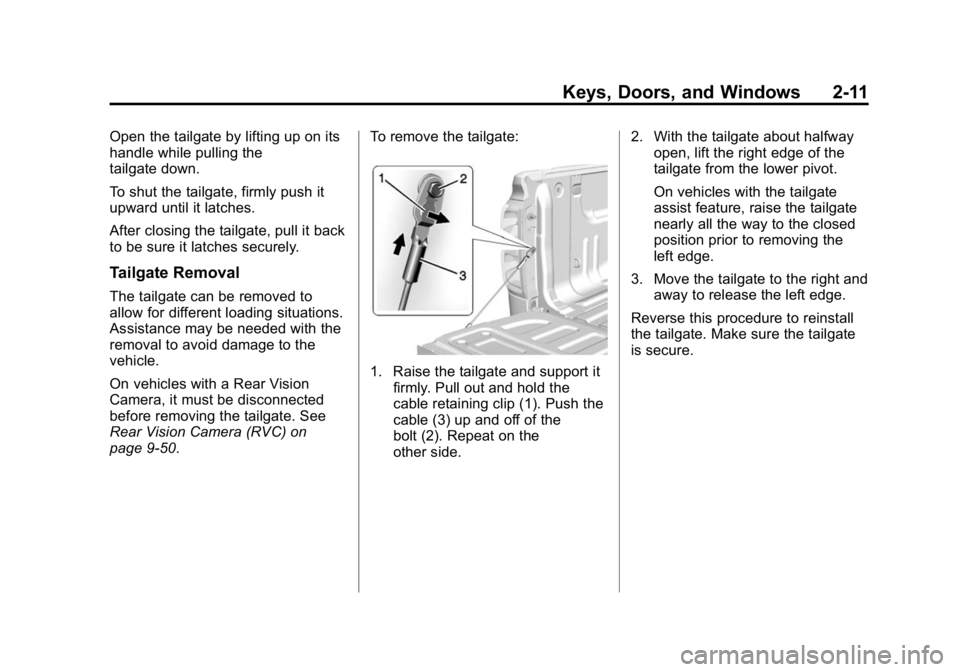
page 9-50.To remove the tailgate:
1. Raise the tailgate and support it
firmly. Pull out and hold the
cable retaining clip (1). Push the
cable (3) up and off of the
bolt (2). Repeat on the
other side. 2. With the tailgate about halfway
open, lift the right edge of the
tailgate from the lower pivot.
On vehicles with the tailgate
assist feature, raise the tailgate
nearly all the way to the closed
position prior to removing the
left edge.
3. Move the tailgate to the right and away to release the left edge.
Reverse this procedure to reinstall
the tailgate. Make sure the tailgate
is secure.
Page 47 of 433
Black plate (18,1)GMC Canyon Owner Manual (GMNA-Localizing-U.S./Canada-7587000) -
2015 - CRC - 3/17/15
2-18 Keys, Doors, and Windows
The vehicle aerodynamics are
designed to improve fuel economy
performance. This may result in a
pulsing sound when either rear
window is down and the front
windows are up. To reduce the
sound, open either a front window
or the sunroof, if equipped.
Power Windows
{Warning
Children could be seriously
injured or killed if caught in the
path of a closing window. Never
leave keys in a vehicle with
children. When there are children
in the rear seat, use the window
lockout button to prevent
operation of the windows.
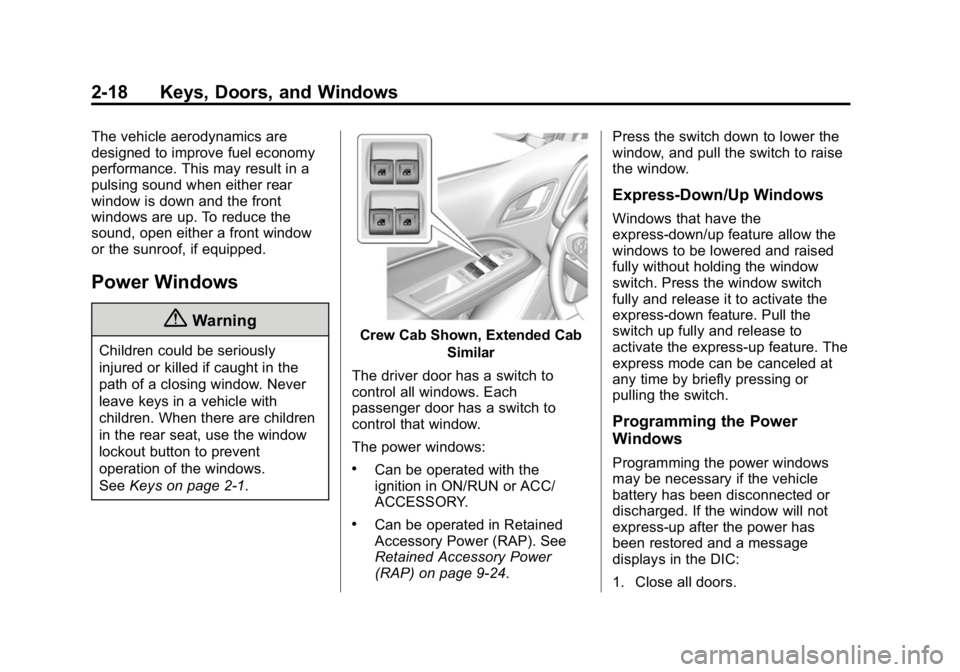
SeeKeys on page 2-1.Crew Cab Shown, Extended Cab
Similar
The driver door has a switch to
control all windows. Each
passenger door has a switch to
control that window.
The power windows:
.Can be operated with the
ignition in ON/RUN or ACC/
ACCESSORY.
.Can be operated in Retained
Accessory Power (RAP). See
Retained Accessory Power
(RAP) on page 9-24. Press the switch down to lower the
window, and pull the switch to raise
the window.
Express-Down/Up Windows
Windows that have the
express-down/up feature allow the
windows to be lowered and raised
fully without holding the window
switch. Press the window switch
fully and release it to activate the
express-down feature. Pull the
switch up fully and release to
activate the express-up feature. The
express mode can be canceled at
any time by briefly pressing or
pulling the switch.
Programming the Power
Windows
Programming the power windows
may be necessary if the vehicle
battery has been disconnected or
discharged. If the window will not
express-up after the power has
been restored and a message
displays in the DIC:
1. Close all doors.
Page 50 of 433
Black plate (1,1)GMC Canyon Owner Manual (GMNA-Localizing-U.S./Canada-7587000) -
2015 - CRC - 3/17/15
Seats and Restraints 3-1
Seats and
Restraints
Head Restraints
Head Restraints . . . . . . . . . . . . . . . 3-2
Front Seats
Seat Adjustment . . . . . . . . . . . . . . 3-3
Power Seat Adjustment . . . . . . . 3-4
Lumbar Adjustment . . . . . . . . . . . 3-4
Reclining Seatbacks . . . . . . . . . . 3-4
Heated Front Seats . . . . . . . . . . . 3-6
Rear Seats
Rear Seats (Crew Cab) . . . . . . . 3-7
Safety Belts
Safety Belts . . . . . . . . . . . . . . . . . . . 3-9
How to Wear Safety BeltsProperly . . . . . . . . . . . . . . . . . . . . 3-10
Lap-Shoulder Belt . . . . . . . . . . . . 3-11 Safety Belt Use During
Pregnancy . . . . . . . . . . . . . . . . . . 3-14
Safety Belt Extender . . . . . . . . . 3-15
Safety System Check . . . . . . . . 3-15
Safety Belt Care . . . . . . . . . . . . . 3-15
Replacing Safety Belt System Parts after a Crash . . . . . . . . . 3-15
Airbag System
Airbag System . . . . . . . . . . . . . . . 3-16
Where Are the Airbags? . . . . . 3-18
When Should an AirbagInflate? . . . . . . . . . . . . . . . . . . . . . 3-20
What Makes an Airbag Inflate? . . . . . . . . . . . . . . . . . . . . . 3-21
How Does an Airbag Restrain? . . . . . . . . . . . . . . . . . . . 3-21
What Will You See after an Airbag Inflates? . . . . . . . . . . . . 3-21
Passenger Sensing System . . . . . . . . . . . . . . . . . . . . . 3-23
Servicing the Airbag-Equipped Vehicle . . . . . . . . . . . . . . . . . . . . . 3-27 Adding Equipment to the
Airbag-Equipped Vehicle . . . 3-28
Airbag System Check . . . . . . . . 3-29
Replacing Airbag System Parts after a Crash . . . . . . . . . 3-29
Child Restraints
Older Children . . . . . . . . . . . . . . . 3-30
Infants and Young
Children . . . . . . . . . . . . . . . . . . . . 3-32
Child Restraint Systems . . . . . 3-34
Where to Put the Restraint . . . 3-36
Lower Anchors and Tethers for Children (LATCH
System) . . . . . . . . . . . . . . . . . . . . 3-38
Replacing LATCH System Parts After a Crash . . . . . . . . . 3-53
Securing Child Restraints (Rear Seat) . . . . . . . . . . . . . . . . . 3-53
Securing Child Restraints (Front Passenger Seat) . . . . 3-59
Page 51 of 433
Black plate (2,1)GMC Canyon Owner Manual (GMNA-Localizing-U.S./Canada-7587000) -
2015 - CRC - 3/17/15
3-2 Seats and Restraints
Head Restraints
The vehicle's front seats have
adjustable head restraints in the
outboard seating positions.
{Warning
With head restraints that are not
installed and adjusted properly,
there is a greater chance that
occupants will suffer a neck/
spinal injury in a crash. Do not
drive until the head restraints for
all occupants are installed and
adjusted properly.
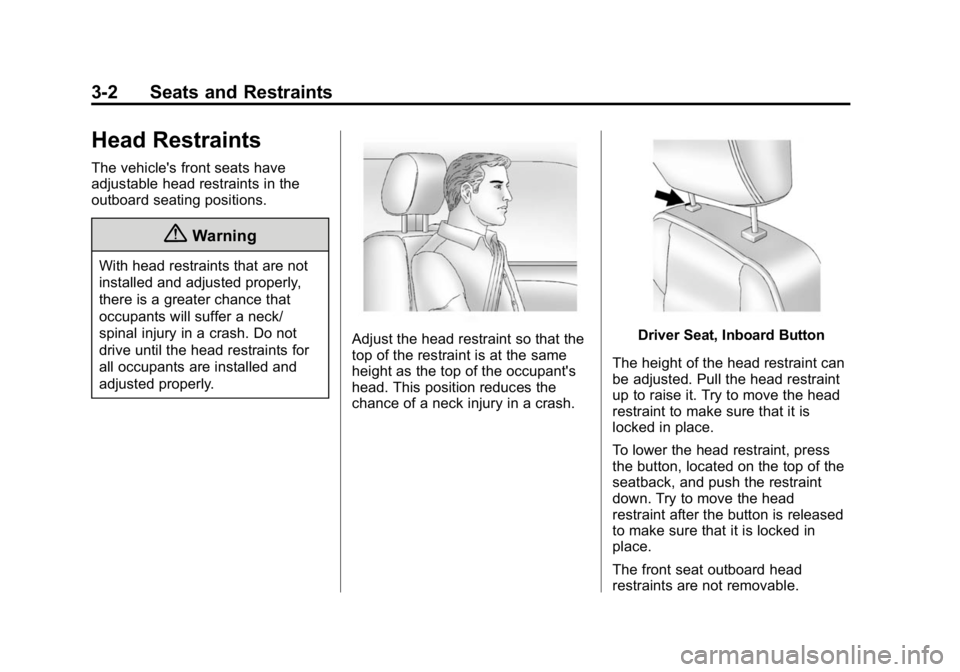
Adjust the head restraint so that the
top of the restraint is at the same
height as the top of the occupant's
head. This position reduces the
chance of a neck injury in a crash.Driver Seat, Inboard Button
The height of the head restraint can
be adjusted. Pull the head restraint
up to raise it. Try to move the head
restraint to make sure that it is
locked in place.
To lower the head restraint, press
the button, located on the top of the
seatback, and push the restraint
down. Try to move the head
restraint after the button is released
to make sure that it is locked in
place.
The front seat outboard head
restraints are not removable.