2015 GMC ACADIA seat adjustment
[x] Cancel search: seat adjustmentPage 8 of 407

Black plate (1,1)GMC Acadia/Acadia Denali Owner Manual (GMNA-Localizing-U.S./Canada/
Mexico-7576030) - 2015 - CRC - 8/18/14
In Brief 1-1
In Brief
Instrument Panel
Instrument Panel . . . . . . . . . . . . . . 1-2
Initial Drive Information
Initial Drive Information . . . . . . . . 1-4
Remote Keyless Entry (RKE)System . . . . . . . . . . . . . . . . . . . . . . 1-4
Remote Vehicle Start . . . . . . . . . 1-4
Door Locks . . . . . . . . . . . . . . . . . . . 1-5
Liftgate . . . . . . . . . . . . . . . . . . . . . . . . 1-5
Windows . . . . . . . . . . . . . . . . . . . . . . 1-6
Seat Adjustment . . . . . . . . . . . . . . 1-6
Memory Features . . . . . . . . . . . . . 1-7
Second Row Seats . . . . . . . . . . . 1-8
Third Row Seats . . . . . . . . . . . . . . 1-8
Heated and Cooled Front Seats . . . . . . . . . . . . . . . . . . . . . . . . 1-9
Head Restraint Adjustment . . . . 1-9
Safety Belts . . . . . . . . . . . . . . . . . . . 1-9 Passenger Sensing
System . . . . . . . . . . . . . . . . . . . . . 1-10
Mirror Adjustment . . . . . . . . . . . . 1-10
Steering Wheel Adjustment . . . . . . . . . . . . . . . . . 1-11
Interior Lighting . . . . . . . . . . . . . . 1-12
Exterior Lighting . . . . . . . . . . . . . 1-13
Windshield Wiper/Washer . . . . 1-13
Climate Controls . . . . . . . . . . . . . 1-14
Transmission . . . . . . . . . . . . . . . . 1-15
Vehicle Features
Radio(s) . . . . . . . . . . . . . . . . . . . . . 1-16
Satellite Radio . . . . . . . . . . . . . . . 1-17
Portable Audio Devices . . . . . . 1-18
Bluetooth
®. . . . . . . . . . . . . . . . . . . 1-18
Steering Wheel Controls . . . . . 1-18
Cruise Control . . . . . . . . . . . . . . . 1-19
Forward Collision Alert (FCA)
System . . . . . . . . . . . . . . . . . . . . . 1-19
Lane Departure Warning (LDW) . . . . . . . . . . . . . 1-19 Side Blind Zone
Alert (SBZA) . . . . . . . . . . . . . . . 1-19
Rear Vision Camera (RVC) . . . . . . . . . . . . . 1-20
Rear Cross Traffic Alert
(RCTA) System . . . . . . . . . . . . 1-20
Parking Assist . . . . . . . . . . . . . . . 1-20
Power Outlets . . . . . . . . . . . . . . . 1-20
Universal Remote System . . . 1-20
Sunroof . . . . . . . . . . . . . . . . . . . . . . 1-21
Performance and Maintenance
Traction Control/Electronic Stability Control . . . . . . . . . . . . 1-21
Tire Pressure Monitor . . . . . . . . 1-22
Engine Oil Life System . . . . . . 1-22
Driving for Better Fuel Economy . . . . . . . . . . . . . . . . . . . 1-22
Roadside Assistance Program . . . . . . . . . . . . . . . . . . . . 1-23
OnStar
®. . . . . . . . . . . . . . . . . . . . . 1-23
Page 10 of 407

Black plate (3,1)GMC Acadia/Acadia Denali Owner Manual (GMNA-Localizing-U.S./Canada/
Mexico-7576030) - 2015 - CRC - 8/18/14
In Brief 1-3
1.Air Vents on page 8-11.
2. Windshield Wiper/Washer on
page 5-3 (Out of View).
Turn Signal Lever. See Turn and
Lane-Change Signals on
page 6-4.
3. Instrument Cluster on page 5-10.
4. Head-Up Display (HUD) on
page 5-28 (If Equipped).
5. Instrument Panel Storage on
page 4-1.
6. Infotainment on page 7-1.
7. Exterior Lamp Controls on
page 6-1.
8. Hood Release. See Hood on
page 10-4.
9. Parking Brake on page 9-27.
10. Data Link Connector (DLC) (Out of View). See Malfunction
Indicator Lamp on page 5-15. 11. Dome Lamp Override. See
Dome Lamps on page 6-5.
Instrument Panel Illumination
Control on page 6-5.
12. Cruise Control on page 9-30.
13. Steering Wheel Adjustment on
page 5-2.
14. Horn on page 5-3.
15. Steering Wheel Controls on
page 5-2 (If Equipped).
16. Driver Information Center (DIC) Buttons. See Driver Information
Center (DIC) on page 5-23.
17. Climate Control Systems on
page 8-1 orDual Automatic
Climate Control System on
page 8-4 (If Equipped).
18. Shift Lever. See Automatic
Transmission on page 9-22.
19. USB Port. See Auxiliary
Devices on page 7-15.
20. Power Outlets on page 5-7. 21.
Rear Window Wiper/Washer on
page 5-4.
Traction Control/Electronic
Stability Control on page 9-28.
Forward Collision Alert (FCA)
System on page 9-33 (If
Equipped).
Lane Departure Warning
(LDW) on page 9-40 (If
Equipped).
Tow/Haul Button (If Equipped).
See Tow/Haul Mode on
page 9-25.
Power Liftgate Button (If
Equipped). See Liftgate on
page 2-8.
22. Heated and Cooled Front
Seats on page 3-8 (If
Equipped).
23. Hazard Warning Flashers on
page 6-3.
24. Passenger Airbag Status Indicator. See Passenger
Sensing System on page 3-29.
Page 13 of 407

Black plate (6,1)GMC Acadia/Acadia Denali Owner Manual (GMNA-Localizing-U.S./Canada/
Mexico-7576030) - 2015 - CRC - 8/18/14
1-6 In Brief
Power Liftgate
If equipped with a power liftgate, the
vehicle must be in P (Park) to
operate it.
.Press and hold8on the
Remote Keyless Entry
(RKE) transmitter.
.PressO.
.Press the touch pad on the
outside liftgate handle.
See Liftgate on page 2-8.
Windows
Uplevel Shown, Base Similar
Press the switch to lower the
window. Pull the switch up to
raise it.
For more information, see Power
Windows on page 2-17.
Seat Adjustment
Manual Seats
1. Seat Adjustment Handle
2. Driver Seat Height
Adjustment Lever
3. Seatback Lever
To adjust a manual seat:
1. Lift the handle (1) under the seat to unlock it.
2. Slide the seat to the desired position, and then release the
handle (1).
Page 14 of 407
Black plate (7,1)GMC Acadia/Acadia Denali Owner Manual (GMNA-Localizing-U.S./Canada/
Mexico-7576030) - 2015 - CRC - 8/18/14
In Brief 1-7
3. Try to move the seat back andforth to be sure it is locked in
place.
Move the lever (2) up or down to
raise or lower the seat.
Use the lever (3) to adjust the
seatback.
See Seat Adjustment on page 3-3
and Reclining Seatbacks on
page 3-5.
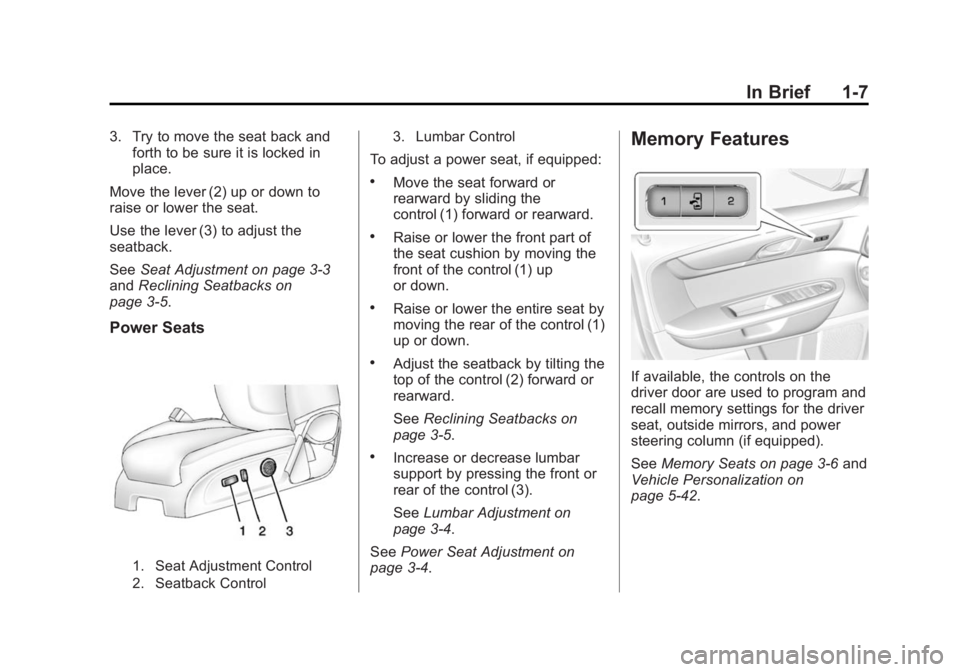
Power Seats
1. Seat Adjustment Control
2. Seatback Control 3. Lumbar Control
To adjust a power seat, if equipped:
.Move the seat forward or
rearward by sliding the
control (1) forward or rearward.
.Raise or lower the front part of
the seat cushion by moving the
front of the control (1) up
or down.
.Raise or lower the entire seat by
moving the rear of the control (1)
up or down.
.Adjust the seatback by tilting the
top of the control (2) forward or
rearward.
See
Reclining Seatbacks on
page 3-5.
.Increase or decrease lumbar
support by pressing the front or
rear of the control (3).
See Lumbar Adjustment on
page 3-4.
See Power Seat Adjustment on
page 3-4.
Memory Features
If available, the controls on the
driver door are used to program and
recall memory settings for the driver
seat, outside mirrors, and power
steering column (if equipped).
See Memory Seats on page 3-6 and
Vehicle Personalization on
page 5-42.
Page 16 of 407

Black plate (9,1)GMC Acadia/Acadia Denali Owner Manual (GMNA-Localizing-U.S./Canada/
Mexico-7576030) - 2015 - CRC - 8/18/14
In Brief 1-9
Heated and Cooled Front
Seats
Heated and Cooled Seat ButtonsShown, Heated Seat Buttons Similar
If equipped, the buttons are on the
center stack. To operate, the engine
must be running.
I: If equipped, press to heat the
seatback only.
H: If equipped, press to cool the
entire seat.
J: Press to heat the seat and
seatback. Press the button once for the
highest setting. With each press of
the button, the seat will change to
the next lower setting, and then to
the off setting. The lights indicate
three for the highest setting and one
for the lowest.
See
Heated and Cooled Front Seats
on page 3-8.
Head Restraint
Adjustment
Do not drive until the head restraints
for all occupants are installed and
adjusted properly.
To achieve a comfortable seating
position, change the seatback
recline angle as little as necessary
while keeping the seat and the head
restraint height in the proper
position.
See Head Restraints on page 3-2
and Seat Adjustment on page 3-3.
Safety Belts
Refer to the following sections for
important information on how to use
safety belts properly:
.Safety Belts on page 3-14.
.How to Wear Safety Belts
Properly on page 3-15.
.Lap-Shoulder Belt on page 3-16.
.Lower Anchors and Tethers for
Children (LATCH System) on
page 3-44.
Page 52 of 407
Black plate (1,1)GMC Acadia/Acadia Denali Owner Manual (GMNA-Localizing-U.S./Canada/
Mexico-7576030) - 2015 - CRC - 8/18/14
Seats and Restraints 3-1
Seats and
Restraints
Head Restraints
Head Restraints . . . . . . . . . . . . . . . 3-2
Front Seats
Seat Adjustment . . . . . . . . . . . . . . 3-3
Power Seat Adjustment . . . . . . . 3-4
Lumbar Adjustment . . . . . . . . . . . 3-4
Reclining Seatbacks . . . . . . . . . . 3-5
Memory Seats . . . . . . . . . . . . . . . . 3-6
Heated and Cooled FrontSeats . . . . . . . . . . . . . . . . . . . . . . . . 3-8
Rear Seats
Rear Seats . . . . . . . . . . . . . . . . . . . . 3-9
Third Row Seats . . . . . . . . . . . . . 3-11
Safety Belts
Safety Belts . . . . . . . . . . . . . . . . . . 3-14
How to Wear Safety BeltsProperly . . . . . . . . . . . . . . . . . . . . 3-15 Lap-Shoulder Belt . . . . . . . . . . . 3-16
Safety Belt Use During
Pregnancy . . . . . . . . . . . . . . . . . . 3-20
Safety Belt Extender . . . . . . . . . 3-21
Safety System Check . . . . . . . . 3-21
Safety Belt Care . . . . . . . . . . . . . 3-21
Replacing Safety Belt System Parts after a Crash . . . . . . . . . 3-21
Airbag System
Airbag System . . . . . . . . . . . . . . . 3-22
Where Are the Airbags? . . . . . 3-24
When Should an AirbagInflate? . . . . . . . . . . . . . . . . . . . . . 3-26
What Makes an Airbag Inflate? . . . . . . . . . . . . . . . . . . . . . 3-27
How Does an Airbag
Restrain? . . . . . . . . . . . . . . . . . . . 3-28
What Will You See after an Airbag Inflates? . . . . . . . . . . . . 3-28
Passenger Sensing System . . . . . . . . . . . . . . . . . . . . . 3-29
Servicing the Airbag-Equipped Vehicle . . . . . . . . . . . . . . . . . . . . . 3-34 Adding Equipment to the
Airbag-Equipped Vehicle . . . 3-34
Airbag System Check . . . . . . . . 3-35
Replacing Airbag System Parts after a Crash . . . . . . . . . 3-35
Child Restraints
Older Children . . . . . . . . . . . . . . . 3-36
Infants and Young
Children . . . . . . . . . . . . . . . . . . . . 3-38
Child Restraint Systems . . . . . 3-41
Where to Put the Restraint . . . 3-42
Lower Anchors and Tethers for Children (LATCH
System) . . . . . . . . . . . . . . . . . . . . 3-44
Replacing LATCH System Parts After a Crash . . . . . . . . . 3-50
Securing Child Restraints (Rear Seat) . . . . . . . . . . . . . . . . . 3-51
Securing Child Restraints (Front Passenger Seat) . . . . 3-53
Page 54 of 407

Black plate (3,1)GMC Acadia/Acadia Denali Owner Manual (GMNA-Localizing-U.S./Canada/
Mexico-7576030) - 2015 - CRC - 8/18/14
Seats and Restraints 3-3
and push the head restraint
rearward until the desired locking
position is reached. Try to move the
head restraint after the button is
released to make sure that it is
locked in place.
The front seat outboard head
restraints are not removable.
Rear Seats
The vehicle's second row seats
have head restraints in the outboard
seating positions that cannot be
adjusted.
The vehicle's third row seats have
headrests in the outboard seating
positions that cannot be adjusted.
The second row head restraints and
third row headrests are not
removable.
Front Seats
Seat Adjustment
{Warning
You can lose control of the
vehicle if you try to adjust a driver
seat while the vehicle is moving.
Adjust the driver seat only when
the vehicle is not moving.
1. Seat Adjustment Handle2. Driver Seat Height
Adjustment Lever
3. Seatback Lever
To adjust a manual seat:
1. Lift the handle (1) under the seat to unlock it.
2. Slide the seat to the desired position, and then release the
handle (1).
3. Try to move the seat back and forth to be sure it is locked in
place.
Move the lever (2) up or down to
raise or lower the seat.
Use the lever (3) to adjust the
seatback. See Reclining Seatbacks
on page 3-5.
Page 55 of 407
Black plate (4,1)GMC Acadia/Acadia Denali Owner Manual (GMNA-Localizing-U.S./Canada/
Mexico-7576030) - 2015 - CRC - 8/18/14
3-4 Seats and Restraints
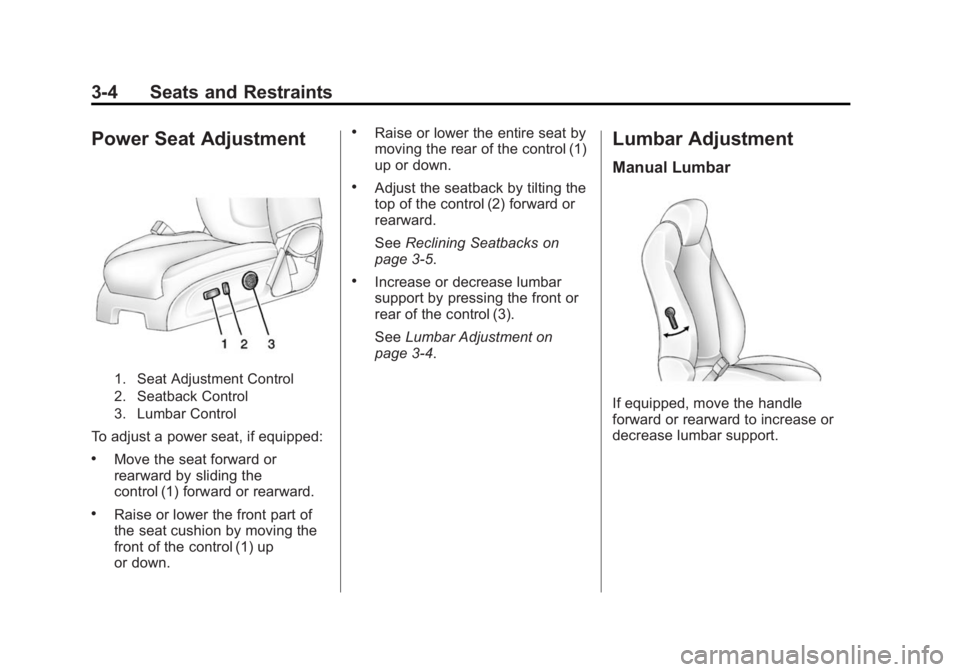
Power Seat Adjustment
1. Seat Adjustment Control
2. Seatback Control
3. Lumbar Control
To adjust a power seat, if equipped:
.Move the seat forward or
rearward by sliding the
control (1) forward or rearward.
.Raise or lower the front part of
the seat cushion by moving the
front of the control (1) up
or down.
.Raise or lower the entire seat by
moving the rear of the control (1)
up or down.
.Adjust the seatback by tilting the
top of the control (2) forward or
rearward.
SeeReclining Seatbacks on
page 3-5.
.Increase or decrease lumbar
support by pressing the front or
rear of the control (3).
See Lumbar Adjustment on
page 3-4.
Lumbar Adjustment
Manual Lumbar
If equipped, move the handle
forward or rearward to increase or
decrease lumbar support.