2015 GMC ACADIA seat adjustment
[x] Cancel search: seat adjustmentPage 60 of 407

Black plate (9,1)GMC Acadia/Acadia Denali Owner Manual (GMNA-Localizing-U.S./Canada/
Mexico-7576030) - 2015 - CRC - 8/18/14
Seats and Restraints 3-9
the off setting. The lights indicate
three for the highest setting and one
for the lowest.
The passenger heated seat may
take longer to heat up.
The heated and/or cooled seats are
canceled after the ignition is
turned off.
Remote Start Heated Seats
When it is cold outside, the heated
seats may turn on automatically
during a remote vehicle start. The
heated seats will be canceled when
the ignition is turned on. Press the
desired heated seat button to use
the heated seats after the vehicle is
started.
The heated seat button lights will
not turn on during a remote start.
The temperature of an unoccupied
seat may be reduced.
SeeRemote Vehicle Start on
page 2-4.Rear Seats
1. Seat Adjustment Handle
2. Reclining Seatback Strap
3. Sliding Seat Lever
Entering and Exiting the
Third Row
{Warning
Using the third row seating
position while the second row is
folded, or folded and tumbled,
could cause injury in a sudden
stop or crash. Be sure to return
the seat to the passenger seating
position. Push and pull on the
seat to make sure it is locked into
place.
{Caution
Folding a rear seat with the safety
belts still fastened may cause
damage to the seat or the safety
belts. Always unbuckle the safety
belts and return them to their
normal stowed position before
folding a rear seat.
Page 62 of 407
Black plate (11,1)GMC Acadia/Acadia Denali Owner Manual (GMNA-Localizing-U.S./Canada/
Mexico-7576030) - 2015 - CRC - 8/18/14
Seats and Restraints 3-11
3. Pull forward on the recliningseatback strap (2).
The head restraint will fold down
automatically.
To return the seatback to the
seating position, lift the seatback
and push it rearward until it locks
into place. Push and pull on the
seatback to make sure it is locked.
Pull up on the head restraint to
return it to the upright, locked
position.
Adjusting the Seats
To adjust the second row seats, pull
outward on the seat adjustment
handle (1). Slide the seat forward or
rearward to the desired position.
Release the handle (1), and push
and pull on the seat to make sure it
is locked.
Third Row Seats
{Warning
Using the third row seating
position while the second row is
folded, or pushed forward in the
entry position, could cause injury
in a sudden stop or crash. Be
sure to return the seat to the
passenger seating position. Push
and pull on the seat to make sure
it is locked into place.
Folding the Seatback
{Caution
Folding a rear seat with the safety
belts still fastened may cause
damage to the seat or the safety
belts. Always unbuckle the safety
belts and return them to their
normal stowed position before
folding a rear seat. To fold the third row seatback:
1. If the second row seat is in the
full rear position, adjust it
forward to allow the third row
seat to fold fully flat.
2. Remove anything on or under the seat.
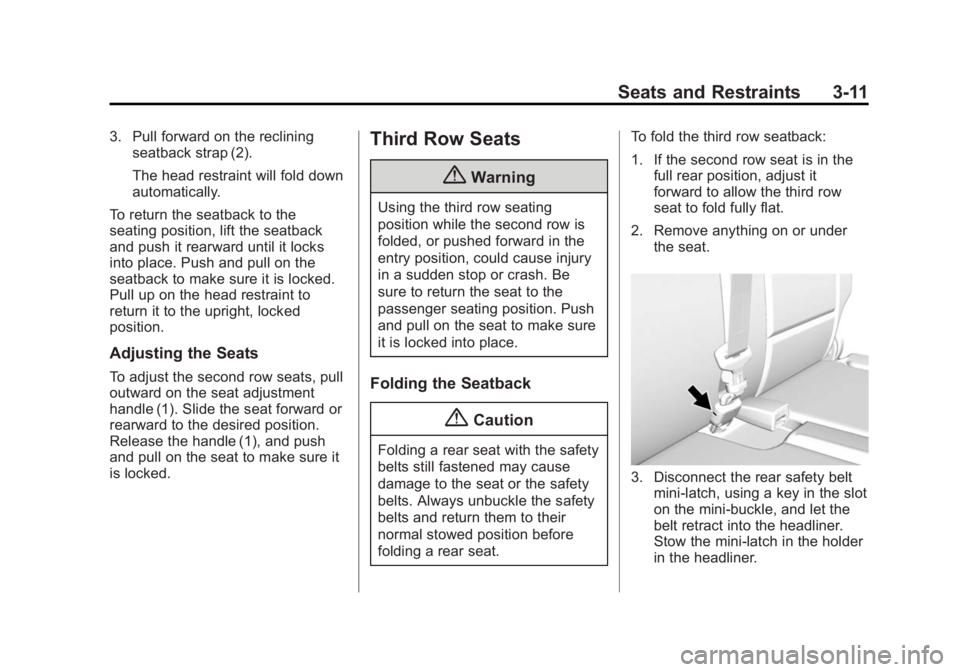
3. Disconnect the rear safety beltmini-latch, using a key in the slot
on the mini-buckle, and let the
belt retract into the headliner.
Stow the mini-latch in the holder
in the headliner.
Page 69 of 407
Black plate (18,1)GMC Acadia/Acadia Denali Owner Manual (GMNA-Localizing-U.S./Canada/
Mexico-7576030) - 2015 - CRC - 8/18/14
3-18 Seats and Restraints
Shoulder Belt Height Adjuster
The vehicle has a shoulder belt
height adjuster for the driver and
right front passenger seating
positions.
Adjust the height so the shoulder
portion of the belt is on the shoulder
but not falling off of it. The belt
should be close to but not
contacting the neck. Improper
shoulder belt height adjustment
could reduce the effectiveness of
the safety belt in a crash. SeeHow
to Wear Safety Belts Properly on
page 3-15.
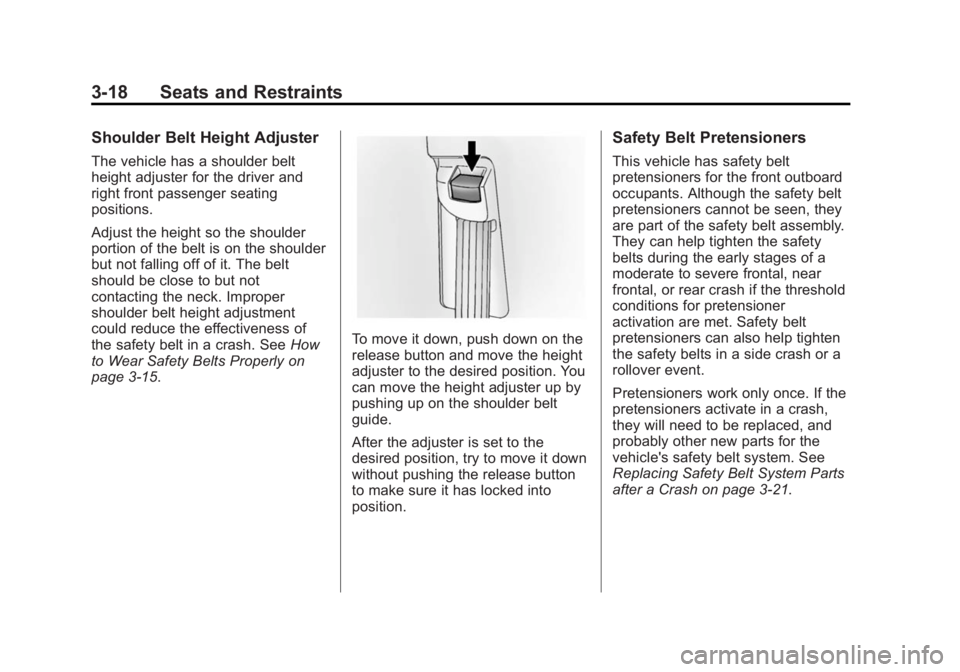
To move it down, push down on the
release button and move the height
adjuster to the desired position. You
can move the height adjuster up by
pushing up on the shoulder belt
guide.
After the adjuster is set to the
desired position, try to move it down
without pushing the release button
to make sure it has locked into
position.
Safety Belt Pretensioners
This vehicle has safety belt
pretensioners for the front outboard
occupants. Although the safety belt
pretensioners cannot be seen, they
are part of the safety belt assembly.
They can help tighten the safety
belts during the early stages of a
moderate to severe frontal, near
frontal, or rear crash if the threshold
conditions for pretensioner
activation are met. Safety belt
pretensioners can also help tighten
the safety belts in a side crash or a
rollover event.
Pretensioners work only once. If the
pretensioners activate in a crash,
they will need to be replaced, and
probably other new parts for the
vehicle's safety belt system. See
Replacing Safety Belt System Parts
after a Crash on page 3-21.
Page 119 of 407

Black plate (6,1)GMC Acadia/Acadia Denali Owner Manual (GMNA-Localizing-U.S./Canada/
Mexico-7576030) - 2015 - CRC - 8/18/14
5-6 Instruments and Controls
note pad holder, or any other
magnetic item. Turn off the vehicle,
move the magnetic item, then turn
on the vehicle and calibrate the
compass.
To calibrate the compass, use the
following procedure:
Compass Calibration Procedure
1. Before calibrating the compass,make sure the compass zone is
set to the variance zone in which
the vehicle is located. See
“Compass Variance (Zone)
Procedure” earlier in this
section.
Do not operate any switches
such as window, sunroof,
climate controls, seats, etc.
during the calibration procedure.
2. Press the vehicle information button until PRESS
VTO
CALIBRATE COMPASS
displays. 3. Press the set/reset button to
start the compass calibration.
4. The DIC will display CALIBRATING: DRIVE IN
CIRCLES. Drive the vehicle in
tight circles at less than 8 km/h
(5 mph) to complete the
calibration. The DIC will display
CALIBRATION COMPLETE for a
few seconds when the
calibration is complete. The DIC
display will then return to the
previous menu.
Clock
Press Settings on the Home Page
Menu, then press the Set Time or
Set Date settings screen button to
display the different options for
setting the time and date.
Set Time:
.Press the up or down arrows to
increase or decrease the Hours,
Minutes, AM, PM, or the 24 hour
setting on the clock.
.Press and hold to quickly
increase or decrease the time
settings.
.Press OK to save the
adjustments.
.Press Back or Cancel screen
button to cancel the
adjustments.
Set Date:
.Press the up or down arrows to
increase or decrease the Month,
Day, and Year settings.
.Press and hold to quickly
increase or decrease the date
settings.
.Press OK to save the
adjustments.
.Press Back or Cancel screen
button to cancel the
adjustments.
Page 160 of 407

Black plate (47,1)GMC Acadia/Acadia Denali Owner Manual (GMNA-Localizing-U.S./Canada/
Mexico-7576030) - 2015 - CRC - 8/18/14
Instruments and Controls 5-47
DRIVER MIRROR:The driver
outside mirror will be tilted down
when the vehicle is shifted into
R (Reverse).
PASSENGER MIRROR: The
passenger outside mirror will be
tilted down when the vehicle is
shifted into R (Reverse).
BOTH MIRRORS: The driver and
passenger outside mirrors will be
tilted down when the vehicle is
shifted into R (Reverse).
NO CHANGE: No change will be
made to this feature. The current
setting will remain.
To select a setting, press the set/
reset button while the desired
setting is displayed on the DIC.
EASY EXIT SEAT
If your vehicle has this feature, it
allows you to select your preference
for the automatic easy exit seat
feature. See Memory Seats on
page 3-6. Press the customization button until
EASY EXIT SEAT appears on the
DIC display. Press the set/reset
button once to access the settings
for this feature. Then press the
customization button to scroll
through the following settings:
OFF (default):
No automatic seat
exit recall will occur.
ON: The driver seat will move back
when the key is removed from the
ignition. The steering column will
also move up and forward on
vehicles with the power tilt and
telescopic steering feature. See
Steering Wheel Adjustment on
page 5-2.
The automatic easy exit seat
movement will only occur one time
after the key is removed from the
ignition. If the automatic movement
has already occurred, and you put
the key back in the ignition and
remove it again, the seat and
steering column will stay in the original exit position, unless a
memory recall took place prior to
removing the key again.
NO CHANGE:
No change will be
made to this feature. The current
setting will remain.
To select a setting, press the set/
reset button while the desired
setting is displayed on the DIC.
MEMORY SEAT RECALL
If your vehicle has this feature, it
allows you to select your preference
for the remote memory seat recall
feature. See Memory Seats on
page 3-6.
Press the customization button until
MEMORY SEAT RECALL appears
on the DIC display. Press the set/
reset button once to access the
settings for this feature. Then press
the customization button to scroll
through the following settings:
OFF (default): No remote memory
seat recall will occur.
Page 161 of 407

Black plate (48,1)GMC Acadia/Acadia Denali Owner Manual (GMNA-Localizing-U.S./Canada/
Mexico-7576030) - 2015 - CRC - 8/18/14
5-48 Instruments and Controls
ON:The driver seat and outside
mirrors will automatically move to
the stored driving position when the
unlock button on the Remote
Keyless Entry (RKE) transmitter is
pressed. The steering column will
also move on vehicles with the
power tilt and telescopic steering
feature. See Steering Wheel
Adjustment on page 5-2. See
“Memory Remote Recall” under
Memory Seats on page 3-6 for
information on matching transmitters
to driver positions.
NO CHANGE: No change will be
made to this feature. The current
setting will remain.
To select a setting, press the set/
reset button while the desired
setting is displayed on the DIC.
REMOTE START
If your vehicle has this feature, it
allows you to turn the remote start
off or on. The remote start feature
allows you to start the engine from
outside of the vehicle using the Remote Keyless Entry (RKE)
transmitter. See
Remote Vehicle
Start on page 2-4.
Press the customization button until
REMOTE START appears on the
DIC display. Press the set/reset
button once to access the settings
for this feature. Then press the
customization button to scroll
through the following settings:
OFF: The remote start feature will
be disabled.
ON (default): The remote start
feature will be enabled.
NO CHANGE: No change will be
made to this feature. The current
setting will remain.
To select a setting, press the set/
reset button while the desired
setting is displayed on the DIC.
FACTORY SETTINGS
This feature allows you to set all of
the customization features back to
their factory default settings. Press the customization button until
FACTORY SETTINGS appears on
the DIC display. Press the set/reset
button once to access the settings
for this feature. Then press the
customization button to scroll
through the following settings:
RESTORE ALL (default):
The
customization features will be set to
their factory default settings.
DO NOT RESTORE: The
customization features will not be
set to their factory default settings.
To select a setting, press the set/
reset button while the desired
setting is displayed on the DIC.
EXIT FEATURE SETTINGS
This feature allows you to exit the
feature settings menu.
Press the customization button until
FEATURE SETTINGS PRESS
V
TO EXIT appears in the DIC display.
Press the set/reset button once to
exit the menu.
Page 396 of 407

Black plate (1,1)GMC Acadia/Acadia Denali Owner Manual (GMNA-Localizing-U.S./Canada/
Mexico-7576030) - 2015 - CRC - 8/18/14
INDEX i-1
A
Accessories andModifications . . . . . . . . . . . . . . . . . 10-2
Accessory Power . . . . . . . . . . . . . . 9-19
Add-On Electrical Equipment . . . . . . . . . . . . . . . . . . . 9-53
Additional Information
OnStar
®. . . . . . . . . . . . . . . . . . . . . . 14-6
Additional Maintenance and Care . . . . . . . . . . . . . . . . . . . . . 11-8
Adjustments
Lumbar, Front Seats . . . . . . . . . . . 3-4
Air Cleaner/Filter, Engine . . . . . 10-10
Air Filter, Passenger Compartment . . . . . . . . . . . . . . . . 8-12
Air Vents . . . . . . . . . . . . . . . . . . . . . . 8-11
Airbag System
Check . . . . . . . . . . . . . . . . . . . . . . . . 3-35
How Does an AirbagRestrain? . . . . . . . . . . . . . . . . . . . 3-28
Passenger Sensing System . . . . . . . . . . . . . . . . . . . . . . 3-29
What Makes an Airbag Inflate? . . . . . . . . . . . . . . . . . . . . . . 3-27 Airbag System (cont'd)
What Will You See after an
Airbag Inflates? . . . . . . . . . . . . . 3-28
When Should an Airbag
Inflate? . . . . . . . . . . . . . . . . . . . . . . 3-26
Where Are the Airbags? . . . . . . 3-24
Airbags Adding Equipment to theVehicle . . . . . . . . . . . . . . . . . . . . . . 3-34
Passenger Status Indicator . . . 5-14
Readiness Light . . . . . . . . . . . . . . 5-14
Servicing Airbag-Equipped Vehicles . . . . . . . . . . . . . . . . . . . . . 3-34
System Check . . . . . . . . . . . . . . . . 3-22
Alarm Vehicle Security . . . . . . . . . . . . . . 2-11
Alert Side Blind Zone (SBZA) . . . . . . 9-36
All-Season Tires . . . . . . . . . . . . . . 10-38
All-Wheel Drive . . . . . . . . . 9-26, 10-23
AM-FM Radio . . . . . . . . . . . . . . . . . . . 7-6
Antenna Multi-band . . . . . . . . . . . . . . . . . . . . 7-11
Antilock Brake System (ABS) . . . . . . . . . . . . . . . . 9-26
Warning Light . . . . . . . . . . . . . . . . . 5-19 Appearance Care
Exterior . . . . . . . . . . . . . . . . . . . . . 10-75
Interior . . . . . . . . . . . . . . . . . . . . . . 10-80
Armrest Storage . . . . . . . . . . . . . . . . 4-2
Assistance Program, Roadside . . . . . . . . . . . . . . . . . . . . . 13-5
Audio Controller,
Rear (RAC) . . . . . . . . . . . . . . . . . . 7-17
Audio Players . . . . . . . . . . . . . . . . . 7-11 CD . . . . . . . . . . . . . . . . . . . . . . . . . . . 7-11
MP3 . . . . . . . . . . . . . . . . . . . . . . . . . . 7-13
Audio System Radio Reception . . . . . . . . . . . . . . 7-10
Rear Seat (RSA) . . . . . . . . . . . . . 7-16
Theft-Deterrent Feature . . . . . . . . 7-2
Automatic
Dimming Mirrors . . . . . . . . . . . . . . 2-16
Door Locks . . . . . . . . . . . . . . . . . . . . 2-7
Transmission . . . . . . . . . . . . . . . . . 9-22
Transmission Fluid . . . . . . . . . 10-10
Automatic Transmission
Manual Mode . . . . . . . . . . . . . . . . . 9-24
Shift Lock ControlFunction Check . . . . . . . . . . . 10-23
Auxiliary
Devices . . . . . . . . . . . . . . . . . . . . . . . 7-15
Page 399 of 407

Black plate (4,1)GMC Acadia/Acadia Denali Owner Manual (GMNA-Localizing-U.S./Canada/
Mexico-7576030) - 2015 - CRC - 8/18/14
i-4 INDEX
Driving (cont'd)Vehicle Load Limits . . . . . . . . . . . . 9-9
Wet Roads . . . . . . . . . . . . . . . . . . . . 9-6
Winter . . . . . . . . . . . . . . . . . . . . . . . . . 9-7
Dual Automatic Climate Control System . . . . . . . . . . . . . . . . 8-4
E
Electrical Equipment,Add-On . . . . . . . . . . . . . . . . . . . . . . 9-53
Electrical System
Engine CompartmentFuse Block . . . . . . . . . . . . . . . . 10-28
Fuses and Circuit Breakers . . . . . . . . . . . . . . . . . . 10-28
Instrument Panel Fuse
Block . . . . . . . . . . . . . . . . . . . . . . 10-34
Overload . . . . . . . . . . . . . . . . . . . 10-27
Emergency OnStar
®. . . . . . . . . . . . . . . . . . . . . . 14-2
Engine Air Cleaner/Filter . . . . . . . . . . . 10-10
Check and Service EngineSoon Light . . . . . . . . . . . . . . . . . . 5-15
Compartment Overview . . . . . . . 10-5
Coolant . . . . . . . . . . . . . . . . . . . . . 10-12 Engine (cont'd)
Coolant Temperature
Gauge . . . . . . . . . . . . . . . . . . . . . . 5-12
Coolant Temperature
Warning Light . . . . . . . . . . . . . . . 5-21
Cooling System . . . . . . . . . . . . . .10-11
Cooling System Messages . . . 5-34
Cover . . . . . . . . . . . . . . . . . . . . . . . . . 10-6
Drive Belt Routing . . . . . . . . . . . . 12-3
Exhaust . . . . . . . . . . . . . . . . . . . . . . 9-21
Heater . . . . . . . . . . . . . . . . . . . . . . . . 9-17
Oil Life System . . . . . . . . . . . . . . . 10-9
Oil Messages . . . . . . . . . . . . . . . . . 5-35
Overheated Protection Operating Mode . . . . . . . . . . . 10-18
Overheating . . . . . . . . . . . . . . . . 10-16
Power Messages . . . . . . . . . . . . . 5-35
Pressure Light . . . . . . . . . . . . . . . . 5-21
Running While Parked . . . . . . . . 9-22
Starting . . . . . . . . . . . . . . . . . . . . . . . 9-16
Entry Lighting . . . . . . . . . . . . . . . . . . . 6-6
Equipment, Towing . . . . . . . . . . . . 9-51
Event Data Recorders . . . . . . . . 13-14
Extender, Safety Belt . . . . . . . . . . 3-21
Exterior Lamp Controls . . . . . . . . . 6-1
F
Features Memory . . . . . . . . . . . . . . . . . . . . . . . . 1-7
Filter, Engine Air Cleaner . . . . . . . . . 10-10
Flash-to-Pass . . . . . . . . . . . . . . . . . . . 6-2
Flashers, Hazard Warning . . . . . . 6-3
Flat Tire . . . . . . . . . . . . . . . . . . . . . . 10-58 Changing . . . . . . . . . . . . . . . . . . . 10-59
Floor Mats . . . . . . . . . . . . . . . . . . . . 10-83
Fluid Automatic Transmission . . . . 10-10
Brakes . . . . . . . . . . . . . . . . . . . . . . 10-21
Power Steering . . . . . . . . . . . . . 10-18
Washer . . . . . . . . . . . . . . . . . . . . . 10-19
Fog Lamps . . . . . . . . . . . . . . . . . . . . . 6-4
Folding Mirrors . . . . . . . . . . . . . . . . 2-15
Forward Collision Alert
(FCA) System . . . . . . . . . . . . . . . . 9-33
Frequency Statement
Radio . . . . . . . . . . . . . . . . . . . . . . . 13-12
Front Fog Lamp Light . . . . . . . . . . . . . . . . . . . . . . . . . . 5-23
Front Seats Adjustment . . . . . . . . . . . . . . . . . . . . 3-3
Heated and Cooled . . . . . . . . . . . . 3-8