2015 FORD TRANSIT maintenance
[x] Cancel search: maintenancePage 272 of 461

MOTORCRAFT PARTS - 3.2L POWER STROKE DIESEL
3.2L Power Stroke Diesel
Part number
Component
FA-1921
Pre air filter
FA-1916
Air filter element
Service required
Automatic transmission fluid filter
BAGM-48H6-760 - dual batteries
Battery
FL-500S
Oil filter
FD-46-21
Fuel filter
WW-2955 - driver side
Windshield wiper blades - vehicles with low
roof WW-2112 - passenger side
WW-2901 - driver side
Windshield wiper blades - vehicles with
medium or high roof WW-2049 - passenger side
Note: Motorcraft replacement parts are recommended for scheduled maintenance and
are available at an authorized dealer or at fordparts.com. These parts meet or exceed Ford
Motor Company ’s specifications, and are engineered for your vehicle. Use of other parts may
impact vehicle performance, emissions and durability. Your vehicle Warranty may be void
for any damage related to use of other parts.
Note: Should a Motorcraft oil filter not be available, use an oil filter that meets industry
performance specification SAE/USCAR-36.
269Transit (TTH) Canada/United States of America, enUSA, Edition date: 03/2014 Capacities and Specifications
Page 275 of 461
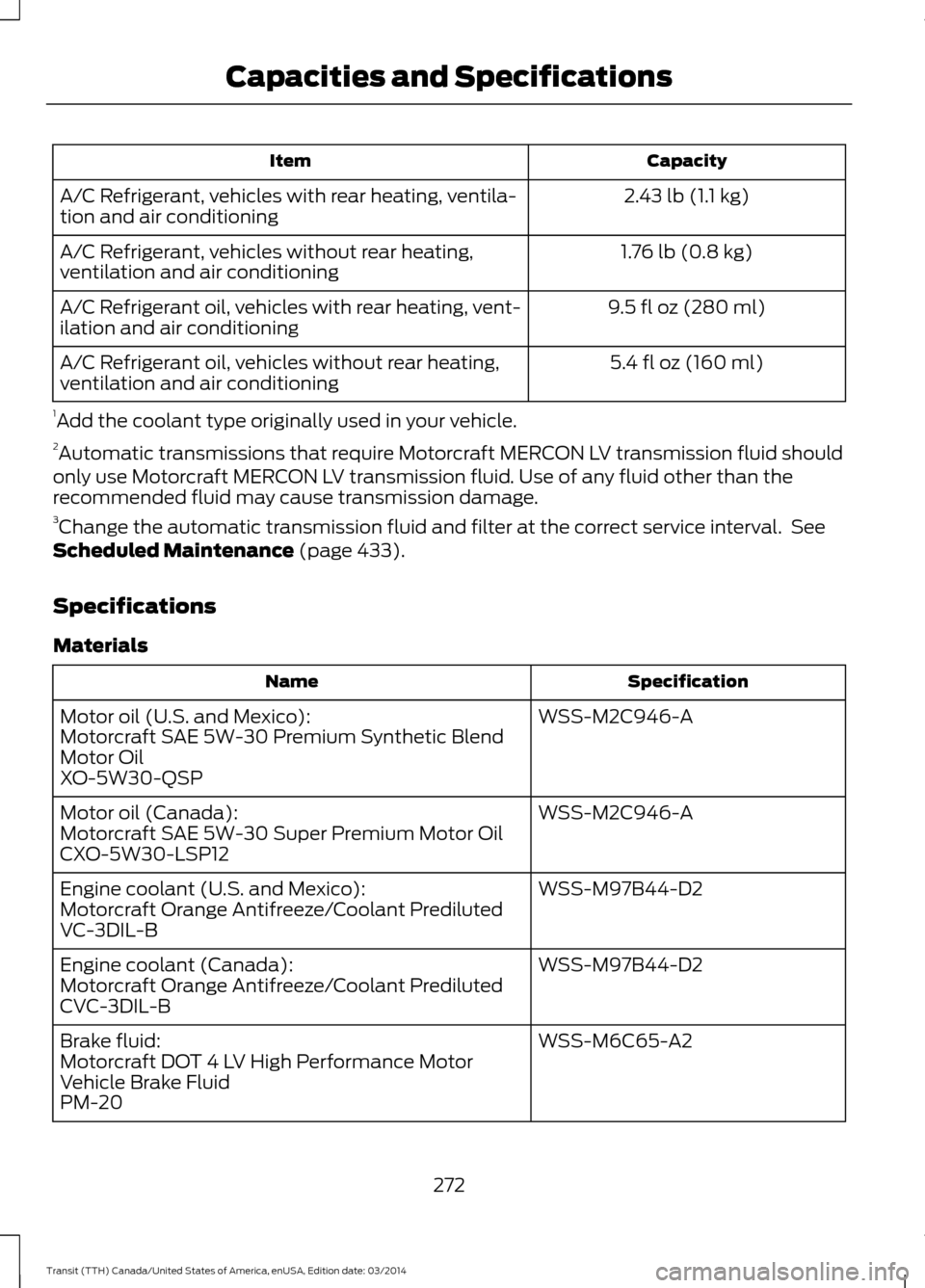
Capacity
Item
2.43 lb (1.1 kg)
A/C Refrigerant, vehicles with rear heating, ventila-
tion and air conditioning
1.76 lb (0.8 kg)
A/C Refrigerant, vehicles without rear heating,
ventilation and air conditioning
9.5 fl oz (280 ml)
A/C Refrigerant oil, vehicles with rear heating, vent-
ilation and air conditioning
5.4 fl oz (160 ml)
A/C Refrigerant oil, vehicles without rear heating,
ventilation and air conditioning
1 Add the coolant type originally used in your vehicle.
2 Automatic transmissions that require Motorcraft MERCON LV transmission fluid should
only use Motorcraft MERCON LV transmission fluid. Use of any fluid other than the
recommended fluid may cause transmission damage.
3 Change the automatic transmission fluid and filter at the correct service interval. See
Scheduled Maintenance (page 433).
Specifications
Materials Specification
Name
WSS-M2C946-A
Motor oil (U.S. and Mexico):
Motorcraft SAE 5W-30 Premium Synthetic Blend
Motor Oil
XO-5W30-QSP
WSS-M2C946-A
Motor oil (Canada):
Motorcraft SAE 5W-30 Super Premium Motor Oil
CXO-5W30-LSP12
WSS-M97B44-D2
Engine coolant (U.S. and Mexico):
Motorcraft Orange Antifreeze/Coolant Prediluted
VC-3DIL-B
WSS-M97B44-D2
Engine coolant (Canada):
Motorcraft Orange Antifreeze/Coolant Prediluted
CVC-3DIL-B
WSS-M6C65-A2
Brake fluid:
Motorcraft DOT 4 LV High Performance Motor
Vehicle Brake Fluid
PM-20
272Transit (TTH) Canada/United States of America, enUSA, Edition date: 03/2014Capacities and Specifications
Page 278 of 461

Capacity
Item
16.4 qt (15.5 L)
Engine cooling system, vehicles with an auxiliary
heater 1
14.9 qt (14.1 L)
Engine cooling system, vehicles without an auxiliary
heater 1
13.1 qt (12.4 L)
Automatic transmission 2, 3
20.9 gal (95 L)
Fuel tank
4.8 qt (4.5 L)
Windshield and rear window washer system –
including headlamp washer
2.43 lb (1.1 kg)
A/C Refrigerant, vehicles with rear heating, ventila-
tion and air conditioning
1.76 lb (0.8 kg)
A/C Refrigerant, vehicles without rear heating,
ventilation and air conditioning
9.5 fl oz (280 ml)
A/C Refrigerant oil, vehicles with rear heating, vent-
ilation and air conditioning
5.4 fl oz (160 ml)
A/C Refrigerant oil, vehicles without rear heating,
ventilation and air conditioning
1 Add the coolant type originally used in your vehicle.
2 Automatic transmissions that require Motorcraft MERCON LV transmission fluid should
only use Motorcraft MERCON LV transmission fluid. Use of any fluid other than the
recommended fluid may cause transmission damage.
3 Change the automatic transmission fluid and filter at the correct service interval. See
Scheduled Maintenance (page 433).
275Transit (TTH) Canada/United States of America, enUSA, Edition date: 03/2014 Capacities and Specifications
Page 282 of 461

Capacity
Item
1.76 lb (0.8 kg)
A/C Refrigerant, vehicles without rear heating,
ventilation and air conditioning
9.5 fl oz (280 ml)
A/C Refrigerant oil, vehicles with rear heating, vent-
ilation and air conditioning
5.4 fl oz (160 ml)
A/C Refrigerant oil, vehicles without rear heating,
ventilation and air conditioning
1 Add the coolant type originally used in your vehicle.
2 Automatic transmissions that require Motorcraft MERCON LV transmission fluid should
only use Motorcraft MERCON LV transmission fluid. Use of any fluid other than the
recommended fluid may cause transmission damage.
3 Change the automatic transmission fluid and filter at the correct service interval. See
Scheduled Maintenance (page 433).
Specifications
Materials Specification
Name
WSS-M2C171-E
Motor oil:
Motorcraft SAE 5W-40 Full Synthetic Diesel Motor
Oil
XO-5W40-5QSD
WSS-M97B44-D2
Engine coolant (U.S. and Mexico):
Motorcraft Orange Antifreeze/Coolant Prediluted
VC-3DIL-B
WSS-M97B44-D2
Engine coolant (Canada):
Motorcraft Orange Antifreeze/Coolant Prediluted
CVC-3DIL-B
WSS-M6C65-A2
Brake fluid:
Motorcraft DOT 4 LV High Performance Motor
Vehicle Brake Fluid
PM-20
WSS-M2C938-A
Automatic transmission fluid (U.S. and Mexico):
MERCON LV
Motorcraft MERCON LV Automatic Transmission
Fluid
XT-10-QLVC
WSS-M2C938-A
Automatic transmission fluid (Canada):
279Transit (TTH) Canada/United States of America, enUSA, Edition date: 03/2014 Capacities and Specifications
Page 323 of 461

Action and Description
Message
Press the OK button to select and then press OK again when
the following message appears in the display.
Restore Defaults?
Completely erase all information stored on SYNC, for example
phonebook, call history, text messages and paired devices,
and return the system to the factory default settings.
Master reset
Press OK to select. The display indicates when complete.
SYNC returns you to the Advanced menu.
Install applications you have downloaded.
Install Application?
Press the
OK button and scroll to select. Press the OK button
to confirm.
Access the Auto Version number as well as the FDN number.
System info
Press the
OK button to select.
This is a Bluetooth component, which can further help your
cell phone with the exchange of text messages.
MAP Profile
Exit the current menu.
Return
SYNC™ APPLICATIONS AND
SERVICES
(If Equipped)
In order for the following features to work,
your cell phone must be compatible with
SYNC. To check your phone's
compatibility, visit www.SYNCMyRide.com,
www.SYNCMyRide.ca or
www.syncmaroute.ca.
• SYNC Services *
: Provides access to
traffic, directions and information such
as travel, horoscopes, stock prices and
more.
• 911 Assist: Can alert 911 in the event of
an emergency. •
Vehicle Health Report *
: Provides a
diagnostic and maintenance report
card of your vehicle.
• SYNC AppLink: Allows you to connect
to and use certain applications, for
example Pandora and Stitcher on a
compatible cell phone.
* This is an optional feature and available
in the United States only.
911 Assist
(If Equipped) WARNINGS
Unless the 911 Assist setting is set on
before a crash, the system will not
dial for help which could delay
response time, potentially increasing the
risk of serious injury or death after a crash.
320 Transit (TTH) Canada/United States of America, enUSA, Edition date: 03/2014 SYNC™
Page 326 of 461

Vehicle Health Report
WARNING
Always follow scheduled
maintenance instructions, regularly
inspect your vehicle, and seek repair
for any damage or problem you suspect.
Vehicle Health Report supplements, but
cannot replace, normal maintenance and
vehicle inspection. Vehicle Health Report
only monitors certain systems
electronically monitored by your vehicle
and will not monitor or report the status
of any other system, (such as brake lining
wear). Failure to perform scheduled
maintenance and regularly inspect your
vehicle may result in vehicle damage and
serious injury. Note:
This feature is only available in the
United States.
Note: Your Vehicle Health Report feature
requires activation before use. Visit
www.SYNCMyRide.com to register. There
is no fee or subscription associated with
Vehicle Health Report, but you must register
to use this feature.
Note: This feature may not function
properly if you have enabled caller ID
blocking on your cellular phone. Before
running a report, review the Vehicle Health
Report Privacy Notice. Note:
In order to allow a break-in period for
your vehicle, you may not be able to create
a Vehicle Health Report until your vehicle
odometer has reached 200 miles.
Note: Cellular phone and SMS charges may
apply when making a report.
Register for Vehicle Health Report and set
your report preferences at
www.SYNCMyRide.com. After registering,
you can request a Vehicle Health Report
(inside your vehicle). Return to your
account at www.SYNCMyRide.com to view
your report. You can also choose for SYNC
to remind you automatically to run reports
at specific mileage intervals.
The system allows you to check your
vehicle's overall health in the form of a
diagnostic report card. The Vehicle Health
Report contains valuable information, for
example:
• Vehicle diagnostic information
• Scheduled maintenance
• Open recalls and Field Service Actions
• Items noted during vehicle inspections
by an authorized dealer that still need
servicing.
You can run a vehicle health report after
your vehicle has been running a minimum
of 60 seconds. Choose one of the following
options.
Press the voice button and when prompted say: Action and Description
Voice command
The system will run a vehicle health report of your vehicle's
diagnostic systems and send the results to Ford where it
combines with scheduled maintenance information, open
recalls, other field service actions and vehicle inspection items
that still need servicing by an authorized dealer.
vehicle [health] report
323Transit (TTH) Canada/United States of America, enUSA, Edition date: 03/2014 SYNC™
Page 327 of 461
![FORD TRANSIT 2015 5.G Owners Manual Press the phone button, then scroll to:
Action and Description
Message
Press the OK button.
vehicle [health] report
Select one of the following:
Press the
OK button to and select on or off.
Report In](/manual-img/11/5392/w960_5392-326.png "FORD TRANSIT 2015 5.G Owners Manual Press the phone button, then scroll to:
Action and Description
Message
Press the OK button.
vehicle [health] report
Select one of the following:
Press the
OK button to and select on or off.
Report In")
Press the phone button, then scroll to:
Action and Description
Message
Press the OK button.
vehicle [health] report
Select one of the following:
Press the
OK button to and select on or off.
Report Interval
Select On to have SYNC automatically prompt you to run a
health report at certain mileage intervals. *
Scroll to select between 5000, 7500 or 10000-mile intervals.
Select your desire option and press the
OK button.
Mileage Interval
Press the
OK button for SYNC to run a health report of your
vehicle's diagnostic systems and send the results to Ford
where it combines with scheduled maintenance information,
open recalls, other field service actions and vehicle inspection
items that still need servicing by an authorized dealer.
Run Report
Exit the current menu.
Return
* You must first turn this feature on before you can select the desired mileage interval.
Vehicle Health Report Privacy Notice
When you create a Vehicle Health Report,
Ford Motor Company may collect your
cellular phone number (to process your
report request) and diagnostic information
about your vehicle. Certain versions or
updates to Vehicle Health Report may also
collect more vehicle information. Ford may
use your vehicle information it collects for
any purpose. If you do not want to disclose
your cellular phone number or vehicle
information, do not run the feature or set
up your Vehicle Health Report profile at
www.SYNCMyRide.com. See
www.SYNCMyRide.com (Vehicle Health
Report Terms and Conditions, and Privacy
Statement) for more information. SYNC Services: Traffic, Directions
& Information (TDI) (If Equipped,
United States Only)
Note:
SYNC Services varies by trim level
and model year and may require a
subscription. Traffic alerts and turn-by-turn
directions available in select markets.
Message and data rates may apply. Ford
Motor Company reserves the right to change
or discontinue this product service at any
time without prior notification or incurring
any future obligation.
324 Transit (TTH) Canada/United States of America, enUSA, Edition date: 03/2014 SYNC™
Page 406 of 461
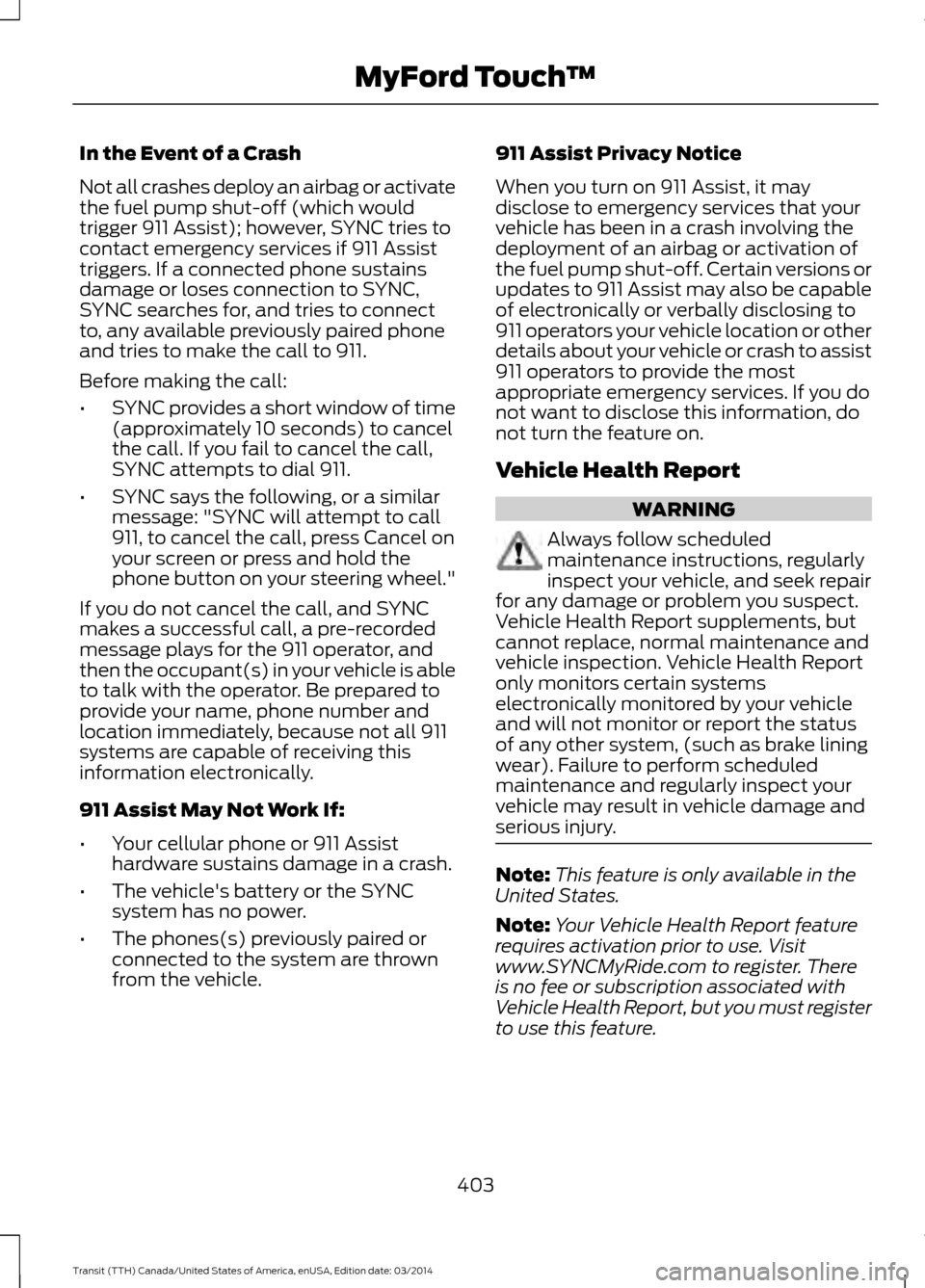
In the Event of a Crash
Not all crashes deploy an airbag or activate
the fuel pump shut-off (which would
trigger 911 Assist); however, SYNC tries to
contact emergency services if 911 Assist
triggers. If a connected phone sustains
damage or loses connection to SYNC,
SYNC searches for, and tries to connect
to, any available previously paired phone
and tries to make the call to 911.
Before making the call:
•
SYNC provides a short window of time
(approximately 10 seconds) to cancel
the call. If you fail to cancel the call,
SYNC attempts to dial 911.
• SYNC says the following, or a similar
message: "SYNC will attempt to call
911, to cancel the call, press Cancel on
your screen or press and hold the
phone button on your steering wheel."
If you do not cancel the call, and SYNC
makes a successful call, a pre-recorded
message plays for the 911 operator, and
then the occupant(s) in your vehicle is able
to talk with the operator. Be prepared to
provide your name, phone number and
location immediately, because not all 911
systems are capable of receiving this
information electronically.
911 Assist May Not Work If:
• Your cellular phone or 911 Assist
hardware sustains damage in a crash.
• The vehicle's battery or the SYNC
system has no power.
• The phones(s) previously paired or
connected to the system are thrown
from the vehicle. 911 Assist Privacy Notice
When you turn on 911 Assist, it may
disclose to emergency services that your
vehicle has been in a crash involving the
deployment of an airbag or activation of
the fuel pump shut-off. Certain versions or
updates to 911 Assist may also be capable
of electronically or verbally disclosing to
911 operators your vehicle location or other
details about your vehicle or crash to assist
911 operators to provide the most
appropriate emergency services. If you do
not want to disclose this information, do
not turn the feature on.
Vehicle Health Report
WARNING
Always follow scheduled
maintenance instructions, regularly
inspect your vehicle, and seek repair
for any damage or problem you suspect.
Vehicle Health Report supplements, but
cannot replace, normal maintenance and
vehicle inspection. Vehicle Health Report
only monitors certain systems
electronically monitored by your vehicle
and will not monitor or report the status
of any other system, (such as brake lining
wear). Failure to perform scheduled
maintenance and regularly inspect your
vehicle may result in vehicle damage and
serious injury. Note:
This feature is only available in the
United States.
Note: Your Vehicle Health Report feature
requires activation prior to use. Visit
www.SYNCMyRide.com to register. There
is no fee or subscription associated with
Vehicle Health Report, but you must register
to use this feature.
403 Transit (TTH) Canada/United States of America, enUSA, Edition date: 03/2014 MyFord Touch
™