2015 FORD TRANSIT page 42
[x] Cancel search: page 42Page 262 of 461

4. Remove the retaining nut to release
the spare wheel bracket.
Vehicles With a Spare Wheel
Chassis Cab and Cutaway
The spare wheel is under the rear of your
vehicle.
If the spare wheel is the same type and
size as your vehicle road wheel, you can fit
the spare wheel and continue to drive in
the normal manner.
If the spare wheel is not the same type and
size as your vehicle road wheel, it has a
label showing the maximum driving speed
limit.
Note: If your vehicle is fitted with a tire
pressure monitoring system, the warning
indicator will flash if you fit the spare wheel
to your vehicle. To restore the correct
operation of the tire pressure monitoring
system, you must have the repaired road
wheel and tire assembly refitted to your
vehicle. See Tire Pressure Monitoring
System (page 251). To prevent damage
occurring to the tire pressure monitoring
system sensors, make sure you have a
damage tire repaired or replaced by a tire
professional. 1. Insert the flat end of the lug wrench
into the socket. Turn counterclockwise
until the spare wheel rests on the
ground and the cable is loose. 2. Raise the cable end cover.
259 Transit (TTH) Canada/United States of America, enUSA, Edition date: 03/2014 Wheels and TiresE146813 E184880 E146811
Page 266 of 461
WARNINGS
Make sure the wheel and hub
contact surfaces are free from
foreign material.
Never use wheels or lug nuts
different than the original equipment
as this could damage the wheel or
mounting system. This damage could
allow the wheels to come off when your
vehicle is moving. 1. Install the wheel.
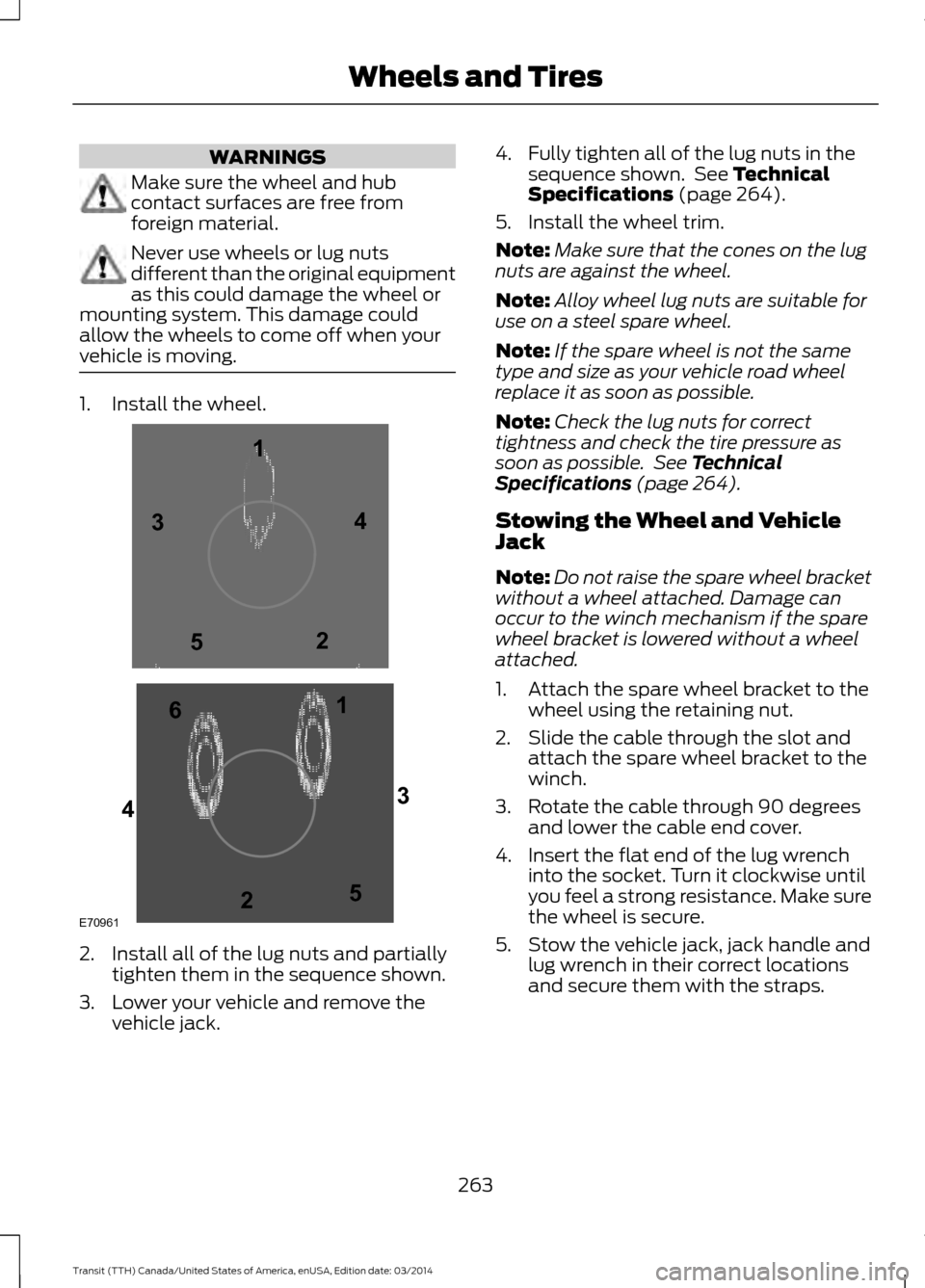
2. Install all of the lug nuts and partially
tighten them in the sequence shown.
3. Lower your vehicle and remove the vehicle jack. 4. Fully tighten all of the lug nuts in the
sequence shown. See Technical
Specifications (page 264).
5. Install the wheel trim.
Note: Make sure that the cones on the lug
nuts are against the wheel.
Note: Alloy wheel lug nuts are suitable for
use on a steel spare wheel.
Note: If the spare wheel is not the same
type and size as your vehicle road wheel
replace it as soon as possible.
Note: Check the lug nuts for correct
tightness and check the tire pressure as
soon as possible. See Technical
Specifications (page 264).
Stowing the Wheel and Vehicle
Jack
Note: Do not raise the spare wheel bracket
without a wheel attached. Damage can
occur to the winch mechanism if the spare
wheel bracket is lowered without a wheel
attached.
1. Attach the spare wheel bracket to the wheel using the retaining nut.
2. Slide the cable through the slot and attach the spare wheel bracket to the
winch.
3. Rotate the cable through 90 degrees and lower the cable end cover.
4. Insert the flat end of the lug wrench into the socket. Turn it clockwise until
you feel a strong resistance. Make sure
the wheel is secure.
5. Stow the vehicle jack, jack handle and lug wrench in their correct locations
and secure them with the straps.
263 Transit (TTH) Canada/United States of America, enUSA, Edition date: 03/2014 Wheels and TiresE709611
1
2 3
4
5
6
2
3
4
5
Page 270 of 461

MOTORCRAFT PARTS - 3.5L
3.5L V6 Ecoboost
Part number
Component
FA-1921
Pre air filter
FA-1916
Air filter element
Service required
Automatic transmission fluid filter
BXT-48H6-610
Battery
BAGM-48H6-760 - dual batteries
FL-500S
Oil filter
FD-46-21
Fuel filter
SP534
Spark plugs
WW-2955 - driver side
Windshield wiper blades - vehicles with low
roof WW-2112 - passenger side
WW-2901 - driver side
Windshield wiper blades - vehicles with
medium or high roof WW-2049 - passenger side
Note: Motorcraft replacement parts are recommended for scheduled maintenance and
are available at an authorized dealer or at fordparts.com. These parts meet or exceed Ford
Motor Company ’s specifications, and are engineered for your vehicle. Use of other parts may
impact vehicle performance, emissions and durability. Your vehicle Warranty may be void
for any damage related to use of other parts.
Note: Should a Motorcraft oil filter not be available, use an oil filter that meets industry
performance specification SAE/USCAR-36.
Note: For spark plug replacement, see an authorized dealer. Replace the spark plugs at the
appropriate intervals. Refer to Scheduled Maintenance for the replacement intervals. See
Normal Scheduled Maintenance (page 436).
267Transit (TTH) Canada/United States of America, enUSA, Edition date: 03/2014 Capacities and Specifications
Page 271 of 461

MOTORCRAFT PARTS - 3.7L
3.7L Duratec
Part number
Component
FA-1921
Pre air filter
FA-1916
Air filter element
Service required
Automatic transmission fluid filter
BXT-48H6-610
Battery
BAGM-48H6-760 - dual batteries
FL-500S
Oil filter
FD-46-21
Fuel filter
SP520
Spark plugs
WW-2955 - driver side
Windshield wiper blades - vehicles with low
roof WW-2112 - passenger side
WW-2901 - driver side
Windshield wiper blades - vehicles with
medium or high roof WW-2049 - passenger side
Note: Motorcraft replacement parts are recommended for scheduled maintenance and
are available at an authorized dealer or at fordparts.com. These parts meet or exceed Ford
Motor Company ’s specifications, and are engineered for your vehicle. Use of other parts may
impact vehicle performance, emissions and durability. Your vehicle Warranty may be void
for any damage related to use of other parts.
Note: Should a Motorcraft oil filter not be available, use an oil filter that meets industry
performance specification SAE/USCAR-36.
Note: For spark plug replacement, see an authorized dealer. Replace the spark plugs at the
appropriate intervals. Refer to Scheduled Maintenance for the replacement intervals. See
Normal Scheduled Maintenance (page 436).
268 Transit (TTH) Canada/United States of America, enUSA, Edition date: 03/2014Capacities and Specifications
Page 275 of 461
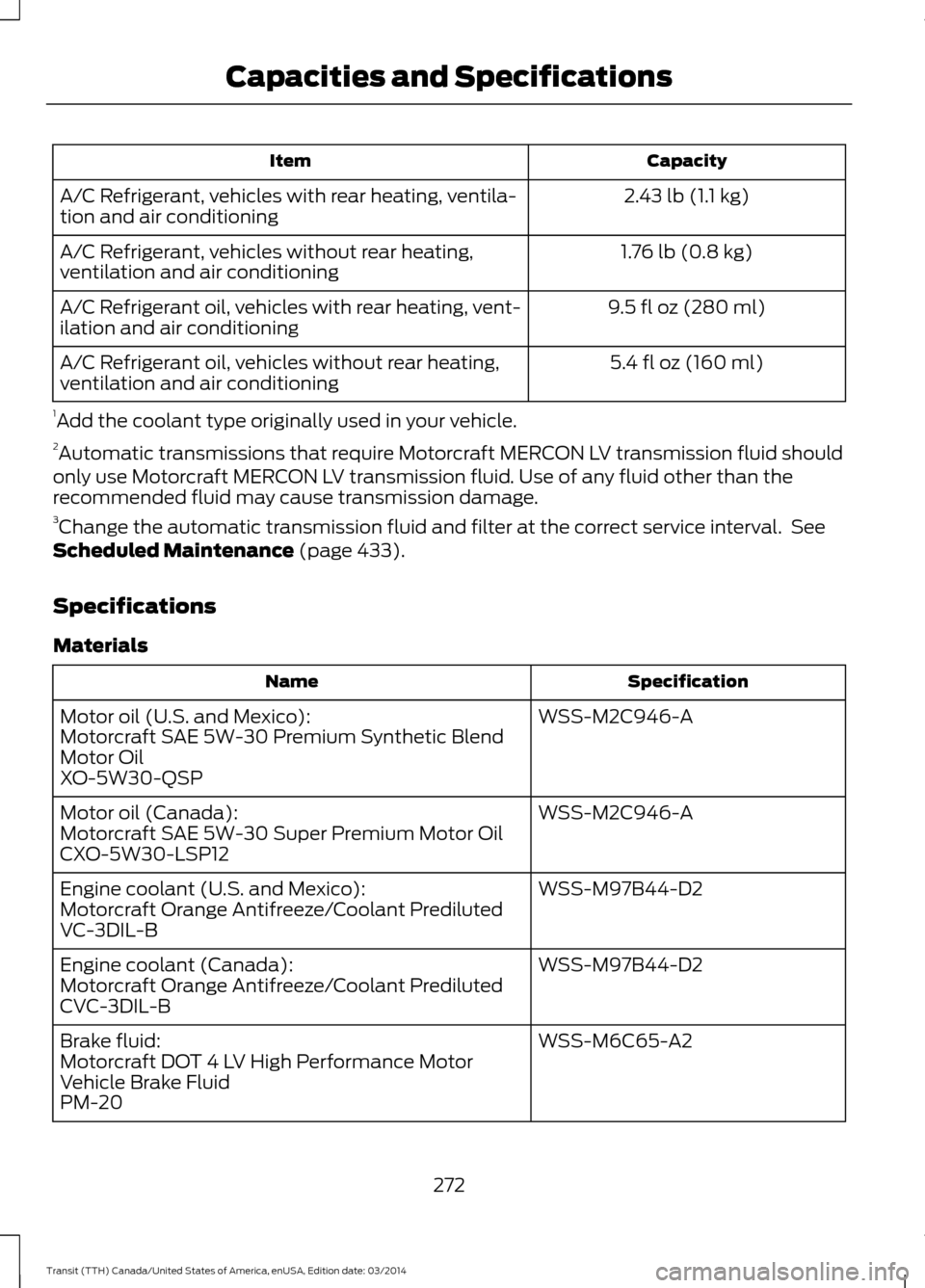
Capacity
Item
2.43 lb (1.1 kg)
A/C Refrigerant, vehicles with rear heating, ventila-
tion and air conditioning
1.76 lb (0.8 kg)
A/C Refrigerant, vehicles without rear heating,
ventilation and air conditioning
9.5 fl oz (280 ml)
A/C Refrigerant oil, vehicles with rear heating, vent-
ilation and air conditioning
5.4 fl oz (160 ml)
A/C Refrigerant oil, vehicles without rear heating,
ventilation and air conditioning
1 Add the coolant type originally used in your vehicle.
2 Automatic transmissions that require Motorcraft MERCON LV transmission fluid should
only use Motorcraft MERCON LV transmission fluid. Use of any fluid other than the
recommended fluid may cause transmission damage.
3 Change the automatic transmission fluid and filter at the correct service interval. See
Scheduled Maintenance (page 433).
Specifications
Materials Specification
Name
WSS-M2C946-A
Motor oil (U.S. and Mexico):
Motorcraft SAE 5W-30 Premium Synthetic Blend
Motor Oil
XO-5W30-QSP
WSS-M2C946-A
Motor oil (Canada):
Motorcraft SAE 5W-30 Super Premium Motor Oil
CXO-5W30-LSP12
WSS-M97B44-D2
Engine coolant (U.S. and Mexico):
Motorcraft Orange Antifreeze/Coolant Prediluted
VC-3DIL-B
WSS-M97B44-D2
Engine coolant (Canada):
Motorcraft Orange Antifreeze/Coolant Prediluted
CVC-3DIL-B
WSS-M6C65-A2
Brake fluid:
Motorcraft DOT 4 LV High Performance Motor
Vehicle Brake Fluid
PM-20
272Transit (TTH) Canada/United States of America, enUSA, Edition date: 03/2014Capacities and Specifications
Page 278 of 461

Capacity
Item
16.4 qt (15.5 L)
Engine cooling system, vehicles with an auxiliary
heater 1
14.9 qt (14.1 L)
Engine cooling system, vehicles without an auxiliary
heater 1
13.1 qt (12.4 L)
Automatic transmission 2, 3
20.9 gal (95 L)
Fuel tank
4.8 qt (4.5 L)
Windshield and rear window washer system –
including headlamp washer
2.43 lb (1.1 kg)
A/C Refrigerant, vehicles with rear heating, ventila-
tion and air conditioning
1.76 lb (0.8 kg)
A/C Refrigerant, vehicles without rear heating,
ventilation and air conditioning
9.5 fl oz (280 ml)
A/C Refrigerant oil, vehicles with rear heating, vent-
ilation and air conditioning
5.4 fl oz (160 ml)
A/C Refrigerant oil, vehicles without rear heating,
ventilation and air conditioning
1 Add the coolant type originally used in your vehicle.
2 Automatic transmissions that require Motorcraft MERCON LV transmission fluid should
only use Motorcraft MERCON LV transmission fluid. Use of any fluid other than the
recommended fluid may cause transmission damage.
3 Change the automatic transmission fluid and filter at the correct service interval. See
Scheduled Maintenance (page 433).
275Transit (TTH) Canada/United States of America, enUSA, Edition date: 03/2014 Capacities and Specifications
Page 282 of 461

Capacity
Item
1.76 lb (0.8 kg)
A/C Refrigerant, vehicles without rear heating,
ventilation and air conditioning
9.5 fl oz (280 ml)
A/C Refrigerant oil, vehicles with rear heating, vent-
ilation and air conditioning
5.4 fl oz (160 ml)
A/C Refrigerant oil, vehicles without rear heating,
ventilation and air conditioning
1 Add the coolant type originally used in your vehicle.
2 Automatic transmissions that require Motorcraft MERCON LV transmission fluid should
only use Motorcraft MERCON LV transmission fluid. Use of any fluid other than the
recommended fluid may cause transmission damage.
3 Change the automatic transmission fluid and filter at the correct service interval. See
Scheduled Maintenance (page 433).
Specifications
Materials Specification
Name
WSS-M2C171-E
Motor oil:
Motorcraft SAE 5W-40 Full Synthetic Diesel Motor
Oil
XO-5W40-5QSD
WSS-M97B44-D2
Engine coolant (U.S. and Mexico):
Motorcraft Orange Antifreeze/Coolant Prediluted
VC-3DIL-B
WSS-M97B44-D2
Engine coolant (Canada):
Motorcraft Orange Antifreeze/Coolant Prediluted
CVC-3DIL-B
WSS-M6C65-A2
Brake fluid:
Motorcraft DOT 4 LV High Performance Motor
Vehicle Brake Fluid
PM-20
WSS-M2C938-A
Automatic transmission fluid (U.S. and Mexico):
MERCON LV
Motorcraft MERCON LV Automatic Transmission
Fluid
XT-10-QLVC
WSS-M2C938-A
Automatic transmission fluid (Canada):
279Transit (TTH) Canada/United States of America, enUSA, Edition date: 03/2014 Capacities and Specifications
Page 289 of 461

Station Preset Buttons
This feature allows you to store your
favorite stations. They can be recalled by
selecting the appropriate frequency band
and pressing one of the preset buttons.
1. Select a frequency band.
2. Tune to the station required.
3. Press and hold one of the preset
buttons. The audio unit will also mute
momentarily as confirmation.
You can repeat this on each frequency
band and for each preset button.
Menu Button
This allows you to adjust all of the audio
system settings. Press the button
repeatedly until the required setting is
displayed. Use the cursor up or down arrow
buttons to adjust the following settings:
• Clock hour.
• Clock minutes.
• 24 hour, 12 hour.
• Bass.
• Treble.
• Balance.
• Fade.
• RDS.
Sound Button
This allows you to adjust the sound
settings for bass, treble, balance or fade.
1. Press the sound button until the required setting is displayed. 2. Use the cursor up or down arrow
buttons to select the required level.
Note: Fade settings are only adjustable if
there are speakers in the rear of your vehicle.
AUX Button
Connect your media device to the audio
unit. See USB Port (page 297).
Select your media device as the audio
source by pressing the
AUX button. After
connecting your media device, the first
track will start to play automatically.
AUDIO UNIT - VEHICLES WITH:
PREMIUM AM/FM/CD WARNING
Driving while distracted can result in
loss of vehicle control, crash and
injury. We strongly recommend that
you use extreme caution when using any
device that may take your focus off the
road. Your primary responsibility is the safe
operation of your vehicle. We recommend
against the use of any hand-held device
while driving and encourage the use of
voice-operated systems when possible.
Make sure you are aware of all applicable
local laws that may affect the use of
electronic devices while driving. Note:
The MyFord Touch system controls
most of the audio features. See
MyFord
Touch ™ (page 349).
286 Transit (TTH) Canada/United States of America, enUSA, Edition date: 03/2014 Audio System