2015 FORD SUPER DUTY stop start
[x] Cancel search: stop startPage 216 of 470
HAZARD WARNING FLASHERS
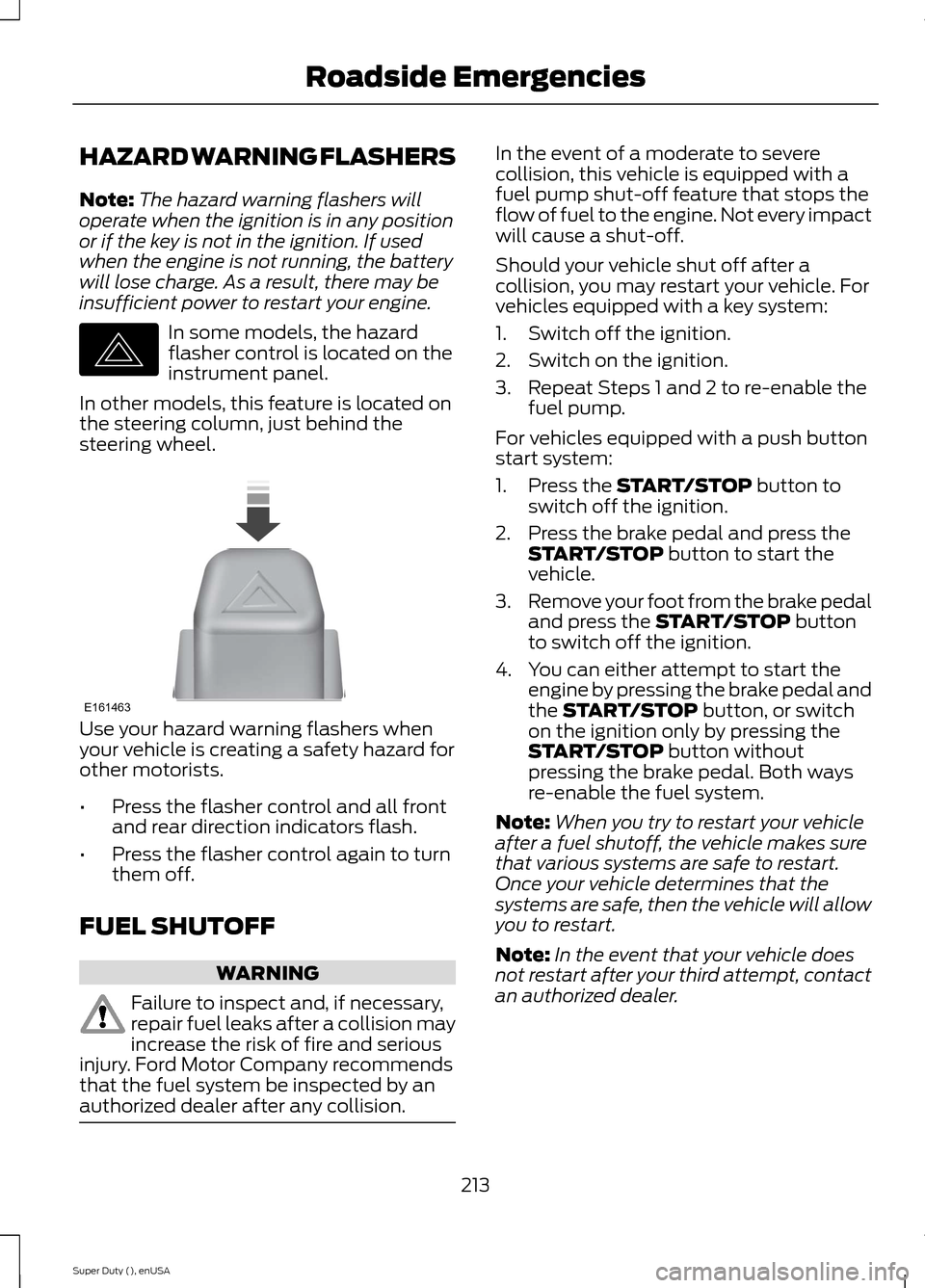
Note:The hazard warning flashers willoperate when the ignition is in any positionor if the key is not in the ignition. If usedwhen the engine is not running, the batterywill lose charge. As a result, there may beinsufficient power to restart your engine.
In some models, the hazardflasher control is located on theinstrument panel.
In other models, this feature is located onthe steering column, just behind thesteering wheel.
Use your hazard warning flashers whenyour vehicle is creating a safety hazard forother motorists.
•Press the flasher control and all frontand rear direction indicators flash.
•Press the flasher control again to turnthem off.
FUEL SHUTOFF
WARNING
Failure to inspect and, if necessary,repair fuel leaks after a collision mayincrease the risk of fire and seriousinjury. Ford Motor Company recommendsthat the fuel system be inspected by anauthorized dealer after any collision.
In the event of a moderate to severecollision, this vehicle is equipped with afuel pump shut-off feature that stops theflow of fuel to the engine. Not every impactwill cause a shut-off.
Should your vehicle shut off after acollision, you may restart your vehicle. Forvehicles equipped with a key system:
1.Switch off the ignition.
2.Switch on the ignition.
3.Repeat Steps 1 and 2 to re-enable thefuel pump.
For vehicles equipped with a push buttonstart system:
1.Press the START/STOP button toswitch off the ignition.
2.Press the brake pedal and press theSTART/STOP button to start thevehicle.
3.Remove your foot from the brake pedaland press the START/STOP buttonto switch off the ignition.
4.You can either attempt to start theengine by pressing the brake pedal andthe START/STOP button, or switchon the ignition only by pressing theSTART/STOP button withoutpressing the brake pedal. Both waysre-enable the fuel system.
Note:When you try to restart your vehicleafter a fuel shutoff, the vehicle makes surethat various systems are safe to restart.Once your vehicle determines that thesystems are safe, then the vehicle will allowyou to restart.
Note:In the event that your vehicle doesnot restart after your third attempt, contactan authorized dealer.
213Super Duty (), enUSARoadside EmergenciesE142663 E161463
Page 248 of 470
Note:Electrical or electronic accessoriesor components added to the vehicle by thedealer or the owner may adversely affectbattery performance and durability.
Your vehicle is equipped with a Motorcraftmaintenance-free battery which normallydoes not require additional water duringits life of service.
For longer, trouble-free operation, keep thetop of the battery clean and dry. Also,make certain the battery cables are alwaystightly fastened to the battery terminals.
If you see any corrosion on the battery orterminals, remove the cables from theterminals and clean with a wire brush. Youcan neutralize the acid with a solution ofbaking soda and water.
It is recommended that the negativebattery cable terminal be disconnectedfrom the battery if you plan to store yourvehicle for an extended period of time.
Because your vehicle’s engine iselectronically controlled by a computer,some control conditions are maintainedby power from the battery. When thebattery is disconnected or a new batteryis installed, the engine must relearn its idleand fuel trim strategy for optimumdriveability and performance. Flexible fuelvehicles (FFV) must also relearn theethanol content of the fuel for optimumdriveability and performance. To begin thisprocess
1.With the vehicle at a complete stop,set the parking brake.
2.Put the gearshift in P, turn off allaccessories.
3.Start the engine. Run the engine untilit reaches normal operatingtemperature.
4.Allow the engine to idle for at least oneminute.
5.Turn the A/C on and allow the engineto idle for at least one minute.
6.Release the parking brake. With yourfoot on the brake pedal and with theA/C on, put the vehicle in D and allowthe engine to idle for at least oneminute.
•If you do not allow the engine torelearn its idle trim, the idle qualityof your vehicle may be adverselyaffected until the idle trim iseventually relearned.
7.Drive the vehicle to complete therelearning process
•The vehicle may need to be driven10 mi (16 km) or more to relearn theidle and fuel trim strategy alongwith the ethanol content for flexiblefuel vehicles.
•For flexible fuel vehicles, if you areoperating on E85, you mayexperience poor starts or aninability to start the engine anddriveability problems until the fueltrim and ethanol content have beenrelearned.
If the battery has been disconnected or anew battery has been installed, the clockand radio settings must be reset once thebattery is reconnected.
Always dispose of automotivebatteries in a responsible manner.Follow your local authorized standardsfor disposal. Call your local authorizedrecycling center to find out more aboutrecycling automotive batteries.
Battery Management System (IfEquipped)
The battery management system (BMS)monitors battery conditions and takesactions to extend battery life. If excessivebattery drain is detected, the system maytemporarily disable certain electricalfeatures to protect the battery. Thoseelectrical accessories affected include therear defrost, heated/cooled seats, climate
245Super Duty (), enUSAMaintenance
Page 283 of 470
*Avoid fast starts, stops and turns
*Avoid potholes and objects onthe road
*Do not run over curbs or hit thetire against a curb when parking
Highway Hazards
No matter how carefully you drivethere’s always the possibility thatyou may eventually have a flat tireon the highway. Drive slowly to theclosest safe area out of traffic.This may further damage the flattire, but your safety is moreimportant.
If you feel a sudden vibration orride disturbance while driving, oryou suspect your tire or vehiclehas been damaged, immediately
reduce your speed. Drive withcaution until you can safely pulloff the road. Stop and inspect thetires for damage. If a tire isunder-inflated or damaged,deflate it, remove wheel andreplace it with your spare tire andwheel. If you cannot detect acause, have the vehicle towed tothe nearest repair facility or tiredealer to have the vehicleinspected.
Tire and Wheel Alignment
A bad jolt from hitting a curb orpothole can cause the front endof your vehicle to becomemisaligned or cause damage toyour tires. If your vehicle seems topull to one side when you’redriving, the wheels may be out ofalignment. Have an authorizeddealer check the wheel alignmentperiodically.
Wheel misalignment in the frontor the rear can cause uneven andrapid treadwear of your tires andshould be corrected by anauthorized dealer. Front-wheeldrive vehicles and those with anindependent rear suspension mayrequire alignment of all fourwheels.
The tires should also be balancedperiodically. An unbalanced tireand wheel assembly may result inirregular tire wear.
Tire Rotation
WARNING
If the tire label showsdifferent tire pressures for thefront and rear tires and the vehicleis equipped with a tire pressuremonitoring system, then thesettings for the system sensorsneed to be updated. Alwaysperform the system resetprocedure after tire rotation. If thesystem is not reset, it may notprovide a low tire pressurewarning when necessary.
280Super Duty (), enUSAWheels and Tires
Page 286 of 470
Each tire, including the spare (ifprovided), should be checkedmonthly when cold and inflatedto the inflation pressurerecommended by the vehicle manufactureron the vehicle placard or tire inflationpressure label. (If your vehicle has tires ofa different size than the size indicated onthe vehicle placard or tire inflation pressurelabel, you should determine the proper tireinflation pressure for those tires.)
As an added safety feature, your vehiclehas been equipped with a Tire PressureMonitoring System (TPMS) thatilluminates a low tire pressure telltalewhen one or more of your tires issignificantly under-inflated. Accordingly,when the low tire pressure telltaleilluminates, you should stop and checkyour tires as soon as possible, and inflatethem to the proper pressure. Driving on asignificantly under-inflated tire causes thetire to overheat and can lead to tire failure.Under-inflation also reduces fuel efficiencyand tire tread life, and may affect thevehicle’s handling and stopping ability.
Please note that the TPMS is not asubstitute for proper tire maintenance, andit is the driver’s responsibility to maintaincorrect tire pressure, even if under-inflationhas not reached the level to triggerillumination of the TPMS low tire pressuretelltale.
Your vehicle has also been equipped witha TPMS malfunction indicator to indicatewhen the system is not operating properly.The TPMS malfunction indicator iscombined with the low tire pressuretelltale. When the system detects amalfunction, the telltale will flash forapproximately one minute and then remaincontinuously illuminated. This sequencewill continue upon subsequent vehiclestart-ups as long as the malfunction exists.
When the malfunction indicator isilluminated, the system may not be ableto detect or signal low tire pressure asintended. TPMS malfunctions may occurfor a variety of reasons, including theinstallation of replacement or alternatetires or wheels on the vehicle that preventthe TPMS from functioning properly.Always check the TPMS malfunctiontelltale after replacing one or more tires orwheels on your vehicle to ensure that thereplacement or alternate tires and wheelsallow the TPMS to continue to functionproperly.
The tire pressure monitoring systemcomplies with part 15 of the FCC rules andwith RSS-210 of Industry Canada.Operation is subject to the following twoconditions: (1) This device may not causeharmful interference, and (2) This devicemust accept any interference received,including interference that may causeundesired operation.
Changing Tires With a TirePressure Monitoring System
Note:Each road tire is equipped with a tirepressure sensor located inside the wheeland tire assembly cavity. The pressuresensor is attached to the valve stem. Thepressure sensor is covered by the tire and isnot visible unless the tire is removed. Takecare when changing the tire to avoiddamaging the sensor
283Super Duty (), enUSAWheels and Tires E142549
Page 290 of 470
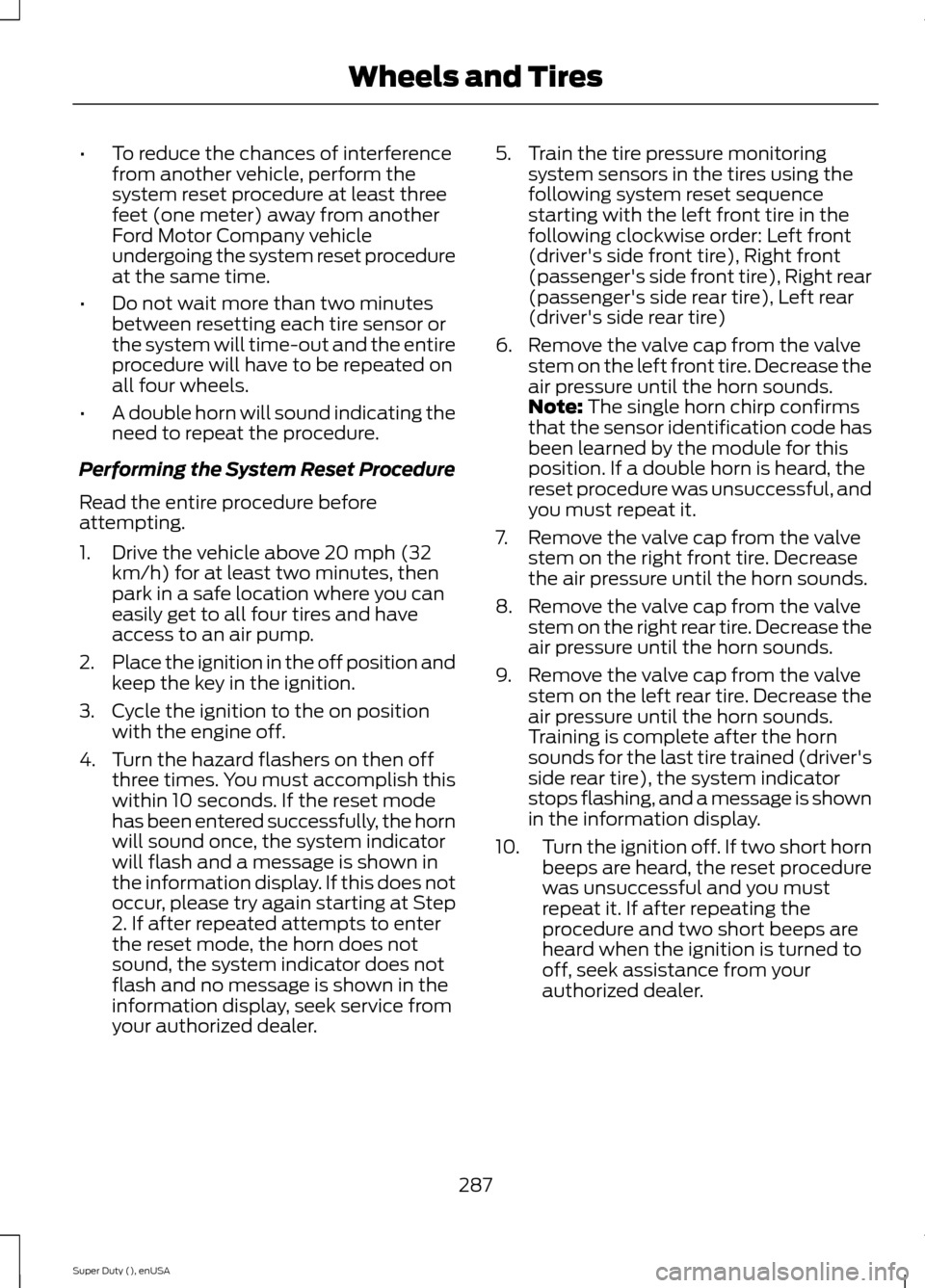
•To reduce the chances of interferencefrom another vehicle, perform thesystem reset procedure at least threefeet (one meter) away from anotherFord Motor Company vehicleundergoing the system reset procedureat the same time.
•Do not wait more than two minutesbetween resetting each tire sensor orthe system will time-out and the entireprocedure will have to be repeated onall four wheels.
•A double horn will sound indicating theneed to repeat the procedure.
Performing the System Reset Procedure
Read the entire procedure beforeattempting.
1.Drive the vehicle above 20 mph (32km/h) for at least two minutes, thenpark in a safe location where you caneasily get to all four tires and haveaccess to an air pump.
2.Place the ignition in the off position andkeep the key in the ignition.
3.Cycle the ignition to the on positionwith the engine off.
4.Turn the hazard flashers on then offthree times. You must accomplish thiswithin 10 seconds. If the reset modehas been entered successfully, the hornwill sound once, the system indicatorwill flash and a message is shown inthe information display. If this does notoccur, please try again starting at Step2. If after repeated attempts to enterthe reset mode, the horn does notsound, the system indicator does notflash and no message is shown in theinformation display, seek service fromyour authorized dealer.
5.Train the tire pressure monitoringsystem sensors in the tires using thefollowing system reset sequencestarting with the left front tire in thefollowing clockwise order: Left front(driver's side front tire), Right front(passenger's side front tire), Right rear(passenger's side rear tire), Left rear(driver's side rear tire)
6.Remove the valve cap from the valvestem on the left front tire. Decrease theair pressure until the horn sounds.Note: The single horn chirp confirmsthat the sensor identification code hasbeen learned by the module for thisposition. If a double horn is heard, thereset procedure was unsuccessful, andyou must repeat it.
7.Remove the valve cap from the valvestem on the right front tire. Decreasethe air pressure until the horn sounds.
8.Remove the valve cap from the valvestem on the right rear tire. Decrease theair pressure until the horn sounds.
9.Remove the valve cap from the valvestem on the left rear tire. Decrease theair pressure until the horn sounds.Training is complete after the hornsounds for the last tire trained (driver'sside rear tire), the system indicatorstops flashing, and a message is shownin the information display.
10.Turn the ignition off. If two short hornbeeps are heard, the reset procedurewas unsuccessful and you mustrepeat it. If after repeating theprocedure and two short beeps areheard when the ignition is turned tooff, seek assistance from yourauthorized dealer.
287Super Duty (), enUSAWheels and Tires
Page 393 of 470
Playing Video from Your Device
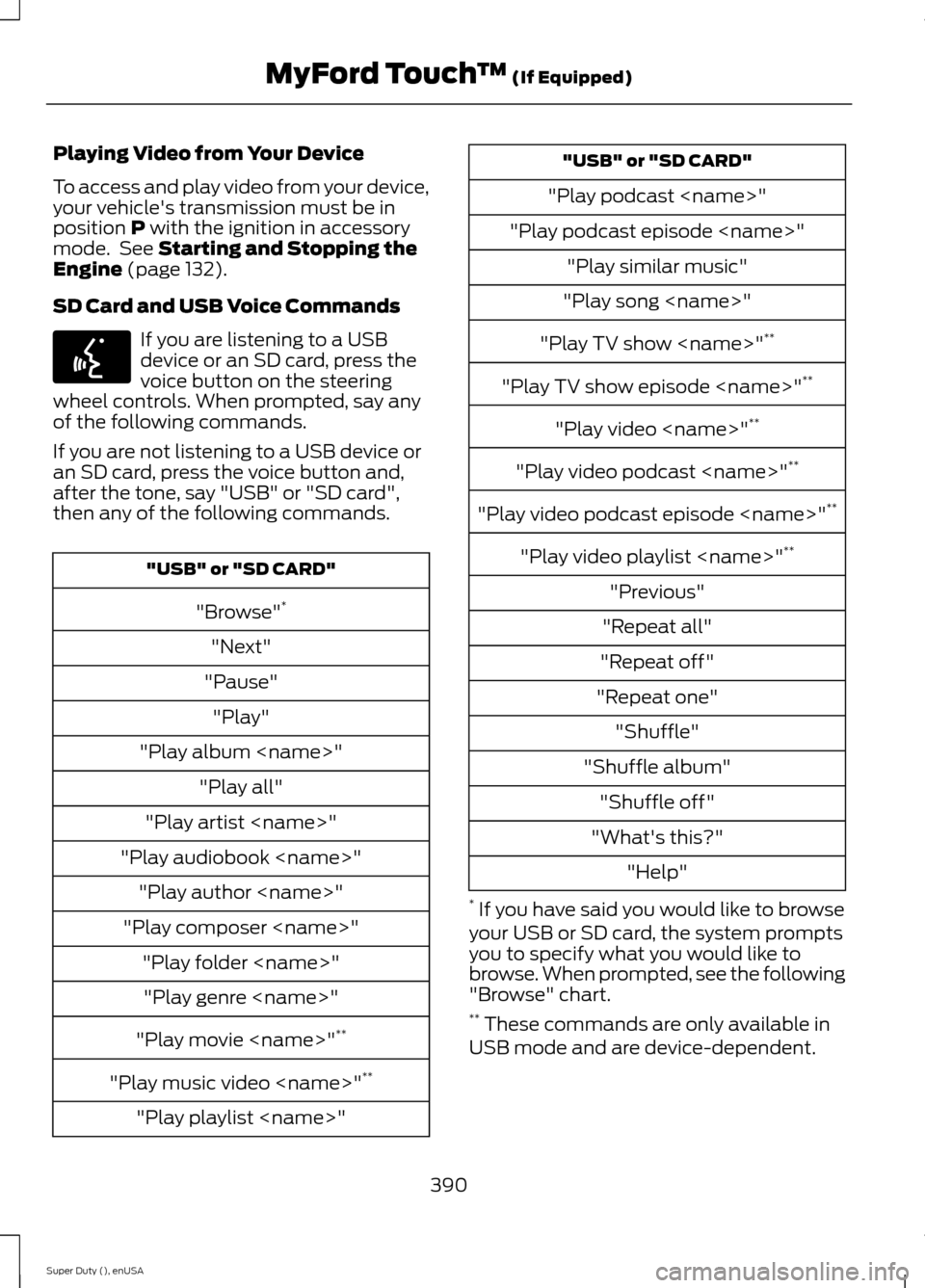
To access and play video from your device,your vehicle's transmission must be inposition P with the ignition in accessorymode. See Starting and Stopping theEngine (page 132).
SD Card and USB Voice Commands
If you are listening to a USBdevice or an SD card, press thevoice button on the steeringwheel controls. When prompted, say anyof the following commands.
If you are not listening to a USB device oran SD card, press the voice button and,after the tone, say "USB" or "SD card",then any of the following commands.
"USB" or "SD CARD"
"Browse"*
"Next"
"Pause"
"Play"
"Play album
"Play all"
"Play artist
"Play audiobook
"Play author
"Play composer
"Play folder
"Play genre
"Play movie
"Play music video
"Play playlist
"USB" or "SD CARD"
"Play podcast
"Play podcast episode
"Play similar music"
"Play song
"Play TV show
"Play TV show episode
"Play video
"Play video podcast
"Play video podcast episode
"Play video playlist
"Previous"
"Repeat all"
"Repeat off"
"Repeat one"
"Shuffle"
"Shuffle album"
"Shuffle off"
"What's this?"
"Help"
* If you have said you would like to browseyour USB or SD card, the system promptsyou to specify what you would like tobrowse. When prompted, see the following"Browse" chart.** These commands are only available inUSB mode and are device-dependent.
390Super Duty (), enUSAMyFord Touch™ (If Equipped)E142599
Page 467 of 470
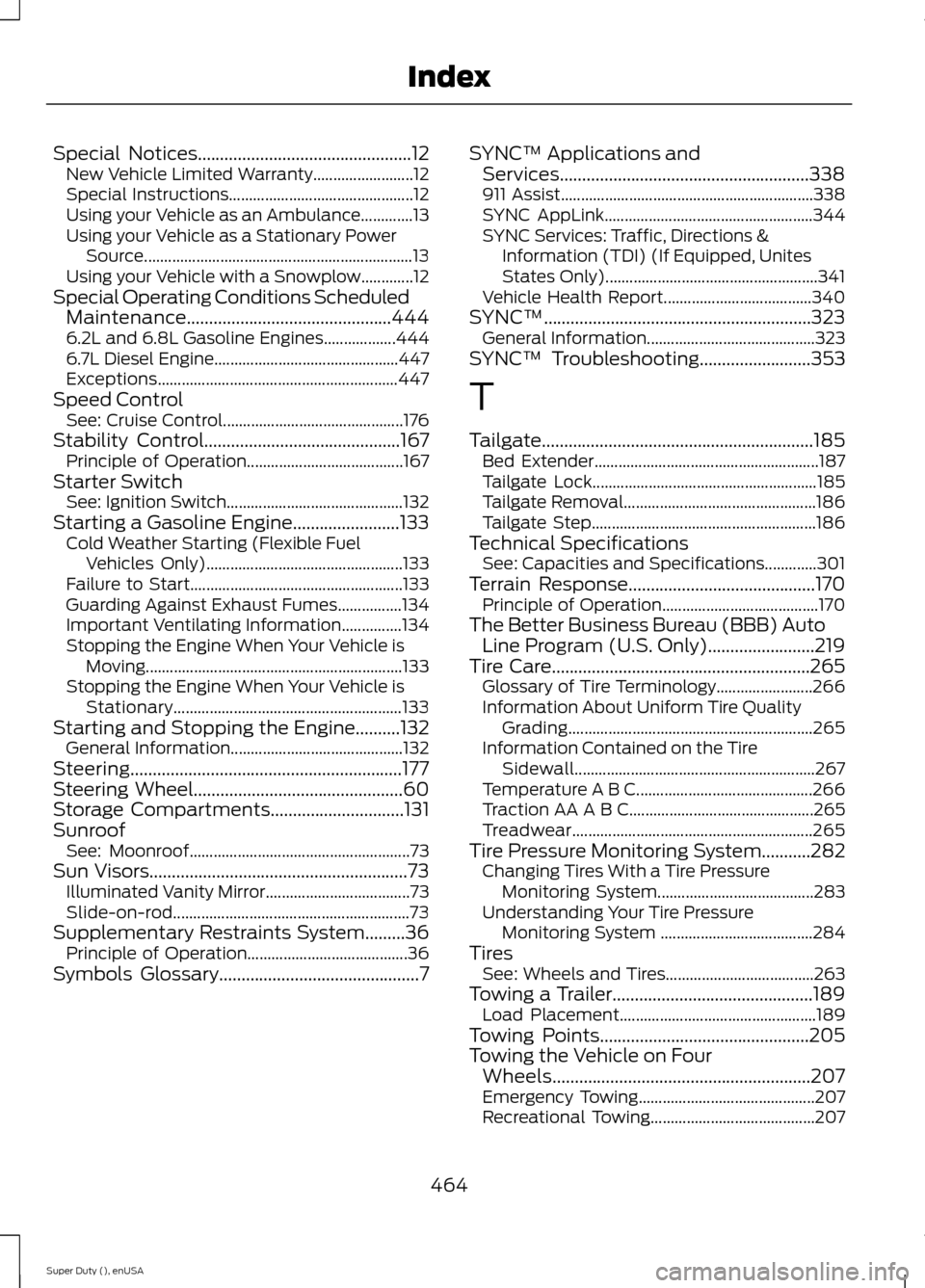
Special Notices................................................12New Vehicle Limited Warranty.........................12Special Instructions..............................................12Using your Vehicle as an Ambulance.............13Using your Vehicle as a Stationary PowerSource...................................................................13Using your Vehicle with a Snowplow.............12Special Operating Conditions ScheduledMaintenance..............................................4446.2L and 6.8L Gasoline Engines..................4446.7L Diesel Engine..............................................447Exceptions............................................................447Speed ControlSee: Cruise Control.............................................176Stability Control............................................167Principle of Operation.......................................167Starter SwitchSee: Ignition Switch............................................132Starting a Gasoline Engine........................133Cold Weather Starting (Flexible FuelVehicles Only).................................................133Failure to Start.....................................................133Guarding Against Exhaust Fumes................134Important Ventilating Information...............134Stopping the Engine When Your Vehicle isMoving................................................................133Stopping the Engine When Your Vehicle isStationary.........................................................133Starting and Stopping the Engine..........132General Information...........................................132Steering.............................................................177Steering Wheel...............................................60Storage Compartments..............................131SunroofSee: Moonroof.......................................................73Sun Visors..........................................................73Illuminated Vanity Mirror....................................73Slide-on-rod...........................................................73Supplementary Restraints System.........36Principle of Operation........................................36Symbols Glossary.............................................7
SYNC™ Applications andServices........................................................338911 Assist...............................................................338SYNC AppLink....................................................344SYNC Services: Traffic, Directions &Information (TDI) (If Equipped, UnitesStates Only).....................................................341Vehicle Health Report.....................................340SYNC™............................................................323General Information..........................................323SYNC™ Troubleshooting.........................353
T
Tailgate.............................................................185Bed Extender........................................................187Tailgate Lock........................................................185Tailgate Removal................................................186Tailgate Step........................................................186Technical SpecificationsSee: Capacities and Specifications.............301Terrain Response..........................................170Principle of Operation.......................................170The Better Business Bureau (BBB) AutoLine Program (U.S. Only)........................219Tire Care..........................................................265Glossary of Tire Terminology........................266Information About Uniform Tire QualityGrading.............................................................265Information Contained on the TireSidewall............................................................267Temperature A B C............................................266Traction AA A B C..............................................265Treadwear............................................................265Tire Pressure Monitoring System...........282Changing Tires With a Tire PressureMonitoring System.......................................283Understanding Your Tire PressureMonitoring System ......................................284TiresSee: Wheels and Tires.....................................263Towing a Trailer.............................................189Load Placement.................................................189Towing Points...............................................205Towing the Vehicle on FourWheels..........................................................207Emergency Towing............................................207Recreational Towing.........................................207
464Super Duty (), enUSAIndex
Page 468 of 470
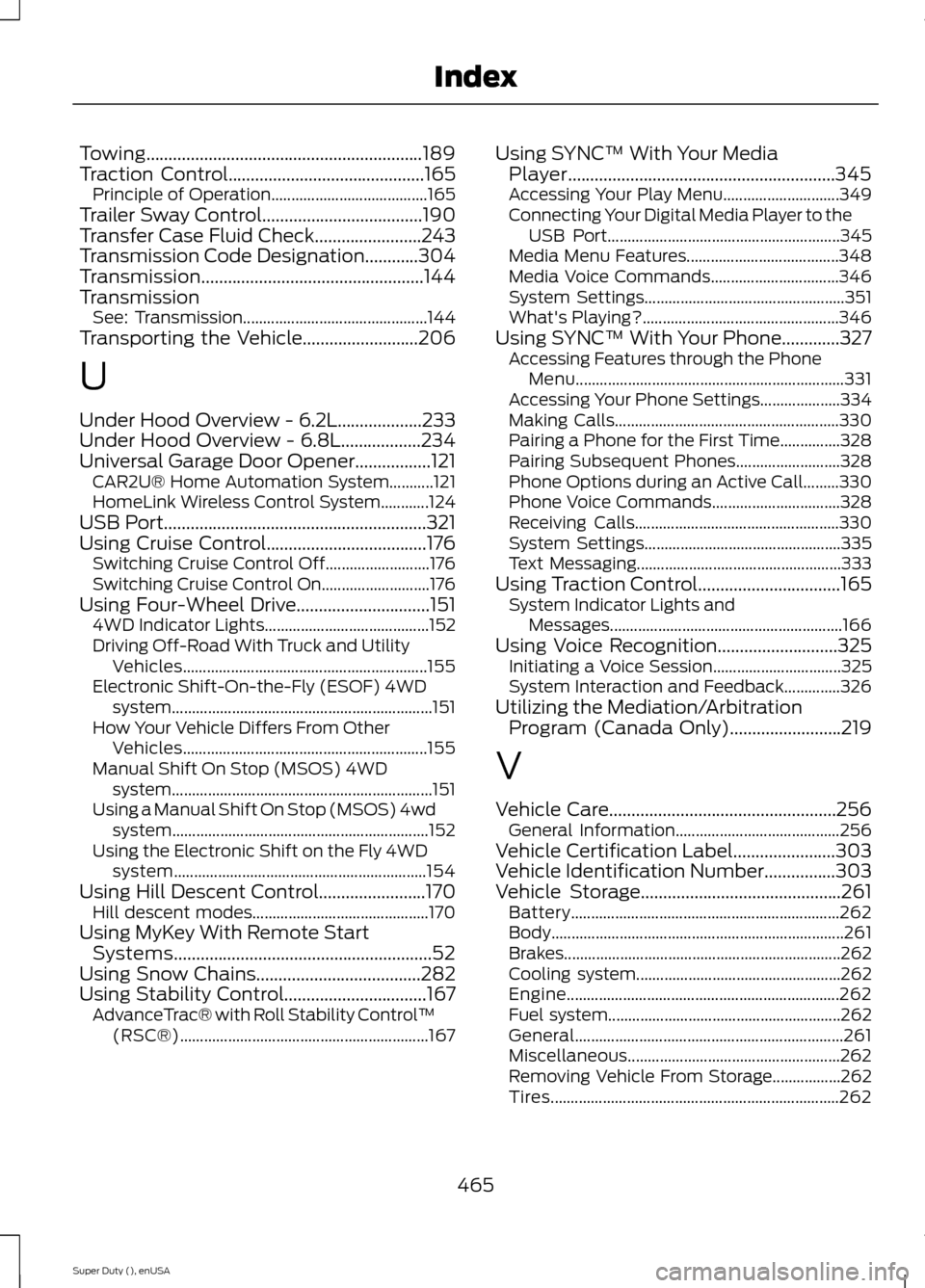
Towing..............................................................189Traction Control............................................165Principle of Operation.......................................165Trailer Sway Control....................................190Transfer Case Fluid Check........................243Transmission Code Designation............304Transmission..................................................144TransmissionSee: Transmission..............................................144Transporting the Vehicle..........................206
U
Under Hood Overview - 6.2L...................233Under Hood Overview - 6.8L..................234Universal Garage Door Opener.................121CAR2U® Home Automation System...........121HomeLink Wireless Control System............124USB Port...........................................................321Using Cruise Control....................................176Switching Cruise Control Off..........................176Switching Cruise Control On...........................176Using Four-Wheel Drive..............................1514WD Indicator Lights.........................................152Driving Off-Road With Truck and UtilityVehicles.............................................................155Electronic Shift-On-the-Fly (ESOF) 4WDsystem.................................................................151How Your Vehicle Differs From OtherVehicles.............................................................155Manual Shift On Stop (MSOS) 4WDsystem.................................................................151Using a Manual Shift On Stop (MSOS) 4wdsystem................................................................152Using the Electronic Shift on the Fly 4WDsystem...............................................................154Using Hill Descent Control........................170Hill descent modes............................................170Using MyKey With Remote StartSystems..........................................................52Using Snow Chains.....................................282Using Stability Control................................167AdvanceTrac® with Roll Stability Control™(RSC®)..............................................................167
Using SYNC™ With Your MediaPlayer............................................................345Accessing Your Play Menu.............................349Connecting Your Digital Media Player to theUSB Port..........................................................345Media Menu Features......................................348Media Voice Commands................................346System Settings..................................................351What's Playing?.................................................346Using SYNC™ With Your Phone.............327Accessing Features through the PhoneMenu...................................................................331Accessing Your Phone Settings....................334Making Calls........................................................330Pairing a Phone for the First Time...............328Pairing Subsequent Phones..........................328Phone Options during an Active Call.........330Phone Voice Commands................................328Receiving Calls...................................................330System Settings.................................................335Text Messaging...................................................333Using Traction Control................................165System Indicator Lights andMessages..........................................................166Using Voice Recognition...........................325Initiating a Voice Session................................325System Interaction and Feedback..............326Utilizing the Mediation/ArbitrationProgram (Canada Only).........................219
V
Vehicle Care...................................................256General Information.........................................256Vehicle Certification Label.......................303Vehicle Identification Number................303Vehicle Storage.............................................261Battery...................................................................262Body.........................................................................261Brakes.....................................................................262Cooling system...................................................262Engine....................................................................262Fuel system..........................................................262General...................................................................261Miscellaneous.....................................................262Removing Vehicle From Storage.................262Tires........................................................................262
465Super Duty (), enUSAIndex