2015 FORD SUPER DUTY USB
[x] Cancel search: USBPage 349 of 470
Press OK and scroll through selections of:
•Play All
•Albums
•Genres
•Playlists
•Tracks
•Explore USB
•Similar Music
•Return
What's Playing?
At any time when a track is playing, youcan press the voice icon and ask thesystem "What's playing?". The systemreads the metadata tags (if populated) ofthe playing track to you.
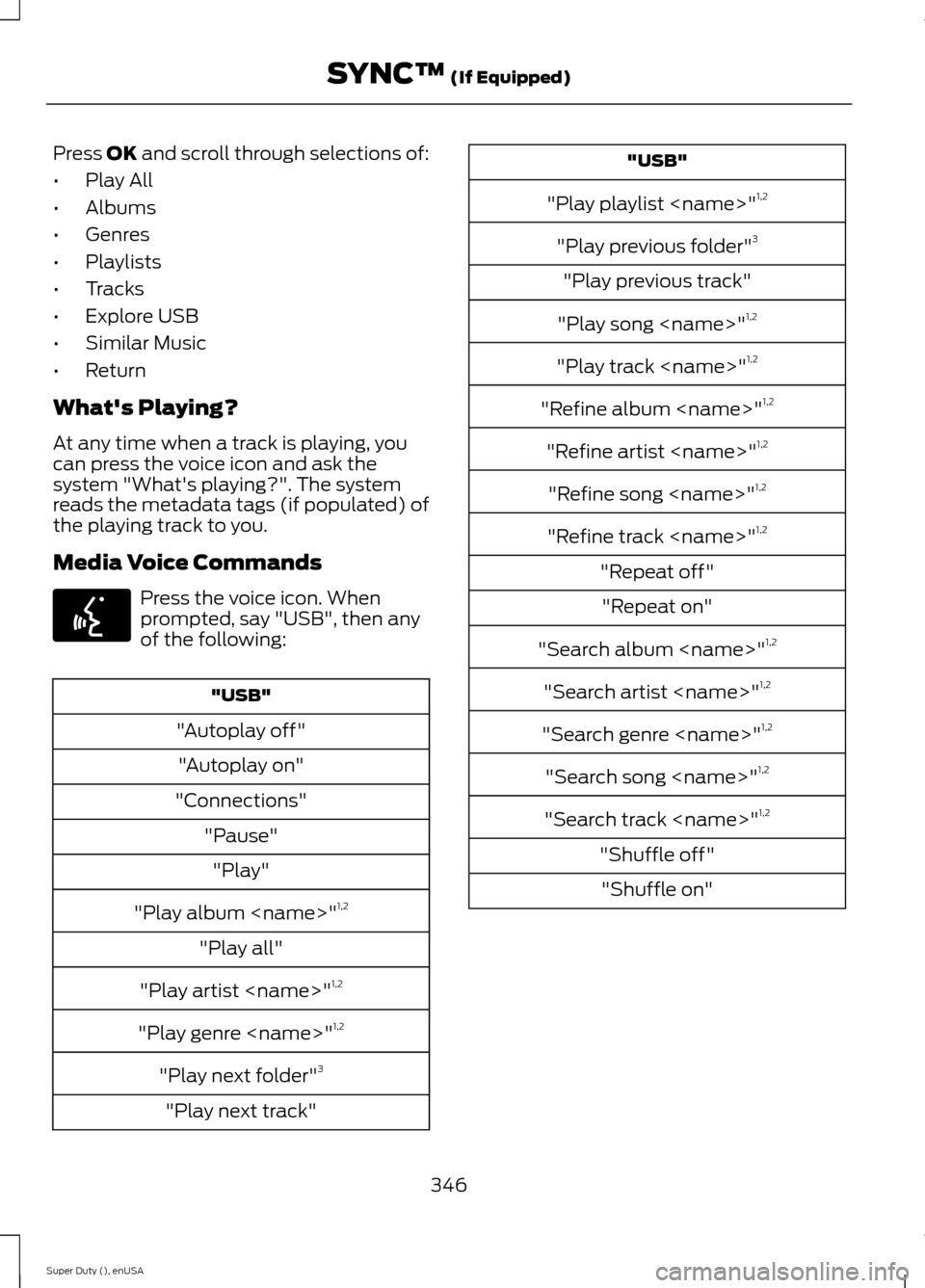
Media Voice Commands
Press the voice icon. Whenprompted, say "USB", then anyof the following:
"USB"
"Autoplay off"
"Autoplay on"
"Connections"
"Pause"
"Play"
"Play album
"Play all"
"Play artist
"Play genre
"Play next folder"3
"Play next track"
"USB"
"Play playlist
"Play previous folder"3
"Play previous track"
"Play song
"Play track
"Refine album
"Refine artist
"Refine song
"Refine track
"Repeat off"
"Repeat on"
"Search album
"Search artist
"Search genre
"Search song
"Search track
"Shuffle off"
"Shuffle on"
346Super Duty (), enUSASYNC™ (If Equipped)E142599
Page 350 of 470
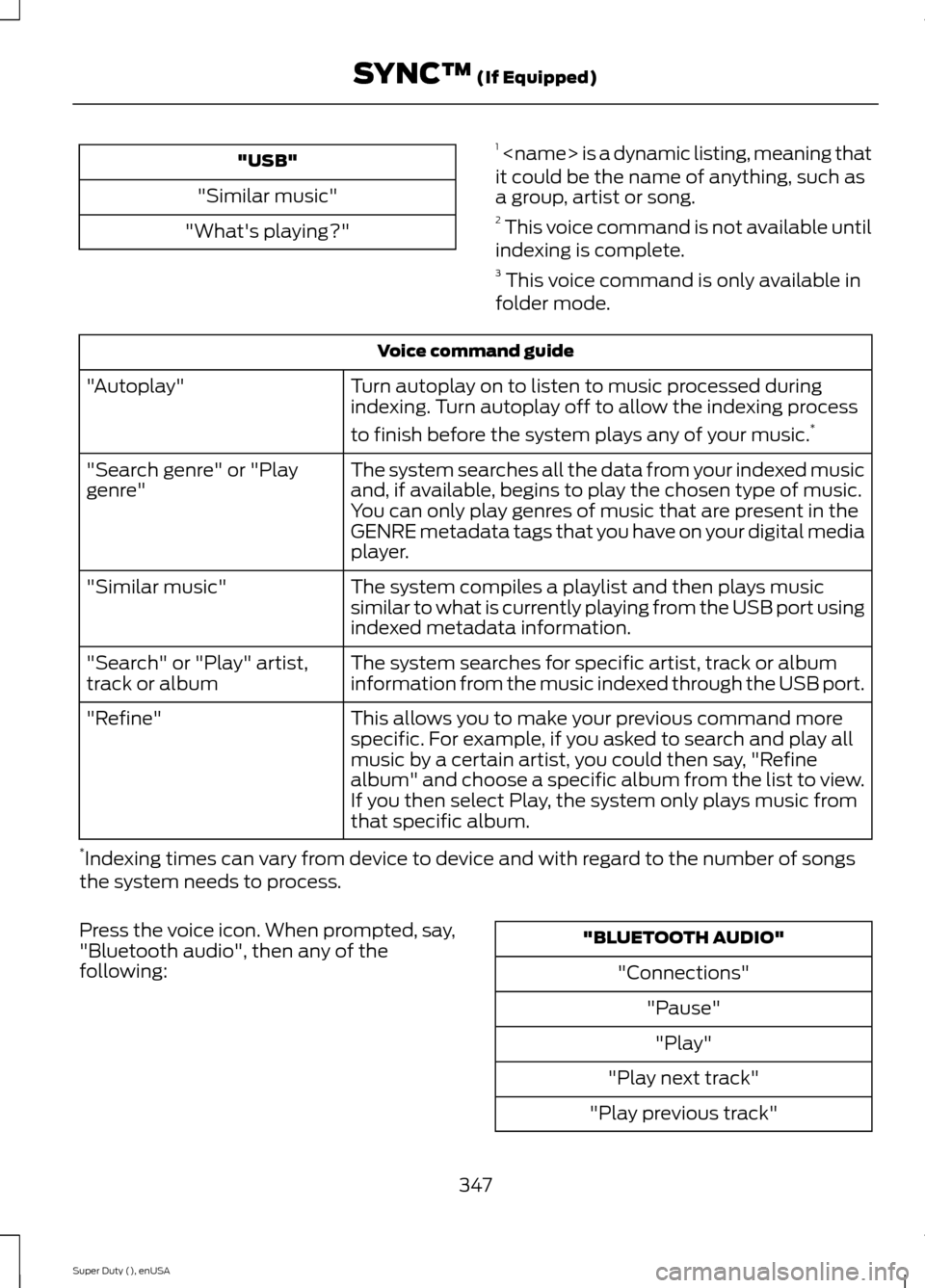
"USB"
"Similar music"
"What's playing?"
1
Voice command guide
Turn autoplay on to listen to music processed duringindexing. Turn autoplay off to allow the indexing process
to finish before the system plays any of your music.*
"Autoplay"
The system searches all the data from your indexed musicand, if available, begins to play the chosen type of music.You can only play genres of music that are present in theGENRE metadata tags that you have on your digital mediaplayer.
"Search genre" or "Playgenre"
The system compiles a playlist and then plays musicsimilar to what is currently playing from the USB port usingindexed metadata information.
"Similar music"
The system searches for specific artist, track or albuminformation from the music indexed through the USB port."Search" or "Play" artist,track or album
This allows you to make your previous command morespecific. For example, if you asked to search and play allmusic by a certain artist, you could then say, "Refinealbum" and choose a specific album from the list to view.If you then select Play, the system only plays music fromthat specific album.
"Refine"
*Indexing times can vary from device to device and with regard to the number of songsthe system needs to process.
Press the voice icon. When prompted, say,"Bluetooth audio", then any of thefollowing:
"BLUETOOTH AUDIO"
"Connections"
"Pause"
"Play"
"Play next track"
"Play previous track"
347Super Duty (), enUSASYNC™ (If Equipped)
Page 351 of 470
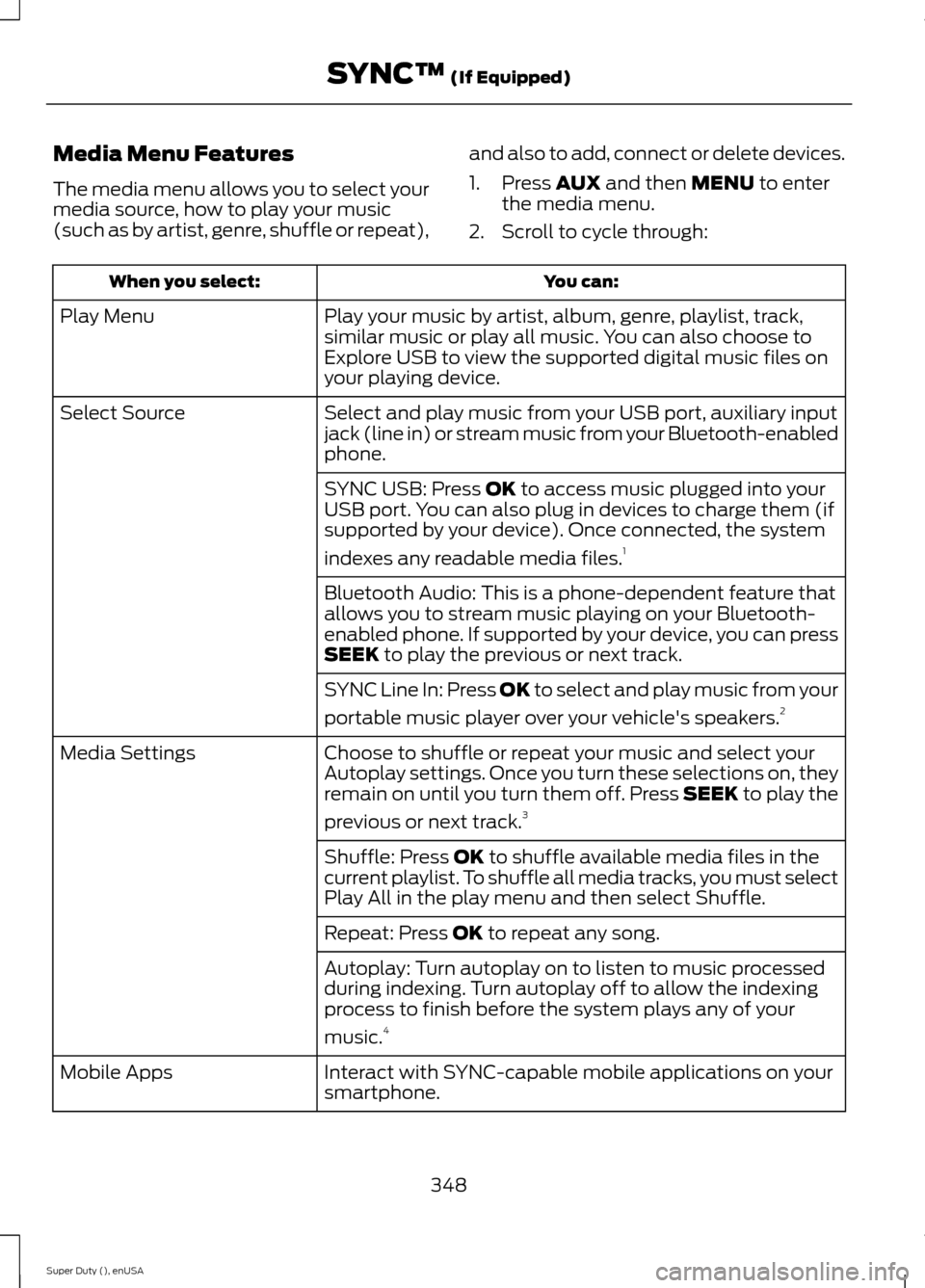
Media Menu Features
The media menu allows you to select yourmedia source, how to play your music(such as by artist, genre, shuffle or repeat),
and also to add, connect or delete devices.
1.Press AUX and then MENU to enterthe media menu.
2.Scroll to cycle through:
You can:When you select:
Play your music by artist, album, genre, playlist, track,similar music or play all music. You can also choose toExplore USB to view the supported digital music files onyour playing device.
Play Menu
Select and play music from your USB port, auxiliary inputjack (line in) or stream music from your Bluetooth-enabledphone.
Select Source
SYNC USB: Press OK to access music plugged into yourUSB port. You can also plug in devices to charge them (ifsupported by your device). Once connected, the system
indexes any readable media files.1
Bluetooth Audio: This is a phone-dependent feature thatallows you to stream music playing on your Bluetooth-enabled phone. If supported by your device, you can pressSEEK to play the previous or next track.
SYNC Line In: Press OK to select and play music from your
portable music player over your vehicle's speakers.2
Choose to shuffle or repeat your music and select yourAutoplay settings. Once you turn these selections on, theyremain on until you turn them off. Press SEEK to play the
previous or next track.3
Media Settings
Shuffle: Press OK to shuffle available media files in thecurrent playlist. To shuffle all media tracks, you must selectPlay All in the play menu and then select Shuffle.
Repeat: Press OK to repeat any song.
Autoplay: Turn autoplay on to listen to music processedduring indexing. Turn autoplay off to allow the indexingprocess to finish before the system plays any of your
music.4
Interact with SYNC-capable mobile applications on yoursmartphone.Mobile Apps
348Super Duty (), enUSASYNC™ (If Equipped)
Page 352 of 470
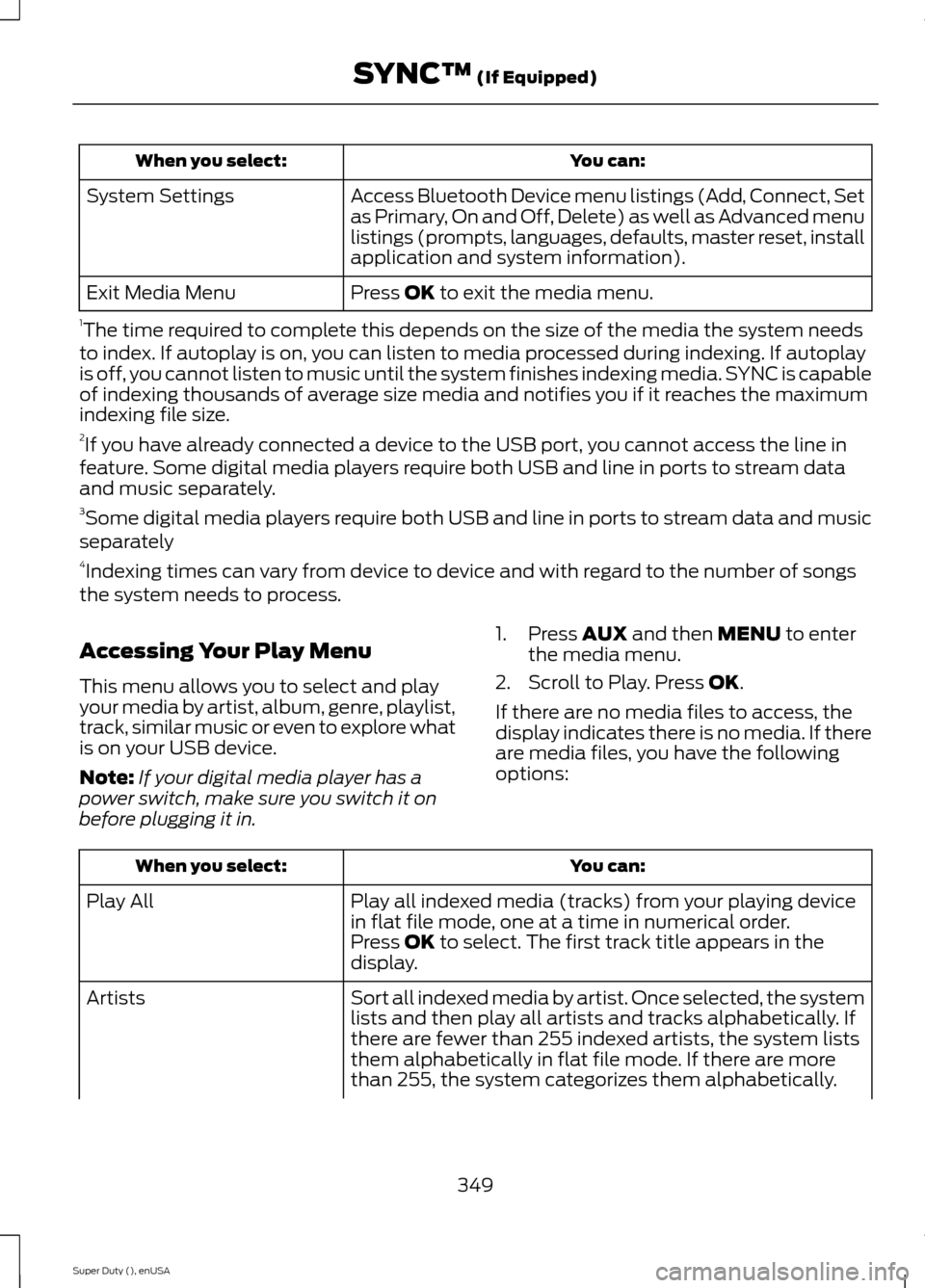
You can:When you select:
Access Bluetooth Device menu listings (Add, Connect, Setas Primary, On and Off, Delete) as well as Advanced menulistings (prompts, languages, defaults, master reset, installapplication and system information).
System Settings
Press OK to exit the media menu.Exit Media Menu
1The time required to complete this depends on the size of the media the system needsto index. If autoplay is on, you can listen to media processed during indexing. If autoplayis off, you cannot listen to music until the system finishes indexing media. SYNC is capableof indexing thousands of average size media and notifies you if it reaches the maximumindexing file size.2If you have already connected a device to the USB port, you cannot access the line infeature. Some digital media players require both USB and line in ports to stream dataand music separately.3Some digital media players require both USB and line in ports to stream data and musicseparately4Indexing times can vary from device to device and with regard to the number of songsthe system needs to process.
Accessing Your Play Menu
This menu allows you to select and playyour media by artist, album, genre, playlist,track, similar music or even to explore whatis on your USB device.
Note:If your digital media player has apower switch, make sure you switch it onbefore plugging it in.
1.Press AUX and then MENU to enterthe media menu.
2.Scroll to Play. Press OK.
If there are no media files to access, thedisplay indicates there is no media. If thereare media files, you have the followingoptions:
You can:When you select:
Play all indexed media (tracks) from your playing devicein flat file mode, one at a time in numerical order.Play All
Press OK to select. The first track title appears in thedisplay.
Sort all indexed media by artist. Once selected, the systemlists and then play all artists and tracks alphabetically. Ifthere are fewer than 255 indexed artists, the system liststhem alphabetically in flat file mode. If there are morethan 255, the system categorizes them alphabetically.
Artists
349Super Duty (), enUSASYNC™ (If Equipped)
Page 353 of 470
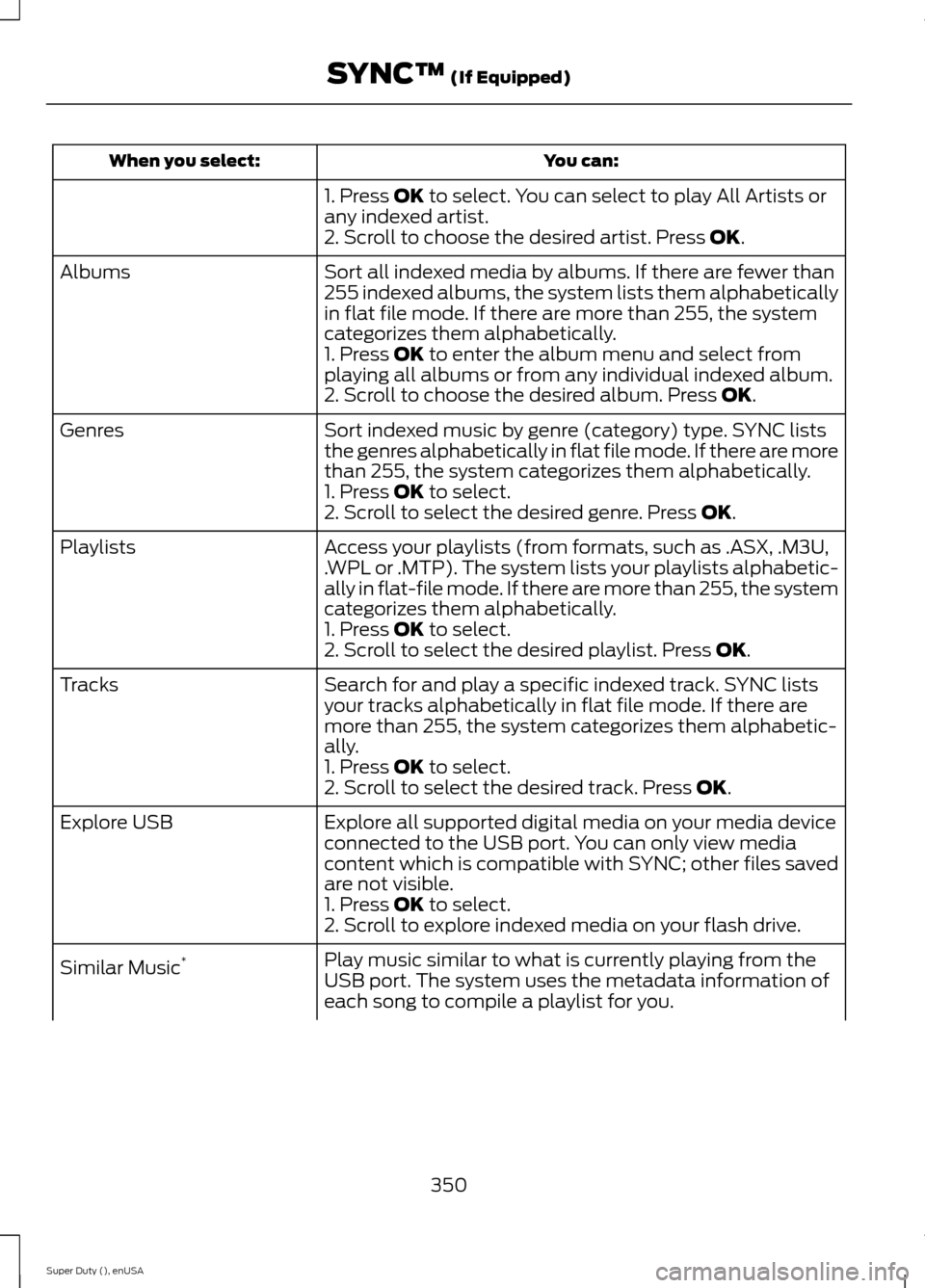
You can:When you select:
1. Press OK to select. You can select to play All Artists orany indexed artist.2. Scroll to choose the desired artist. Press OK.
Sort all indexed media by albums. If there are fewer than255 indexed albums, the system lists them alphabeticallyin flat file mode. If there are more than 255, the systemcategorizes them alphabetically.
Albums
1. Press OK to enter the album menu and select fromplaying all albums or from any individual indexed album.2. Scroll to choose the desired album. Press OK.
Sort indexed music by genre (category) type. SYNC liststhe genres alphabetically in flat file mode. If there are morethan 255, the system categorizes them alphabetically.
Genres
1. Press OK to select.2. Scroll to select the desired genre. Press OK.
Access your playlists (from formats, such as .ASX, .M3U,.WPL or .MTP). The system lists your playlists alphabetic-ally in flat-file mode. If there are more than 255, the systemcategorizes them alphabetically.
Playlists
1. Press OK to select.2. Scroll to select the desired playlist. Press OK.
Search for and play a specific indexed track. SYNC listsyour tracks alphabetically in flat file mode. If there aremore than 255, the system categorizes them alphabetic-ally.
Tracks
1. Press OK to select.2. Scroll to select the desired track. Press OK.
Explore all supported digital media on your media deviceconnected to the USB port. You can only view mediacontent which is compatible with SYNC; other files savedare not visible.
Explore USB
1. Press OK to select.2. Scroll to explore indexed media on your flash drive.
Play music similar to what is currently playing from theUSB port. The system uses the metadata information ofeach song to compile a playlist for you.
Similar Music*
350Super Duty (), enUSASYNC™ (If Equipped)
Page 356 of 470
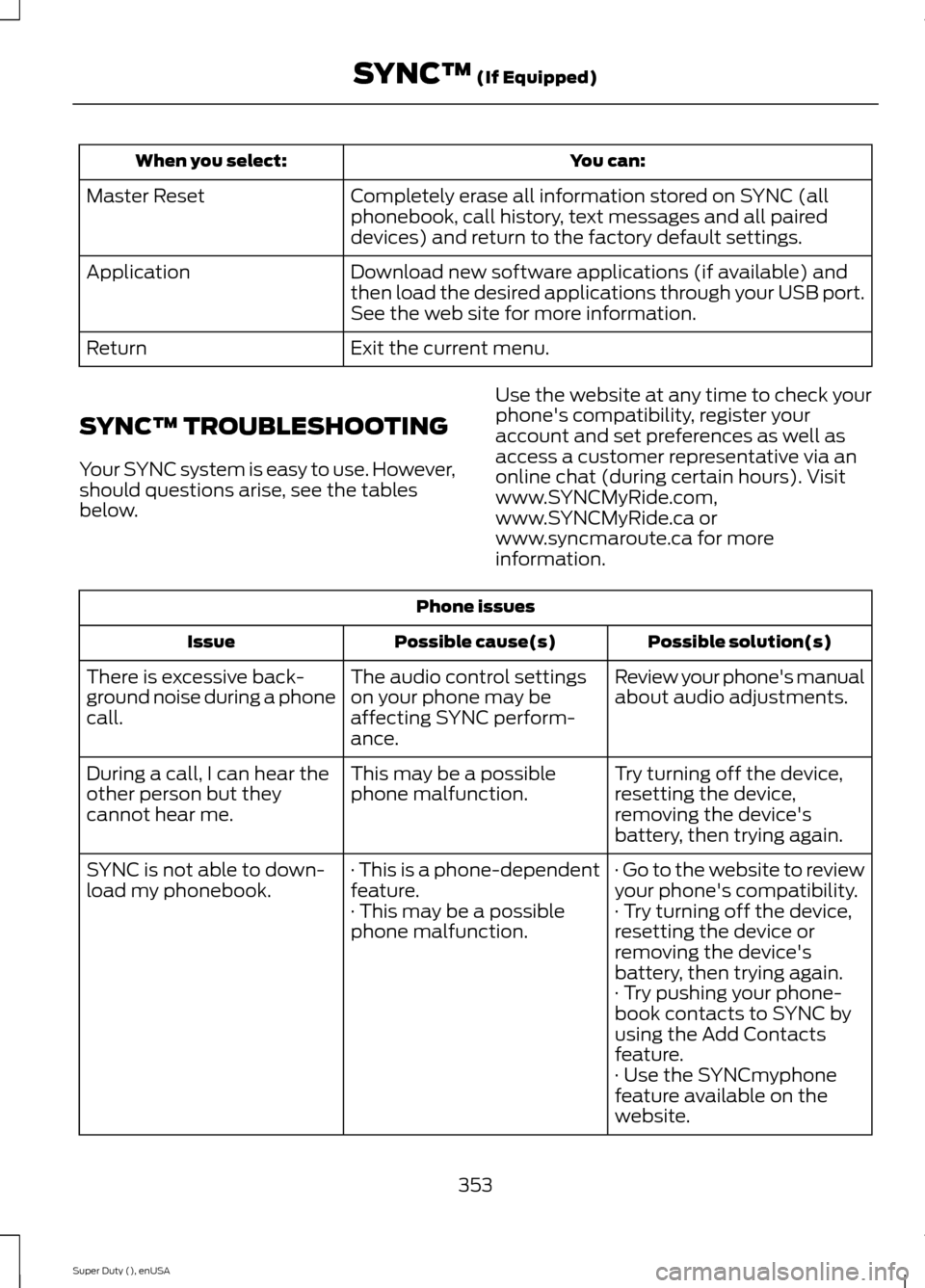
You can:When you select:
Completely erase all information stored on SYNC (allphonebook, call history, text messages and all paireddevices) and return to the factory default settings.
Master Reset
Download new software applications (if available) andthen load the desired applications through your USB port.See the web site for more information.
Application
Exit the current menu.Return
SYNC™ TROUBLESHOOTING
Your SYNC system is easy to use. However,should questions arise, see the tablesbelow.
Use the website at any time to check yourphone's compatibility, register youraccount and set preferences as well asaccess a customer representative via anonline chat (during certain hours). Visitwww.SYNCMyRide.com,www.SYNCMyRide.ca orwww.syncmaroute.ca for moreinformation.
Phone issues
Possible solution(s)Possible cause(s)Issue
Review your phone's manualabout audio adjustments.The audio control settingson your phone may beaffecting SYNC perform-ance.
There is excessive back-ground noise during a phonecall.
Try turning off the device,resetting the device,removing the device'sbattery, then trying again.
This may be a possiblephone malfunction.During a call, I can hear theother person but theycannot hear me.
· Go to the website to reviewyour phone's compatibility.· This is a phone-dependentfeature.SYNC is not able to down-load my phonebook.· Try turning off the device,resetting the device orremoving the device'sbattery, then trying again.
· This may be a possiblephone malfunction.
· Try pushing your phone-book contacts to SYNC byusing the Add Contactsfeature.· Use the SYNCmyphonefeature available on thewebsite.
353Super Duty (), enUSASYNC™ (If Equipped)
Page 358 of 470
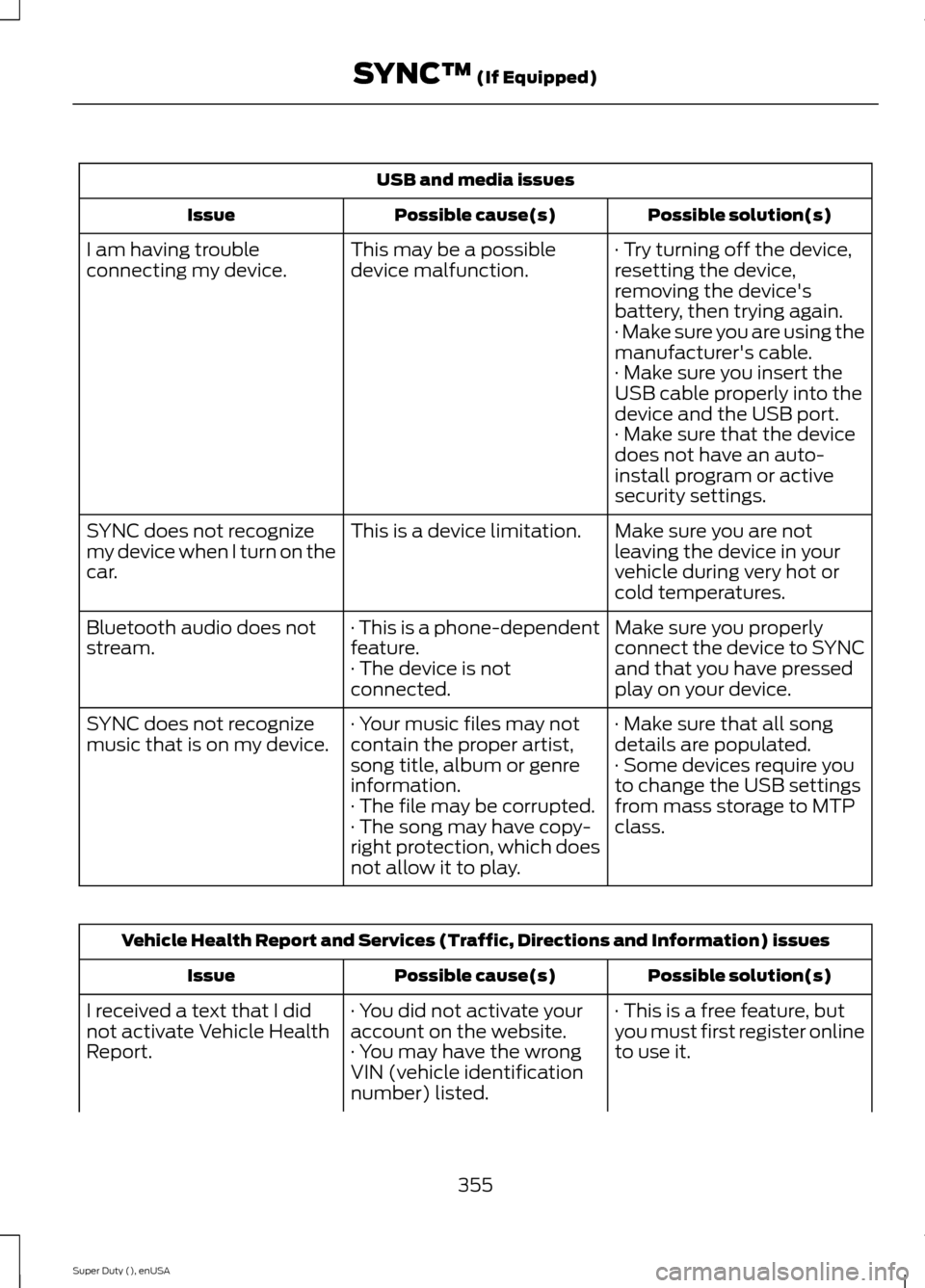
USB and media issues
Possible solution(s)Possible cause(s)Issue
· Try turning off the device,resetting the device,removing the device'sbattery, then trying again.
This may be a possibledevice malfunction.I am having troubleconnecting my device.
· Make sure you are using themanufacturer's cable.· Make sure you insert theUSB cable properly into thedevice and the USB port.· Make sure that the devicedoes not have an auto-install program or activesecurity settings.
Make sure you are notleaving the device in yourvehicle during very hot orcold temperatures.
This is a device limitation.SYNC does not recognizemy device when I turn on thecar.
Make sure you properlyconnect the device to SYNCand that you have pressedplay on your device.
· This is a phone-dependentfeature.· The device is notconnected.
Bluetooth audio does notstream.
· Make sure that all songdetails are populated.· Your music files may notcontain the proper artist,song title, album or genreinformation.
SYNC does not recognizemusic that is on my device.· Some devices require youto change the USB settingsfrom mass storage to MTPclass.· The file may be corrupted.· The song may have copy-right protection, which doesnot allow it to play.
Vehicle Health Report and Services (Traffic, Directions and Information) issues
Possible solution(s)Possible cause(s)Issue
· This is a free feature, butyou must first register onlineto use it.
· You did not activate youraccount on the website.· You may have the wrongVIN (vehicle identificationnumber) listed.
I received a text that I didnot activate Vehicle HealthReport.
355Super Duty (), enUSASYNC™ (If Equipped)
Page 364 of 470
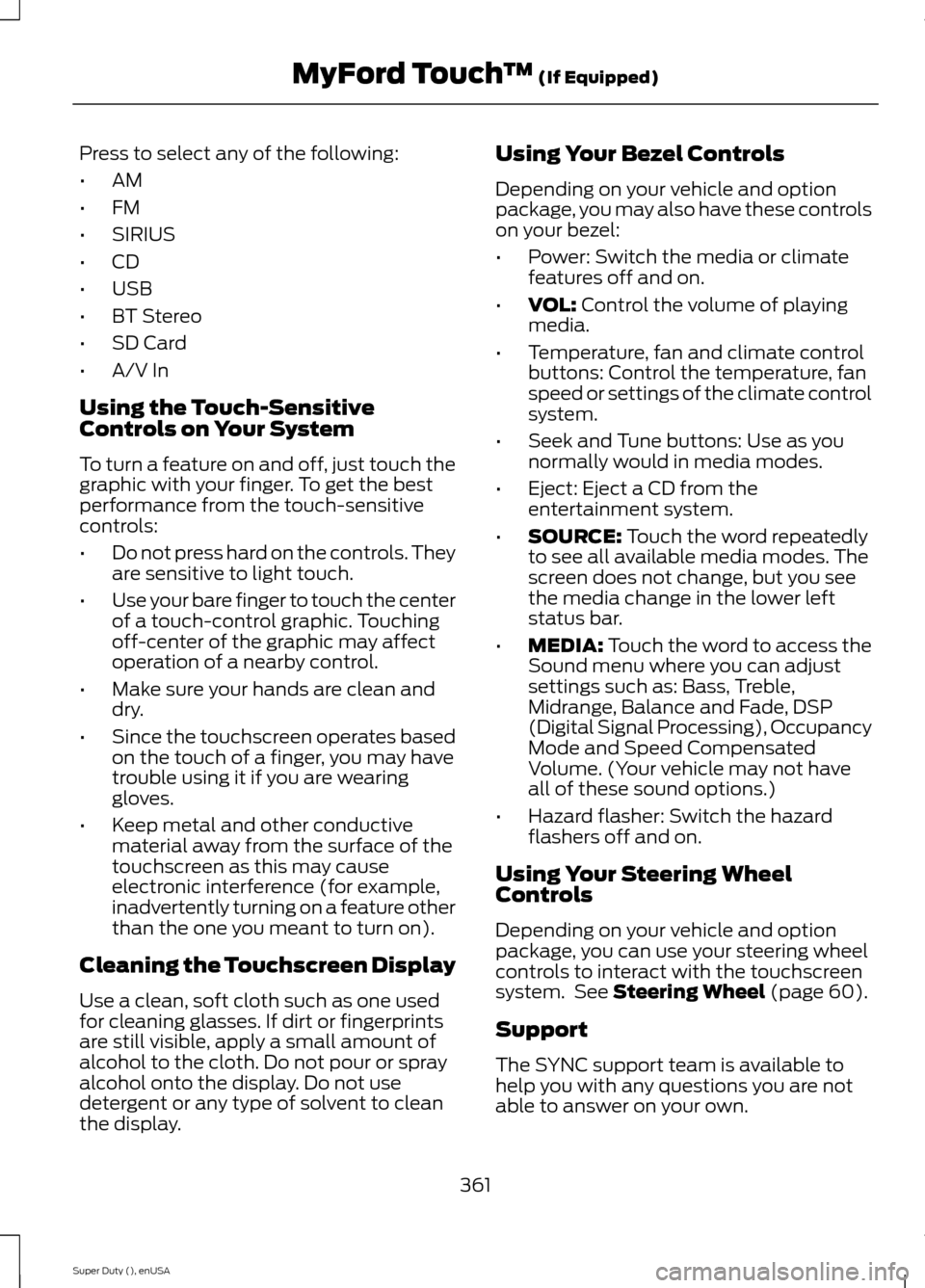
Press to select any of the following:
•AM
•FM
•SIRIUS
•CD
•USB
•BT Stereo
•SD Card
•A/V In
Using the Touch-SensitiveControls on Your System
To turn a feature on and off, just touch thegraphic with your finger. To get the bestperformance from the touch-sensitivecontrols:
•Do not press hard on the controls. Theyare sensitive to light touch.
•Use your bare finger to touch the centerof a touch-control graphic. Touchingoff-center of the graphic may affectoperation of a nearby control.
•Make sure your hands are clean anddry.
•Since the touchscreen operates basedon the touch of a finger, you may havetrouble using it if you are wearinggloves.
•Keep metal and other conductivematerial away from the surface of thetouchscreen as this may causeelectronic interference (for example,inadvertently turning on a feature otherthan the one you meant to turn on).
Cleaning the Touchscreen Display
Use a clean, soft cloth such as one usedfor cleaning glasses. If dirt or fingerprintsare still visible, apply a small amount ofalcohol to the cloth. Do not pour or sprayalcohol onto the display. Do not usedetergent or any type of solvent to cleanthe display.
Using Your Bezel Controls
Depending on your vehicle and optionpackage, you may also have these controlson your bezel:
•Power: Switch the media or climatefeatures off and on.
•VOL: Control the volume of playingmedia.
•Temperature, fan and climate controlbuttons: Control the temperature, fanspeed or settings of the climate controlsystem.
•Seek and Tune buttons: Use as younormally would in media modes.
•Eject: Eject a CD from theentertainment system.
•SOURCE: Touch the word repeatedlyto see all available media modes. Thescreen does not change, but you seethe media change in the lower leftstatus bar.
•MEDIA: Touch the word to access theSound menu where you can adjustsettings such as: Bass, Treble,Midrange, Balance and Fade, DSP(Digital Signal Processing), OccupancyMode and Speed CompensatedVolume. (Your vehicle may not haveall of these sound options.)
•Hazard flasher: Switch the hazardflashers off and on.
Using Your Steering WheelControls
Depending on your vehicle and optionpackage, you can use your steering wheelcontrols to interact with the touchscreensystem. See Steering Wheel (page 60).
Support
The SYNC support team is available tohelp you with any questions you are notable to answer on your own.
361Super Duty (), enUSAMyFord Touch™ (If Equipped)