2015 FORD SUPER DUTY display
[x] Cancel search: displayPage 29 of 84
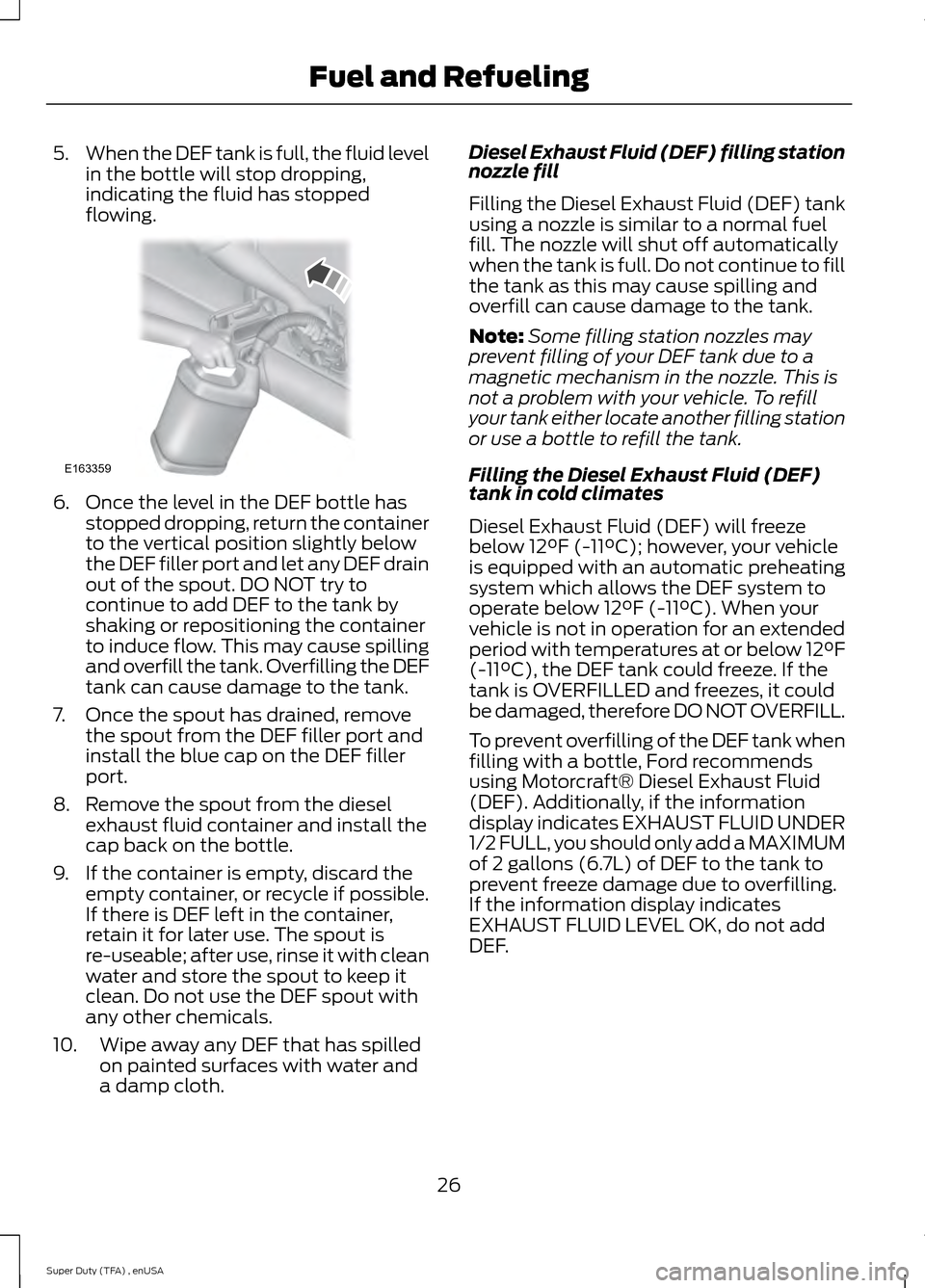
5.
When the DEF tank is full, the fluid level
in the bottle will stop dropping,
indicating the fluid has stopped
flowing. 6. Once the level in the DEF bottle has
stopped dropping, return the container
to the vertical position slightly below
the DEF filler port and let any DEF drain
out of the spout. DO NOT try to
continue to add DEF to the tank by
shaking or repositioning the container
to induce flow. This may cause spilling
and overfill the tank. Overfilling the DEF
tank can cause damage to the tank.
7. Once the spout has drained, remove the spout from the DEF filler port and
install the blue cap on the DEF filler
port.
8. Remove the spout from the diesel exhaust fluid container and install the
cap back on the bottle.
9. If the container is empty, discard the empty container, or recycle if possible.
If there is DEF left in the container,
retain it for later use. The spout is
re-useable; after use, rinse it with clean
water and store the spout to keep it
clean. Do not use the DEF spout with
any other chemicals.
10. Wipe away any DEF that has spilled on painted surfaces with water and
a damp cloth. Diesel Exhaust Fluid (DEF) filling station
nozzle fill
Filling the Diesel Exhaust Fluid (DEF) tank
using a nozzle is similar to a normal fuel
fill. The nozzle will shut off automatically
when the tank is full. Do not continue to fill
the tank as this may cause spilling and
overfill can cause damage to the tank.
Note:
Some filling station nozzles may
prevent filling of your DEF tank due to a
magnetic mechanism in the nozzle. This is
not a problem with your vehicle. To refill
your tank either locate another filling station
or use a bottle to refill the tank.
Filling the Diesel Exhaust Fluid (DEF)
tank in cold climates
Diesel Exhaust Fluid (DEF) will freeze
below 12°F (-11°C); however, your vehicle
is equipped with an automatic preheating
system which allows the DEF system to
operate below 12°F (-11°C). When your
vehicle is not in operation for an extended
period with temperatures at or below 12°F
(-11°C), the DEF tank could freeze. If the
tank is OVERFILLED and freezes, it could
be damaged, therefore DO NOT OVERFILL.
To prevent overfilling of the DEF tank when
filling with a bottle, Ford recommends
using Motorcraft® Diesel Exhaust Fluid
(DEF). Additionally, if the information
display indicates EXHAUST FLUID UNDER
1/2 FULL, you should only add a MAXIMUM
of 2 gallons (6.7L) of DEF to the tank to
prevent freeze damage due to overfilling.
If the information display indicates
EXHAUST FLUID LEVEL OK, do not add
DEF.
26
Super Duty (TFA) , enUSA Fuel and RefuelingE163359
Page 30 of 84
Contaminated Diesel Exhaust Fluid
(DEF) or inoperative Selective
Catalytic Reduction system
Selective catalytic reduction
systems are sensitive to
contamination of the Diesel
Exhaust Fluid (DEF). USE ONLY API or ISO
22241 CERTIFIED DIESEL EXHAUST FLUID
(DEF). If the selective catalytic reduction
system becomes contaminated or
inoperative, the Diesel Exhaust Fluid (DEF)
light will illuminate and exhaust fluid
system fault messages will appear in the
information display.
Continued driving without replacing DEF
or having the selective catalytic reduction
system repaired will result in the following
actions as required by the California Air
Resources Board (CARB) and U.S.
Environmental Protection Agency (EPA):
• Within a certain number of miles
(kilometers) to empty, speed will be
limited upon restart. Prior to this
occurring a message will appear in the
information display.
• Further vehicle operation without
replacing contaminated DEF will cause
the engine to enter an idle-only
condition. This will only occur upon
vehicle refueling, vehicle idling in park
for 1 hour, or engine shutdown for 10
minutes or more and will be indicated
by a message in the information display
indicating required actions to resume
normal operation.
For either vehicle speed limiting or idle-only
condition, normal vehicle operation will
resume when you repair the contaminated
system. To service a contaminated or
inoperative system, see an authorized
dealer. Diesel Exhaust Fluid (DEF) guidelines
and information
•
Use only Diesel Exhaust Fluid that
carries the trademark: American
Petroleum Institute (API) certified DEF
or ISO 22241.
• Do not put DEF in the diesel fuel tank.
• Do not overfill the DEF tank.
• Do not re-use the DEF container once
it is emptied.
• Avoid spilling DEF on painted surfaces,
carpeting or plastic components.
Immediately wipe away any DEF that
has spilled with a damp cloth and
water. If it has already crystallized, use
warm water and a sponge.
• Store DEF out of direct sunlight and in
temperatures between 23°F (-5°C) —
68°F (20°C).
• DEF will freeze below 12°F (-11°C).
• Do not store the DEF bottle in your
vehicle. If it leaks it could cause
damage to interior components or
release an ammonia odor inside your
vehicle.
• DEF is non-flammable, non-toxic,
colorless and water-soluble liquid.
• Do not dilute DEF with water or any
other liquid.
• An ammonia odor may be smelled
when the cap is removed or during
refill. Refill DEF in a well ventilated
area.
Typical Diesel Exhaust Fluid (DEF)
Usage
The charts below illustrate approximate
Diesel Exhaust Fluid (DEF) usage for the
given distances traveled under various
driving conditions and when using the
power take off. Your usage may vary
depending on: driving style, trailer towing,
loaded vehicle weight, weather, idle time,
PTO usage.
27
Super Duty (TFA) , enUSA Fuel and RefuelingE163176
Page 33 of 84
Diesel fuel dispensing nozzle fill rate
Your truck is equipped with a fuel fill pipe
that is able to accept fuel up to 20 gallons
per minute from an 11⁄8 fuel-dispensing
nozzle. Pumping fuel at greater flow rates
may result in premature nozzle shut-off or
spit back.
Fuel filler cap
WARNINGS
The fuel system may be under
pressure. If the fuel filler cap is
venting vapor or if you hear a hissing
sound, wait until it stops before completely
removing the fuel filler cap. Otherwise, fuel
may spray out and injure you or others. If you do not use the proper fuel filler
cap, excessive pressure or vacuum
in the fuel tank may damage the fuel
system or cause the fuel cap to disengage
in a collision, which may result in possible
personal injury. Note:
If you must replace the fuel filler cap,
replace it with a fuel filler cap designed for
your vehicle. The vehicle warranty may be
void for any damage to the fuel tank or fuel
system if the correct genuine Ford or
Motorcraft® fuel filler cap is not used.
Your fuel tank filler cap has an indexed
design with a 1/4 turn on/off feature.
When fueling your vehicle:
1. Turn the engine off.
2. Carefully turn the filler cap counterclockwise until it spins off.
3. Pull to remove the cap from the fuel filler pipe.
4. To install the cap, align the tabs on the
cap with the notches on the filler pipe.
5. Turn the filler cap clockwise 1/4 of a turn until it clicks at least once. EMISSION CONTROL SYSTEM
Diesel Exhaust System: Oxidation
Catalyst And Diesel Particulate
Filter System (If Equipped)
Your vehicle is equipped with a diesel
particulate filter. The diesel particulate
filter is an inline filter in the exhaust system
that reduces carbon emissions by trapping
exhaust particles before they reach the
tailpipe. The diesel particulate filter looks
similar to a traditional exhaust catalyst,
except larger, and is part of the exhaust
system under the vehicle. The filter couples
to a diesel oxidation catalyst that reduces
the amount of harmful exhaust emitted
from the tailpipe. As soot gathers in the
system, it begins to restrict the filter. You
need to periodically clean the soot that
gathers inside the filter. You can clean the
soot in two different ways, passive
regeneration and active regeneration. Both
methods occur automatically and require
no actions from the driver. During either
one of these regeneration methods, you
may notice a change in exhaust tone. At
certain times, the information display will
display various messages related to the
diesel particulate filter. See the Information
Displays chapter in the Owner Guide for
more information.
Passive regeneration
In passive regeneration, the exhaust
system temperature and constituents
automatically clean the filter, or reduce
the soot level, by burning (oxidizing) the
soot. Cleaning occurs naturally because of
normal engine operating conditions (at
varying levels, due to driving patterns).
30
Super Duty (TFA) , enUSA Fuel and Refueling
Page 34 of 84
Diesel particulate filter maintenance
You must properly maintain your diesel
particulate filter in order for it to function
properly. Do not disregard the EXHAUST
OVERLOADED DRIVE TO CLEAN and
EXHAUST AT LIMIT DRIVE TO CLEAN
NOW
maintenance messages otherwise
system damage could result that your
warranty may not cover.
Failure to perform active or Operator
Commanded Regeneration when
instructed could result in a clogged diesel
particulate filter. If your diesel particulate
filter fills beyond the regeneration
threshold, your vehicle will disable the
ability for active and Operator
Commanded Regeneration. This could
result in irreversible damage to the filter
requiring replacement that your warranty
may not cover. If your vehicle is not
equipped with Operator Commanded
Regeneration, check with your dealer for
availability.
Once the diesel particulate filter is full of
exhaust particles, the engine control
module will command the exhaust system
to clean the filter through a process called
active regeneration. Active regeneration
requires the engine computer to raise the
exhaust temperature to eliminate the
particles. During cleaning, the particles
convert to harmless gasses. Once cleaned
the diesel particulate filter will then be
ready to continue trapping exhaust
particles.
The regeneration process operates more
efficiently when you safely operate your
vehicle at least 30 mph (48 km/h) with a
steady pedal for approximately 20 minutes
to complete the process. The frequency
and duration of regeneration will fluctuate
by how you drive your vehicle, outside air
temperature, and altitude. For most driving,
regeneration frequency will vary from 100 - 500 miles (161 - 805 km) between
occurrences and each occurrence will last
from 9 - 20 minutes. You can usually
reduce the duration of regeneration if you
maintain a constant speed above 30 mph
(48 km/h).
When the engine control module detects
that the diesel particulate filter is nearly
full of particulates and you are not
operating your in a manner to allow
effective automatic cleaning, the
information display will display
EXH
OVERLOADED DRIVE TO CLEAN for
base information display and Exhaust
Overloaded Drive to Clean for the
optional information display. These
messages appear as a reminder for you to
drive in order to clean the diesel particulate
filter. If you operate your vehicle in a
manner to allow effective automatic
cleaning, the information display will
display a cleaning exhaust filter message,
which is the normal regeneration process.
See the Information Displays chapter of
the Owner Guide for more information.
You can also choose Operator
Commanded Regeneration to clean the
exhaust system at this point. See How to
start Operator Commanded Regeneration
later in this chapter.
If you are not able to drive in a manner that
allows effective automatic cleaning (active
regeneration) or you choose to perform
regeneration of the diesel particulate filter
(cleaning) while at idle (stationary), then
Operator Commanded Regeneration
would need to be performed. See Operator
Commanded Regeneration later in this
chapter.
31
Super Duty (TFA) , enUSA Fuel and Refueling
Page 35 of 84
Operator Commanded Regeneration
(If Equipped)
If your vehicle is operated with significant
stationary operation, low speed drive
cycles less than 25 mph, short drive cycles,
a drive time is less than 10 - 15 minutes or
the vehicle does not fully warm up, passive
and active regeneration may not
sufficiently clean the diesel particulate
filter system. Operator Commanded
Regeneration allows you to manually start
regeneration of the diesel particulate filter
at idle (while stationary) to clean the filter.
If you are not sure whether your vehicle is
equipped with this feature, contact an
authorized dealer.
When to perform Operator Commanded
Regeneration
Use the Operator Commanded
Regeneration feature when the EXH
OVERLOADED DRIVE TO CLEAN
message appears in the information
display and:
• the operator is not able to drive in
manner that allows effective
automatic cleaning (active
regeneration),
• or the operator instead wishes to
manually start regeneration (cleaning)
of the diesel particulate filter while the
vehicle is idle (stationary).
Operator Commanded Regeneration
precautions and safe exhaust position WARNING
Failure to comply with the following
instructions for Operator
Commanded Regeneration may
result in fire, serious injury, death and/or
property damage. Before you start operator commanded
regeneration, do the following: •
Place your vehicle in
P (Park) with the
parking brake set on stable, level
ground
• You must park your vehicle outside of
any structure
• Your vehicle must be 10 – 15 feet (3 –
5 meters) away from any obstructions
and must be away from materials that
can easily combust or melt (for
example, paper, leaves, petroleum
products, fuels, plastics and other dry
organic material)
• Make sure there is a minimum of 1/8
tank of fuel
• Make sure all fluids are at proper levels
Make sure that the louvers (holes) located
at the tip of the exhaust are also clear of
any obstructions as they are used to
introduce fresh air into the tailpipe to cool
the exhaust gas as it leaves. See Cleaning
the Exhaust
(page 54).
How to start Operator Commanded
Regeneration WARNING
Stay clear of exhaust tip during
regeneration. You or others can be
burned.
Note:
You cannot use the Operator
Commanded Regeneration until the diesel
particulate filter load percentage has
reached 100% (Full). The diesel particulate
filter load percentage will fluctuate up and
down when driving your vehicle due to active
and passive regenerations.
Note: During the use of Operator
Commanded Regeneration, you may
observe a light amount of white smoke. This
is normal. You cannot use the Operator
Commanded Regeneration if the
service engine soon light is
illuminated.
32
Super Duty (TFA) , enUSA Fuel and Refueling
Page 36 of 84
Information display procedure
Start with your vehicle engine fully warmed
and then press the Info button on the
steering wheel until the information display
reads one of the following choices:
• EXHST XX% FULL CLEAN? Y/N
• EXHAUST FULL CLEAN? Y/N
Answer yes to this prompt and then follow
the prompts regarding exhaust position as
needed to initiate Operator Commanded
Regeneration. Be sure to understand each
prompt. If you are not sure what is being
asked by each prompt, contact an
authorized dealer. The display will confirm
the operation has started and when it has
finished.
If the diesel particulate filter is near or at
saturation, a message requesting
permission to initiate filter cleaning will
display
EXH AT LIMIT CLEAN? Y/N.
Answer yes to this prompt and then follow
the prompts regarding exhaust position as
needed to initiate Operator Commanded
Regeneration. Be sure to understand each
prompt. If you are not sure what is being
asked by each prompt, contact an
authorized dealer. The display will confirm
the operation has started and when it has
finished. You can also drive to clean the
filter. See Active regeneration earlier in this
chapter. When the system is at the point
of oversaturation, the service
engine soon light will illuminate
and the following message
EXH OVER
LIMIT SERVICE NOW will appear . You
will not be able to allow cleaning. You
must have your vehicle serviced by an
authorized dealer. Once operator commanded regeneration
starts, the engine
’s rpm will rise to
approximately 2,000 - 2,400 rpm and the
cooling fan will increase speed; you will
hear a change in audible sound due to the
fan and engine speed increase.
It is not necessary to open the hood on the
engine compartment. Once Operator
Commanded Regeneration is complete,
the engine rpm and fan will return to
normal idling. The exhaust system will
remain very hot for several minutes even
after regeneration is complete. Do not
reposition the vehicle over materials that
could burn until the exhaust system has
had sufficient time to cool. Depending on
the amount of soot collected by the diesel
particulate filter, ambient temperature,
and altitude, Operator Commanded
Regeneration may last from 10 to 25
minutes.
How to interrupt or cancel Operator
Commanded Regeneration
If you need to cancel the Operator
Commanded Regeneration, pressing the
brake, accelerator, or shutting off the
vehicle will stop the procedure. Depending
on the amount of time you allowed the
Operator Commanded Regeneration to
operate, soot may not have had sufficient
time to be eliminated, but the exhaust
system and exhaust gas may still be hot.
If you shut your vehicle off during Operator
Commanded Regeneration, you will notice
turbo flutter. This is a normal consequence
caused by shutting off a diesel engine
during boosted operation and is considered
normal.
Filter service and maintenance
Over time, a slight amount of ash will build
up in the diesel particulate filter, which is
not removed during the regeneration
process. The filter may need to be removed
for ash cleaning at approximately 120,000
miles (193,000 km) or greater (actual
33
Super Duty (TFA) , enUSA Fuel and Refueling
Page 39 of 84
Noise Emissions Warranty, Prohibited
Tampering Acts and Maintenance
On January 1, 1978, Federal regulation
became effective governing the noise
emission on trucks over 10,000 lbs. (4,536
kg) GVWR (Gross Vehicle Weight Rating).
The preceding statements concerning
prohibited tampering acts and
maintenance, and the noise warranty
found in the Warranty Guide, are
applicable to complete chassis cabs over
10,000 lbs. (4,536 kg) GVWR.
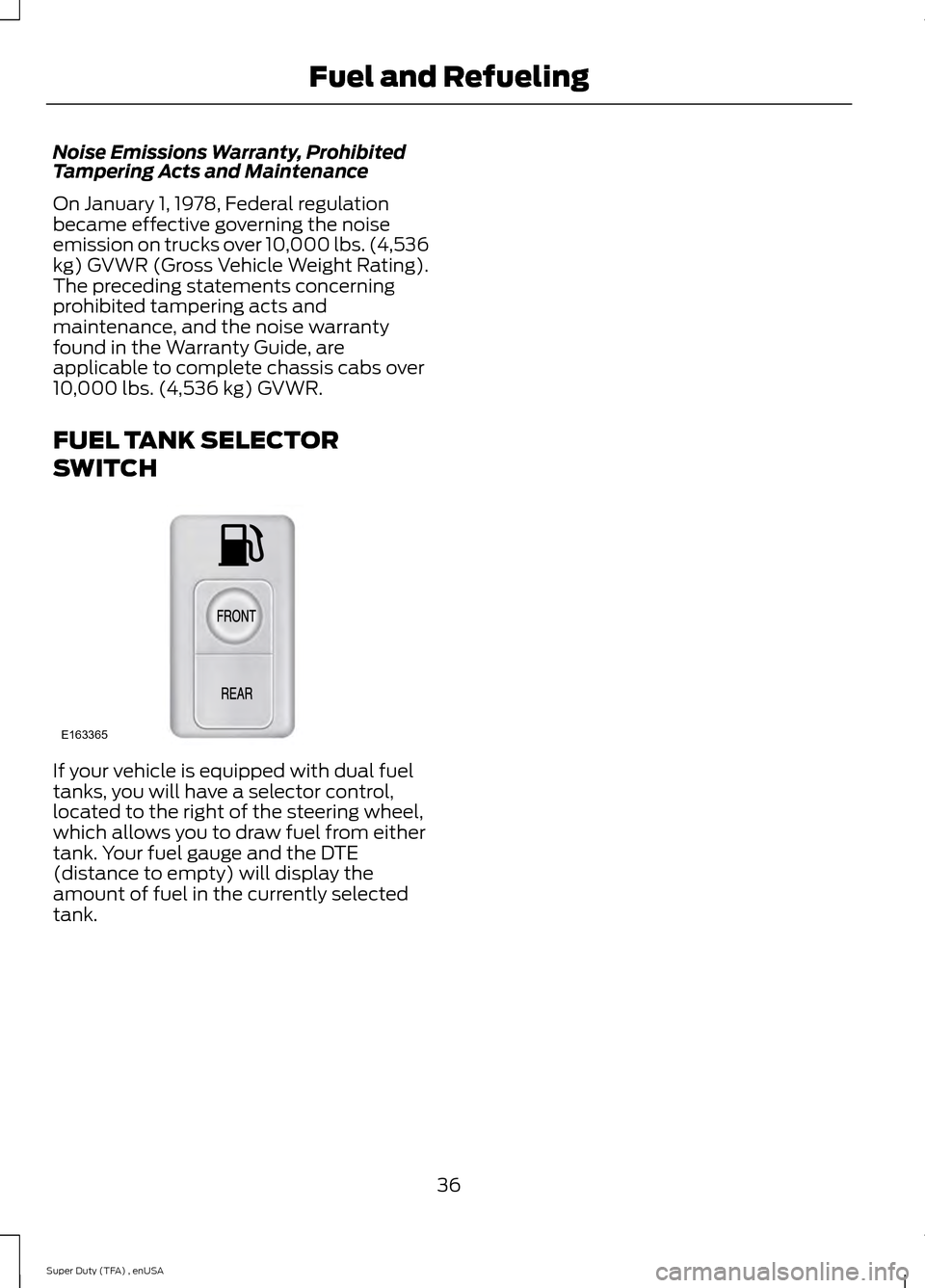
FUEL TANK SELECTOR
SWITCH
If your vehicle is equipped with dual fuel
tanks, you will have a selector control,
located to the right of the steering wheel,
which allows you to draw fuel from either
tank. Your fuel gauge and the DTE
(distance to empty) will display the
amount of fuel in the currently selected
tank.
36
Super Duty (TFA) , enUSA Fuel and RefuelingE163365
Page 47 of 84
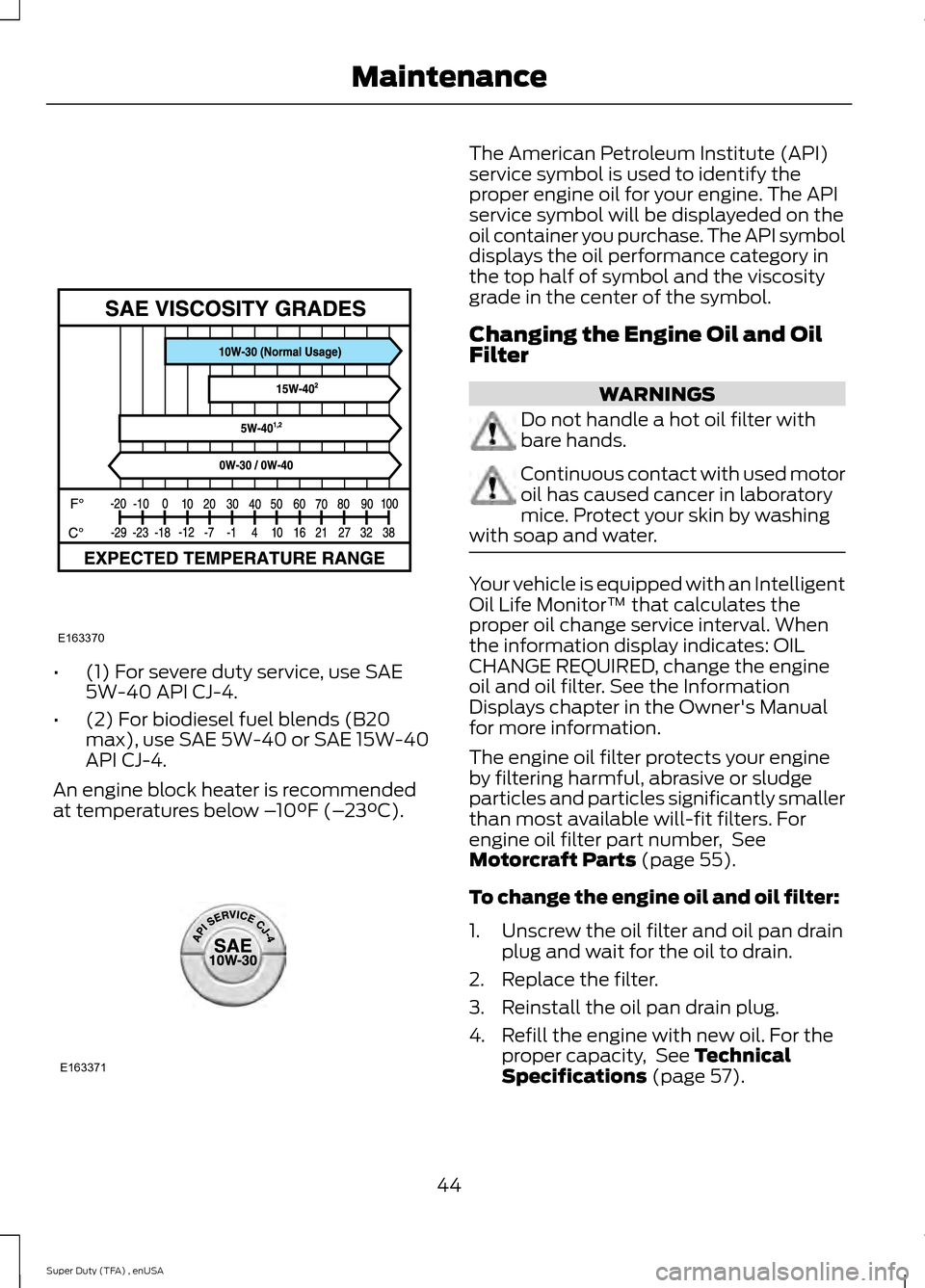
•
(1) For severe duty service, use SAE
5W-40 API CJ-4.
• (2) For biodiesel fuel blends (B20
max), use SAE 5W-40 or SAE 15W-40
API CJ-4.
An engine block heater is recommended
at temperatures below – 10°F (–23°C). The American Petroleum Institute (API)
service symbol is used to identify the
proper engine oil for your engine. The API
service symbol will be displayeded on the
oil container you purchase. The API symbol
displays the oil performance category in
the top half of symbol and the viscosity
grade in the center of the symbol.
Changing the Engine Oil and Oil
Filter
WARNINGS
Do not handle a hot oil filter with
bare hands.
Continuous contact with used motor
oil has caused cancer in laboratory
mice. Protect your skin by washing
with soap and water. Your vehicle is equipped with an Intelligent
Oil Life Monitor™ that calculates the
proper oil change service interval. When
the information display indicates: OIL
CHANGE REQUIRED, change the engine
oil and oil filter. See the Information
Displays chapter in the Owner's Manual
for more information.
The engine oil filter protects your engine
by filtering harmful, abrasive or sludge
particles and particles significantly smaller
than most available will-fit filters. For
engine oil filter part number, See
Motorcraft Parts (page 55).
To change the engine oil and oil filter:
1. Unscrew the oil filter and oil pan drain plug and wait for the oil to drain.
2. Replace the filter.
3. Reinstall the oil pan drain plug.
4. Refill the engine with new oil. For the proper capacity, See
Technical
Specifications (page 57).
44
Super Duty (TFA) , enUSA MaintenanceE163370 E163371