2015 FORD MUSTANG ignition
[x] Cancel search: ignitionPage 190 of 441
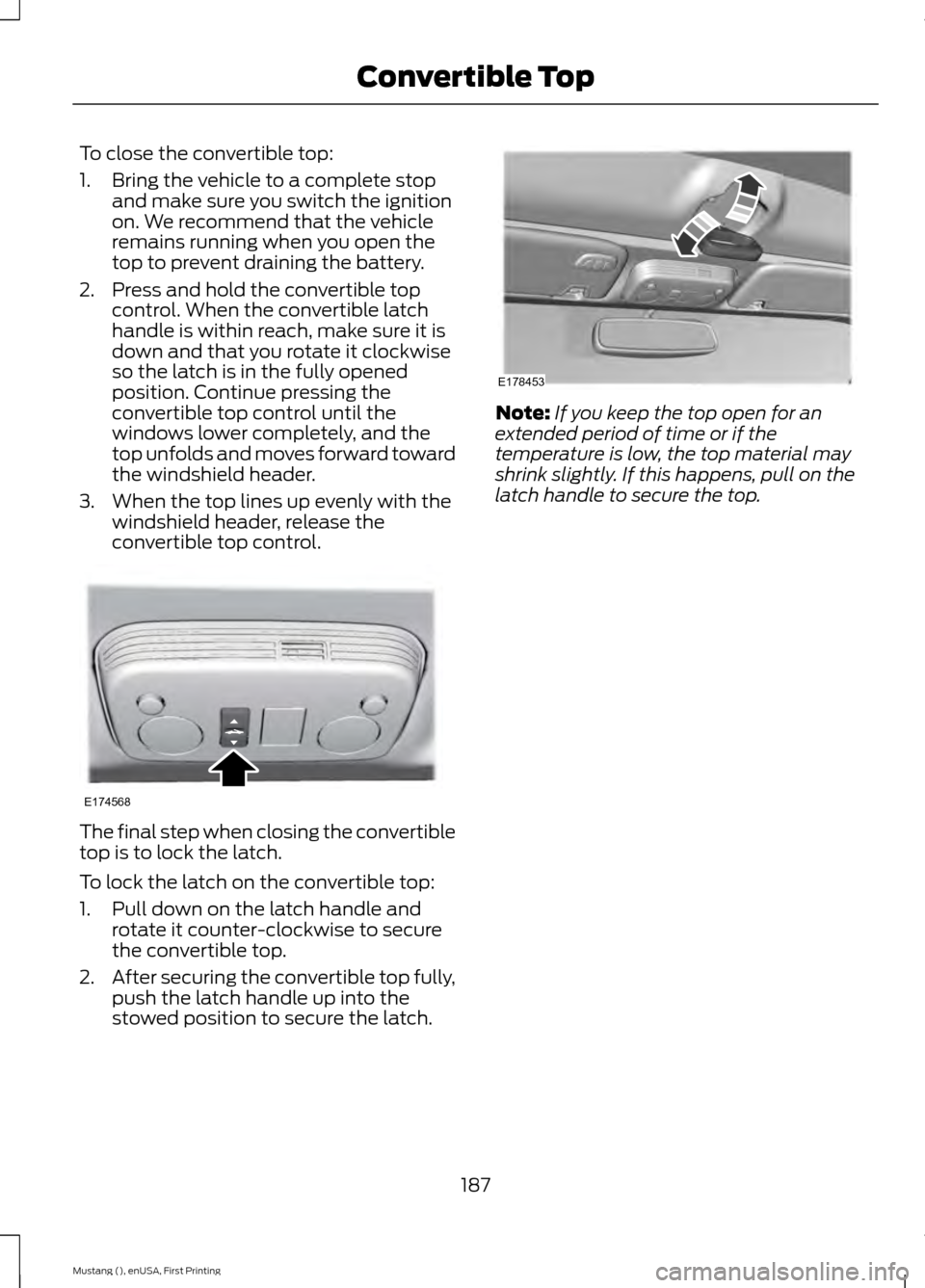
To close the convertible top:
1. Bring the vehicle to a complete stop
and make sure you switch the ignition
on. We recommend that the vehicle
remains running when you open the
top to prevent draining the battery.
2. Press and hold the convertible top control. When the convertible latch
handle is within reach, make sure it is
down and that you rotate it clockwise
so the latch is in the fully opened
position. Continue pressing the
convertible top control until the
windows lower completely, and the
top unfolds and moves forward toward
the windshield header.
3. When the top lines up evenly with the windshield header, release the
convertible top control. The final step when closing the convertible
top is to lock the latch.
To lock the latch on the convertible top:
1. Pull down on the latch handle and
rotate it counter-clockwise to secure
the convertible top.
2. After securing the convertible top fully,
push the latch handle up into the
stowed position to secure the latch. Note:
If you keep the top open for an
extended period of time or if the
temperature is low, the top material may
shrink slightly. If this happens, pull on the
latch handle to secure the top.
187
Mustang (), enUSA, First Printing Convertible TopE174568 E178453
Page 195 of 441
Canadian roadside coverage and benefits
may differ from the U.S. coverage. If you
require more information, please refer to
the coverage section of your warranty
guide, call us in Canada at
1-800-665-2006, or visit our website at
www.ford.ca.
Sykes Assistance Services Corporation
administers the Roadside Assistance
program. You must receive covered
services in Canada or the continental
United States. Coverage extends to
vehicles that use public, non-seasonal,
annually traveled roadways. Roadside
Assistance coverage does not extend to
vehicles involved in cross-country driving,
logging, autocross and any other form of
off-road use. Well maintained roads and
surfaces help ensure safe travel for the
supplier, and allow their representatives
to perform service as per the standard
operating procedures.
In Remote Locations
If our supplier cannot take your vehicle by
road to the nearest authorized dealership,
transportation by rail or water may be
necessary. The program covers a tow to
the dock or rail terminal and also to the
dealership at the end of the trip.
For rail or water transportation, however,
contact your authorized dealer to confirm
if you are eligible for additional coverage
before you authorize or pay for the service.
Call the Ford Roadside Assistance at
1-800-665-2006 for additional
information.
HAZARD WARNING FLASHERS
Note:
The hazard warning flashers will
operate when the ignition is in any position
or if the key is not in the ignition. If used
when the engine is not running, the battery
will lose charge. As a result, there may be
insufficient power to restart your engine. The hazard flasher control is
located on the instrument panel
by the radio. Use it when your
vehicle is disabled and is creating a safety
hazard for other motorists.
• Press the flasher control and all front
and rear direction indicators flash.
• Press the flasher control again to turn
them off.
FUEL SHUTOFF WARNING
Failure to inspect and, if necessary,
repair fuel leaks after a collision may
increase the risk of fire and serious
injury. Ford Motor Company recommends
that the fuel system be inspected by an
authorized dealer after any collision. In the event of a moderate to severe
collision, this vehicle includes a fuel pump
shut-off feature that stops the flow of fuel
to the engine. Not every impact will cause
a shut-off.
192
Mustang (), enUSA, First Printing Roadside EmergenciesE142663
Page 196 of 441

Should your vehicle shut off after a
collision, you may restart your vehicle. For
vehicles equipped with a push button start
system:
1. Press the START/STOP button to
switch off the ignition.
2. Press the brake pedal (automatic transmission) or the clutch pedal
(manual transmission) and press the
START/STOP
button to start the
vehicle.
3. Remove your foot from the brake or clutch pedal and press the
START/STOP
button to switch off
the ignition.
4. Press the brake or clutch pedal and the
START/STOP
button, or switch on
the ignition only by pressing the
START/STOP
button without
pressing the brake or clutch pedal. Both
ways re-enable the fuel system.
Note: When you try to restart your vehicle
after a fuel shutoff, the vehicle makes sure
that various systems are safe to restart.
Once your vehicle determines that the
systems are safe, then the vehicle will allow
you to restart.
Note: In the event that your vehicle does
not restart after your third attempt, contact
an authorized dealer.
JUMP STARTING THE VEHICLE WARNINGS
The gases around the battery can
explode if exposed to flames, sparks,
or lit cigarettes. An explosion could
result in personal injury or vehicle damage. Batteries contain sulfuric acid which
can burn skin, eyes and clothing, if
contacted.
Use only an adequate-sized cable
with insulated clamps. Preparing Your Vehicle
Note:
Do not attempt to push-start your
automatic transmission vehicle. Automatic
transmissions do not have push-start
capability. Attempting to push-start a
vehicle with an automatic transmission may
cause transmission damage.
Note: Use only a 12-volt supply to start your
vehicle.
Note: Do not disconnect the battery of the
disabled vehicle as this could damage the
vehicle's electrical system.
Park the booster vehicle close to the hood
of the disabled vehicle, making sure the
two vehicles do not touch. Turn all
accessories off.
Connecting the Jumper Cables WARNING
Do not attach the cables to fuel lines,
engine rocker covers, the intake
manifold or electrical components
as grounding points. Stay clear of moving
parts. To avoid reverse polarity
connections, make sure that you correctly
identify the positive (+) and negative (-)
terminals on both the disabled and booster
vehicles before connecting the cables. Note:
In the illustration, the bottom vehicle
represents the booster vehicle.
193
Mustang (), enUSA, First Printing Roadside Emergencies
Page 233 of 441
•
Never wash or rinse any ignition coil,
spark plug wire or spark plug well, or
the area in and around these locations.
• Cover the battery, power distribution
box, and air filter assembly to prevent
water damage when cleaning the
engine.
CLEANING THE WINDOWS AND
WIPER BLADES
Car wash chemicals and environmental
fallout can result in windshield and wiper
blade contamination. Dirty windshield and
wipers will result in poor windshield wiper
operation. Keep the windshield and wiper
blades clean to maintain windshield wiper
performance.
To clean the windshield and wiper blades:
• Clean the windshield with a
non-abrasive glass cleaner.
• For windshields contaminated with
tree sap, chemicals, wax or bugs, clean
the entire windshield using steel wool
(no greater than 0000 grade) in a
circular motion and rinse with water.
• Clean the wiper blades with isopropyl
rubbing alcohol or windshield washer
concentrate.
Note: Do not use razor blades or other
sharp objects to clean or remove decals
from the inside of the heated rear window.
The vehicle warranty does not cover
damage caused to the heated rear window
grid lines.
CLEANING THE INTERIOR WARNINGS
Do not use cleaning solvents, bleach
or dye on the vehicle
’s safety belts,
as these actions may weaken the
belt webbing. WARNINGS
On vehicles equipped with
seat-mounted airbags, do not use
chemical solvents or strong
detergents. Such products could
contaminate the side airbag system and
affect performance of the side airbag in a
collision. For fabric, carpets, cloth seats, safety belts
and seats equipped with side airbags:
•
Remove dust and loose dirt with a
vacuum cleaner.
• Remove light stains and soil with
Motorcraft Professional Strength
Carpet & Upholstery Cleaner.
• If grease or tar is present on the
material, spot-clean the area first with
Motorcraft Spot and Stain Remover. In
Canada, use Motorcraft Multi-Purpose
Cleaner.
• If a ring forms on the fabric after spot
cleaning, clean the entire area
immediately (but do not oversaturate)
or the ring will set.
• Do not use household cleaning
products or glass cleaners, which can
stain and discolor the fabric and affect
the flame retardant abilities of the seat
materials.
CLEANING THE INSTRUMENT
PANEL AND INSTRUMENT
CLUSTER LENS WARNING
Do not use chemical solvents or
strong detergents when cleaning the
steering wheel or instrument panel
to avoid contamination of the airbag
system. 230
Mustang (), enUSA, First Printing Vehicle Care
Page 270 of 441
ENGINE SPECIFICATIONS
5.0L V8
3.7 V6
2.3L I4 Ecoboost
Engine
302
226
138
Cubic inches
Minimum 87 octane
Minimum 87 octane
Minimum 87 octane
Required fuel
1-5-4-8-6-3-7-2
1-4-2-5-3-6
1-3-4-2
Firing order
Coil on plug
Coil on plug
Coil on plug
Ignition system
.049-.053 in. (1.25-1.35 mm)
.049-.053 in. (1.25-
1.35 mm)
.027-.031 in. (.70-.80
mm)
Spark plug gap
11.0:1
10.5:1
9.5:1
Compression ratio
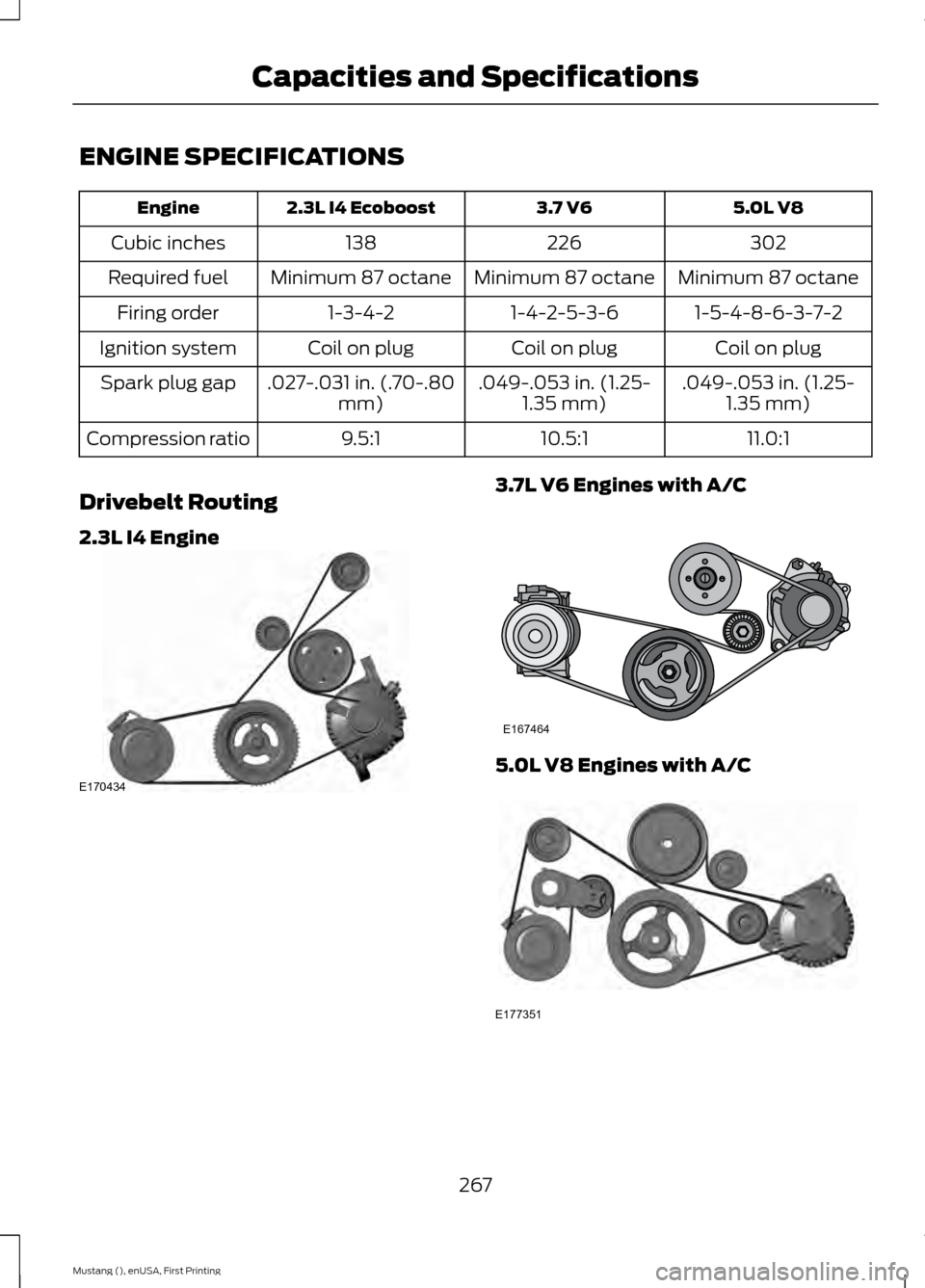
Drivebelt Routing
2.3L I4 Engine 3.7L V6 Engines with A/C
5.0L V8 Engines with A/C
267
Mustang (), enUSA, First Printing Capacities and SpecificationsE170434 E167464 E177351
Page 302 of 441
Changing the Voice Settings
In addition to using voice commands to
change the voice settings, you can also use
the menu in the audio display.
1. Press the MENU button.
2. Select
SYNC-Settings.
3. Select
Voice Settings.
USING SYNC™ WITH YOUR
PHONE
Hands-free calling is one of the main
features of SYNC. While the system
supports a variety of features, many are
dependent on your cellular phone's
functionality. At a minimum, most cellular
phones with Bluetooth wireless technology
support the following functions:
• Answering an incoming call.
• Ending a call.
• Using privacy mode.
• Dialing a number.
• Redialing.
• Call waiting notification.
• Caller ID.
Other features, such as text messaging
using Bluetooth and automatic phonebook
download, are phone-dependent features.
To check your phone's compatibility, see
your phone's manual and visit
www.SYNCMyRide.com,
www.SYNCMyRide.ca or
www.syncmaroute.ca.
Pairing a Phone for the First Time
Wirelessly pairing your phone with SYNC
allows you to make and receive hands-free
calls.
Note: SYNC can support downloading up
to approximately 4000 entries per
Bluetooth-enabled cellular phone. Note:
Make sure to switch on the ignition
and the radio. Put the transmission in park
(P).
Using the Audio System
Note: To scroll through the menus, press
the up and down arrows on your audio
system.
1. Make sure to switch on your phone's Bluetooth feature before starting the
search. See your device's manual if
necessary.
2. Press the
PHONE button. When the
audio display indicates there is no
paired phone, select the option to add.
3. When a message to begin pairing appears in the audio display, search for
SYNC on your phone to start the pairing
process.
4. When prompted on your phone's display, enter the six-digit PIN provided
by the system in the radio display. The
display indicates when the pairing is
successful.
Depending on your phone's capability and
your market, the system may prompt you
with questions, such as setting the current
phone as the primary phone (the phone
SYNC automatically tries to connect with
first upon vehicle start-up) and
downloading your phonebook.
Using Voice Commands 1. Make sure to switch on your phone's
Bluetooth feature before starting the
search. See your device's manual if
necessary.
2. Start a voice session, and then say "Pair device".
3. Follow the instructions on the audio display.
299
Mustang (), enUSA, First Printing SYNC™
(If Equipped)E142599
Page 303 of 441
Depending on your phone's capability and
your market, the system may prompt you
with questions, such as setting the current
phone as the primary phone (the phone
SYNC automatically tries to connect with
first upon vehicle start-up) and
downloading your phonebook.
Pairing Subsequent Phones
Note:
Make sure to switch on the ignition
and the radio. Put the transmission in park
(P).
Note: To scroll through the menus, press
the up and down arrows on your audio
system.
1. Make sure to switch on your phone's Bluetooth feature before starting the
search. See your device's manual if
necessary.
2. Press the PHONE button.
3. Select the option for Bluetooth Devices.
4. Press the
OK button.
5. Select the option to add. This starts the pairing process.
6. When a message to begin pairing appears in the audio display, search for
SYNC on your device.
7. When prompted on your phone's display, enter the six-digit PIN provided
by the system in the audio display. The
display indicates when the pairing is
successful.
Depending on your phone's capability and
your market, the system may prompt you
with questions, such as setting the current
phone as the primary phone (the phone
SYNC automatically tries to connect with
first upon vehicle start-up) and
downloading your phonebook. Phone Voice Commands Press the voice button. When
prompted, say any of the
following:
"PHONE"
"Call
"Call
"Call
"Dial"1
"Go to handsfree" 2
"Hold call
"Join calls" 2
"Messages" 3
"Mute call" 2
"Phone help" "Privacy on" 2
"Turn ringer
1 See
Dial table below.
2 This commands are only valid while in a
phone call.
3 See
Messages table below.
300
Mustang (), enUSA, First Printing SYNC™
(If Equipped)E142599
Page 310 of 441
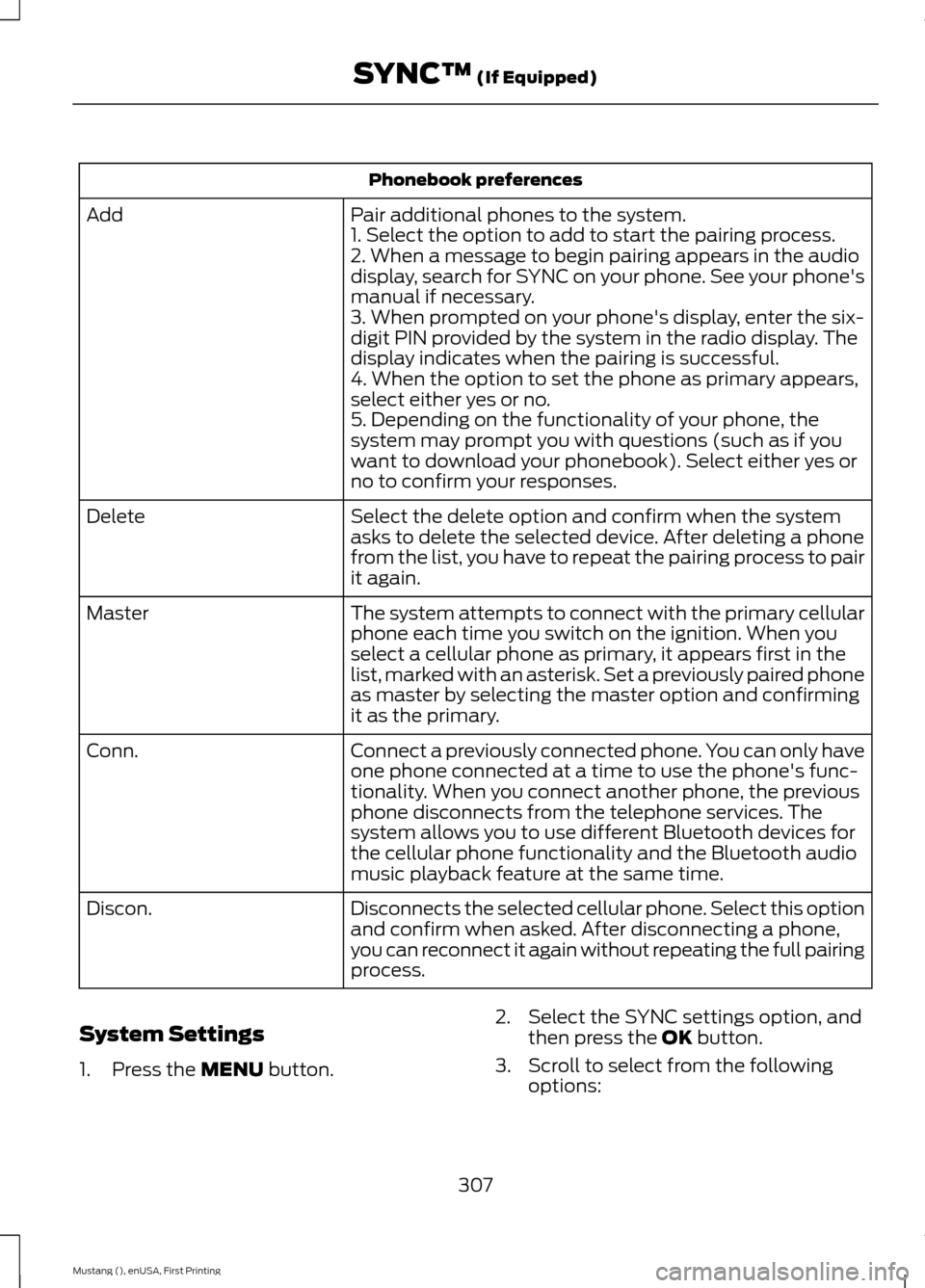
Phonebook preferences
Pair additional phones to the system.
Add
1. Select the option to add to start the pairing process.
2. When a message to begin pairing appears in the audio
display, search for SYNC on your phone. See your phone's
manual if necessary.
3. When prompted on your phone's display, enter the six-
digit PIN provided by the system in the radio display. The
display indicates when the pairing is successful.
4. When the option to set the phone as primary appears,
select either yes or no.
5. Depending on the functionality of your phone, the
system may prompt you with questions (such as if you
want to download your phonebook). Select either yes or
no to confirm your responses.
Select the delete option and confirm when the system
asks to delete the selected device. After deleting a phone
from the list, you have to repeat the pairing process to pair
it again.
Delete
The system attempts to connect with the primary cellular
phone each time you switch on the ignition. When you
select a cellular phone as primary, it appears first in the
list, marked with an asterisk. Set a previously paired phone
as master by selecting the master option and confirming
it as the primary.
Master
Connect a previously connected phone. You can only have
one phone connected at a time to use the phone's func-
tionality. When you connect another phone, the previous
phone disconnects from the telephone services. The
system allows you to use different Bluetooth devices for
the cellular phone functionality and the Bluetooth audio
music playback feature at the same time.
Conn.
Disconnects the selected cellular phone. Select this option
and confirm when asked. After disconnecting a phone,
you can reconnect it again without repeating the full pairing
process.
Discon.
System Settings
1. Press the MENU button. 2. Select the SYNC settings option, and
then press the
OK button.
3. Scroll to select from the following options:
307
Mustang (), enUSA, First Printing SYNC™
(If Equipped)