2015 FORD MUSTANG bluetooth
[x] Cancel search: bluetoothPage 378 of 441

SYNC Services (If Equipped,
United States Only)
Note:
SYNC Services varies by trim level
and model year and may require a
subscription. Traffic alerts and turn-by-turn
directions available in select markets.
Message and data rates may apply. Ford
Motor Company reserves the right to change
or discontinue this product service at any
time without prior notification or incurring
any future obligation.
Note: SYNC Services requires activation
before use. Visit www.SYNCMyRide.com to
register and check your eligibility for
complimentary services. Standard phone
and message rates may apply. Subscription
may be required. You must also have the
active SYNC Services Bluetooth-enabled
cellular phone paired and connected to the
system in order to connect to, and use,
SYNC Services. See Phone (page 368).
Note: This feature does not function
properly if you have enabled caller ID
blocking on your cellular phone. Make sure
your cellular phone is not blocking caller ID
before using SYNC Services.
Note: The driver is ultimately responsible
for the safe operation of the vehicle, and
therefore, must evaluate whether it is safe
to follow the suggested directions. Any
navigation features provided are only an aid.
Make your driving decisions based on your
observations of local conditions and existing
traffic regulations. Do not follow the route
suggestions if doing so would result in an
unsafe or illegal maneuver, if you would be
placed in an unsafe situation, or if you would
be directed into an area that you consider
unsafe. Maps used by this system may be
inaccurate because of errors, changes in
roads, traffic conditions or driving
conditions. Note:
When you connect, the service uses
GPS technology and advanced vehicle
sensors to collect your vehicle's current
location, travel direction and speed to help
provide you with the directions, traffic
reports, or business searches you request.
Further, to provide the services you request,
for continuous improvement, the service
may collect and record call details and voice
communications. For more information, see
SYNC Services Terms and Conditions at
www.SYNCMyRide.com. If you do not want
Ford or its service providers to collect your
vehicle travel information or other
information identified in the Terms and
Conditions, do not subscribe or use the
service.
SYNC Services uses advanced vehicle
sensors, integrated GPS technology and
comprehensive map and traffic data, to
give you personalized traffic reports,
precise turn-by-turn directions, business
search, news, sports, weather and more.
For a complete list of services, or to learn
more, please visit www.SYNCMyRide.com.
Connecting to SYNC Services Using
Voice Commands 1. Press the voice button.
2. When prompted, say "Services". This
initiates an outgoing call to SYNC
Services using your paired and
connected Bluetooth-enabled cellular
phone.
3. Once you connect to the service, follow
the voice prompts to request the
desired service, such as "Traffic" or
"Directions". You can also say, "What
are my choices?" to receive a list of
available services from which to
choose.
4. Say, "Services" to return to the Services
main menu or for help, say, "Help".
375
Mustang (), enUSA, First Printing MyFord Touch
™
(If Equipped)E142599
Page 380 of 441
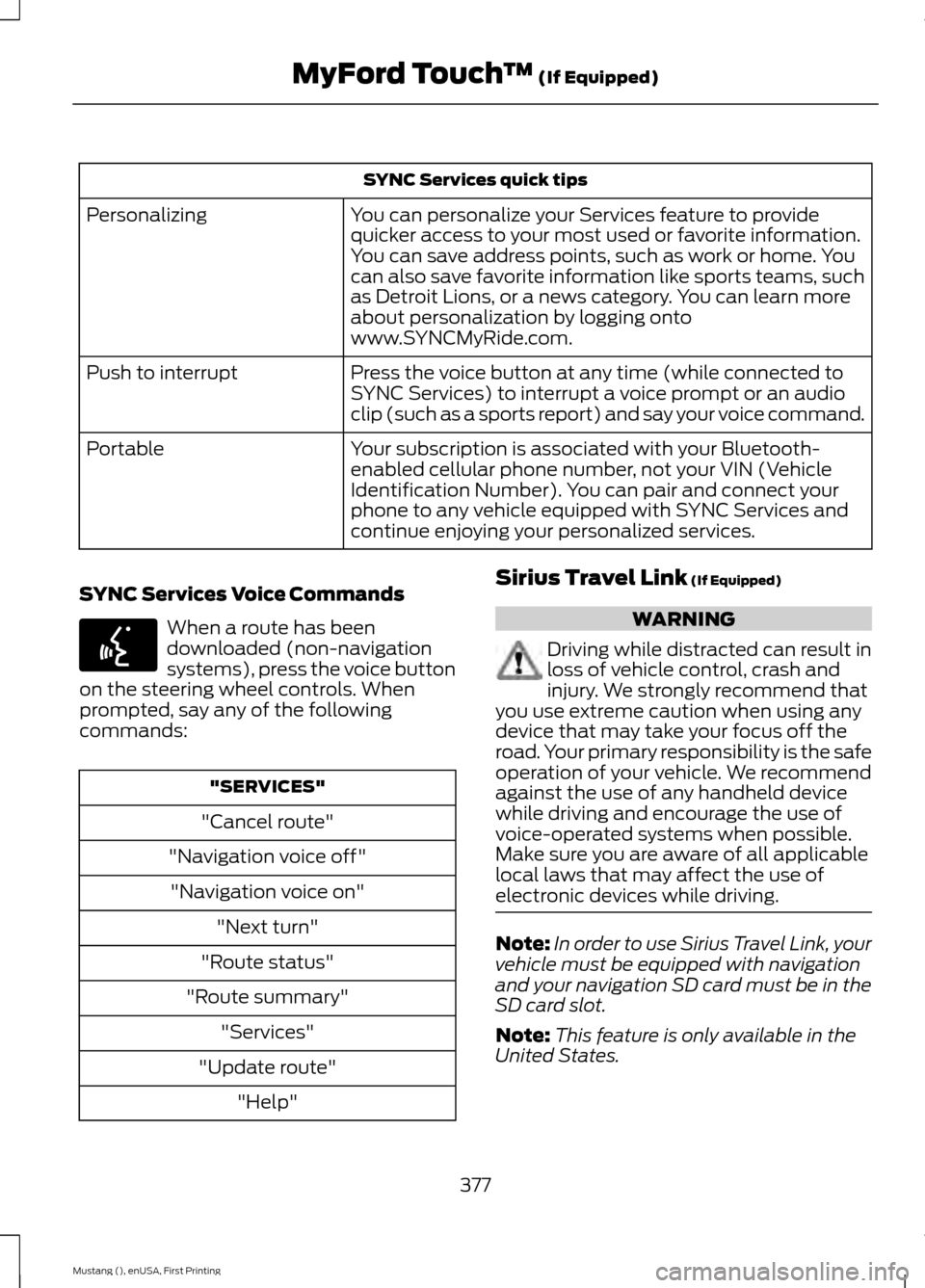
SYNC Services quick tips
You can personalize your Services feature to provide
quicker access to your most used or favorite information.
You can save address points, such as work or home. You
can also save favorite information like sports teams, such
as Detroit Lions, or a news category. You can learn more
about personalization by logging onto
www.SYNCMyRide.com.
Personalizing
Press the voice button at any time (while connected to
SYNC Services) to interrupt a voice prompt or an audio
clip (such as a sports report) and say your voice command.
Push to interrupt
Your subscription is associated with your Bluetooth-
enabled cellular phone number, not your VIN (Vehicle
Identification Number). You can pair and connect your
phone to any vehicle equipped with SYNC Services and
continue enjoying your personalized services.
Portable
SYNC Services Voice Commands When a route has been
downloaded (non-navigation
systems), press the voice button
on the steering wheel controls. When
prompted, say any of the following
commands: "SERVICES"
"Cancel route"
"Navigation voice off" "Navigation voice on" "Next turn"
"Route status"
"Route summary" "Services"
"Update route" "Help" Sirius Travel Link (If Equipped) WARNING
Driving while distracted can result in
loss of vehicle control, crash and
injury. We strongly recommend that
you use extreme caution when using any
device that may take your focus off the
road. Your primary responsibility is the safe
operation of your vehicle. We recommend
against the use of any handheld device
while driving and encourage the use of
voice-operated systems when possible.
Make sure you are aware of all applicable
local laws that may affect the use of
electronic devices while driving. Note:
In order to use Sirius Travel Link, your
vehicle must be equipped with navigation
and your navigation SD card must be in the
SD card slot.
Note: This feature is only available in the
United States.
377
Mustang (), enUSA, First Printing MyFord Touch
™
(If Equipped)E142599
Page 384 of 441
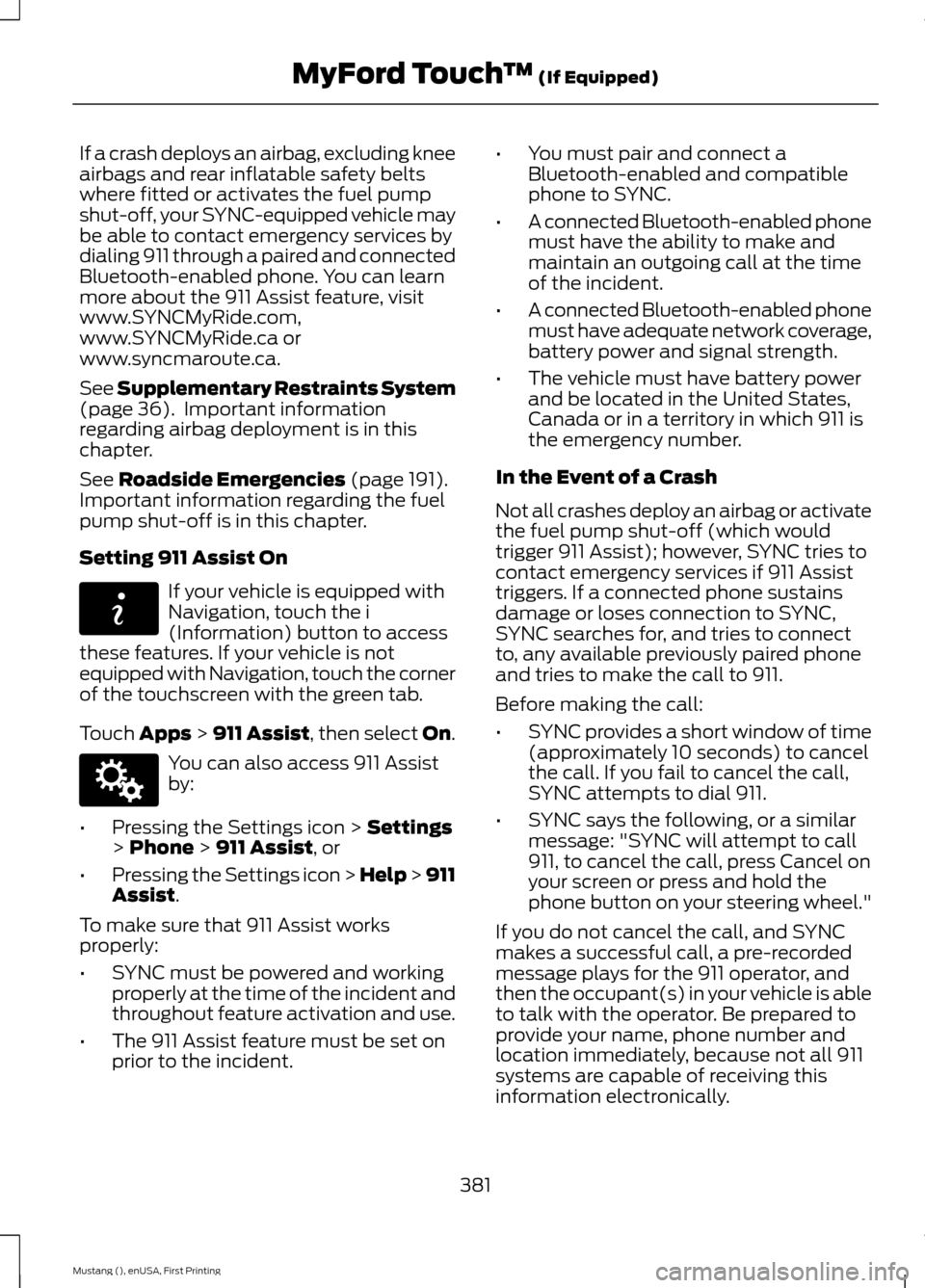
If a crash deploys an airbag, excluding knee
airbags and rear inflatable safety belts
where fitted or activates the fuel pump
shut-off, your SYNC-equipped vehicle may
be able to contact emergency services by
dialing 911 through a paired and connected
Bluetooth-enabled phone. You can learn
more about the 911 Assist feature, visit
www.SYNCMyRide.com,
www.SYNCMyRide.ca or
www.syncmaroute.ca.
See Supplementary Restraints System
(page 36). Important information
regarding airbag deployment is in this
chapter.
See
Roadside Emergencies (page 191).
Important information regarding the fuel
pump shut-off is in this chapter.
Setting 911 Assist On If your vehicle is equipped with
Navigation, touch the i
(Information) button to access
these features. If your vehicle is not
equipped with Navigation, touch the corner
of the touchscreen with the green tab.
Touch
Apps > 911 Assist, then select On. You can also access 911 Assist
by:
• Pressing the Settings icon >
Settings
> Phone > 911 Assist, or
• Pressing the Settings icon > Help > 911
Assist
.
To make sure that 911 Assist works
properly:
• SYNC must be powered and working
properly at the time of the incident and
throughout feature activation and use.
• The 911 Assist feature must be set on
prior to the incident. •
You must pair and connect a
Bluetooth-enabled and compatible
phone to SYNC.
• A connected Bluetooth-enabled phone
must have the ability to make and
maintain an outgoing call at the time
of the incident.
• A connected Bluetooth-enabled phone
must have adequate network coverage,
battery power and signal strength.
• The vehicle must have battery power
and be located in the United States,
Canada or in a territory in which 911 is
the emergency number.
In the Event of a Crash
Not all crashes deploy an airbag or activate
the fuel pump shut-off (which would
trigger 911 Assist); however, SYNC tries to
contact emergency services if 911 Assist
triggers. If a connected phone sustains
damage or loses connection to SYNC,
SYNC searches for, and tries to connect
to, any available previously paired phone
and tries to make the call to 911.
Before making the call:
• SYNC provides a short window of time
(approximately 10 seconds) to cancel
the call. If you fail to cancel the call,
SYNC attempts to dial 911.
• SYNC says the following, or a similar
message: "SYNC will attempt to call
911, to cancel the call, press Cancel on
your screen or press and hold the
phone button on your steering wheel."
If you do not cancel the call, and SYNC
makes a successful call, a pre-recorded
message plays for the 911 operator, and
then the occupant(s) in your vehicle is able
to talk with the operator. Be prepared to
provide your name, phone number and
location immediately, because not all 911
systems are capable of receiving this
information electronically.
381
Mustang (), enUSA, First Printing MyFord Touch
™
(If Equipped)E142608 E142607
Page 434 of 441

Drive Control..................................................166
Selectable Drive Modes................................... 166
Selectable Steering............................................ 167
Driver and Passenger Airbags....................37 Children and Airbags........................................... 37
Proper Driver and Front Passenger Seating Adjustment........................................................ 37
Driver and Passenger Knee Airbags........42
Driving Aids
.....................................................159
Driving at High Speed................................265
Driving Hints
...................................................188
Driving Through Water...............................188
DRL See: Daytime Running Lamps......................... 70
E
Economical Driving......................................188
Emission Control System...........................131 On-Board Diagnostics (OBD-II).................... 132
Readiness for Inspection/Maintenance (I/M) Testing.................................................... 132
End User License Agreement..................397 SYNC End User License Agreement
(EULA).............................................................. 397
Engine Block Heater....................................124 Using the Engine Block Heater...................... 125
Engine Coolant Check
.................................215
Adding Engine Coolant..................................... 216
Checking the Engine Coolant......................... 215
Recycled Engine Coolant................................. 216
Severe Climates................................................... 217
What You Should Know About Fail-Safe Cooling............................................................... 217
Engine Immobilizer See: Passive Anti-Theft System..................... 62
Engine Oil Check
...........................................214
Adding Engine Oil............................................... 214
Engine Oil Dipstick.......................................214
Engine Specifications
.................................267
Drivebelt Routing................................................ 267Entertainment................................................351
AM/FM Radio...................................................... 353
Bluetooth Audio................................................. 366
Browsing Device Content................................ 351
CD........................................................................\
.... 362
Line In..................................................................... 367
SD Card Slot and USB Port........................... 363
Sirius® Satellite Radio (If Activated)........358
Supported Media Players, Formats and Metadata Information................................ 366
Essential Towing Checks
............................181
Before Towing a Trailer...................................... 181
Hitches..................................................................... 181
Launching or Retrieving a Boat or Personal Watercraft (PWC)......................................... 182
Safety Chains........................................................ 181
Trailer Brakes......................................................... 181
Trailer Lamps........................................................ 181
When Towing a Trailer...................................... 182
Event Data Recording See: Data Recording.............................................. 9
Export Unique Options..................................13
Extended Service Plan (ESP)..................412 SERVICE PLANS (CANADA ONLY).............413
SERVICE PLANS (U.S. Only).......................... 412
Exterior Mirrors
.................................................74
Auto-Dimming Feature...................................... 74
Blind Spot Monitor............................................... 75
Fold-Away Exterior Mirrors................................ 74
Heated Exterior Mirrors....................................... 74
Integrated Blind Spot Mirrors........................... 75
Memory Mirrors..................................................... 74
Pony Projection Lights........................................ 74
Power Exterior Mirrors......................................... 74
Signal Indicator Mirrors...................................... 74
F
Fastening the Safety Belts
.........................30
Safety Belt Extension Assembly..................... 32
Safety Belt Locking Modes................................ 31
Using Safety Belts During Pregnancy............31
Flat Tire Inflation See: Temporary Mobility Kit........................... 235
Floor Mats
.......................................................189
Fog Lamps - Front See: Front Fog Lamps.......................................... 71
431
Mustang (), enUSA, First Printing Index
Page 440 of 441

Using Adaptive Cruise Control.................153
Automatic Cancellation................................... 156
Blocked Sensor.................................................... 157
Changing the Set Speed.................................. 156
Detection Issues.................................................. 157
Disengaging the System.................................. 156
Following a Vehicle............................................ 154
Hilly Condition Usage........................................ 156
Overriding the System...................................... 156
Resuming the Set Speed................................. 156
Setting a Speed................................................... 154
Setting the Gap Distance................................ 155
Switching the System Off............................... 156
Switching the System On................................ 153
Switching to Normal Cruise Control...........158
System Not Available........................................ 157
Using Cruise Control....................................152 Switching Cruise Control Off.......................... 153
Switching Cruise Control On.......................... 152
Using MyKey With Remote Start Systems..........................................................54
Using Snow Chains.....................................256
Using Stability Control
...............................144
AdvanceTrac ™ ................................................... 144
Line Lock................................................................ 145
Using Summer Tires
...................................256
Using SYNC™ With Your Media Player..............................................................317
Accessing Your USB Song Library...............320
Bluetooth Devices and System Settings............................................................. 322
Connecting Your Digital Media Player to the USB Port............................................................ 317
Line In Audio......................................................... 322
Media Menu Features....................................... 319
Media Voice Commands................................. 318
USB 2...................................................................... 322
Voice Commands for Audio Sources..........322
What's Playing?.................................................. 318Using SYNC™ With Your Phone............299
Accessing Features through the Phone
Menu.................................................................. 302
Accessing Your Phone Settings................... 305
Bluetooth Devices............................................. 306
Making Calls......................................................... 301
Pairing a Phone for the First Time..............299
Pairing Subsequent Phones......................... 300
Phone Options during an Active Call..........301
Phone Voice Commands............................... 300
Receiving Calls.................................................... 301
System Settings................................................. 307
Text Messaging................................................... 303
Using Traction Control
................................142
System Indicator Lights and
Messages.......................................................... 142
Using Voice Recognition............................297 Initiating a Voice Session................................ 297
System Interaction and Feedback..............298
Utilizing the Mediation/Arbitration Program (Canada Only).........................198
V
Vehicle Care...................................................228 General Information......................................... 228
Vehicle Certification Label.......................269
Vehicle Identification Number
...............268
Vehicle Storage.............................................232
Battery.................................................................... 233
Body........................................................................\
233
Brakes..................................................................... 234
Cooling system................................................... 233
Engine..................................................................... 233
Fuel system.......................................................... 233
General.................................................................. 233
Miscellaneous..................................................... 234
Removing Vehicle From Storage.................234
Tires........................................................................\
234
Ventilation See: Climate Control.......................................... 101
VIN See: Vehicle Identification Number............268
Voice Control
...................................................65
437
Mustang (), enUSA, First Printing Index