2015 FORD MUSTANG remote start
[x] Cancel search: remote startPage 125 of 441
STEERING WHEEL LOCK (If
Equipped)
The steering wheel locks automatically
when you leave your vehicle and take the
intelligent access key with you. The
steering wheel unlocks automatically when
you enter your vehicle with the intelligent
access key.
Note: You may need to turn the steering
wheel left or right if the wheel does not
unlock completely. This may happen in
certain situations, such as parking your
vehicle on a steep grade.
STARTING A GASOLINE
ENGINE
When you start the engine, the idle speed
increases, this helps to warm up the
engine. If the engine idle speed does not
slow down automatically, have your
vehicle checked by an authorized dealer.
Note: You can crank the engine for a total
of 60 seconds (without the engine starting)
before the starting system temporarily
disables. The 60 seconds does not have to
be all at once. For example, if you crank the
engine three times for 20 seconds each
time, without the engine starting, you
reached the 60-second time limit. A
message appears in the information display
alerting you that you exceeded the cranking
time. You cannot attempt to start the engine
for at least 15 minutes. After 15 minutes, you
are limited to a 15-second engine cranking
time. You need to wait 60 minutes before
you can crank the engine for 60 seconds
again. Before starting the engine, check the
following:
•
Make sure all occupants have fastened
their safety belts.
• Make sure the headlamps and
electrical accessories are off.
• Make sure the parking brake is on.
• Move the transmission selector lever
to park (P) (automatic transmission)
or neutral (manual transmission)
Note: Do not touch the accelerator pedal.
Note: You must have your intelligent access
key in the vehicle in order to shift the
transmission out of position
P.
1. Fully press the brake pedal.
2. Press the button.
The system does not function if:
• The key frequencies are jammed.
• The key battery has no charge.
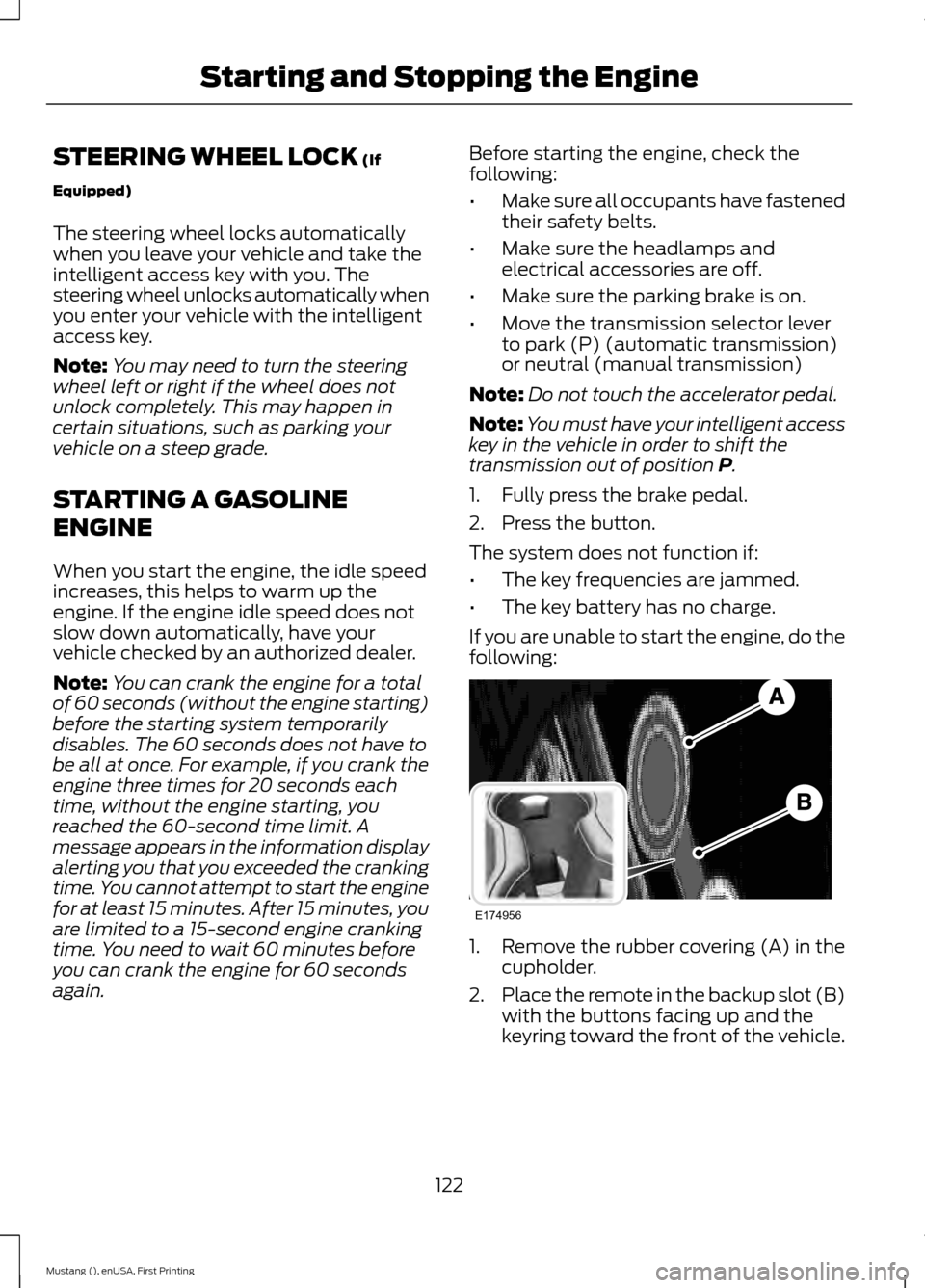
If you are unable to start the engine, do the
following: 1. Remove the rubber covering (A) in the
cupholder.
2. Place the remote in the backup slot (B)
with the buttons facing up and the
keyring toward the front of the vehicle.
122
Mustang (), enUSA, First Printing Starting and Stopping the EngineE174956
Page 195 of 441
Canadian roadside coverage and benefits
may differ from the U.S. coverage. If you
require more information, please refer to
the coverage section of your warranty
guide, call us in Canada at
1-800-665-2006, or visit our website at
www.ford.ca.
Sykes Assistance Services Corporation
administers the Roadside Assistance
program. You must receive covered
services in Canada or the continental
United States. Coverage extends to
vehicles that use public, non-seasonal,
annually traveled roadways. Roadside
Assistance coverage does not extend to
vehicles involved in cross-country driving,
logging, autocross and any other form of
off-road use. Well maintained roads and
surfaces help ensure safe travel for the
supplier, and allow their representatives
to perform service as per the standard
operating procedures.
In Remote Locations
If our supplier cannot take your vehicle by
road to the nearest authorized dealership,
transportation by rail or water may be
necessary. The program covers a tow to
the dock or rail terminal and also to the
dealership at the end of the trip.
For rail or water transportation, however,
contact your authorized dealer to confirm
if you are eligible for additional coverage
before you authorize or pay for the service.
Call the Ford Roadside Assistance at
1-800-665-2006 for additional
information.
HAZARD WARNING FLASHERS
Note:
The hazard warning flashers will
operate when the ignition is in any position
or if the key is not in the ignition. If used
when the engine is not running, the battery
will lose charge. As a result, there may be
insufficient power to restart your engine. The hazard flasher control is
located on the instrument panel
by the radio. Use it when your
vehicle is disabled and is creating a safety
hazard for other motorists.
• Press the flasher control and all front
and rear direction indicators flash.
• Press the flasher control again to turn
them off.
FUEL SHUTOFF WARNING
Failure to inspect and, if necessary,
repair fuel leaks after a collision may
increase the risk of fire and serious
injury. Ford Motor Company recommends
that the fuel system be inspected by an
authorized dealer after any collision. In the event of a moderate to severe
collision, this vehicle includes a fuel pump
shut-off feature that stops the flow of fuel
to the engine. Not every impact will cause
a shut-off.
192
Mustang (), enUSA, First Printing Roadside EmergenciesE142663
Page 198 of 441

2. Remove the jumper cable on the
negative (-) terminal of the booster
vehicle's battery.
3. Remove the jumper cable from the positive (+) terminal of the booster
vehicle's battery.
4. Remove the jumper cable from the positive (+) terminal of the disabled
vehicle's battery.
After the disabled vehicle has been started
and the jumper cables removed, allow it
to idle for several minutes so the battery
can recharge.
POST-CRASH ALERT SYSTEM
The system flashes the turn signal lamps
and sounds the horn (intermittently) in the
event of a serious impact that deploys an
airbag (front, side, side curtain or Safety
Canopy) or the safety belt pretensioners.
The horn and lamps will turn off when:
• You press the hazard control button.
• You press the panic button on the
remote entry transmitter (if equipped).
• Your vehicle runs out of power.
195
Mustang (), enUSA, First Printing Roadside Emergencies
Page 398 of 441
For a complete listing of the accessories
that are available for your vehicle, please
contact an authorized dealer or visit our
online store at www.Accessories.Ford.com
(United States only).
Ford Custom Accessories are available for
your vehicle through an authorized Ford
dealer. Ford Motor Company will repair or
replace any properly authorized
dealer-installed Ford Genuine Accessory
found to be defective in factory-supplied
materials or workmanship during the
warranty period, as well as any component
damaged by the defective accessories.
Ford Motor Company will warrant your
Ford Genuine Accessory through the
warranty that provides the greatest
benefit:
•
24 months, unlimited mileage.
• The remainder of your new vehicle
limited warranty.
Contact an authorized dealer for details
and a copy of the warranty.
Exterior style
• Rear spoilers.
• Splash guards.
• Wheels.
• Custom graphics*.
• Wheel center caps.
Interior style
• Floor mats.
• Sport pedals.
• Ambient lighting.
• Flexible visor storage system (tissue
dispenser, organizer, CD holder).
• Auto dimming interior mirror with
compass and temperature.
• Illuminated sill plates. •
Leather-trimmed interior seating*.
• Rear seat entertainment system*.
Lifestyle
• Ash cup (smoker's packages).
• Soft cargo organizers.
• Cargo net.
• Cargo area protector.
Peace of mind
• Remote start.
• Vehicle security systems.
• Wheel locks.
• Bumper mounted parking assist
system*.
• Full vehicle covers.
*Ford Licensed Accessory. The accessory
manufacturer designs, develops and
therefore warrants Ford Licensed
Accessories, and does not design or test
these accessories to Ford Motor Company
engineering requirements. Contact an
authorized Ford dealer for the
manufacturer's limited warranty details
and request a copy of the Ford Licensed
Accessories product limited warranty from
the accessory manufacturer.
395
Mustang (), enUSA, First Printing Accessories
Page 436 of 441

Information Messages..................................91
Adaptive Cruise Control...................................... 91
AdvanceTrac ™...................................................... 92
Airbag........................................................................\
92
Alarm........................................................................\
93
Battery and Charging System......................... 93
Blind Spot Information and Cross Traffic Alert System..................................................... 94
Collision Warning System................................. 94
Doors and Locks................................................... 94
Fuel........................................................................\
.... 95
Hill Start Assist..................................................... 95
Keys and Intelligent Access.............................. 95
Maintenance.......................................................... 96
MyKey....................................................................... 96
Park Aid.................................................................... 97
Park Brake............................................................... 97
Remote Start.......................................................... 97
Seats........................................................................\
. 98
Starting System ................................................... 98
Steering System................................................... 98
Tire Pressure Monitoring System................... 99
Traction Control................................................... 99
Transmission......................................................... 99
Installing Child Seats
.....................................19
Child Seats............................................................... 19
Using Lap and Shoulder Belts......................... 20
Using Lower Anchors and Tethers for CHildren (LATCH)............................................ 22
Using Tether Straps............................................. 23
Instrument Cluster
.........................................77
Instrument Lighting Dimmer.....................69
Vehicles With Front Fog Lamps..................... 69
Vehicles Without Front Fog Lamps...............70
Interior Lamps...................................................71 Map Lamps.............................................................. 71
Interior Luggage Compartment Release...........................................................60
Interior Mirror
....................................................75
Auto-Dimming Mirror.......................................... 75
Introduction.........................................................7 J
Jump Starting the Vehicle.........................193
Connecting the Jumper Cables..................... 193
Jump Starting...................................................... 194
Preparing Your Vehicle...................................... 193
Removing the Jumper Cables........................ 194
K
Keyless Starting..............................................121 Ignition Modes....................................................... 121
Keys and Remote Controls.........................45
L
Lighting Control..............................................68 Headlamp Flasher............................................... 68
High Beams............................................................ 68
Lighting..............................................................68
Limited Slip Differential
.............................139
Traction-Lok ™ and TORSEN™ Axles (if
equipped)......................................................... 139
Load Carrying.................................................168
Load Limit.......................................................168 Special Loading Instructions for Owners of
Pick-up Trucks and Utility-type
Vehicles.............................................................. 172
Vehicle Loading - with and without a Trailer................................................................. 168
Locking and Unlocking
.................................56
Activating Intelligent Access ........................... 57
Autolock Feature.................................................. 58
Auto Relock............................................................ 58
Battery Saver......................................................... 59
Illuminated Entry.................................................. 59
Illuminated Exit..................................................... 59
Key Blade................................................................ 58
Luggage Compartment..................................... 60
Power Door Locks................................................ 56
Remote Control.................................................... 56
Smart Unlocks ...................................................... 57
Locks
...................................................................56
Lug Nuts See: Changing a Road Wheel....................... 260
433
Mustang (), enUSA, First Printing Index
Page 438 of 441
R
Rear Axle..........................................................139
Rear Seats........................................................112
Second Row Split-Folding Rear Seat ..........113
Rear View Camera
.......................................148
Using the Rear View Camera System.........149
Rear View Camera See: Rear View Camera................................... 148
Recommended Towing Weights............180
Refueling..........................................................128 Easy Fuel ™ Capless Fuel System................129
Remote Control
..............................................46
Car Finder................................................................ 48
Intelligent Access Key........................................ 46
Remote Start......................................................... 48
Replacing the Battery......................................... 47
Sounding a Panic Alarm.................................... 48
Using the Key Blade............................................ 46
Remote Start..................................................107 Automatic Settings............................................ 107
Repairing Minor Paint Damage
...............232
Replacement Parts Recommendation.........................................11
Collision Repairs..................................................... 11
Scheduled Maintenance and Mechanical Repairs................................................................... 11
Warranty on Replacement Parts..................... 12
Replacing a Lost Key or Remote Control............................................................49
Reporting Safety Defects (Canada Only)...............................................................201
Reporting Safety Defects (U.S. Only).............................................................200
Roadside Assistance....................................191 Vehicles Sold in Canada: Getting Roadside
Assistance......................................................... 191
Vehicles Sold in Canada: Using Roadside Assistance......................................................... 191
Vehicles Sold in the United States: Getting Roadside Assistance..................................... 191
Vehicles Sold in the United States: Using Roadside Assistance..................................... 191
Roadside Emergencies
................................191
Running-In See: Breaking-In.................................................. 188Running Out of Fuel.....................................127
Refilling With a Portable Fuel
Container.......................................................... 128
S
Safety Belt Minder.........................................32 Belt-Minder™........................................................ 32
Safety Belts
......................................................29
Principle of Operation........................................ 29
Safety Belt Warning Lamp and Indicator Chime...............................................................32
Conditions of operation..................................... 32
Safety Canopy ™ - Coupe
...........................42
Safety Precautions.......................................126
Satellite Radio..............................................290
Satellite Radio Electronic Serial Number
(ESN)................................................................. 291
Satellite Radio Reception Factors................291
SIRIUS® Satellite Radio Service................... 291
Troubleshooting................................................. 292
Scheduled Maintenance Record
............422
Scheduled Maintenance...........................414
Seats.................................................................108
Security..............................................................62
Settings............................................................341 Clock....................................................................... 342
Display................................................................... 342
Settings................................................................. 344
Sound..................................................................... 343
Vehicle................................................................... 343
Side Airbags
.....................................................40
Sitting in the Correct Position.................108
Snow Chains See: Using Snow Chains................................. 256
Special Notices................................................12 Additional Warranty Information.................... 12
New Vehicle Limited Warranty......................... 12
Special Instructions.............................................. 12
Special Operating Conditions Scheduled Maintenance...............................................419
Exceptions............................................................. 421
Speed Control See: Cruise Control............................................. 152
Stability Control
............................................143
Principle of Operation....................................... 143
435
Mustang (), enUSA, First Printing Index
Page 440 of 441

Using Adaptive Cruise Control.................153
Automatic Cancellation................................... 156
Blocked Sensor.................................................... 157
Changing the Set Speed.................................. 156
Detection Issues.................................................. 157
Disengaging the System.................................. 156
Following a Vehicle............................................ 154
Hilly Condition Usage........................................ 156
Overriding the System...................................... 156
Resuming the Set Speed................................. 156
Setting a Speed................................................... 154
Setting the Gap Distance................................ 155
Switching the System Off............................... 156
Switching the System On................................ 153
Switching to Normal Cruise Control...........158
System Not Available........................................ 157
Using Cruise Control....................................152 Switching Cruise Control Off.......................... 153
Switching Cruise Control On.......................... 152
Using MyKey With Remote Start Systems..........................................................54
Using Snow Chains.....................................256
Using Stability Control
...............................144
AdvanceTrac ™ ................................................... 144
Line Lock................................................................ 145
Using Summer Tires
...................................256
Using SYNC™ With Your Media Player..............................................................317
Accessing Your USB Song Library...............320
Bluetooth Devices and System Settings............................................................. 322
Connecting Your Digital Media Player to the USB Port............................................................ 317
Line In Audio......................................................... 322
Media Menu Features....................................... 319
Media Voice Commands................................. 318
USB 2...................................................................... 322
Voice Commands for Audio Sources..........322
What's Playing?.................................................. 318Using SYNC™ With Your Phone............299
Accessing Features through the Phone
Menu.................................................................. 302
Accessing Your Phone Settings................... 305
Bluetooth Devices............................................. 306
Making Calls......................................................... 301
Pairing a Phone for the First Time..............299
Pairing Subsequent Phones......................... 300
Phone Options during an Active Call..........301
Phone Voice Commands............................... 300
Receiving Calls.................................................... 301
System Settings................................................. 307
Text Messaging................................................... 303
Using Traction Control
................................142
System Indicator Lights and
Messages.......................................................... 142
Using Voice Recognition............................297 Initiating a Voice Session................................ 297
System Interaction and Feedback..............298
Utilizing the Mediation/Arbitration Program (Canada Only).........................198
V
Vehicle Care...................................................228 General Information......................................... 228
Vehicle Certification Label.......................269
Vehicle Identification Number
...............268
Vehicle Storage.............................................232
Battery.................................................................... 233
Body........................................................................\
233
Brakes..................................................................... 234
Cooling system................................................... 233
Engine..................................................................... 233
Fuel system.......................................................... 233
General.................................................................. 233
Miscellaneous..................................................... 234
Removing Vehicle From Storage.................234
Tires........................................................................\
234
Ventilation See: Climate Control.......................................... 101
VIN See: Vehicle Identification Number............268
Voice Control
...................................................65
437
Mustang (), enUSA, First Printing Index