2015 FORD MUSTANG climate settings
[x] Cancel search: climate settingsPage 337 of 441
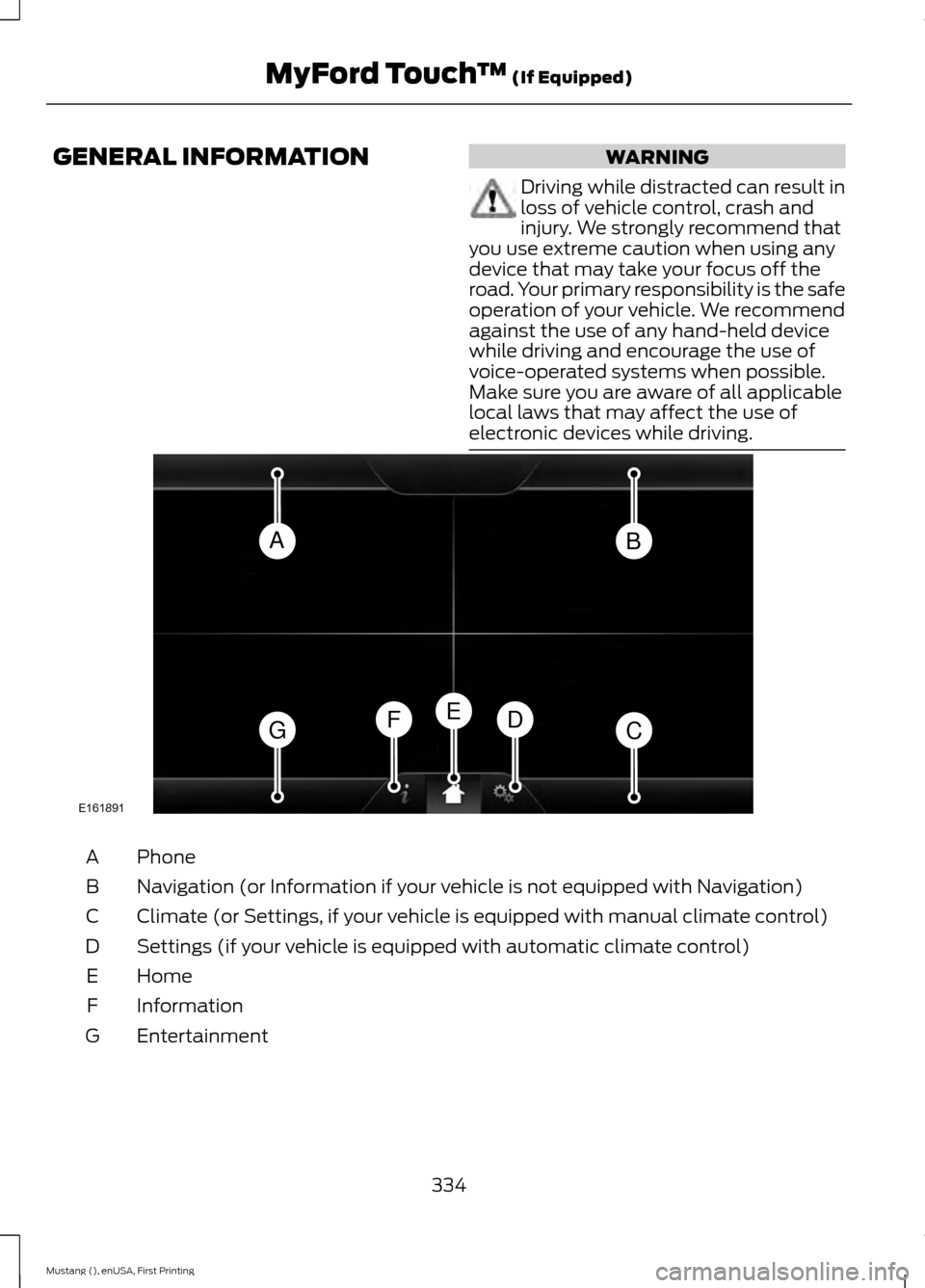
GENERAL INFORMATION WARNING
Driving while distracted can result in
loss of vehicle control, crash and
injury. We strongly recommend that
you use extreme caution when using any
device that may take your focus off the
road. Your primary responsibility is the safe
operation of your vehicle. We recommend
against the use of any hand-held device
while driving and encourage the use of
voice-operated systems when possible.
Make sure you are aware of all applicable
local laws that may affect the use of
electronic devices while driving. Phone
A
Navigation (or Information if your vehicle is not equipped with Navigation)
B
Climate (or Settings, if your vehicle is equipped with manual climate control)
C
Settings (if your vehicle is equipped with automatic climate control)
D
Home
E
Information
F
Entertainment
G
334
Mustang (), enUSA, First Printing MyFord Touch
™ (If Equipped)AB
GCDFE
E161891
Page 338 of 441
This system uses a four-corner strategy to
provide quick access to several vehicle
features and settings. The touchscreen
provides easy interaction with your cellular
phone, multimedia, climate control and
navigation system. The corners display any
active modes within those menus, such as
phone status or the climate temperature.
Note:
Some features are not available while
your vehicle is moving.
Note: Your system is equipped with a
feature that allows you to access and
control audio features for 30 minutes after
you switch the ignition off (and no doors
open).
PHONE
Press to select any of the following:
• Phone
• Quick Dial
• Phonebook
• History
• Messaging
• Settings
NAVIGATION
Press to select any of the following:
• My Home
• Favorites
• Previous Destinations
• Point of Interest
• Emergency
• Street Address
• Intersection
• City Center
• Map
• Edit Route
• Cancel Route
CLIMATE Press to select any of the following:
•
Driver Settings
• Recirculated Air
• Auto
• Dual
• Passenger Settings
• A/C
• Defrost SETTINGS
Press to select any of the following:
• Clock
• Display
• Sound
• Vehicle
• Settings
• Help HOME
Press to access your home
screen. Depending on your
vehicle ’s option package and software,
your screens may vary in appearance from
the descriptions in this section. Your
features may also be limited depending on
your market. Check with an authorized
dealer for availability. INFORMATION
Press to select any of the following:
• Services
• Travel Link
• Alerts
• Calendar
• Apps
ENTERTAINMENT
335
Mustang (), enUSA, First Printing MyFord Touch
™ (If Equipped)E142607 E142613 E142608
Page 339 of 441
Press to select any of the following:
•
AM
• FM
• SIRIUS
• CD
• USB
• BT Stereo
• SD Card
• Line In
Cleaning the Touchscreen Display
Use a clean, soft cloth such as one used
for cleaning glasses. If dirt or fingerprints
are still visible, apply a small amount of
alcohol to the cloth. Do not pour or spray
alcohol onto the display. Do not use
detergent or any type of solvent to clean
the display.
Using Your Bezel Controls
Depending on your vehicle and option
package, you may also have these controls
on your bezel:
• Power: Switch the media or climate
features off and on.
• VOL:
Control the volume of playing
media.
• Climate:
Control the temperature, fan
speed or settings of the climate control
system.
• Seek buttons and Tune knob: Use as
you normally would in media modes. •
Eject:
Eject a CD from the
entertainment system.
• Sound:
Touch the musical note icon
to access the Sound menu where you
can adjust settings such as: Bass,
Treble, Midrange, Balance and Fade,
DSP (Digital Signal Processing),
Occupancy Mode and Speed
Compensated Volume. (Your vehicle
may not have all of these sound
options.)
Using Your Steering Wheel
Controls
You can use your steering wheel controls
to interact with the touchscreen system.
• VOL:
Control the volume of audio
output.
• M:
Change the source of playing media.
• Mute:
Mute the audio output.
• Voice:
Press to start a voice session.
Press again to end an active voice
prompt so you can begin speaking.
Press and hold to end a voice session.
• PHONE ACCEPT:
Press to answer a
call, or to switch between calls.
• PHONE REJECT:
Press to end a call
or to reject an incoming call.
See
Steering Wheel (page 64).
Support
The SYNC support team is available to
help you with any questions you are not
able to answer on your own.
Monday-Saturday, 8:30am-9:00pm EST.
Sunday, 10:30am-7:30pm EST.
In the United States, call: 1-800-392-3673.
In Canada, call: 1-800-565-3673.
Times are subject to change due to
holidays.
336
Mustang (), enUSA, First Printing MyFord Touch
™
(If Equipped)
Page 343 of 441
Available voice commands
"Audio list of commands"
"Bluetooth audio list of commands" "Browse list of commands""CD list of commands"
"Climate control list of commands" "List of commands"
"Navigation list of commands" *
"Phone list of commands" "Radio list of commands"
"SD card list of commands"
"Sirius satellite list of commands" **
"Travel link list of commands" *
"USB list of commands"
"Voice instructions list of commands" "Voice settings list of commands" "Help"
* This command is only available when
your vehicle is equipped with the
navigation system, and the navigation
system SD card is in the card slot.
** This command is only available when
you have an active SIRIUS satellite radio
subscription.
Voice Settings
Voice settings allow you to customize the
level of system interaction, help and
feedback. The system defaults to standard
interaction that uses candidate lists and
confirmation prompts as these provide the
highest level of guidance and feedback. •
Interaction Mode: Novice mode
provides detailed interaction and
guidance while the advanced mode
has less audible interaction and more
tone prompts.
• Confirmation Prompts:
The system
uses these short questions to confirm
your voice request. If turned off, the
system simply makes a best guess as
to what you requested. The system
may still occasionally ask you to
confirm settings.
• Phone and Media Candidate Lists:
Candidate lists are lists of possible
results from your voice commands. The
system creates these lists when it has
the same confidence level of several
options based on your voice command.
To access these settings using the
touchscreen:
1. Press the Settings icon >
Settings >
Voice Control.
2. Select from:
• Interaction Mode
• Confirmation Prompts
• Media Candidate Lists
• Phone Candidate Lists
• Voice Control Volume.
To access these settings using voice
commands:
1. Press the voice icon. Wait for the prompt "Please say a command".
Another tone sounds to let you know
the system is listening.
2. Say any of the following commands: Voice settings using voice commands
"Confirmation prompts off""Confirmation prompts on"
"Interaction mode advanced"
340
Mustang (), enUSA, First Printing MyFord Touch
™
(If Equipped)
Page 347 of 441
Settings
Access and adjust system settings, voice
features, as well as phone, navigation and
wireless settings.
System Press the Settings icon >
Settings > System, then select
from the following: System
Select to have the touchscreen display in English, Spanish
or French.
Language
Select to display units in kilometers or miles.
Distance
Select to display units in Celsius or Fahrenheit.
Temperature
Adjust the volume of voice prompts from the system.
System Prompt Volume
Select to have the system beep to confirm choices made
through the touchscreen.
Touch Screen Button Beep
Select to have the system beep to confirm button choices
made through the climate or audio system.
Touch Panel Button Beep
Have the touchscreen keyboard display in QWERTY or
ABC format.
Keyboard Layout
Install any downloaded applications or view the current
software licenses.
Install Applications
Select to restore factory defaults. This erases all personal
settings and personal data.
Master Reset
Voice Control Press the Settings icon >
Settings
> Voice Control, then
select from the following:
344
Mustang (), enUSA, First Printing MyFord Touch
™
(If Equipped)E142607 E142607
Page 386 of 441
To run a report by voice
command, press the voice
button on the steering wheel
and, when prompted, say "Vehicle health
report".
Vehicle Health Report Privacy Notice
When you create a Vehicle Health Report,
Ford Motor Company may collect your
cellular phone number (to process your
report request) and diagnostic information
about your vehicle. Certain versions or
updates to Vehicle Health Report may also
collect more vehicle information. Ford may
use your vehicle information it collects for
any purpose. If you do not want to disclose
your cellular phone number or vehicle information, do not run the feature or set
up your Vehicle Health Report profile at
www.SYNCMyRide.com. See
www.SYNCMyRide.com (Vehicle Health
Report Terms and Conditions, and Privacy
Statement) for more information.
CLIMATE
Touch the lower right corner on the
touchscreen to access your climate control
features. Depending on your vehicle line
and option package, your climate screen
may look different from this screen.
Note:
You can switch temperature units
between Fahrenheit and Celsius. See
Settings (page 341). Power:
Touch the button to switch the system on and off. Switching off the
climate control system prevents outside air from entering the vehicle.
A
Passenger settings:
B
Touch the
+ or – to increase or decrease the air temperature on the passenger
side of the vehicle.
Touch the heated seat icon to switch the heated seat off and on (if equipped).
Touch the climate-controlled seat icon to switch the climate-controlled seat
off and on (if equipped).
383
Mustang (), enUSA, First Printing MyFord Touch
™
(If Equipped)E142599 E176637
Page 388 of 441
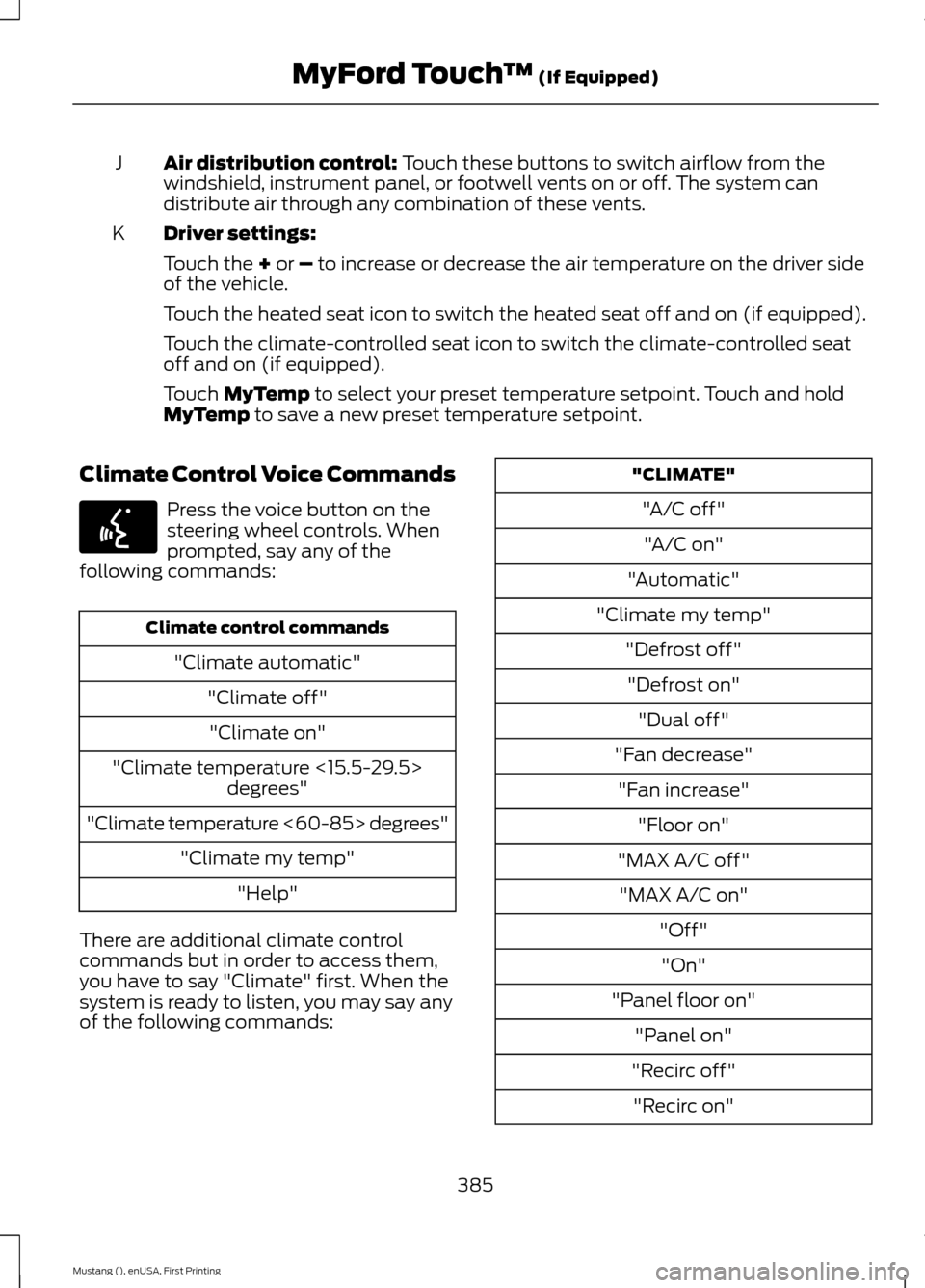
Air distribution control: Touch these buttons to switch airflow from the
windshield, instrument panel, or footwell vents on or off. The system can
distribute air through any combination of these vents.
J
Driver settings:
K
Touch the
+ or – to increase or decrease the air temperature on the driver side
of the vehicle.
Touch the heated seat icon to switch the heated seat off and on (if equipped).
Touch the climate-controlled seat icon to switch the climate-controlled seat
off and on (if equipped).
Touch
MyTemp to select your preset temperature setpoint. Touch and hold
MyTemp to save a new preset temperature setpoint.
Climate Control Voice Commands Press the voice button on the
steering wheel controls. When
prompted, say any of the
following commands: Climate control commands
"Climate automatic" "Climate off""Climate on"
"Climate temperature <15.5-29.5> degrees"
"Climate temperature <60-85> degrees" "Climate my temp""Help"
There are additional climate control
commands but in order to access them,
you have to say "Climate" first. When the
system is ready to listen, you may say any
of the following commands: "CLIMATE"
"A/C off""A/C on"
"Automatic"
"Climate my temp" "Defrost off""Defrost on" "Dual off"
"Fan decrease" "Fan increase" "Floor on"
"MAX A/C off" "MAX A/C on" "Off""On"
"Panel floor on" "Panel on"
"Recirc off" "Recirc on"
385
Mustang (), enUSA, First Printing MyFord Touch
™
(If Equipped)E142599
Page 433 of 441

Capacities and Specifications - 2.3L
EcoBoost™ ...................................................271
Specifications...................................................... 272
Capacities and Specifications - 3.7L..................................................................275
Specifications...................................................... 276
Capacities and Specifications - 5.0L 32V Ti-VCT...........................................................279
Specifications..................................................... 280
Capacities and Specifications
................267
Car Wash See: Cleaning the Exterior.............................. 228
Center Console..............................................120
Changing a Bulb...........................................224 Accessing the Direction Indicator and Fog
Lamp Bulbs..................................................... 224
Lamp Assembly Condensation.................... 224
Replacing Fog Lamp Bulbs (If Equipped)........................................................ 225
Replacing HID Headlamp Bulbs................... 224
Replacing LED Fog Lamp Bulbs (If Equipped)........................................................ 225
Replacing rear, Brake, High-Mount Brake, Rear Direction Indicator and License
Plate Lamp Bulbs......................................... 225
Replacing Reverse Lamp Bulbs.................... 225
Replacing the Direction Indicator Bulbs.................................................................. 225
Changing a Fuse..........................................209 Fuses...................................................................... 209
Changing a Road Wheel
...........................260
Dissimilar Spare Wheel and Tire Assembly
Information..................................................... 260
Tire Change Procedure..................................... 261
Changing the 12V Battery.........................220 Battery Management System (If
Equipped)......................................................... 221
Changing the Engine Air Filter.................227
Changing the Wiper Blades.....................222
Checking MyKey System Status...............53
Checking the Wiper Blades......................222
Child Restraint and Safety Belt Maintenance.................................................34
Child Safety
.......................................................18
General Information............................................. 18
Child Seat Positioning...................................27
Cleaning Leather Seats..............................231
Cleaning Products.......................................228 Cleaning the Alloy Wheels.......................232
Cleaning the Engine....................................229
Cleaning the Exterior..................................228
Cleaning Plastic Exterior Parts..................... 229
Exterior Chrome................................................. 228
Stripes or Graphics (if equipped)................228
Underbody........................................................... 229
Cleaning the Instrument Panel and Instrument Cluster Lens........................230
Cleaning the Interior...................................230
Cleaning the Windows and Wiper Blades...........................................................230
Clearing All MyKeys
........................................51
Climate............................................................383 Climate Control Voice Commands.............385
Climate Control..............................................101
Climate Controlled Seats...........................113 Cooled Seats......................................................... 113
Closing the Convertible Top.....................186
Collision Warning System
.........................164
PRINCIPLE OF OPERATION........................... 164
Convertible Top.............................................185
Coolant Check See: Engine Coolant Check............................. 215
Crash Sensors and Airbag Indicator........43
Creating a MyKey.............................................51 Programming/Changing Configurable
Settings................................................................ 51
Cruise Control..................................................65 Principle of Operation....................................... 152
Cruise control See: Using Cruise Control................................ 152
Customer Assistance.................................196
D
Data Recording
..................................................9
Event Data Recording........................................... 9
Service Data Recording........................................ 9
Daytime Running Lamps.............................70 Type 1 - Conventional
(Non-Configurable)....................................... 70
Type 2 - Configurable..........................................70
Digital Radio
..................................................288
HD Radio Reception and Station
Troubleshooting............................................ 289
Direction Indicators
.........................................71
430
Mustang (), enUSA, First Printing Index