Page 35 of 453
Left-Hand Side
Turn counterclockwise to lock and
clockwise to unlock.
Right-Hand Side
Turn clockwise to lock and
counterclockwise to unlock.
32
Focus (CDH), enUSA, First Printing Child Safety
Page 217 of 453

Only use oils certified for gasoline engines
by the American Petroleum Institute (API).
An oil with this trademark symbol
conforms to the current engine and
emission system protection standards and
fuel economy requirements of the
International Lubricants Specification
Advisory Council (ILSAC), comprised of
U.S. and Japanese automobile
manufacturers.
WARNINGS
Only add oil when the engine is cold.
If the engine is hot, wait 10 minutes
for the engine to cool down.
Do not remove the filler cap when
the engine is running.
1. Remove the engine oil filler cap.
2. Add engine oil that meets Ford
specifications. See Capacities and
Specifications (page 261).
3. Wipe off any spilled oil.
4. Replace the engine oil filler cap. Turn it clockwise until you feel a strong
resistance.
Note: Do not add oil further than the
maximum mark. Oil levels above the
maximum mark may cause engine damage.
Note: Soak up any spillage with an
absorbent cloth immediately.
ENGINE COOLANT CHECK
Checking the Engine Coolant
When the engine is cold, check the
concentration and level of the engine
coolant at the intervals listed in the
scheduled maintenance information. See
Scheduled Maintenance
(page 425).
Note: Make sure that the level is between
the MIN and MAX marks on the coolant
reservoir. Note:
Coolant expands when it is hot. The
level may extend beyond the MAX mark.
Note: If the level is at the MIN mark, below
the MIN mark, or empty, add coolant
immediately. See
Adding Engine Coolant
in this chapter.
Maintain coolant concentration within
48% to 50%, which equates to a freeze
point between -30°F (-34°C) and -34°F
(-37°C).
Note: For best results, coolant
concentration should be tested with a
refractometer, for example Robinair®
Coolant and Battery Refractometer 75240.
We do not recommend the use of
hydrometers or coolant test strips for
measuring coolant concentrations.
Note: Automotive fluids are not
interchangeable. Do not use engine coolant,
antifreeze or windshield washer fluid outside
of its specified function and vehicle location.
Adding Engine Coolant WARNINGS
Do not add engine coolant when the
engine is hot. Steam and scalding
liquids released from a hot cooling
system can burn you badly. Also, spilling
coolant on hot engine parts can burn you. Do not put engine coolant in the
windshield washer fluid reservoir. If
sprayed on the windshield, engine
coolant could make it difficult to see
through the windshield. Do not add coolant further than the
MAX mark.
To reduce the risk of personal injury,
make sure the engine is cool before
unscrewing the coolant pressure
relief cap. The cooling system is under
pressure; steam and hot liquid can come
out forcefully when the cap is loosened
slightly. 214
Focus (CDH), enUSA, First Printing Maintenance
Page 221 of 453

Note:
If a person adds electrical or
electronic accessories or components to the
vehicle, the accessories or components may
adversely affect the low voltage battery
performance and durability and may also
affect the performance of other electrical
systems in the vehicle.
For longer, trouble-free operation, keep the
top of the battery clean and dry. Also,
make certain the battery cables are always
tightly fastened to the battery terminals.
If you see any corrosion on the battery or
terminals, remove the cables from the
terminals and clean with a wire brush. You
can neutralize the acid with a solution of
baking soda and water.
When a battery replacement is required,
the battery should only be replaced with
a Ford recommended replacement battery
that matches the electrical requirements
of the vehicle.
Because your vehicle ’s engine is
electronically-controlled by a computer,
some engine control settings are
maintained by power from the low voltage
battery. Some engine computer settings,
like the idle trim and fuel trim strategy,
optimize the driveability and performance
of the engine. Some other computer
settings, like the clock and radio station
presets, are also maintained in memory by
power from the low voltage battery. When
a technician disconnects and connects the
low voltage battery, these settings are
erased. Complete the following procedure
in order to restore the settings:
1. With the vehicle at a complete stop, set the parking brake.
2. Shift the transmission into P.
3. Turn off all accessories.
4. Step on the brake pedal and start the vehicle. 5. Run the engine until it reaches normal
operating temperature. While the
engine is warming up, complete the
following: Reset the clock. See Audio
System (page 273). Reset the power
windows bounce-back feature. See
Windows and Mirrors
(page 85).
Reset the radio station presets. See
Audio System
(page 273).
6. Allow the engine to idle for at least one
minute. If the engine turns off, step on
the accelerator to start the engine.
7. While the engine is running, step on the
brake pedal and shift the transmission
to N.
8. Allow the engine to run for at least one
minute by pressing on the accelerator
pedal.
9. Drive the vehicle at least 10 miles (16 kilometers) to completely relearn the
idle and fuel trim strategy.
Note: If you do not allow the engine to
relearn the idle and fuel trim strategy, the
idle quality of your vehicle may be adversely
affected until the engine computer
eventually relearns the idle trim and fuel
trim strategy.
Note: Always dispose of automotive
batteries in a responsible manner. Follow
your local authorized standards for disposal.
Call your local authorized recycling center
to find out more about recycling automotive
batteries.
Note: It is recommended that the negative
battery cable terminal be disconnected from
the battery if you plan to store your vehicle
for an extended period of time.
218
Focus (CDH), enUSA, First Printing Maintenance
Page 224 of 453
Note:
There may be an identifying mark on
the lens to help you locate the center of the
bulb.
Note: To see a clearer light pattern while
adjusting one headlamp, you may want to
block the light from the other headlamp.
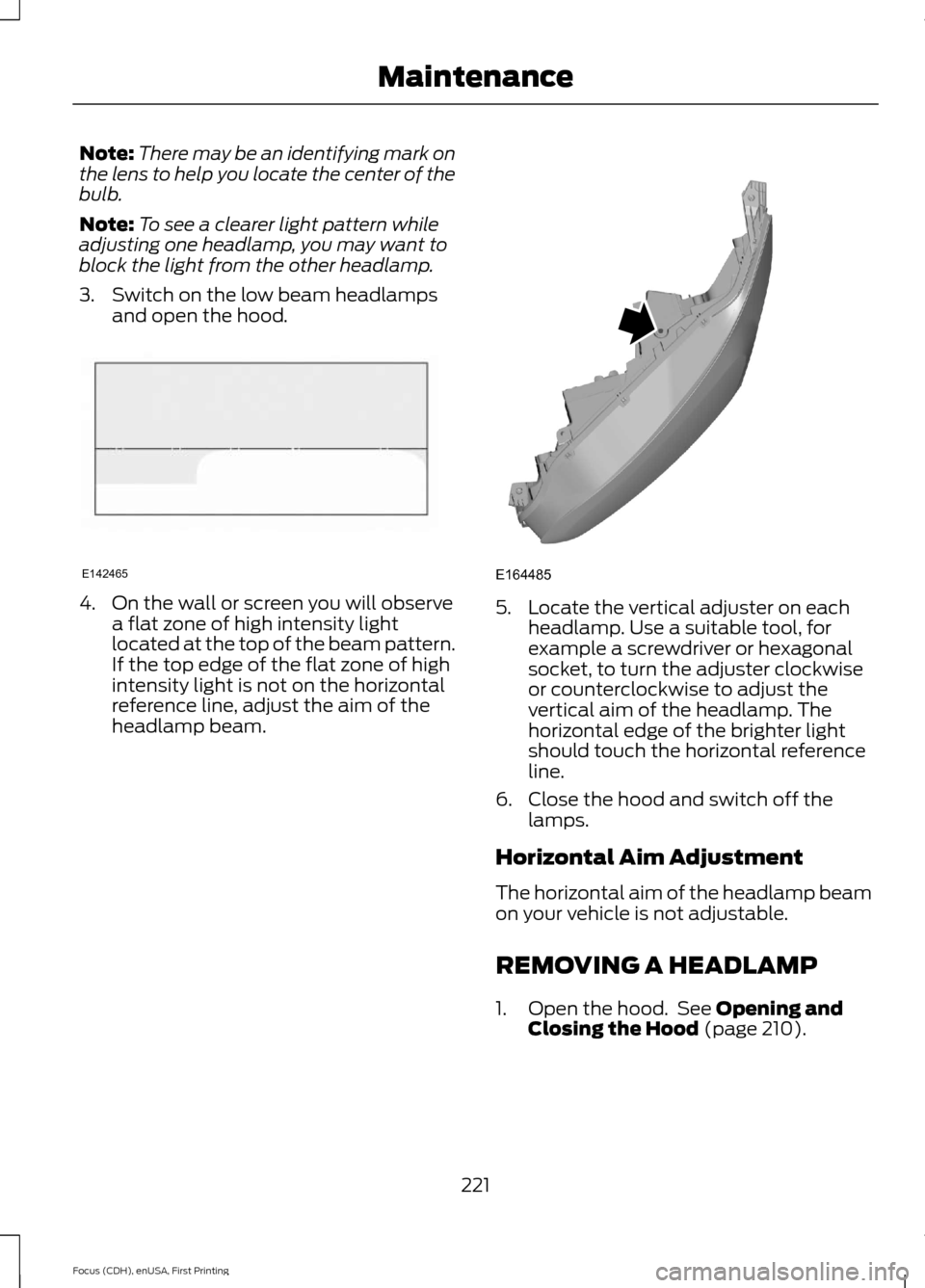
3. Switch on the low beam headlamps and open the hood. 4. On the wall or screen you will observe
a flat zone of high intensity light
located at the top of the beam pattern.
If the top edge of the flat zone of high
intensity light is not on the horizontal
reference line, adjust the aim of the
headlamp beam. 5. Locate the vertical adjuster on each
headlamp. Use a suitable tool, for
example a screwdriver or hexagonal
socket, to turn the adjuster clockwise
or counterclockwise to adjust the
vertical aim of the headlamp. The
horizontal edge of the brighter light
should touch the horizontal reference
line.
6. Close the hood and switch off the lamps.
Horizontal Aim Adjustment
The horizontal aim of the headlamp beam
on your vehicle is not adjustable.
REMOVING A HEADLAMP
1. Open the hood. See Opening and
Closing the Hood (page 210).
221
Focus (CDH), enUSA, First Printing MaintenanceE142465 E164485
Page 226 of 453
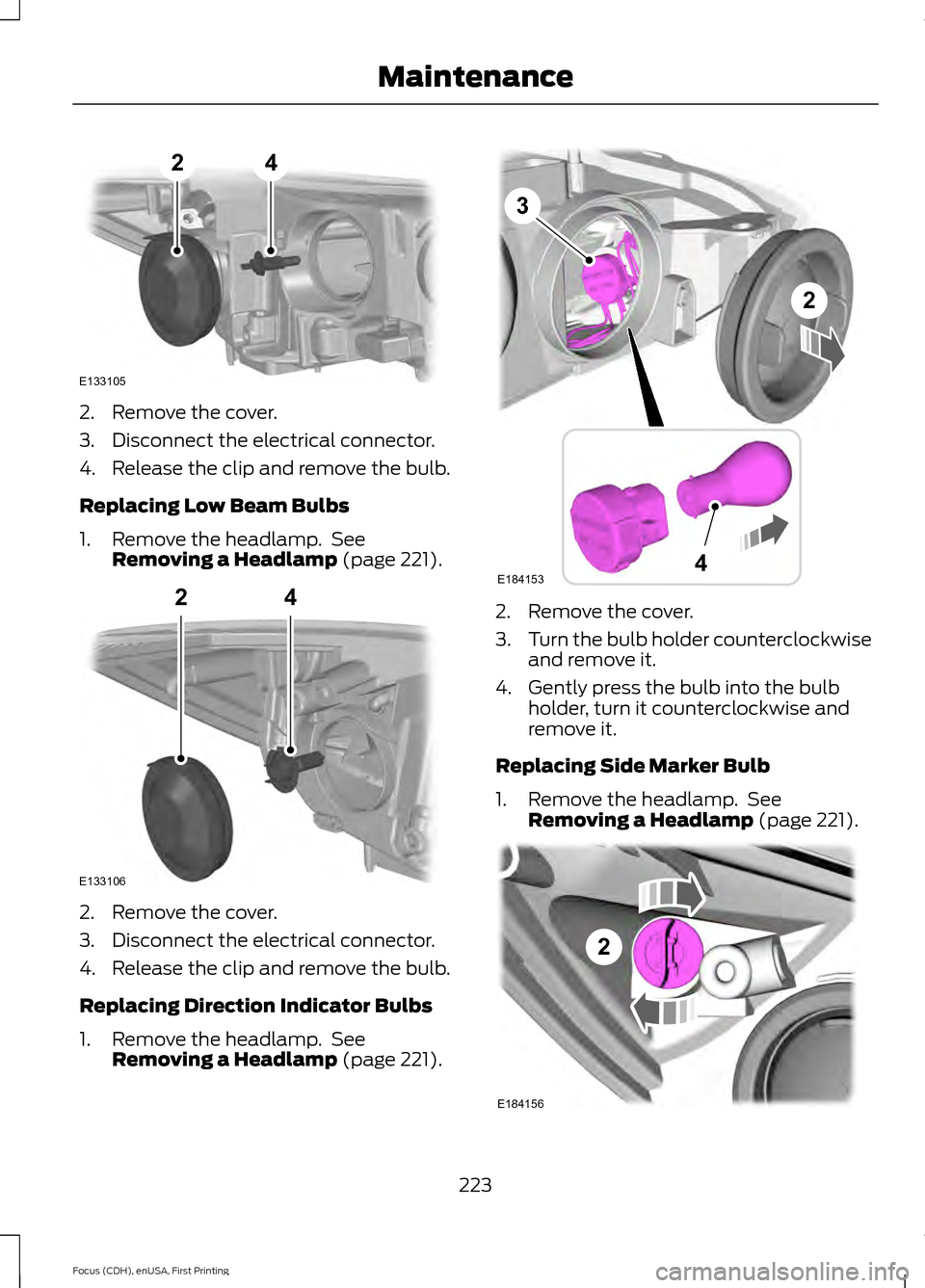
2. Remove the cover.
3. Disconnect the electrical connector.
4. Release the clip and remove the bulb.
Replacing Low Beam Bulbs
1. Remove the headlamp. See
Removing a Headlamp (page 221). 2. Remove the cover.
3. Disconnect the electrical connector.
4. Release the clip and remove the bulb.
Replacing Direction Indicator Bulbs
1. Remove the headlamp. See
Removing a Headlamp
(page 221). 2. Remove the cover.
3.
Turn the bulb holder counterclockwise
and remove it.
4. Gently press the bulb into the bulb holder, turn it counterclockwise and
remove it.
Replacing Side Marker Bulb
1. Remove the headlamp. See Removing a Headlamp
(page 221). 223
Focus (CDH), enUSA, First Printing MaintenanceE133105
24 E133106
24 E184153
3
4
2 2
E184156
Page 227 of 453
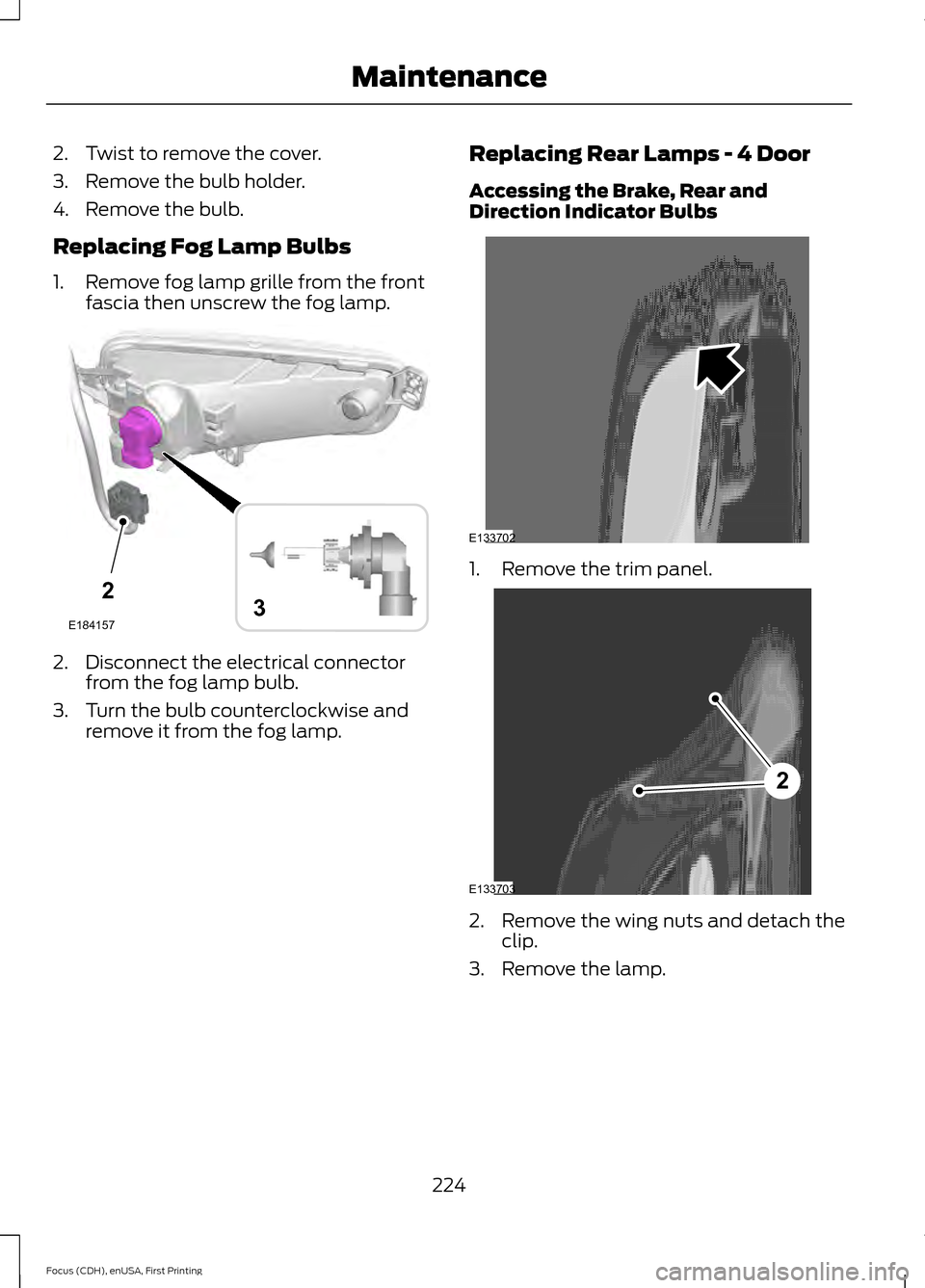
2. Twist to remove the cover.
3. Remove the bulb holder.
4. Remove the bulb.
Replacing Fog Lamp Bulbs
1. Remove fog lamp grille from the front
fascia then unscrew the fog lamp. 2. Disconnect the electrical connector
from the fog lamp bulb.
3. Turn the bulb counterclockwise and remove it from the fog lamp. Replacing Rear Lamps - 4 Door
Accessing the Brake, Rear and
Direction Indicator Bulbs 1. Remove the trim panel.
2. Remove the wing nuts and detach the
clip.
3. Remove the lamp.
224
Focus (CDH), enUSA, First Printing Maintenance2
E1841573 E133702 2
E133703
Page 228 of 453
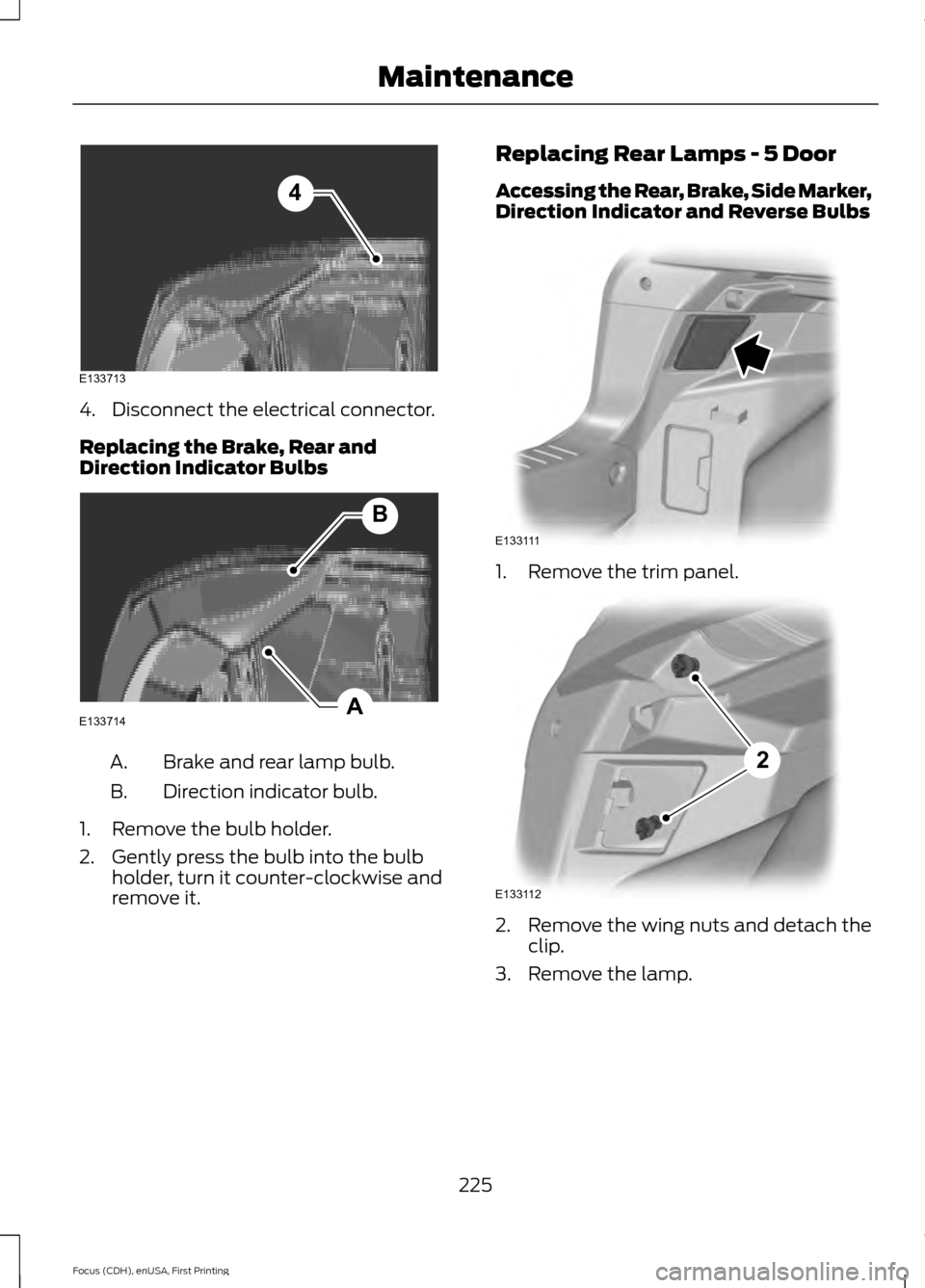
4. Disconnect the electrical connector.
Replacing the Brake, Rear and
Direction Indicator Bulbs
Brake and rear lamp bulb.
A.
Direction indicator bulb.
B.
1. Remove the bulb holder.
2. Gently press the bulb into the bulb holder, turn it counter-clockwise and
remove it. Replacing Rear Lamps - 5 Door
Accessing the Rear, Brake, Side Marker,
Direction Indicator and Reverse Bulbs
1. Remove the trim panel.
2. Remove the wing nuts and detach the
clip.
3. Remove the lamp.
225
Focus (CDH), enUSA, First Printing MaintenanceE133713
4 A
B
E133714 E133111 E133112
2
Page 229 of 453
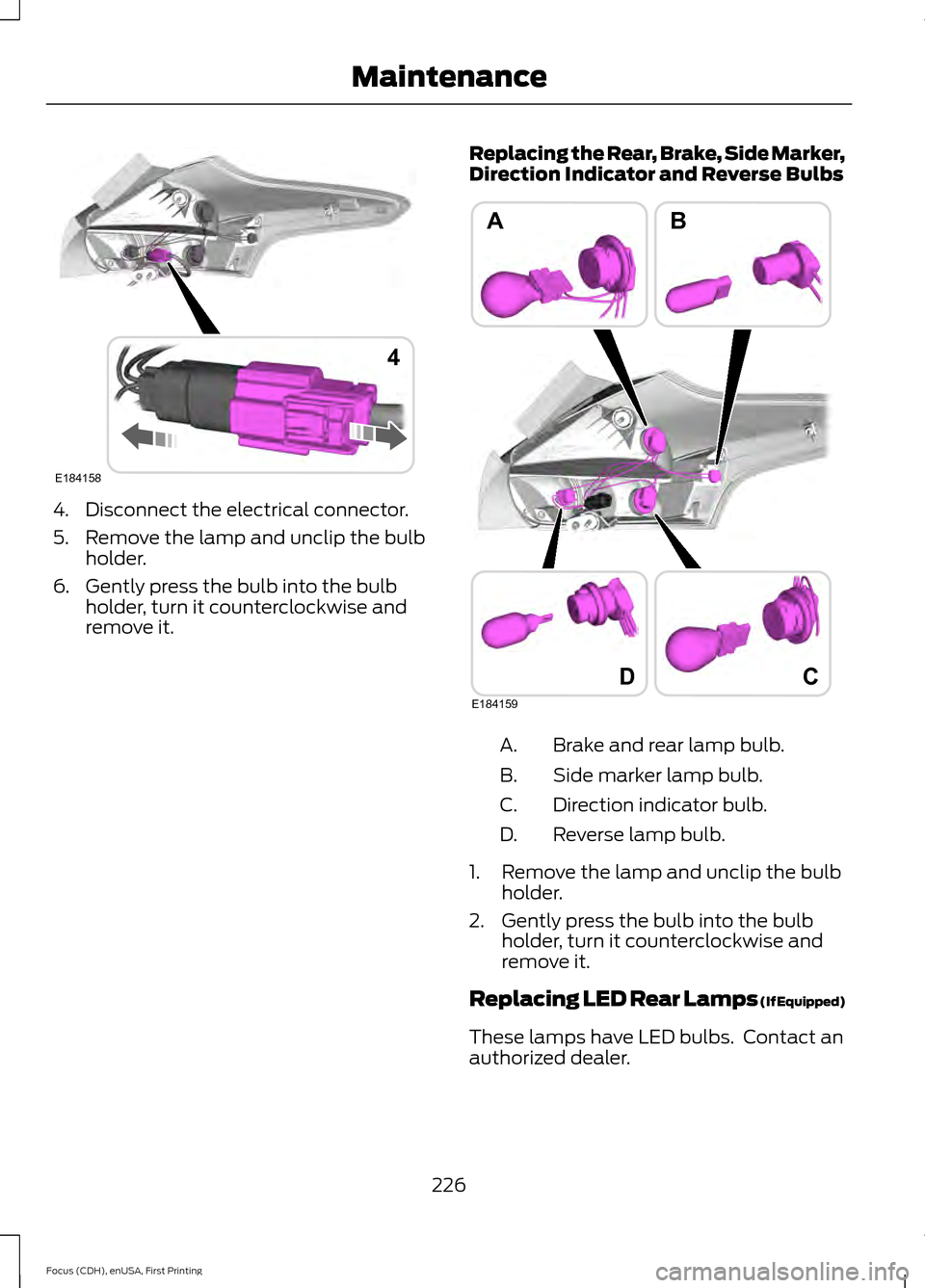
4. Disconnect the electrical connector.
5. Remove the lamp and unclip the bulb
holder.
6. Gently press the bulb into the bulb holder, turn it counterclockwise and
remove it. Replacing the Rear, Brake, Side Marker,
Direction Indicator and Reverse Bulbs Brake and rear lamp bulb.
A.
Side marker lamp bulb.
B.
Direction indicator bulb.
C.
Reverse lamp bulb.
D.
1. Remove the lamp and unclip the bulb holder.
2. Gently press the bulb into the bulb holder, turn it counterclockwise and
remove it.
Replacing LED Rear Lamps (If Equipped)
These lamps have LED bulbs. Contact an
authorized dealer.
226
Focus (CDH), enUSA, First Printing MaintenanceE184158
4 D
AB
E184159
C