Page 101 of 453
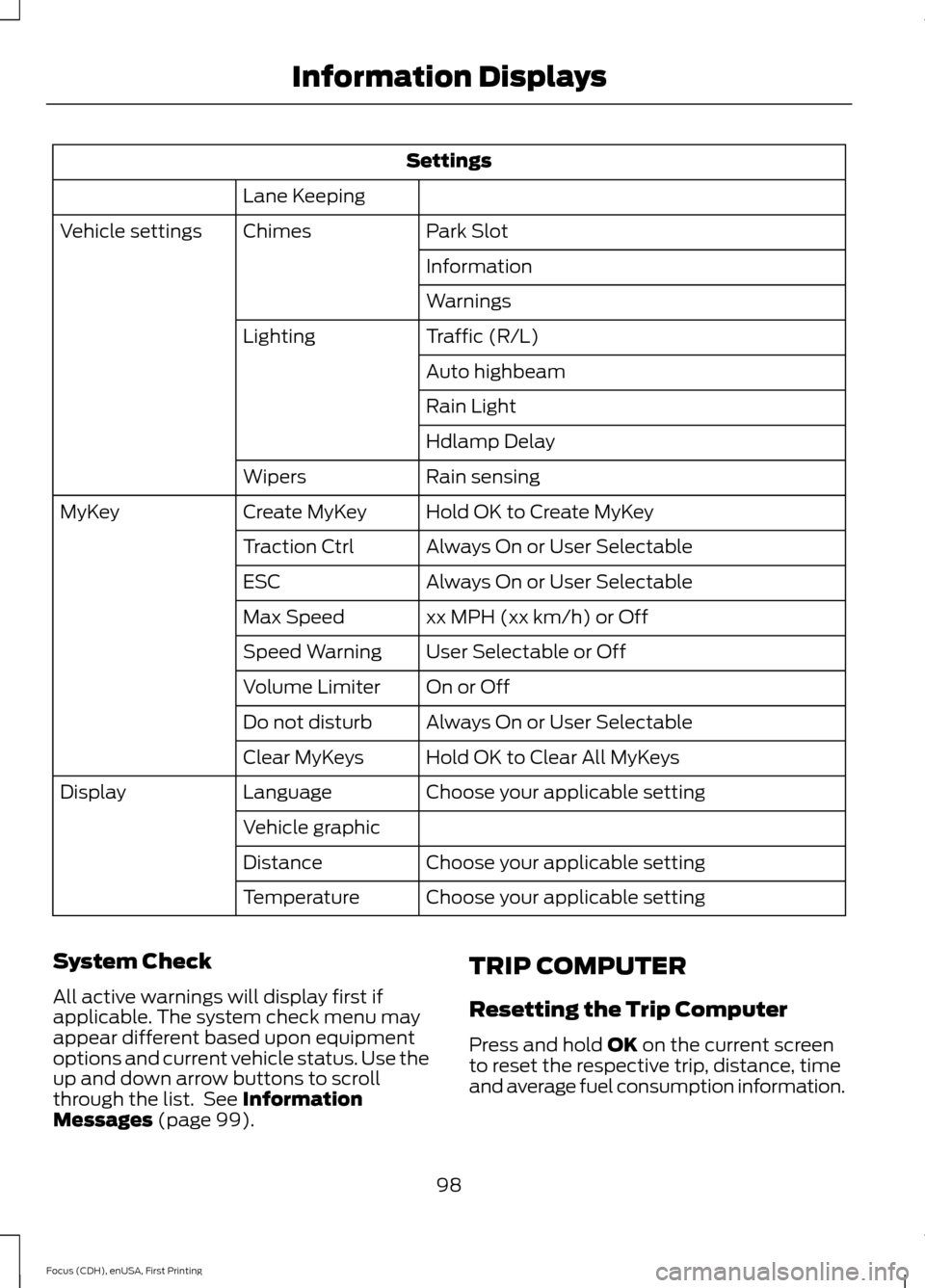
Settings
Lane Keeping Park Slot
Chimes
Vehicle settings
Information
Warnings
Traffic (R/L)
Lighting
Auto highbeam
Rain Light
Hdlamp Delay
Rain sensing
Wipers
Hold OK to Create MyKey
Create MyKey
MyKey
Always On or User Selectable
Traction Ctrl
Always On or User Selectable
ESC
xx MPH (xx km/h) or Off
Max Speed
User Selectable or Off
Speed Warning
On or Off
Volume Limiter
Always On or User Selectable
Do not disturb
Hold OK to Clear All MyKeys
Clear MyKeys
Choose your applicable setting
Language
Display
Vehicle graphicChoose your applicable setting
Distance
Choose your applicable setting
Temperature
System Check
All active warnings will display first if
applicable. The system check menu may
appear different based upon equipment
options and current vehicle status. Use the
up and down arrow buttons to scroll
through the list. See Information
Messages (page 99). TRIP COMPUTER
Resetting the Trip Computer
Press and hold
OK on the current screen
to reset the respective trip, distance, time
and average fuel consumption information.
98
Focus (CDH), enUSA, First Printing Information Displays
Page 107 of 453
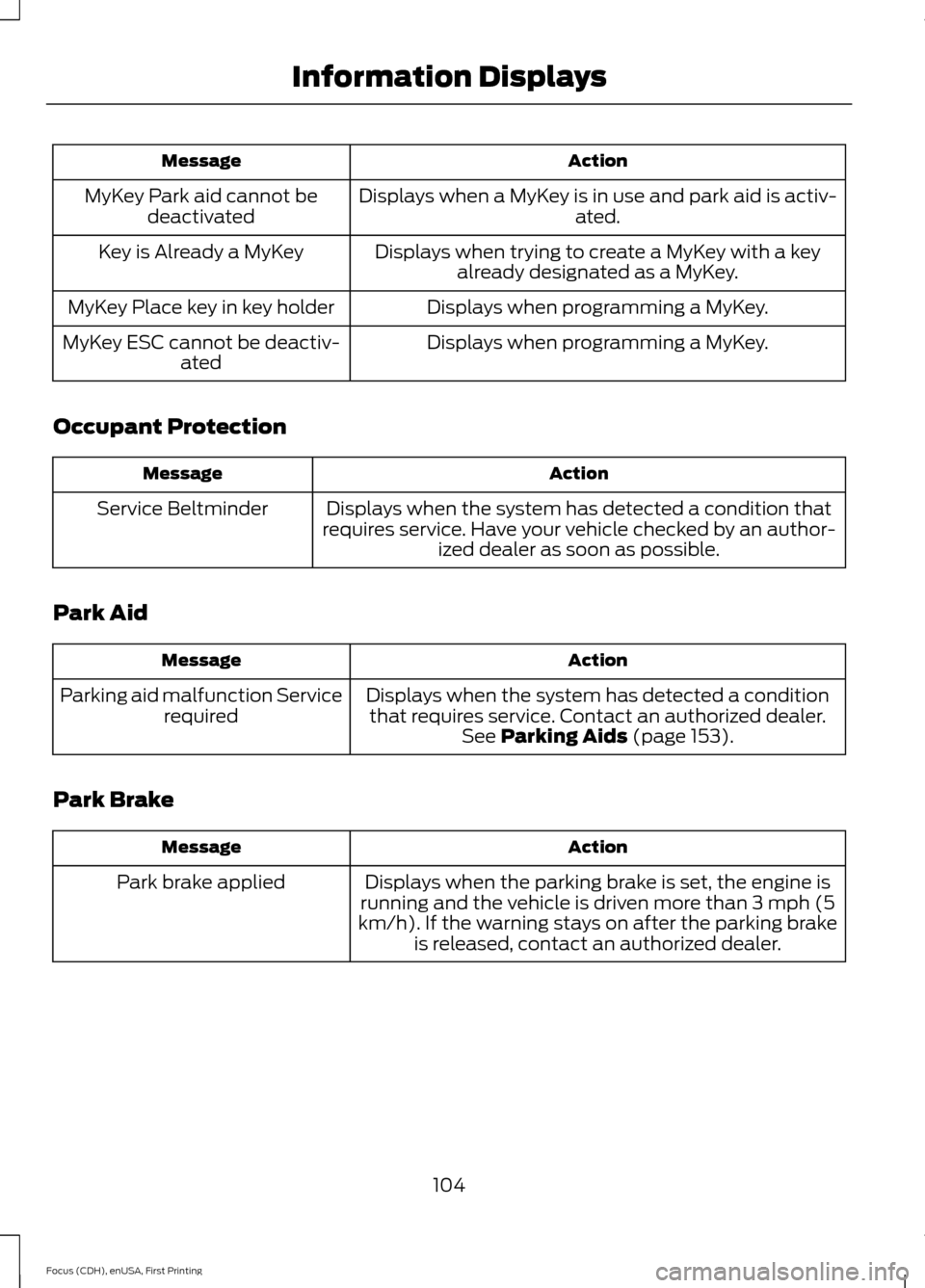
Action
Message
Displays when a MyKey is in use and park aid is activ- ated.
MyKey Park aid cannot be
deactivated
Displays when trying to create a MyKey with a keyalready designated as a MyKey.
Key is Already a MyKey
Displays when programming a MyKey.
MyKey Place key in key holder
Displays when programming a MyKey.
MyKey ESC cannot be deactiv-
ated
Occupant Protection Action
Message
Displays when the system has detected a condition that
requires service. Have your vehicle checked by an author- ized dealer as soon as possible.
Service Beltminder
Park Aid Action
Message
Displays when the system has detected a conditionthat requires service. Contact an authorized dealer. See Parking Aids (page 153).
Parking aid malfunction Service
required
Park Brake Action
Message
Displays when the parking brake is set, the engine is
running and the vehicle is driven more than 3 mph (5
km/h). If the warning stays on after the parking brake is released, contact an authorized dealer.
Park brake applied
104
Focus (CDH), enUSA, First Printing Information Displays
Page 109 of 453

Transmission
Action
Message
See an authorized dealer.
Transmission malfunction
Service now
The transmission is overheating and needs to cool.Stop in a safe place as soon as it’ s possible.
Transmission overheating Stop
safely
Transmission is hot. Wait as needed to let it cool.
Transmission Hot Wait ...
Displays as a reminder to shift into park.
Transmission not in Park Select
P
Displays to request the operator to apply the brake asneeded by the transmission.
Press brake to unlock gearshift
lever
Displays when the transmission shift lever is unlockedand free to select gears.
Gearshift lever unlocked
Tire Pressure Monitoring System Action
Message
Displays when one or more tires on your vehicle havelow tire pressure. See Tire Pressure Monitoring
System (page 253).
Low Tire Pressure
Displays when the tire pressure monitoring system ismalfunctioning. If the warning stays on or continues to come on, contact an authorized dealer.
See Tire
Pressure Monitoring System (page 253).
Tire Pressure Monitor Fault
Displayed when a tire pressure sensor is malfunc-
tioning, or your spare tire is in use. For more information on how the system operates under these conditions,see
See Tire Pressure Monitoring System (page
253). If the warning stays on or continues to come on,
contact an authorized dealer as soon as possible.
Tire Pressure Sensor Fault
Traction Control Action
Message
Displays when the traction control system has been
switched off. See
Using Traction Control (page 151).
Traction control off
106
Focus (CDH), enUSA, First Printing Information Displays
Page 117 of 453
SITTING IN THE CORRECT
POSITION
WARNINGS
Do not recline the seat backrest too
far as this can cause the occupant
to slide under the safety belt,
resulting in serious injury in the event of a
crash. Sitting improperly, out of position or
with the seat backrest reclined too
far, can result in serious injury or
death in the event of a crash. Always sit
upright against your seat backrest, with
your feet on the floor. Do not place objects higher than the
seat backrest to reduce the risk of
serious injury in the event of a crash
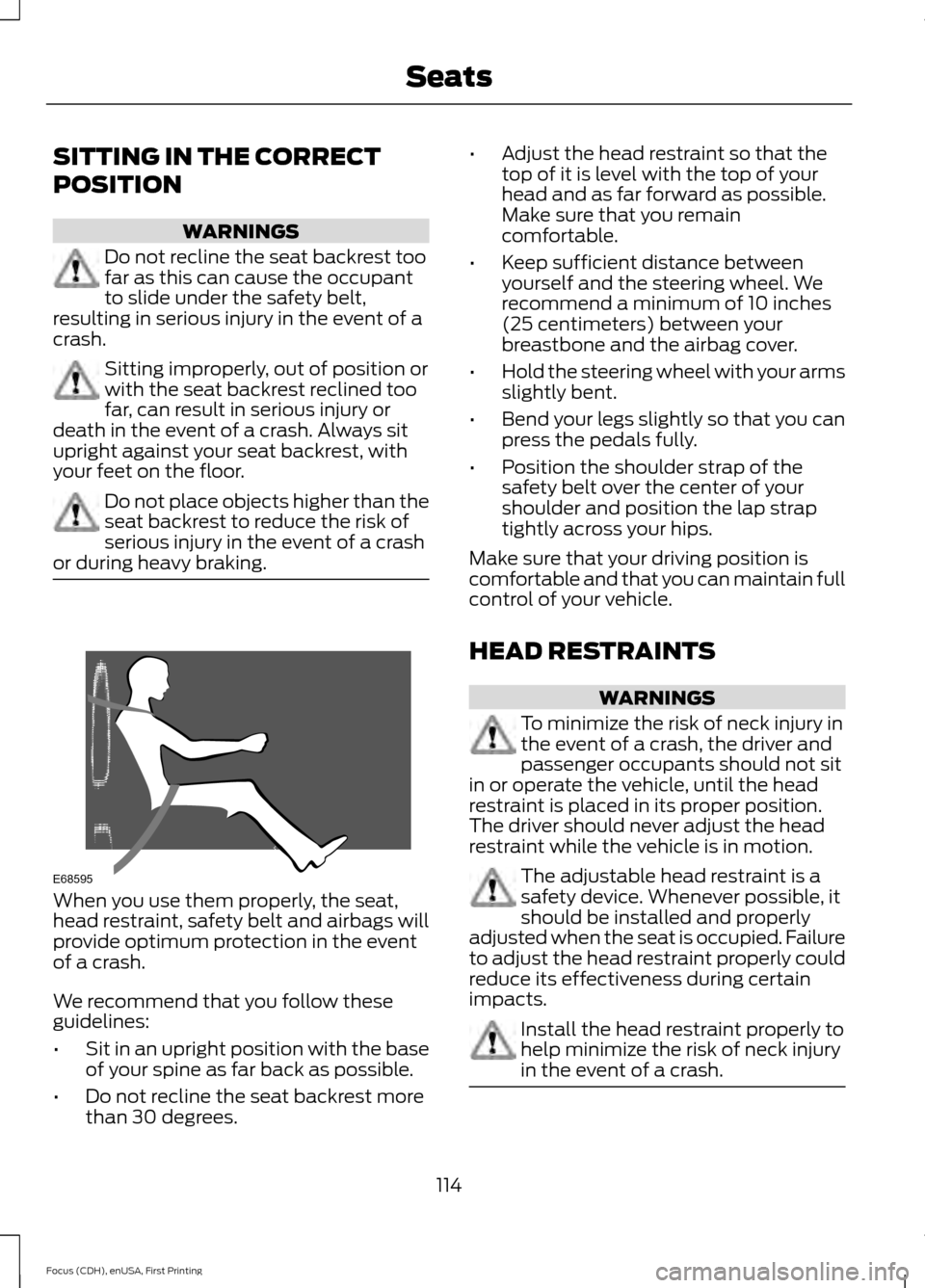
or during heavy braking. When you use them properly, the seat,
head restraint, safety belt and airbags will
provide optimum protection in the event
of a crash.
We recommend that you follow these
guidelines:
•
Sit in an upright position with the base
of your spine as far back as possible.
• Do not recline the seat backrest more
than 30 degrees. •
Adjust the head restraint so that the
top of it is level with the top of your
head and as far forward as possible.
Make sure that you remain
comfortable.
• Keep sufficient distance between
yourself and the steering wheel. We
recommend a minimum of 10 inches
(25 centimeters) between your
breastbone and the airbag cover.
• Hold the steering wheel with your arms
slightly bent.
• Bend your legs slightly so that you can
press the pedals fully.
• Position the shoulder strap of the
safety belt over the center of your
shoulder and position the lap strap
tightly across your hips.
Make sure that your driving position is
comfortable and that you can maintain full
control of your vehicle.
HEAD RESTRAINTS WARNINGS
To minimize the risk of neck injury in
the event of a crash, the driver and
passenger occupants should not sit
in or operate the vehicle, until the head
restraint is placed in its proper position.
The driver should never adjust the head
restraint while the vehicle is in motion. The adjustable head restraint is a
safety device. Whenever possible, it
should be installed and properly
adjusted when the seat is occupied. Failure
to adjust the head restraint properly could
reduce its effectiveness during certain
impacts. Install the head restraint properly to
help minimize the risk of neck injury
in the event of a crash.
114
Focus (CDH), enUSA, First Printing SeatsE68595
Page 119 of 453
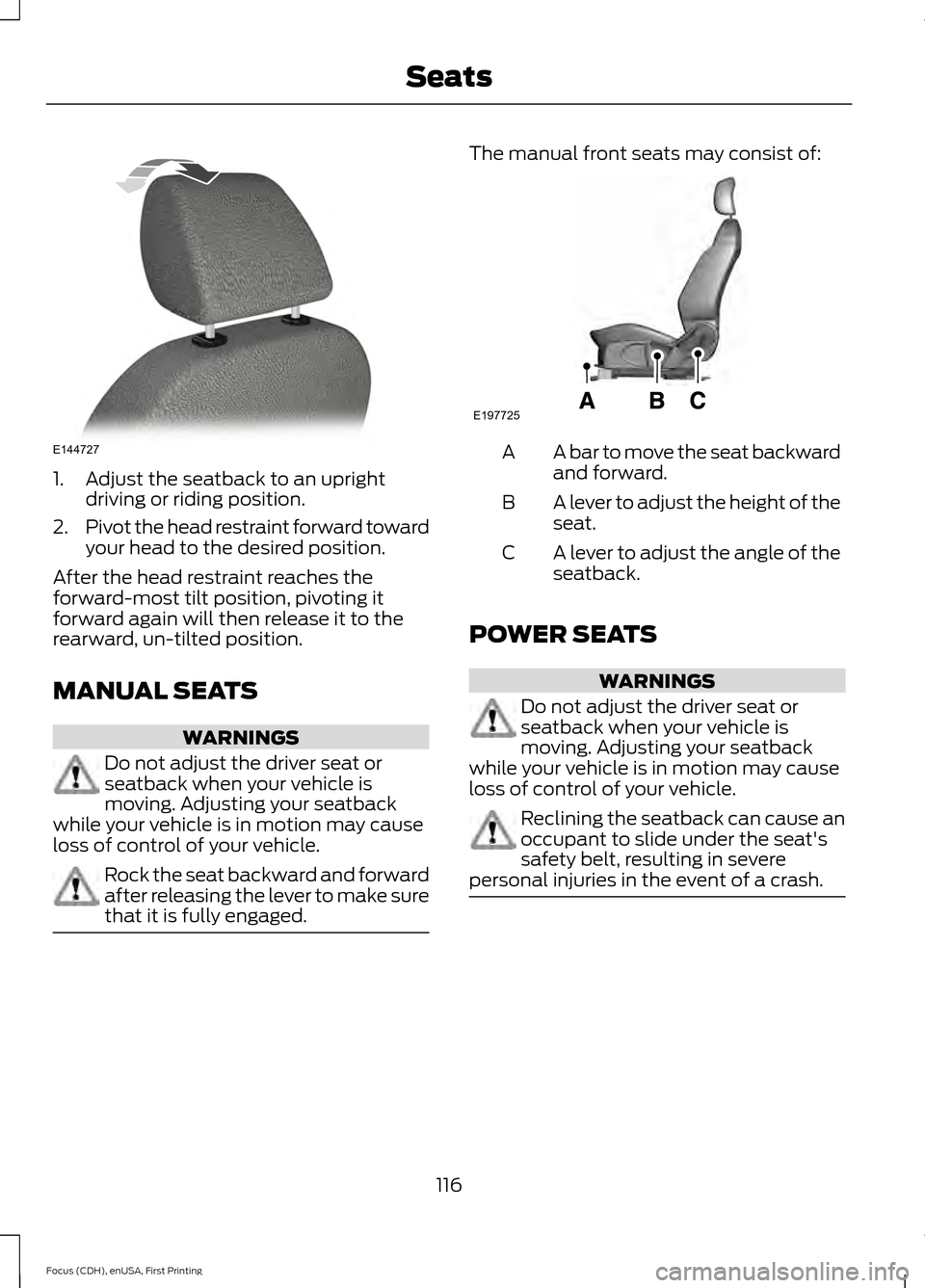
1. Adjust the seatback to an upright
driving or riding position.
2. Pivot the head restraint forward toward
your head to the desired position.
After the head restraint reaches the
forward-most tilt position, pivoting it
forward again will then release it to the
rearward, un-tilted position.
MANUAL SEATS WARNINGS
Do not adjust the driver seat or
seatback when your vehicle is
moving. Adjusting your seatback
while your vehicle is in motion may cause
loss of control of your vehicle. Rock the seat backward and forward
after releasing the lever to make sure
that it is fully engaged. The manual front seats may consist of:
A bar to move the seat backward
and forward.
A
A lever to adjust the height of the
seat.
B
A lever to adjust the angle of the
seatback.
C
POWER SEATS WARNINGS
Do not adjust the driver seat or
seatback when your vehicle is
moving. Adjusting your seatback
while your vehicle is in motion may cause
loss of control of your vehicle. Reclining the seatback can cause an
occupant to slide under the seat's
safety belt, resulting in severe
personal injuries in the event of a crash. 116
Focus (CDH), enUSA, First Printing SeatsE144727 E197725
Page 121 of 453
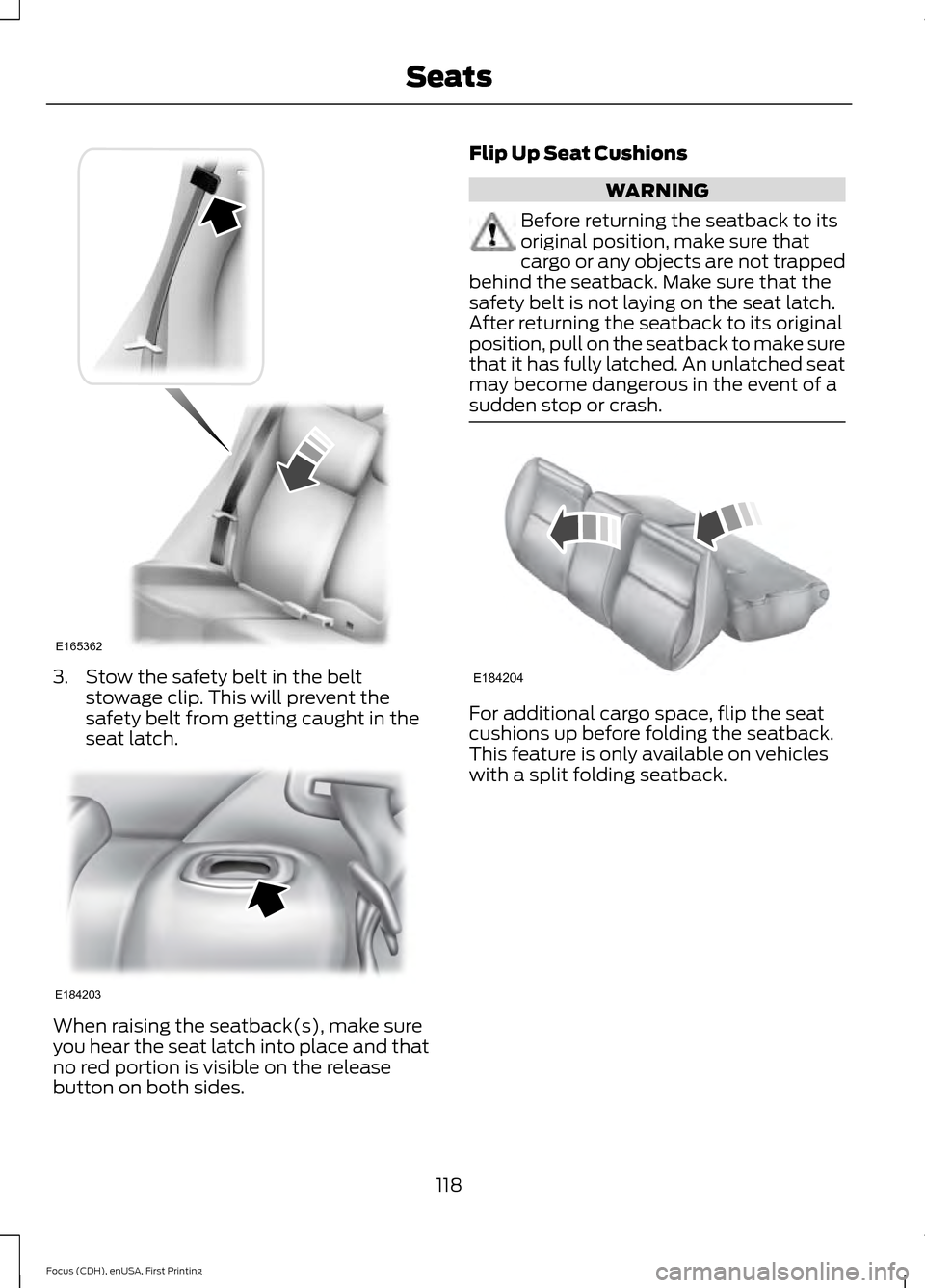
3. Stow the safety belt in the belt
stowage clip. This will prevent the
safety belt from getting caught in the
seat latch. When raising the seatback(s), make sure
you hear the seat latch into place and that
no red portion is visible on the release
button on both sides. Flip Up Seat Cushions WARNING
Before returning the seatback to its
original position, make sure that
cargo or any objects are not trapped
behind the seatback. Make sure that the
safety belt is not laying on the seat latch.
After returning the seatback to its original
position, pull on the seatback to make sure
that it has fully latched. An unlatched seat
may become dangerous in the event of a
sudden stop or crash. For additional cargo space, flip the seat
cushions up before folding the seatback.
This feature is only available on vehicles
with a split folding seatback.
118
Focus (CDH), enUSA, First Printing SeatsE165362 E184203 E184204
Page 122 of 453

HEATED SEATS (If Equipped)
WARNING
People who are unable to feel pain
to their skin because of advanced
age, chronic illness, diabetes, spinal
cord injury, medication, alcohol use,
exhaustion or other physical conditions,
must exercise care when using the heated
seat. The heated seat may cause burns
even at low temperatures, especially if
used for long periods of time. Do not place
anything on the seat that insulates against
heat, such as a blanket or cushion. This
may cause the heated seat to overheat.
Do not puncture the seat with pins, needles
or other pointed objects. This may damage
the heating element which may cause the
heated seat to overheat. An overheated
seat may cause serious personal injury. Do not do the following:
•
Place heavy objects on the seat.
• Operate the heated seat if water or any
other liquid is spilled on the seat. Allow
the seat to dry thoroughly.
• Operate the heated seats unless the
engine is running. Doing so can cause
the battery to lose charge. Press the heated seat symbol to cycle
through the various heat settings and off.
Warmer settings are indicated by more
indicator lights.
119
Focus (CDH), enUSA, First Printing SeatsE146941
Page 123 of 453

12 Volt DC Power Point
WARNING
Do not plug optional electrical
accessories into the cigar lighter
socket. Incorrect use of the lighter
can cause damage not covered by your
warranty, and can result in fire or serious
injury. Note:
After starting your vehicle, you can
use the socket to power 12-volt appliances
with a maximum current rating of 20 amps.
After you switch your vehicle off, the power
supply works only for a maximum of 30
minutes.
Note: Do not insert objects other than an
accessory plug into the power point. This
damages the outlet and can blow the fuse.
Note: Do not hang any type of accessory or
accessory bracket from the plug.
Note: Do not use the power point over the
vehicle capacity of 12 volt DC 180 watt or a
fuse may blow.
Note: Do not use the power point for
operating a cigar lighter element.
Note: Incorrect use of the power point can
cause damage not covered by your
warranty.
Note: Always keep the power point caps
closed when not in use.
Run the vehicle for full capacity use of the
power point.
To prevent the battery from running out of
charge:
• Do not use the power point longer than
necessary after switching the vehicle
off.
• Do not leave devices plugged in
overnight or when your vehicle is in park
(P) for extended periods. Location
You may find power points in the following
locations:
•
On the center console
• In the center console.
120
Focus (CDH), enUSA, First Printing Auxiliary Power Points