2015 FORD FOCUS center console
[x] Cancel search: center consolePage 319 of 453
Description and Action
Display
2. Scroll to select the desired genre, and then press the
OK button.
Browse all supported media files on your media player
connected to the USB port. You can only view media files
that are compatible with SYNC. (Other files are not
visible.)
Browse USB
1. Press the
OK button to select.
2. Scroll to browse indexed media files on the device, and
then press the
OK button.
Resets the USB index. After the new indexing is complete,
you can choose what to play from the USB song library.
Reset USB
* You can use the buttons at the bottom of the audio display to jump to a certain
alphabetical category quickly. You can also use the letters on the audio system's numeric
keypad to jump in the list.
Using Voice Commands
You can access and view your USB songs
using voice commands.
Plug the device into your vehicle's USB
port.
Press the voice button and when
prompted, say any of the following
commands: Accessing and Viewing USB Media
(browse | search | show) all (album |
albums)
(browse | search | show) all (artist |
artists)
(browse | search | show) all (genre |
genres)
(browse | search | show) all (playlist |
playlists)
(browse | search | show) all (song | songs
| title | titles | file | files | track | tracks)
Browse album
Browse artist
Browse genre
Browse playlist
USB 2
(If Equipped)
Your vehicle may come equipped with an
additional USB port. If so, USB 1 is located
at the front of the vehicle at the bottom of
the instrument panel. USB 2 is located
inside the storage compartment of the
vehicle's center console.
You can plug in an additional USB device
into the second USB port.
Note: SYNC only supports one connected
iOS (Apple) devices at a time (whichever
one you plug in first). When you connect a
second iOS device, the systems charges it,
but does not support playback from it.
316
Focus (CDH), enUSA, First Printing SYNC™
Page 366 of 453
WARNINGS
Store the portable music player in a
secure location, such as the center
console or the glove box, when your
vehicle is moving. Hard objects may
become projectiles in a crash or sudden
stop, which may increase the risk of serious
injury. The audio extension cable must be
long enough to allow the portable music
player to be safely stored while your
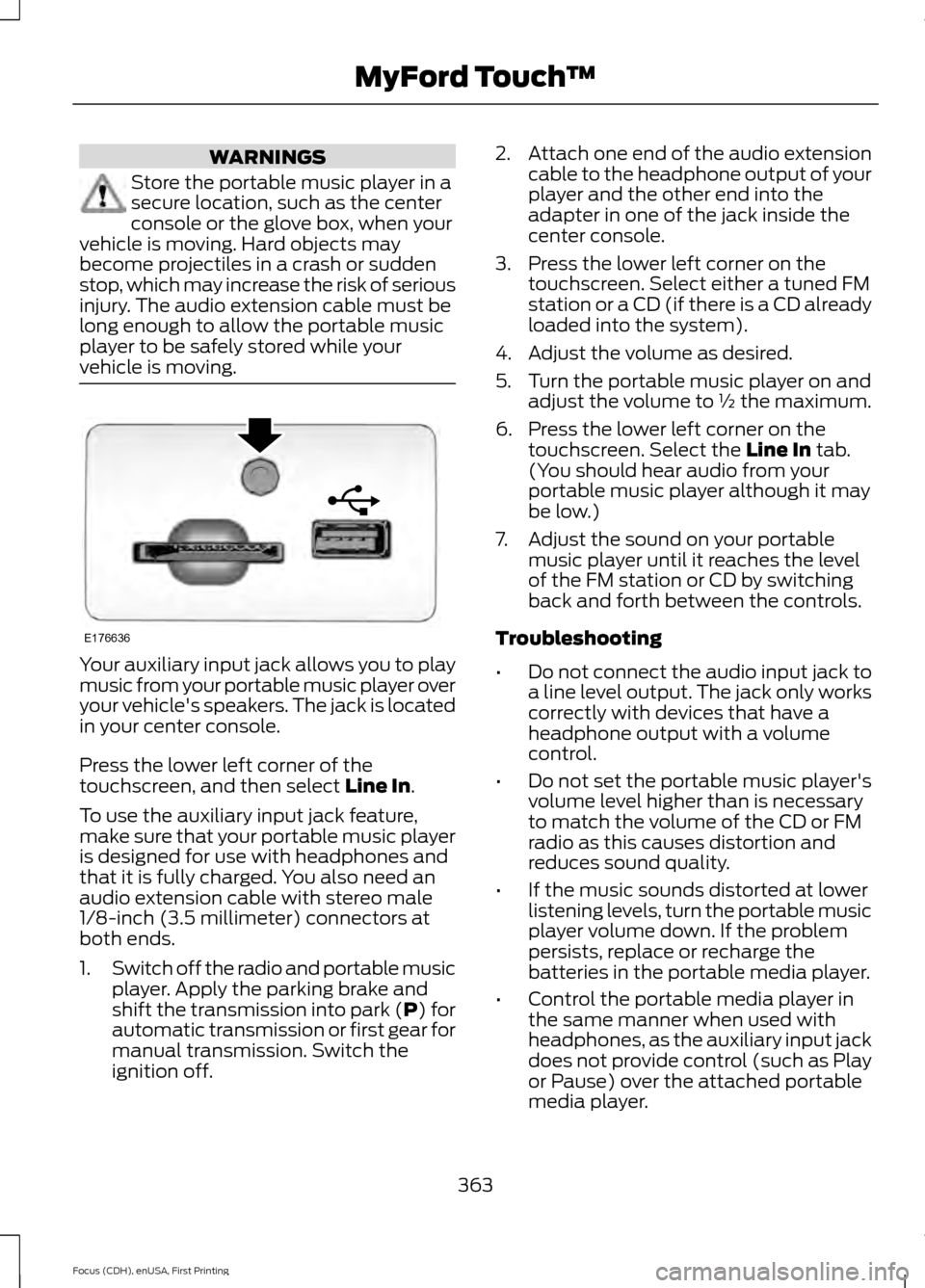
vehicle is moving. Your auxiliary input jack allows you to play
music from your portable music player over
your vehicle's speakers. The jack is located
in your center console.
Press the lower left corner of the
touchscreen, and then select Line In.
To use the auxiliary input jack feature,
make sure that your portable music player
is designed for use with headphones and
that it is fully charged. You also need an
audio extension cable with stereo male
1/8-inch (3.5 millimeter) connectors at
both ends.
1. Switch off the radio and portable music
player. Apply the parking brake and
shift the transmission into park (P) for
automatic transmission or first gear for
manual transmission. Switch the
ignition off. 2.
Attach one end of the audio extension
cable to the headphone output of your
player and the other end into the
adapter in one of the jack inside the
center console.
3. Press the lower left corner on the touchscreen. Select either a tuned FM
station or a CD (if there is a CD already
loaded into the system).
4. Adjust the volume as desired.
5. Turn the portable music player on and adjust the volume to ½ the maximum.
6. Press the lower left corner on the touchscreen. Select the
Line In tab.
(You should hear audio from your
portable music player although it may
be low.)
7. Adjust the sound on your portable music player until it reaches the level
of the FM station or CD by switching
back and forth between the controls.
Troubleshooting
• Do not connect the audio input jack to
a line level output. The jack only works
correctly with devices that have a
headphone output with a volume
control.
• Do not set the portable music player's
volume level higher than is necessary
to match the volume of the CD or FM
radio as this causes distortion and
reduces sound quality.
• If the music sounds distorted at lower
listening levels, turn the portable music
player volume down. If the problem
persists, replace or recharge the
batteries in the portable media player.
• Control the portable media player in
the same manner when used with
headphones, as the auxiliary input jack
does not provide control (such as Play
or Pause) over the attached portable
media player.
363
Focus (CDH), enUSA, First Printing MyFord Touch
™E176636
Page 445 of 453

Booster Seats..................................................28
Types of Booster Seats...................................... 28
Brake Fluid Check.........................................216
Brakes...............................................................148 General Information.......................................... 148
Breaking-In.....................................................186
Bulb Specification Chart...........................227
C
Cabin Air Filter.................................................112
California Proposition 65..............................11
Capacities and Specifications - 1.0L EcoBoost™.................................................266
Specifications...................................................... 267
Capacities and Specifications - 2.0L Duratec-HE (MI4)
....................................269
Specifications..................................................... 270
Capacities and Specifications.................261
Car Wash See: Cleaning the Exterior.............................. 230
Center Console
...............................................121
Changing a Bulb...........................................222 Replacing Fog Lamp Bulbs............................ 224
Replacing Headlamp Bulbs........................... 222
Replacing HID Headlamp Bulbs................... 222
Replacing LED Rear Lamps........................... 226
Replacing Licence Plate and High Mounted Brake Lamp Bulbs......................................... 227
Replacing Rear Lamps - 4 Door................... 224
Replacing Rear Lamps - 5 Door.................... 225
Changing a Fuse..........................................209 Fuses...................................................................... 209
Changing a Road Wheel...........................256 Dissimilar Spare Wheel and Tire Assembly
Information..................................................... 256
Tire Change Procedure..................................... 257
Changing the 12V Battery...........................217
Changing the Engine Air Filter.................229
Changing the Wiper Blades
......................219
Checking MyKey System Status................61
Checking the Wiper Blades.......................219
Child Restraint and Safety Belt Maintenance.................................................39
Child Safety......................................................20 General Information............................................ 20Child Safety Locks...........................................31
Left-Hand Side...................................................... 32
Right-Hand Side................................................... 32
Child Seat Positioning
..................................30
Cleaning Leather Seats.............................233
Cleaning Products.......................................230
Cleaning the Alloy Wheels.......................234
Cleaning the Engine.....................................231
Cleaning the Exterior..................................230 Body Paintwork Preservation......................... 231
Cleaning the Chrome Trim............................. 230
Cleaning the Headlamps................................ 230
Cleaning the Rear Window............................ 230
Cleaning the Instrument Panel and Instrument Cluster Lens.........................232
Cleaning the Interior....................................232 Instrument Cluster Screens, LCD Screens
and Radio Screens........................................ 232
Rear Windows..................................................... 232
Safety Belts.......................................................... 232
Cleaning the Windows and Wiper Blades............................................................232
Clearing All MyKeys......................................60
Climate.............................................................381 Climate Control Voice Commands.............383
Climate Control
.............................................107
Clutch Fluid Check - Manual Transmission................................................217
Cold Weather Precautions
........................186
Coolant Check See: Engine Coolant Check............................. 214
Crash Sensors and Airbag Indicator.......48
Creating a MyKey...........................................59 Programming/Changing Configurable
Settings............................................................... 59
Cruise Control
..................................................75
Principle of Operation....................................... 162
Cruise control See: Using Cruise Control................................ 162
Customer Assistance
..................................194
D
Data Recording
..................................................9
Event Data Recording........................................... 9
Service Data Recording........................................ 9
442
Focus (CDH), enUSA, First Printing Index
Page 449 of 453

Luggage Covers..............................................174
Removing the Cover........................................... 174
Lug Nuts See: Changing a Road Wheel....................... 256
Lug Nuts
..........................................................260
M
Maintenance..................................................210 General Information.......................................... 210
Manual Climate Control.............................107
Manual Liftgate...............................................67 Closing the Liftgate............................................. 68
Opening the Liftgate........................................... 68
Manual Seats..................................................116
Manual Transmission - 1.0L EcoBoost™..................................................142
Parking Your Vehicle.......................................... 143
Recommended Shift Speeds......................... 142
Reverse................................................................... 143
Using the Clutch.................................................. 142
Manual Transmission - 2.0L Duratec-HE (MI4)...............................................................141
Parking Your Vehicle.......................................... 142
Recommended Shift Speeds.......................... 141
Reverse.................................................................... 141
Using the Clutch................................................... 141
Media Hub......................................................289
Message Center See: Information Displays................................. 96
Mirrors See: Heated Windows and Mirrors................112
See: Windows and Mirrors................................ 85
Mobile Communications Equipment
.......12
Moonroof..........................................................88 Bounce-Back......................................................... 89
Opening and Closing the Moonroof.............88
Venting the Moonroof........................................ 89
Motorcraft Parts - 1.0L EcoBoost™.................................................262
Motorcraft Parts - 2.0L Duratec-HE (MI4).............................................................263
MyFord Touch ™
............................................327
General Information.......................................... 327
MyFord Touch ™ Troubleshooting
.........392
MyKey Troubleshooting...............................62
MyKey ™.............................................................58
Principle of Operation........................................ 58N
Navigation......................................................383
cityseekr................................................................ 385
Destination Mode.............................................. 383
Map Mode............................................................ 389
Navigation Map Updates................................ 392
Navigation Voice Commands....................... 392
Point of Interest (POI) Categories..............385
Quick-touch Buttons......................................... 391
Setting Your Navigation Preferences.........386
Normal Scheduled Maintenance..........428 Intelligent Oil-Life Monitor®......................... 428
Normal Maintenance Intervals..................... 429
O
Oil Check See: Engine Oil Check....................................... 213
Opening and Closing the Hood
...............210
Ordering Additional Owner's Literature......................................................198
Obtaining a French Owner ’s Manual..........198
Overhead Console.........................................121
P
Parking Aids....................................................153
Parking Brake
.................................................149
All Vehicles............................................................ 149
Vehicles With Automatic Transmission................................................... 149
Vehicles With Manual Transmission...........149
Passive Anti-Theft System..........................71 SecuriLock................................................................ 71
PATS See: Passive Anti-Theft System...................... 71
Perchlorate.........................................................11
Personal Safety System ™
.........................40
How Does the Personal Safety System
Work?.................................................................. 40
446
Focus (CDH), enUSA, First Printing Index