2015 FORD FOCUS ELECTRIC instrument panel
[x] Cancel search: instrument panelPage 188 of 369
Note:
Follow the same procedure as
cleaning leather seats for cleaning leather
instrument panels and leather interior trim
surfaces. See Cleaning Leather Seats
(page 185).
Clean the instrument panel and cluster
lens with a clean, damp and soft cloth,
then use a clean, dry and soft cloth to dry
these areas.
• Avoid cleaners or polishes that increase
the gloss of the upper portion of the
instrument panel. The dull finish in this
area helps protect you from
undesirable windshield reflection.
• Do not use any household cleaning
products or glass cleaners as these
may damage the finish of the
instrument panel, interior trim and
cluster lens.
• Wash or wipe your hands clean if you
have been in contact with certain
products such as insect repellent and
suntan lotion to avoid possible damage
to the interior painted surfaces.
• Do not allow air fresheners and hand
sanitizers to spill onto interior surfaces.
If a spill occurs, wipe off immediately.
Your warranty may not cover these
damages.
If a staining liquid like coffee or juice has
been spilled on the instrument panel or on
interior trim surfaces:
1. Wipe up spilled liquid using a clean, soft cloth as quickly as possible.
2. Use Motorcraft Premium Leather and Vinyl Cleaner or a commercially
available leather cleaning product for
automotive interiors. Test any cleaner
or stain remover on an inconspicuous
area.
3. Alternatively, wipe the surface with a clean, soft cloth and a mild soap and
water solution. Dry the area with a
clean, soft cloth. 4. If necessary, apply more soap and
water solution or cleaning product to
a clean, soft cloth and press it onto the
soiled area. Allow this to set at room
temperature for 30 minutes.
5. Remove the soaked cloth, then with a clean, damp cloth, use a rubbing
motion for 60 seconds on the soiled
area.
6. Dry the area with a clean, soft cloth.
CLEANING LEATHER SEATS
(If
Equipped)
Note: Follow the same procedure as
cleaning leather seats for cleaning leather
instrument panels and leather interior trim
surfaces.
For routine cleaning, wipe the surface with
a soft, damp cloth and a mild soap and
water solution. Dry the area with a clean,
soft cloth.
For cleaning and removing spots and stains
such as dye transfer, use Motorcraft
Premium Leather and Vinyl Cleaner or a
commercially available leather cleaning
product for automotive interiors.
Note: Test any cleaner or stain remover on
an inconspicuous area.
You should:
• Remove dust and loose dirt with a
vacuum cleaner.
• Clean and treat spills and stains as
soon as possible.
Do not use the following products as these
may damage the leather:
• Oil and petroleum or silicone-based
leather conditioners.
• Household cleaners.
185
Focus (CDH), enUSA, First Printing Vehicle Care
Page 194 of 369
What to do When a Tire Is
Punctured
Repair a tire puncture within the tire's tread
area in two stages with the kit.
•
In the first stage, inflate the tire with a
sealing compound and air. After you
inflate the tire, you will need to drive
the vehicle a short distance (about 4
miles [6 kilometers]) to distribute the
sealant in the tire.
• In the second stage, check the tire
pressure and adjust, if necessary, to the
vehicle's specified tire inflation
pressure.
First Stage: Inflating the Tire with
Sealing Compound and Air WARNINGS
Do not stand directly over the kit
while inflating the tire. If you notice
any unusual bulges or deformations
in the tire's sidewall during inflation, stop
and call roadside assistance. If the tire does not inflate to the
recommended tire pressure within
15 minutes, stop and call roadside
assistance. Preparation: Park the vehicle in a safe, level
and secure area, away from moving traffic.
Switch the hazard lights on. Apply the
parking brake and switch the engine off.
Inspect the flat tire for visible damage.
WARNING
Do not run the engine during kit
operation unless the vehicle is
outdoors or in a well-ventilated area.
Sealant compound contains latex. To
avoid any allergic reactions, use the
non-latex gloves found in the accessory
box on the underside of the kit housing. Do not remove any foreign object that has
pierced the tire. If a puncture is located in
the tire sidewall, stop and call roadside
assistance.
1. Remove the valve cap from the tire
valve.
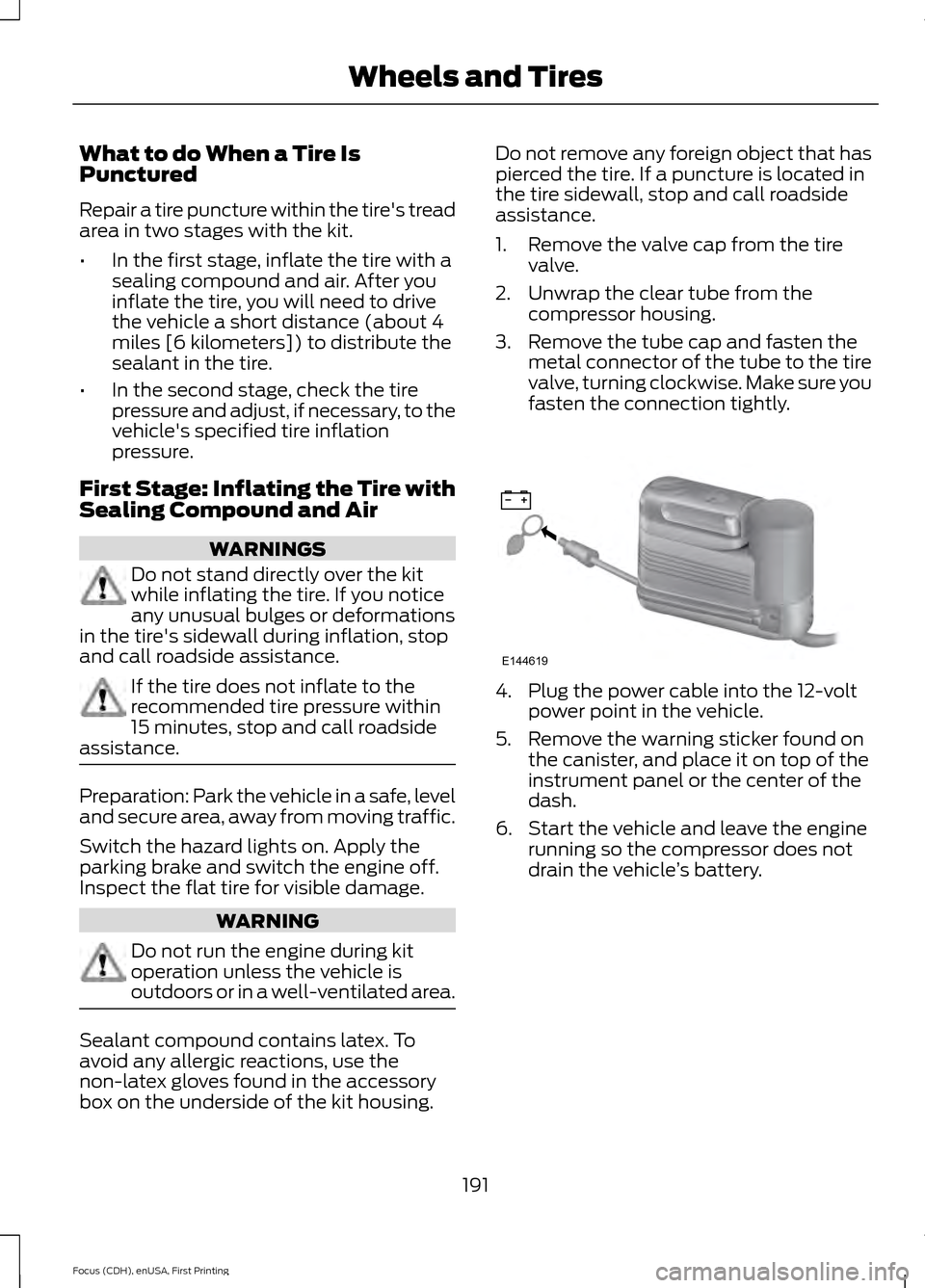
2. Unwrap the clear tube from the compressor housing.
3. Remove the tube cap and fasten the metal connector of the tube to the tire
valve, turning clockwise. Make sure you
fasten the connection tightly. 4. Plug the power cable into the 12-volt
power point in the vehicle.
5. Remove the warning sticker found on the canister, and place it on top of the
instrument panel or the center of the
dash.
6. Start the vehicle and leave the engine running so the compressor does not
drain the vehicle ’s battery.
191
Focus (CDH), enUSA, First Printing Wheels and TiresE144619
Page 200 of 369
Preparation: Park the vehicle in a safe, level
and secure area, away from moving traffic.
Switch the hazard lights on. Apply the
parking brake and switch the engine off.
Inspect the flat tire for visible damage.
Sealant compound contains latex. Use
appropriate precautions to avoid any
allergic reactions.
Do not remove any foreign object that has
pierced the tire. If a puncture is located in
the tire sidewall, stop and call roadside
assistance.
1. Remove the valve cap from the tire
valve.
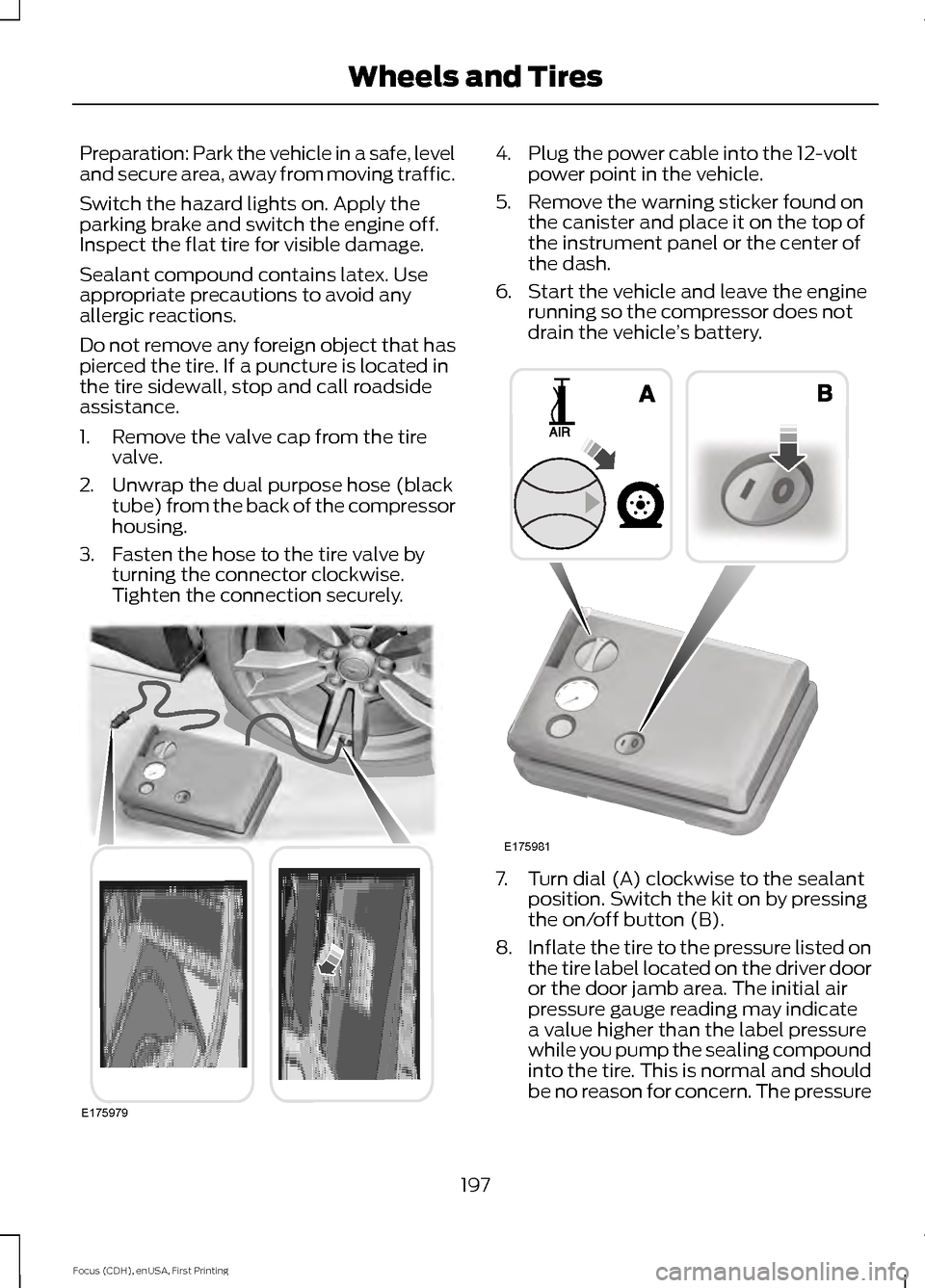
2. Unwrap the dual purpose hose (black tube) from the back of the compressor
housing.
3. Fasten the hose to the tire valve by turning the connector clockwise.
Tighten the connection securely. 4. Plug the power cable into the 12-volt
power point in the vehicle.
5. Remove the warning sticker found on the canister and place it on the top of
the instrument panel or the center of
the dash.
6. Start the vehicle and leave the engine running so the compressor does not
drain the vehicle ’s battery. 7. Turn dial (A) clockwise to the sealant
position. Switch the kit on by pressing
the on/off button (B).
8. Inflate the tire to the pressure listed on
the tire label located on the driver door
or the door jamb area. The initial air
pressure gauge reading may indicate
a value higher than the label pressure
while you pump the sealing compound
into the tire. This is normal and should
be no reason for concern. The pressure
197
Focus (CDH), enUSA, First Printing Wheels and TiresE175979 E175981
Page 226 of 369
VEHICLE IDENTIFICATION
NUMBER
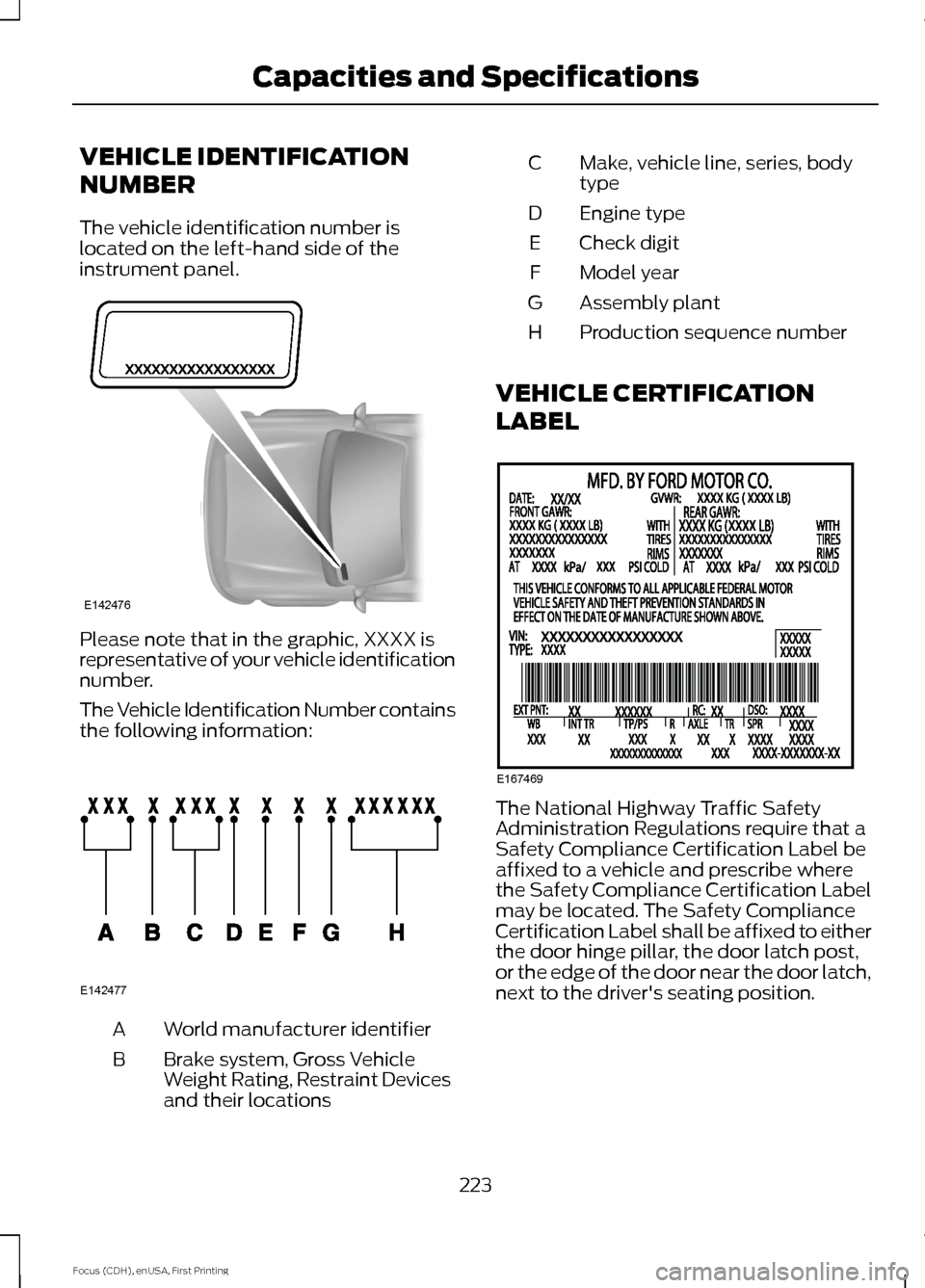
The vehicle identification number is
located on the left-hand side of the
instrument panel.
Please note that in the graphic, XXXX is
representative of your vehicle identification
number.
The Vehicle Identification Number contains
the following information:
World manufacturer identifier
A
Brake system, Gross Vehicle
Weight Rating, Restraint Devices
and their locations
B Make, vehicle line, series, body
type
C
Engine type
D
Check digit
E
Model year
F
Assembly plant
G
Production sequence number
H
VEHICLE CERTIFICATION
LABEL The National Highway Traffic Safety
Administration Regulations require that a
Safety Compliance Certification Label be
affixed to a vehicle and prescribe where
the Safety Compliance Certification Label
may be located. The Safety Compliance
Certification Label shall be affixed to either
the door hinge pillar, the door latch post,
or the edge of the door near the door latch,
next to the driver's seating position.
223
Focus (CDH), enUSA, First Printing Capacities and SpecificationsE142476 E142477 E167469
Page 305 of 369
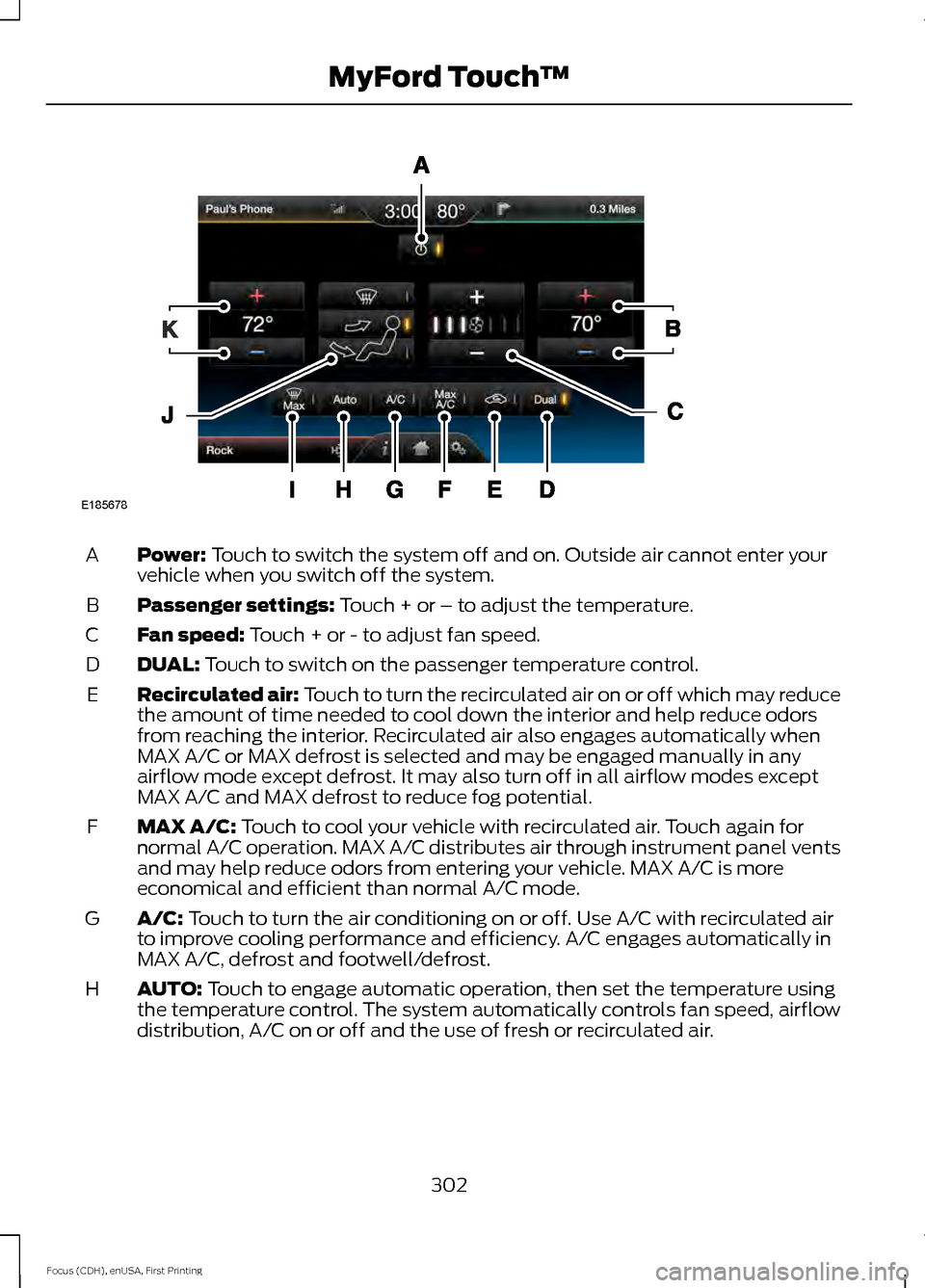
Power: Touch to switch the system off and on. Outside air cannot enter your
vehicle when you switch off the system.
A
Passenger settings:
Touch + or – to adjust the temperature.
B
Fan speed:
Touch + or - to adjust fan speed.
C
DUAL:
Touch to switch on the passenger temperature control.
D
Recirculated air: Touch to turn the recirculated air on or off which may reduce
the amount of time needed to cool down the interior and help reduce odors
from reaching the interior. Recirculated air also engages automatically when
MAX A/C or MAX defrost is selected and may be engaged manually in any
airflow mode except defrost. It may also turn off in all airflow modes except
MAX A/C and MAX defrost to reduce fog potential.
E
MAX A/C:
Touch to cool your vehicle with recirculated air. Touch again for
normal A/C operation. MAX A/C distributes air through instrument panel vents
and may help reduce odors from entering your vehicle. MAX A/C is more
economical and efficient than normal A/C mode.
F
A/C:
Touch to turn the air conditioning on or off. Use A/C with recirculated air
to improve cooling performance and efficiency. A/C engages automatically in
MAX A/C, defrost and footwell/defrost.
G
AUTO:
Touch to engage automatic operation, then set the temperature using
the temperature control. The system automatically controls fan speed, airflow
distribution, A/C on or off and the use of fresh or recirculated air.
H
302
Focus (CDH), enUSA, First Printing MyFord Touch
™E185678
Page 306 of 369
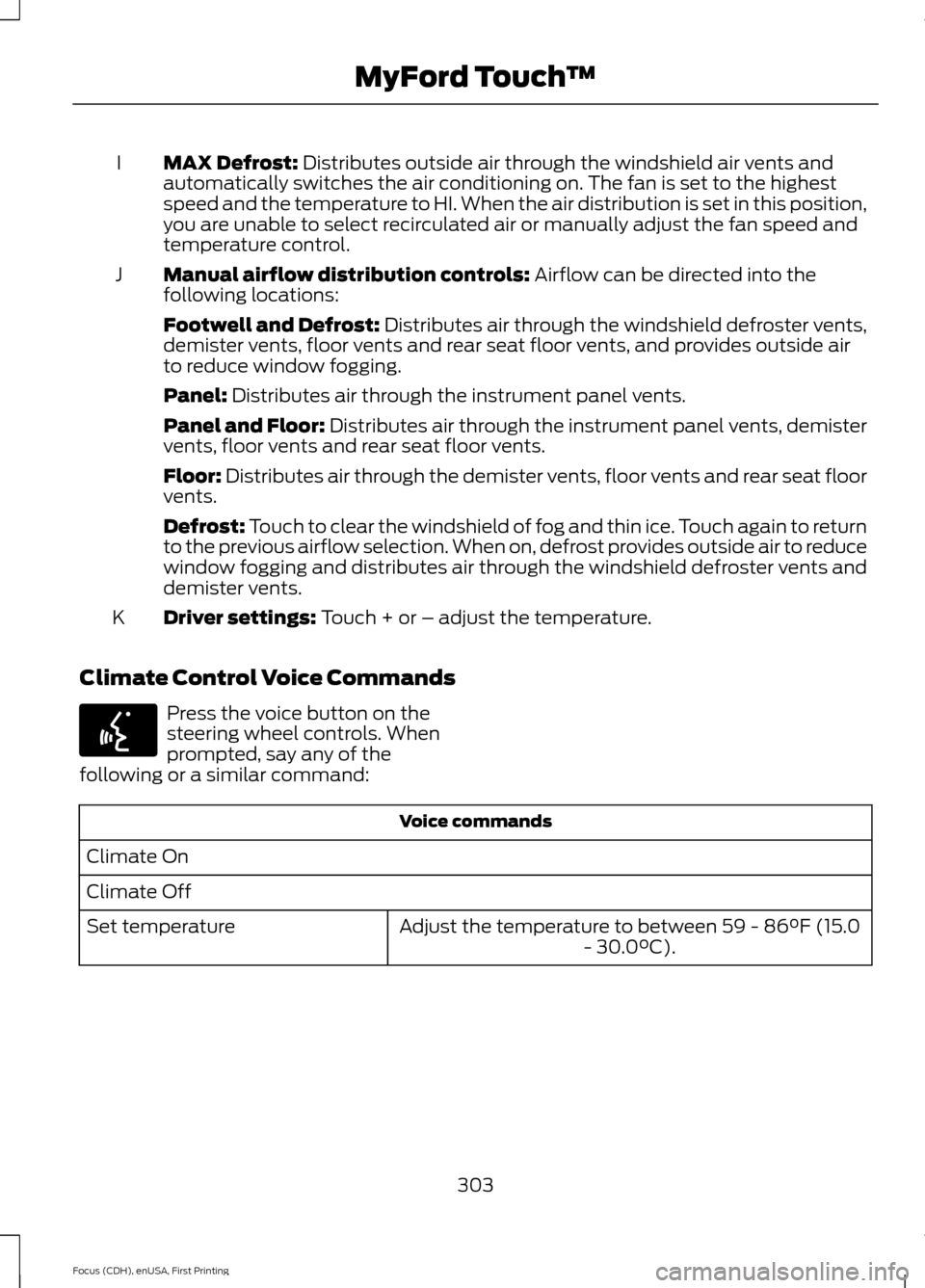
MAX Defrost: Distributes outside air through the windshield air vents and
automatically switches the air conditioning on. The fan is set to the highest
speed and the temperature to HI. When the air distribution is set in this position,
you are unable to select recirculated air or manually adjust the fan speed and
temperature control.
I
Manual airflow distribution controls:
Airflow can be directed into the
following locations:
J
Footwell and Defrost: Distributes air through the windshield defroster vents,
demister vents, floor vents and rear seat floor vents, and provides outside air
to reduce window fogging.
Panel:
Distributes air through the instrument panel vents.
Panel and Floor:
Distributes air through the instrument panel vents, demister
vents, floor vents and rear seat floor vents.
Floor:
Distributes air through the demister vents, floor vents and rear seat floor
vents.
Defrost:
Touch to clear the windshield of fog and thin ice. Touch again to return
to the previous airflow selection. When on, defrost provides outside air to reduce
window fogging and distributes air through the windshield defroster vents and
demister vents.
Driver settings:
Touch + or – adjust the temperature.
K
Climate Control Voice Commands Press the voice button on the
steering wheel controls. When
prompted, say any of the
following or a similar command: Voice commands
Climate On
Climate Off Adjust the temperature to between 59 - 86°F (15.0- 30.0°C).
Set temperature
303
Focus (CDH), enUSA, First Printing MyFord Touch
™E142599
Page 363 of 369
Changing the Wiper Blades......................175
Charging the High Voltage Battery.........115 Charge Port............................................................ 118
Charging.................................................................. 118
Charging Equipment........................................... 115
Convenience Charging and MyFord Mobile................................................................ 120
Disconnecting the Charging Coupler..........120
Locking the Charging Coupler......................... 119
Waiting to Charge................................................ 119
Checking MyKey System Status...............53
Checking the Wiper Blades.......................175
Child Restraint and Safety Belt Maintenance.................................................35
Child Safety
........................................................17
General Information............................................. 17
Child Safety Locks..........................................27 Left-Hand Side..................................................... 28
Right-Hand Side................................................... 28
Child Seat Positioning..................................26
Cleaning Leather Seats..............................185
Cleaning Products
........................................182
Cleaning the Alloy Wheels........................186
Cleaning the Engine.....................................183
Cleaning the Exterior...................................182 Exterior Chrome Parts....................................... 182
Exterior Plastic Parts......................................... 183
Stripes or Graphics............................................. 183
Underbody............................................................ 183
Cleaning the Instrument Panel and Instrument Cluster Lens.........................184
Cleaning the Interior
....................................184
Cleaning the Windows and Wiper Blades............................................................184
Clearing All MyKeys.......................................52
Climate.............................................................301 Climate Control Voice Commands.............303
Climate Control............................................100
Cold Weather Precautions........................145
Collision, Damage or Fire Event..............150 Guidance for Ford Motor Company Electric
and Hybrid-Electric Vehicles Equipped
With High Voltage Batteries...................... 150
Coolant Check.................................................171 Adding Coolant..................................................... 171
Recycled Coolant................................................ 172
Severe Climates................................................... 172
Crash Sensors and Airbag Indicator.......44 Creating a MyKey.............................................51
Programming/Changing Configurable
Settings................................................................ 51
Cruise Control.................................................68 Principle of Operation....................................... 133
Cruise control See: Using Cruise Control................................ 133
Customer Assistance
..................................152
D
Data Recording
..................................................7
Event Data Recording............................................ 7
Service Data Recording......................................... 7
Daytime Running Lamps.............................74 Type 1 - Conventional
(Non-Configurable)........................................ 74
Type 2 - Configurable.......................................... 74
Direction Indicators........................................75
Driver and Passenger Airbags...................38 Children and Airbags.......................................... 38
Proper Driver and Front Passenger Seating Adjustment........................................................ 38
Driver Knee Airbag.........................................42
Driving Aids
.....................................................134
Driving Hints...................................................145
Driving Through Water................................145
DRL See: Daytime Running Lamps......................... 74
E
Electric Vehicle Information.....................278 Power..................................................................... 289
Settings.................................................................. 279
End User License Agreement..................323 SYNC End User License Agreement
(EULA).............................................................. 323
Engine Immobilizer See: Passive Anti-Theft System..................... 64
360
Focus (CDH), enUSA, First Printing Index
Page 365 of 369
I
In California (U.S. Only)..............................153
Information Display Control......................68
Multimedia Controls........................................... 69
Information Displays
....................................86
General Information........................................... 86
Information....................................................292 911 Assist............................................................... 298
Alerts....................................................................... 297
Calendar............................................................... 298
Sirius Travel Link................................................ 296
SYNC Services (If Equipped, United States Only).................................................................. 292
Vehicle Health Report..................................... 300
Information Messages
..................................92
AdvanceTrac®....................................................... 93
Alarm........................................................................\
93
Battery and Charging System (High Voltage).............................................................. 93
Doors........................................................................\
95
Hill Start Assist..................................................... 95
Keys and Intelligent Access.............................. 95
Lighting.................................................................... 96
Maintenance.......................................................... 96
MyKey....................................................................... 96
Park Aid.................................................................... 97
Park Brake............................................................... 97
Power Steering..................................................... 98
Remote Start......................................................... 98
Tire Pressure Monitoring System................... 98
Transmission......................................................... 99
Installing Child Seats
.....................................18
Child Seats............................................................... 18
Using Lap and Shoulder Belts.......................... 19
Using Lower Anchors and Tethers for Children (LATCH)............................................. 21
Using Tether Straps............................................. 23
Instrument Cluster
.........................................81
Instrument Lighting Dimmer......................74
Instrument Panel Overview.........................15
Interior Lamps..................................................75
Front Interior Lamps (If Equipped)................75
Interior Mirror
....................................................79
Introduction........................................................5 J
Jump Starting the Vehicle
.........................148
To Connect the Booster Cables.................... 149
To Start Your Vehicle......................................... 149
K
Keyless Entry....................................................62 SECURICODE™ KEYLESS ENTRY
KEYPAD............................................................... 62
Keys and Remote Controls........................46
L
Lighting Control
...............................................72
Headlamp Flasher................................................ 73
High Beams............................................................. 72
Lighting...............................................................72 General Information............................................ 72
Load Carrying
.................................................135
Load Limit........................................................135
Vehicle Loading - with and without a
Trailer.................................................................. 135
Locking and Unlocking
.................................57
Activating Intelligent Access........................... 58
Autolock Feature.................................................. 59
Autounlock Feature............................................ 60
Battery Saver.......................................................... 61
Disabled Intelligent Access Keys.................... 59
Enabling or Disabling Autolock and Autounlock........................................................ 60
Illuminated Entry................................................. 60
Illuminated Exit..................................................... 60
Opening the Liftgate............................................ 61
Power Door Locks................................................. 57
Remote Control..................................................... 57
Smart Unlocks for Intelligent Access Keys...................................................................... 59
Locks...................................................................57
Lug Nuts See: Changing a Road Wheel....................... 220
Lug Nuts
...........................................................221
M
Maintenance..................................................169 General Information.......................................... 169
362
Focus (CDH), enUSA, First Printing Index