2015 FORD FOCUS ELECTRIC reset
[x] Cancel search: resetPage 97 of 369
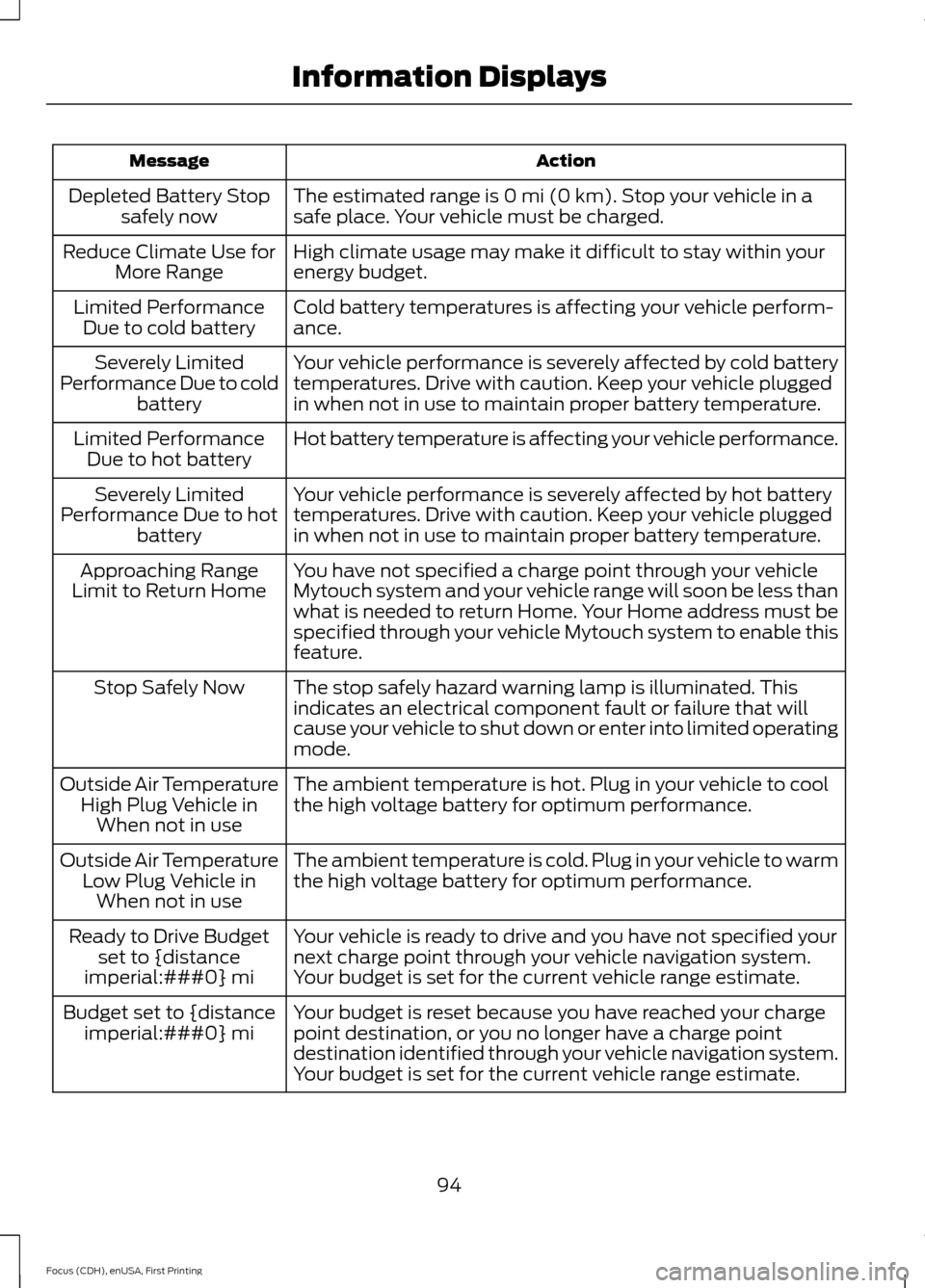
Action
Message
The estimated range is 0 mi (0 km). Stop your vehicle in a
safe place. Your vehicle must be charged.
Depleted Battery Stop
safely now
High climate usage may make it difficult to stay within your
energy budget.
Reduce Climate Use for
More Range
Cold battery temperatures is affecting your vehicle perform-
ance.
Limited Performance
Due to cold battery
Your vehicle performance is severely affected by cold battery
temperatures. Drive with caution. Keep your vehicle plugged
in when not in use to maintain proper battery temperature.
Severely Limited
Performance Due to cold battery
Hot battery temperature is affecting your vehicle performance.
Limited Performance
Due to hot battery
Your vehicle performance is severely affected by hot battery
temperatures. Drive with caution. Keep your vehicle plugged
in when not in use to maintain proper battery temperature.
Severely Limited
Performance Due to hot battery
You have not specified a charge point through your vehicle
Mytouch system and your vehicle range will soon be less than
what is needed to return Home. Your Home address must be
specified through your vehicle Mytouch system to enable this
feature.
Approaching Range
Limit to Return Home
The stop safely hazard warning lamp is illuminated. This
indicates an electrical component fault or failure that will
cause your vehicle to shut down or enter into limited operating
mode.
Stop Safely Now
The ambient temperature is hot. Plug in your vehicle to cool
the high voltage battery for optimum performance.
Outside Air Temperature
High Plug Vehicle inWhen not in use
The ambient temperature is cold. Plug in your vehicle to warm
the high voltage battery for optimum performance.
Outside Air Temperature
Low Plug Vehicle inWhen not in use
Your vehicle is ready to drive and you have not specified your
next charge point through your vehicle navigation system.
Your budget is set for the current vehicle range estimate.
Ready to Drive Budget
set to {distance
imperial:###0} mi
Your budget is reset because you have reached your charge
point destination, or you no longer have a charge point
destination identified through your vehicle navigation system.
Your budget is set for the current vehicle range estimate.
Budget set to {distance
imperial:###0} mi
94
Focus (CDH), enUSA, First Printing Information Displays
Page 161 of 369
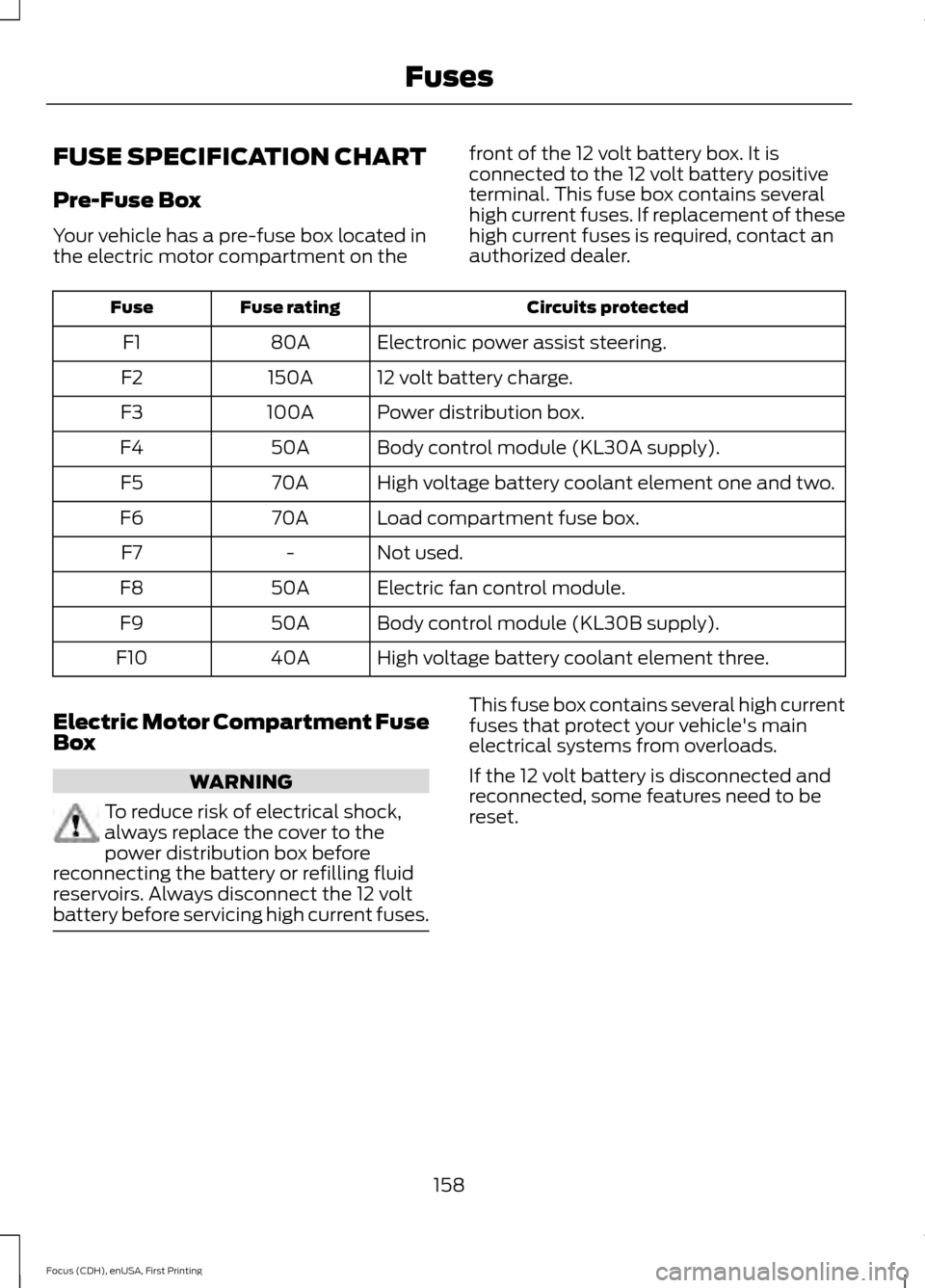
FUSE SPECIFICATION CHART
Pre-Fuse Box
Your vehicle has a pre-fuse box located in
the electric motor compartment on the
front of the 12 volt battery box. It is
connected to the 12 volt battery positive
terminal. This fuse box contains several
high current fuses. If replacement of these
high current fuses is required, contact an
authorized dealer. Circuits protected
Fuse rating
Fuse
Electronic power assist steering.
80A
F1
12 volt battery charge.
150A
F2
Power distribution box.
100A
F3
Body control module (KL30A supply).
50A
F4
High voltage battery coolant element one and two.
70A
F5
Load compartment fuse box.
70A
F6
Not used.
-
F7
Electric fan control module.
50A
F8
Body control module (KL30B supply).
50A
F9
High voltage battery coolant element three.
40A
F10
Electric Motor Compartment Fuse
Box WARNING
To reduce risk of electrical shock,
always replace the cover to the
power distribution box before
reconnecting the battery or refilling fluid
reservoirs. Always disconnect the 12 volt
battery before servicing high current fuses. This fuse box contains several high current
fuses that protect your vehicle's main
electrical systems from overloads.
If the 12 volt battery is disconnected and
reconnected, some features need to be
reset.
158
Focus (CDH), enUSA, First Printing Fuses
Page 177 of 369
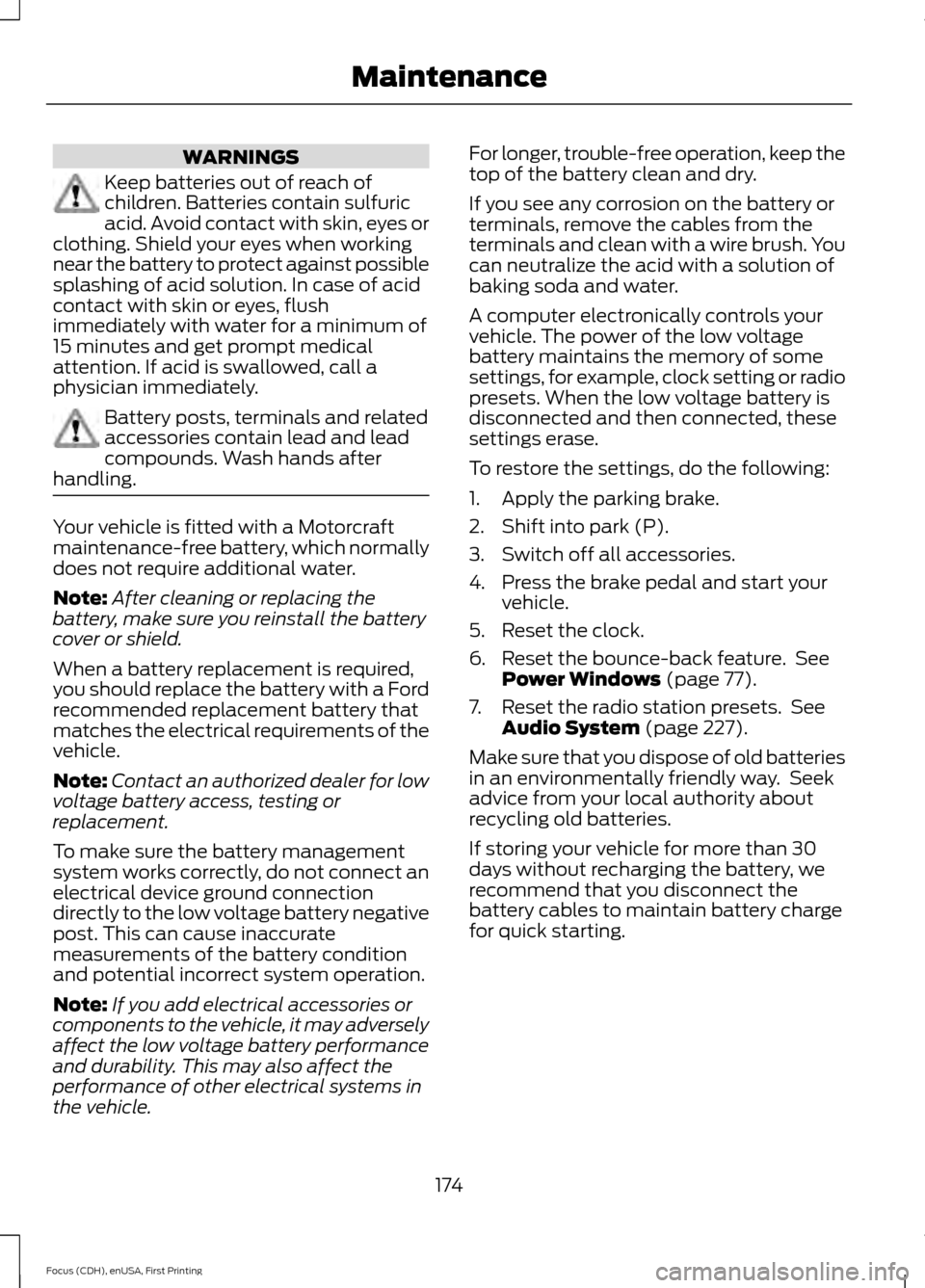
WARNINGS
Keep batteries out of reach of
children. Batteries contain sulfuric
acid. Avoid contact with skin, eyes or
clothing. Shield your eyes when working
near the battery to protect against possible
splashing of acid solution. In case of acid
contact with skin or eyes, flush
immediately with water for a minimum of
15 minutes and get prompt medical
attention. If acid is swallowed, call a
physician immediately. Battery posts, terminals and related
accessories contain lead and lead
compounds. Wash hands after
handling. Your vehicle is fitted with a Motorcraft
maintenance-free battery, which normally
does not require additional water.
Note:
After cleaning or replacing the
battery, make sure you reinstall the battery
cover or shield.
When a battery replacement is required,
you should replace the battery with a Ford
recommended replacement battery that
matches the electrical requirements of the
vehicle.
Note: Contact an authorized dealer for low
voltage battery access, testing or
replacement.
To make sure the battery management
system works correctly, do not connect an
electrical device ground connection
directly to the low voltage battery negative
post. This can cause inaccurate
measurements of the battery condition
and potential incorrect system operation.
Note: If you add electrical accessories or
components to the vehicle, it may adversely
affect the low voltage battery performance
and durability. This may also affect the
performance of other electrical systems in
the vehicle. For longer, trouble-free operation, keep the
top of the battery clean and dry.
If you see any corrosion on the battery or
terminals, remove the cables from the
terminals and clean with a wire brush. You
can neutralize the acid with a solution of
baking soda and water.
A computer electronically controls your
vehicle. The power of the low voltage
battery maintains the memory of some
settings, for example, clock setting or radio
presets. When the low voltage battery is
disconnected and then connected, these
settings erase.
To restore the settings, do the following:
1. Apply the parking brake.
2. Shift into park (P).
3. Switch off all accessories.
4. Press the brake pedal and start your
vehicle.
5. Reset the clock.
6. Reset the bounce-back feature. See Power Windows (page 77).
7. Reset the radio station presets. See Audio System
(page 227).
Make sure that you dispose of old batteries
in an environmentally friendly way. Seek
advice from your local authority about
recycling old batteries.
If storing your vehicle for more than 30
days without recharging the battery, we
recommend that you disconnect the
battery cables to maintain battery charge
for quick starting.
174
Focus (CDH), enUSA, First Printing Maintenance
Page 190 of 369
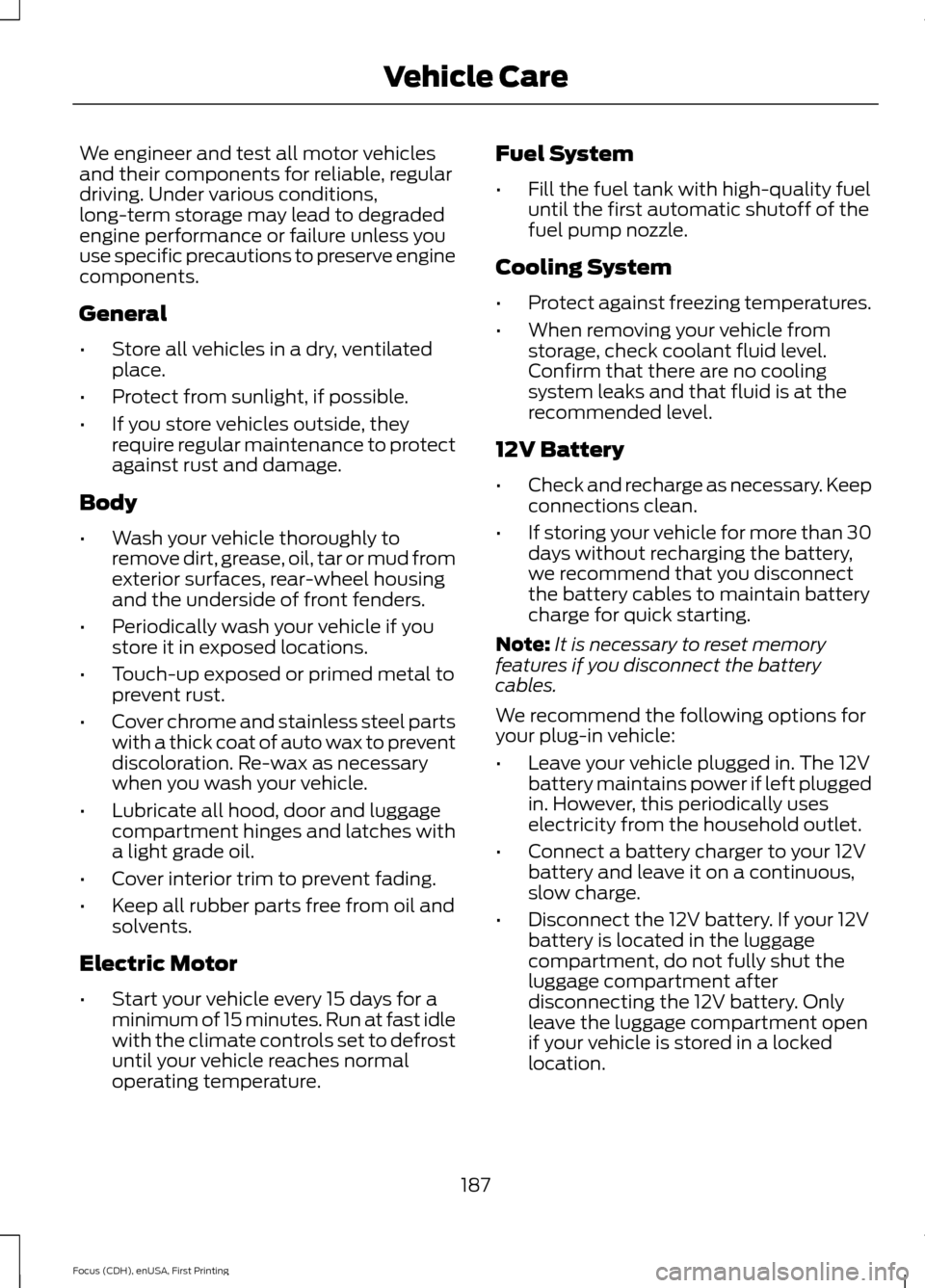
We engineer and test all motor vehicles
and their components for reliable, regular
driving. Under various conditions,
long-term storage may lead to degraded
engine performance or failure unless you
use specific precautions to preserve engine
components.
General
•
Store all vehicles in a dry, ventilated
place.
• Protect from sunlight, if possible.
• If you store vehicles outside, they
require regular maintenance to protect
against rust and damage.
Body
• Wash your vehicle thoroughly to
remove dirt, grease, oil, tar or mud from
exterior surfaces, rear-wheel housing
and the underside of front fenders.
• Periodically wash your vehicle if you
store it in exposed locations.
• Touch-up exposed or primed metal to
prevent rust.
• Cover chrome and stainless steel parts
with a thick coat of auto wax to prevent
discoloration. Re-wax as necessary
when you wash your vehicle.
• Lubricate all hood, door and luggage
compartment hinges and latches with
a light grade oil.
• Cover interior trim to prevent fading.
• Keep all rubber parts free from oil and
solvents.
Electric Motor
• Start your vehicle every 15 days for a
minimum of 15 minutes. Run at fast idle
with the climate controls set to defrost
until your vehicle reaches normal
operating temperature. Fuel System
•
Fill the fuel tank with high-quality fuel
until the first automatic shutoff of the
fuel pump nozzle.
Cooling System
• Protect against freezing temperatures.
• When removing your vehicle from
storage, check coolant fluid level.
Confirm that there are no cooling
system leaks and that fluid is at the
recommended level.
12V Battery
• Check and recharge as necessary. Keep
connections clean.
• If storing your vehicle for more than 30
days without recharging the battery,
we recommend that you disconnect
the battery cables to maintain battery
charge for quick starting.
Note: It is necessary to reset memory
features if you disconnect the battery
cables.
We recommend the following options for
your plug-in vehicle:
• Leave your vehicle plugged in. The 12V
battery maintains power if left plugged
in. However, this periodically uses
electricity from the household outlet.
• Connect a battery charger to your 12V
battery and leave it on a continuous,
slow charge.
• Disconnect the 12V battery. If your 12V
battery is located in the luggage
compartment, do not fully shut the
luggage compartment after
disconnecting the 12V battery. Only
leave the luggage compartment open
if your vehicle is stored in a locked
location.
187
Focus (CDH), enUSA, First Printing Vehicle Care
Page 218 of 369
Tire and Wheel Alignment
A bad jolt from hitting a curb or
pothole can cause the front end
of your vehicle to become
misaligned or cause damage to
your tires. If your vehicle seems to
pull to one side when you are
driving, the wheels may be out of
alignment. Have an authorized
dealer check the wheel alignment
periodically.
Wheel misalignment in the front
or the rear can cause uneven and
rapid treadwear of your tires and
should be corrected by an
authorized dealer. Front-wheel
drive vehicles and those with an
independent rear suspension (if
equipped) may require alignment
of all four wheels.
The tires should also be balanced
periodically. An unbalanced tire
and wheel assembly may result in
irregular tire wear.
Tire Rotation WARNING
If the tire label shows
different tire pressures for the
front and rear tires and the vehicle
is equipped with a tire pressure
monitoring system, then the
settings for the system sensors
need to be updated. Always
perform the system reset
procedure after tire rotation. If the
system is not reset, it may not
provide a low tire pressure
warning when necessary. See Tire
Pressure Monitoring System
(page 216). Note:
If your tires show uneven
wear ask an authorized dealer to
check for and correct any wheel
misalignment, tire imbalance or
mechanical problem involved
before tire rotation.
Note: Your vehicle may be
equipped with a dissimilar spare
wheel and tire assembly. A
dissimilar spare wheel and tire
assembly is defined as a spare
wheel and tire assembly that is
different in brand, size or
appearance from the road tires and
wheels. If you have a dissimilar
spare wheel and tire assembly it is
intended for temporary use only
and should not be used in a tire
rotation.
Note: After having your tires
rotated, inflation pressure must be
checked and adjusted to the
vehicle requirements.
215
Focus (CDH), enUSA, First Printing Wheels and Tires
Page 239 of 369
Speed-restricted Features
Editing the list of wireless networks
Adding or editing wallpaper
Photos and Graphics
Composing text messages
Text Messages
Viewing received text messages
Editing preset text messages
Using the keyboard to enter a destination
Navigation
Demo navigation route
Adding or editing Address Book or Avoid Area entries
Privacy Information
When you connect a cell phone to SYNC,
the system creates a profile within your
vehicle that links to that cell phone. This
profile helps in offering you more cellular
features and operating more efficiently.
Among other things, this profile may
contain data about your cell phone book,
text messages (read and unread), and call
history, including history of calls when your
cell phone was not connected to the
system. In addition, if you connect a media
device, the system creates and retains an
index of supported media content. The
system also records a short development
log of approximately 10 minutes of all
recent system activity. The log profile and
other system data may be used to improve
the system and help diagnose any
problems that may occur. The cellular profile, media device index,
and development log remain in your
vehicle unless you delete them, and are
generally accessible only in your vehicle
when your cell phone or media player is
connected. If you no longer plan to use the
system or your vehicle, we recommend you
carry out a Master Reset to erase all stored
information.
System data cannot be accessed without
special equipment and access to your
vehicle's SYNC module. Ford Motor
Company and Ford of Canada do not
access the system data for any purpose
other than as described without consent,
a court order, or where required by law
enforcement, other government
authorities, or other third parties acting
with lawful authority. Other parties may
seek to access the information
independently of Ford Motor Company and
Ford of Canada. For further privacy
information, see the sections on 911
Assist®, Vehicle Health Report, and Traffic,
Directions and Information.
236
Focus (CDH), enUSA, First Printing MyFord Touch
™
Page 240 of 369
Accessing and Adjusting Modes Through Your Right Vehicle Information
Display
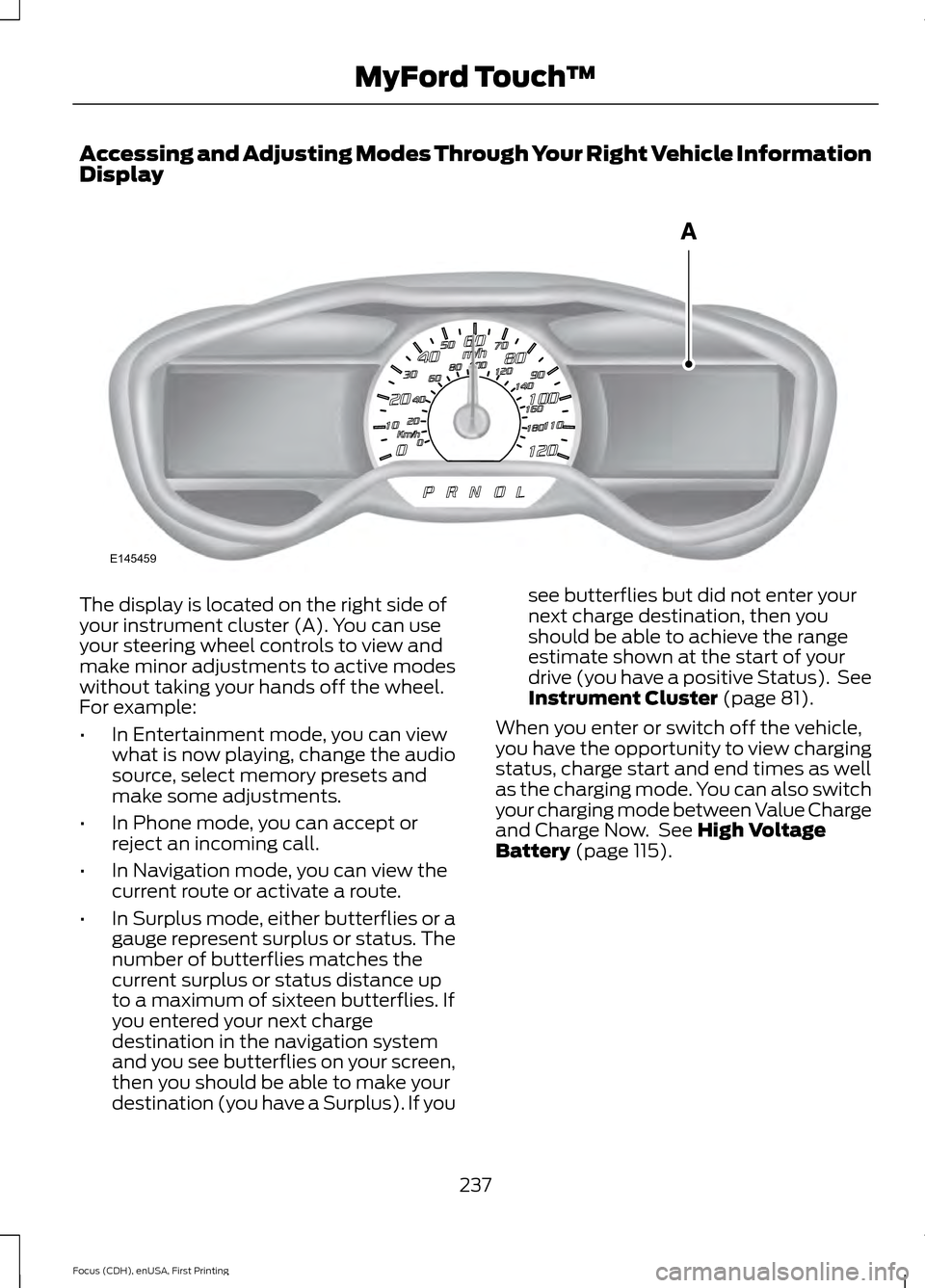
The display is located on the right side of
your instrument cluster (A). You can use
your steering wheel controls to view and
make minor adjustments to active modes
without taking your hands off the wheel.
For example:
•
In Entertainment mode, you can view
what is now playing, change the audio
source, select memory presets and
make some adjustments.
• In Phone mode, you can accept or
reject an incoming call.
• In Navigation mode, you can view the
current route or activate a route.
• In Surplus mode, either butterflies or a
gauge represent surplus or status. The
number of butterflies matches the
current surplus or status distance up
to a maximum of sixteen butterflies. If
you entered your next charge
destination in the navigation system
and you see butterflies on your screen,
then you should be able to make your
destination (you have a Surplus). If you see butterflies but did not enter your
next charge destination, then you
should be able to achieve the range
estimate shown at the start of your
drive (you have a positive Status). See
Instrument Cluster (page 81).
When you enter or switch off the vehicle,
you have the opportunity to view charging
status, charge start and end times as well
as the charging mode. You can also switch
your charging mode between Value Charge
and Charge Now. See
High Voltage
Battery (page 115).
237
Focus (CDH), enUSA, First Printing MyFord Touch
™E145459
Page 248 of 369
Camera Settings This menu allows you to access
settings for your rear view
camera.
To make adjustments using the touchscreen, select: Action and Description
Menu Item
Press the settings icon.
Settings
Vehicle
Camera Settings
Then select from the following:
Enhanced Park Aids
Rear Camera Delay
You can find more information on the rear view camera system in another chapter. See
Parking Aids (page 129).
Enable Valet Mode Valet mode allows you to lock
the system. No information is
accessible until the system is
unlocked with the correct PIN. Note:
If the system locks, and you need to
reset the PIN, enter 3681 and the system
unlocks.
To make adjustments using the touchscreen, select: Action and Description
Menu Item
Press the settings icon.
Settings
Vehicle
Then enter a four digit PIN twice, as prompted.
Enable Valet Mode
After you press Continue the system locks until you enter the
PIN again.
Continue
Charge Point Light Ring 245
Focus (CDH), enUSA, First Printing MyFord Touch
™E142607 E142607 E142607