2015 FORD FOCUS ELECTRIC mirror
[x] Cancel search: mirrorPage 133 of 369
Press the parking aid button to switch the
system off. If a fault is present in the
system, a warning message appears in the
information display and does not allow you
to switch the system on.
REAR VIEW CAMERA
WARNINGS
The rear view camera system is a
reverse aid supplement device that
still requires the driver to use it in
conjunction with the interior and exterior
mirrors for maximum coverage. Objects that are close to either
corner of the bumper or under the
bumper, might not be seen on the
screen due to the limited coverage of the
camera system. Back up as slow as possible since
higher speeds might limit your
reaction time to stop your vehicle.
Use caution when using the rear
video camera and the luggage
compartment door is ajar. If the
luggage compartment door is ajar, the
camera will be out of position and the
video image may be incorrect. All
guidelines disappear when the luggage
compartment door is ajar. Use caution when turning camera
features on or off. Make sure your
vehicle is not moving.
The rear view camera system provides a
video image of the area behind your
vehicle.
During operation, lines appear in the
display which represent your vehicle
’s path
and proximity to objects behind your
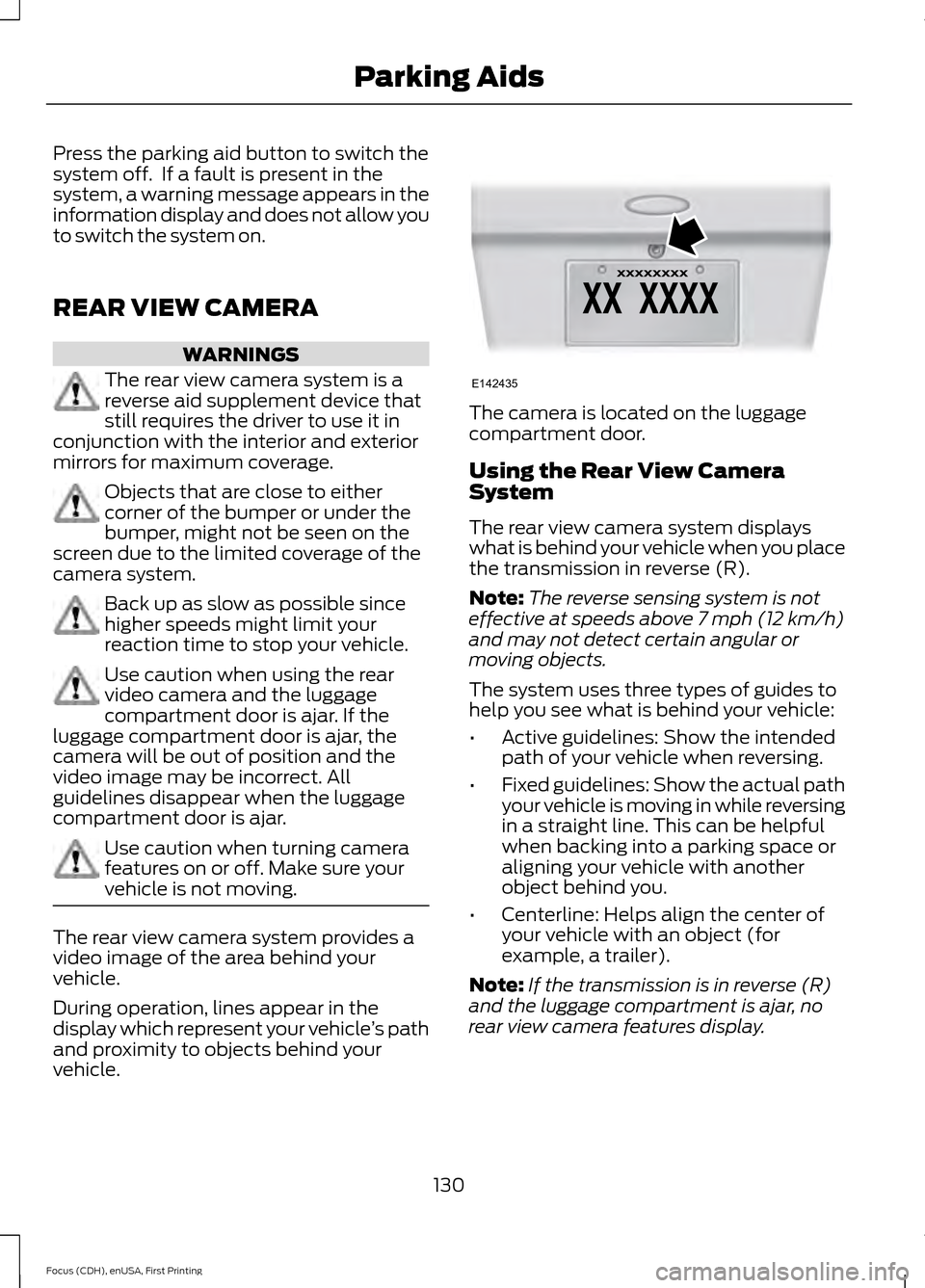
vehicle. The camera is located on the luggage
compartment door.
Using the Rear View Camera
System
The rear view camera system displays
what is behind your vehicle when you place
the transmission in reverse (R).
Note:
The reverse sensing system is not
effective at speeds above 7 mph (12 km/h)
and may not detect certain angular or
moving objects.
The system uses three types of guides to
help you see what is behind your vehicle:
• Active guidelines: Show the intended
path of your vehicle when reversing.
• Fixed guidelines: Show the actual path
your vehicle is moving in while reversing
in a straight line. This can be helpful
when backing into a parking space or
aligning your vehicle with another
object behind you.
• Centerline: Helps align the center of
your vehicle with an object (for
example, a trailer).
Note: If the transmission is in reverse (R)
and the luggage compartment is ajar, no
rear view camera features display.
130
Focus (CDH), enUSA, First Printing Parking AidsE142435
Page 135 of 369
Always use caution while reversing.
Objects in the red zone are closest to your
vehicle and objects in the green zone are
farther away. Objects are getting closer to
your vehicle as they move from the green
zone to the yellow or red zones. Use the
side view mirrors and rear view mirror to
get better coverage on both sides and rear
of your vehicle.
Manual Zoom
WARNING
When manual zoom is on, the full
area behind your vehicle may not
show. Be aware of your surroundings
when using the manual zoom feature. Note:
Manual zoom is only available when
the transmission is in reverse (R).
Note: When you enable manual zoom, only
the centerline is shown.
Selectable settings for this feature are
Zoom in (+) and Zoom out (-). Press the
symbol in the camera screen to change the
view. The default setting is Zoom OFF.
This allows you to get a closer view of an
object behind your vehicle. The zoomed
image keeps the bumper in the image to
provide a reference. The zoom is only
active while the transmission is in reverse
(R).
Camera System Settings
To access any of the rear view camera
system settings, make the following
selections in the multifunctional display
when the transmission is not in reverse (R):
• With Touch Screen: Settings > Vehicle
> Camera Settings
• Without Touch Screen: Menu > Camera
Settings Enhanced Park Aids or Park Pilot (If
Equipped)
Selectable settings for this feature are ON
and OFF.
The system uses red, yellow and green
highlights that appear on top of the video
image when any of the sensing systems
detect an object.
Rear Camera Delay
Selectable settings for this feature are ON
and OFF.
The default setting for the rear camera
delay is OFF.
When shifting the transmission out of
reverse (R) and into any gear other than
park (P), the camera image remains in the
display until:
•
Your vehicle speed sufficiently
increases.
• You shift your vehicle into park (P).
• 10 seconds of time elapse.
132
Focus (CDH), enUSA, First Printing Parking Aids
Page 168 of 369
Circuits protected
Fuse rating
Fuse
Driver door unlock (ground).
20A
F84
Double locking ground (ground).
Heated seats switch.
7.5A
F85
Restraint system.
10A
F86
Passenger airbag deactivation system.
Not used.
-
F87
Not used.
-
F88
Not used.
-
F89
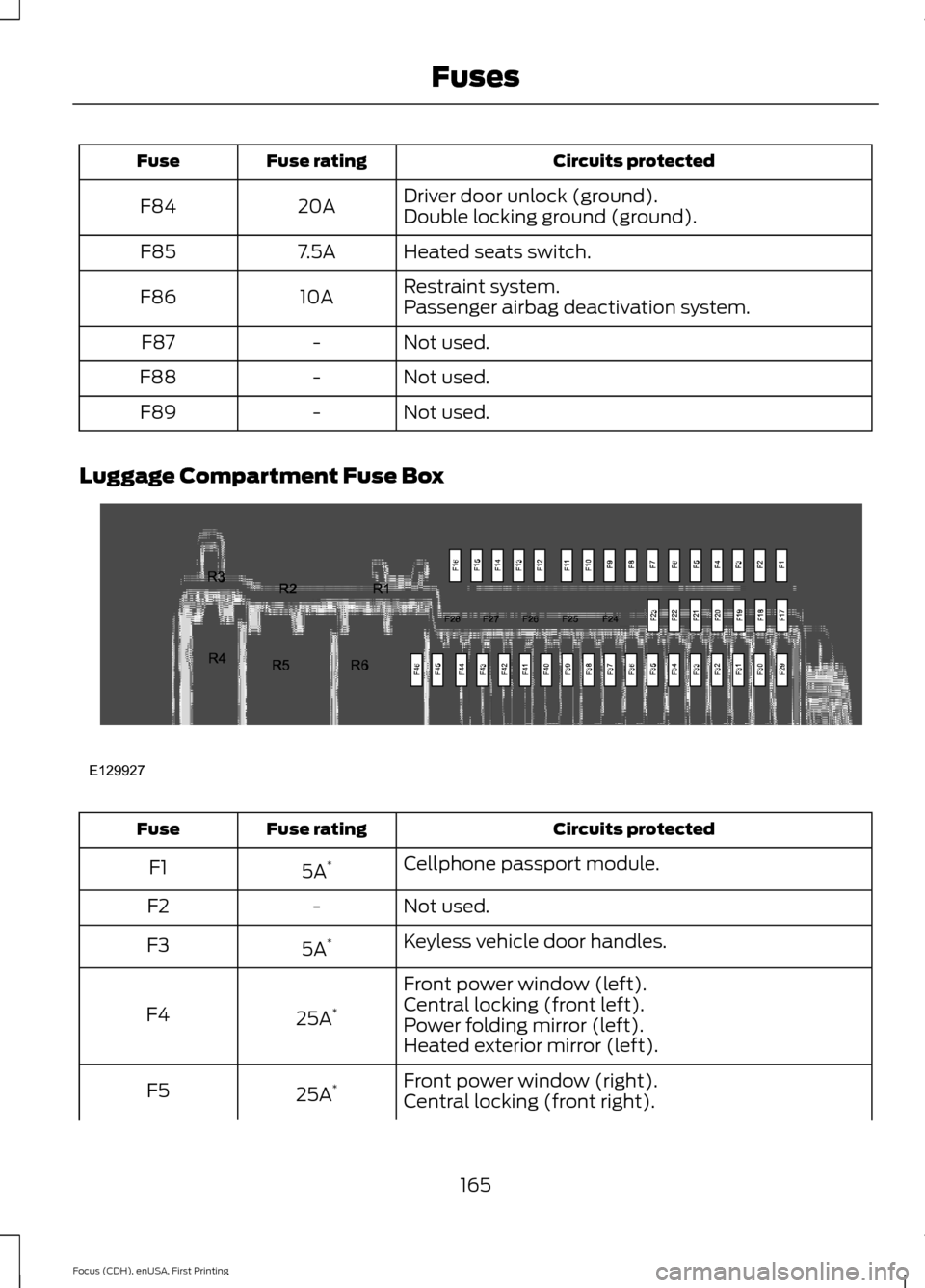
Luggage Compartment Fuse Box Circuits protected
Fuse rating
Fuse
Cellphone passport module.
5A *
F1
Not used.
-
F2
Keyless vehicle door handles.
5A *
F3
Front power window (left).
25A *
F4 Central locking (front left).
Power folding mirror (left).
Heated exterior mirror (left).
Front power window (right).
25A *
F5
Central locking (front right).
165
Focus (CDH), enUSA, First Printing FusesE129927
Page 169 of 369
Circuits protected
Fuse rating
Fuse
Power folding mirror (right).
Heated exterior mirror (right).
Rear left door module (KL30 supply).
25A *
F6
Rear right door module (KL30 supply).
25A *
F7
Ignition relay.
5A *
F8
Driver power seat.
25A *
F9
Heated rear window.
25A *
F10
High voltage battery (12V B+).
5A *
F11
Not used.
-
F12
Not used.
-
F13
Not used.
-
F14
Not used.
-
F15
Not used.
-
F16
Not used.
-
F17
Not used.
-
F18
Not used.
-
F19
Not used.
-
F20
Not used.
-
F21
Not used.
-
F22
Not used.
-
F23
Not used.
-
F24
Not used.
-
F25
Not used.
-
F26
Not used.
-
F27
Not used.
-
F28
High voltage battery (12V B+).
5A *
F29
166
Focus (CDH), enUSA, First Printing Fuses
Page 186 of 369
Note:
Never use abrasive materials, for
example steel wool or plastic pads as they
can scratch the chrome surface.
Note: Do not use chrome cleaner, metal
cleaner or polish on wheels or wheel covers.
Exterior Plastic Parts
For routine cleaning we recommend
Motorcraft Detail Wash. If tar or grease
spots are present, we recommend
Motorcraft Bug and Tar Remover.
Stripes or Graphics (If Equipped)
Do not use a commercial or high-pressure
sprayer on the surface or edge of stripes
and graphics. This can damage them and
cause the edges to peel away from the
vehicle surface.
Underbody
Flush the complete underside of your
vehicle frequently. Keep body and door
drain holes free of debris or foreign
material.
WAXING
Regular waxing is necessary to protect your
car's paint from the elements. We
recommend that you wash and wax the
painted surface once or twice a year.
When washing and waxing, park your
vehicle in a shaded area out of direct
sunlight. Always wash your vehicle before
applying wax.
• Use a quality wax that does not contain
abrasives.
• Follow the manufacturer ’s instructions
to apply and remove the wax.
• Apply a small amount of wax in a
back-and-forth motion, not in circles. •
Do not allow wax to come in contact
with any non-body (low-gloss black)
colored trim. The wax will discolor or
stain the parts over time.
•Roof racks.
• Bumpers.
• Grained door handles.
• Side moldings.
• Mirror housings.
• Windshield cowl area.
• Do not apply wax to glass areas.
• After waxing, your car's paint should
feel smooth, and be free of streaks and
smudges.
CLEANING THE ENGINE
Engines are more efficient when they are
clean because grease and dirt buildup keep
the engine warmer than normal.
When washing:
• Take care when using a power washer
to clean the engine. The high-pressure
fluid could penetrate the sealed parts
and cause damage.
• Do not spray a hot engine with cold
water to avoid cracking the engine
block or other engine components.
• Spray Motorcraft Engine Shampoo and
Degreaser on all parts that require
cleaning and pressure rinse clean. In
Canada, use Motorcraft Engine
Shampoo.
• Never wash or rinse the engine while it
is hot or running; water in the running
engine may cause internal damage.
183
Focus (CDH), enUSA, First Printing Vehicle Care
Page 364 of 369
Entertainment..............................................254
AM/FM Radio...................................................... 255
Bluetooth Audio................................................. 269
CD........................................................................\
.... 265
Line In..................................................................... 269
SD Card Slot and USB Port........................... 266
SIRIUS® Satellite Radio (If Activated)....................................................... 260
Supported Media Players, Formats and Metadata Information................................ 269
Environment.......................................................11
Event Data Recording See: Data Recording............................................... 7
Extended Service Plan (ESP).................345 SERVICE PLANS (CANADA ONLY)............346
SERVICE PLANS (U.S. Only)......................... 345
Exterior Mirrors
................................................78
Fold-Away Exterior Mirrors............................... 78
Heated Exterior Mirrors...................................... 79
Integrated Blind Spot Mirrors........................... 79
Power Exterior Mirrors........................................ 78
F
Fastening the Safety Belts
.........................30
Safety Belt Extension Assembly..................... 32
Safety Belt Locking Modes................................ 31
Using Safety Belts During Pregnancy...........30
Flat Tire Inflation See: Temporary Mobility Kit........................... 189
Floor Mats
........................................................145
Ford Credit...........................................................9
(U.S. Only)................................................................. 9
Front Exterior Overview.................................12
Front Passenger Sensing System............39
Fuses.................................................................158
Fuse Specification Chart...........................158 Electric Motor Compartment Fuse
Box...................................................................... 158
Luggage Compartment Fuse Box................165
Passenger Compartment Fuse Box............163
Pre-Fuse Box........................................................ 158
G
Gauges................................................................81 Common Displays................................................. 81General Information on Radio
Frequencies...................................................46
General Maintenance Information........347 Multi-point Inspection..................................... 349
Owner Checks and Services......................... 348
Protecting Your Investment........................... 347
Why Maintain Your Vehicle?.......................... 347
Why Maintain Your Vehicle at Your Dealership?..................................................... 347
Getting Assistance Outside the U.S. and Canada..........................................................155
Getting the Services You Need
................152
Away From Home............................................... 152
H
Handbrake See: Parking Brake.............................................. 125
Hazard Warning Flashers..........................148
Headlamp Exit Delay.....................................74
Head Restraints............................................104 Adjusting the Head Restraint......................... 105
Tilting Head Restraints .................................... 105
Heated Seats.................................................109
Heated Windows and Mirrors..................102 Heated Exterior Mirrors.................................... 103
Heated Rear Window........................................ 102
Heating See: Climate Control........................................ 100
High Voltage Battery Cut-Off Switch
............................................................120
High Voltage Battery....................................115 General Information........................................... 115
Hill Start Assist
..............................................125
Using Hill Start Assist....................................... 126
Hints on Controlling the Interior Climate...........................................................101
General Hints........................................................ 101
Improving Vehicle Drive Range...................... 102
Recommended Settings for Cooling...........102
Side Window Defogging in Cold Weather............................................................. 102
Hints on Driving With Anti-Lock Brakes.............................................................125
Hood Lock See: Opening and Closing the Hood...........169
361
Focus (CDH), enUSA, First Printing Index
Page 365 of 369
I
In California (U.S. Only)..............................153
Information Display Control......................68
Multimedia Controls........................................... 69
Information Displays
....................................86
General Information........................................... 86
Information....................................................292 911 Assist............................................................... 298
Alerts....................................................................... 297
Calendar............................................................... 298
Sirius Travel Link................................................ 296
SYNC Services (If Equipped, United States Only).................................................................. 292
Vehicle Health Report..................................... 300
Information Messages
..................................92
AdvanceTrac®....................................................... 93
Alarm........................................................................\
93
Battery and Charging System (High Voltage).............................................................. 93
Doors........................................................................\
95
Hill Start Assist..................................................... 95
Keys and Intelligent Access.............................. 95
Lighting.................................................................... 96
Maintenance.......................................................... 96
MyKey....................................................................... 96
Park Aid.................................................................... 97
Park Brake............................................................... 97
Power Steering..................................................... 98
Remote Start......................................................... 98
Tire Pressure Monitoring System................... 98
Transmission......................................................... 99
Installing Child Seats
.....................................18
Child Seats............................................................... 18
Using Lap and Shoulder Belts.......................... 19
Using Lower Anchors and Tethers for Children (LATCH)............................................. 21
Using Tether Straps............................................. 23
Instrument Cluster
.........................................81
Instrument Lighting Dimmer......................74
Instrument Panel Overview.........................15
Interior Lamps..................................................75
Front Interior Lamps (If Equipped)................75
Interior Mirror
....................................................79
Introduction........................................................5 J
Jump Starting the Vehicle
.........................148
To Connect the Booster Cables.................... 149
To Start Your Vehicle......................................... 149
K
Keyless Entry....................................................62 SECURICODE™ KEYLESS ENTRY
KEYPAD............................................................... 62
Keys and Remote Controls........................46
L
Lighting Control
...............................................72
Headlamp Flasher................................................ 73
High Beams............................................................. 72
Lighting...............................................................72 General Information............................................ 72
Load Carrying
.................................................135
Load Limit........................................................135
Vehicle Loading - with and without a
Trailer.................................................................. 135
Locking and Unlocking
.................................57
Activating Intelligent Access........................... 58
Autolock Feature.................................................. 59
Autounlock Feature............................................ 60
Battery Saver.......................................................... 61
Disabled Intelligent Access Keys.................... 59
Enabling or Disabling Autolock and Autounlock........................................................ 60
Illuminated Entry................................................. 60
Illuminated Exit..................................................... 60
Opening the Liftgate............................................ 61
Power Door Locks................................................. 57
Remote Control..................................................... 57
Smart Unlocks for Intelligent Access Keys...................................................................... 59
Locks...................................................................57
Lug Nuts See: Changing a Road Wheel....................... 220
Lug Nuts
...........................................................221
M
Maintenance..................................................169 General Information.......................................... 169
362
Focus (CDH), enUSA, First Printing Index
Page 366 of 369
Manual Liftgate................................................61
Closing the Liftgate............................................. 62
Opening the Liftgate............................................ 61
Manual Seats
.................................................106
Media Hub......................................................230
Message Center See: Information Displays................................. 86
Mirrors See: Heated Windows and Mirrors..............102
See: Windows and Mirrors................................. 77
Mobile Communications Equipment......................................................10
Motorcraft Parts
...........................................222
MyFord Touch ™............................................231
General Information........................................... 231
MyFord Touch ™ Troubleshooting..........314
MyKey Troubleshooting...............................55
MyKey ™
............................................................50
Principle of Operation........................................ 50
N
Navigation......................................................304 cityseekr................................................................ 307
Destination Mode.............................................. 304
Map Mode............................................................... 311
Navigation Map Updates................................. 313
Navigation Voice Commands........................ 313
Point of Interest (POI) Categories..............305
Quick-touch Buttons......................................... 312
Setting Your Navigation Preferences.........308
Normal Scheduled Maintenance
..........350
O
Opening and Closing the Hood...............169
Ordering Additional Owner's Literature......................................................156
Obtaining a French Owner ’s Manual..........156
Overhead Console
..........................................111
P
Parking Aids
....................................................129
Parking Brake.................................................125
Passive Anti-Theft System........................64 SecuriLock.............................................................. 64PATS
See: Passive Anti-Theft System..................... 64
Perchlorate..........................................................9
Personal Safety System ™
..........................36
How Does the Personal Safety System
Work?.................................................................. 36
Phone................................................................271 Making Calls......................................................... 273
Pairing Subsequent Cell Phones.................. 272
Pairing Your Cell Phone for the First Time.................................................................... 272
Phone Menu Options........................................ 274
Phone Settings.................................................... 277
Phone Voice Commands................................ 278
Receiving Calls.................................................... 273
Text Messaging................................................... 275
Post-Crash Alert System
............................151
Power Door Locks See: Locking and Unlocking.............................. 57
Power Seats
...................................................106
Power Lumbar..................................................... 107
Power Windows...............................................77 Accessory Delay.................................................... 78
Bounce-Back
.......................................................... 77
One-Touch Down.................................................. 77
One-Touch Up........................................................ 77
Window Lock.......................................................... 77
Protecting the Environment.........................11
R
Rear Exterior Overview
..................................13
Rear Parking Aid............................................129 Rear Sensing System........................................ 129
Rear Seats.......................................................107 Folding the Seatback........................................ 107
Rear Under Floor Storage
..........................135
Cargo Management System........................... 135
Rear View Camera.......................................130 Using the Rear View Camera System.........130
Rear View Camera See: Rear View Camera................................... 130
Rear Window Wiper and Washers............71 Rear Window Washer.......................................... 71
Rear Window Wiper.............................................. 71
363
Focus (CDH), enUSA, First Printing Index