2015 FORD FLEX window
[x] Cancel search: windowPage 291 of 571
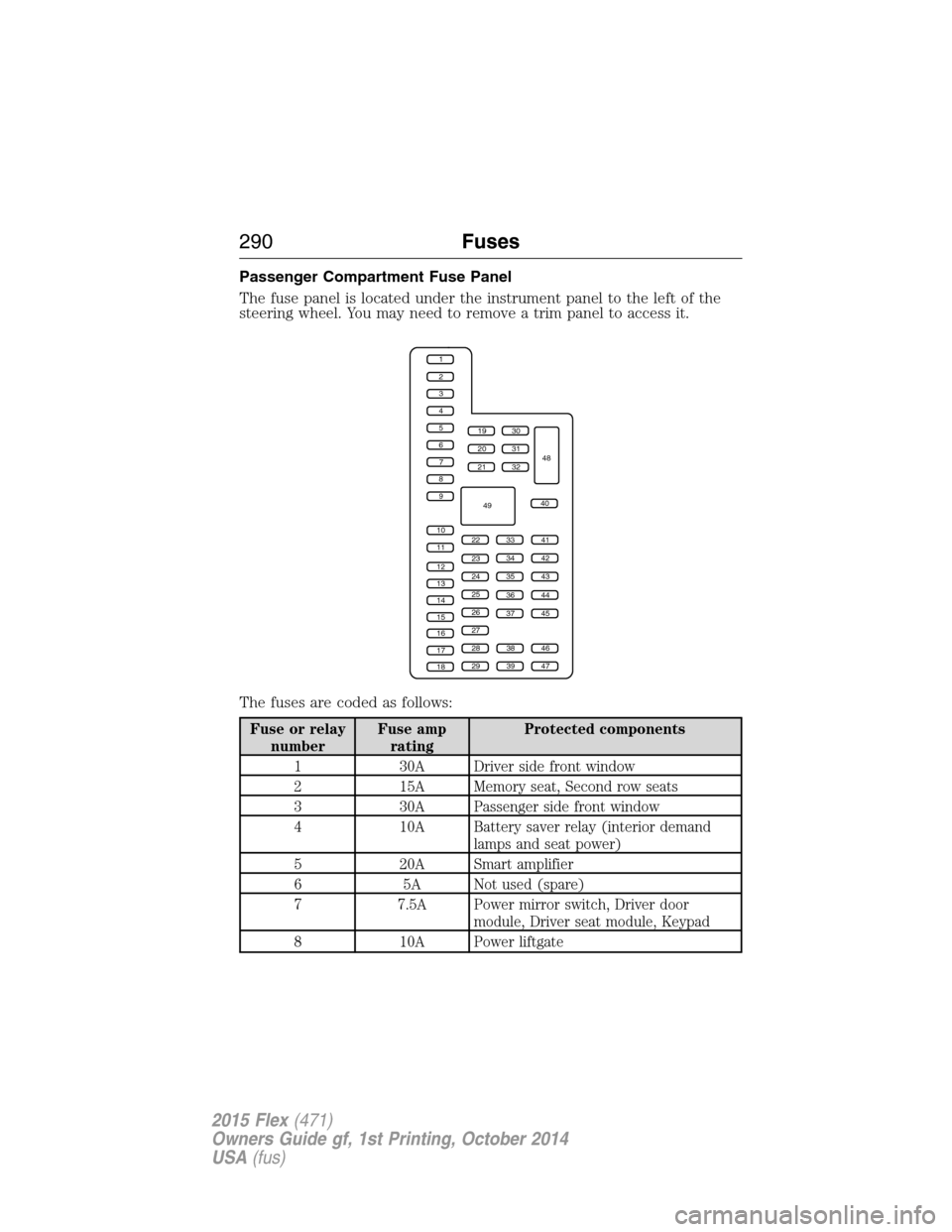
Passenger Compartment Fuse Panel
The fuse panel is located under the instrument panel to the left of the
steering wheel. You may need to remove a trim panel to access it.
The fuses are coded as follows:
Fuse or relay
numberFuse amp
ratingProtected components
1 30A Driver side front window
2 15A Memory seat, Second row seats
3 30A Passenger side front window
4 10A Battery saver relay (interior demand
lamps and seat power)
5 20A Smart amplifier
6 5A Not used (spare)
7 7.5A Power mirror switch, Driver door
module, Driver seat module, Keypad
8 10A Power liftgate
1
2
3
4
5
6
7
8
9
10
11
12
13
14
15
16
17
18
19
20
21
223341
42
43
44
45
34
35
36
37
23
24
25
26
27
283846
394729
32
40
31
30
48
49
290Fuses
2015 Flex(471)
Owners Guide gf, 1st Printing, October 2014
USA(fus)
Page 293 of 571

Fuse or relay
numberFuse amp
ratingProtected components
30 15A Front park lamps, Trailer tow relay for
park lamps, Front side markers
31 5A Trailer tow controller
32 15A Driver window switch and motor, Power
lock switches, Moonroof, 110V AC
power point, Interior rearview mirror
33 10A Not used (spare)
34 10A Blind spot monitor, 2nd row heated
seats, Reverse sensing system, Rearview
camera
35 5A Heads-up display, Climate control
humidity sensor
36 10A Heated steering wheel
37 10A Refrigerator
38 10A Front passenger window switch
39 15A High beam headlamps
40 10A Rear park lamps, License plate lamps
41 7.5A Occupant classification system,
Restraints control module
42 5A Not used (spare)
43 10A Not used (spare)
44 10A Not used (spare)
45 5A Not used (spare)
46 10A Climate control module
47 15A Fog lamps, Fog lamp indicator, Front
turn signals #2
48 30A Circuit
BreakerFront passenger power window, Rear
power windows
49 Delayed
accessory relayBody control module
292Fuses
2015 Flex(471)
Owners Guide gf, 1st Printing, October 2014
USA(fus)
Page 312 of 571

CHECKING THE WIPER BLADES
Run the tip of your fingers over the edge of the blade
to check for roughness.
Clean the wiper blades with washer fluid or water
applied with a soft sponge or cloth.
CHANGING THE WIPER BLADES
1. Pull the wiper arm away from the
vehicle. Turn the blade at an angle
from the wiper arm. Press the lock
tab to release the blade and pull the
wiper blade down toward the
windshield to remove it from the arm.
2. Attach the new wiper to the wiper
arm and press it into place until a
click is heard.
Replace wiper blades at least once per year for optimum performance.
Poor wiper quality can be improved by cleaning the wiper blades and the
windshield.
To prolong the life of the wiper blades, it is highly recommended to
scrape off the ice on the windshield before turning on the wipers. The
layer of ice has many sharp edges and can damage the micro edge of the
wiper rubber element.
Changing rear window wiper blade
To replace the rear wiper blade:
1. Grab the wiper arm with one
hand close to the arm/blade joint
and pull it as far away from the
glass as possible. Do not use
excessive force because it can break
the wiper arm at the heel. Hold it
there until the next step.
Maintenance311
2015 Flex(471)
Owners Guide gf, 1st Printing, October 2014
USA(fus)
Page 324 of 571

•Spray Motorcraft Engine Shampoo and Degreaser on all parts that
require cleaning and pressure rinse clean. In Canada, use Motorcraft
Engine Shampoo.
•Never wash or rinse the engine while it is hot or running; water in the
running engine may cause internal damage.
•Never wash or rinse any ignition coil, spark plug wire or spark plug
well, or the area in and around these locations.
•Cover the battery, power distribution box, and air filter assembly to
prevent water damage when cleaning the engine.
CLEANING THE WINDOWS AND WIPER BLADES
The windows and wiper blades should be cleaned regularly. If the wipers
do not wipe properly, substances on the vehicle’s glass or the wiper
blades may cause squeaking or chatter noise from the blades, and
streaking and smearing of the windshield. To clean these items, follow
these tips:
•The windows may be cleaned with a non-abrasive cleaner such as
Motorcraft® Ultra-Clear Spray Glass Cleaner (U.S.) or Motorcraft
Premium Glass Cleaner (Canada).
•The wiper blades can be cleaned with isopropyl (rubbing) alcohol or
Motorcraft Premium Windshield Washer Concentrates in the U.S., or
Motorcraft Premium Quality Windshield Washer Fluid in Canada.
Replace your wiper blades when they appear worn or do not function
properly.
•Do not use abrasive materials, as they may cause scratches.
•Do not use fuel, kerosene, or paint thinner to clean any parts.
If you cannot remove those streaks after cleaning with the glass cleaner
or if the wipers chatter and move in a jerky motion, clean the outer
surface of the windshield and the wiper blades using a sponge or soft
cloth with a neutral detergent or mild-abrasive cleaning solution. After
cleaning, rinse the windshield and wiper blades with clean water. The
windshield is clean if beads do not form when you rinse the windshield
with water.
Note:Do not use sharp objects, such as a razor blade, to clean the
inside of the rear window or to remove decals, as it may cause damage
to the rear window defroster’s heated grid lines.
Vehicle Care323
2015 Flex(471)
Owners Guide gf, 1st Printing, October 2014
USA(fus)
Page 330 of 571

Removing Vehicle from Storage
When your vehicle is ready to come out of storage, do the following:
•Wash your vehicle to remove any dirt or grease film build-up on
window surfaces.
•Check windshield wipers for any deterioration.
•Check under the hood for any foreign material that may have collected
during storage (mice/squirrel nests).
•Check the exhaust for any foreign material that may have collected
during storage.
•Check tire pressures and set tire inflation per the Tire Label.
•Check brake pedal operation. Drive the vehicle 15 feet (4.5 meters)
back and forth to remove rust build-up.
•Check fluid levels (including coolant, oil and gas) to make sure there
are no leaks and fluids are at recommended levels.
•If the battery was removed, clean the battery cable ends and inspect.
Contact your authorized dealer if you have any concerns or issues.
Vehicle Care329
2015 Flex(471)
Owners Guide gf, 1st Printing, October 2014
USA(fus)
Page 397 of 571

Adjusting the Interaction Level
Push the voice icon; when prompted, say “Voice settings”, then
any of the following:
When you say: The system:
“Interaction mode standard” Provides more detailed interaction and
guidance.
“Interaction mode advanced” Provides less audible interaction and
more tone prompts.
The system defaults to the standard interaction mode.
Confirmation prompts are short questions the system asks when it is not
sure of your request or when there are multiple possible responses to your
request. (For example, the system may ask “Phone, is that correct?”) If
turned off, the system simply makes a best guess as to what you requested
and you may still occasionally be asked to confirm settings.
“Confirmation prompts on”
“Confirmation prompts off”
The system creates candidate lists when it has the same confidence level
of several options based on your voice command. When turned on, you
may be prompted with as many as four possibilities for clarification.
For example, “Say 1 after the tone to call John Doe at home. Say 2 after
the tone to call Johnny Doe on mobile. Say 3 after the tone to call Jane
Doe at home.” Or, “Say 1 after the tone to play John Doe, Say 2 after the
tone to play Johnny Doe.”
“Phone candidate lists on”
“Phone candidate lists off”
“Media candidate lists on”
“Media candidate lists off”
Helpful Hints
•Make sure the interior of the vehicle is as quiet as possible. Wind
noise from open windows and road vibrations may prevent the system
from correctly recognizing spoken commands.
•After pressing the voice icon, wait until after the tone sounds and
Listening appears before saying a command. Any command spoken
prior to this does not register with the system.
396SYNC®
2015 Flex(471)
Owners Guide gf, 1st Printing, October 2014
USA(fus)
Page 415 of 571

In the Event of a Crash
Not all crashes deploy an airbag or activate the fuel pump shut-off
(which would activate 911 Assist); however, if 911 Assist is triggered,
SYNC tries to contact emergency services. If a connected phone is
damaged or loses connection to SYNC, SYNC searches for, and tries to
connect to, any available previously paired phone and tries to make the
call to 911.
Before making the call:
•SYNC provides a short window of time (about 10 seconds) to cancel
the call. Failure to cancel the call results in SYNC attempting to dial
911.
•SYNC says the following, or a similar message: “SYNC will attempt to
call 911, to cancel the call, press Cancel on your screen or press and
hold the phone button on your steering wheel.”
If the call is not cancelled and a successful call is made, a pre-recorded
message is played for the 911 operator, then the occupant(s) in the
vehicle is able to talk with the operator. Be prepared to provide your
name, phone number and location immediately, because not all 911
systems are capable of receiving this information electronically.
911 Assist May Not Work If
•Your cellular phone or 911 Assist hardware was damaged in a crash.
•The vehicle’s battery or SYNC system has no power.
•The phone(s) paired and connected to the system was thrown from
the vehicle.
911 Assist Privacy Notice
Once 911 Assist is set on, it may disclose to emergency services that the
vehicle has been in a crash involving the deployment of an airbag or
activation of the fuel pump shut-off. Certain versions or updates to 911
Assist may also be capable of electronically or verbally disclosing to 911
operators the vehicle location, and/or other details about the vehicle or
crash to assist 911 operators to provide the most appropriate emergency
services. If you do not want to disclose this information, do not turn the
feature on.
414SYNC®
2015 Flex(471)
Owners Guide gf, 1st Printing, October 2014
USA(fus)
Page 452 of 571

How to Use Voice Commands with Your System
Press the voice icon. After the tone, speak your command
clearly.
These commands can be said at any time.
“Cancel”
“Exit”
“Go back”
“List of commands”
“Main menu”
“Next page”
“Previous page”
“What can I say?”
“Help”
What Can I Say?
To access the available voice commands for the current session, do one
of the following:
•During a voice session, press the Help icon (?) in the lower left status
bar of the screen.
•Say, “What can I say?” for an on-screen listing of the possible voice
commands associated with your current voice session.
•Press the voice icon. After the tone, say, “Help” to hear a list of
possible voice commands.
Helpful Hints
•Make sure the interior of your vehicle is as quiet as possible. Wind
noise from open windows and road vibrations may prevent the system
from correctly recognizing spoken commands.
•After pressing the voice icon, wait until after the tone sounds and
Listening appears before saying a command. Any command spoken
prior to this does not register with the system.
•Speak naturally, without long pauses between words.
•At any time, you can interrupt the system while it is speaking by
pressing the voice icon.
MyFord Touch® (If Equipped)451
2015 Flex(471)
Owners Guide gf, 1st Printing, October 2014
USA(fus)