Page 119 of 596

Brake system warning light
To confirm the brake system warning light is functional, it will
momentarily illuminate when the ignition is turned to the on
position when the engine is not running, or in a position
between on and start, or by applying the parking brake when the ignition
is turned to the on position.
If it illuminates when you are driving, check that the parking brake is not
engaged. If the parking brake is not engaged, this indicates low brake
fluid level or a brake system malfunction. Have the system checked
immediately by your authorized dealer.
WARNING:Driving a vehicle with the brake system warning
light on is dangerous. A significant decrease in braking
performance may occur. It will take you longer to stop the vehicle.
Have the vehicle checked by your authorized dealer as soon as possible.
Driving extended distances with the parking brake engaged can cause
brake failure and the risk of personal injury.
Charging system (RTT)
Illuminates when the battery is not charging properly. If it stays
on while the engine is running, there may be a malfunction with
the charging system. Contact your authorized dealer as soon as
possible. This indicates a problem with the electrical system or a related
component.
Door ajar (RTT)
Displays when the ignition is on and any door is not completely
closed.
Engine oil pressure (RTT)
Illuminates when the oil pressure falls below the normal range.
Engine coolant temperature (RTT)
Illuminates when the engine coolant temperature is high. Stop
the vehicle as soon as possible, switch off the engine and let
cool.
11 8Instrument Cluster
2015 Explorer(exp)
Owners Guide gf, 2nd Printing, September 2014
USA(fus)
Page 120 of 596
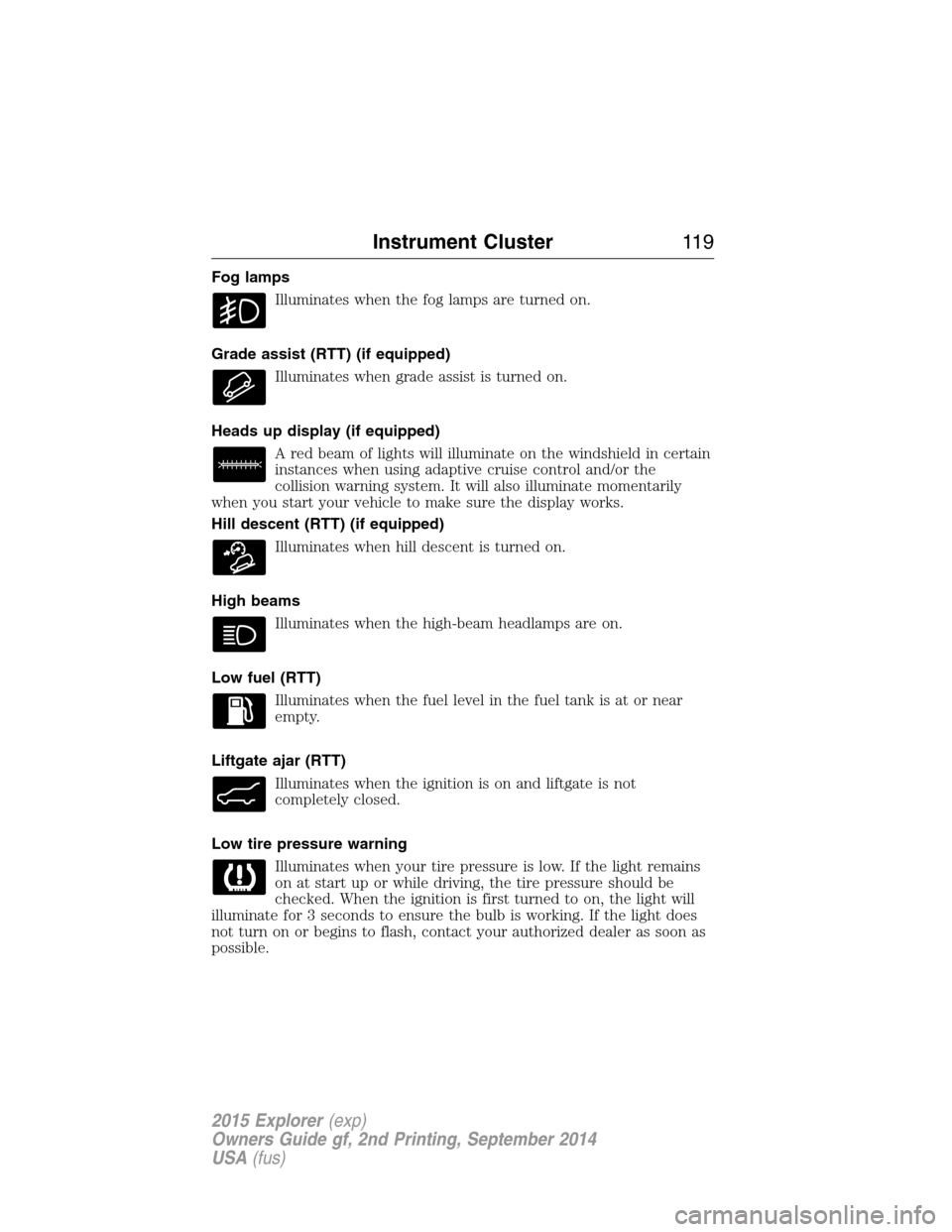
Fog lamps
Illuminates when the fog lamps are turned on.
Grade assist (RTT) (if equipped)
Illuminates when grade assist is turned on.
Heads up display (if equipped)
A red beam of lights will illuminate on the windshield in certain
instances when using adaptive cruise control and/or the
collision warning system. It will also illuminate momentarily
when you start your vehicle to make sure the display works.
Hill descent (RTT) (if equipped)
Illuminates when hill descent is turned on.
High beams
Illuminates when the high-beam headlamps are on.
Low fuel (RTT)
Illuminates when the fuel level in the fuel tank is at or near
empty.
Liftgate ajar (RTT)
Illuminates when the ignition is on and liftgate is not
completely closed.
Low tire pressure warning
Illuminates when your tire pressure is low. If the light remains
on at start up or while driving, the tire pressure should be
checked. When the ignition is first turned to on, the light will
illuminate for 3 seconds to ensure the bulb is working. If the light does
not turn on or begins to flash, contact your authorized dealer as soon as
possible.
Instrument Cluster11 9
2015 Explorer(exp)
Owners Guide gf, 2nd Printing, September 2014
USA(fus)
Page 121 of 596
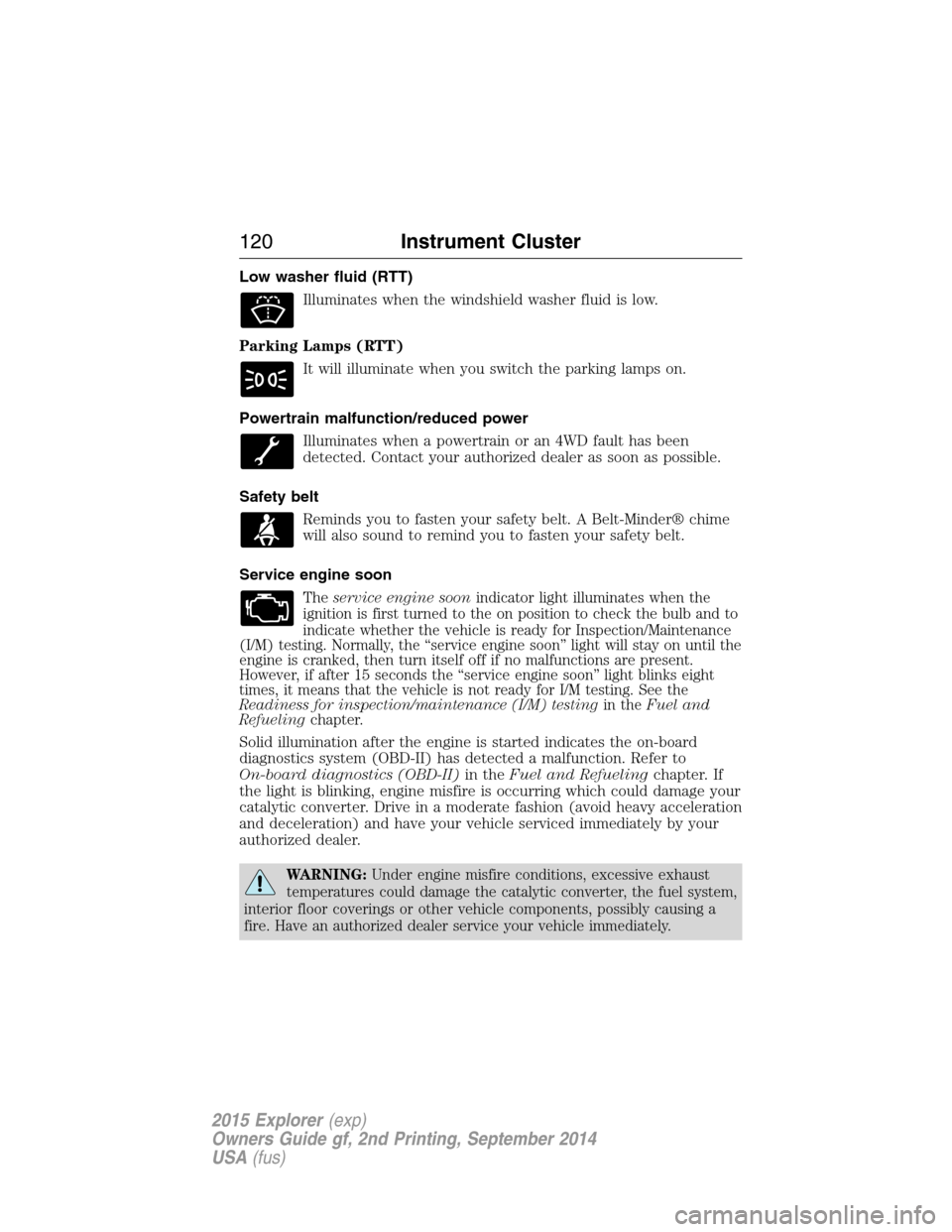
Low washer fluid (RTT)
Illuminates when the windshield washer fluid is low.
Parking Lamps (RTT)
It will illuminate when you switch the parking lamps on.
Powertrain malfunction/reduced power
Illuminates when a powertrain or an 4WD fault has been
detected. Contact your authorized dealer as soon as possible.
Safety belt
Reminds you to fasten your safety belt. A Belt-Minder® chime
will also sound to remind you to fasten your safety belt.
Service engine soon
Theservice engine soonindicator light illuminates when the
ignition is first turned to the on position to check the bulb and to
indicate whether the vehicle is ready for Inspection/Maintenance
(I/M) testing. Normally, the “service engine soon” light will stay on until the
engine is cranked, then turn itself off if no malfunctions are present.
However, if after 15 seconds the “service engine soon” light blinks eight
times, it means that the vehicle is not ready for I/M testing. See the
Readiness for inspection/maintenance (I/M) testingin theFuel and
Refuelingchapter.
Solid illumination after the engine is started indicates the on-board
diagnostics system (OBD-II) has detected a malfunction. Refer to
On-board diagnostics (OBD-II)in theFuel and Refuelingchapter. If
the light is blinking, engine misfire is occurring which could damage your
catalytic converter. Drive in a moderate fashion (avoid heavy acceleration
and deceleration) and have your vehicle serviced immediately by your
authorized dealer.
WARNING:Under engine misfire conditions, excessive exhaust
temperatures could damage the catalytic converter, the fuel system,
interior floor coverings or other vehicle components, possibly causing a
fire. Have an authorized dealer service your vehicle immediately.
120Instrument Cluster
2015 Explorer(exp)
Owners Guide gf, 2nd Printing, September 2014
USA(fus)
Page 122 of 596

Speed control (RTT) (if equipped)
The speed control system indicator light changes color to
indicate what mode the system is in:
•On (gray light–type 1 and type 2): Illuminates when the speed control
system is turned on. Turns off when the speed control system is
turned off.
•Engaged (white light-type 1, green light-type 2): Illuminates when the
speed control system is engaged. Turns off when the speed control
system is disengaged.
Stability Control System
Displays when the AdvanceTrac®/Traction control is active. If
the light remains on, have the system serviced immediately.
Stability Control System Off
Illuminates when AdvanceTrac®/Traction control has been
disabled by the driver.
Transmission Tow/Haul Feature (RTT) (if equipped)
Displays when the Tow/Haul feature has been activated. If the
light flashes steadily, have the system serviced immediately,
damage to the transmission could occur.
Turn signal
Illuminates when the left or right turn signal or the hazard
warning flasher is turned on. If the indicators stay on or flash
faster, check for a burned out bulb.
Instrument Cluster121
2015 Explorer(exp)
Owners Guide gf, 2nd Printing, September 2014
USA(fus)
Page 123 of 596
AUDIBLE WARNINGS AND INDICATORS
Key In Ignition Warning Chime
Sounds when the key is left in the ignition in the off or accessory
position and the driver’s door is opened.
Keyless Warning Alert (If Equipped)
Sounds the horn twice when you exit your vehicle with the intelligent
access key, after the last door is closed and your keyless vehicle is in
RUN, indicating your vehicle is still on.
Headlamps On Warning Chime
Sounds when the headlamps or parking lamps are on, the ignition is off
(the key is not in the ignition) and the driver’s door is opened.
Parking Brake On Warning Chime
Sounds when you have left the parking brake on and drive your vehicle.
If the warning chime remains on after you have released the parking
brake, have the system checked by your authorized dealer immediately.
122Instrument Cluster
2015 Explorer(exp)
Owners Guide gf, 2nd Printing, September 2014
USA(fus)
Page 124 of 596
GENERAL INFORMATION
WARNING:Driving while distracted can result in loss of vehicle
control, crash and injury. We strongly recommend that you use
extreme caution when using any device that may take your focus off
the road. Your primary responsibility is the safe operation of your
vehicle. We recommend against the use of any handheld device while
driving and encourage the use of voice-operated systems when possible.
Make sure you are aware of all applicable local laws that may affect the
use of electronic devices while driving..
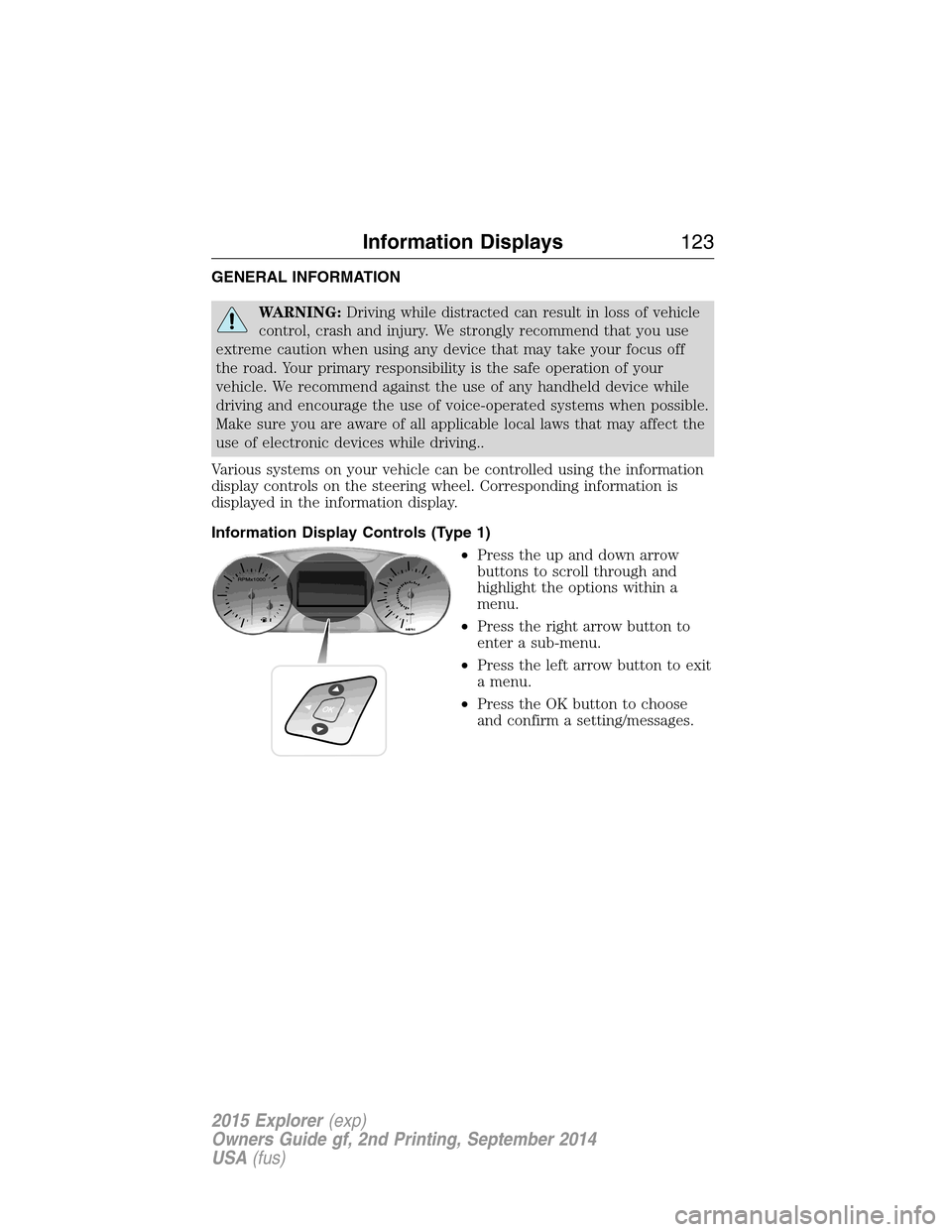
Various systems on your vehicle can be controlled using the information
display controls on the steering wheel. Corresponding information is
displayed in the information display.
Information Display Controls (Type 1)
•Press the up and down arrow
buttons to scroll through and
highlight the options within a
menu.
•Press the right arrow button to
enter a sub-menu.
•Press the left arrow button to exit
a menu.
•Press the OK button to choose
and confirm a setting/messages.
Information Displays123
2015 Explorer(exp)
Owners Guide gf, 2nd Printing, September 2014
USA(fus)
Page 126 of 596
Settings
Driver Assist Traction Ctrl — check enabled (default) / uncheck
disabled
Blind Spot — check enabled (default) / uncheck disabled
Collision Warning Sensitivity (if
MyKey is
programmed)High, Normal or
Low
Cross Traffic — check enabled (default) / uncheck
disabled
Cruise Control Adaptive or Normal
Driver Alert — check enabled (default) / uncheck disabled
Front Park Aid — check enabled (default) / uncheck
disabled
Lane Keeping Sys Mode Alert, Aid or
Alert +Aid
Intensity High, Normal or
Low
Rear Park Aid — check enabled (default) / uncheck
disabled
Trailer Sway — check enabled (default) / uncheck disabled
Display Language English, Español or Français
Units Distance Miles & Gal.
L/100km
km/L
Temperature Fahrenheit (°F)
or Celsius (°C)
Information Displays125
2015 Explorer(exp)
Owners Guide gf, 2nd Printing, September 2014
USA(fus)
Page 128 of 596

Settings
MyKey Create MyKey Hold OK to Create MyKey
911 Assist Always On / User Selectable
Traction Control Always On or User Selectable
Max Speed 80 MPH (130 km/h) or Off
Speed Warning 45 mph (75 km/h), 55 mph
(90 km/h), 65 mph (105 km/h) or Off
Volume Limiter
Do Not Disturb Always On / User Selectable
Clear MyKeys Hold OK to Clear MyKeys
Trip Computer
Resetting the Trip Computer
Press and hold OK on the current screen to reset the respective trip,
distance, time and fuel information.
Trip Odometer
Registers the mileage of individual journeys.
Distance to E
Indicates the approximate distance the vehicle will travel on the fuel
remaining in the tank. Changes in driving pattern may cause the value to
vary.
Average fuel
Indicates the average fuel consumption since the function was last reset.
Total Odometer
Registers the total mileage of the vehicle.
Information Messages
SeeInformation Messageslater in this chapter for more information.
Information Displays127
2015 Explorer(exp)
Owners Guide gf, 2nd Printing, September 2014
USA(fus)