2015 FORD EXPLORER Climate control
[x] Cancel search: Climate controlPage 477 of 596
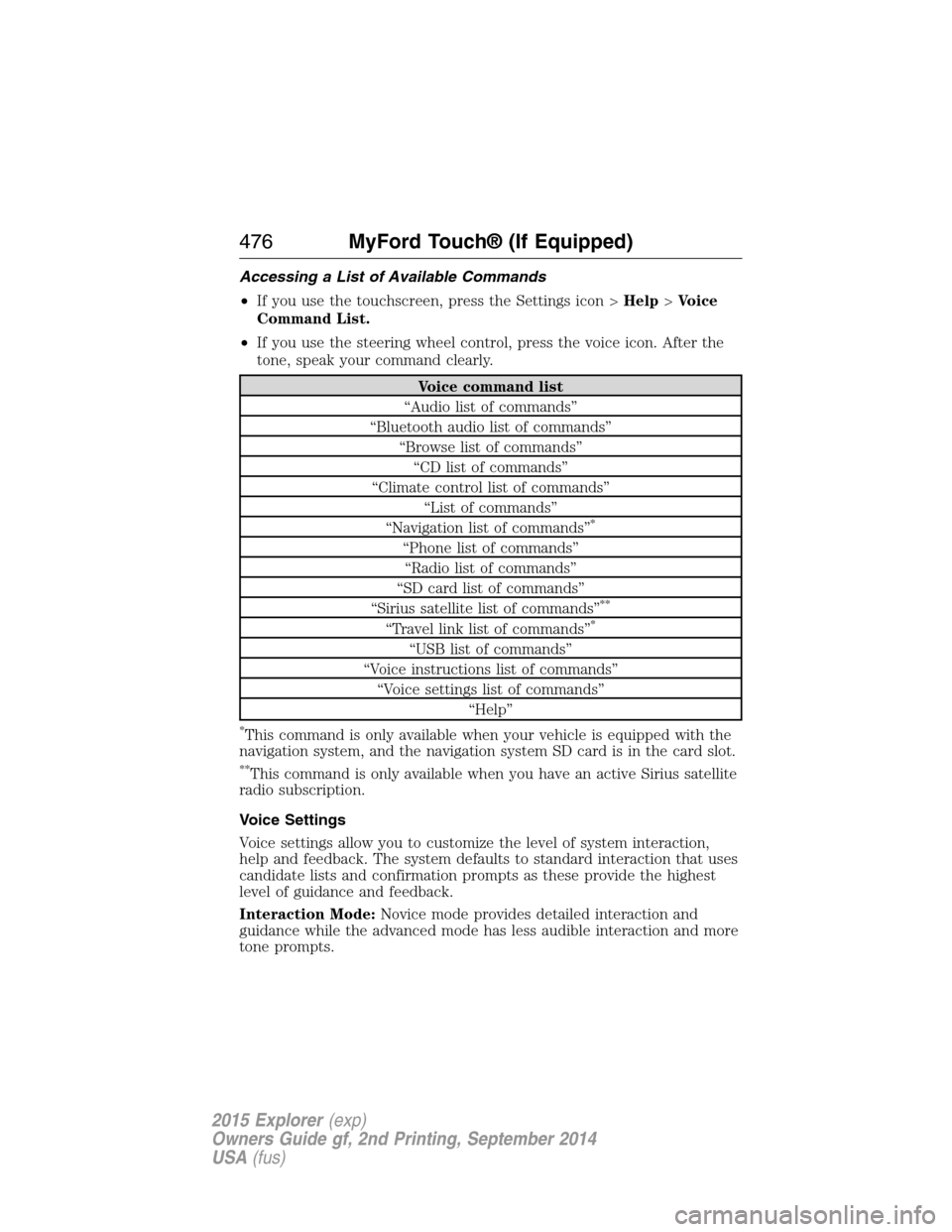
Accessing a List of Available Commands
•If you use the touchscreen, press the Settings icon >Help>Voice
Command List.
•If you use the steering wheel control, press the voice icon. After the
tone, speak your command clearly.
Voice command list
“Audio list of commands”
“Bluetooth audio list of commands”
“Browse list of commands”
“CD list of commands”
“Climate control list of commands”
“List of commands”
“Navigation list of commands”
*
“Phone list of commands”
“Radio list of commands”
“SD card list of commands”
“Sirius satellite list of commands”
**
“Travel link list of commands”*
“USB list of commands”
“Voice instructions list of commands”
“Voice settings list of commands”
“Help”
*This command is only available when your vehicle is equipped with the
navigation system, and the navigation system SD card is in the card slot.
**This command is only available when you have an active Sirius satellite
radio subscription.
Voice Settings
Voice settings allow you to customize the level of system interaction,
help and feedback. The system defaults to standard interaction that uses
candidate lists and confirmation prompts as these provide the highest
level of guidance and feedback.
Interaction Mode:Novice mode provides detailed interaction and
guidance while the advanced mode has less audible interaction and more
tone prompts.
476MyFord Touch® (If Equipped)
2015 Explorer(exp)
Owners Guide gf, 2nd Printing, September 2014
USA(fus)
Page 523 of 596
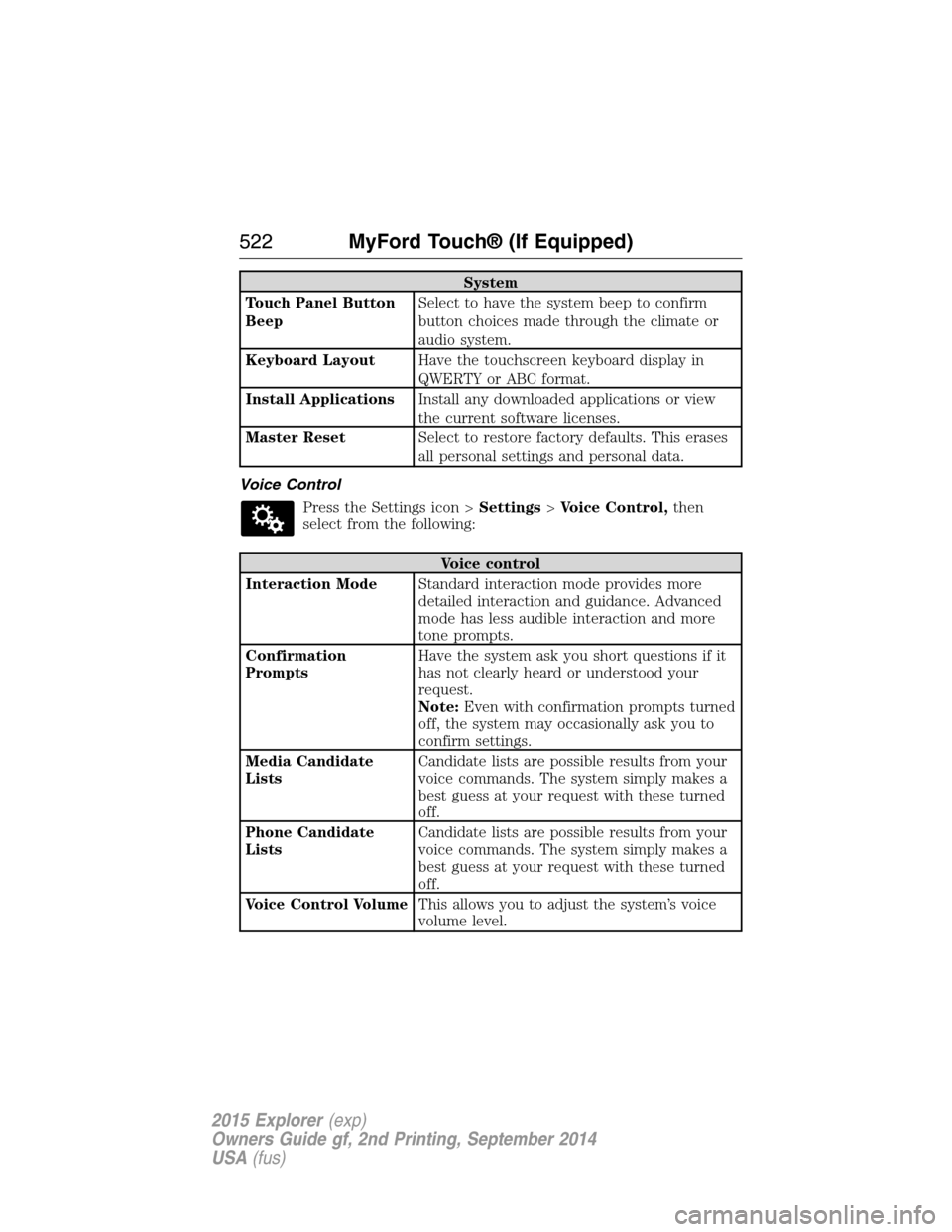
System
Touch Panel Button
BeepSelect to have the system beep to confirm
button choices made through the climate or
audio system.
Keyboard LayoutHave the touchscreen keyboard display in
QWERTY or ABC format.
Install ApplicationsInstall any downloaded applications or view
the current software licenses.
Master ResetSelect to restore factory defaults. This erases
all personal settings and personal data.
Voice Control
Press the Settings icon >Settings>Voice Control,then
select from the following:
Voice control
Interaction ModeStandard interaction mode provides more
detailed interaction and guidance. Advanced
mode has less audible interaction and more
tone prompts.
Confirmation
PromptsHave the system ask you short questions if it
has not clearly heard or understood your
request.
Note:Even with confirmation prompts turned
off, the system may occasionally ask you to
confirm settings.
Media Candidate
ListsCandidate lists are possible results from your
voice commands. The system simply makes a
best guess at your request with these turned
off.
Phone Candidate
ListsCandidate lists are possible results from your
voice commands. The system simply makes a
best guess at your request with these turned
off.
Voice Control VolumeThis allows you to adjust the system’s voice
volume level.
522MyFord Touch® (If Equipped)
2015 Explorer(exp)
Owners Guide gf, 2nd Printing, September 2014
USA(fus)
Page 531 of 596
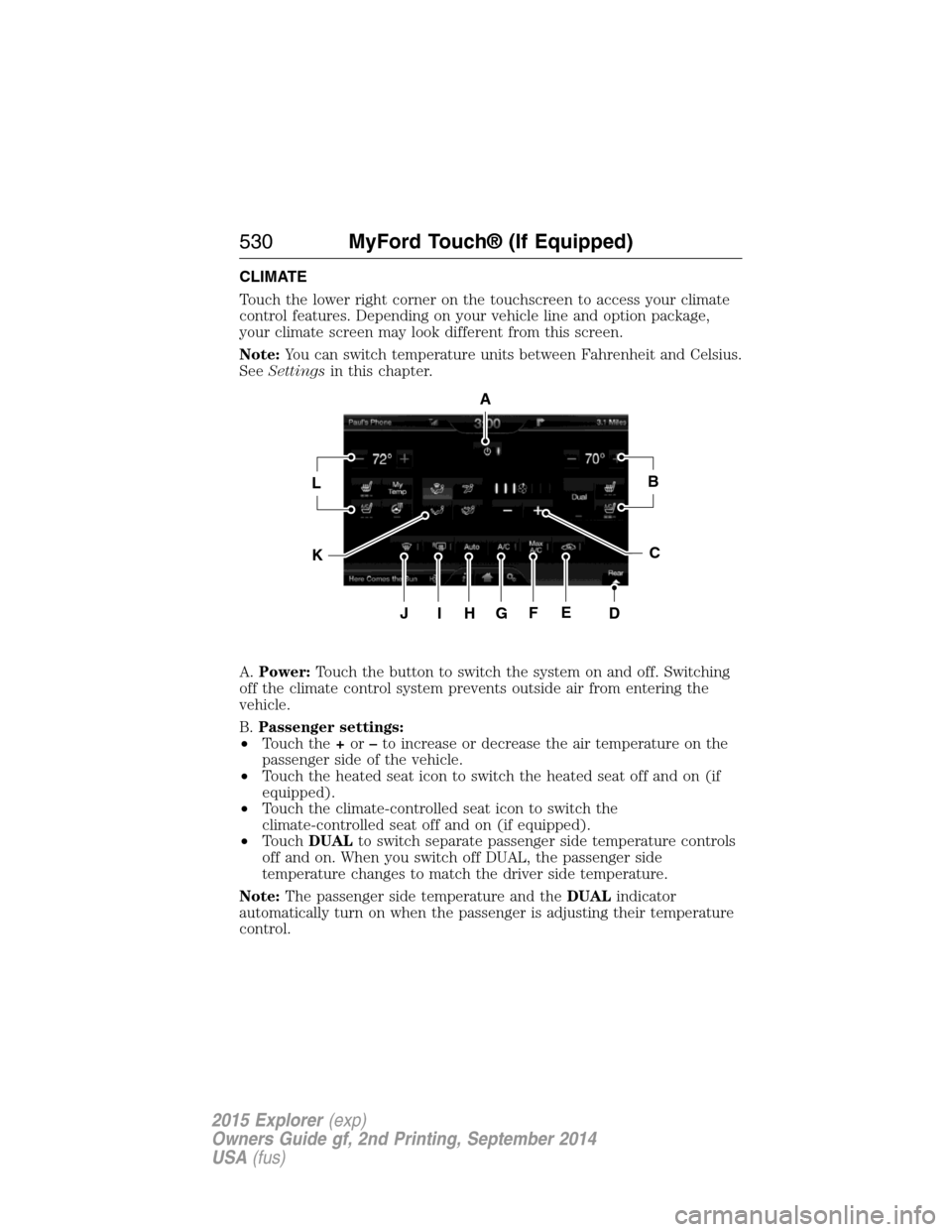
CLIMATE
Touch the lower right corner on the touchscreen to access your climate
control features. Depending on your vehicle line and option package,
your climate screen may look different from this screen.
Note:You can switch temperature units between Fahrenheit and Celsius.
SeeSettingsin this chapter.
A.Power:Touch the button to switch the system on and off. Switching
off the climate control system prevents outside air from entering the
vehicle.
B.Passenger settings:
•Touch the+or–to increase or decrease the air temperature on the
passenger side of the vehicle.
•Touch the heated seat icon to switch the heated seat off and on (if
equipped).
•Touch the climate-controlled seat icon to switch the
climate-controlled seat off and on (if equipped).
•TouchDUALto switch separate passenger side temperature controls
off and on. When you switch off DUAL, the passenger side
temperature changes to match the driver side temperature.
Note:The passenger side temperature and theDUALindicator
automatically turn on when the passenger is adjusting their temperature
control.
A
LB
KC
JIHGFED
530MyFord Touch® (If Equipped)
2015 Explorer(exp)
Owners Guide gf, 2nd Printing, September 2014
USA(fus)
Page 532 of 596
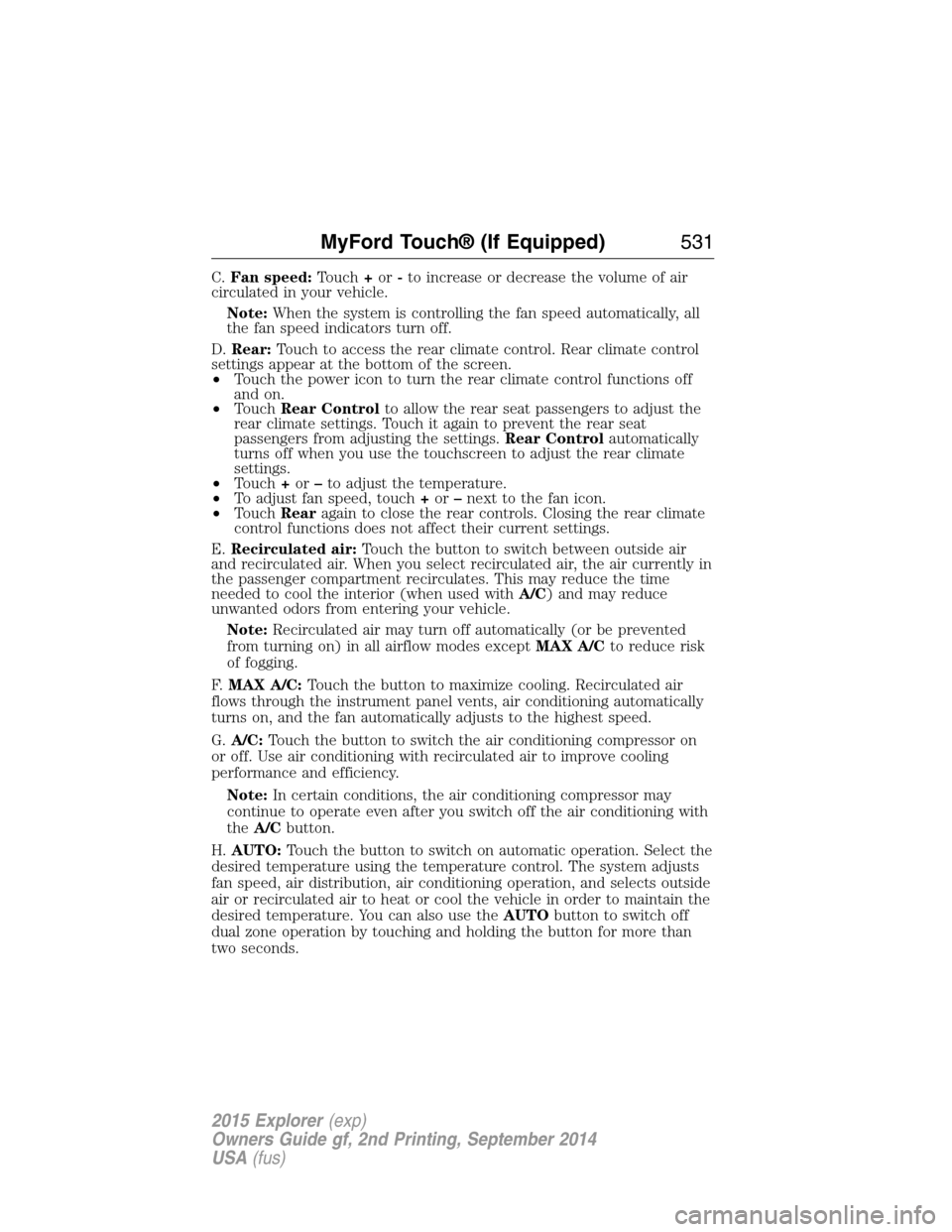
C.Fan speed:Touch+or-to increase or decrease the volume of air
circulated in your vehicle.
Note:When the system is controlling the fan speed automatically, all
the fan speed indicators turn off.
D.Rear:Touch to access the rear climate control. Rear climate control
settings appear at the bottom of the screen.
•Touch the power icon to turn the rear climate control functions off
and on.
•TouchRear Controlto allow the rear seat passengers to adjust the
rear climate settings. Touch it again to prevent the rear seat
passengers from adjusting the settings.Rear Controlautomatically
turns off when you use the touchscreen to adjust the rear climate
settings.
•Touch+or–to adjust the temperature.
•To adjust fan speed, touch+or–next to the fan icon.
•TouchRearagain to close the rear controls. Closing the rear climate
control functions does not affect their current settings.
E.Recirculated air:Touch the button to switch between outside air
and recirculated air. When you select recirculated air, the air currently in
the passenger compartment recirculates. This may reduce the time
needed to cool the interior (when used withA/C) and may reduce
unwanted odors from entering your vehicle.
Note:Recirculated air may turn off automatically (or be prevented
from turning on) in all airflow modes exceptMAX A/Cto reduce risk
of fogging.
F.MAX A/C:Touch the button to maximize cooling. Recirculated air
flows through the instrument panel vents, air conditioning automatically
turns on, and the fan automatically adjusts to the highest speed.
G.A/C:Touch the button to switch the air conditioning compressor on
or off. Use air conditioning with recirculated air to improve cooling
performance and efficiency.
Note:In certain conditions, the air conditioning compressor may
continue to operate even after you switch off the air conditioning with
theA/Cbutton.
H.AUTO:Touch the button to switch on automatic operation. Select the
desired temperature using the temperature control. The system adjusts
fan speed, air distribution, air conditioning operation, and selects outside
air or recirculated air to heat or cool the vehicle in order to maintain the
desired temperature. You can also use theAUTObutton to switch off
dual zone operation by touching and holding the button for more than
two seconds.
MyFord Touch® (If Equipped)531
2015 Explorer(exp)
Owners Guide gf, 2nd Printing, September 2014
USA(fus)
Page 533 of 596
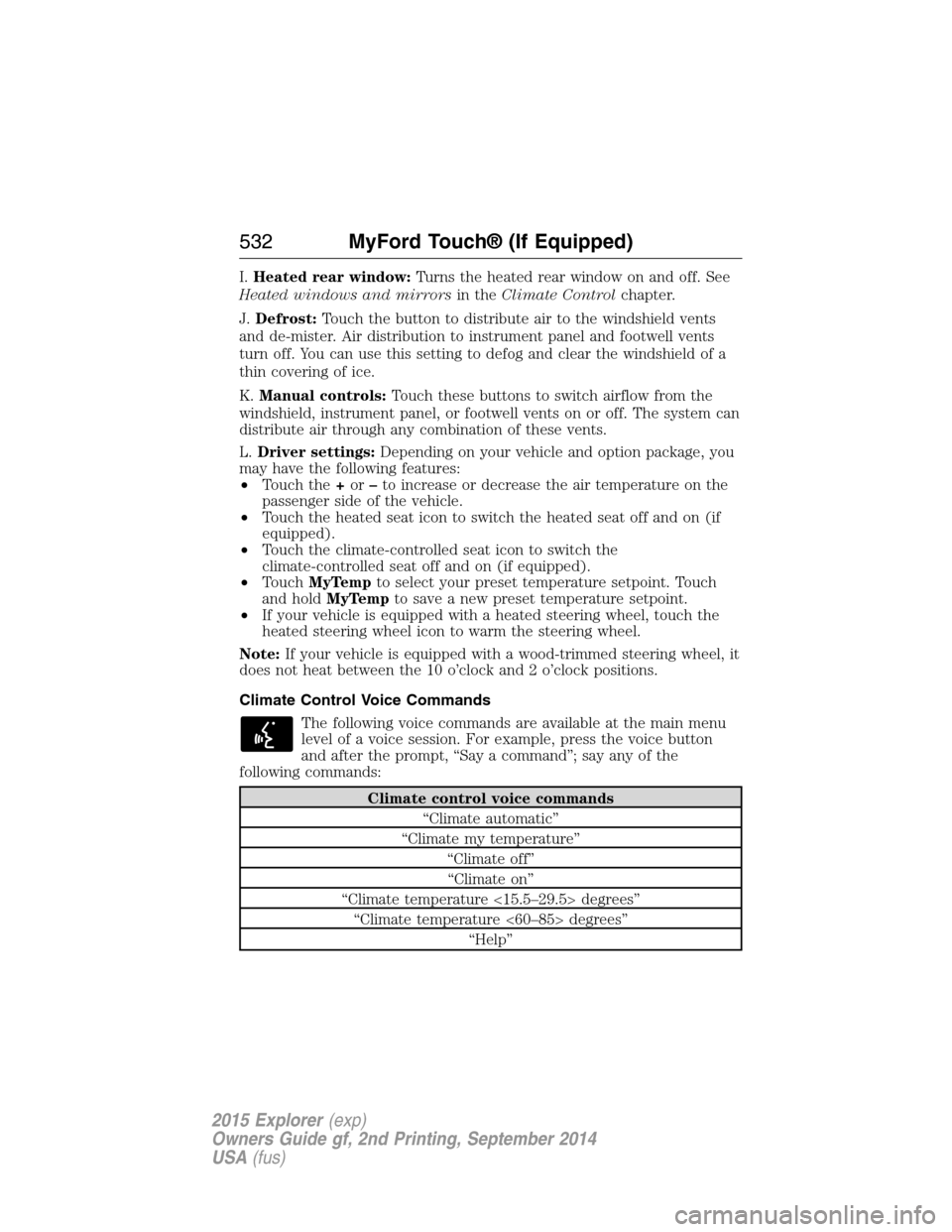
I.Heated rear window:Turns the heated rear window on and off. See
Heated windows and mirrorsin theClimate Controlchapter.
J.Defrost:Touch the button to distribute air to the windshield vents
and de-mister. Air distribution to instrument panel and footwell vents
turn off. You can use this setting to defog and clear the windshield of a
thin covering of ice.
K.Manual controls:Touch these buttons to switch airflow from the
windshield, instrument panel, or footwell vents on or off. The system can
distribute air through any combination of these vents.
L.Driver settings:Depending on your vehicle and option package, you
may have the following features:
•Touch the+or–to increase or decrease the air temperature on the
passenger side of the vehicle.
•Touch the heated seat icon to switch the heated seat off and on (if
equipped).
•Touch the climate-controlled seat icon to switch the
climate-controlled seat off and on (if equipped).
•TouchMyTempto select your preset temperature setpoint. Touch
and holdMyTempto save a new preset temperature setpoint.
•If your vehicle is equipped with a heated steering wheel, touch the
heated steering wheel icon to warm the steering wheel.
Note:If your vehicle is equipped with a wood-trimmed steering wheel, it
does not heat between the 10 o’clock and 2 o’clock positions.
Climate Control Voice Commands
The following voice commands are available at the main menu
level of a voice session. For example, press the voice button
and after the prompt, “Say a command”; say any of the
following commands:
Climate control voice commands
“Climate automatic”
“Climate my temperature”
“Climate off”
“Climate on”
“Climate temperature <15.5–29.5> degrees”
“Climate temperature <60–85> degrees”
“Help”
532MyFord Touch® (If Equipped)
2015 Explorer(exp)
Owners Guide gf, 2nd Printing, September 2014
USA(fus)
Page 534 of 596
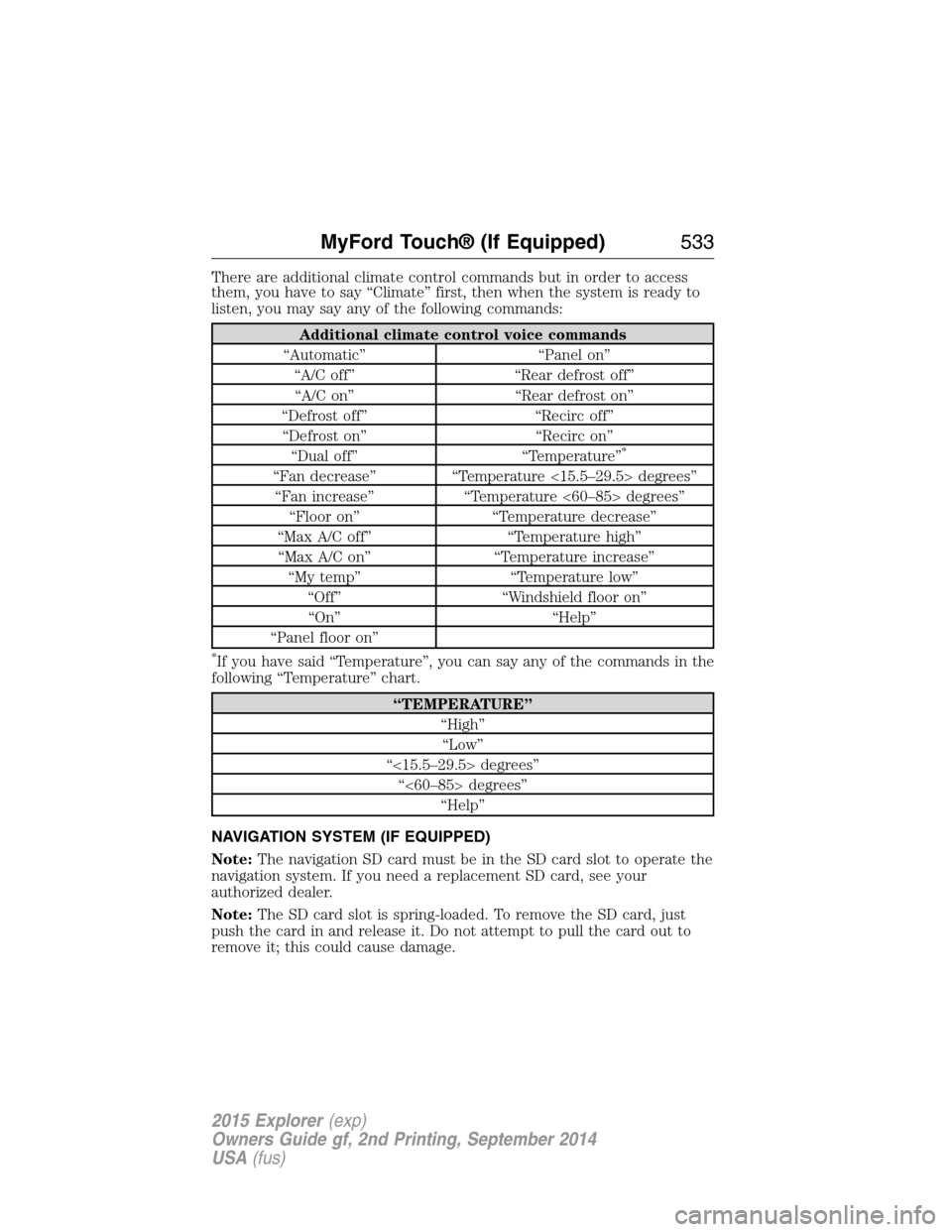
There are additional climate control commands but in order to access
them, you have to say “Climate” first, then when the system is ready to
listen, you may say any of the following commands:
Additional climate control voice commands
“Automatic” “Panel on”
“A/C off” “Rear defrost off”
“A/C on” “Rear defrost on”
“Defrost off” “Recirc off”
“Defrost on” “Recirc on”
“Dual off” “Temperature”
*
“Fan decrease” “Temperature <15.5–29.5> degrees”
“Fan increase” “Temperature <60–85> degrees”
“Floor on” “Temperature decrease”
“Max A/C off” “Temperature high”
“Max A/C on” “Temperature increase”
“My temp” “Temperature low”
“Off” “Windshield floor on”
“On” “Help”
“Panel floor on”
*If you have said “Temperature”, you can say any of the commands in the
following “Temperature” chart.
“TEMPERATURE”
“High”
“Low”
“<15.5–29.5> degrees”
“<60–85> degrees”
“Help”
NAVIGATION SYSTEM (IF EQUIPPED)
Note:The navigation SD card must be in the SD card slot to operate the
navigation system. If you need a replacement SD card, see your
authorized dealer.
Note:The SD card slot is spring-loaded. To remove the SD card, just
push the card in and release it. Do not attempt to pull the card out to
remove it; this could cause damage.
MyFord Touch® (If Equipped)533
2015 Explorer(exp)
Owners Guide gf, 2nd Printing, September 2014
USA(fus)
Page 579 of 596

Other maintenance items1
Every 20000 miles
(32000 km)Replace cabin air filter (if equipped).
Every 30000 miles
(48000 km)Replace climate-controlled (heated and
cooled) seat filter.
2
Replace engine air filter.
At 100000 miles
(160000 km)Change engine coolant.3
Every 100000 miles
(160000 km)Replace spark plugs.
Inspect accessory drive belt(s).4
Every 150000 miles
(240000 km)Change automatic transmission fluid
Replace accessory drive belt(s) if not replaced
within the last 100000 miles (160000 km).
1These maintenance items can be performed within 3000 miles
(4800 kilometers) of the last oil change. Do not exceed the designated
distance for the interval.
2If your vehicle has climate-controlled (heated and cooled) seats.
3Initial replacement at six years or 100000 miles (160000 kilometers),
then every three years or 50000 miles (80000 kilometers).
4After initial inspection, inspect every other oil change until replaced.
578Scheduled Maintenance
2015 Explorer(exp)
Owners Guide gf, 2nd Printing, September 2014
USA(fus)
Page 590 of 596
maintenance-free ....................327
replacement, specifications ...391
servicing ..................................327
Blind Spot Information
System .......................................254
Booster seats ...............................23
Brakes ........................................219
anti-lock ...................................220
anti-lock brake system (ABS)
warning light ...........................220
brake warning light ................220
fluid, checking and adding ....326
fluid, refill capacities ..............386
fluid, specifications .................386
lubricant specifications ..........386
parking ....................................220
shift interlock ..........................209
trailer .......................................278
C
Capacities for refilling fluids ....386
Cargo net ...................................264
CD ..............................401, 406–407
CD player ..........................399, 491
CD voice commands .................492
Cell phone use ............................17
Changing a tire .........................375
Changing the air filter ..............332
Child safety restraints ..........31, 33
Child safety seats
attaching with tether straps ....33
automatic locking mode
(retractor) .................................41
LATCH .......................................31
Child safety seats - booster
seats .............................................23
Cleaning the touchscreen ........470Cleaning your vehicle ...............341
engine compartment ..............343
instrument panel ....................345
interior .....................................345
plastic parts ............................342
washing ....................................341
waxing .....................................343
wheels ......................................347
wiper blades ............................344
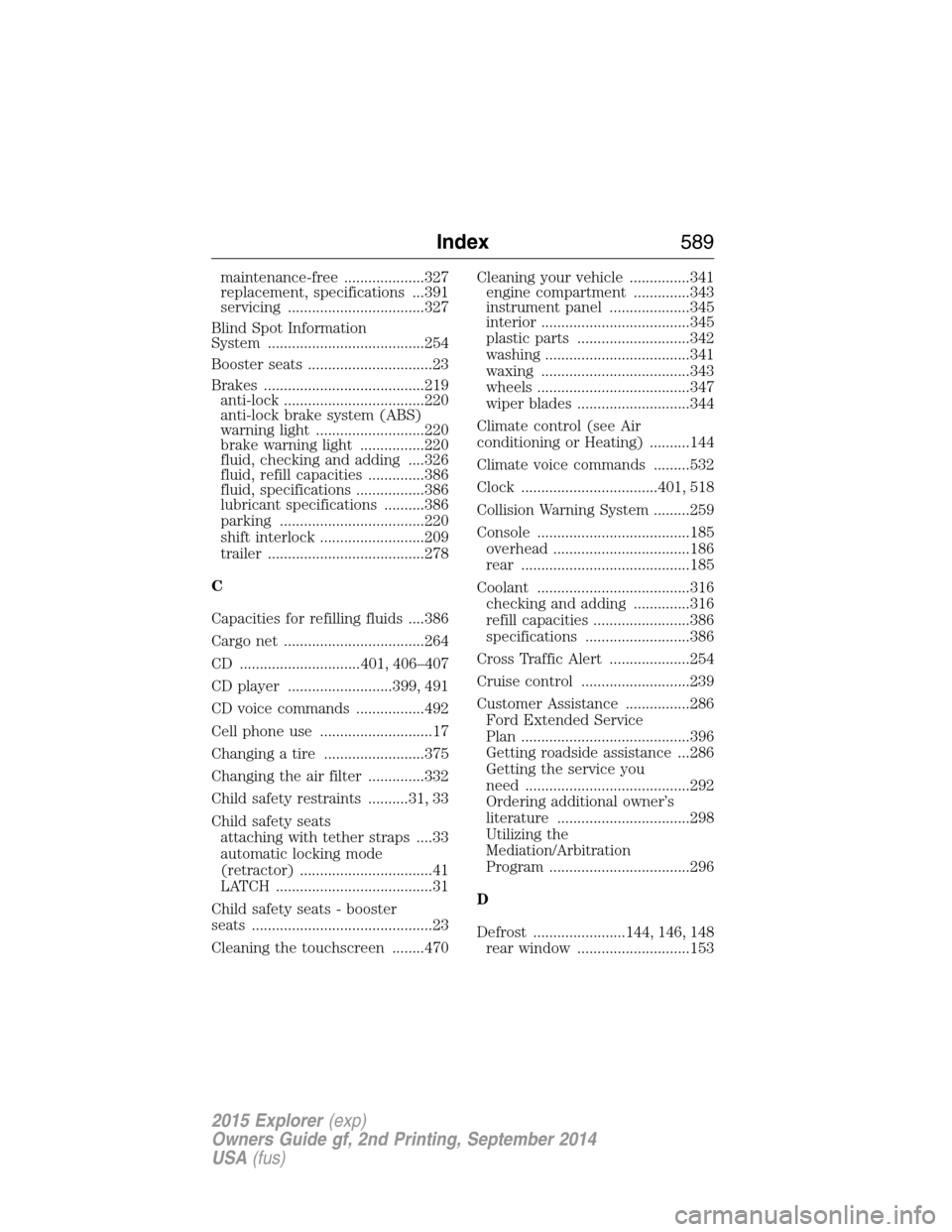
Climate control (see Air
conditioning or Heating) ..........144
Climate voice commands .........532
Clock ..................................401, 518
Collision Warning System .........259
Console ......................................185
overhead ..................................186
rear ..........................................185
Coolant ......................................316
checking and adding ..............316
refill capacities ........................386
specifications ..........................386
Cross Traffic Alert ....................254
Cruise control ...........................239
Customer Assistance ................286
Ford Extended Service
Plan ..........................................396
Getting roadside assistance ...286
Getting the service you
need .........................................292
Ordering additional owner’s
literature .................................298
Utilizing the
Mediation/Arbitration
Program ...................................296
D
Defrost .......................144, 146, 148
rear window ............................153
Index589
2015 Explorer(exp)
Owners Guide gf, 2nd Printing, September 2014
USA(fus)