2015 FORD EXPLORER Climate control
[x] Cancel search: Climate controlPage 310 of 596
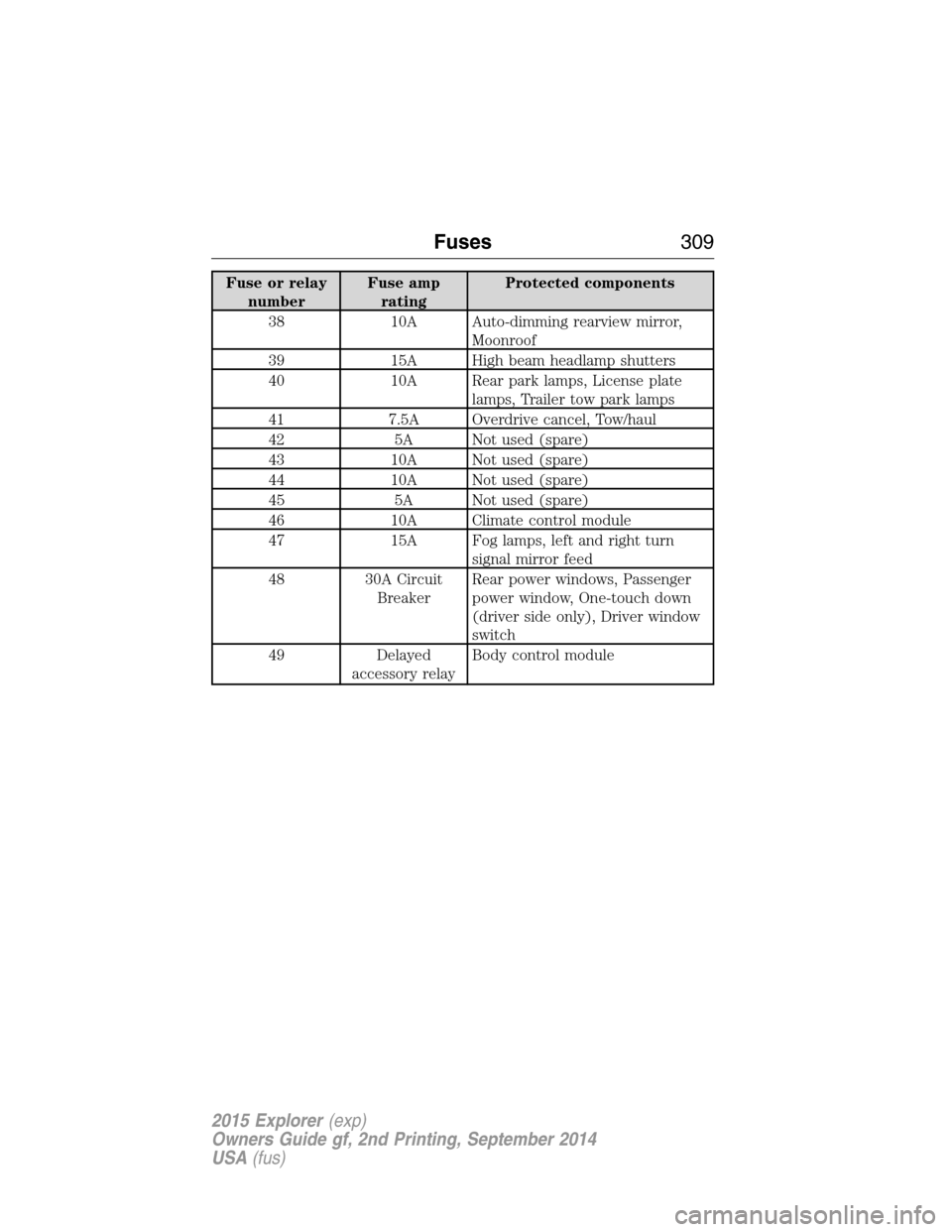
Fuse or relay
numberFuse amp
ratingProtected components
38 10A Auto-dimming rearview mirror,
Moonroof
39 15A High beam headlamp shutters
40 10A Rear park lamps, License plate
lamps, Trailer tow park lamps
41 7.5A Overdrive cancel, Tow/haul
42 5A Not used (spare)
43 10A Not used (spare)
44 10A Not used (spare)
45 5A Not used (spare)
46 10A Climate control module
47 15A Fog lamps, left and right turn
signal mirror feed
48 30A Circuit
BreakerRear power windows, Passenger
power window, One-touch down
(driver side only), Driver window
switch
49 Delayed
accessory relayBody control module
Fuses309
2015 Explorer(exp)
Owners Guide gf, 2nd Printing, September 2014
USA(fus)
Page 330 of 596

•The vehicle may need to be driven to relearn the idle and fuel trim
strategy.
•Note:If you do not allow the engine to relearn its idle trim, the idle
quality of your vehicle may be adversely affected until the idle trim is
eventually relearned.
When the battery is disconnected or a new battery installed, the
transmission must relearn its adaptive strategy. As a result of this, the
transmission may shift firmly. This operation is considered normal and
will not affect function or durability of the transmission. Over time the
adaptive learning process will fully update transmission operation to its
optimum shift feel.
If the battery has been disconnected or a new battery has been installed,
the clock and the preset radio stations must be reset once the battery is
reconnected.
Always dispose of automotive batteries in a responsible manner. Follow
your local authorized standards for disposal. Call your local authorized
recycling center to find out more about recycling automotive batteries.
Battery management system
The battery management system (BMS) monitors battery conditions and
takes actions to extend battery life. If excessive battery drain is
detected, the system may temporarily disable certain electrical features
to protect the battery. Those electrical accessories affected include rear
defrost, heated/cooled seats, climate control fan, heated steering wheel,
audio and navigation system. A message may be displayed on the
instrument cluster or center stack display to alert the driver that battery
protection actions are active. See theInformation displaysin the
Instrument ClusterandEntertainment Systemschapters for more
information. These messages are only for notification that an action is
taking place, and do not necessarily indicate that an electrical problem
exists or that the battery requires replacement.
Electrical accessory installation
To ensure proper operation of the BMS, any electrical devices that are
added to the vehicle should not have their ground connection made
directly at the negative battery post. A connection at the negative
battery post can cause inaccurate measurements of the battery condition
and potential incorrect system operation.
Note:Electrical or electronic accessories added to the vehicle by the
dealer or the owner may adversely affect battery performance and
durability and may also affect the performance of other electrical
systems in the vehicle.
Maintenance329
2015 Explorer(exp)
Owners Guide gf, 2nd Printing, September 2014
USA(fus)
Page 350 of 596
Engine
•The engine oil and filter should be changed prior to storage, as used
engine oil contains contaminates that may cause engine damage.
•Start the engine every 15 days. Run at fast idle with the climate
controls set to defrost until it reaches normal operating temperature.
•With your foot on the brake, shift through all the gears while the
engine is running.
Fuel system
•Fill the fuel tank with high-quality fuel until the first automatic shutoff
of the fuel pump nozzle.
Cooling system
•Protect against freezing temperatures.
•When removing vehicle from storage, check coolant fluid level.
Confirm there are no cooling system leaks, and fluid is at the
recommended level.
Battery
•Check and recharge as necessary. Keep connections clean.
•If storing your vehicle for more than 30 days without recharging the
battery, it may be advisable to disconnect the battery cables to ensure
battery charge is maintained for quick starting.
Note:If battery cables are disconnected, it will be necessary to reset
memory features.
Brakes
•Make sure brakes and parking brake are fully released.
Tires
•Maintain recommended air pressure.
Miscellaneous
•Make sure all linkages, cables, levers and pins under vehicle are
covered with grease to prevent rust.
•Move vehicles at least 25 feet (8 meters) every 15 days to lubricate
working parts and prevent corrosion.
Vehicle Care349
2015 Explorer(exp)
Owners Guide gf, 2nd Printing, September 2014
USA(fus)
Page 356 of 596
Treadwear
The treadwear grade is a comparative rating based on the wear rate of
the tire when tested under controlled conditions on a specified
government test course. For example, a tire graded 150 would wear 1
12
times as well on the government course as a tire graded 100. The
relative performance of tires depends upon the actual conditions of their
use, however, and may depart significantly from the norm due to
variations in driving habits, service practices, and differences in road
characteristics and climate.
Traction AA A B C
WARNING:The traction grade assigned to this tire is based on
straight-ahead braking traction tests, and does not include
acceleration, cornering, hydroplaning or peak traction characteristics.
The traction grades, from highest to lowest are AA, A, B, and C. The
grades represent the tire’s ability to stop on wet pavement as measured
under controlled conditions on specified government test surfaces of
asphalt and concrete. A tire marked C may have poor traction
performance.
Temperature A B C
WARNING:The temperature grade for this tire is established for
a tire that is properly inflated and not overloaded. Excessive
speed, underinflation, or excessive loading, either separately or in
combination, can cause heat buildup and possible tire failure.
The temperature grades are A (the highest), B and C, representing the
tire’s resistance to the generation of heat and its ability to dissipate heat
when tested under controlled conditions on a specified indoor laboratory
test wheel. Sustained high temperature can cause the material of the tire
to degenerate and reduce tire life, and excessive temperature can lead to
sudden tire failure. The grade C corresponds to a level of performance
which all passenger car tires must meet under the Federal Motor Vehicle
Safety Standard No. 139. Grades B and A represent higher levels of
performance on the laboratory test wheel than the minimum required by
law.
Wheels and Tires355
2015 Explorer(exp)
Owners Guide gf, 2nd Printing, September 2014
USA(fus)
Page 371 of 596
USING SNOW CHAINS
WARNING:Snow tires must be the same size, load index and
speed rating as those originally provided by Ford. Use of any tire
or wheel not recommended by Ford can affect the safety and
performance of your vehicle, which could result in an increased risk of
loss of vehicle control, vehicle rollover, personal injury and death.
Additionally, the use of non-recommended tires and wheels could cause
steering, suspension, axle, transfer case or power transfer unit failure.
Note:The suspension insulation and bumpers will help prevent vehicle
damage. Do not remove these components from your vehicle when using
snow tires and chains.
The tires on your vehicle (excluding the 265/45ZR20 Sport tire) have
all-weather treads to provide traction in rain and snow. However, in some
climates, you may need to use snow tires and chains. If you need to use
chains, it is recommended that cable chains are used only with steel wheels
(of the same size and specifications) as chains may chip aluminum wheels.
Only certain chains or snow cables have been approved by Ford as safe for
use on your vehicle. You should only install chains or cables that have been
rated as 10 mm or less in dimension as measured on the sidewall of your
tire. Not all S-class snow chains or cables meet these restrictions. Chains of
this size restriction will include a tensioning device. Purchase chains or
cables from a manufacturer that clearly labels body to tire dimension
restrictions. The snow chains or cables must be mounted in pairs on the
front tires only. Do not exceed 30 mph (50 km/h) while using snow chains.
Follow these guidelines when using snow tires and cable chains:
•If possible, avoid fully loading your vehicle.
•Install cable chains only on the front wheels.
•Use cable chains only on vehicles equipped with P245/60R18 tires.
•Do not use tire chains, cables or optional traction devices on vehicles
equipped with P255/50R20, P245/50R20 or 265/45ZR20 tires.
•Drive cautiously. If you hear the cable chains rub or bang against your
vehicle, stop and retighten the cable chains. If this does not work,
remove the cable chains to prevent damage to your vehicle.
•Remove the tire cable chains when they are no longer needed. Do not
use tire cable chains on dry roads.
If you have any questions regarding snow chains or cables, please
contact your authorized dealer.
370Wheels and Tires
2015 Explorer(exp)
Owners Guide gf, 2nd Printing, September 2014
USA(fus)
Page 467 of 596

GENERAL INFORMATION
WARNING:Driving while distracted can result in loss of vehicle
control, crash and injury. We strongly recommend that you use
extreme caution when using any device that may take your focus off
the road. Your primary responsibility is the safe operation of your
vehicle. We recommend against the use of any hand-held device while
driving and encourage the use of voice-operated systems when possible.
Make sure you are aware of all applicable local laws that may affect the
use of electronic devices while driving.
A. Phone
B. Navigation (or Information if your vehicle is not equipped with
Navigation)
C. Climate
D. Settings
E. Home
F. Information
G. Entertainment
AB
GCDFE
466MyFord Touch® (If Equipped)
2015 Explorer(exp)
Owners Guide gf, 2nd Printing, September 2014
USA(fus)
Page 468 of 596

This system uses a four-corner strategy to provide quick access several
vehicle features and settings. The touchscreen provides easy interaction
with your cellular phone, multimedia, climate control and navigation
system. The corners display any active modes within those menus, such
as phone status or the climate temperature.
Note:Some features are not available while your vehicle is moving.
Note:Your system is equipped with a feature that allows you to access
and control audio features for 30 minutes after you switch the ignition
off (and no doors open).
PHONE
Press to select any of the following:
•Making Calls
•Quick Dial
•Phonebook
•Call History
•Text Messaging
•Settings
NAVIGATION
Press to select any of the following:
•My Home
•Favorites
•Previous Destinations
•Point of Interest
•Emergency
•Street Address
•Intersection
•City Center
•Map
•Edit Route
•Cancel Route
CLIMATE
Press to select any of the following:
•Driver Settings
•Recirculated Air
•Auto
•Dual
•Passenger Settings
•A/C
•Defrost
MyFord Touch® (If Equipped)467
2015 Explorer(exp)
Owners Guide gf, 2nd Printing, September 2014
USA(fus)
Page 470 of 596
Using the Touch-sensitive Controls on Your System
To turn a feature on and off, just touch the graphic with your finger. To
get the best performance from the touch-sensitive controls:
•Do not press hard on the controls. They are sensitive to light touch.
•Use your bare finger to touch the center of a touch-control graphic.
Touching off-center of the graphic may affect operation of a nearby
control.
•Make sure your hands are clean and dry.
•Keep metal and other conductive material away from the surface of
the touchscreen as this may cause electronic interference (for
example, inadvertently turning on a feature other than the one you
meant to turn on).
Depending on your vehicle and option package, you may also have these
controls on your bezel:
•Power:Switch the media or climate features off and on.
•VOL:Control the volume of playing media.
•SeekandTune:Use as you normally would in media modes.
•Eject:Eject a CD from the entertainment system.
•SOURCE:Touch the word repeatedly to see all available media
modes. The screen does not change, but you see the media change in
the lower left status bar.
•SOUND:Touch the word to access the Sound menu where you can
adjust settings such as: Bass, Treble, Midrange, Balance and Fade,
THX Deep Note Demo, DSP (Digital Signal Processing), Occupancy
Mode and Speed Compensated Volume. (Your vehicle may not have
all of these sound options.)
•Temperature, fan and climate control:Control the temperature,
fan speed or settings of the climate control system.
Using Your Steering Wheel Controls
Depending on your vehicle and option package, you can use your
steering wheel controls to interact with the touchscreen system.
•VOL:Control the volume of audio output.
•SEEK:
•While in radio mode, press to seek between memory presets or
press and hold to seek between stations.
•While in USB or CD mode, press to seek between stations or press
and hold to fast seek.
•Voice:Press to start a voice session. Press again to interrupt a voice
prompt and begin speaking. Press and hold to end a voice session.
MyFord Touch® (If Equipped)469
2015 Explorer(exp)
Owners Guide gf, 2nd Printing, September 2014
USA(fus)