2015 FORD EXPLORER air condition
[x] Cancel search: air conditionPage 118 of 596
WARNING LAMPS AND INDICATORS
There are indicators that can alert you to a vehicle condition that may
become serious enough to cause expensive repairs. Many lights will
illuminate when you start your vehicle to make sure they work. If any
light remains on after starting the vehicle, refer to the respective system
warning light for additional information.
Note:Some warning indicators are reconfigurable telltales (RTT). These
indicators appear in the information display and function the same as a
warning light, but do not display on startup.
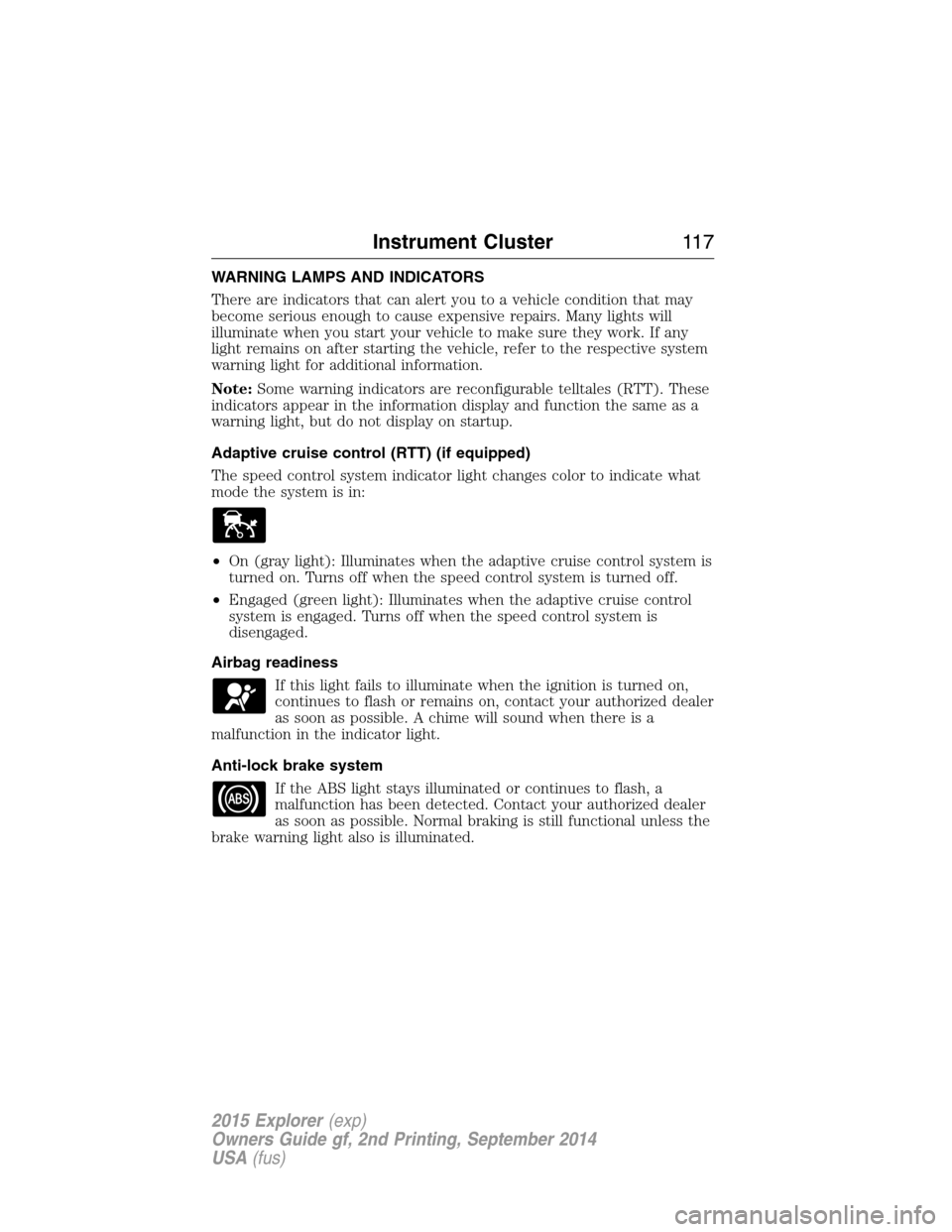
Adaptive cruise control (RTT) (if equipped)
The speed control system indicator light changes color to indicate what
mode the system is in:
•On (gray light): Illuminates when the adaptive cruise control system is
turned on. Turns off when the speed control system is turned off.
•Engaged (green light): Illuminates when the adaptive cruise control
system is engaged. Turns off when the speed control system is
disengaged.
Airbag readiness
If this light fails to illuminate when the ignition is turned on,
continues to flash or remains on, contact your authorized dealer
as soon as possible. A chime will sound when there is a
malfunction in the indicator light.
Anti-lock brake system
If the ABS light stays illuminated or continues to flash, a
malfunction has been detected. Contact your authorized dealer
as soon as possible. Normal braking is still functional unless the
brake warning light also is illuminated.
Instrument Cluster11 7
2015 Explorer(exp)
Owners Guide gf, 2nd Printing, September 2014
USA(fus)
Page 145 of 596
MANUAL CLIMATE CONTROL
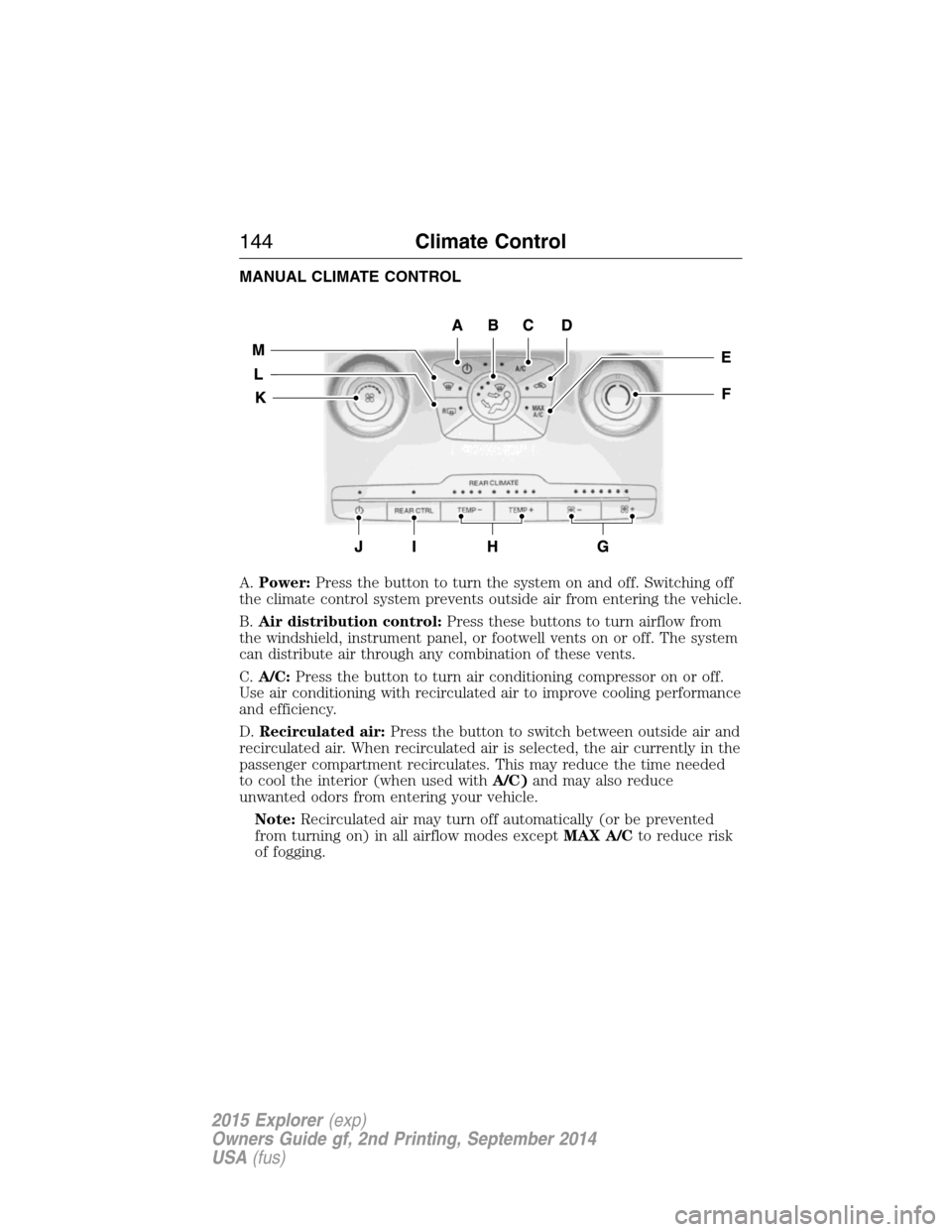
A.Power:Press the button to turn the system on and off. Switching off
the climate control system prevents outside air from entering the vehicle.
B.Air distribution control:Press these buttons to turn airflow from
the windshield, instrument panel, or footwell vents on or off. The system
can distribute air through any combination of these vents.
C.A/C:Press the button to turn air conditioning compressor on or off.
Use air conditioning with recirculated air to improve cooling performance
and efficiency.
D.Recirculated air:Press the button to switch between outside air and
recirculated air. When recirculated air is selected, the air currently in the
passenger compartment recirculates. This may reduce the time needed
to cool the interior (when used withA/C)and may also reduce
unwanted odors from entering your vehicle.
Note:Recirculated air may turn off automatically (or be prevented
from turning on) in all airflow modes exceptMAX A/Cto reduce risk
of fogging.
144Climate Control
2015 Explorer(exp)
Owners Guide gf, 2nd Printing, September 2014
USA(fus)
Page 146 of 596

E.MAX A/C:Turn the temperature control dial all the way past the full
cool position to maximize cooling. Recirculated air flows through the
instrument panel vents, air conditioning automatically turns on, and the
fan automatically adjusts to the highest speed.
F.Front temperature control:Controls the temperature of the airflow
in the front of your vehicle. Adjust to select the desired temperature.
G.Rear fan speed control:Controls the volume of air circulated in the
rear of your vehicle. Press+or-to select the desired fan speed.
H.Rear temperature control:Controls the temperature of the airflow
in the rear of your vehicle. PressTEMP +andTEMP -to select the
desired temperature.
I.REAR CTRL:Press to change control of the rear climate controls
system from the front controls to the rear controls.
J.Rear climate control system power:Press the button to turn the
rear climate system on and off.
K.Front fan speed control:Controls the volume of air circulated in
your vehicle. Adjust to select the desired fan speed.
L.Heated rear window:Turns the heated rear window on and off. See
Heated windows and mirrorslater in this chapter for more
information.
M.Defrost:Press the button to distribute air to the windshield vents
and de-mister. Air distribution to instrument panel and footwell vents
turn off. You can use this setting to defog and clear the windshield of a
thin covering of ice.
Climate Control145
2015 Explorer(exp)
Owners Guide gf, 2nd Printing, September 2014
USA(fus)
Page 147 of 596
AUTOMATIC CLIMATE CONTROL (WITH SONY® AUDIO SYSTEM)
Note:You can switch temperature units between Fahrenheit and Celsius.
SeeMenu featuresin theMyFord TouchorMyLincoln Touchchapter.
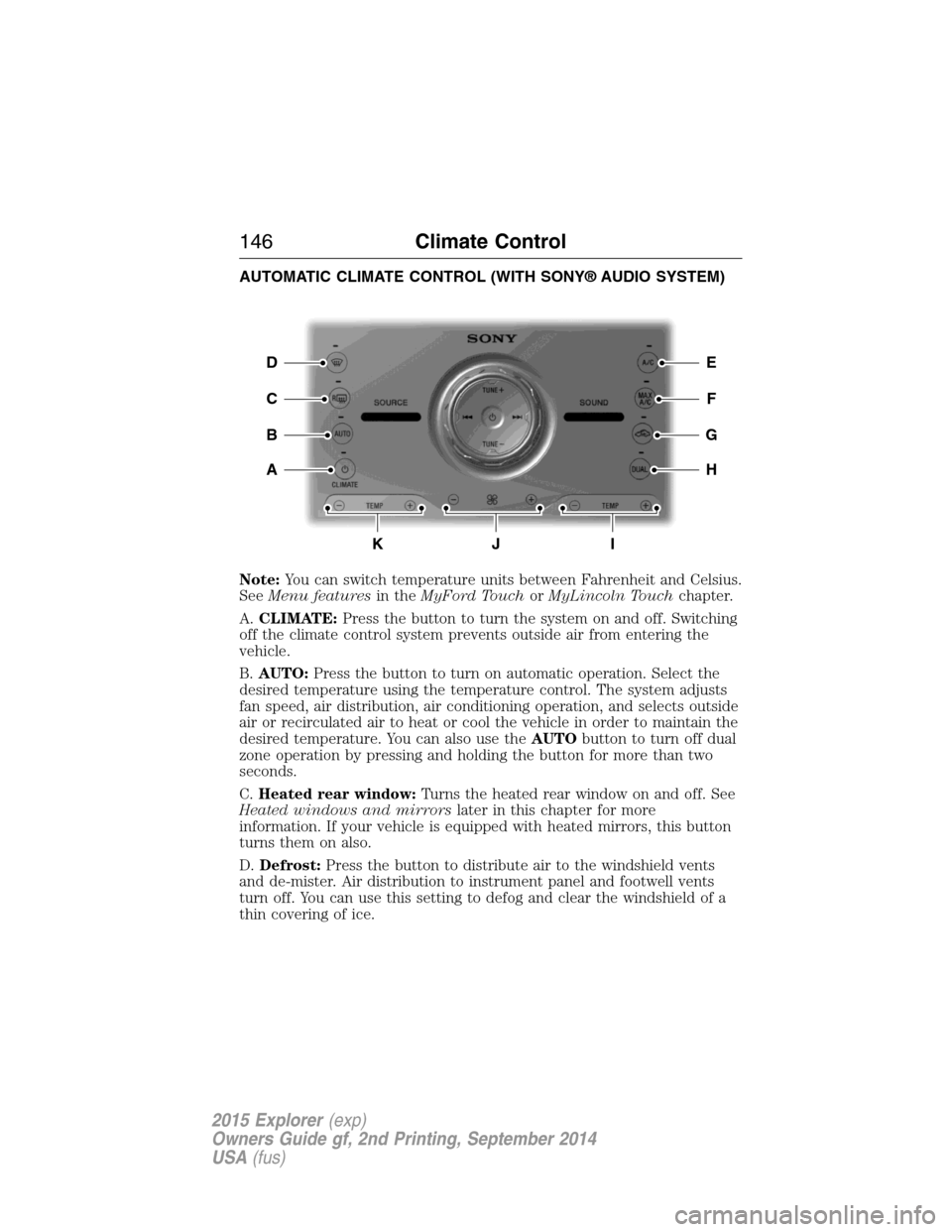
A.CLIMATE:Press the button to turn the system on and off. Switching
off the climate control system prevents outside air from entering the
vehicle.
B.AUTO:Press the button to turn on automatic operation. Select the
desired temperature using the temperature control. The system adjusts
fan speed, air distribution, air conditioning operation, and selects outside
air or recirculated air to heat or cool the vehicle in order to maintain the
desired temperature. You can also use theAUTObutton to turn off dual
zone operation by pressing and holding the button for more than two
seconds.
C.Heated rear window:Turns the heated rear window on and off. See
Heated windows and mirrorslater in this chapter for more
information. If your vehicle is equipped with heated mirrors, this button
turns them on also.
D.Defrost:Press the button to distribute air to the windshield vents
and de-mister. Air distribution to instrument panel and footwell vents
turn off. You can use this setting to defog and clear the windshield of a
thin covering of ice.
E
F
G
H
D
C
A
B
KJI
146Climate Control
2015 Explorer(exp)
Owners Guide gf, 2nd Printing, September 2014
USA(fus)
Page 148 of 596
E.A/C:Press the button to turn air conditioning compressor on or off.
Use air conditioning with recirculated air to improve cooling performance
and efficiency.
F.MAX A/C:Press the button to maximize cooling. Recirculated air
flows through the instrument panel vents, air conditioning automatically
turns on, and the fan automatically adjusts to the highest speed.
G.Recirculated air:Press the button to switch between outside air and
recirculated air. When you select recirculated air, the air currently in the
passenger compartment recirculates. This may reduce the time needed
to cool the interior (when used withA/C) and may reduce unwanted
odors from entering your vehicle.
Note:Recirculated air may turn off automatically (or be prevented
from turning on) in all airflow modes exceptMAX A/Cto reduce risk
of fogging.
H.DUAL:Press the button to allow the passenger to set their
temperature independent of the driver temperature.
I.Passenger temperature control:Press+or-to increase or decrease
the air temperature on the passenger side of the vehicle. This turns on
dual zone mode.
J.Fan speed control:Press+or-to increase or decrease the volume
of air circulated in the vehicle.
K.Driver temperature control:Press+or-to increase or decrease
the air temperature for the driver side of the vehicle. This control also
adjusts the passenger side temperature when not in dual zone mode.
Climate Control147
2015 Explorer(exp)
Owners Guide gf, 2nd Printing, September 2014
USA(fus)
Page 149 of 596
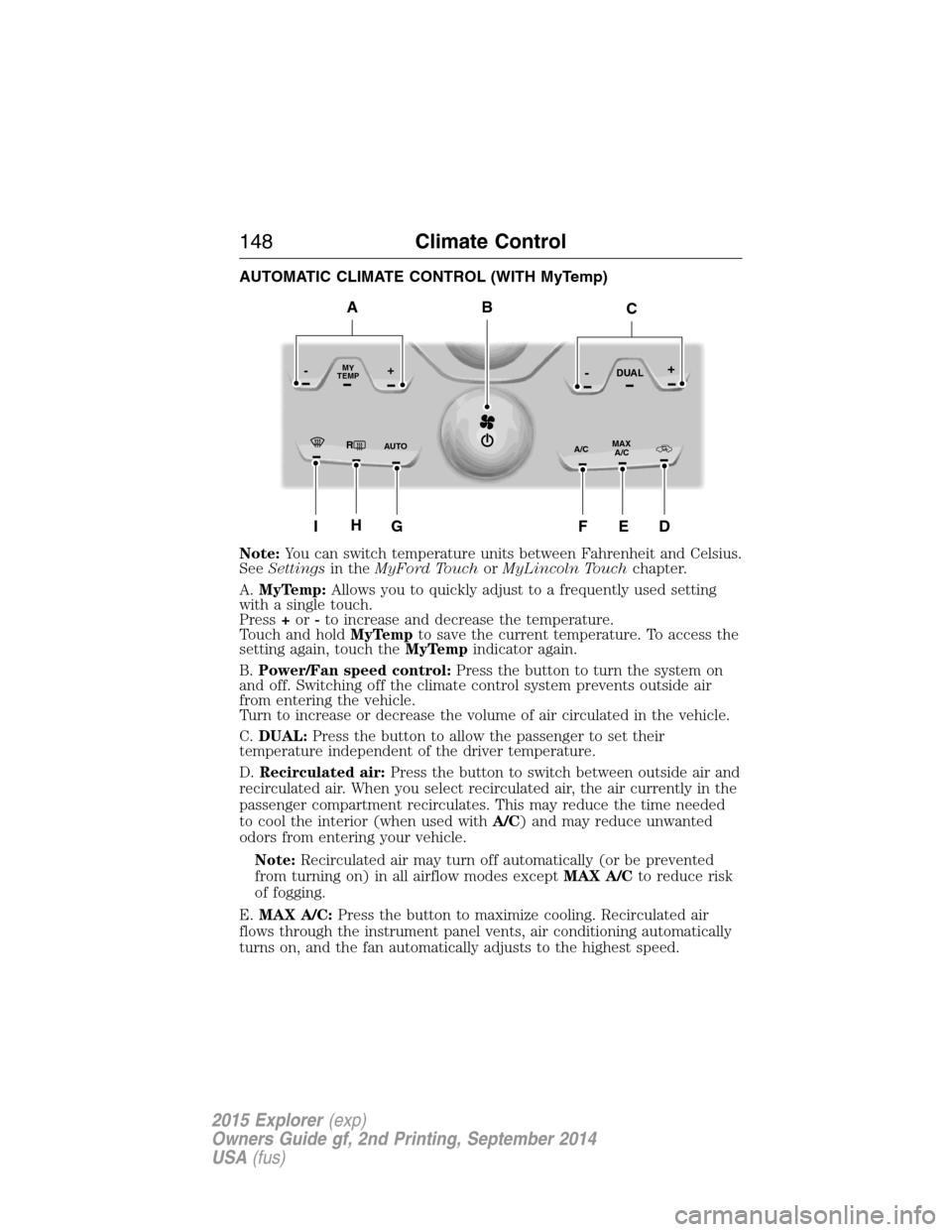
AUTOMATIC CLIMATE CONTROL (WITH MyTemp)
Note:You can switch temperature units between Fahrenheit and Celsius.
SeeSettingsin theMyFord TouchorMyLincoln Touchchapter.
A.MyTemp:Allows you to quickly adjust to a frequently used setting
with a single touch.
Press+or-to increase and decrease the temperature.
Touch and holdMyTempto save the current temperature. To access the
setting again, touch theMyTempindicator again.
B.Power/Fan speed control:Press the button to turn the system on
and off. Switching off the climate control system prevents outside air
from entering the vehicle.
Turn to increase or decrease the volume of air circulated in the vehicle.
C.DUAL:Press the button to allow the passenger to set their
temperature independent of the driver temperature.
D.Recirculated air:Press the button to switch between outside air and
recirculated air. When you select recirculated air, the air currently in the
passenger compartment recirculates. This may reduce the time needed
to cool the interior (when used withA/C) and may reduce unwanted
odors from entering your vehicle.
Note:Recirculated air may turn off automatically (or be prevented
from turning on) in all airflow modes exceptMAX A/Cto reduce risk
of fogging.
E.MAX A/C:Press the button to maximize cooling. Recirculated air
flows through the instrument panel vents, air conditioning automatically
turns on, and the fan automatically adjusts to the highest speed.
RMAX
A/C A/C
TEMP
AU TO
MY-+DUAL-+
IG
B
HEDF
AC
148Climate Control
2015 Explorer(exp)
Owners Guide gf, 2nd Printing, September 2014
USA(fus)
Page 150 of 596

F.A/C:Press the button to turn air conditioning compressor on or off.
Use air conditioning with recirculated air to improve cooling performance
and efficiency.
G.
AUTO:Press the button to turn on automatic operation. Select the
desired temperature using the temperature control. The system adjusts fan
speed, air distribution, air conditioning operation, and selects outside air or
recirculated air to heat or cool the vehicle in order to maintain the desired
temperature. You can also use theAUTObutton to turn off dual zone
operation by pressing and holding the button for more than two seconds.
H.Heated rear window:Turns the heated rear window on and off. See
Heated windows and mirrorslater in this chapter for more
information. If your vehicle is equipped with heated mirrors, this button
turns them on also.
I.Defrost:Press the button to distribute air to the windshield vents and
de-mister. Air distribution to instrument panel and footwell vents turn
off. You can use this setting to defog and clear the windshield of a thin
covering of ice.
REAR PASSENGER CLIMATE CONTROLS
A.Fan control:Controls the volume of air circulated in the rear of your
vehicle. Adjust to select the desired fan speed.
B.Panel:Press to select air flow direction to the panel.
C.Floor:Press to direct air flow to the floor vents.
D.Panel and floor:Press to direct air flow to the panel and floor vents.
E.REAR LOCK:Illuminates when the rear (auxiliary) climate system is
being controlled by the front controls. The rear (auxiliary) climate
controls do not work when this graphic is illuminated
F.Temperature control:Controls the temperature of the airflow in the
rear of your vehicle.
ABCDEF
Climate Control149
2015 Explorer(exp)
Owners Guide gf, 2nd Printing, September 2014
USA(fus)
Page 213 of 596
USING YOUR FOUR WHEEL DRIVE (4WD) SYSTEM
The intelligent 4WD system continuously monitors vehicle conditions and
automatically adjusts the power distribution between the front and rear
wheels. It combines transparent all-surface operation with highly capable
four-wheel drive.
The 4WD system is always active and requires no driver input. It is
capable of handling all road conditions, including street and highway
driving as well as off-road and winter driving. The driver can optimize
more 4WD control by moving the terrain management switch for the
correct terrain. See theTerrain Managementchapter for more
information.
Note:When an 4WD system fault is present, the warning Check AWD
will display in the information display. The 4WD system is not
functioning correctly and will default to front-wheel drive. When this
warning is displayed, have your vehicle serviced at an authorized dealer.
Note:The AWD Off message may also be displayed in the information
display if the 4WD system has overheated and defaulted to front-wheel
drive. This condition may occur if the vehicle was operated in extreme
conditions with excessive wheel slip, such as deep sand. To resume
normal 4WD function as soon as possible, stop the vehicle in a safe
location and stop the engine for at least 10 minutes. After the engine has
been restarted and the 4WD system has adequately cooled, the AWD Off
message will turn off and normal 4WD function will return. The AWD Off
message will turn off when the system cools and normal 4WD function
returns.
If your vehicle is equipped with 4WD, a spare tire of a different size
other than the tire provided should never be used. If the mini-spare tire
is installed, the 4WD system may disable automatically and enter
front-wheel drive only mode to protect driveline components. This
condition may be indicated by an AWD Off message in the information
display. If there is an AWD Off message in the information display from
using the spare tire, this indicator should turn off after reinstalling the
repaired or replaced normal road tire and cycling the ignition off and on.
It is recommended to reinstall the repaired or replaced road tire as soon
as possible. Major dissimilar tire sizes between the front and rear axles
could cause the 4WD system to stop functioning and default to
front-wheel drive or damage the 4WD system.
212Four-Wheel Drive (If Equipped)
2015 Explorer(exp)
Owners Guide gf, 2nd Printing, September 2014
USA(fus)