2015 FORD EXPEDITION deactivate
[x] Cancel search: deactivatePage 43 of 564
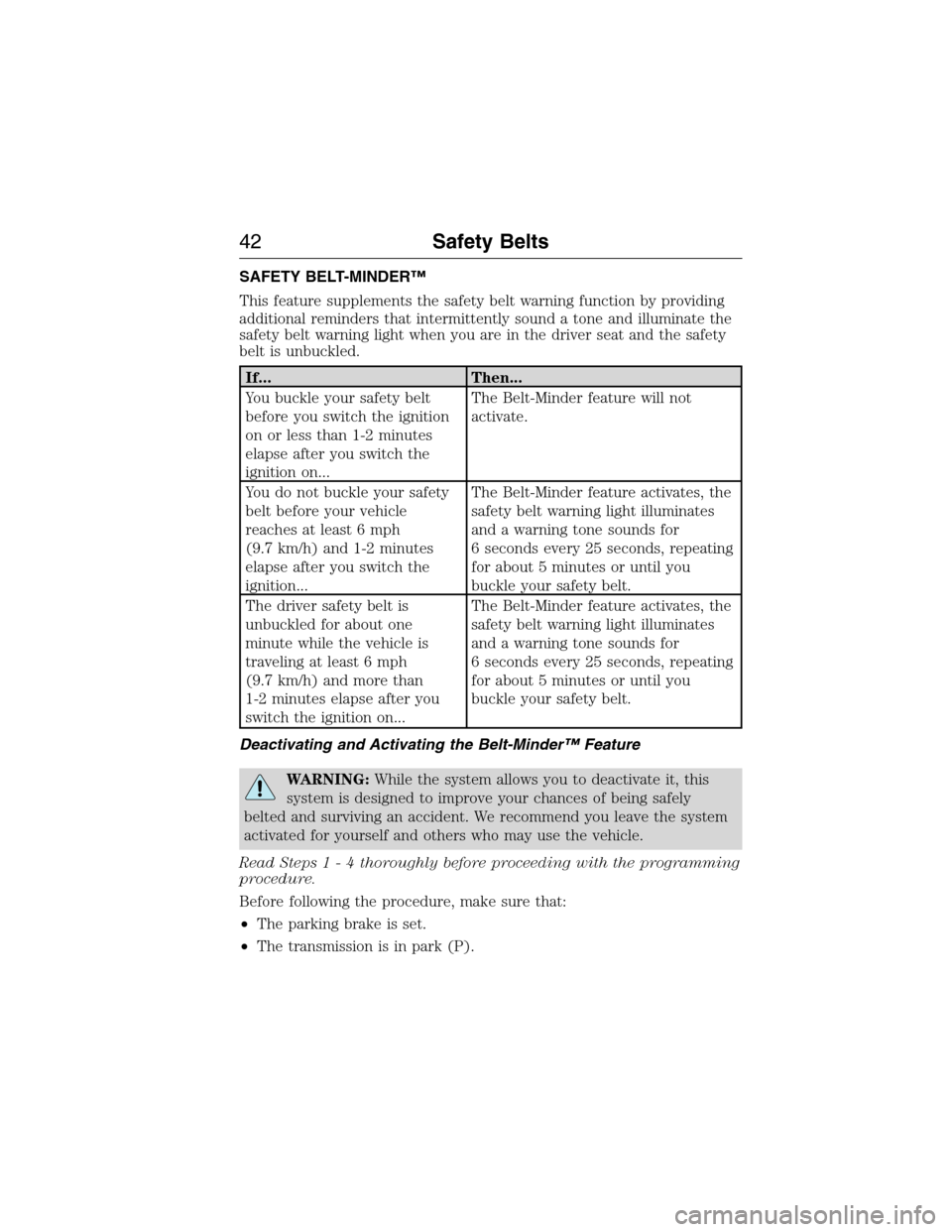
SAFETY BELT-MINDER™
This feature supplements the safety belt warning function by providing
additional reminders that intermittently sound a tone and illuminate the
safety belt warning light when you are in the driver seat and the safety
belt is unbuckled.
If... Then...
You buckle your safety belt
before you switch the ignition
on or less than 1-2 minutes
elapse after you switch the
ignition on...The Belt-Minder feature will not
activate.
You do not buckle your safety
belt before your vehicle
reaches at least 6 mph
(9.7 km/h) and 1-2 minutes
elapse after you switch the
ignition...The Belt-Minder feature activates, the
safety belt warning light illuminates
and a warning tone sounds for
6 seconds every 25 seconds, repeating
for about 5 minutes or until you
buckle your safety belt.
The driver safety belt is
unbuckled for about one
minute while the vehicle is
traveling at least 6 mph
(9.7 km/h) and more than
1-2 minutes elapse after you
switch the ignition on...The Belt-Minder feature activates, the
safety belt warning light illuminates
and a warning tone sounds for
6 seconds every 25 seconds, repeating
for about 5 minutes or until you
buckle your safety belt.
Deactivating and Activating the Belt-Minder™ Feature
WARNING:While the system allows you to deactivate it, this
system is designed to improve your chances of being safely
belted and surviving an accident. We recommend you leave the system
activated for yourself and others who may use the vehicle.
Read Steps1-4thoroughly before proceeding with the programming
procedure.
Before following the procedure, make sure that:
•The parking brake is set.
•The transmission is in park (P).
42Safety Belts
2015 Expedition(exd)
Owners Guide gf, 1st Printing, July 2014
USA(fus)
Page 60 of 564

Car Finder
Press the button twice within three seconds. The horn will sound
and the turn signals will flash. We recommend you use this
method to locate your vehicle, rather than using the panic alarm.
Sounding a Panic Alarm
Press the button to activate the alarm. Press the button again
or switch the ignition on to deactivate.
Note:The panic alarm will only operate when the ignition is off.
Remote Start (If Equipped)
WARNING:To avoid exhaust fumes, do not use remote start if
your vehicle is parked indoors or areas that are not well
ventilated.
Note:Do not use remote start if your vehicle is low on fuel.
The remote start button is on the transmitter.
This feature allows you to start your vehicle from outside your vehicle.
The transmitter has an extended operating range.
Vehicles with automatic climate control can be configured to operate
when the vehicle is remote started. See theClimate Controlchapter for
more information. A manual climate control system will run at the setting
it was set to when your vehicle was last turned off.
Many states and provinces have restrictions for the use of remote start.
Check your local and state or provincial laws for specific requirements
regarding remote start systems.
The remote start system will not work if:
•the ignition is on
•the alarm system is triggered
•you disable the feature
•the hood is open
•the transmission is not inP
•the vehicle battery voltage is too low
•the service engine soon light is on.
Keys and Remote Control59
2015 Expedition(exd)
Owners Guide gf, 1st Printing, July 2014
USA(fus)
Page 131 of 564
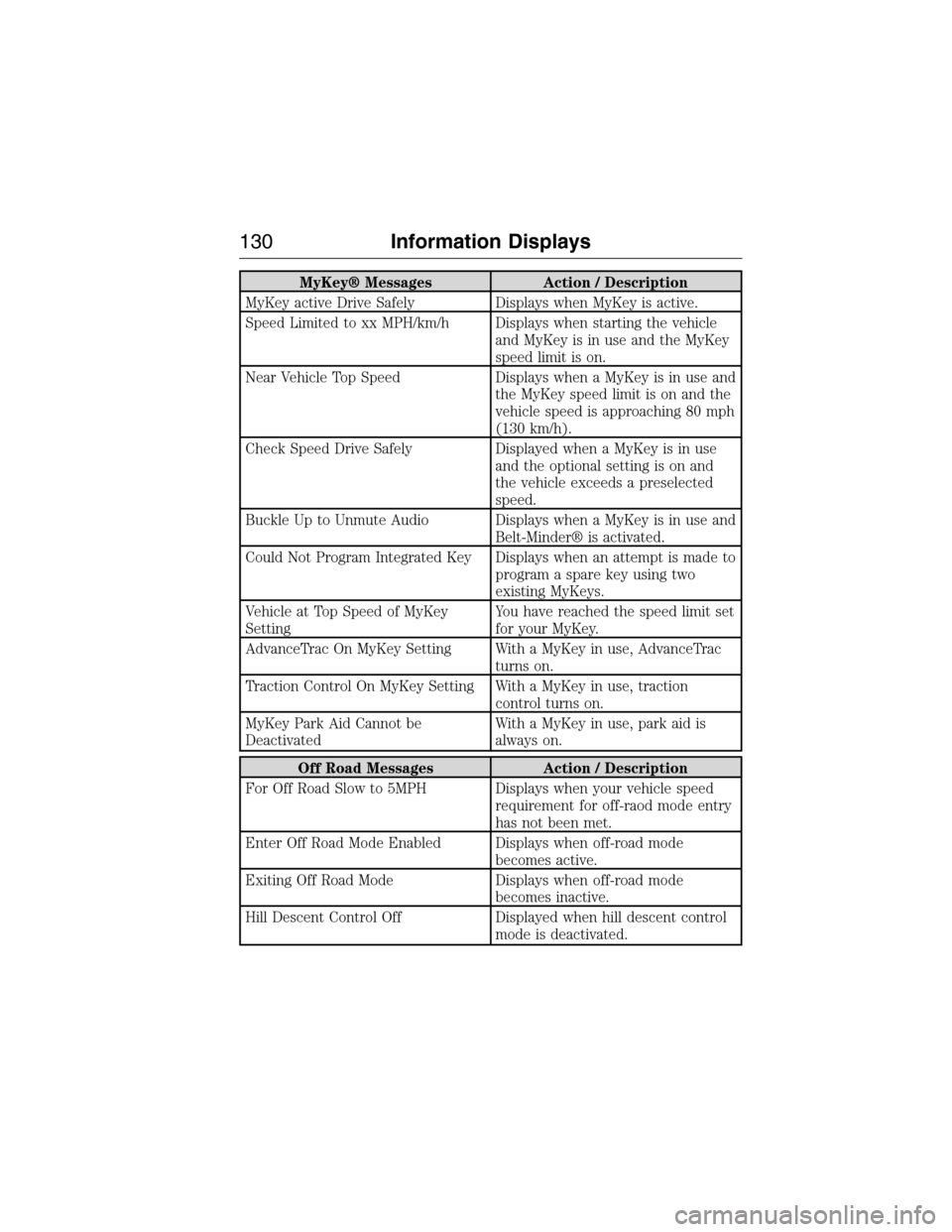
MyKey® Messages Action / Description
MyKey active Drive Safely Displays when MyKey is active.
Speed Limited to xx MPH/km/h Displays when starting the vehicle
and MyKey is in use and the MyKey
speed limit is on.
Near Vehicle Top Speed Displays when a MyKey is in use and
the MyKey speed limit is on and the
vehicle speed is approaching 80 mph
(130 km/h).
Check Speed Drive Safely Displayed when a MyKey is in use
and the optional setting is on and
the vehicle exceeds a preselected
speed.
Buckle Up to Unmute Audio Displays when a MyKey is in use and
Belt-Minder® is activated.
Could Not Program Integrated Key Displays when an attempt is made to
program a spare key using two
existing MyKeys.
Vehicle at Top Speed of MyKey
SettingYou have reached the speed limit set
for your MyKey.
AdvanceTrac On MyKey Setting With a MyKey in use, AdvanceTrac
turns on.
Traction Control On MyKey Setting With a MyKey in use, traction
control turns on.
MyKey Park Aid Cannot be
DeactivatedWith a MyKey in use, park aid is
always on.
Off Road Messages Action / Description
For Off Road Slow to 5MPH Displays when your vehicle speed
requirement for off-raod mode entry
has not been met.
Enter Off Road Mode Enabled Displays when off-road mode
becomes active.
Exiting Off Road Mode Displays when off-road mode
becomes inactive.
Hill Descent Control Off Displayed when hill descent control
mode is deactivated.
130Information Displays
2015 Expedition(exd)
Owners Guide gf, 1st Printing, July 2014
USA(fus)
Page 197 of 564
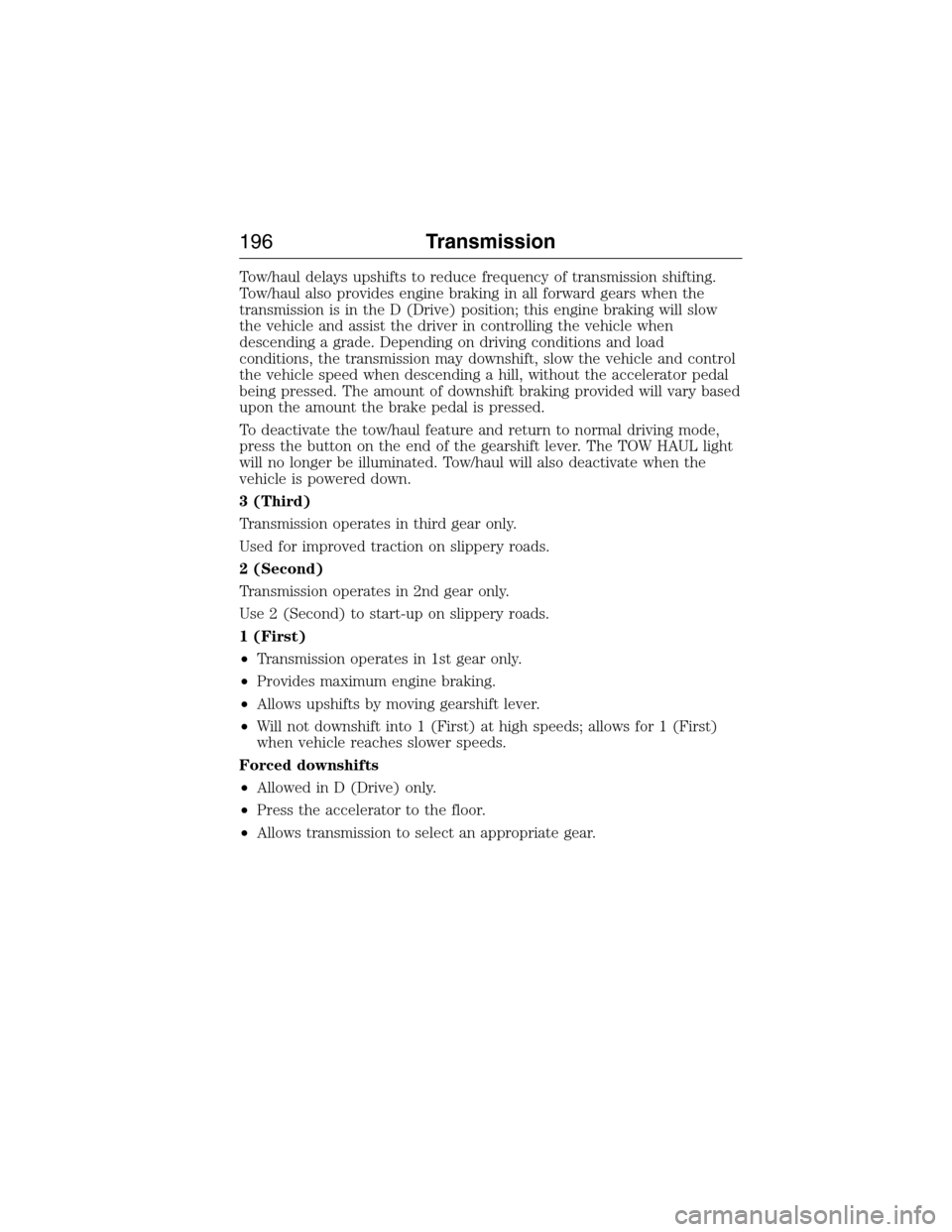
Tow/haul delays upshifts to reduce frequency of transmission shifting.
Tow/haul also provides engine braking in all forward gears when the
transmission is in the D (Drive) position; this engine braking will slow
the vehicle and assist the driver in controlling the vehicle when
descending a grade. Depending on driving conditions and load
conditions, the transmission may downshift, slow the vehicle and control
the vehicle speed when descending a hill, without the accelerator pedal
being pressed. The amount of downshift braking provided will vary based
upon the amount the brake pedal is pressed.
To deactivate the tow/haul feature and return to normal driving mode,
press the button on the end of the gearshift lever. The TOW HAUL light
will no longer be illuminated. Tow/haul will also deactivate when the
vehicle is powered down.
3 (Third)
Transmission operates in third gear only.
Used for improved traction on slippery roads.
2 (Second)
Transmission operates in 2nd gear only.
Use 2 (Second) to start-up on slippery roads.
1 (First)
•Transmission operates in 1st gear only.
•Provides maximum engine braking.
•Allows upshifts by moving gearshift lever.
•Will not downshift into 1 (First) at high speeds; allows for 1 (First)
when vehicle reaches slower speeds.
Forced downshifts
•Allowed in D (Drive) only.
•Press the accelerator to the floor.
•Allows transmission to select an appropriate gear.
196Transmission
2015 Expedition(exd)
Owners Guide gf, 1st Printing, July 2014
USA(fus)
Page 214 of 564
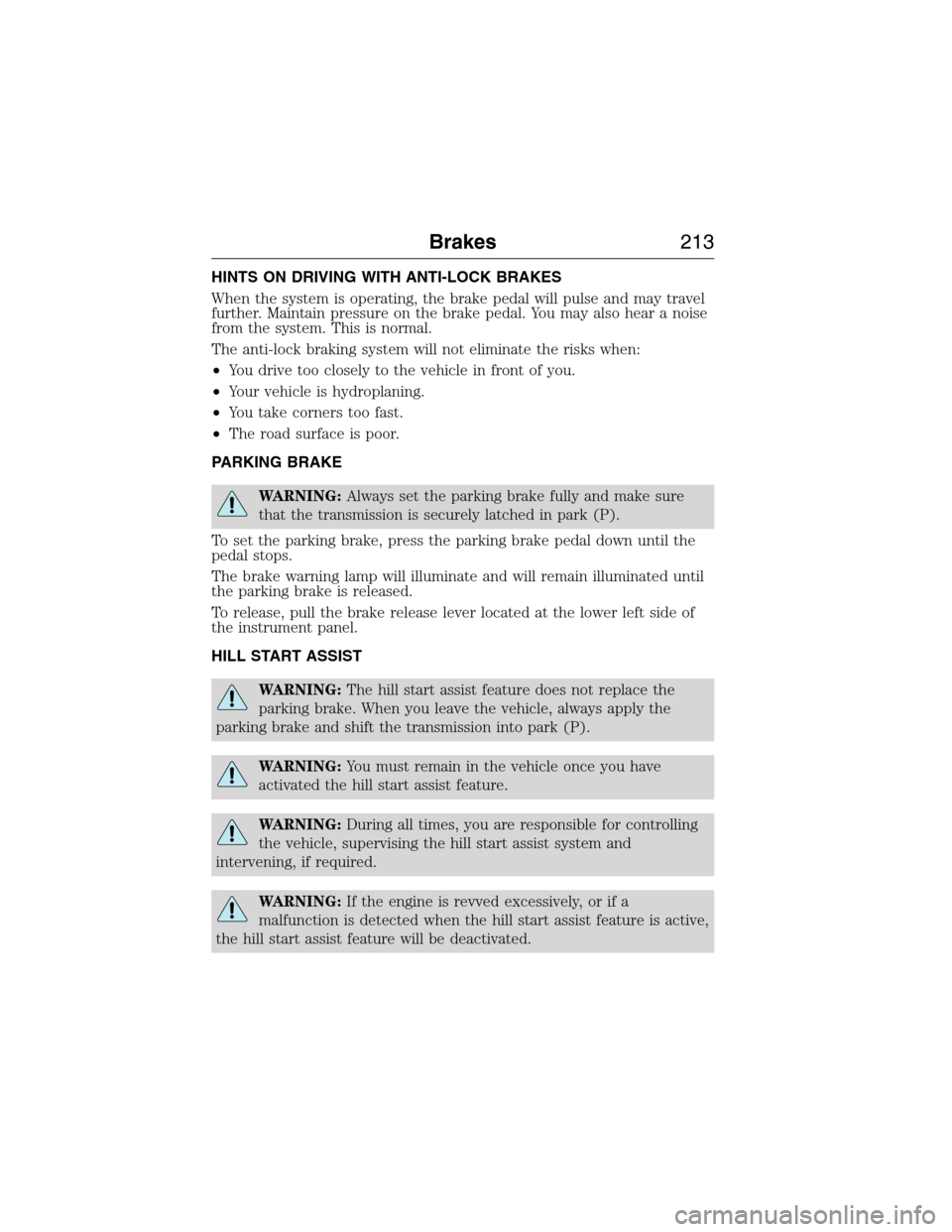
HINTS ON DRIVING WITH ANTI-LOCK BRAKES
When the system is operating, the brake pedal will pulse and may travel
further. Maintain pressure on the brake pedal. You may also hear a noise
from the system. This is normal.
The anti-lock braking system will not eliminate the risks when:
•You drive too closely to the vehicle in front of you.
•Your vehicle is hydroplaning.
•You take corners too fast.
•The road surface is poor.
PARKING BRAKE
WARNING:Always set the parking brake fully and make sure
that the transmission is securely latched in park (P).
To set the parking brake, press the parking brake pedal down until the
pedal stops.
The brake warning lamp will illuminate and will remain illuminated until
the parking brake is released.
To release, pull the brake release lever located at the lower left side of
the instrument panel.
HILL START ASSIST
WARNING:The hill start assist feature does not replace the
parking brake. When you leave the vehicle, always apply the
parking brake and shift the transmission into park (P).
WARNING:You must remain in the vehicle once you have
activated the hill start assist feature.
WARNING:During all times, you are responsible for controlling
the vehicle, supervising the hill start assist system and
intervening, if required.
WARNING:If the engine is revved excessively, or if a
malfunction is detected when the hill start assist feature is active,
the hill start assist feature will be deactivated.
Brakes213
2015 Expedition(exd)
Owners Guide gf, 1st Printing, July 2014
USA(fus)
Page 404 of 564
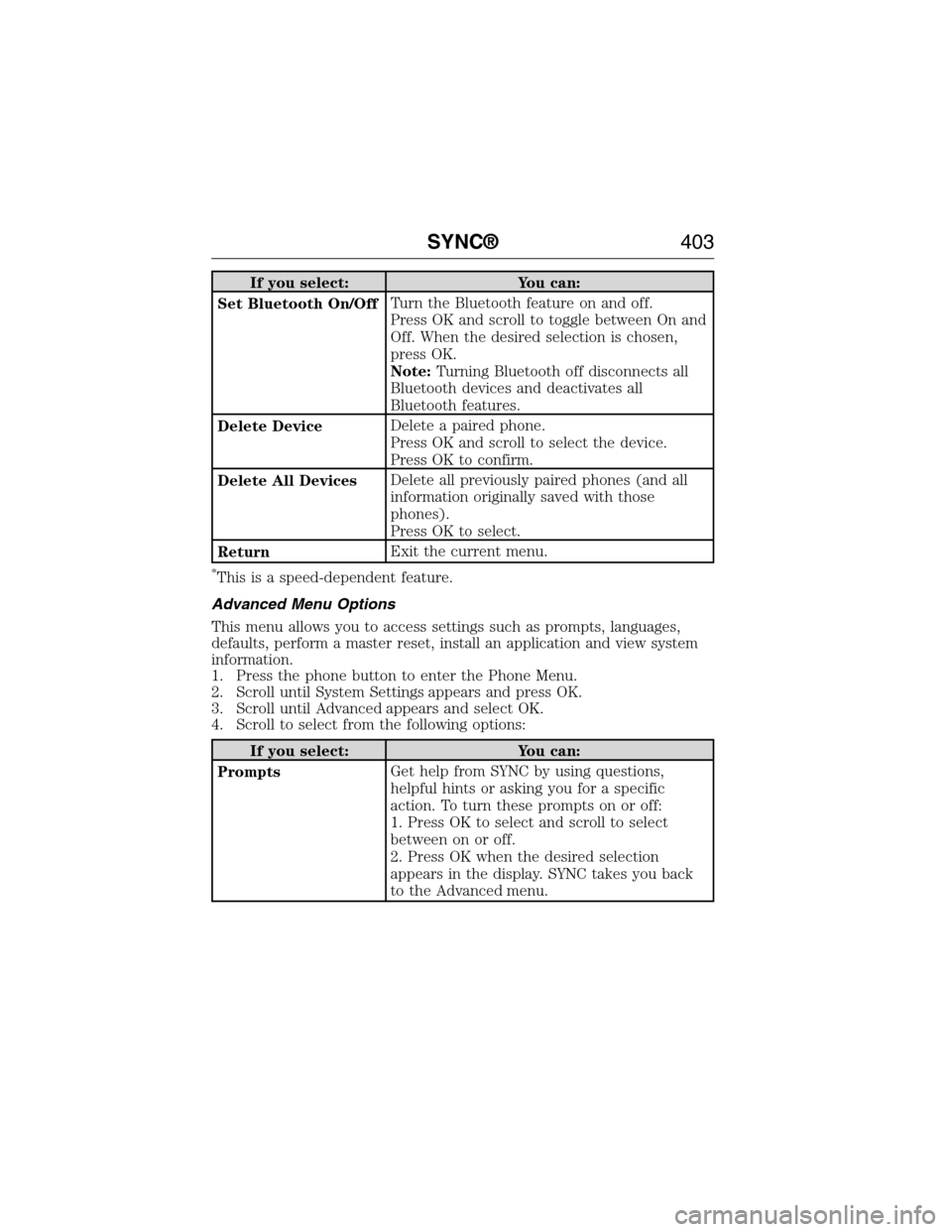
If you select: You can:
Set Bluetooth On/OffTurn the Bluetooth feature on and off.
Press OK and scroll to toggle between On and
Off. When the desired selection is chosen,
press OK.
Note:Turning Bluetooth off disconnects all
Bluetooth devices and deactivates all
Bluetooth features.
Delete DeviceDelete a paired phone.
Press OK and scroll to select the device.
Press OK to confirm.
Delete All DevicesDelete all previously paired phones (and all
information originally saved with those
phones).
Press OK to select.
ReturnExit the current menu.
*This is a speed-dependent feature.
Advanced Menu Options
This menu allows you to access settings such as prompts, languages,
defaults, perform a master reset, install an application and view system
information.
1. Press the phone button to enter the Phone Menu.
2. Scroll until System Settings appears and press OK.
3. Scroll until Advanced appears and select OK.
4. Scroll to select from the following options:
If you select: You can:
PromptsGet help from SYNC by using questions,
helpful hints or asking you for a specific
action. To turn these prompts on or off:
1. Press OK to select and scroll to select
between on or off.
2. Press OK when the desired selection
appears in the display. SYNC takes you back
to the Advanced menu.
SYNC®403
2015 Expedition(exd)
Owners Guide gf, 1st Printing, July 2014
USA(fus)
Page 424 of 564
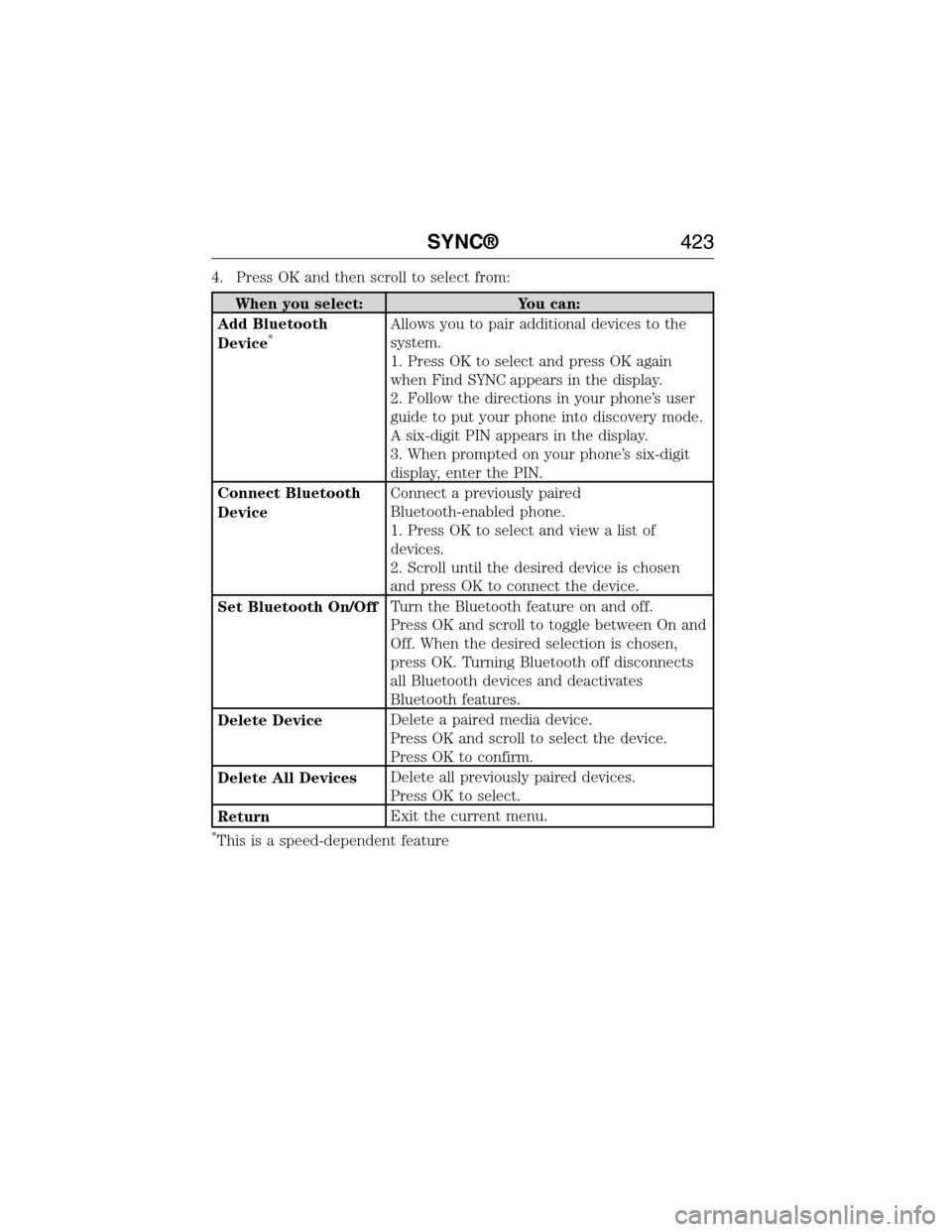
4. Press OK and then scroll to select from:
When you select: You can:
Add Bluetooth
Device
*Allows you to pair additional devices to the
system.
1. Press OK to select and press OK again
when Find SYNC appears in the display.
2. Follow the directions in your phone’s user
guide to put your phone into discovery mode.
A six-digit PIN appears in the display.
3. When prompted on your phone’s six-digit
display, enter the PIN.
Connect Bluetooth
DeviceConnect a previously paired
Bluetooth-enabled phone.
1. Press OK to select and view a list of
devices.
2. Scroll until the desired device is chosen
and press OK to connect the device.
Set Bluetooth On/OffTurn the Bluetooth feature on and off.
Press OK and scroll to toggle between On and
Off. When the desired selection is chosen,
press OK. Turning Bluetooth off disconnects
all Bluetooth devices and deactivates
Bluetooth features.
Delete DeviceDelete a paired media device.
Press OK and scroll to select the device.
Press OK to confirm.
Delete All DevicesDelete all previously paired devices.
Press OK to select.
ReturnExit the current menu.
*This is a speed-dependent feature
SYNC®423
2015 Expedition(exd)
Owners Guide gf, 1st Printing, July 2014
USA(fus)