2015 FORD EXPEDITION key
[x] Cancel search: keyPage 263 of 564
TOWING THE VEHICLE ON FOUR WHEELS
Emergency Towing
If your vehicle becomes inoperable (without access to wheel dollies,
car-hauling trailer, or flatbed transport vehicle), it can be flat-towed (all
wheels on the ground, regardless of the powertrain and transmission
configuration) under the following conditions:
•Your vehicle is facing forward for towing in a forward direction.
•Place the transmission in positionN.SeeAutomatic transmissionin
theTransmissionchapter if you cannot move the transmission into
N.
•Maximum speed is 35 mph (56 km/h).
•Maximum distance is 50 miles (80 kilometers).
Four-wheel-down Towing
Note:Make sure you properly secure your vehicle to the tow vehicle.
Entering four-wheel-down towing
1. Put the ignition in the on position:
•If your vehicle has an ignition key, turn the key to on. Do not
start the engine.
•If your vehicle has intelligent access, press the engine
START/STOP button twice without pressing the brake pedal. Do
not start the engine.
2. Press and hold the brake pedal.
3. Rotate the four–wheel drive switch to 2H.
4. Shift the transmission to positionN.
5. Rotate the four–wheel drive switch from 2H to 4L and back to 2H
five times within seven seconds.
•If completed successfully, the information display shows
NEUTRAL TOW LEAVE IN NorNEUTRAL TOW ENABLED
LEAVE TRANSMISSION IN NEUTRAL.This indicates that
your vehicle is safe to tow with all wheels on the ground.
•If you do not see the message in the display, you must perform
the procedure again from the beginning.
•You may hear an audible noise as the transfer case shifts into its
neutral position. This is normal.
6. Release the brake pedal.
262Towing
2015 Expedition(exd)
Owners Guide gf, 1st Printing, July 2014
USA(fus)
Page 264 of 564
7. Leave the transmission in positionN.
•If your vehicle has an ignition key, turn the ignition as far as it
goes toward the off position (it does not turn fully off when the
transmission is in positionN.)You must leave the key in the
ignition while towing. To lock and unlock your vehicle, use the
keyless entry keypad or extra set of keys.
•If your vehicle has intelligent access, turn the ignition off by
pressing the engine START/STOP button once without pressing on
the brake pedal. You do not need to leave your keys in the
vehicle. You can lock and unlock your vehicle as you normally do.
WARNING:Do not disconnect the battery during recreational
towing. Doing so will prevent the transfer case from shifting
properly and may cause the vehicle to roll even if the transmission is in
P (Park).
WARNING:Shifting the transfer case to its neutral position for
recreational towing may cause the vehicle to be able to roll even
if the transmission is in P (Park). The driver or others could be injured.
Make sure the foot brake is depressed and the vehicle is in a secure
and safe position while the transfer case is being shifted to its neutral
position.
WARNING:Failing to put the transfer case in its neutral position
will damage vehicle components.
Note:You can check four-wheel-down towing status at any time by
opening the driver’s door or turning the ignition to the accessory or on
position and verifying theNEUTRAL TOW ENABLED LEAVE
TRANSMISSION IN NEUTRALmessage displays in the cluster.
Exiting four-wheel-down towing
To exit four-wheel-down towing and return the transfer case to its 2H
position:
1. With your vehicle still properly secured to the tow vehicle, put the
ignition in the on position:
•If your vehicle has an ignition key, turn the key to on. Do not
start the engine.
•If your vehicle has intelligent access, press the engine
START/STOP button twice without pressing the brake pedal. Do
not start the engine.
Towing263
2015 Expedition(exd)
Owners Guide gf, 1st Printing, July 2014
USA(fus)
Page 269 of 564
ROADSIDE ASSISTANCE
Vehicles Sold in the United States: Getting Roadside Assistance
To fully assist you should you have a vehicle concern, Ford Motor
Company offers a complimentary Roadside Assistance program. This
program is separate from the New Vehicle Limited Warranty. The service
is available:
•24 hours a day, seven days a week.
•For the coverage period listed on the Roadside Assistance Card
included in your Owner’s Manual portfolio.
Roadside assistance will cover:
•A flat tire change with a good spare (except vehicles that have been
supplied with a tire inflation kit).
•Battery jump start.
•Lock-out assistance (key replacement cost is the customer’s
responsibility).
•Fuel delivery – Independent Service Contractors, if not prohibited by
state, local or municipal law, shall deliver up to 2.0 gallons (7.5 liters)
of gasoline or 5.0 gallons (18.9 liters) of diesel fuel to a disabled
vehicle. Fuel delivery service is limited to two no-charge occurrences
within a 12-month period.
•Winch out – available within 100 feet (30.5 meters) of a paved or
county maintained road, no recoveries.
•Towing – Ford eligible vehicles will be towed to an authorized dealer
within 35 miles (56.3 kilometers) of the disablement location or to the
nearest authorized dealer. If a member requests to be towed to an
authorized dealer more than 35 miles (56.3 kilometers) from the
disablement location, the member shall be responsible for any mileage
costs in excess of 35 miles (56.3 kilometers).
Roadside Assistance will include up to $200 coverage for a towed trailer
if the disabled eligible vehicle requires service at the nearest authorized
dealer. If the towing vehicle is operational but the trailer is not, then the
trailer does not qualify for any roadside services.
268Roadside Emergencies
2015 Expedition(exd)
Owners Guide gf, 1st Printing, July 2014
USA(fus)
Page 289 of 564

Fuse or relay
locationFuse amp rating Protected circuits
9 10A SYNC, power lift gate, electric finish
panel, display
10 10A Run accessory relay
11 10A Passive entry/start module
12 15A Interior lighting, puddle lamps
13 15A Right turn and stop/turn signals
14 15A Left turn and stop/turn signals
15 15A Reverse lamp, center high mount
stop lamp, EC mirror
16 10A Right front low beam
17 10A Left front low beam
18 10A Brake shift interlock/start button
LED/keypad illumination, third row
power folding seat, passive entry
touch start
19 — Not used
20 20A Lock/unlock relays
21 — Not used
22 20A Horn
23 15A SWCM, cluster
24 15A Adjustable pedals/power adjustable
column, Datalink
25 15A Liftgate release decklid, liftglass
release motor
26 5A Push to start switch
27 20A Passive entry/start module
28 15A Ignition switch, key inhibit switch
29 20A Radio, GPS
30 15A Front park lamps
31 5A Trailer brake on/off
32 15A Power vent, rear windows, power
inverter
33 10A CCD suspension module
288Fuses
2015 Expedition(exd)
Owners Guide gf, 1st Printing, July 2014
USA(fus)
Page 292 of 564
Working with the Engine Off
1. Set the parking brake and shift toP(Park).
2. Turn off the engine and remove the key (if equipped).
3. Block the wheels.
Working with the Engine On
WARNING:To reduce the risk of vehicle damage or personal
burn injuries, do not start your engine with the air cleaner
removed and do not remove it while the engine is running.
1. Set the parking brake and shift to positionP(Park) .
2. Block the wheels.
OPENING AND CLOSING THE HOOD
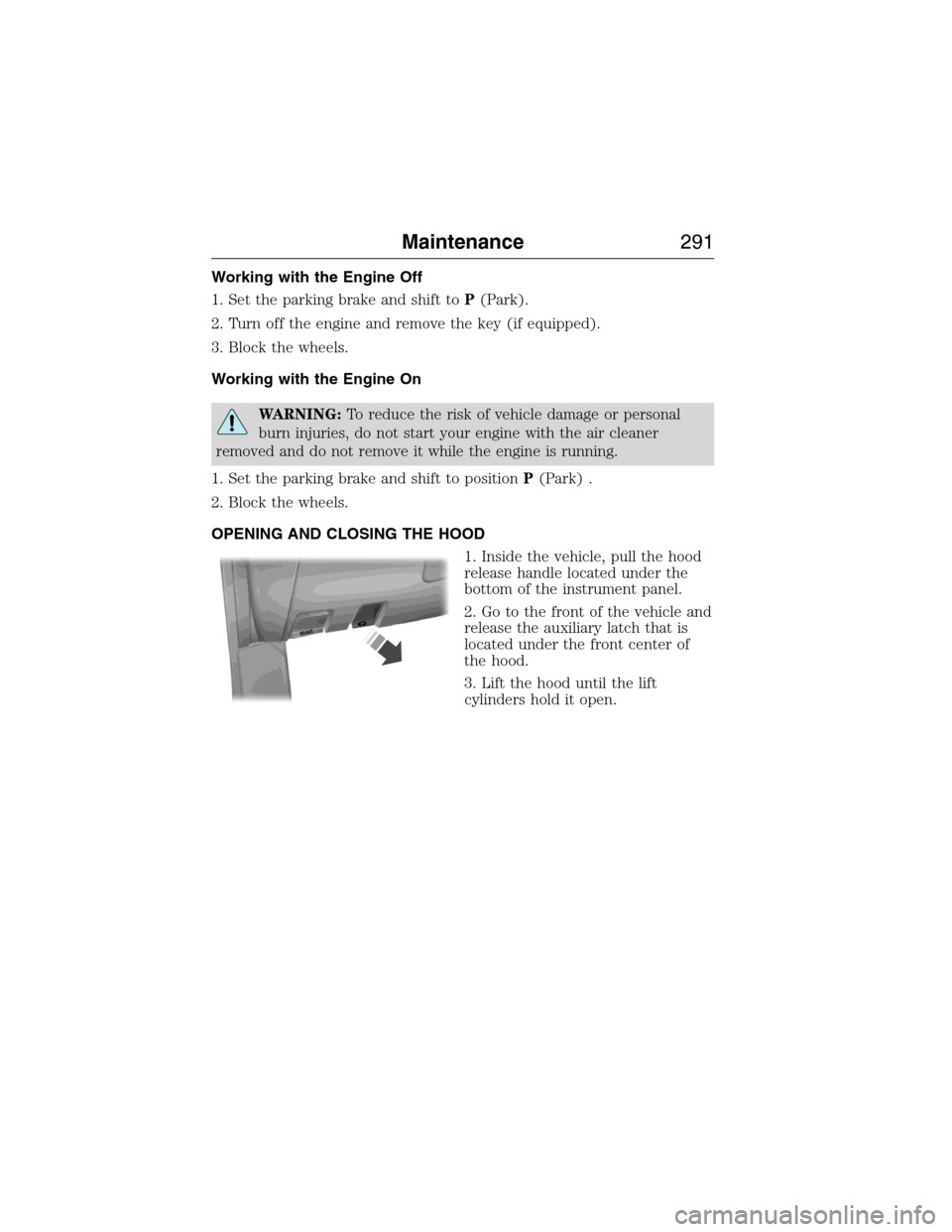
1. Inside the vehicle, pull the hood
release handle located under the
bottom of the instrument panel.
2. Go to the front of the vehicle and
release the auxiliary latch that is
located under the front center of
the hood.
3. Lift the hood until the lift
cylinders hold it open.
B
R
A
K
E
Maintenance291
2015 Expedition(exd)
Owners Guide gf, 1st Printing, July 2014
USA(fus)
Page 304 of 564
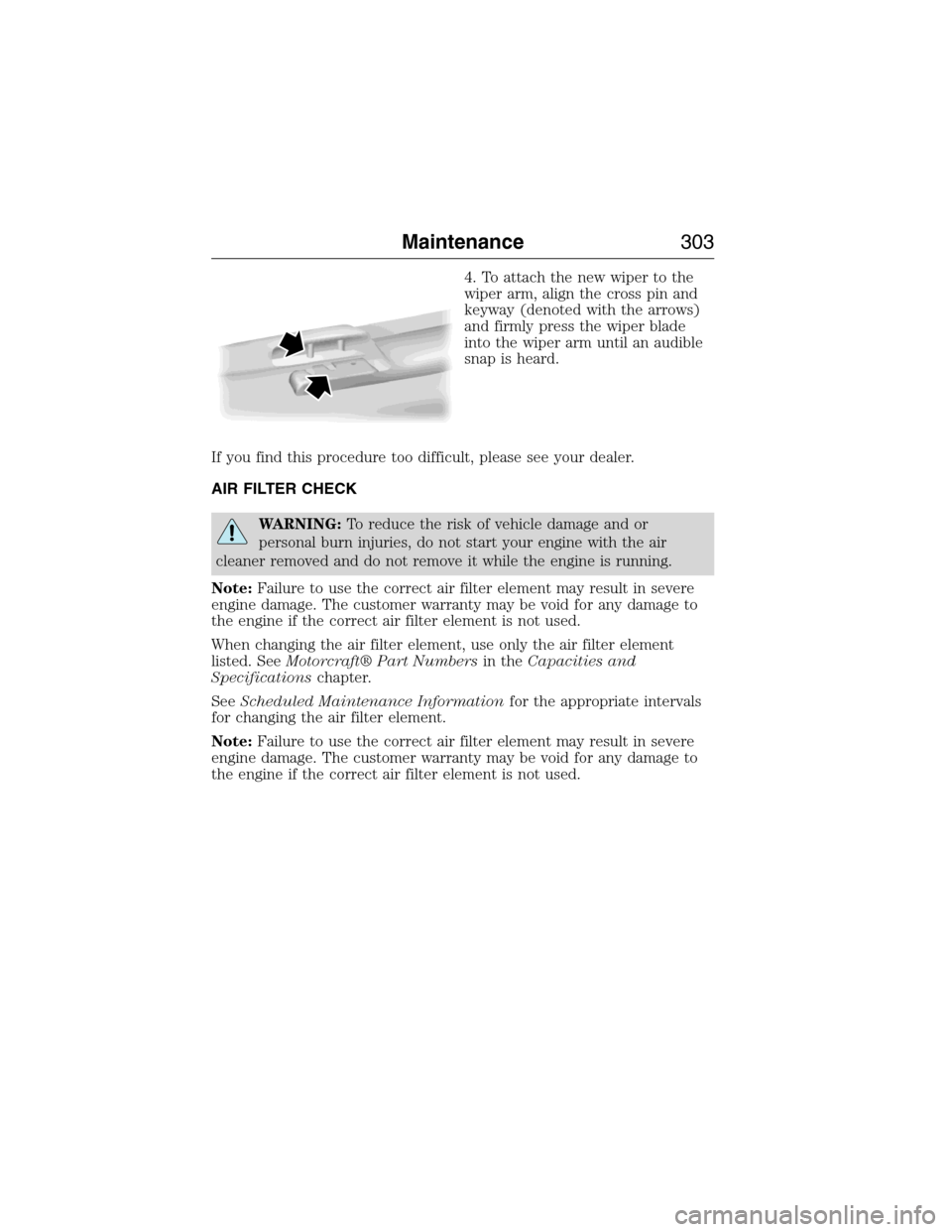
4. To attach the new wiper to the
wiper arm, align the cross pin and
keyway (denoted with the arrows)
and firmly press the wiper blade
into the wiper arm until an audible
snap is heard.
If you find this procedure too difficult, please see your dealer.
AIR FILTER CHECK
WARNING:To reduce the risk of vehicle damage and or
personal burn injuries, do not start your engine with the air
cleaner removed and do not remove it while the engine is running.
Note:Failure to use the correct air filter element may result in severe
engine damage. The customer warranty may be void for any damage to
the engine if the correct air filter element is not used.
When changing the air filter element, use only the air filter element
listed. SeeMotorcraft® Part Numbersin theCapacities and
Specificationschapter.
SeeScheduled Maintenance Informationfor the appropriate intervals
for changing the air filter element.
Note:Failure to use the correct air filter element may result in severe
engine damage. The customer warranty may be void for any damage to
the engine if the correct air filter element is not used.
Maintenance303
2015 Expedition(exd)
Owners Guide gf, 1st Printing, July 2014
USA(fus)
Page 382 of 564
Sirius Satellite Radio Service
Note:Sirius reserves the unrestricted right to change, rearrange, add or
delete programming including canceling, moving or adding particular
channels, and its prices, at any time, with or without notice to you. Ford
Motor Company shall not be responsible for any such programming changes.
Sirius satellite radio is a
subscription-based satellite radio
service that broadcasts a variety of
music, sports, news, weather, traffic
and entertainment programming.
Your factory-installed Sirius satellite
radio system includes hardware and
a limited subscription term which begins on the date of sale or lease of
your vehicle. See an authorized dealer for availability.
For more information on extended subscription terms (a service fee is
required), the online media player and a complete list of Sirius satellite
radio channels, and other features, please visit www.siriusxm.com in the
United States, www.sirius.ca in Canada, or call Sirius at 1–888–539–7474.
Satellite Radio Electronic Serial Number (ESN)
You need your ESN to activate, modify or track your satellite radio account.
When in satellite radio mode, you can view this number by pressingSIRIUS
and memory preset 1 at the same time. To access your ESN, press the
bottom left corner of the touchscreen, thenSIRIUS>Options.
Troubleshooting
Radio display Condition Possible action
Acquiring Radio requires more
than two seconds to
produce audio for the
selected channel.No action required.
This message should
disappear shortly.
Sat Fault/SIRIUS
system failureThere is an internal
module or system
failure present.If this message does
not clear shortly, or
with an ignition key
cycle, your receiver
may have a fault. See
an authorized dealer
for service.
Audio System381
2015 Expedition(exd)
Owners Guide gf, 1st Printing, July 2014
USA(fus)
Page 442 of 564
Speed-restricted Features
Some features of this system may be too difficult to use while your
vehicle is moving so they are restricted from use unless your vehicle is
stationary.
•Screens that are too crowded with information, such as Point of
Interest reviews and ratings, Sirius Travel Link sports scores, movie
times and ski conditions.
•Any action that requires you to use a keyboard is restricted, such as
entering a navigation destination or editing information.
•All lists are limited so the user can view fewer entries (such as phone
contacts or recent phone call entries).
See the following chart for more specific examples:
Restricted Features
Cellular Phone Pairing a Bluetooth phone
Adding phonebook contacts or uploading
phonebook contacts (from a USB)
List entries are limited for phone contacts and
recent phone call entries
System Functionality Editing the keypad code
Enabling Valet Mode
Editing settings while the rear view camera or
Active Park Assist are active
Wi-Fi and Wireless Editing wireless settings
Editing the list of wireless networks
Videos, Photos and
GraphicsPlaying video
Editing the screen’s wallpaper or adding new
wallpaper
Text Messages Composing text messages
Viewing received text messages
Editing preset text messages
Navigation Using the keyboard to enter a destination
Demo navigation route
Adding or Editing Address Book entries or
Avoid Areas
MyFord Touch® (If Equipped)441
2015 Expedition(exd)
Owners Guide gf, 1st Printing, July 2014
USA(fus)