Page 118 of 564
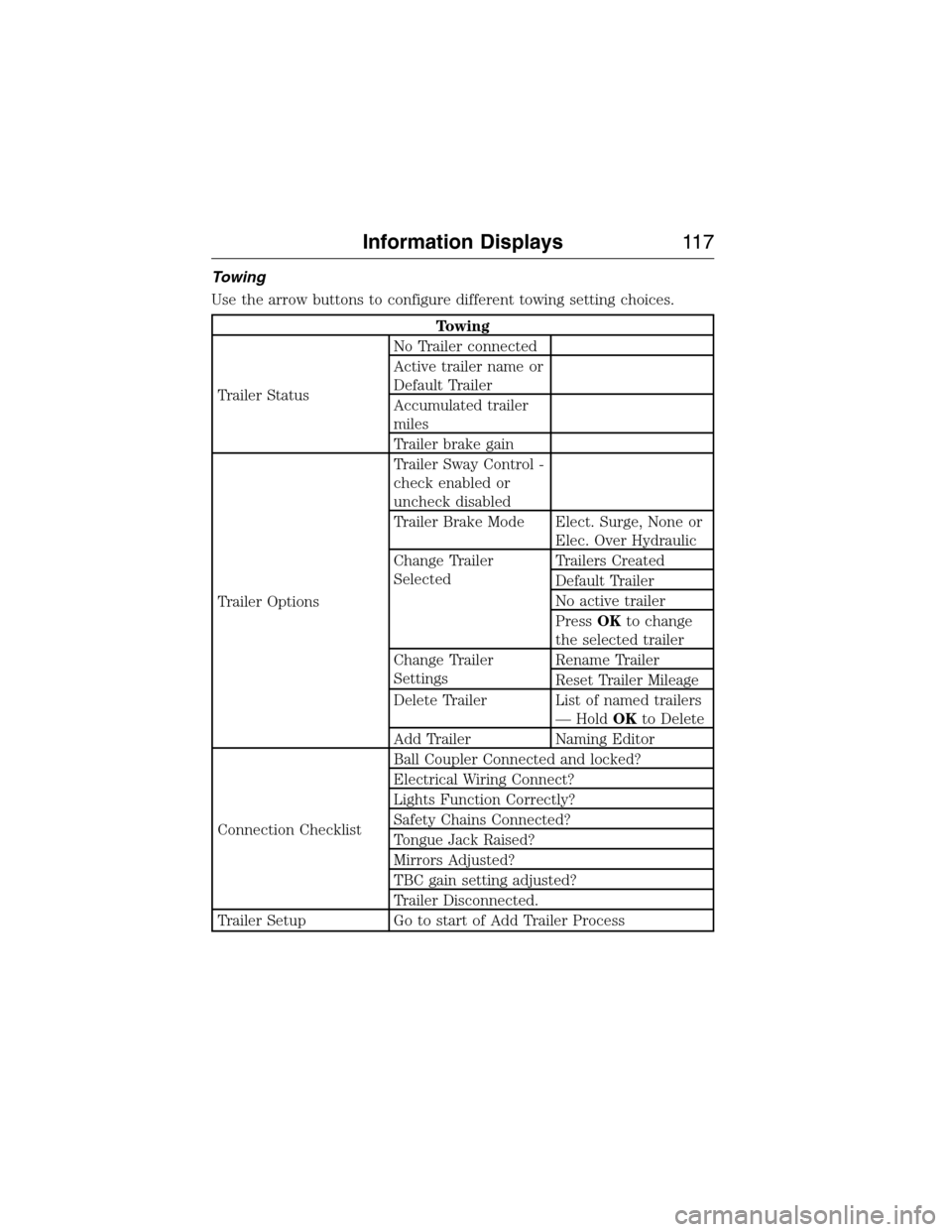
Towing
Use the arrow buttons to configure different towing setting choices.
Towing
Trailer StatusNo Trailer connected
Active trailer name or
Default Trailer
Accumulated trailer
miles
Trailer brake gain
Trailer OptionsTrailer Sway Control -
check enabled or
uncheck disabled
Trailer Brake Mode Elect. Surge, None or
Elec. Over Hydraulic
Change Trailer
SelectedTrailers Created
Default Trailer
No active trailer
PressOKto change
the selected trailer
Change Trailer
SettingsRename Trailer
Reset Trailer Mileage
Delete Trailer List of named trailers
— HoldOKto Delete
Add Trailer Naming Editor
Connection ChecklistBall Coupler Connected and locked?
Electrical Wiring Connect?
Lights Function Correctly?
Safety Chains Connected?
Tongue Jack Raised?
Mirrors Adjusted?
TBC gain setting adjusted?
Trailer Disconnected.
Trailer Setup Go to start of Add Trailer Process
Information Displays11 7
2015 Expedition(exd)
Owners Guide gf, 1st Printing, July 2014
USA(fus)
Page 120 of 564
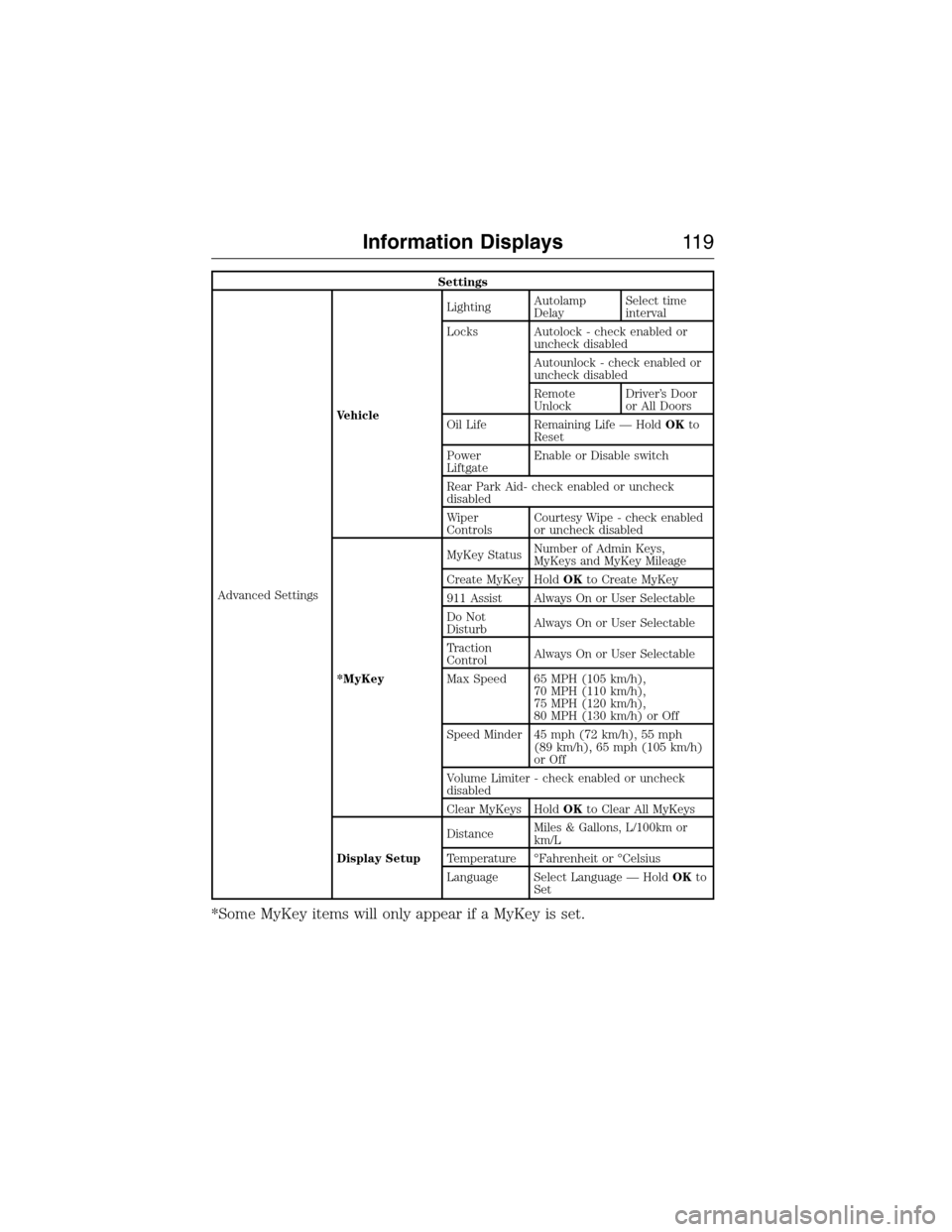
Settings
Advanced SettingsVehicleLightingAutolamp
DelaySelect time
interval
Locks Autolock - check enabled or
uncheck disabled
Autounlock - check enabled or
uncheck disabled
Remote
UnlockDriver’s Door
or All Doors
Oil Life Remaining Life — HoldOKto
Reset
Power
LiftgateEnable or Disable switch
Rear Park Aid- check enabled or uncheck
disabled
Wiper
ControlsCourtesy Wipe - check enabled
or uncheck disabled
*MyKeyMyKey StatusNumber of Admin Keys,
MyKeys and MyKey Mileage
Create MyKey HoldOKto Create MyKey
911 Assist Always On or User Selectable
Do Not
DisturbAlways On or User Selectable
Traction
ControlAlways On or User Selectable
Max Speed 65 MPH (105 km/h),
70 MPH (110 km/h),
75 MPH (120 km/h),
80 MPH (130 km/h) or Off
Speed Minder 45 mph (72 km/h), 55 mph
(89 km/h), 65 mph (105 km/h)
or Off
Volume Limiter - check enabled or uncheck
disabled
Clear MyKeys HoldOKto Clear All MyKeys
Display SetupDistanceMiles & Gallons, L/100km or
km/L
Temperature °Fahrenheit or °Celsius
Language Select Language — HoldOKto
Set
*Some MyKey items will only appear if a MyKey is set.
Information Displays11 9
2015 Expedition(exd)
Owners Guide gf, 1st Printing, July 2014
USA(fus)
Page 123 of 564
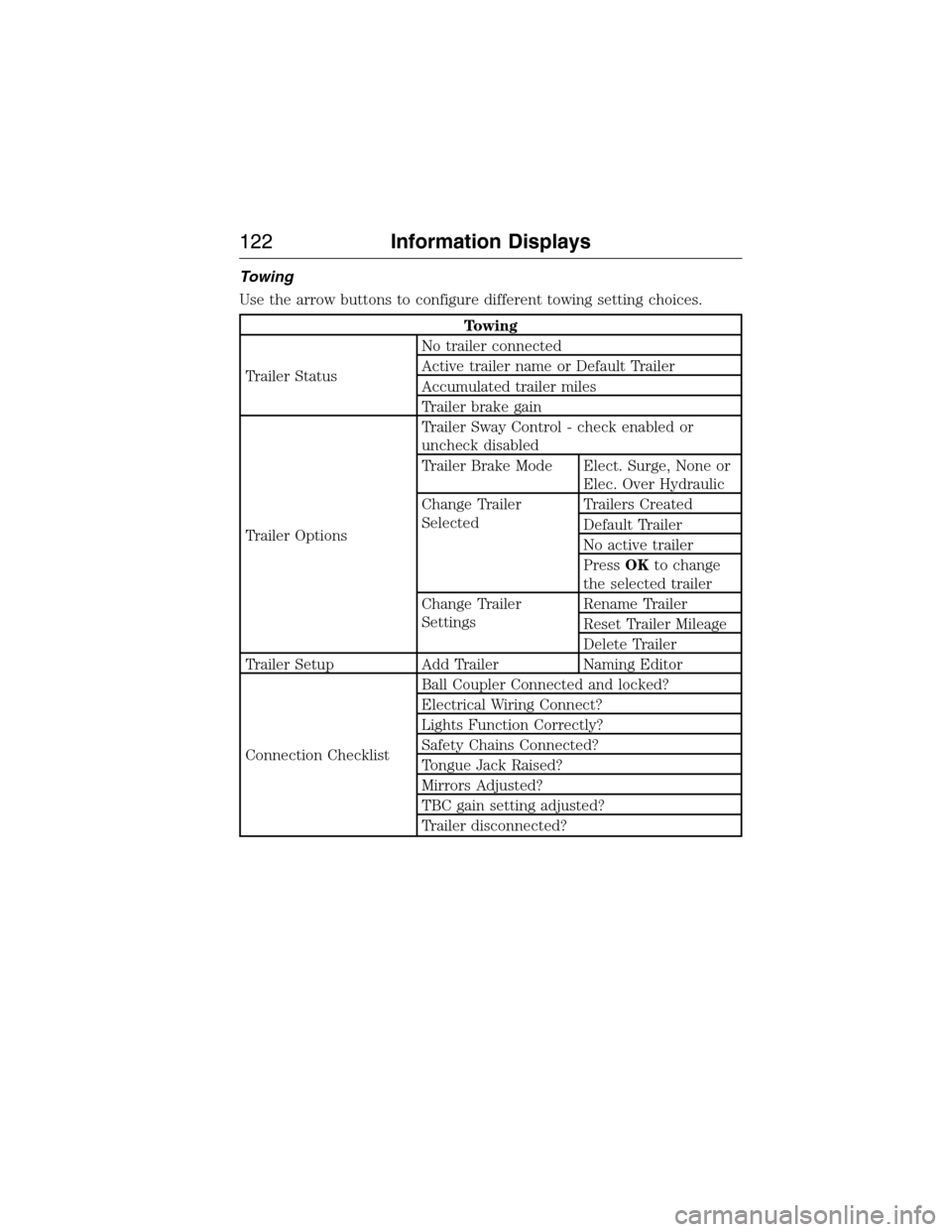
Towing
Use the arrow buttons to configure different towing setting choices.
Towing
Trailer StatusNo trailer connected
Active trailer name or Default Trailer
Accumulated trailer miles
Trailer brake gain
Trailer OptionsTrailer Sway Control - check enabled or
uncheck disabled
Trailer Brake Mode Elect. Surge, None or
Elec. Over Hydraulic
Change Trailer
SelectedTrailers Created
Default Trailer
No active trailer
PressOKto change
the selected trailer
Change Trailer
SettingsRename Trailer
Reset Trailer Mileage
Delete Trailer
Trailer Setup Add Trailer Naming Editor
Connection ChecklistBall Coupler Connected and locked?
Electrical Wiring Connect?
Lights Function Correctly?
Safety Chains Connected?
Tongue Jack Raised?
Mirrors Adjusted?
TBC gain setting adjusted?
Trailer disconnected?
122Information Displays
2015 Expedition(exd)
Owners Guide gf, 1st Printing, July 2014
USA(fus)
Page 125 of 564
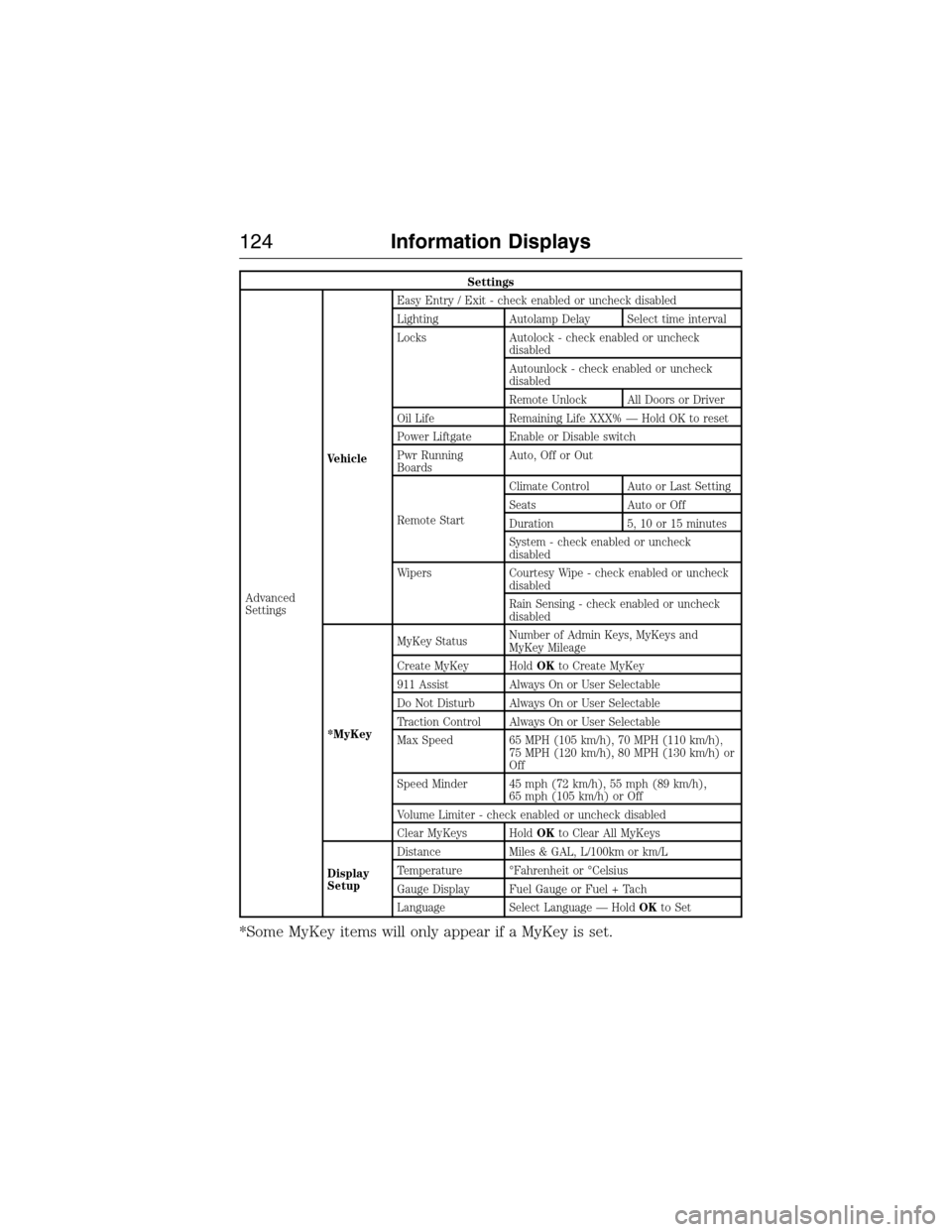
Settings
Advanced
SettingsVehicleEasy Entry / Exit - check enabled or uncheck disabled
Lighting Autolamp Delay Select time interval
Locks Autolock - check enabled or uncheck
disabled
Autounlock - check enabled or uncheck
disabled
Remote Unlock All Doors or Driver
Oil Life Remaining Life XXX% — Hold OK to reset
Power Liftgate Enable or Disable switch
Pwr Running
BoardsAuto, Off or Out
Remote StartClimate Control Auto or Last Setting
Seats Auto or Off
Duration 5, 10 or 15 minutes
System - check enabled or uncheck
disabled
Wipers Courtesy Wipe - check enabled or uncheck
disabled
Rain Sensing - check enabled or uncheck
disabled
*MyKeyMyKey StatusNumber of Admin Keys, MyKeys and
MyKey Mileage
Create MyKey HoldOKto Create MyKey
911 Assist Always On or User Selectable
Do Not Disturb Always On or User Selectable
Traction Control Always On or User Selectable
Max Speed 65 MPH (105 km/h), 70 MPH (110 km/h),
75 MPH (120 km/h), 80 MPH (130 km/h) or
Off
Speed Minder 45 mph (72 km/h), 55 mph (89 km/h),
65 mph (105 km/h) or Off
Volume Limiter - check enabled or uncheck disabled
Clear MyKeys HoldOKto Clear All MyKeys
Display
SetupDistance Miles & GAL, L/100km or km/L
Temperature °Fahrenheit or °Celsius
Gauge Display Fuel Gauge or Fuel + Tach
Language Select Language — HoldOKto Set
*Some MyKey items will only appear if a MyKey is set.
124Information Displays
2015 Expedition(exd)
Owners Guide gf, 1st Printing, July 2014
USA(fus)
Page 127 of 564

Battery and Charging System
MessagesAction / Description
Check Charging System Stop your vehicle as soon as it is
safetodosoandswitchoffthe
ignition. Contact your authorized
dealer.
Turn Power Off to Save Battery Displays to warn of a low 12–volt
battery condition. Turn off all
unneeded electrical accessories.
Contact your authorized dealer.
Low Battery Features Temporarily
Turned OffDisplays to warn of a low 12–volt
battery condition. Turn off all
unneeded electrical accessories.
Blind Spot Information System
MessagesAction / Description
Blind Spot Not Available Sensor
BlockedDisplays when the blind spot
information system/cross traffic
alert system sensors are blocked.
Driver can typically clean the
sensor to resolve.
Blind Spot System Fault Displays when a fault with the
blind spot information system has
occurred. Contact your authorized
dealer as soon as possible.
Cross Traffic Not Available Sensor
BlockedDisplays when the blind spot
information system/cross traffic
alert system sensors are blocked.
Driver can typically clean the
sensor to resolve.
Cross Traffic System Fault Displays when a fault with the
cross traffic alert system has
occurred. Contact your authorized
dealer as soon as possible.
126Information Displays
2015 Expedition(exd)
Owners Guide gf, 1st Printing, July 2014
USA(fus)
Page 143 of 564
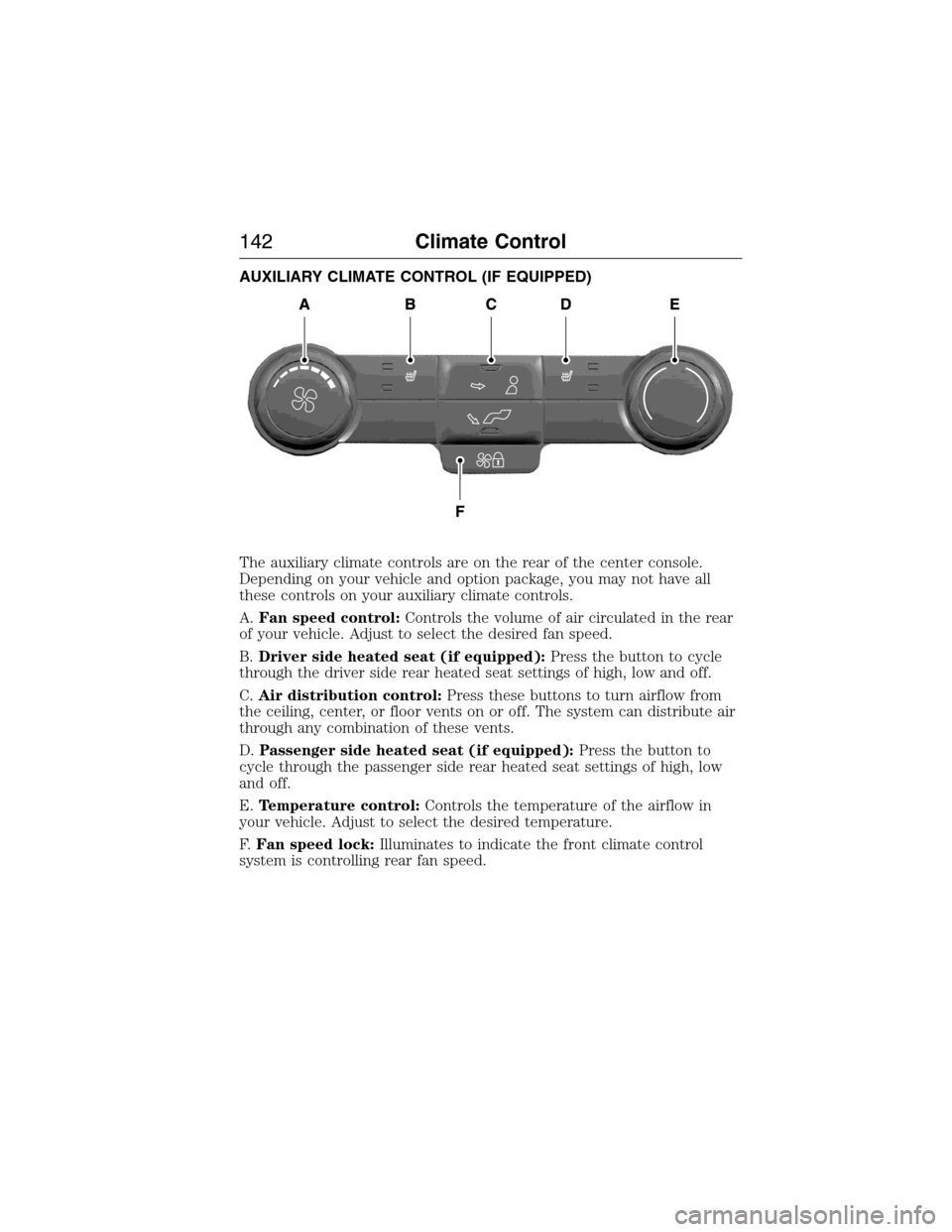
AUXILIARY CLIMATE CONTROL (IF EQUIPPED)
The auxiliary climate controls are on the rear of the center console.
Depending on your vehicle and option package, you may not have all
these controls on your auxiliary climate controls.
A.Fan speed control:Controls the volume of air circulated in the rear
of your vehicle. Adjust to select the desired fan speed.
B.Driver side heated seat (if equipped):Press the button to cycle
through the driver side rear heated seat settings of high, low and off.
C.Air distribution control:Press these buttons to turn airflow from
the ceiling, center, or floor vents on or off. The system can distribute air
through any combination of these vents.
D.Passenger side heated seat (if equipped):Press the button to
cycle through the passenger side rear heated seat settings of high, low
and off.
E.Temperature control:Controls the temperature of the airflow in
your vehicle. Adjust to select the desired temperature.
F.Fan speed lock:Illuminates to indicate the front climate control
system is controlling rear fan speed.
142Climate Control
2015 Expedition(exd)
Owners Guide gf, 1st Printing, July 2014
USA(fus)
Page 151 of 564
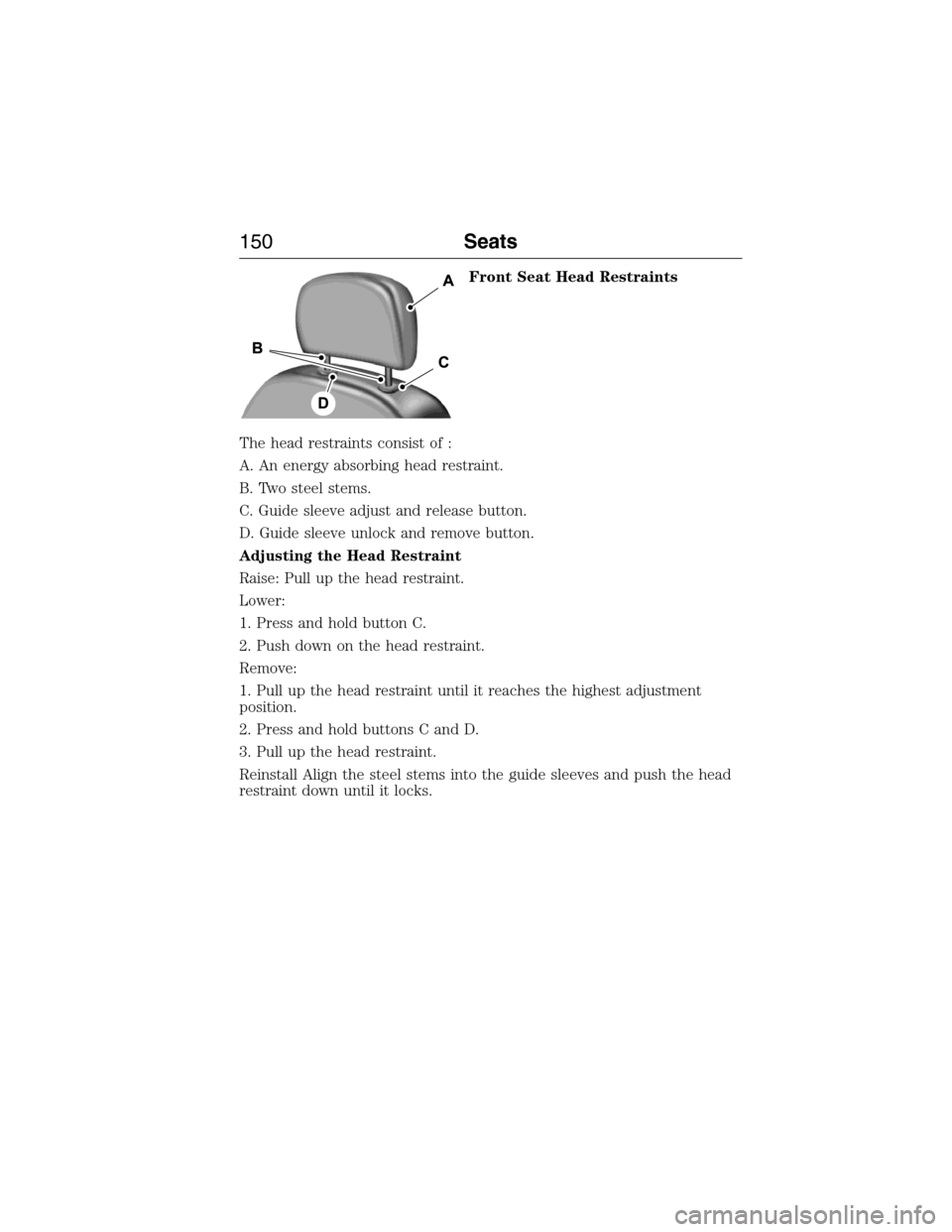
Front Seat Head Restraints
The head restraints consist of :
A. An energy absorbing head restraint.
B. Two steel stems.
C. Guide sleeve adjust and release button.
D. Guide sleeve unlock and remove button.
Adjusting the Head Restraint
Raise: Pull up the head restraint.
Lower:
1. Press and hold button C.
2. Push down on the head restraint.
Remove:
1. Pull up the head restraint until it reaches the highest adjustment
position.
2. Press and hold buttons C and D.
3. Pull up the head restraint.
Reinstall Align the steel stems into the guide sleeves and push the head
restraint down until it locks.
150Seats
2015 Expedition(exd)
Owners Guide gf, 1st Printing, July 2014
USA(fus)
Page 156 of 564
MEMORY FUNCTION (IF EQUIPPED)
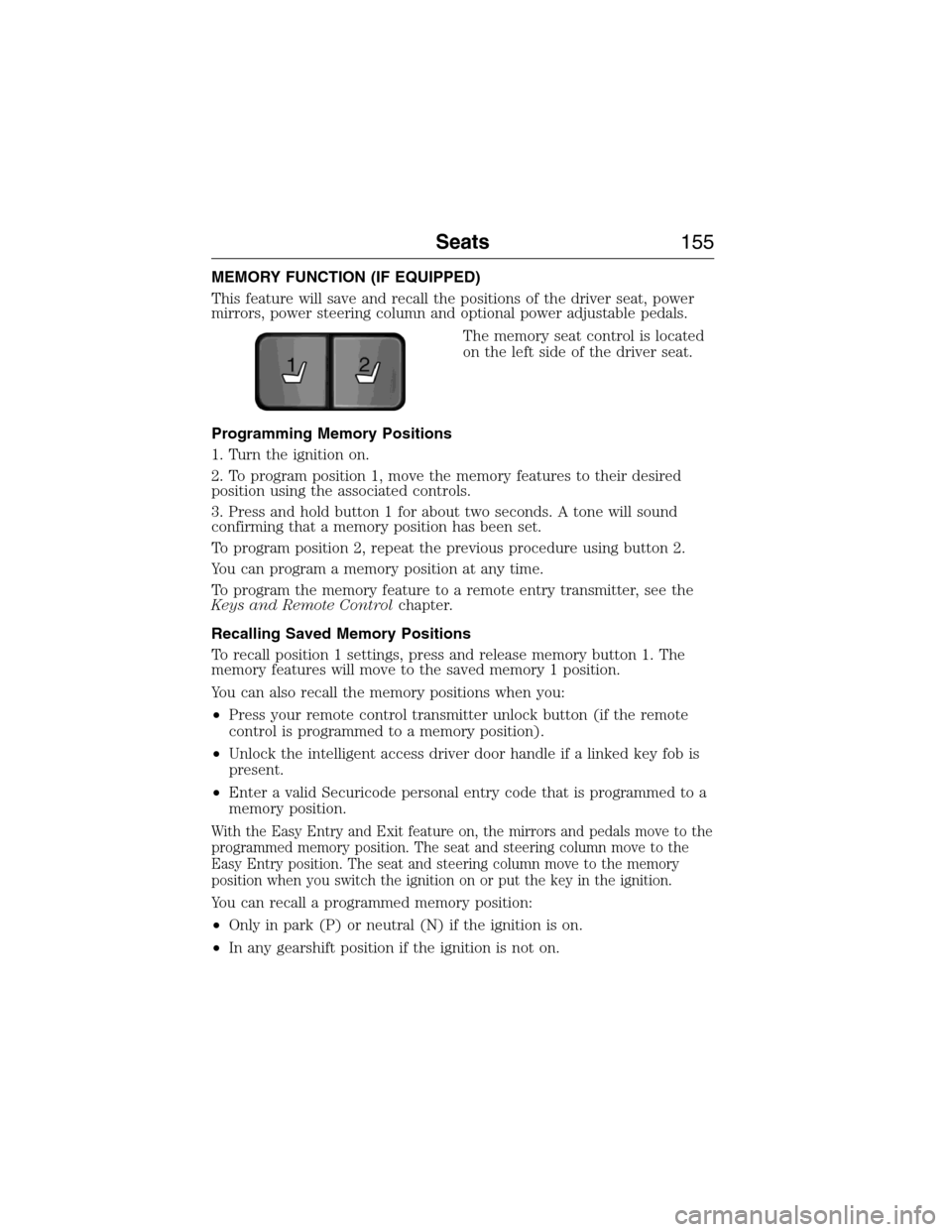
This feature will save and recall the positions of the driver seat, power
mirrors, power steering column and optional power adjustable pedals.
The memory seat control is located
on the left side of the driver seat.
Programming Memory Positions
1. Turn the ignition on.
2. To program position 1, move the memory features to their desired
position using the associated controls.
3. Press and hold button 1 for about two seconds. A tone will sound
confirming that a memory position has been set.
To program position 2, repeat the previous procedure using button 2.
You can program a memory position at any time.
To program the memory feature to a remote entry transmitter, see the
Keys and Remote Controlchapter.
Recalling Saved Memory Positions
To recall position 1 settings, press and release memory button 1. The
memory features will move to the saved memory 1 position.
You can also recall the memory positions when you:
•Press your remote control transmitter unlock button (if the remote
control is programmed to a memory position).
•Unlock the intelligent access driver door handle if a linked key fob is
present.
•Enter a valid Securicode personal entry code that is programmed to a
memory position.
With the Easy Entry and Exit feature on, the mirrors and pedals move to the
programmed memory position. The seat and steering column move to the
Easy Entry position. The seat and steering column move to the memory
position when you switch the ignition on or put the key in the ignition.
You can recall a programmed memory position:
•Only in park (P) or neutral (N) if the ignition is on.
•In any gearshift position if the ignition is not on.
21
Seats155
2015 Expedition(exd)
Owners Guide gf, 1st Printing, July 2014
USA(fus)