Page 111 of 564
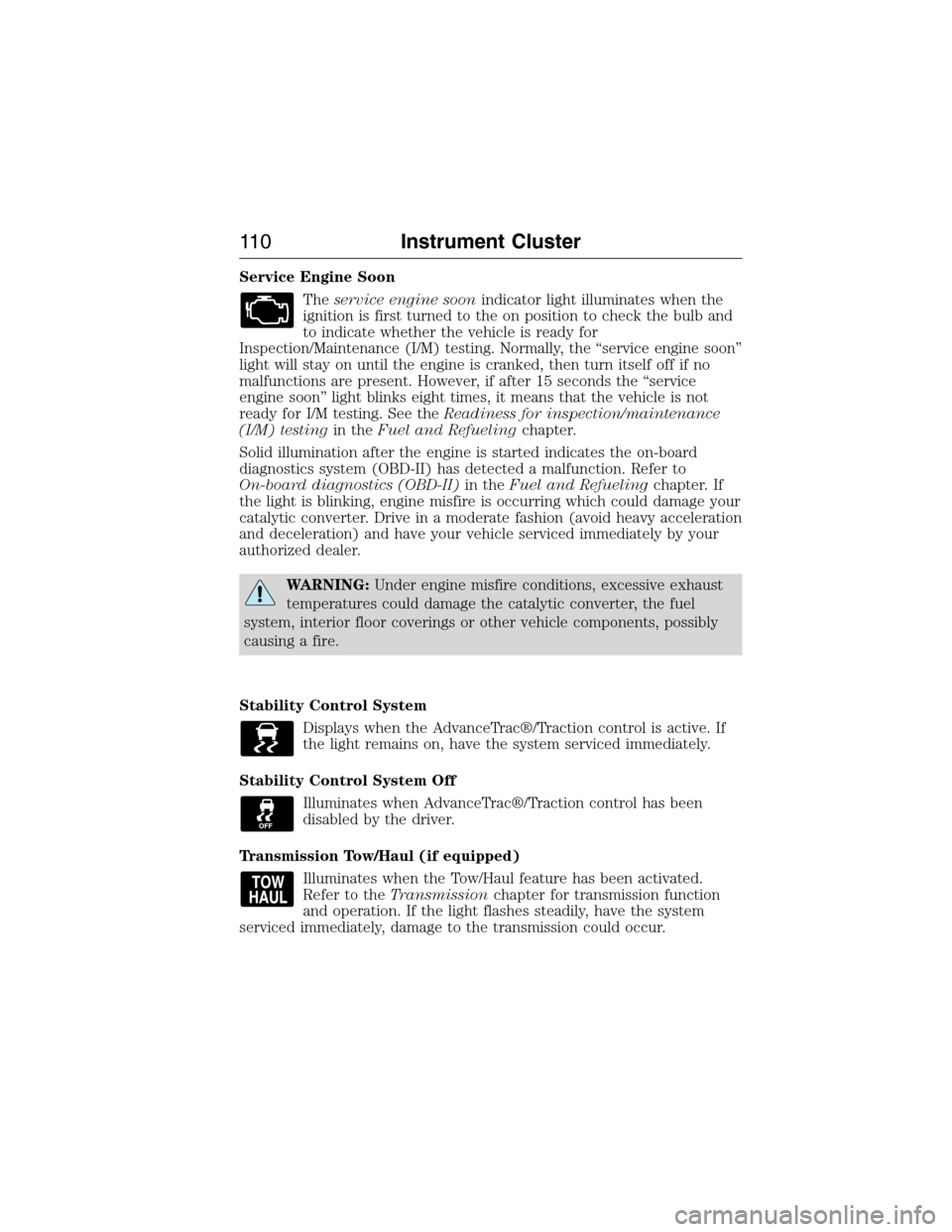
Service Engine Soon
Theservice engine soonindicator light illuminates when the
ignition is first turned to the on position to check the bulb and
to indicate whether the vehicle is ready for
Inspection/Maintenance (I/M) testing. Normally, the “service engine soon”
light will stay on until the engine is cranked, then turn itself off if no
malfunctions are present. However, if after 15 seconds the “service
engine soon” light blinks eight times, it means that the vehicle is not
ready for I/M testing. See theReadiness for inspection/maintenance
(I/M) testingin theFuel and Refuelingchapter.
Solid illumination after the engine is started indicates the on-board
diagnostics system (OBD-II) has detected a malfunction. Refer to
On-board diagnostics (OBD-II)in theFuel and Refuelingchapter. If
the light is blinking, engine misfire is occurring which could damage your
catalytic converter. Drive in a moderate fashion (avoid heavy acceleration
and deceleration) and have your vehicle serviced immediately by your
authorized dealer.
WARNING:Under engine misfire conditions, excessive exhaust
temperatures could damage the catalytic converter, the fuel
system, interior floor coverings or other vehicle components, possibly
causing a fire.
Stability Control System
Displays when the AdvanceTrac®/Traction control is active. If
the light remains on, have the system serviced immediately.
Stability Control System Off
Illuminates when AdvanceTrac®/Traction control has been
disabled by the driver.
Transmission Tow/Haul (if equipped)
Illuminates when the Tow/Haul feature has been activated.
Refer to theTransmissionchapter for transmission function
and operation. If the light flashes steadily, have the system
serviced immediately, damage to the transmission could occur.
11 0Instrument Cluster
2015 Expedition(exd)
Owners Guide gf, 1st Printing, July 2014
USA(fus)
Page 115 of 564
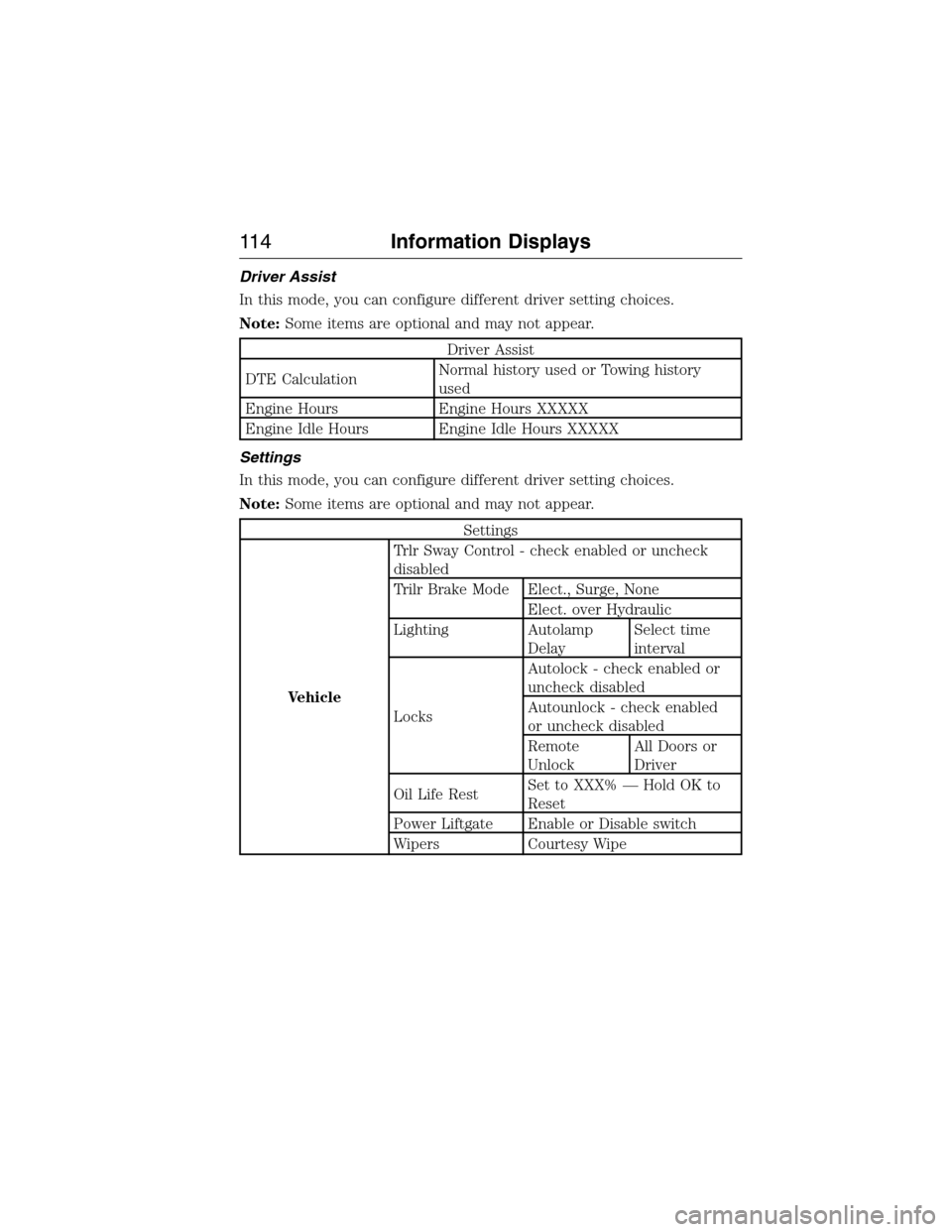
Driver Assist
In this mode, you can configure different driver setting choices.
Note:Some items are optional and may not appear.
Driver Assist
DTE CalculationNormal history used or Towing history
used
Engine Hours Engine Hours XXXXX
Engine Idle Hours Engine Idle Hours XXXXX
Settings
In this mode, you can configure different driver setting choices.
Note:Some items are optional and may not appear.
Settings
VehicleTrlr Sway Control - check enabled or uncheck
disabled
Trilr Brake Mode Elect., Surge, None
Elect. over Hydraulic
Lighting Autolamp
DelaySelect time
interval
LocksAutolock - check enabled or
uncheck disabled
Autounlock - check enabled
or uncheck disabled
Remote
UnlockAll Doors or
Driver
Oil Life RestSet to XXX% — Hold OK to
Reset
Power Liftgate Enable or Disable switch
Wipers Courtesy Wipe
11 4Information Displays
2015 Expedition(exd)
Owners Guide gf, 1st Printing, July 2014
USA(fus)
Page 116 of 564
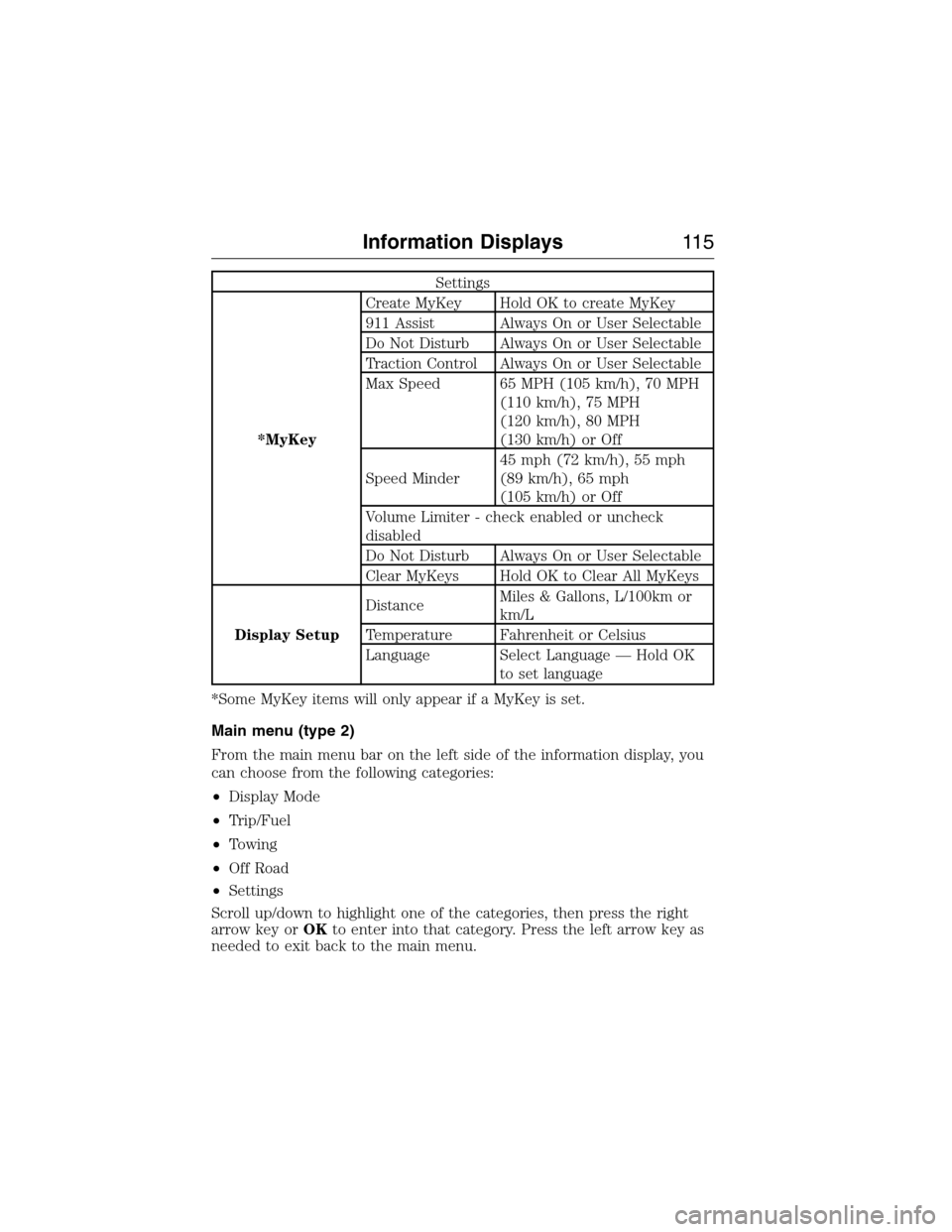
Settings
*MyKeyCreate MyKey Hold OK to create MyKey
911 Assist Always On or User Selectable
Do Not Disturb Always On or User Selectable
Traction Control Always On or User Selectable
Max Speed 65 MPH (105 km/h), 70 MPH
(110 km/h), 75 MPH
(120 km/h), 80 MPH
(130 km/h) or Off
Speed Minder45 mph (72 km/h), 55 mph
(89 km/h), 65 mph
(105 km/h) or Off
Volume Limiter - check enabled or uncheck
disabled
Do Not Disturb Always On or User Selectable
Clear MyKeys Hold OK to Clear All MyKeys
Display SetupDistanceMiles & Gallons, L/100km or
km/L
Temperature Fahrenheit or Celsius
Language Select Language — Hold OK
to set language
*Some MyKey items will only appear if a MyKey is set.
Main menu (type 2)
From the main menu bar on the left side of the information display, you
can choose from the following categories:
•Display Mode
•Trip/Fuel
•Towing
•Off Road
•Settings
Scroll up/down to highlight one of the categories, then press the right
arrow key orOKto enter into that category. Press the left arrow key as
needed to exit back to the main menu.
Information Displays11 5
2015 Expedition(exd)
Owners Guide gf, 1st Printing, July 2014
USA(fus)
Page 118 of 564
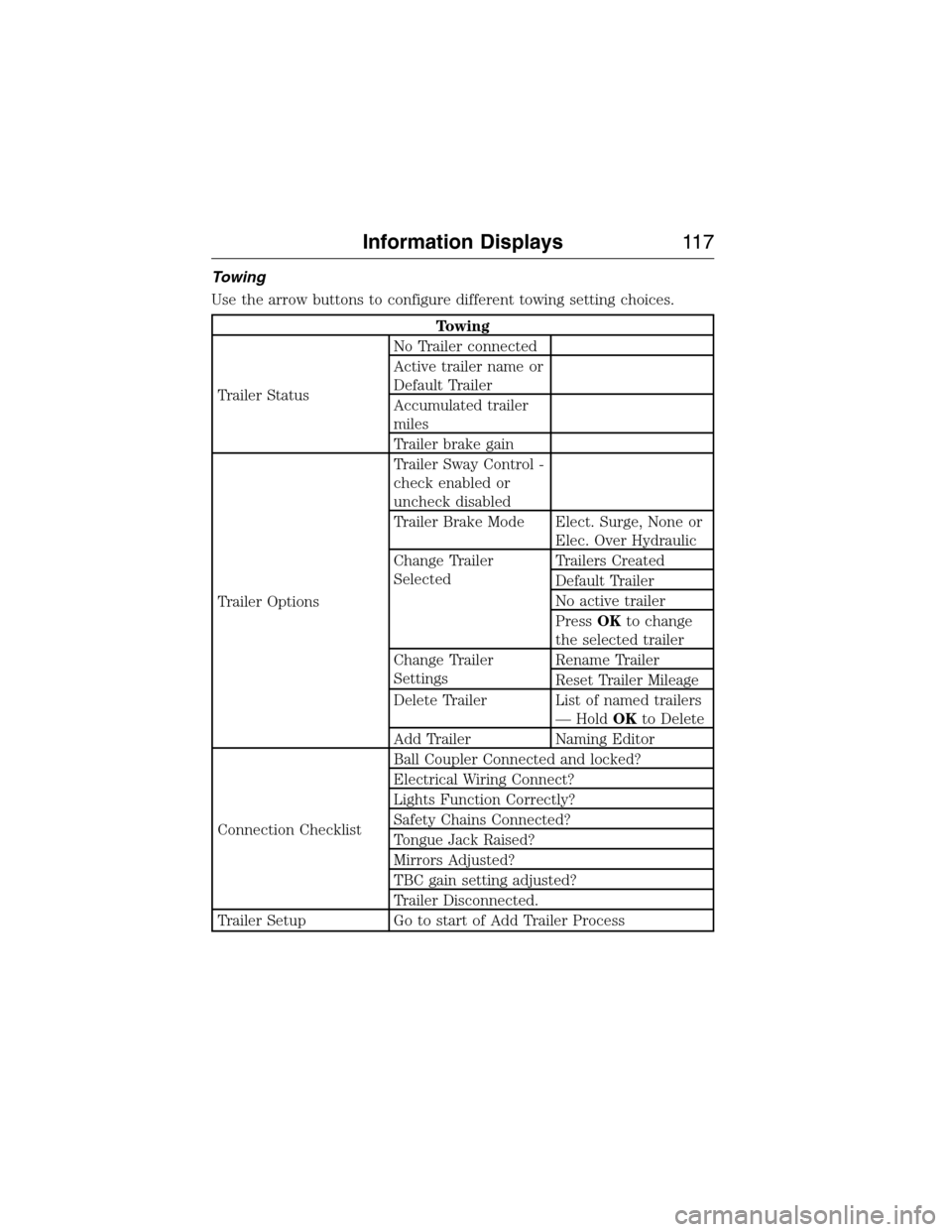
Towing
Use the arrow buttons to configure different towing setting choices.
Towing
Trailer StatusNo Trailer connected
Active trailer name or
Default Trailer
Accumulated trailer
miles
Trailer brake gain
Trailer OptionsTrailer Sway Control -
check enabled or
uncheck disabled
Trailer Brake Mode Elect. Surge, None or
Elec. Over Hydraulic
Change Trailer
SelectedTrailers Created
Default Trailer
No active trailer
PressOKto change
the selected trailer
Change Trailer
SettingsRename Trailer
Reset Trailer Mileage
Delete Trailer List of named trailers
— HoldOKto Delete
Add Trailer Naming Editor
Connection ChecklistBall Coupler Connected and locked?
Electrical Wiring Connect?
Lights Function Correctly?
Safety Chains Connected?
Tongue Jack Raised?
Mirrors Adjusted?
TBC gain setting adjusted?
Trailer Disconnected.
Trailer Setup Go to start of Add Trailer Process
Information Displays11 7
2015 Expedition(exd)
Owners Guide gf, 1st Printing, July 2014
USA(fus)
Page 119 of 564
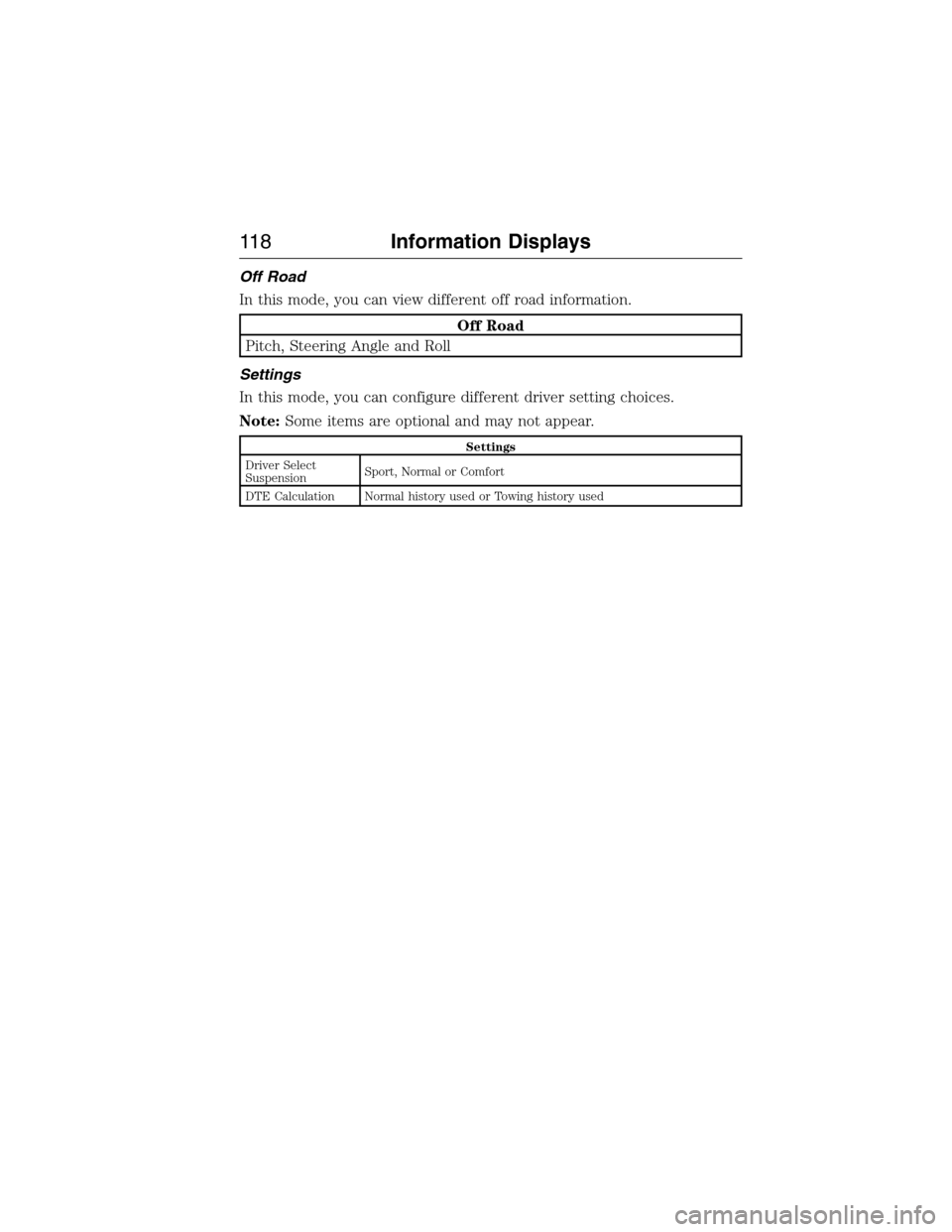
Off Road
In this mode, you can view different off road information.
Off Road
Pitch, Steering Angle and Roll
Settings
In this mode, you can configure different driver setting choices.
Note:Some items are optional and may not appear.
Settings
Driver Select
SuspensionSport, Normal or Comfort
DTE Calculation Normal history used or Towing history used
11 8Information Displays
2015 Expedition(exd)
Owners Guide gf, 1st Printing, July 2014
USA(fus)
Page 121 of 564
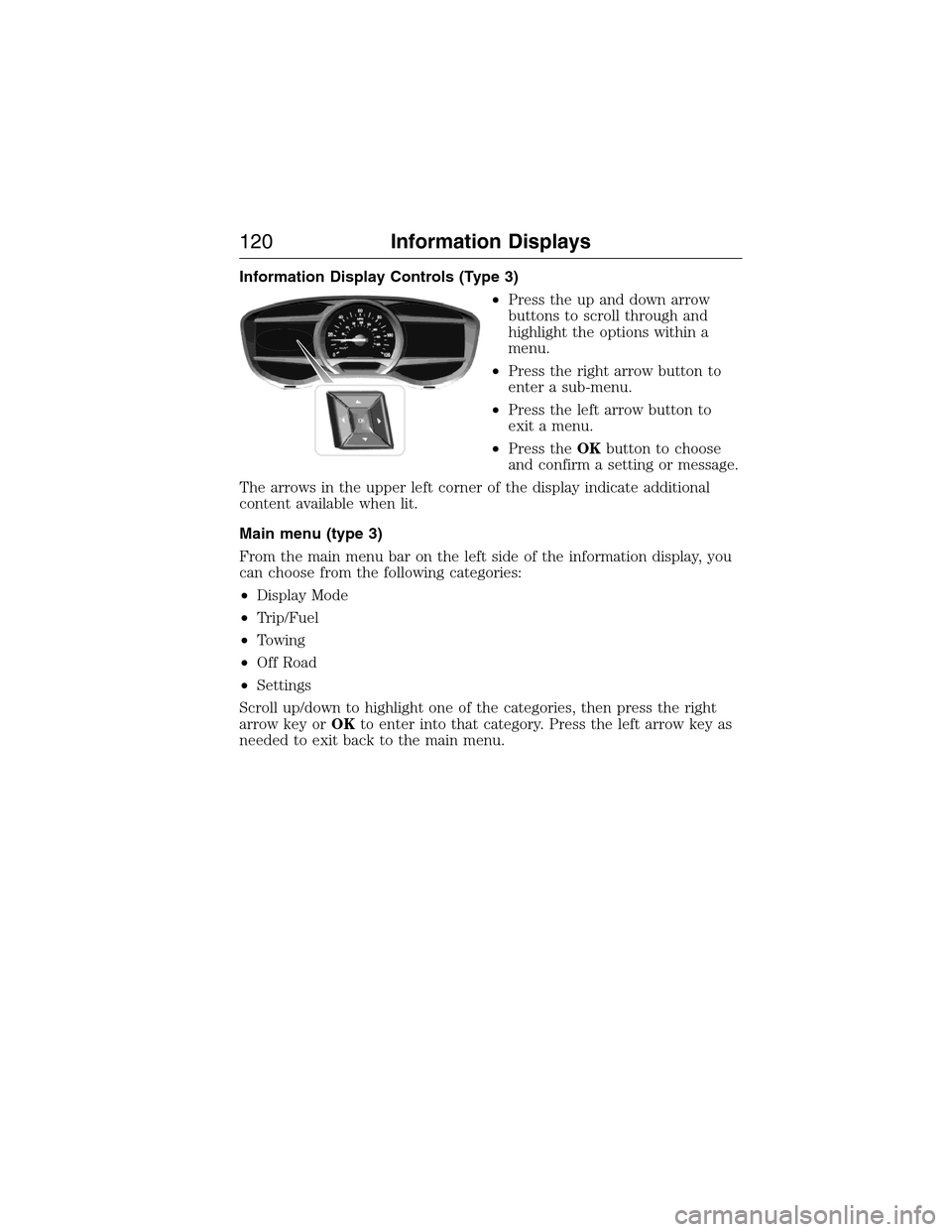
Information Display Controls (Type 3)
•Press the up and down arrow
buttons to scroll through and
highlight the options within a
menu.
•Press the right arrow button to
enter a sub-menu.
•Press the left arrow button to
exit a menu.
•Press theOKbutton to choose
and confirm a setting or message.
The arrows in the upper left corner of the display indicate additional
content available when lit.
Main menu (type 3)
From the main menu bar on the left side of the information display, you
can choose from the following categories:
•Display Mode
•Trip/Fuel
•Towing
•Off Road
•Settings
Scroll up/down to highlight one of the categories, then press the right
arrow key orOKto enter into that category. Press the left arrow key as
needed to exit back to the main menu.
120Information Displays
2015 Expedition(exd)
Owners Guide gf, 1st Printing, July 2014
USA(fus)
Page 123 of 564
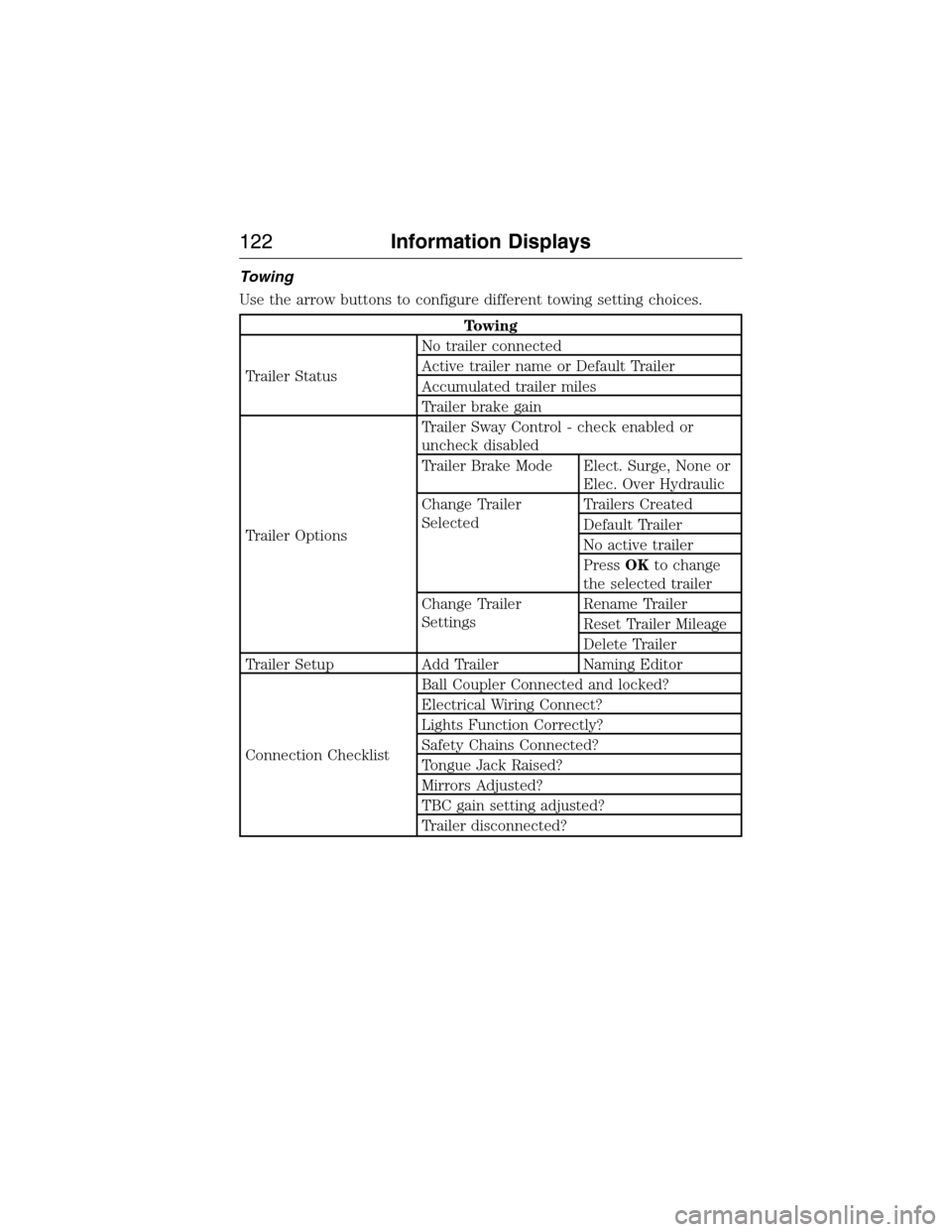
Towing
Use the arrow buttons to configure different towing setting choices.
Towing
Trailer StatusNo trailer connected
Active trailer name or Default Trailer
Accumulated trailer miles
Trailer brake gain
Trailer OptionsTrailer Sway Control - check enabled or
uncheck disabled
Trailer Brake Mode Elect. Surge, None or
Elec. Over Hydraulic
Change Trailer
SelectedTrailers Created
Default Trailer
No active trailer
PressOKto change
the selected trailer
Change Trailer
SettingsRename Trailer
Reset Trailer Mileage
Delete Trailer
Trailer Setup Add Trailer Naming Editor
Connection ChecklistBall Coupler Connected and locked?
Electrical Wiring Connect?
Lights Function Correctly?
Safety Chains Connected?
Tongue Jack Raised?
Mirrors Adjusted?
TBC gain setting adjusted?
Trailer disconnected?
122Information Displays
2015 Expedition(exd)
Owners Guide gf, 1st Printing, July 2014
USA(fus)
Page 124 of 564
Off Road
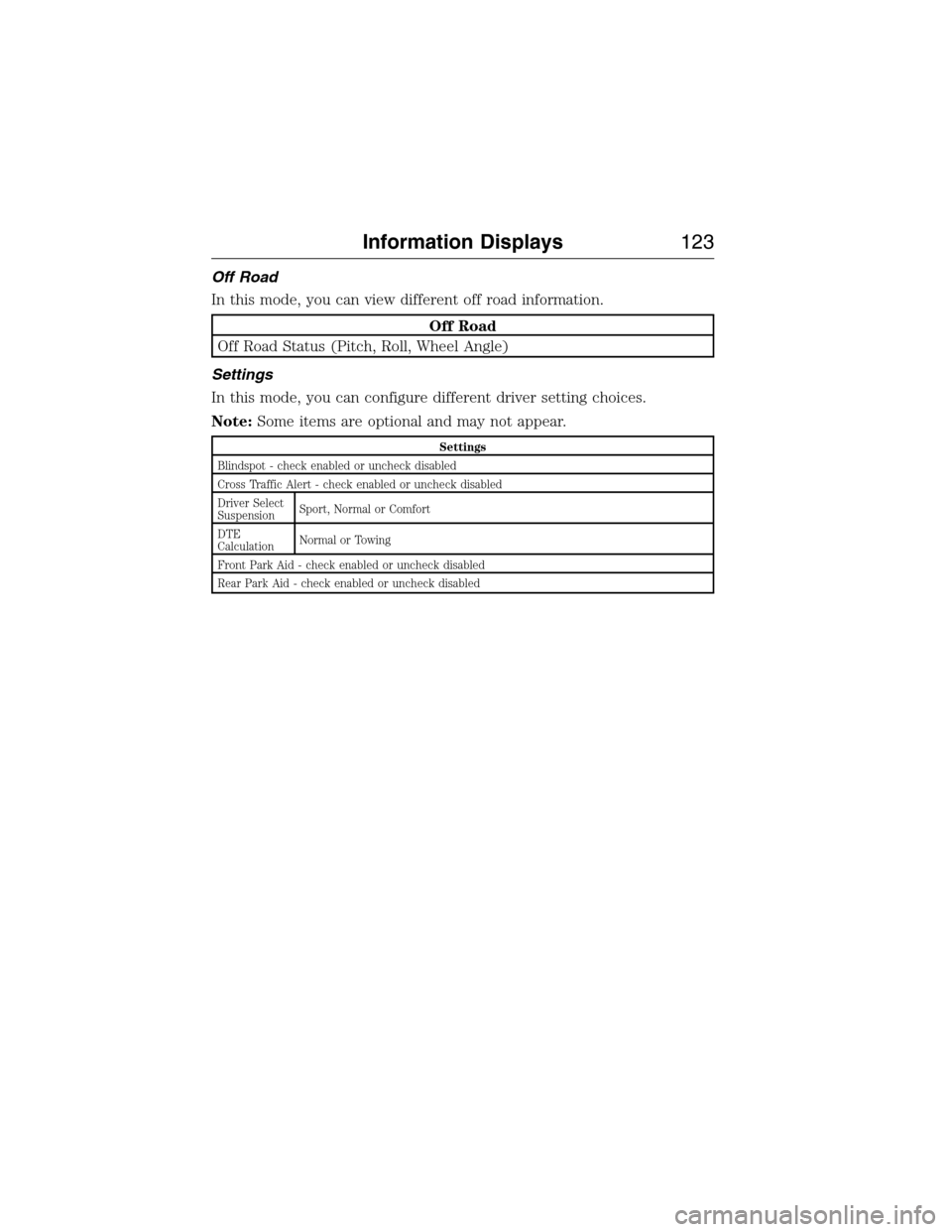
In this mode, you can view different off road information.
Off Road
Off Road Status (Pitch, Roll, Wheel Angle)
Settings
In this mode, you can configure different driver setting choices.
Note:Some items are optional and may not appear.
Settings
Blindspot - check enabled or uncheck disabled
Cross Traffic Alert - check enabled or uncheck disabled
Driver Select
SuspensionSport, Normal or Comfort
DTE
CalculationNormal or Towing
Front Park Aid - check enabled or uncheck disabled
Rear Park Aid - check enabled or uncheck disabled
Information Displays123
2015 Expedition(exd)
Owners Guide gf, 1st Printing, July 2014
USA(fus)