2015 FORD EXPEDITION mileage
[x] Cancel search: mileagePage 410 of 564
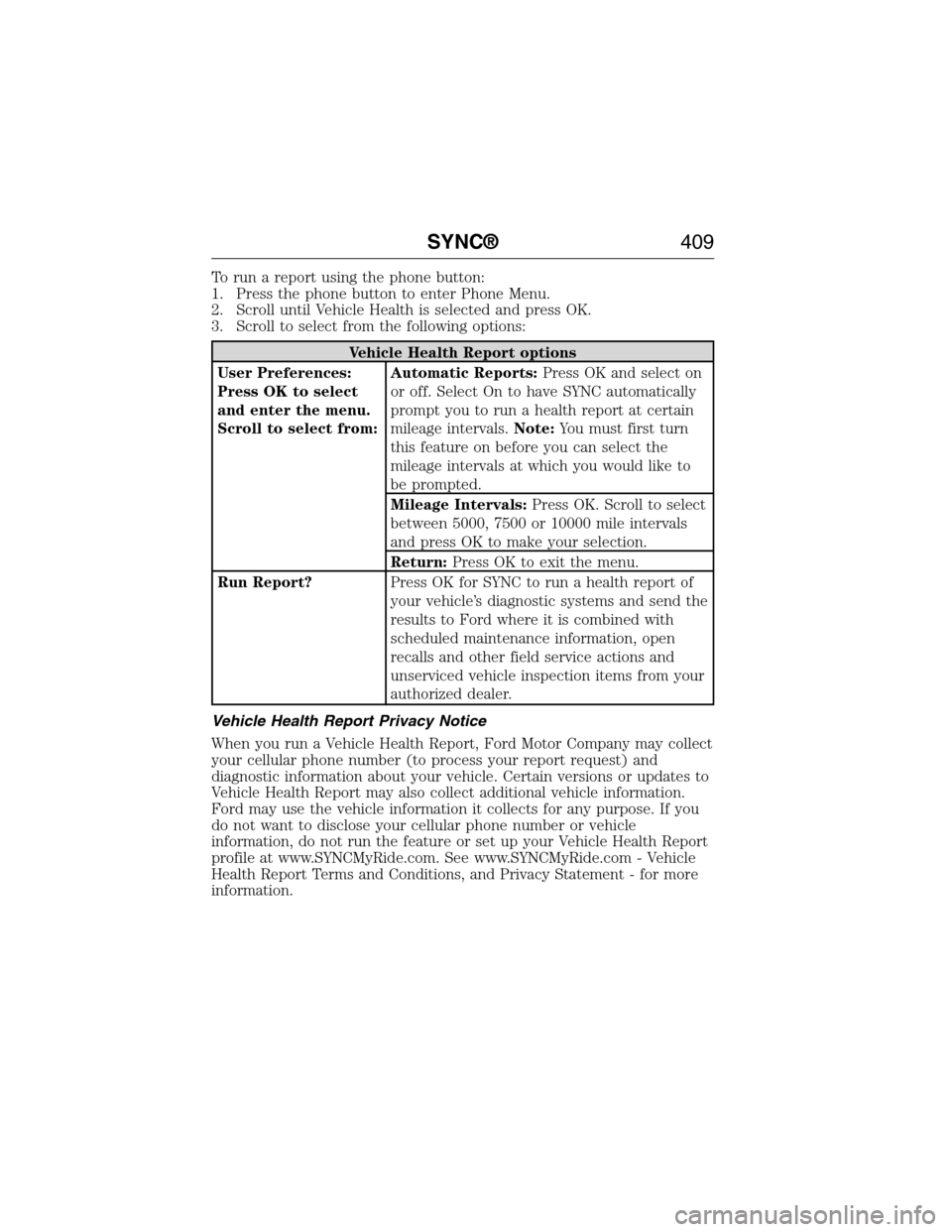
To run a report using the phone button:
1. Press the phone button to enter Phone Menu.
2. Scroll until Vehicle Health is selected and press OK.
3. Scroll to select from the following options:
Vehicle Health Report options
User Preferences:
Press OK to select
and enter the menu.
Scroll to select from:Automatic Reports:Press OK and select on
or off. Select On to have SYNC automatically
prompt you to run a health report at certain
mileage intervals.Note:You must first turn
this feature on before you can select the
mileage intervals at which you would like to
be prompted.
Mileage Intervals:Press OK. Scroll to select
between 5000, 7500 or 10000 mile intervals
and press OK to make your selection.
Return:Press OK to exit the menu.
Run Report?Press OK for SYNC to run a health report of
your vehicle’s diagnostic systems and send the
results to Ford where it is combined with
scheduled maintenance information, open
recalls and other field service actions and
unserviced vehicle inspection items from your
authorized dealer.
Vehicle Health Report Privacy Notice
When you run a Vehicle Health Report, Ford Motor Company may collect
your cellular phone number (to process your report request) and
diagnostic information about your vehicle. Certain versions or updates to
Vehicle Health Report may also collect additional vehicle information.
Ford may use the vehicle information it collects for any purpose. If you
do not want to disclose your cellular phone number or vehicle
information, do not run the feature or set up your Vehicle Health Report
profile at www.SYNCMyRide.com. See www.SYNCMyRide.com - Vehicle
Health Report Terms and Conditions, and Privacy Statement - for more
information.
SYNC®409
2015 Expedition(exd)
Owners Guide gf, 1st Printing, July 2014
USA(fus)
Page 486 of 564
Register for Vehicle Health Report and set your report preferences at
www.SYNCMyRide.com. After registering, you can request a Vehicle
Health Report (inside your vehicle). Return to your account at
www.SYNCMyRide.com to view your report. You can also choose for
SYNC to remind you automatically to run reports at specific mileage
intervals. Cellular phone airtime usage may apply when reporting.
The system allows you to check your vehicle’s overall health in the form
of a diagnostic report card. The Vehicle Health Report contains valuable
information, such as:
•Vehicle Diagnostic Information
•Scheduled maintenance
•Open Recalls and Field Service Actions
•Items noted during vehicle inspections by your authorized dealer that
still need servicing.
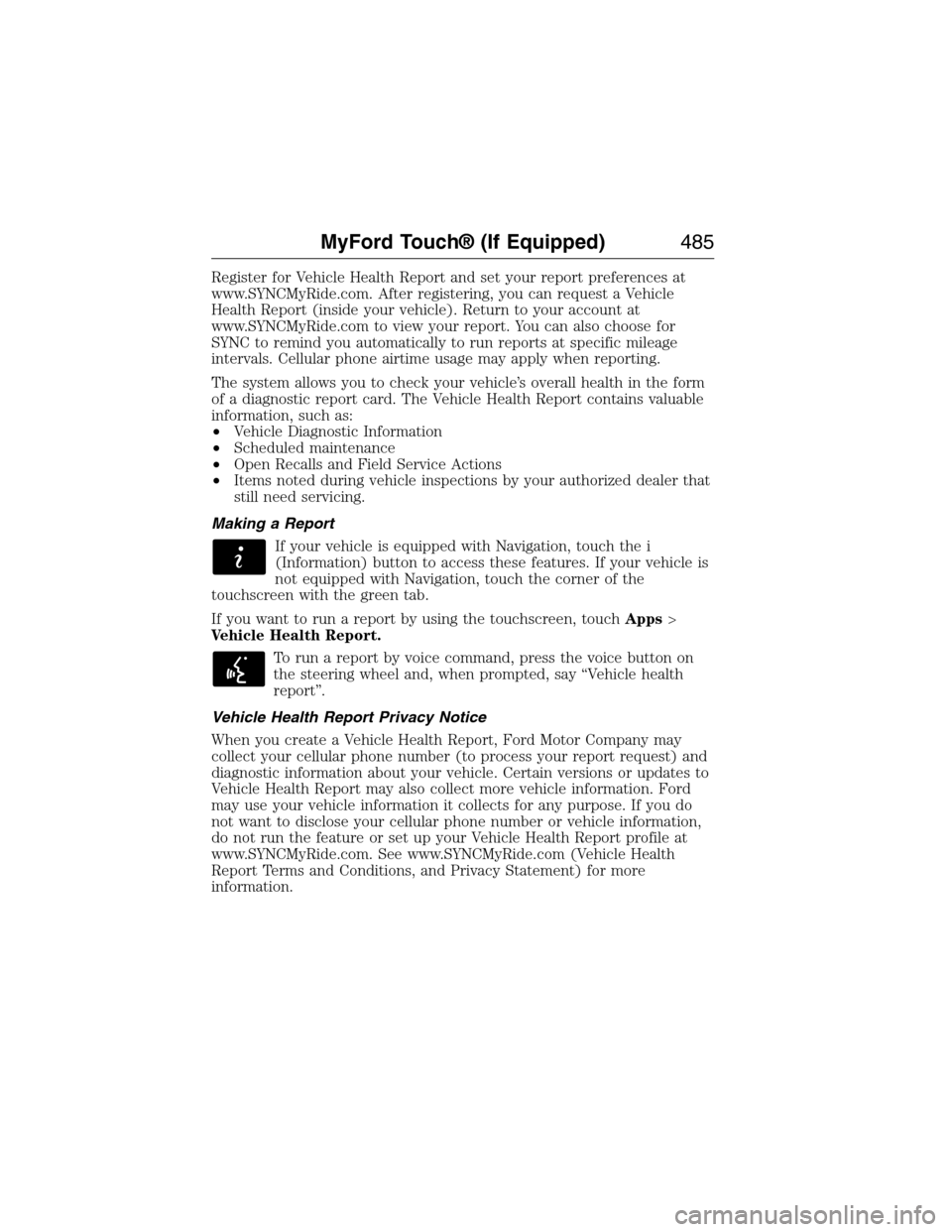
Making a Report
If your vehicle is equipped with Navigation, touch the i
(Information) button to access these features. If your vehicle is
not equipped with Navigation, touch the corner of the
touchscreen with the green tab.
If you want to run a report by using the touchscreen, touchApps>
Vehicle Health Report.
To run a report by voice command, press the voice button on
the steering wheel and, when prompted, say “Vehicle health
report”.
Vehicle Health Report Privacy Notice
When you create a Vehicle Health Report, Ford Motor Company may
collect your cellular phone number (to process your report request) and
diagnostic information about your vehicle. Certain versions or updates to
Vehicle Health Report may also collect more vehicle information. Ford
may use your vehicle information it collects for any purpose. If you do
not want to disclose your cellular phone number or vehicle information,
do not run the feature or set up your Vehicle Health Report profile at
www.SYNCMyRide.com. See www.SYNCMyRide.com (Vehicle Health
Report Terms and Conditions, and Privacy Statement) for more
information.
MyFord Touch® (If Equipped)485
2015 Expedition(exd)
Owners Guide gf, 1st Printing, July 2014
USA(fus)
Page 489 of 564
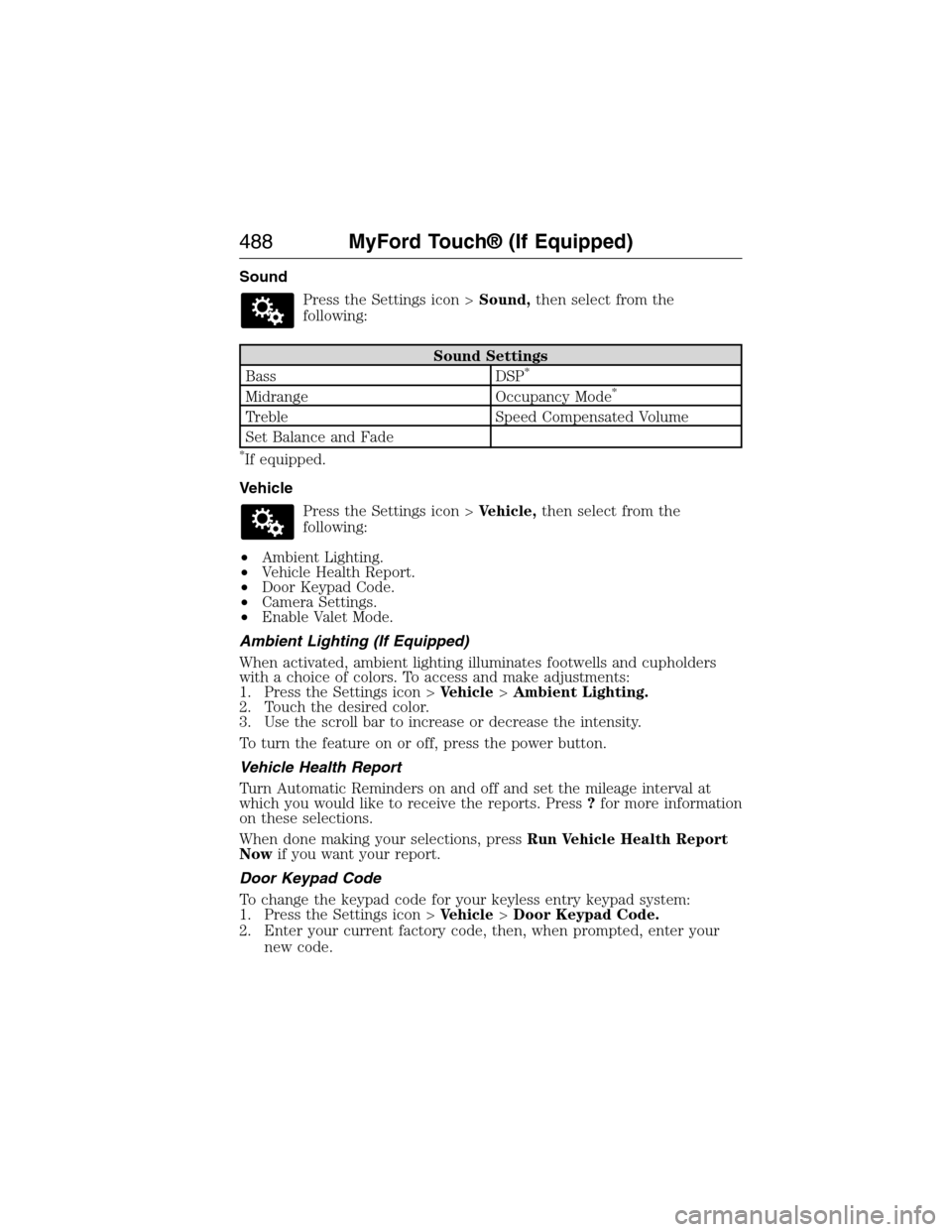
Sound
Press the Settings icon >Sound,then select from the
following:
Sound Settings
Bass DSP*
Midrange Occupancy Mode*
Treble Speed Compensated Volume
Set Balance and Fade
*If equipped.
Vehicle
Press the Settings icon >Vehicle,then select from the
following:
•Ambient Lighting.
•Vehicle Health Report.
•Door Keypad Code.
•Camera Settings.
•Enable Valet Mode.
Ambient Lighting (If Equipped)
When activated, ambient lighting illuminates footwells and cupholders
with a choice of colors. To access and make adjustments:
1. Press the Settings icon >Vehicle>Ambient Lighting.
2. Touch the desired color.
3. Use the scroll bar to increase or decrease the intensity.
To turn the feature on or off, press the power button.
Vehicle Health Report
Turn Automatic Reminders on and off and set the mileage interval at
which you would like to receive the reports. Press?for more information
on these selections.
When done making your selections, pressRun Vehicle Health Report
Nowif you want your report.
Door Keypad Code
To change the keypad code for your keyless entry keypad system:
1. Press the Settings icon >Vehicle>Door Keypad Code.
2. Enter your current factory code, then, when prompted, enter your
new code.
488MyFord Touch® (If Equipped)
2015 Expedition(exd)
Owners Guide gf, 1st Printing, July 2014
USA(fus)
Page 510 of 564
Auto Zoom
Press the green bar to access map mode, then select the+or-zoom
button to bring up the zoom level and Auto buttons on the touchscreen.
When you pressAuto,Auto Zoom turns on andAutodisplays in the
bottom left corner of the screen in the map scale. The map zoom level
then synchronizes with vehicle speed. The slower your vehicle is
traveling, the farther in the map zooms in; the faster your vehicle is
traveling, the farther the map zooms out. To turn the feature off, just
press the+or-button again.
In 3D mode, rotate the map view by swiping your finger across the
shaded bar with the arrows.
The ETA box under the zoom buttons appears when a route is active
and displays the distance and time to your destination. If the button is
pressed, a pop up appears with the destination listed (and waypoint if
applicable) along with mileage and time to destination. You may also
select to have either the estimated time to reach your destination or
your estimated arrival time.
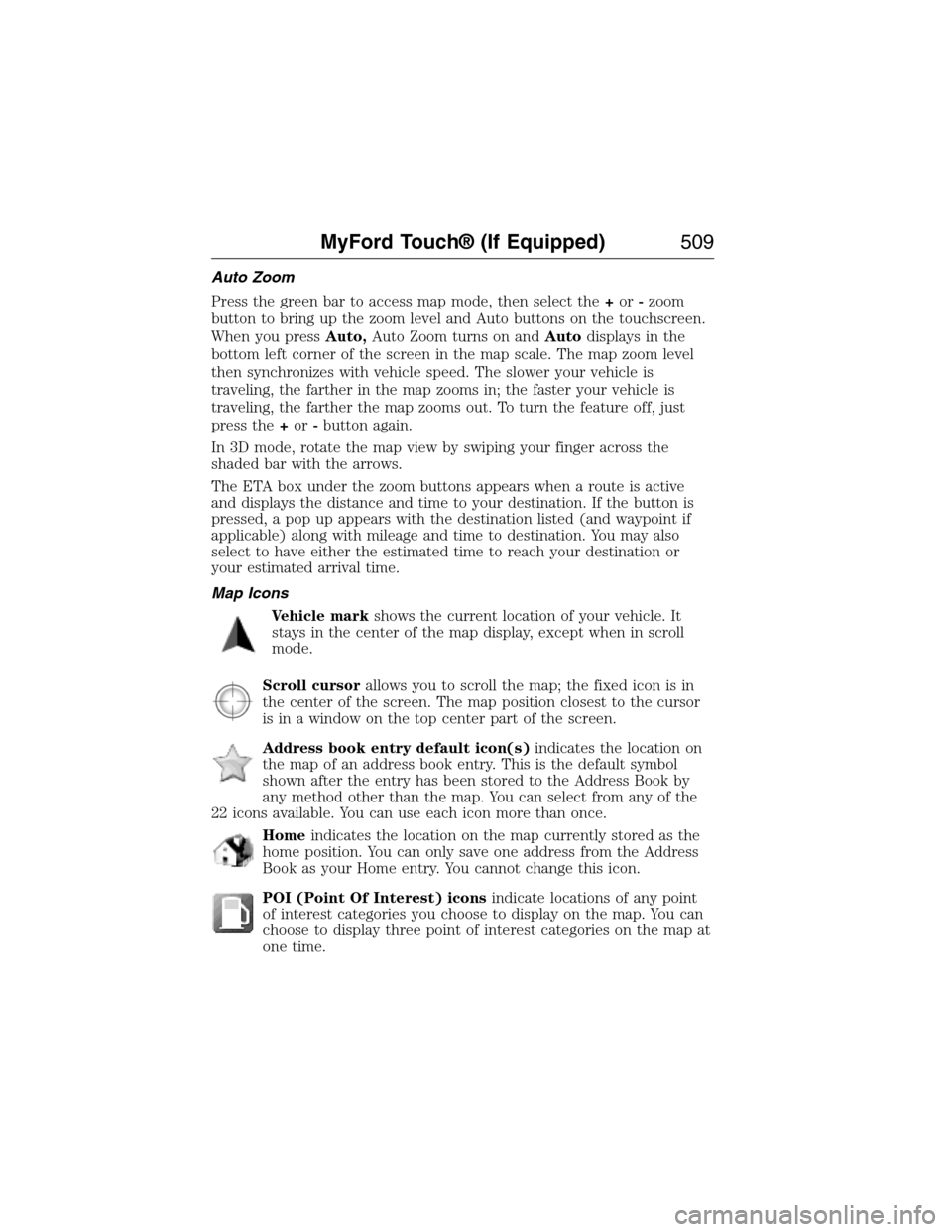
Map Icons
Vehicle markshows the current location of your vehicle. It
stays in the center of the map display, except when in scroll
mode.
Scroll cursorallows you to scroll the map; the fixed icon is in
the center of the screen. The map position closest to the cursor
is in a window on the top center part of the screen.
Address book entry default icon(s)indicates the location on
the map of an address book entry. This is the default symbol
shown after the entry has been stored to the Address Book by
any method other than the map. You can select from any of the
22 icons available. You can use each icon more than once.
Homeindicates the location on the map currently stored as the
home position. You can only save one address from the Address
Book as your Home entry. You cannot change this icon.
POI (Point Of Interest) iconsindicate locations of any point
of interest categories you choose to display on the map. You can
choose to display three point of interest categories on the map at
one time.
MyFord Touch® (If Equipped)509
2015 Expedition(exd)
Owners Guide gf, 1st Printing, July 2014
USA(fus)
Page 540 of 564
Protecting Your Investment
Maintenance is an investment that will pay dividends in the form of
improved reliability, durability and resale value. To maintain the proper
performance of your vehicle and its emission control systems, it is
imperative that scheduled maintenance be completed at the designated
intervals.
Your vehicle is equipped with the Intelligent Oil-Life Monitor (IOLM)
system which displays a message in the information display at the proper
oil change service interval; this interval may be up to one year or
10000 miles (16000 kilometers). When ENGINE OIL CHANGE DUE or
OIL CHANGE REQUIRED appears in the information display, it is time
for an oil change; the oil change must be done within two weeks or
500 miles (800 kilometers) of the ENGINE OIL CHANGE DUE or OIL
CHANGE REQUIRED message appearing. The Intelligent Oil-Life Monitor
must be reset after each oil change; see theInformation Displays
chapter.
If your information display is prematurely reset or becomes inoperative,
you should perform the oil change interval at six months or 5000 miles
(8000 kilometers) from your last oil change. Never exceed one year or
10000 miles (16000 kilometers) between oil change intervals.
Your vehicle is very sophisticated and built with multiple, complex,
performance systems. Every manufacturer develops these systems using
different specifications and performance features. That is why it is
important to rely upon your dealership to properly diagnose and repair
your vehicle.
Ford Motor Company has recommended maintenance intervals for
various parts and component systems based upon engineering testing.
Ford Motor Company relies upon this testing to determine the most
appropriate mileage for replacement of oils and fluids to protect your
vehicle at the lowest overall cost to you and recommends against
maintenance schedules that deviate from the scheduled maintenance
information.
Ford strongly recommends the use of only genuine Ford, Motorcraft or
Ford-authorized remanufactured replacement parts because they are
engineered for your vehicle.
Additives and Chemicals
Ford Motor Company recommended additives and chemicals are listed in
the owner manual and in the Ford Workshop Manual. Additional
chemicals or additives not approved by Ford Motor Company are not
recommended as part of normal maintenance. Please consult your
warranty information.
Scheduled Maintenance539
2015 Expedition(exd)
Owners Guide gf, 1st Printing, July 2014
USA(fus)
Page 544 of 564
NORMAL SCHEDULED MAINTENANCE AND LOG
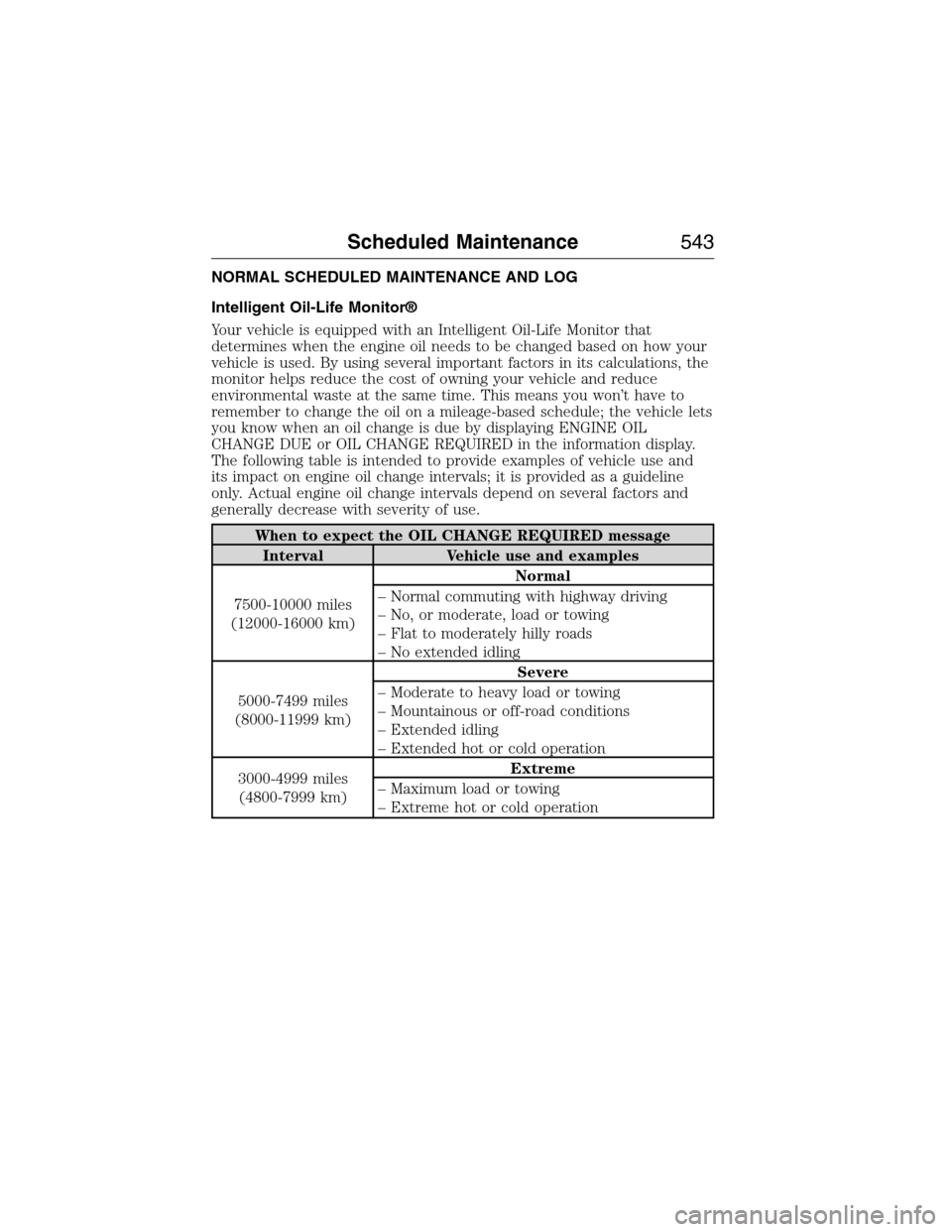
Intelligent Oil-Life Monitor®
Your vehicle is equipped with an Intelligent Oil-Life Monitor that
determines when the engine oil needs to be changed based on how your
vehicle is used. By using several important factors in its calculations, the
monitor helps reduce the cost of owning your vehicle and reduce
environmental waste at the same time. This means you won’t have to
remember to change the oil on a mileage-based schedule; the vehicle lets
you know when an oil change is due by displaying ENGINE OIL
CHANGE DUE or OIL CHANGE REQUIRED in the information display.
The following table is intended to provide examples of vehicle use and
its impact on engine oil change intervals; it is provided as a guideline
only. Actual engine oil change intervals depend on several factors and
generally decrease with severity of use.
When to expect the OIL CHANGE REQUIRED message
Interval Vehicle use and examples
7500-10000 miles
(12000-16000 km)Normal
– Normal commuting with highway driving
– No, or moderate, load or towing
– Flat to moderately hilly roads
– No extended idling
5000-7499 miles
(8000-11999 km)Severe
– Moderate to heavy load or towing
– Mountainous or off-road conditions
– Extended idling
– Extended hot or cold operation
3000-4999 miles
(4800-7999 km)Extreme
– Maximum load or towing
– Extreme hot or cold operation
Scheduled Maintenance543
2015 Expedition(exd)
Owners Guide gf, 1st Printing, July 2014
USA(fus)
Page 547 of 564
Maintenance Schedule Log
DEALERVALIDATION:
P&A C
ODE:
RO#: HOURS:
DAT E:MILEAGE:D
EALERVALIDATION:
P&A C
ODE:
RO#: HOURS:
DAT E:MILEAGE:
D
EALERVALIDATION:
P&A C
ODE:
RO#: HOURS:
DAT E:MILEAGE:D
EALERVALIDATION:
P&A C
ODE:
RO#: HOURS:
DAT E:MILEAGE:
D
EALERVALIDATION:
P&A C
ODE:
RO#: HOURS:
DAT E:MILEAGE:D
EALERVALIDATION:
P&A C
ODE:
RO#: HOURS:
DAT E:MILEAGE:
D
EALERVALIDATION:
P&A C
ODE:
RO#: HOURS:
DAT E:MILEAGE:D
EALERVALIDATION:
P&A C
ODE:
RO#: HOURS:
DAT E:MILEAGE:
D
EALERVALIDATION:
P&A C
ODE:
RO#: HOURS:
DAT E:MILEAGE:D
EALERVALIDATION:
P&A C
ODE:
RO#: HOURS:
DAT E:MILEAGE:
546Scheduled Maintenance
2015 Expedition(exd)
Owners Guide gf, 1st Printing, July 2014
USA(fus)
Page 548 of 564
DEALERVALIDATION:
P&A C
ODE:
RO#: HOURS:
DAT E:MILEAGE:D
EALERVALIDATION:
P&A C
ODE:
RO#: HOURS:
DAT E:MILEAGE:
D
EALERVALIDATION:
P&A C
ODE:
RO#: HOURS:
DAT E:MILEAGE:D
EALERVALIDATION:
P&A C
ODE:
RO#: HOURS:
DAT E:MILEAGE:
D
EALERVALIDATION:
P&A C
ODE:
RO#: HOURS:
DAT E:MILEAGE:D
EALERVALIDATION:
P&A C
ODE:
RO#: HOURS:
DAT E:MILEAGE:
D
EALERVALIDATION:
P&A C
ODE:
RO#: HOURS:
DAT E:MILEAGE:D
EALERVALIDATION:
P&A C
ODE:
RO#: HOURS:
DAT E:MILEAGE:
D
EALERVALIDATION:
P&A C
ODE:
RO#: HOURS:
DAT E:MILEAGE:D
EALERVALIDATION:
P&A C
ODE:
RO#: HOURS:
DAT E:MILEAGE:
Scheduled Maintenance547
2015 Expedition(exd)
Owners Guide gf, 1st Printing, July 2014
USA(fus)