2015 FIAT 500X steering
[x] Cancel search: steeringPage 27 of 240

WINDSCREEN/REAR
WINDOW WIPEROperation is only possible with the
ignition device at MAR.WINDSCREEN
WIPER/WASHER
Operation
7) 8)20)
Ring nut A fig. 31 can be set to the
following positions:
windscreen wiper offslow intermittent operationfast intermittent operation
LOW
slow continuous operation
HIGH
fast continuous operation.Move the stalk upwards (unstable
position) to activate the MIST function:
operation is limited to the time for which
the stalk is held in this position. When
released, the stalk will return to its
default position and the windscreen
wiper will be stopped. This function is
useful to remove small deposits of dust
from the windscreen, or morning dew.
IMPORTANT This function does not
activate the windscreen washer;
windscreen washer fluid will not
therefore be sprayed onto the
windscreen. To spray windscreen
washer fluid onto the windscreen, the
washing function must be used.
With ring nut A fig. 31 in
or
position, the windscreen wiper
will automatically adapt its operating
speed to the speed of the vehicle.
"Smart washing" functionPull the lever towards the steering
wheel (unstable position) to operate the
windscreen washer.
Keep the stalk pulled to activate both
the windscreen washer jet and the
windscreen wiper with a single
movement; the latter turns on
automatically.The windscreen wiper stops working
three strokes after the stalk is released.
The cycle is completed, after about 6
seconds, by a final cleaning stroke
of the windscreen wipers.
RAIN SENSOR(where provided)
This is located behind the interior rear
view mirror, in contact with the
windscreen fig. 32 and can detect the
presence of rain and, consequently,
manage the cleaning of the windscreen
in accordance with the amount of
water on the screen.Activation
9) 10)
By acting on the display menu or on the
Uconnect™system you can
activate/deactivate the rain sensor.
MIST
1
2LOWHIGHA
31
F1B0047C
32
F1B0048C
25
15-12-2014 8:23 Pagina 25
Page 43 of 240
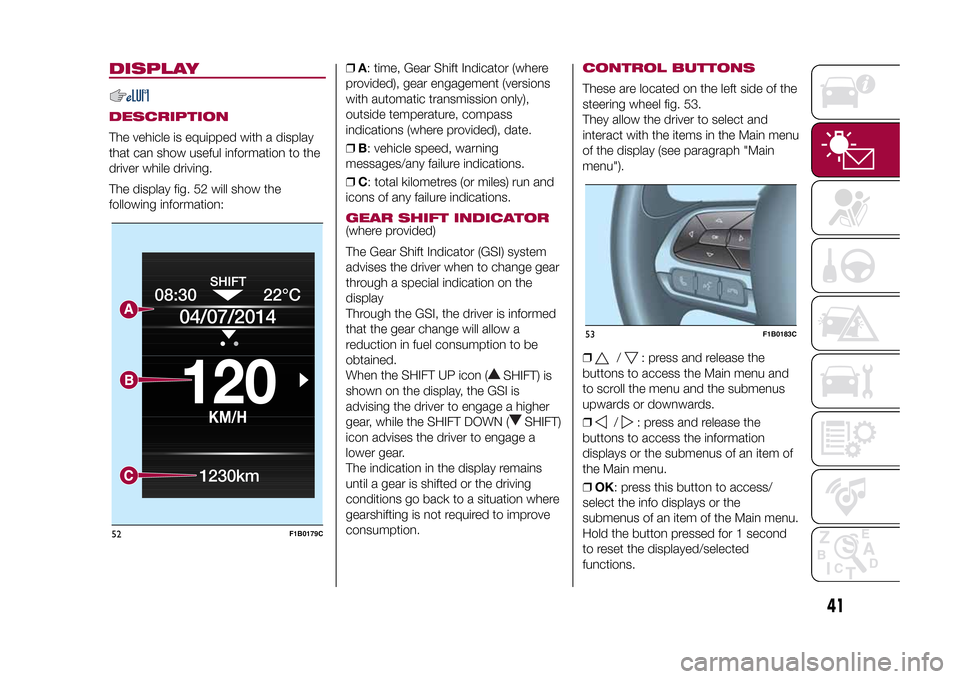
DISPLAYDESCRIPTIONThe vehicle is equipped with a display
that can show useful information to the
driver while driving.
The display fig. 52 will show the
following information:❒A: time, Gear Shift Indicator (where
provided), gear engagement (versions
with automatic transmission only),
outside temperature, compass
indications (where provided), date.
❒B: vehicle speed, warning
messages/any failure indications.
❒C: total kilometres (or miles) run and
icons of any failure indications.
GEAR SHIFT INDICATOR(where provided)
The Gear Shift Indicator (GSI) system
advises the driver when to change gear
through a special indication on the
display
Through the GSI, the driver is informed
that the gear change will allow a
reduction in fuel consumption to be
obtained.
When the SHIFT UP icon (
SHIFT) is
shown on the display, the GSI is
advising the driver to engage a higher
gear, while the SHIFT DOWN (
SHIFT)
icon advises the driver to engage a
lower gear.
The indication in the display remains
until a gear is shifted or the driving
conditions go back to a situation where
gearshifting is not required to improve
consumption.
CONTROL BUTTONSThese are located on the left side of the
steering wheel fig. 53.
They allow the driver to select and
interact with the items in the Main menu
of the display (see paragraph "Main
menu").
❒
/
: press and release the
buttons to access the Main menu and
to scroll the menu and the submenus
upwards or downwards.
❒
/
: press and release the
buttons to access the information
displays or the submenus of an item of
the Main menu.
❒OK: press this button to access/
select the info displays or the
submenus of an item of the Main menu.
Hold the button pressed for 1 second
to reset the displayed/selected
functions.
08:30
KM/H
120
22°C
04/07/2014
1230km
52
F1B0179C
53
F1B0183C
41
15-12-2014 8:23 Pagina 41
Page 45 of 240

TRIP COMPUTERThe "Trip computer" is used to display
information on vehicle operation when
the ignition device is at MAR.
This function is characterised by two
separate memories, called "Trip A" and
"Trip B", where the vehicle's "complete
missions" (journeys) are recorded in a
reciprocally independent manner.
“Trip A” and “Trip B” are used to display
the values relating to:
❒Distance travelled
❒Average consumption
❒Average speed
❒Trip time (driving time)
To reset the values, press and hold
down theOK buttonfig. 54 on the
steering wheel.Note"Range" and "Instant
consumption" values cannot be reset.54
F1B0184C
43
15-12-2014 8:23 Pagina 43
Page 47 of 240

Warning light What it means
POWER STEERING FAILURE
This warning light (or symbol in the display) switches on when the ignition device is brought to MAR, but it
should switch off after a few seconds. If the warning light (or symbol on the display) remains on, you could
not have steering assistance and the effort required to operate the steering wheel could be increased;
steering is, however, possible. On some versions, the display shows the dedicated message. Contact a
Fiat Dealership as soon as possible.SEAT BELTS NOT FASTENED
The warning light switches on constantly if the vehicle is stationary and the driver side and/or passenger
side seat belt (with passenger seated) is not fastened. The warning light flashes and an acoustic signal will
sound if the vehicle is in motion and the driver side and/or passenger side seat belt (with passenger
seated) is not correctly fastened. Fasten the seat belt.AIRBAG FAILURE
If the warning light switches on constantly, this indicates a failure in the airbag system.
28) 29)
WARNING
28)If, when the ignition device is turned to MAR, the
warning light does not switch on or stays on whilst driving, a failure may have
occurred in the restraint systems. In this case the airbags or pretensioners may not be deployed in an impact or, in a lower number of cases,
they may be deployed accidentally. Before proceeding, contact a Fiat Dealership to have the system checked as soon as possible.
29)The failure of the
warning light is signalled by the switching on of the icon
on the instrument panel. In this case, the warning light
may not indicate any failure with the restraint systems. Before continuing, contact a Fiat Dealership immediately to have the system checked.
45
15-12-2014 8:23 Pagina 45
Page 49 of 240

Warning light What it means
iTPMS
iTPMS failure
The warning light switches on when a failure is detected in the iTPMS. Should one or more wheels be fitted
without sensors, the display will show a warning message until initial conditions are restored.
IMPORTANT Do not continue driving with one or more flat tyres as handling may be compromised. Stop
the vehicle, avoiding sharp braking and steering. Repair immediately using the dedicated tyre repair kit (see
the “Fix&Go automatic kit” paragraph in the "In an emergency" chapter) and contact a Fiat Dealership as
soon as possible.
Tyre pressure low
The warning light switches on and a message is displayed to indicate that the tyre pressure is lower than
the recommended value and/or that slow pressure loss is occurring. In these cases, optimal tyre duration
and fuel consumption may not be guaranteed.
Should two or more tyres be in the condition mentioned above, the display will show the indications
corresponding to each tyre.
In any situation in which the dedicated message is shown on the display, it is ESSENTIAL to refer to the
contents of the "Wheels" paragraph in the "Technical data" chapter, strictly complying with the indications
that you find there.
In any situation in which the dedicated message is shown on the display, the sequence of indications
corresponding to each tyre.ABS FAILURE
The warning light switches on to indicate an ABS fault. In this case the braking system will work as normal,
but without the extra performance offered by the ABS. Drive carefully and contact a Fiat Dealership as
soon as possible.
47
15-12-2014 8:23 Pagina 47
Page 52 of 240

Warning light What it means
LANE ASSIST SYSTEM
The warning light switches on as follows:
Warning light continuously on (white):the system is activated, but the lane limits were not detected (the
lane lines are grey).
Warning light on and flashing (amber):the vehicle has approached the lane line and is about to pass it.
Warning light switched on continuously (green):the system has detected the limits of both lanes. The
system will act on the steering wheel if the lane was passed unintentionally.LANE ASSIST SYSTEM
The warning light turns on when the system is not available. Contact a Fiat Dealership to have the system
checked.GLOW PLUG PREHEATING (Diesel versions)
This warning light comes on when the ignition device is brought to MAR and will switch off when the glow
plugs have reached the preset temperature. The engine can be started as soon as the warning light
switches off.
IMPORTANT In mild or high temperature conditions, the warning light comes on for a very short time only.
GLOW PLUG PREHEATING FAILURE (Diesel versions)
The warning light will flash to indicate a failure in the glow plug preheating system. In this case, contact a
Fiat Dealership as soon as possible.FULL BRAKE CONTROL OFF
The warning light switches on in the case of Full Brake Control system failure. Contact a Fiat Dealership as
soon as possible.
50
KNOWING THE INSTRUMENT PANEL
15-12-2014 8:23 Pagina 50
Page 64 of 240

ACTIVE SAFETY
SYSTEMSThe vehicle has the following active
safety systems:
❒ABS (Anti-lock Braking System);
❒DTC (Drag Torque Control);
❒ESC (Electronic Stability Control);
❒TC (Traction Control);
❒PBA (Panic Brake Assist);
❒HHC (Hill Hold Control);
❒DST (Dynamic Steering Torque);
❒ERM (Electronic Rollover Mitigation);
❒TSC (Trailer Sway Control).
For the operation of the systems, see
the following description.ABS (Anti-lock Braking
System)This system, which is an integral part of
the braking system, prevents one or
more wheels from locking and slipping
in all road surface conditions,
irrespective of the intensity of the
braking action, ensuring that the vehicle
can be controlled even during
emergency braking and optimising
stopping distances.
The system intervenes during braking
when the wheels are about to lock,
typically in emergency braking or
low-grip conditions, when locking may
be more frequent.The system also improves control and
stability of the vehicle when braking
on a surface where the grip of the left
and right wheels varies, or on corners.
The Electronic Braking Force
Distribution (EBD) system completes
the system allowing the brake force to
be distributed between the front and
rear wheels.
System interventionThe driver can feel that the ABS system
has come into action because the
brake pedal pulsates slightly and the
system gets noisier: this is entirely
normal with the system operating.
31) 32) 33) 34) 35) 36) 37)
DTC (Drag Torque
Control) SYSTEMThe system intervenes in the event of
sudden downshifting, or during ABS
braking, restoring torque to the engine
and thus preventing excessive drag
at the drive wheels, which may lead the
wheels to lock and a loss of vehicle
stability, above all in low-grip
conditions.
ESC (Electronic Stability
Control) SYSTEMThe ESC system improves the
directional control and stability of the
vehicle in various driving conditions.
The ESC system corrects the vehicle’s
understeer and oversteer, distributing
the brake force on the wheels
appropriately. The torque supplied by
the engine can also be reduced in order
to maintain control of the vehicle.
The ESC system uses sensors installed
on the vehicle to determine the
trajectory that the driver intends to
follow and compares it with the
vehicle’s effective trajectory. When the
real trajectory deviates from the desired
trajectory, the ESC system intervenes
to counter the vehicle’s understeer
or oversteer.
❒Oversteer: occurs when the vehicle is
turning more than it should according
to the angle of the steering wheel.
❒Understeer: occurs when the vehicle
is turning less than it should according
to the angle of the steering wheel.
62
SAFETY
15-12-2014 8:23 Pagina 62
Page 66 of 240

❒downhill: vehicle stationary on a road
with a gradient higher than 5%, engine
running, brake pressed and reverse
gear engaged.
When setting off, the ESC system
control unit maintains the braking
pressure on the wheels until the engine
torque necessary for starting is
reached, or in any case for a maximum
of 2 seconds, allowing your right foot
to be moved easily from the brake
pedal to the accelerator.
When two seconds have elapsed,
without starting, the system is
automatically deactivated, gradually
releasing the braking pressure. During
this release stage it is possible to hear a
typical mechanical brake release noise,
indicating the imminent movement of
the vehicle.
51) 52)
DST SYSTEM (Dynamic
Steering Torque)The DST function uses the integration
of the ESC system with the electric
power steering to increase the safety
level of the whole vehicle.In critical situations (braking on surfaces
with different grip conditions), through
the DST function the ESC system
controls the steering to implement an
additional torque contribution on the
steering wheel, to suggest the most
correct manoeuvre to the driver.
The coordinated action of the brakes
and steering increases the sensation of
safety and control of the vehicle.
53)
ERM (Electronic Rollover
Mitigation) SYSTEMThe system monitors the tendency of
the wheels to rise from the ground if the
driver performs extreme manoeuvres
like quick steering to avoid an obstacle,
especially in poor road conditions.
If these conditions occur, the system
intervenes on the brakes and engine
power to reduce the possibility that the
wheels are raised from the ground. It
is not possible to avoid tendency to roll
over if the phenomenon is due to
reasons such as driving on high side
gradients, collision with objects or other
vehicles.
54)
TSC (Trailer Sway
Control) SYSTEMThe system employs a series of
sensors located on the vehicle to
identify excessive swerving of the trailer
and take the necessary precautions
to eliminate it.
To counteract the effect of trailer sway,
the system can reduce the engine
power and intervene on the wheels
involved. The TSC system activates
automatically once excessive sway of
the trailer is detected.System interventionWhen the system is active, the
warning light flashes on the
instrument panel, the engine power is
reduced and braking can be felt on the
individual wheels, following the attempt
to eliminate the swerving of the trailer.55) 56)
WARNING
31)When the ABS intervenes and you feel
the brake pedal pulsating, do not reduce
the pressure, but hold it down firmly and
confidently; in doing so you will brake
in the shortest distance possible,
depending on the current road conditions.
64
SAFETY
15-12-2014 8:23 Pagina 64