Page 210 of 438
Selecting the footwell/windshield or only windshield dis-
tribution activates the climate control system compressor
(LED on A/C button on) and the air recirculation is set to
#outside air#intake (LED on the recirculation button off ).
This logic guarantees optimum visibility at the windows.
It is, however, always possible to manage air recirculation
and the climate control system compressor manually.
Rear Window Defrosting
Push the Rear Defrost button to activate heated rear
window defrosting.
The effective activation of the function is indicated by the
rear defrost warning light on the instrument panel
switching ON.
This function switches OFF automatically after about 20
minutes or when the engine is turned OFF. It is not
switched on automatically the next time the engine is
started.
If equipped, push the rear defrost button to activate
defrosting of door mirrors and heated rear window.
NOTE:Do not affix stickers to the inside of the heated
rear window over the heating filaments, to avoid damage
that might cause them to stop working properly.
Switching Off The Climate Control System
Push the On/Off button.
With climate control system off:
•air recirculation is on, thus isolating the passenger
compartment from the outside;
•the compressor is off;
•the fan is off;
•the heated rear window can be activated / deacti-
vated.
208 UNDERSTANDING YOUR INSTRUMENT PANEL
Page 217 of 438
Media
Uconnect® offers connections via USB Port, Bluetooth®
and Auxiliary Ports (If Equipped). Voice operation is only
available for connected USB and iPod® devices. (Remote
CD player optional and not available on all vehicles.)
Push the VR button. After the beep, say one of the
following commands and follow the prompts to
switch your media source or choose an artist.
•Change sourceto Bluetooth®
•Change sourceto iPod®
•Change sourceto USB
•Play artistBeethoven;Play albumGreatest Hits;Play
songMoonlight Sonata;Play genreClassical
TIP:Press the Browse button on the touchscreen to see all
of the music on your iPod® or USB device. Your Voice
Command must matchexactlyhow the artist, album,
song and genre information is displayed.
Uconnect® 5.0 Media
4
UNDERSTANDING YOUR INSTRUMENT PANEL 215
Page 224 of 438

!DRIVING ON SLIPPERY SURFACES.........251
▫Acceleration.........................251
▫Traction............................252
!DRIVING THROUGH WATER.............252
▫Flowing/Rising Water..................253
▫Shallow Standing Water.................253
!ELECTRIC POWER STEERING.............255
!PARKING BRAKE......................255
!BRAKE SYSTEM.......................257
!ELECTRONIC BRAKE CONTROL SYSTEM . . . .257
▫Four-Wheel Anti-Lock Brake System (ABS) . . .257
▫Brake Assist System (BAS)...............259
▫Traction Control System (TCS)............260
▫Hill Start Assist (HSA).................260
▫Dynamic Steering Torque (DST)...........261
▫Electronic Stability Control (ESC)..........262
▫ESC Activation/Malfunction Indicator Light And
ESC OFF Indicator Light................263
▫Electronic Roll Mitigation (ERM)..........265
!TIRE SAFETY INFORMATION.............266
▫Tire Markings........................266
▫Tire Identification Number (TIN)...........270
▫Tire Terminology And Definitions..........271
▫Tire Loading And Tire Pressure...........273
!TIRES — GENERAL INFORMATION........278
▫Tire Pressure........................278
▫Tire Inflation Pressures.................279
222 STARTING AND OPERATING
Page 229 of 438
on the type of driving and the amount of cargo, the pump
will run for up to 10 minutes after the engine has been
shut off to circulate coolant through the turbocharger.
Although the pump is rubber-mounted for quiet opera-
tion, it is normal to hear it running during this time.
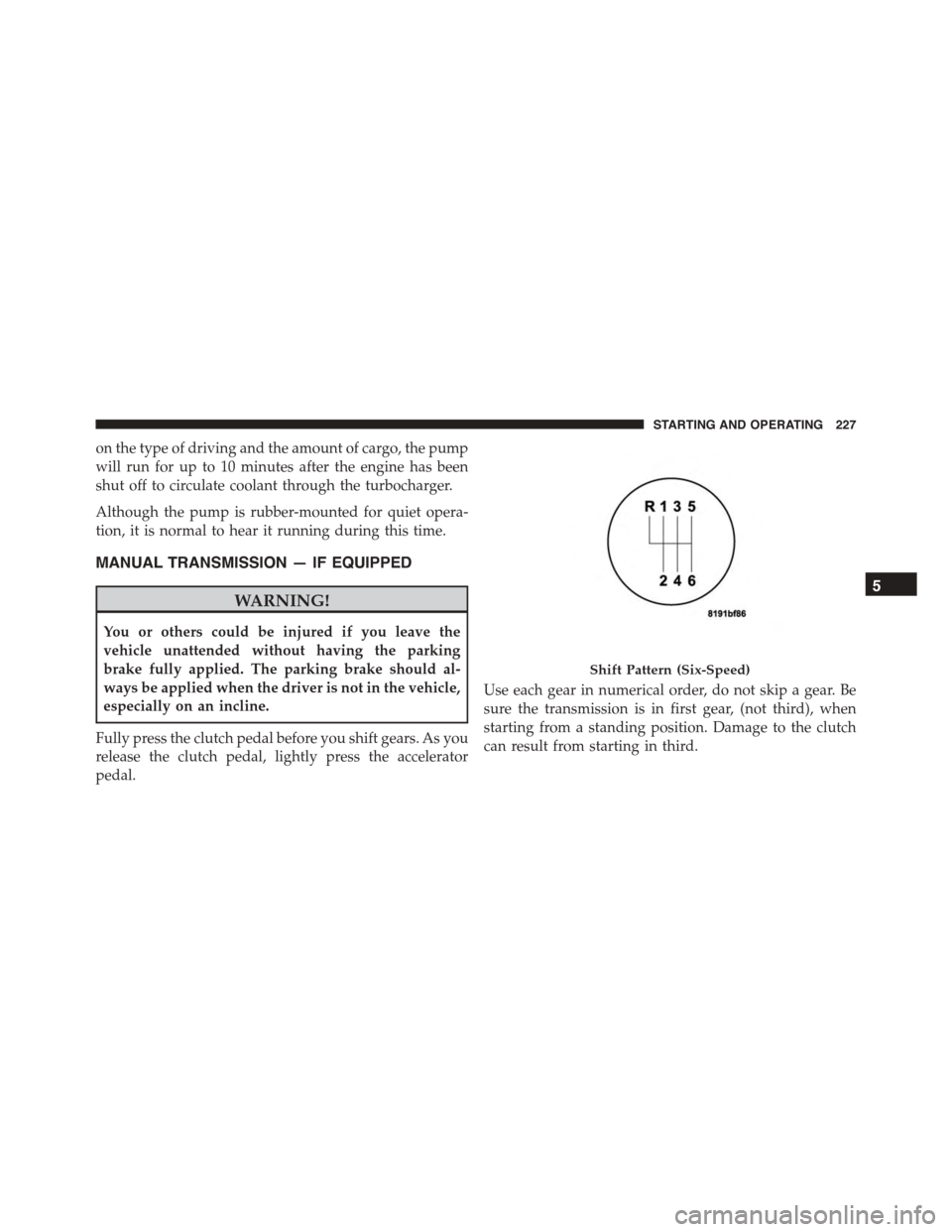
MANUAL TRANSMISSION — IF EQUIPPED
WARNING!
You or others could be injured if you leave the
vehicle unattended without having the parking
brake fully applied. The parking brake should al-
ways be applied when the driver is not in the vehicle,
especially on an incline.
Fully press the clutch pedal before you shift gears. As you
release the clutch pedal, lightly press the accelerator
pedal.
Use each gear in numerical order, do not skip a gear. Be
sure the transmission is in first gear, (not third), when
starting from a standing position. Damage to the clutch
can result from starting in third.
Shift Pattern (Six-Speed)
5
STARTING AND OPERATING 227
Page 230 of 438

For most city driving you will find it easier to use only
the lower gears. For steady highway driving with light
accelerations, sixth gear is recommended.
Never drive with your foot resting on the clutch pedal, or
try to hold the vehicle on a hill with the clutch pedal
partially engaged. This will cause abnormal wear on the
clutch.
To shift into REVERSE, pull up on the ring just below the
gear shift knob and then move into the REVERSE (R)
position.
Never shift into REVERSE until the vehicle has come to a
complete stop.
NOTE:During cold weather, until the transmission lu-
bricant is warm, you may experience slightly higher shift
efforts. This is normal and not harmful to the transmis-
sion.
Downshifting
Proper downshifting will improve fuel economy and
prolong engine life.
CAUTION!
If you skip a gear while downshifting or downshift
at too high of a vehicle speed, these conditions may
cause the engine to overspeed if too low of a gear is
selected and the clutch pedal is released. Damage to
the clutch and the transmission can result from
skipping a gear while downshifting or downshifting
at too high of a vehicle speed even if the clutch pedal
is held pressed (i.e., not released).
To maintain a safe speed and prolong brake life, shift
down to second or first when descending a steep grade.
228 STARTING AND OPERATING
Page 244 of 438

Transmission Limp Home Mode
Transmission function is monitored electronically for
abnormal conditions. If a condition is detected that could
result in transmission damage, Transmission Limp Home
Mode is activated. In this mode, some gears will be
unavailable. The transmission will operate only in a
certain select set of gears (such as 1st, 2nd, 3rd, and
Reverse, or 1st, 3rd, 5th, and Reverse, or 2nd, 4th, and 6th
[with no Reverse]). PARK and NEUTRAL will continue
to be available. The Malfunction Indicator Light (MIL)
may be illuminated. Limp Home Mode allows the vehicle
to be driven to an authorized dealer for service without
damaging the transmission.
In the event of a momentary problem, the transmission
can be reset to regain all forward gears by performing the
following steps:
1. Stop the vehicle.
2. Shift the transmission into PARK.
3. Turn the ignition switch to the OFF position.
4. Wait approximately 10 seconds.
5. Restart the engine.
6. Shift into the desired gear range. If the problem is no
longer detected, the transmission will return to normal
operation.
NOTE:Even if the transmission can be reset, we recom-
mend that you visit your authorized dealer at your
earliest possible convenience. Your authorized dealer has
diagnostic equipment to determine if the problem could
recur.
If the transmission cannot be reset, authorized dealer
service is required.
242 STARTING AND OPERATING
Page 251 of 438
range of torque converter clutch engagement. This is
done to prevent transmission damage due to overheat-
ing.
During cold temperatures, transmission operation may
be modified depending on engine coolant temperature.
Normal operation will resume once the engine tempera-
ture has risen to a suitable level.
Transmission Limp Home Mode
Transmission function is monitored electronically for
abnormal conditions. If a condition is detected that could
result in transmission damage, Transmission Limp Home
Mode is activated. In this mode, the transmission remains
in third gear regardless of which forward gear is selected.
PARK, REVERSE, and NEUTRAL will continue to oper-
ate. The Malfunction Indicator Light (MIL) may be illu-
minated. Limp Home Mode allows the vehicle to be
driven to an authorized dealer for service without dam-
aging the transmission.
In the event of a momentary problem, the transmission
can be reset to regain all forward gears by performing the
following steps:
1. Stop the vehicle.
2. Shift the transmission into PARK.
3. Turn the ignition switch to the OFF position.
4. Wait approximately 10 seconds.
5. Restart the engine.
6. Shift into the desired gear range. If the problem is no
longer detected, the transmission will return to normal
operation.
NOTE:Even if the transmission can be reset, we recom-
mend that you visit your authorized dealer at your
earliest possible convenience. Your authorized dealer has
diagnostic equipment to determine if the problem could
recur.
5
STARTING AND OPERATING 249
Page 255 of 438
Flowing/Rising Water
WARNING!
Do not drive on or across a road or path where water
is flowing and/or rising (as in storm run-off). Flow-
ing water can wear away the road or path’s surface
and cause your vehicle to sink into deeper water.
Furthermore, flowing and/or rising water can carry
your vehicle away swiftly. Failure to follow this
warning may result in injuries that are serious or
fatal to you, your passengers, and others around you.
Shallow Standing Water
Although your vehicle is capable of driving through
shallow standing water, consider the following Cautions
and Warnings before doing so.
WARNING!
•Driving through standing water limits your vehi-
cle’s traction capabilities. Do not exceed 5 mph
(8 km/h) when driving through standing water.
•Driving through standing water limits your vehi-
cle’s braking capabilities, which increases stopping
distances. Therefore, after driving through stand-
ing water, drive slowly and lightly press on the
brake pedal several times to dry the brakes.
•Failure to follow these warnings may result in
injuries that are serious or fatal to you, your pas-
sengers, and others around you.
5
STARTING AND OPERATING 253