Page 137 of 438
out of REVERSE unless the forward vehicle speed ex-
ceeds 8 mph (13 km/h), the transmission is shifted into
#PARK#or the vehicle’s ignition is cycled to the OFF
position.
When enabled, active guide lines are overlaid on the
image to illustrate the width of the vehicle and its
projected backup path based on the steering wheel
position. A dashed center line overlay indicates the center
of the vehicle to assist with parking.
When enabled, fixed guide lines are overlaid on the
image to illustrate the width of the vehicle.
NOTE:The ParkView® Rear Back Up Camera has pro-
grammable modes of operation that may be selected
through the Uconnect® System. Refer to your Uconnect®
Supplement Manual for further information.
Different colored zones indicate the distance to the rear of
the vehicle.
The following table shows the approximate distances for
each zone:
ZoneDistance to the rear of the vehicle
Red0 - 1 ft (0 - 30 cm)
Yellow1 ft - 3 ft (30 cm - 1 m)
Green3 ft or greater (1 m or greater)
3
UNDERSTANDING THE FEATURES OF YOUR VEHICLE 135
Page 165 of 438
UNDERSTANDING YOUR INSTRUMENT PANEL
CONTENTS
!INSTRUMENT PANEL FEATURES..........165
!INSTRUMENT CLUSTER.................166
!INSTRUMENT CLUSTER DESCRIPTIONS.....167
!ELECTRONIC VEHICLE INFORMATION
CENTER (EVIC).......................177
▫EVIC Screen.........................177
▫EVIC Control Buttons..................178
▫Electronic Vehicle Information Center (EVIC)
Setup Menu.........................179
▫Change Engine Oil Indicator System........180
▫Trip Computer.......................181
▫Trip Button..........................181
▫Trip Functions........................182
▫Values Displayed......................183
▫Personal Settings (Customer-Programmable
Features)............................184
!Uconnect® RADIOS.....................187
!iPod®/USB/MEDIA PLAYER CONTROL.....187
!STEERING WHEEL AUDIO CONTROLS......188
▫Radio Operation......................189
4
Page 167 of 438
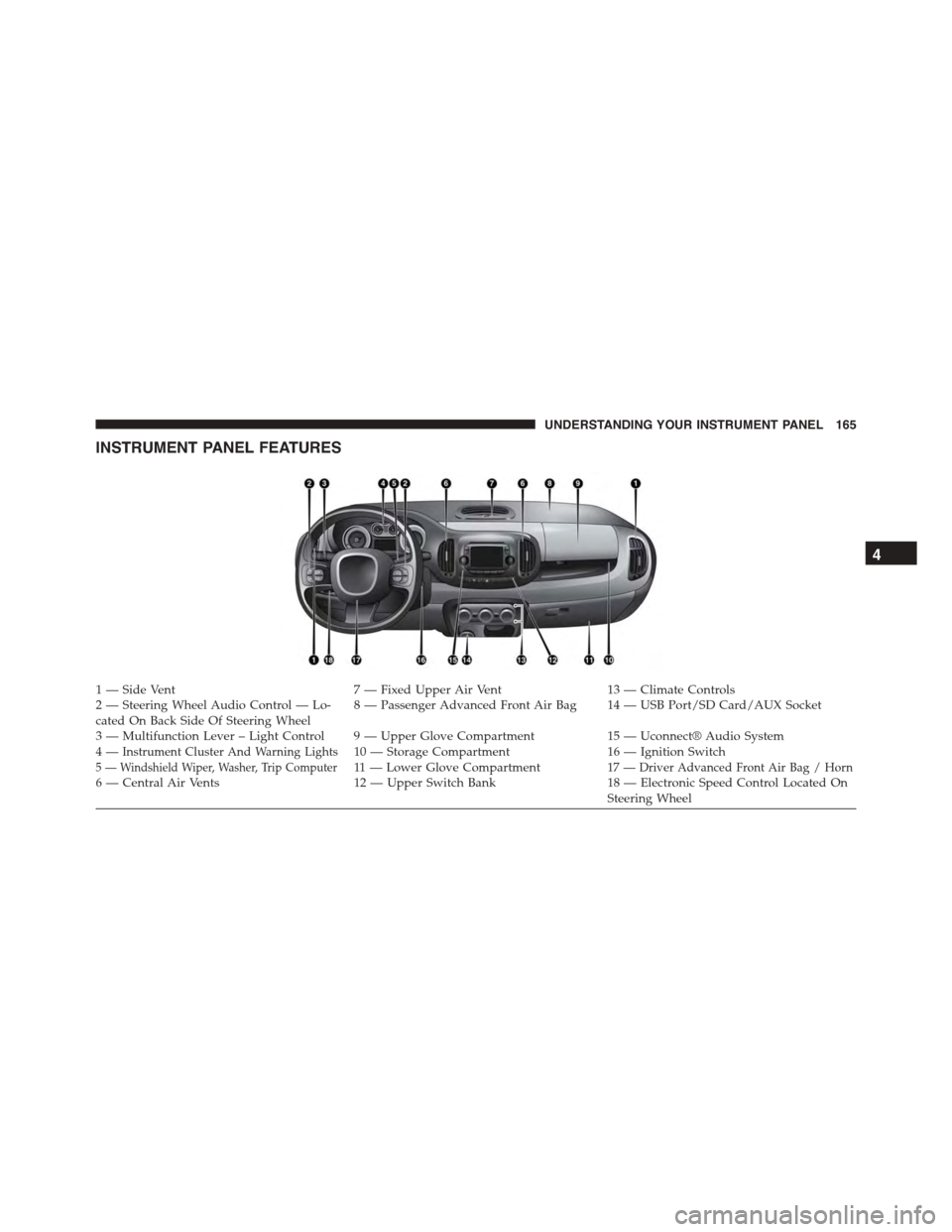
INSTRUMENT PANEL FEATURES
1 — Side Vent7 — Fixed Upper Air Vent13 — Climate Controls2—SteeringWheelAudioControl—Lo-cated On Back Side Of Steering Wheel8—PassengerAdvancedFrontAirBag 14—USBPort/SDCard/AUXSocket
3—MultifunctionLever–LightControl 9—UpperGloveCompartment15 — Uconnect® Audio System4—Instrument Cluster And Warning Lights10 — Storage Compartment16 — Ignition Switch5 — Windshield Wiper, Washer, Trip Computer11 — L o w e r G l o v e C o m p a r t m e n t17 — Driver Advanced Front Air Bag / Horn6 — Central Air Vents12 — Upper Switch Bank18 — Electronic Speed Control Located OnSteering Wheel
4
UNDERSTANDING YOUR INSTRUMENT PANEL 165
Page 183 of 438
2. Fully push the accelerator pedal slowly, three times
within 10 seconds.
3. Turn the ignition switch to the OFF/LOCK position.
NOTE:If the indicator message illuminates when you
start the vehicle, the oil change indicator system did not
reset. If necessary, repeat this procedure.
Trip Computer
The Trip Computer is located in the instrument cluster. It
features a driver-interactive display (displays informa-
tion such as; trip information, range, fuel consumption,
average speed and travel time).
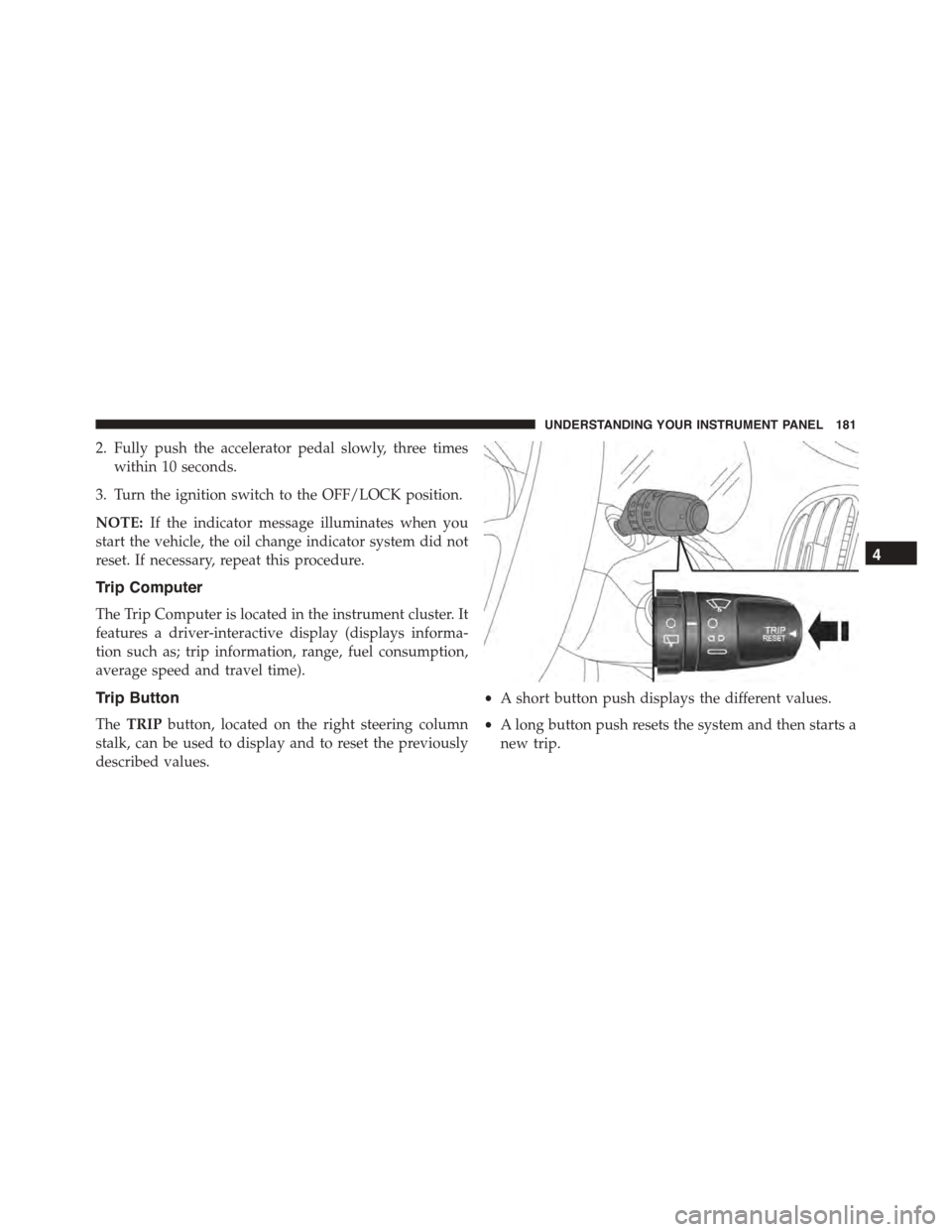
Trip Button
TheTRIPbutton, located on the right steering column
stalk, can be used to display and to reset the previously
described values.
•A short button push displays the different values.
•A long button push resets the system and then starts a
new trip.
4
UNDERSTANDING YOUR INSTRUMENT PANEL 181
Page 190 of 438
Refer to the Uconnect® 5.0/6.5 User’s Manual for iPod®
and external USB support capability.
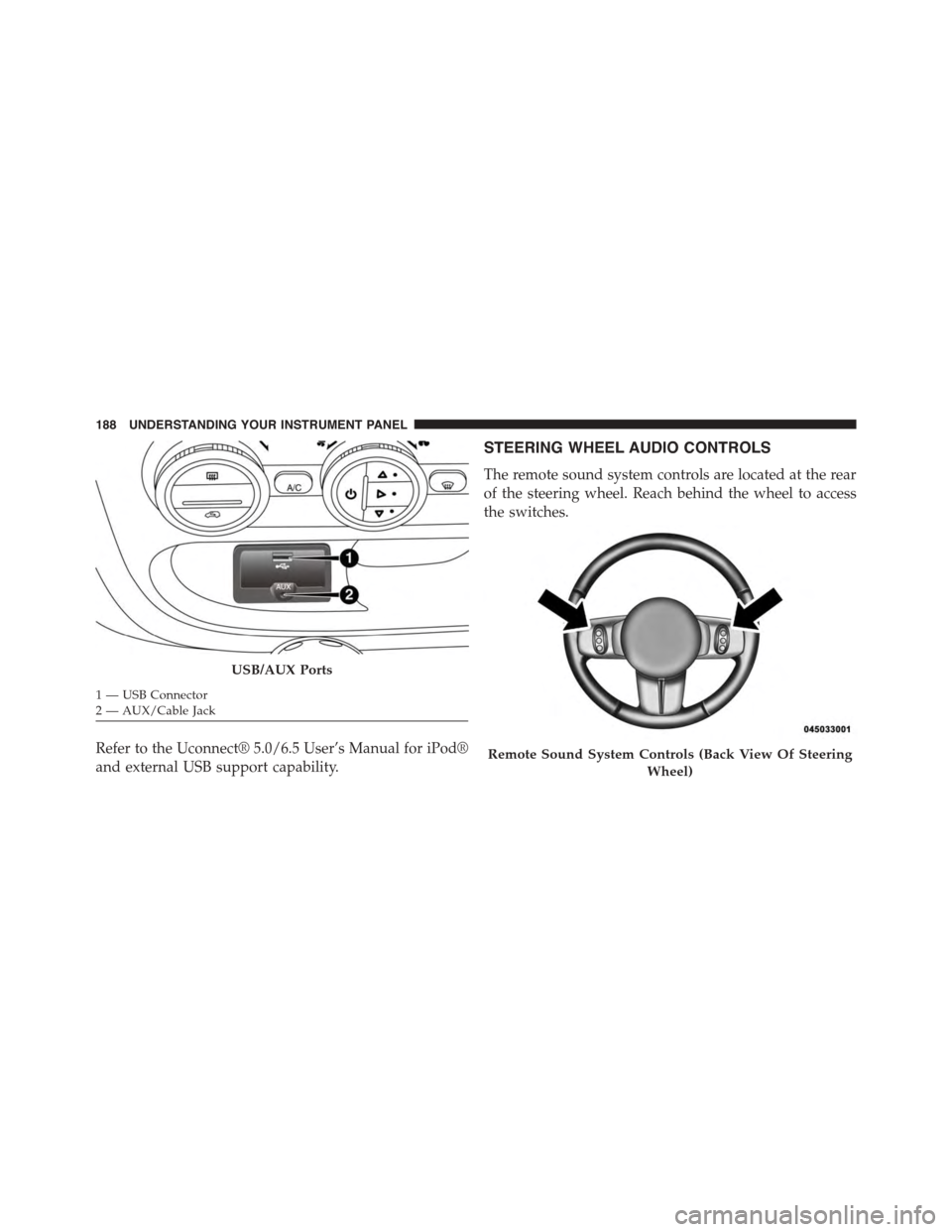
STEERING WHEEL AUDIO CONTROLS
The remote sound system controls are located at the rear
of the steering wheel. Reach behind the wheel to access
the switches.
USB/AUX Ports
1—USBConnector2—AUX/CableJack
Remote Sound System Controls (Back View Of Steering
Wheel)
188 UNDERSTANDING YOUR INSTRUMENT PANEL
Page 213 of 438
Get Started
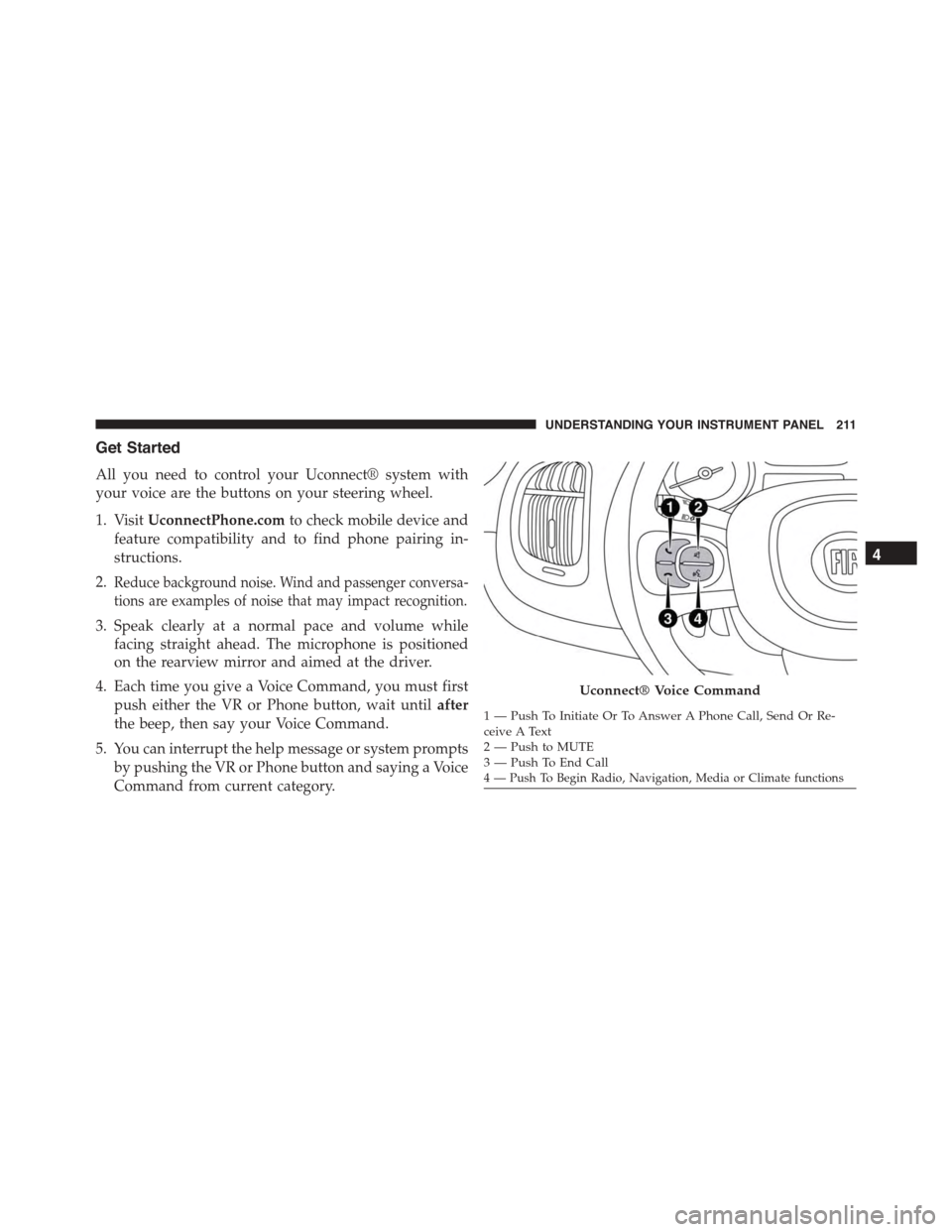
All you need to control your Uconnect® system with
your voice are the buttons on your steering wheel.
1. VisitUconnectPhone.comto check mobile device and
feature compatibility and to find phone pairing in-
structions.
2.Reduce background noise. Wind and passenger conversa-
tions are examples of noise that may impact recognition.
3. Speak clearly at a normal pace and volume while
facing straight ahead. The microphone is positioned
on the rearview mirror and aimed at the driver.
4. Each time you give a Voice Command, you must first
push either the VR or Phone button, wait untilafter
the beep, then say your Voice Command.
5. You can interrupt the help message or system prompts
by pushing the VR or Phone button and saying a Voice
Command from current category.
Uconnect® Voice Command
1—PushToInitiateOrToAnswerAPhoneCall,SendOrRe-ceive A Text2—PushtoMUTE3—PushToEndCall4 — Push To Begin Radio, Navigation, Media or Climate functions
4
UNDERSTANDING YOUR INSTRUMENT PANEL 211
Page 224 of 438

!DRIVING ON SLIPPERY SURFACES.........251
▫Acceleration.........................251
▫Traction............................252
!DRIVING THROUGH WATER.............252
▫Flowing/Rising Water..................253
▫Shallow Standing Water.................253
!ELECTRIC POWER STEERING.............255
!PARKING BRAKE......................255
!BRAKE SYSTEM.......................257
!ELECTRONIC BRAKE CONTROL SYSTEM . . . .257
▫Four-Wheel Anti-Lock Brake System (ABS) . . .257
▫Brake Assist System (BAS)...............259
▫Traction Control System (TCS)............260
▫Hill Start Assist (HSA).................260
▫Dynamic Steering Torque (DST)...........261
▫Electronic Stability Control (ESC)..........262
▫ESC Activation/Malfunction Indicator Light And
ESC OFF Indicator Light................263
▫Electronic Roll Mitigation (ERM)..........265
!TIRE SAFETY INFORMATION.............266
▫Tire Markings........................266
▫Tire Identification Number (TIN)...........270
▫Tire Terminology And Definitions..........271
▫Tire Loading And Tire Pressure...........273
!TIRES — GENERAL INFORMATION........278
▫Tire Pressure........................278
▫Tire Inflation Pressures.................279
222 STARTING AND OPERATING
Page 257 of 438
ELECTRIC POWER STEERING
This only operates with the key turned to MAR/ON and
the engine started. The steering allows the force required
at the steering wheel to be adjusted to suit driving
conditions.
NOTE:When turning the ignition key quickly, full power
steering functionality can be achieved after a few sec-
onds.
PARKING BRAKE
Before leaving the vehicle, make sure that the parking
brake is fully applied. Also, be certain to leave manual
transmission in REVERSE or first gear.
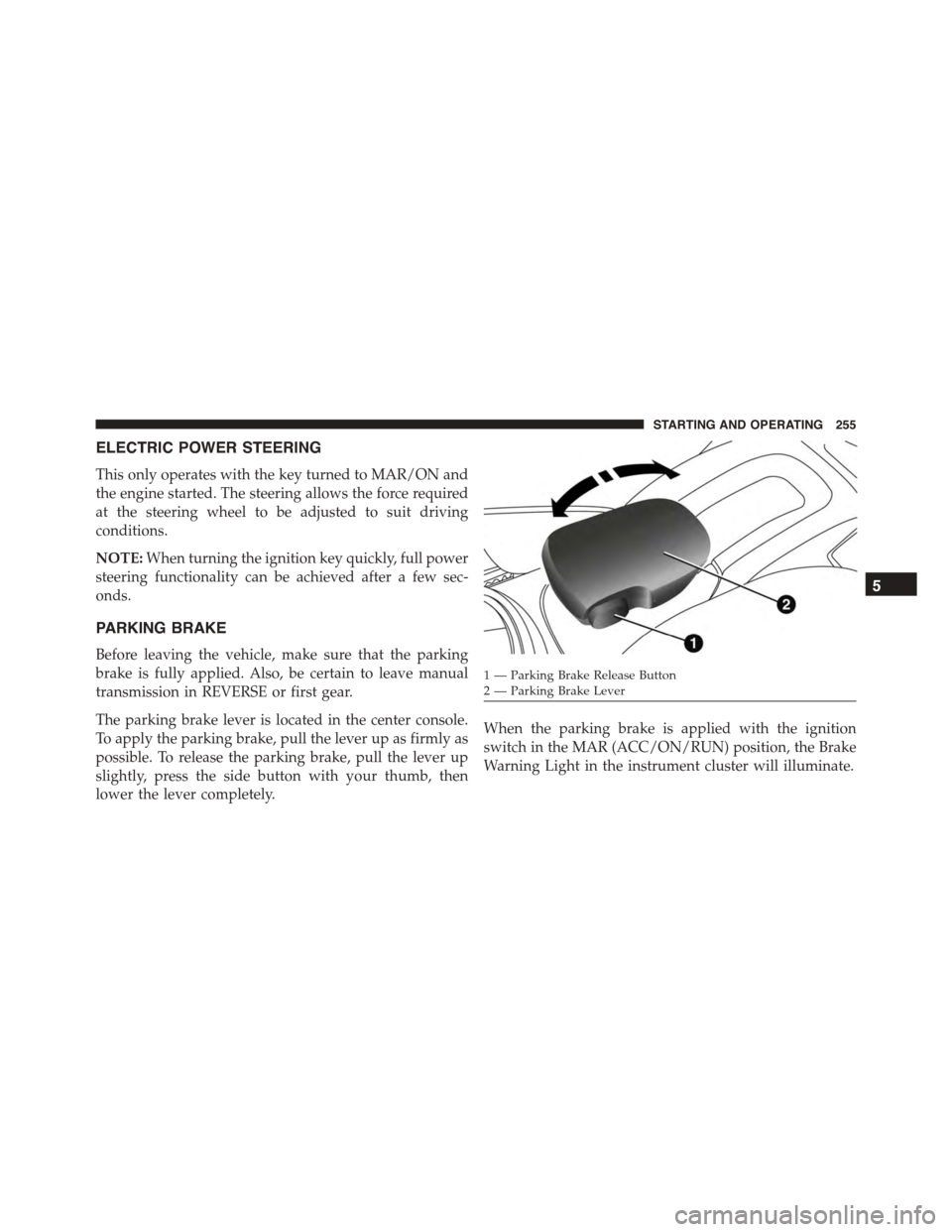
The parking brake lever is located in the center console.
To apply the parking brake, pull the lever up as firmly as
possible. To release the parking brake, pull the lever up
slightly, press the side button with your thumb, then
lower the lever completely.
When the parking brake is applied with the ignition
switch in the MAR (ACC/ON/RUN) position, the Brake
Warning Light in the instrument cluster will illuminate.
1 — Parking Brake Release Button2—ParkingBrakeLever
5
STARTING AND OPERATING 255