Page 102 of 426
NOTE:
•The media player does not support audio files com-
pressed with other formats and DRM (Digital Rights
Management) protected audio files. Non-supported
audio files that may be present on the USB device will
be ignored.
•To use the media player, you have to simply connect
(directly or by an extension lead) your USB device to
the center console USB port. After turning the ignition
key to ON, BLUE&ME™ will start building your
media library. At the end of this operation you can surf
the complete library and scroll its categories as re-
quired using the buttons on the steering wheel or voice
commands. BLUE&ME™ will then play your selection
via the car sound system.
WARNING!
•Driving while distracted can result in loss of ve-
hicle control, accident and injury. It is strongly
recommended that you use extreme caution when
using any device or feature that may take your
focus off the road or your hands off the steering
wheel. Your primary responsibility is the safe op-
eration of your vehicle.
•The use of any handheld device while driving is
not recommended. Use voice-operated systems
when possible. Follow all applicable laws that may
affect the use of electronic devices while driving.
(Continued)
100 UNDERSTANDING THE FEATURES OF YOUR VEHICLE
Page 107 of 426

fore/aft (memory) position on the tracks. This results in
the seat back memory being set only – The track will then
be locked forward of its last set fore/aft memory posi-
tion. To then reset the fore/aft track memory feature (to
reestablish Memory Function Option 1), the seat has to be
returned fully rearward to its last fore/aft memory track
position as described in Memory Function Option 1.
Heated Seats — If Equipped
On some models, the front driver and passenger seats
may be equipped with heaters in both the seat cushions
and seatbacks. The controls for the front heated seats are
located on the center instrument panel area.
Press the switch once to turn on the heated
seats. Press the switch a second time to shut the
heating elements off.
NOTE:Once a heat setting is selected, heat will be felt
within two to five minutes.
WARNING!
•Persons who are unable to feel pain to the skin
because of advanced age, chronic illness, diabetes,
spinal cord injury, medication, alcohol use, exhaus-
tion or other physical condition must exercise care
when using the seat heater. It may cause burns
even at low temperatures, especially if used for
long periods of time.
•Do not place anything on the seat or seatback that
insulates against heat, such as a blanket or cushion.
This may cause the seat heater to overheat. Sitting
in a seat that has been overheated could cause
serious burns due to the increased surface tempera-
ture of the seat.
3
UNDERSTANDING THE FEATURES OF YOUR VEHICLE 105
Page 112 of 426

High Beams
With the low beams activated, push the multi-
function lever towards the instrument panel to
turn on the high beams. Pull the multifunction lever
toward the steering wheel to turn off the high beams.
Flash-To-Pass
You can signal another vehicle with your headlights by
lightly pulling the multifunction lever toward the steer-
ing wheel. This will turn on the high beams until the
lever is released.
Parking Lights
To turn on the parking lights, remove the key
or turn the ignition to OFF/LOCK position and
turn on the headlights.
Daytime Running Lights — If Equipped
To activate the Daytime Running Lights (DRL), rotate the
end of the multifunction lever to theOsymbol.
NOTE:The low beams and side/taillights will not be on
with DRL.
If allowed by law in the country in which the vehicle was
purchased the DRL function can be turned on or off using
the display menus. Refer to “Electronic Vehicle Informa-
tion Center (EVIC)” in “Understanding Your Instrument
Panel” for further information.
Turn Signals
Push the multifunction lever upward to signal a right
turn or downward to signal a left turn. The correspond-
ing indicator in the instrument cluster will blink to
indicate the operation of the turn signal.
11 0 U N D E R S TA N D I N G T H E F E AT U R E S O F Y O U R V E H I C L E
Page 130 of 426

WARNING!
•Drivers must be careful when backing up even
when using the Rear Park Assist system. Always
check carefully behind your vehicle, look behind
you, and be sure to check for pedestrians, animals,
other vehicles, obstructions, and blind spots before
backing up. You are responsible for safety and
must continue to pay attention to your surround-
ings. Failure to do so can result in serious injury or
death.
(Continued)
WARNING!(Continued)
•Before using the Rear Park Assist System, it is
strongly recommended that the ball mount and
hitch ball assembly is disconnected from the ve-
hicle when the vehicle is not used for towing.
Failure to do so can result in injury or damage to
vehicles or obstacles because the hitch ball will be
much closer to the obstacle than the rear fascia
when the warning display turns on the single
flashing arc and sounds the continuous tone. Also,
the sensors could detect the ball mount and hitch
ball assembly, depending on its size and shape,
giving a false indication that an obstacle is behind
the vehicle.
128 UNDERSTANDING THE FEATURES OF YOUR VEHICLE
Page 150 of 426

INSTRUMENT CLUSTER DESCRIPTIONS
1. Tire Pressure Monitoring Telltale Light — If Equipped
Each tire, including the spare (if provided),
should be checked monthly when cold and
inflated to the inflation pressure recommended
by the vehicle manufacturer on the vehicle
placard or tire inflation pressure label. (If your vehicle
has tires of a different size than the size indicated on the
vehicle placard or tire inflation pressure label, you should
determine the proper tire inflation pressure for those
tires.)
As an added safety feature, your vehicle has been
equipped with a Tire Pressure Monitoring System
(TPMS) that illuminates a low tire pressure telltale when
one or more of your tires is significantly under-inflated.
Accordingly, when the low tire pressure telltale illumi-
nates, you should stop and check your tires as soon as
possible, and inflate them to the proper pressure. Driving
on a significantly under-inflated tire causes the tire to
overheat and can lead to tire failure. Under-inflation also
reduces fuel efficiency and tire tread life, and may affect
the vehicle’s handling and stopping ability.
Please note that the TPMS is not a substitute for proper
tire maintenance, and it is the driver ’s responsibility to
maintain correct tire pressure, even if under-inflation has
not reached the level to trigger illumination of the TPMS
low tire pressure telltale.
Your vehicle has also been equipped with a TPMS
malfunction indicator to indicate when the system is not
operating properly. The TPMS malfunction indicator is
combined with the low tire pressure telltale. When the
system detects a malfunction, the telltale will flash for
approximately one minute and then remain continuously
illuminated. This sequence will continue upon subse-
quent vehicle start-ups as long as the malfunction exists.
When the malfunction indicator is illuminated, the sys-
tem may not be able to detect or signal low tire pressure
148 UNDERSTANDING YOUR INSTRUMENT PANEL
Page 190 of 426
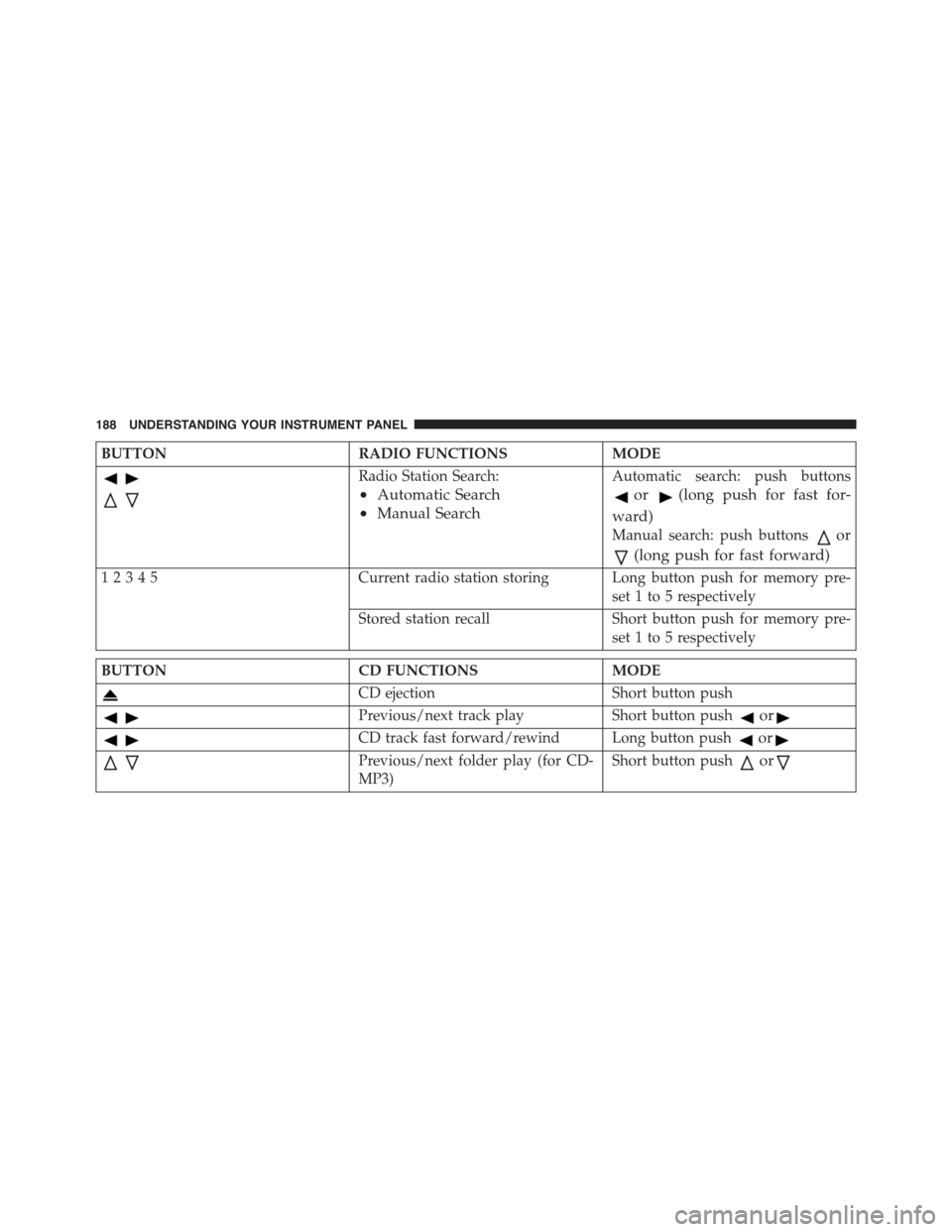
BUTTONRADIO FUNCTIONSMODE
Radio Station Search:
•Automatic Search
•Manual Search
Automatic search: push buttons
or(long push for fast for-
ward)
Manual search: push buttonsor
(long push for fast forward)
12345Current radio station storing Long button push for memory pre-
set 1 to 5 respectively
Stored station recall Short button push for memory pre-
set 1 to 5 respectively
BUTTONCD FUNCTIONSMODE
CD ejectionShort button push
Previous/next track playShort button pushor
CD track fast forward/rewind Long button pushor
Previous/next folder play (for CD-
MP3)
Short button pushor
188 UNDERSTANDING YOUR INSTRUMENT PANEL
Page 200 of 426
Each time the button is pressed the following bands are
selected cyclically:
•AM, FM or SAT (if equipped)
Each band is highlighted by the corresponding wordings
on the display. The radio will be tuned to last station
selected on the respective frequency band.
Preset Buttons
The buttons numbered from 1 to 5 are used to set the
following pre-selections:
•15 in the FM band (5 in FMA, 5 in FMB, 5 in FMC)
•10 in the AM band (5 in AMA, 5 in AMB)
•15 in SAT (if so equipped) (5 SATA, 5 SATB, 5 SATC)
To listen to a preset station, select the desired frequency
band and then briefly push the corresponding preset
button (from 1 to 5).
By pushing the preset button for more than two seconds,
the tuned station will be stored. Pushing the A-B-C
button will change between the preset memory group in
the current frequency band.
Automatic Tuning
Briefly push theorbutton to start the automatic
tuning search for the next station that can be received
in the selected direction.
If theorbutton is pushed for longer, the rapid
search is started. When the button is released, the
tuner will stop on the next station that can be received.
Manual Tuning
This is used to manually search for stations in the
preselected band.
Select the desired frequency band and then push briefly
and repeatedly theorbutton to start the search in
198 UNDERSTANDING YOUR INSTRUMENT PANEL
Page 203 of 426
when installed in the customer ’s vehicle. To reactivate
your service, either call the number listed on the display
or visit the provider online.
CAUTION!
Neither SIRIUS nor FIAT is responsible for any
errors in accuracies in the SIRIUS data services or its
use in vehicles.
SiriusXM and all related marks and logos are trademarks of
SiriusXM Radio Inc. and its subsidiaries. SiriusXM Radio
requires a subscription, sold separately after trial subscrip-
tion included with vehicle purchase. Prices and program-
ming are provided by SiriusXM and are subject to change.
Subscriptions governed by Terms & Conditions available at
www.siriusxm.com/customeragreement. SiriusXM Radio
U.S. service only available to those at least 18 years of age
in the 48 contiguous United States, D.C., & PR.
www.siriusxm.com.
Sirius Subscription Issues When Replacing A
Sirius Radio
When a radio needs to be replaced, the Dealer will need
the SIRIUS information to order a new radio (even if the
SIRIUS subscription has lapsed). The ESN number con-
tains 12 digits.
The following are instructions for retrieving the Elec-
tronic Serial Number (ESN) from FIAT 500 NAFTA model
radios:
To retrieve the ESN of SIRIUS Satellite Receiver Module
tune to Channel 0. Make sure that when the order is
placed, the ESN are correct. If any of the ESN numbers
are not entered correctly, then the SIRIUS subscription
will not be able to be transferred to the new radio and
will not be active when installed in the customer ’s
vehicle.
4
UNDERSTANDING YOUR INSTRUMENT PANEL 201